OpenManage Integration for VMware for Vcenter: How to Deploy Dell EMC
摘要: Systems Management Training Video that Covers How to Deploy Dell EMC OpenManage Integration for VMware for Vcenter.
本文适用于
本文不适用于
本文并非针对某种特定的产品。
本文并非包含所有产品版本。
说明
This video covers How to Deploy Dell EMC OpenManage Integration for VMware vCenter for VMware for VCenter.
Link to the Dell Technologies support videos:
https://www.dell.com/support/contents/en-us/videos
How to Deploy Dell EMC OpenManage Integration for VMware vCenter for VMware for VCenter (OMIVV).
Tutorials On Omivv Deploy VMware.
Duration: 00:06:50 (hh:mm:ss)
When available, closed caption (subtitles) language settings can be chosen using the CC icon on this video player.
OMIVV Deployment:
Deploying OMIVV
- Download and Extract the OMIVV OVF package from the Dell Support Website
- Log in to VCenter, right-click the Datacenter and select Deploy OVF Deployment
- Point it at the OVF downloaded
- Name the Virtual Machine (VM)
- Thick provision is recommended but can choose Thin Provision to save space
- Assign a Network for connectivity
- Finish the wizard
NOTE: It takes several minutes to deploy the OVF. Check the Recent Tasks pane inside VCenter to view progress and completion.
Initial OMIVV Config
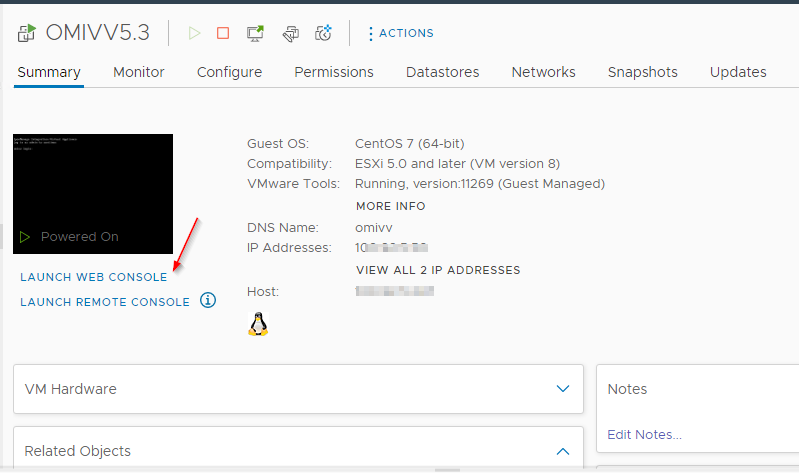
- Open the Guest Console for the recently deployed OMIVV VM
- There is a prompt to log in. This helps set the admin password and read-only password
- After setting the admin password log in to the Admin Console
- Set the Date & time
- Configure IP Settings for the Appliance
NOTE: If setting IP to static ensure that there is a DNS Record for the appliance.
- Change hostname for OMIVV appliance
- Reboot the OMIVV VM
Registration and Verification
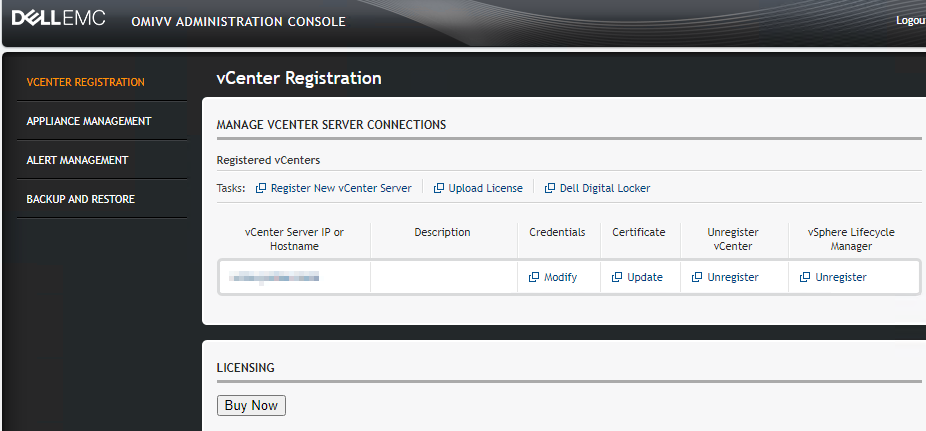
- Log back into the Admin Console
- Select Register New vCenter Server
- Put in IP or FQDN and credentials for vCenter
- Finish out the wizard for registration
- Log in to vCenter
- In the top pane, select Menu > Dell EMC OpenManage Integration for VMware vCenter
- OMIVV is successfully deployed
Troubleshooting
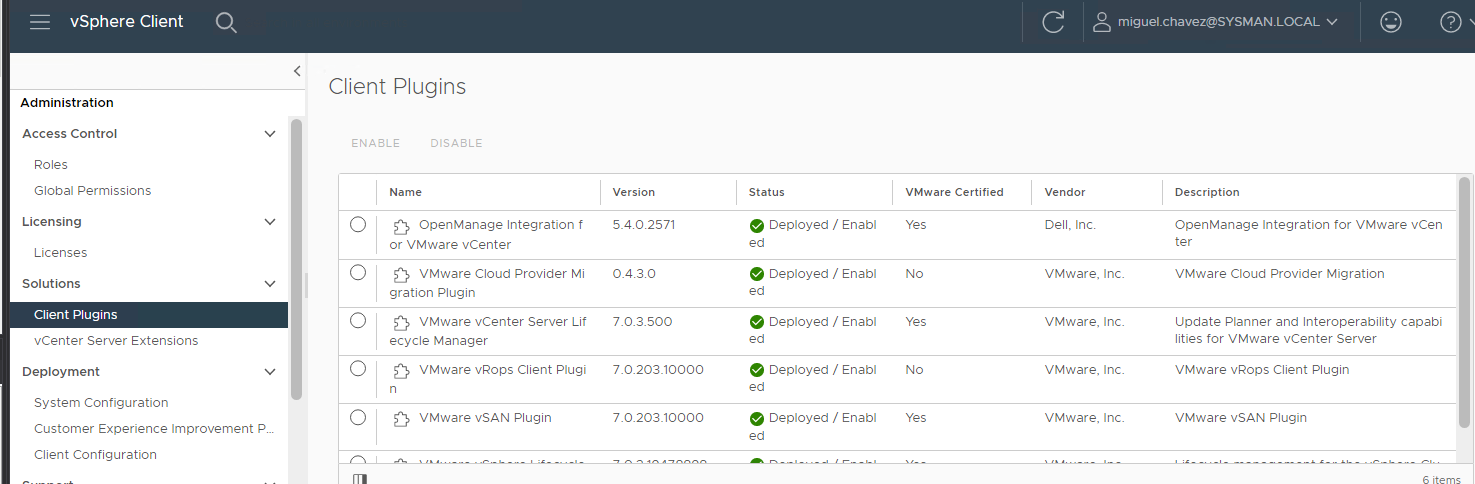
- Vcenter does a reverse lookup to the OMIVV IP. Check that the OMIVV IP is present on DNS
- Check if the OMIVV package is visible in Vcenter, under Administration and Client Plug-ins
- If permissions are a suspect, Register VCenter in OMIVV with the main VCenter administrator credentials, such as administator@vsphere.local
- In some instances an expired certificate in VCenter that interferes with plug-in installations. Verify certificates in VCenter
Vcenter / Administration / Client plug-ins
受影响的产品
C Series, HS Series, Modular Infrastructure, Rack Servers, Tower Servers, XE Servers, XR Servers, PowerEdge XR2, Poweredge C4140, PowerEdge C6400, PowerEdge C6420, PowerEdge C6520, PowerEdge C6525, PowerEdge C6600, PowerEdge C6615, PowerEdge C6620
, PowerEdge FC640, PowerEdge FX2/FX2s, PowerEdge HS5610, PowerEdge HS5620, PowerEdge M1000E, PowerEdge M640, PowerEdge M640 (for PE VRTX), PowerEdge M7701, PowerEdge M7725, PowerEdge MX5016s, PowerEdge MX7000, PowerEdge MX740C, PowerEdge MX750c, PowerEdge MX760c, PowerEdge MX840C, PowerEdge R240, PowerEdge R250, PowerEdge R260, PowerEdge R340, PowerEdge R350, PowerEdge R360, PowerEdge R440, PowerEdge R450, PowerEdge R470, PowerEdge R540, PowerEdge R550, PowerEdge R570, PowerEdge R640, PowerEdge R6415, PowerEdge R650, PowerEdge R650xs, PowerEdge R6515, PowerEdge R6525, PowerEdge R660, PowerEdge R660xs, PowerEdge R6615, PowerEdge R6625, PowerEdge R670, PowerEdge R740, PowerEdge R740XD, PowerEdge R740XD2, PowerEdge R7415, PowerEdge R7425, PowerEdge R750, PowerEdge R750XA, PowerEdge R750xs, PowerEdge R7515, PowerEdge R7525, PowerEdge R760, PowerEdge R760XA, PowerEdge R760xd2, PowerEdge R760xs, PowerEdge R7615, PowerEdge R7625, PowerEdge R770, PowerEdge R7715, PowerEdge R7725, PowerEdge R840, PowerEdge R860, PowerEdge R940, PowerEdge R940xa, PowerEdge R960, PowerEdge T140, PowerEdge T150, PowerEdge T160, PowerEdge T340, PowerEdge T350, PowerEdge T360, PowerEdge T40, PowerEdge T440, PowerEdge T550, PowerEdge T560, PowerEdge T640, POWEREDGE VRTX, PowerEdge XE2420, PowerEdge XE7100, PowerEdge XE7420, PowerEdge XE7440, PowerEdge XE7745, PowerEdge XE8545, PowerEdge XE8640, PowerEdge XE9640, PowerEdge XE9680, PowerEdge XR11, PowerEdge XR12, PowerEdge XR4000r, PowerEdge XR4000w, PowerEdge XR4000z, PowerEdge XR4510c, PowerEdge XR4520c, PowerEdge XR5610, PowerEdge XR7620, PowerEdge XR8000r, PowerEdge XR8610t, PowerEdge XR8620t
...
文章属性
文章编号: 000191295
文章类型: How To
上次修改时间: 10 4月 2025
版本: 7
从其他戴尔用户那里查找问题的答案
支持服务
检查您的设备是否在支持服务涵盖的范围内。