vProtect: "Cannot read from the device: /dev/sdX - vProtect 사용자 권한 확인"
摘要: "Cannot read from the device /dev/sdX - check vProtect user privileges"라는 사용 권한 문제로 백업이 실패합니다. 이 문제는 vProtect 공유 및 vProtect 사용자의 사용 권한이 올바른 권한이 있는 경우에도 발생합니다.
本文适用于
本文不适用于
本文并非针对某种特定的产品。
本文并非包含所有产品版本。
症状
"Cannot read from the device /dev/sdX - check vProtect user privileges"라는 사용 권한 문제로 백업이 실패합니다. 이 문제는 vProtect 공유 및 vProtect 사용자의 사용 권한이 올바른 권한이 있는 경우에도 발생합니다.
이 오류는 백업에 연결된 디스크가 분리되지 않은 경우에 생성됩니다. 이는 하이퍼바이저가 분리 요청에 따라 작동하지 않거나 LVM 필터가 올바르게 구성되지 않고 운영 체제가 디스크를 보존하기 때문일 수 있습니다.
原因
/etc/lvl/lvm.conf 파일이 올바르게 구성되지 않았습니다. 구성된 LVM 필터가 없습니다.
# cat lvm.conf | grep filter

# is used to drive LVM filtering like MD component detection, multipath
        # Configuration option devices/filter.
        # Run vgscan after changing the filter to regenerate the cache.
        # filter = [ "a|.*|" ]
        # filter = [ "r|/dev/cdrom|" ]
        # filter = [ "a|loop|", "r|.*|" ]
        # filter = [ "a|loop|", "r|/dev/hdc|", "a|/dev/ide|", "r|.*|" ]
        # filter = [ "a|^/dev/hda8$|", "r|.*|" ]
        # filter = [ "a|.*|" ]
        # Configuration option devices/global_filter.
        # Because devices/filter may be overridden from the command line, it is
        # not suitable for system-wide device filtering, e.g. udev.
        # Use global_filter to hide devices from these LVM system components.
        # The syntax is the same as devices/filter. Devices rejected by
        # global_filter are not opened by LVM.
        # global_filter = [ "a|.*|" ]
        # This is a quick way of filtering out block devices that are not
        # the LVs with device filters. Also, when this setting is enabled,
        # filtered), which can cause performance problems on systems with
        # an LV. The LVs are ignored using a built in device filter that
        # Configuration option activation/mlock_filter.
        # mlock_filter = [ "locale/locale-archive", "gconv/gconv-modules.cache" ]
운영 체제에는 필수이며 필요한 드라이브는 lvm.conf 파일의 디바이스 섹션에 있는 필터에 있어야 합니다.
解决方案
vProtect 노드는 잠재적으로 자체 클론인 VM 디스크를 연결합니다(예: 템플릿에서 구축된 노드). 디스크가 연결되어 있는 LVM 볼륨을 검사하지 않도록 노드에서 LVM을 구성해야 합니다.
- 디바이스 섹션의 /etc/lvm/lvm.conf에서 다음 변수를 설정하여 LVM 데몬이 시스템 볼륨만 감지하도록 합니다(이 예에서는 파티션이 2개인 SDA 디스크, sda1 및 sda2).
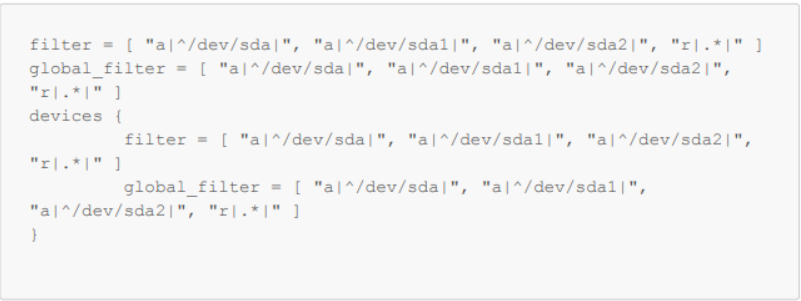
그림 1: /etc/lvm/lvm.conf에서 변수 설정
- vgscan에 운영 체제 볼륨이 여전히 감지되고 있는지 확인합니다.
-vvv

그림 2: 운영 체제 볼륨이 감지되는지 확인합니다.
- 재부팅
受影响的产品
vProtect文章属性
文章编号: 000218735
文章类型: Solution
上次修改时间: 31 10月 2023
版本: 2
从其他戴尔用户那里查找问题的答案
支持服务
检查您的设备是否在支持服务涵盖的范围内。