vProtect: Backups Fail With "Cannot read from the device: /dev/sdX - check vProtect user privileges"
摘要: Backups are failing with a permissions issue "Cannot read from the device /dev/sdX - check vProtect user privileges." This occurs even if the permissions of the vProtect share and the vProtect user have the correct privileges. ...
本文适用于
本文不适用于
本文并非针对某种特定的产品。
本文并非包含所有产品版本。
症状
Backups are failing with a permissions issue "Cannot read from the device /dev/sdX - check vProtect user privileges." This occurs even if the permissions of the vProtect share and the vProtect user have the correct privileges.
This error is generated when disks that are attached for backup are not detached. This may be due to the hypervisor not acting on a detach request or LVM filters not correctly configured and the operating system retaining the disks.
原因
/etc/lvl/lvm.conf file is not configured correctly. There are no LVM filters configured.
# cat lvm.conf | grep filter

# is used to drive LVM filtering like MD component detection, multipath
        # Configuration option devices/filter.
        # Run vgscan after changing the filter to regenerate the cache.
        # filter = [ "a|.*|" ]
        # filter = [ "r|/dev/cdrom|" ]
        # filter = [ "a|loop|", "r|.*|" ]
        # filter = [ "a|loop|", "r|/dev/hdc|", "a|/dev/ide|", "r|.*|" ]
        # filter = [ "a|^/dev/hda8$|", "r|.*|" ]
        # filter = [ "a|.*|" ]
        # Configuration option devices/global_filter.
        # Because devices/filter may be overridden from the command line, it is
        # not suitable for system-wide device filtering, e.g. udev.
        # Use global_filter to hide devices from these LVM system components.
        # The syntax is the same as devices/filter. Devices rejected by
        # global_filter are not opened by LVM.
        # global_filter = [ "a|.*|" ]
        # This is a quick way of filtering out block devices that are not
        # the LVs with device filters. Also, when this setting is enabled,
        # filtered), which can cause performance problems on systems with
        # an LV. The LVs are ignored using a built in device filter that
        # Configuration option activation/mlock_filter.
        # mlock_filter = [ "locale/locale-archive", "gconv/gconv-modules.cache" ]
It is essential for the operating system and required drives be in a filter in the devices section in the lvm.conf file.
解决方案
vProtect node attaches VM disks that potentially are clones of its own (for example if node deployed from the template). You must configure LVM on the node so that it does not scan for LVM volumes where disks are being attached.
- Set the following variables in /etc/lvm/lvm.conf in devices section so that LVM daemon only detects system volumes (in this example SDA disk with two partitions; sda1 and sda2):
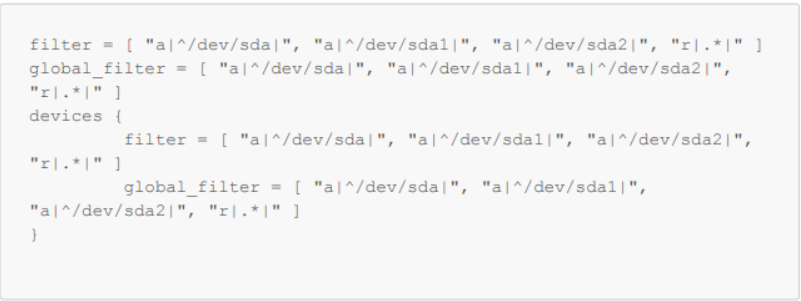
Figure 1: Set variables in /etc/lvm/lvm.conf
- Check with vgscan that your operating system volumes are still being detected:
-vvv

Figure 2: Checking that operating system volumes are detected.
- Reboot
受影响的产品
vProtect文章属性
文章编号: 000218735
文章类型: Solution
上次修改时间: 31 10月 2023
版本: 2
从其他戴尔用户那里查找问题的答案
支持服务
检查您的设备是否在支持服务涵盖的范围内。