vProtect:备份失败并显示“Cannot read from the device:/dev/sdX - 检查 vProtect 用户权限”
摘要: 备份失败并显示权限问题“Cannot read from the device /dev/sdX - check vProtect user privileges.”(无法从设备 /dev/sdX 读取 - 检查 vProtect 用户权限)。即使 vProtect 共享的权限和 vProtect 用户具有正确的权限,也会发生这种情况。
本文适用于
本文不适用于
本文并非针对某种特定的产品。
本文并非包含所有产品版本。
症状
备份失败并显示权限问题“Cannot read from the device /dev/sdX - check vProtect user privileges.”(无法从设备 /dev/sdX 读取 - 检查 vProtect 用户权限)。即使 vProtect 共享的权限和 vProtect 用户具有正确的权限,也会发生这种情况。
当连接用于备份的磁盘未分离时,将生成此错误。这可能是由于虚拟机管理程序未根据断开连接请求或 LVM 筛选器未正确配置以及操作系统保留磁盘。
原因
/etc/lvl/lvm.conf 文件配置不正确。没有配置 LVM 筛选器。
# cat lvm.conf | grep filter

# is used to drive LVM filtering like MD component detection, multipath
        # Configuration option devices/filter.
        # Run vgscan after changing the filter to regenerate the cache.
        # filter = [ "a|.*|" ]
        # filter = [ "r|/dev/cdrom|" ]
        # filter = [ "a|loop|", "r|.*|" ]
        # filter = [ "a|loop|", "r|/dev/hdc|", "a|/dev/ide|", "r|.*|" ]
        # filter = [ "a|^/dev/hda8$|", "r|.*|" ]
        # filter = [ "a|.*|" ]
        # Configuration option devices/global_filter.
        # Because devices/filter may be overridden from the command line, it is
        # not suitable for system-wide device filtering, e.g. udev.
        # Use global_filter to hide devices from these LVM system components.
        # The syntax is the same as devices/filter. Devices rejected by
        # global_filter are not opened by LVM.
        # global_filter = [ "a|.*|" ]
        # This is a quick way of filtering out block devices that are not
        # the LVs with device filters. Also, when this setting is enabled,
        # filtered), which can cause performance problems on systems with
        # an LV. The LVs are ignored using a built in device filter that
        # Configuration option activation/mlock_filter.
        # mlock_filter = [ "locale/locale-archive", "gconv/gconv-modules.cache" ]
它对于操作系统至关重要,所需的驱动器位于 lvm.conf 文件的 devices 部分的筛选器中。
解决方案
vProtect 节点附加的虚拟机磁盘可能是其自己的克隆(例如,如果节点是从模板部署的)。您必须在节点上配置 LVM,以便不会扫描连接磁盘的 LVM 卷。
- 在 /etc/lvm/lvm.conf in devices 部分中设置以下变量,以便 LVM 守护程序仅检测系统卷(在此示例中,SDA 磁盘具有两个分区:sda1 和 sda2):
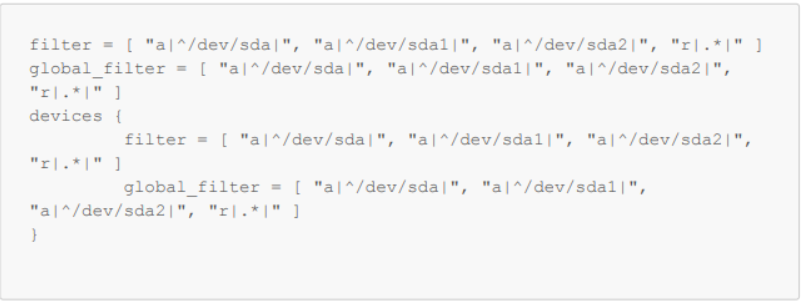
图 1:在 /etc/lvm/lvm.conf 中设置变量
- 使用 vgscan 检查是否仍在检测到您的操作系统卷:
-vvv

图 2:检查是否检测到操作系统卷。
- 重新启动
受影响的产品
vProtect文章属性
文章编号: 000218735
文章类型: Solution
上次修改时间: 31 10月 2023
版本: 2
从其他戴尔用户那里查找问题的答案
支持服务
检查您的设备是否在支持服务涵盖的范围内。