DBCC CHECKDB Troubleshooting SQL Server Database Corruption
摘要: DBCC is a native tool of Microsoft SQL Server designed to check and repair Microsoft SQL Server Databases. This article discusses the DBCC CHECKDB command and options in checking database logical and physical integrity. ...
本文章適用於
本文章不適用於
本文無關於任何特定產品。
本文未識別所有產品版本。
症狀
Microsoft SQL Server database is corrupt and needs to be repaired to maintain stability and consistency.
原因
Software corruption to MS SQL Server database, logs, and application files.
解析度

DBCC CHECKDB (Transact-SQL):

Steps to run DBCC CHECKDB:
- Open SQL Server Studio Management
- Open a query window
- Type in "DBCC CHECKDB (Database Name)"
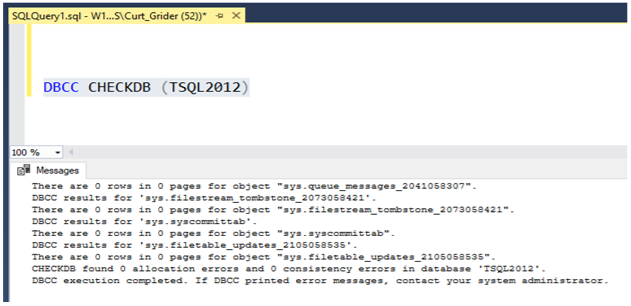
4. Check near the bottom of query results to see allocation and consistency errors.
5. If allocation and consistency errors appear in the results the database should either be restored from backup or perform a database repair using DBCC CHECKDB.
DBCC Repair Options
- REPAIR_REBUILD: Command below puts the database in a mode allowing repair.
USE Master;
GO
ALTER DATABASE TSQL2012
SET SINGLE_USER
WITH ROLLBACK IMMEDIATE;
GO
DBCC CHECKDB (TSQL2012, REPAIR_REBUILD)
GO
ALTER DATABASE TSQL2012
SET MULTI_USER;
GO
Copy the command below and paste to the query session putting in the correct database name:
--Command below performs a Database repair not allowing Data loss

USE Master;
GO
ALTER DATABASE TSQL2012
SET SINGLE_USER
WITH ROLLBACK IMMEDIATE;
GO
DBCC CHECKDB (TSQL2012,REPAIR_REBUILD)
GO
ALTER DATABASE TSQL2012
SET MULTI_USER;
GO
2. REPAIR_ALLOW_DATA_LOSS: Command below performs database repair and may result in data loss to complete the repair process.
--Command below performs a database repair that may result in data loss,
 --replace TSQL2012 with the database name of database being repaired
USE Master
GO
ALTER DATABASE TSQL2012
SET SINGLE_USER
WITH ROLLBACK IMMEDIATE
GO
DBCC CHECKDB (TSQL2012, REPAIR_ALLOW_DATA_LOSS)
GO
ALTERDATABASE TSQL2012
SET MULTI_USER
GO
Copy the command below and paste to the query session putting in the correct database name:
Commands below are useful if database physical disk space is running low.
--Command below estimates the size TEMPDB must be to complete the DBCC CHECKDB job
USE Master;
GO
ALTER DATABASE TSQL2012
SET SINGLE_USER
WITH ROLLBACK IMMEDIATE;
GO
DBCC CHECKDB (TSQL2012, REPAIR_REBUILD)
WITH ESTIMATEONLY;
GO
ALTER DATABASE TSQL2012
SET MULTI_USER
GO
Copy the command below and paste to the query session putting in the correct database name:
--Command below estimates the size TEMPDB must be to complete the DBCC CHECKDB job

USE Master;
GO
ALTER DATABASE TSQL2012
SET SINGLE_USER
WITH ROLLBACK IMMEDIATE;
GO
DBCC CHECKDB (TSQL2012, REPAIR_REBUILD)
WITH ESTIMATEONLY;
GO
ALTER DATABASE TSQL2012
SET MULTI_USER
GO
--Command below will run DBCC CHECKDB without using TEMDB and creating a DB
--snapshot. When not using TEMPDB with a DB snapshot all data will be checked in
-- the live database not not a database snapshot.

USE Master;
GO
ALTER DATABASE TSQL2012
SET SINGLE_USER
WITH ROLLBACK IMMEDIATE;
GO
DBCC CHECKDB (TSQL2012, REPAIR_REBUILD)
WITH TABLOCK;
GO
ALTER DATABASE TSQL2012
SET MULTI_USER
GO
Copy the command below and paste to query session and put in the correct database name:
--Command below will run DBCC CHECKDB without using TEMPDB and creating a DB
--snapshot. When not using TEMPDB with a DB snapshot all data will be checked in ---the live database not a database snapshot.

USE Master;
GO
ALTER DATABASE TSQL2012
SET SINGLE_USER
WITH ROLLBACK IMMEDIATE;
GO
DBCC CHECKDB (TSQL2012, REPAIR_REBUILD)
WITH TABLOCK;
GO
ALTER DATABASE TSQL2012
SET MULTI_USER
GO
受影響的產品
Dell Quickstart Data Warehouse Appliance, Prosupport for Microsoft Software文章屬性
文章編號: 000134529
文章類型: Solution
上次修改時間: 18 3月 2025
版本: 5
向其他 Dell 使用者尋求您問題的答案
支援服務
檢查您的裝置是否在支援服務的涵蓋範圍內。