How to Update Killer Wireless Firmware on Ubuntu Systems
摘要: Learn how to update Killer Wireless firmware on Ubuntu systems. Follow our guide for updating the Linux Firmware package or installing the specific Killer Wireless driver.
本文章適用於
本文章不適用於
本文無關於任何特定產品。
本文未識別所有產品版本。
症狀
原因
No cause information is available.
解析度
Updating the Killer Wireless in Ubuntu
There are two ways to update the drivers for the Killer Wireless card. The simplest method is to update the Linux Firmware package as a whole, which is outlined in the first section below.
If you only want the specific Killer Wireless driver, you can pull that from the Linux Firmware and install it as well, which has been outlined in the second section below.
Table of Contents:
Linux Firmware Package
Update your system with the following commands:
cd ~ && mkdir linux-firmware && cd linux-firmwarewgethttps://mirrors.edge.kernel.org/ubuntu/pool/main/l/linux-firmware/linux-firmware_1.187_all.debsudo dpkg -i *.debsudo modprobe -r ath10k_pci && sudo modprobe ath10k_pci
Note: To determine the current linux-firmware package available go to: https://mirrors.edge.kernel.org/ubuntu/pool/main/l/linux-firmware/ 
Killer N1535 Wireless Manual Firmware Update
The following is the Killer N1535 manual firmware update process.
- In a Terminal, confirm the QCA6174 with this command:
sudo lspci | grep –i qca6174
- Download the latest firmware and extract the contents: https://codeload.github.com/kvalo/ath10k-firmware/zip/master
- Or you can Download the ZIP and save it with the browser at this url as shown: https://github.com/kvalo/ath10k-firmware
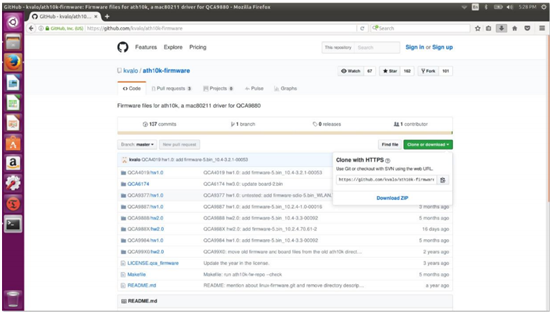
- Open the Downloads folder, then Right Click the ath10k-firmware-master.zip and extract here.
- Confirm the contents of the extracted folder as shown. You should see the "QCA6174" folder.
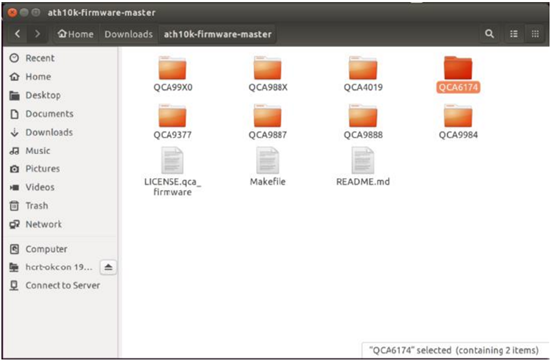
- Back in Terminal, type
sudo nautilusto open a root privilege file manager.Sudo nautilus- Click Computer.
- Click folder lib.
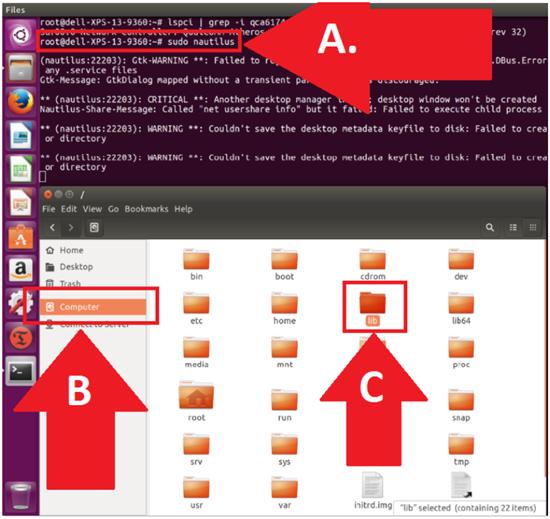
- Go to the QCA6174 firmware directory.
- Click Firmware
- Click to open ath10k
- Right-click and Delete the QCA6174 directory (we are removing everything).
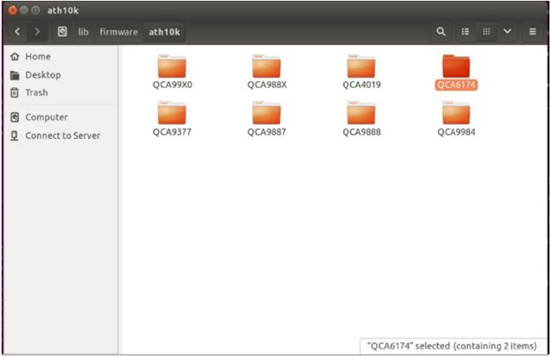
- Go to your other file manager window where your extracted download folder is:
- Confirm your new source file location in Downloads/auth10k-firmware
- Confirm your new destination file location in ../firmware/ath10k
- Copy and paste the QCA6174 directory with all its contents into the destination directory as shown. The path should be: /lib/firmware/ath10k/
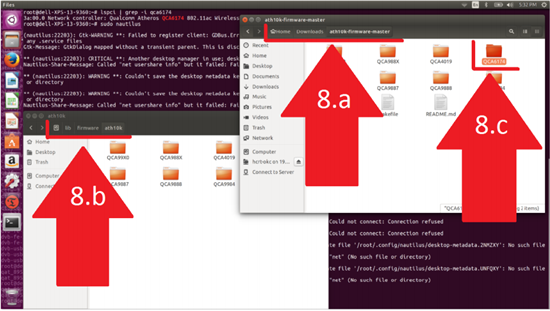
- Open /lib/firmware/ath10k/QCA6174/HW3.0 and rename the file: firmware-4.bin_WLAN.RM.2.0-00180-QCARMSWPZ-1 To: firmware-4.bin
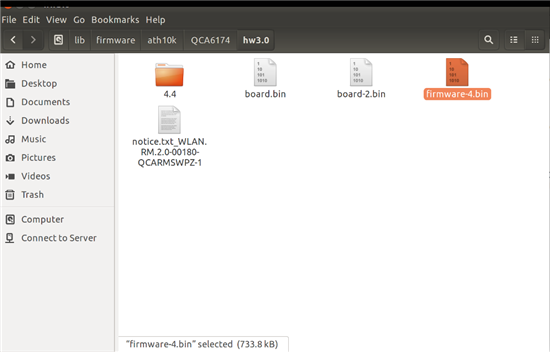
- Now reboot and test the new Killer Wi-Fi firmware.
受影響的產品
XPS 13 9360, XPS 13 9370文章屬性
文章編號: 000144425
文章類型: Solution
上次修改時間: 22 8月 2025
版本: 8
向其他 Dell 使用者尋求您問題的答案
支援服務
檢查您的裝置是否在支援服務的涵蓋範圍內。