VxRail: Next-Generation Connectivity with VxRail 7.0.350 and Later
Summary: Different scenarios are applicable depending on the existing connectivity configuration when planning the upgrade to VxRail 7.0.350 or later. These scenarios should be discussed before the upgrade to ensure that the infrastructure is ready for a smooth transition. ...
This article applies to
This article does not apply to
This article is not tied to any specific product.
Not all product versions are identified in this article.
Instructions
Starting with VxRail 7.0.350, VxRail systems use the Dell Technologies Next-Generation consolidated connectivity solution to connect to the Dell Technologies cloud. This solution allows VxRail to establish a direct connection using a connectivity agent running within VxRail, or using the secure connect gateway 5.0.
Connectivity Deployment
There are two connectivity deployment options available with VxRail 7.0.350:
-
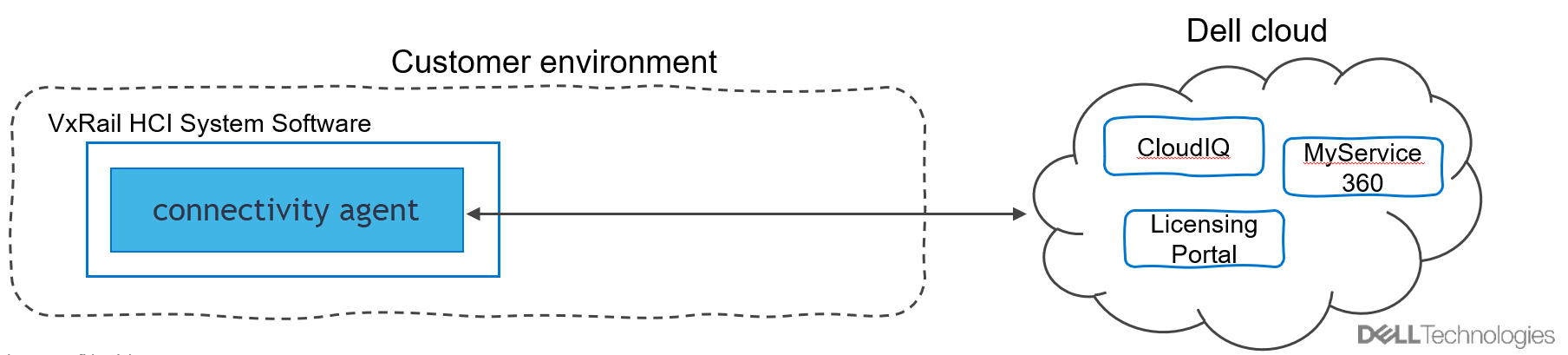
Connect directly to the Dell Technologies infrastructure:
- Each VxRail system connects directly to the Dell Technologies infrastructure using a connectivity agent running on the VxRail Manager.
- This solution is designed for users with a single VxRail cluster or users who want to dedicate connectivity for the individual VxRail solutions.
- Other devices or VxRail clusters cannot share the direct connection.
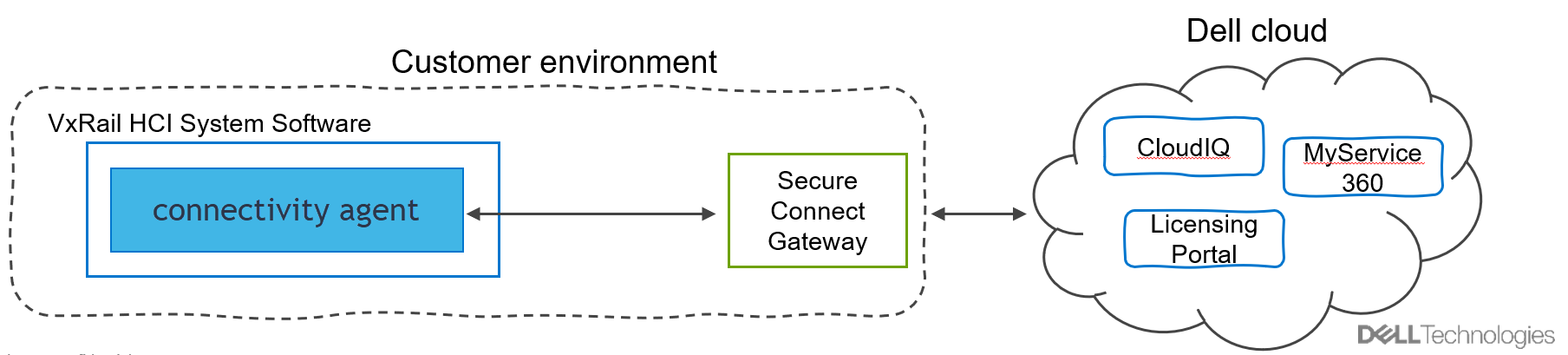
- Connect using a centralized secure connect gateway to the Dell Technologies infrastructure:
- The VxRail cluster connects to an existing customer-managed instance to communicate with the Dell Technologies connectivity services.
- Multiple VxRail clusters or other Dell Technologies products that support secure connect gateway 5.0 connectivity can use the same customer-managed secure connect gateway instance.
Upgrade to VxRail 7.0.350
VxRail 7.0.350 is engineered for the Next-Generation consolidated connectivity solution and does not support Secure Remote Services for connectivity. Before you upgrade to VxRail 7.0.350, the current connectivity configuration determines the required steps to prepare for an upgrade to VxRail 7.0.350:
- If there is no remote connectivity configured, no action is required before the upgrade. It is recommended to enable connectivity to improve the customer experience.
- If you are connected to an external Secure Remote Services gateway or Secure Connect Gateway, verify that the minimum gateway is Secure Connect Gateway version 5.00.07.10 (No supported Remote Services Gateway versions allowed). If not, upgrade to a Secure Connect Gateway before you upgrade to VxRail 7.0.350.
- For VxRail-managed Secure Remote Services configurations VxRail performs an internal Secure Remote Services upgrade to establish a direct connection during the VxRail upgrade process. You may have to update the firewall as per the detail in the following scenarios. The Secure Remote Services virtual machine (VM) is disabled in the process.
User Connectivity Scenarios
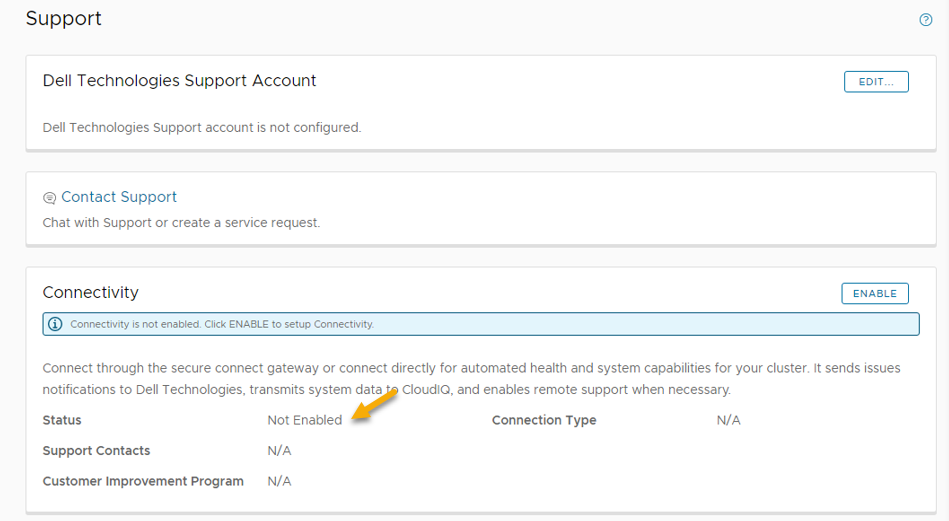
- The VxRail deployment does not have remote connectivity enabled on releases earlier than VxRail 7.0.350.
- In VxRail Manager, Connectivity is not Enabled displays on the Support tab.
- No remote connectivity actions are required before upgrading to VxRail 7.0.350 or later.
- Users should inquire with the account team about the benefits of implementing the secure connect gateway with VxRail after the upgrade, free of charge. See the Secure Connect Gateway product page and SolVe Online for configuration procedures.
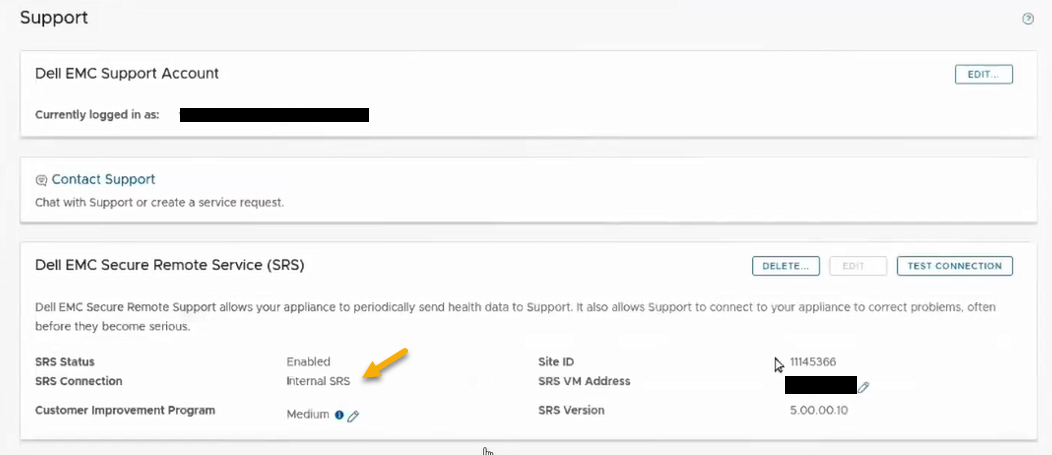
- The user has legacy remote connectivity that uses the VxRail deployed and managed, dedicated Secure Remote Services gateway.
- In the VxRail Manager, the Secure Remote Services connection displays as Internal Secure Remote Services on the Support tab.
- The VxRail upgrade process no longer uses VxRail-managed Secure Remote Services instance that runs as a VM on the VxRail cluster. With VxRail 7.0.0350 and later, the upgrade process uses the connectivity agent that connects directly from the VxRail Manager IP address to the Dell Technologies infrastructure.
- This implies that the legacy gateway VM which had a dedicated IP address is being decommissioned and communication is directly from the VxRail Manager IP address which runs the connectivity agent to the Dell infrastructure.
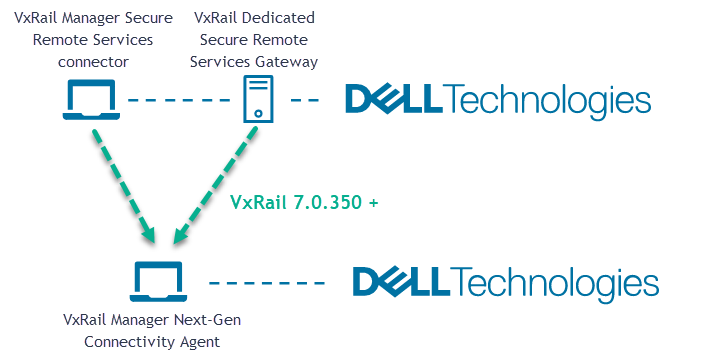
- Action is required before the upgrade to VxRail 7.0.350 or later. Follow these guidelines to ensure that this automated process completes without errors:
- The customer firewall or proxy configuration is validated and updated as required to meet the Secure Connect Gateway/port requirements from the VxRail Manager IP address if existing rules are only set up for the previous Secure Remote Services gateway VM IP address.
- There are no network requirement changes for the VxRail Manager to the gateway communication since the connectivity agent runs inside the VxRail Manager.
- The external network communication and firewall port requirements are provided in the Secure Connect Gateway Support Matrix under network requirements.
- In addition to the Secure Connect Gateway Network Requirement above, VxRail Manager must be able to reach these on port 443 (TCP):
https://esrs3-core.emc.com
https://www.dell.com
https://support.emc.com
https://pf-ng.us.dell.com
For VxRail 8.0.300 and later, VxRail Manager no longer requires reaching https://www.dell.com.
Always check the latest VxRail Rules as per the VxRail firewall configurator utility. For more details, see Secure Connect Gateway 5.x — Virtual Edition Support Matrix.
- After the upgrade finishes, VxRail Manager displays Connect Directly in the Connectivity window.
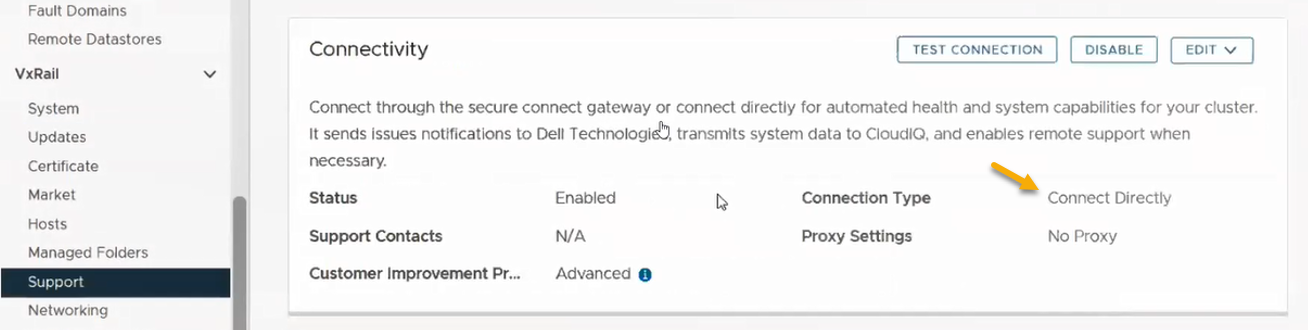
- After the VxRail upgrade completes, select TEST CONNECTION to ensure that connectivity is working as expected (see article VxRail: How to Test Secure Remote Services or Secure Connect Gateway Dial-home Functionality for assistance).
Note: The update workflow does not allow you to switch between the internal and external options. If you want to switch, you should disable the Secure Remote Services starting the upgrade and then reenable connectivity with the required option after the upgrade is complete.
- For legacy remote connectivity using shared, customer-managed Secure Remote Services, SupportAssist Enterprise 4.x, or secure connect gateway 5.x gateway.
- In VxRail Manager, the Secure Remote Services Connection displays External Secure Remote Services on the Support tab.
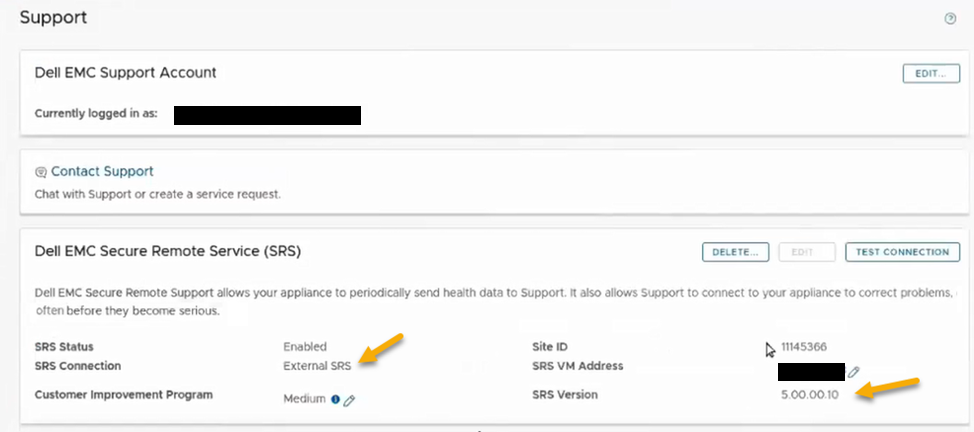
- Action is required before upgrading to VxRail 7.0.350 to ensure that the existing gateway version is Secure Connect Gateway 5.00.07.10 or later as referenced in the VxRail Support Matrix.
- If the user is running a customer-managed Secure Remote Services 3.x, upgrade to the secure connect gateway 5.x.
- If the user is running a customer-managed SupportAssist Enterprise 4.x, upgrade to secure connect gateway 5.x.
- As part of the VxRail 7.0.350 or later upgrade, VxRail Manager re-registers the existing, legacy Secure Remote Services/SupportAssist Enterprise gateway configuration.
- If the external gateway is not at the required minimum secure connect gateway 5.x version, the process fails and the connectivity does not function as expected.
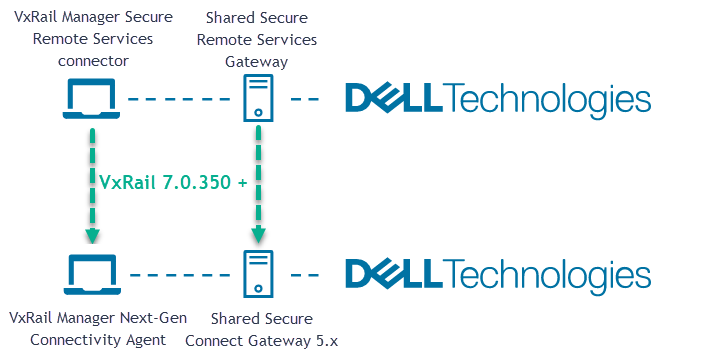
- Go to SolVe Online for relevant Secure Remote Services/SupportAssist Enterprise product upgrade guidance. The procedure can be found:
- Gateway Connectivity
- Secure Remote Services v3.xx
- Upgrade from Secure Remote Services 3.52 to secure connect gateway
- Click Next
- Select Upgrade from Secure Remote Services 3.52 to secure connect gateway
- Click next
- Enter Usage information and Click Next
- Click Generate on the next page to generate the procedure.
- After the VxRail upgrade completes, select TEST CONNECTION to ensure that alerts are working as expected (see article VxRail: How to Test Secure Remote Services or Secure Connect Gateway Dial-home Functionality for assistance).
Note: The update workflow does not allow you to select a new external gateway. If you want to move to a different secure connect gateway, you should disable the Secure Remote Services starting the upgrade and then reenable connectivity with the required option after the upgrade is complete.
Additional Information
The guidance provides a basic insight, kindly reference the provided secure connect gateway and VxRail product references for the latest up-to-date information.
Products
VxRail Appliance Family, VxRail Appliance Series, VxRail SoftwareArticle Properties
Article Number: 000196945
Article Type: How To
Last Modified: 13 May 2026
Version: 15
Find answers to your questions from other Dell users
Support Services
Check if your device is covered by Support Services.