Computer Vision on Microsoft Azure Stack HCI
This white paper describes the validation of a Dell Technologies five-node Azure Stack Hyper-Converged Infrastructure (ASHCI) platform deployed with video management and AI computer vision applications from BriefCam, Ipsotek, and Milestone.
Implementing a hybrid cloud strategy requires careful consideration of the unique needs and circumstances of your organization. It is a journey involving adapting to new technologies, business requirements, and market trends.
Dell Technologies offers products that ease your journey to realizing the benefits of hybrid cloud including the Dell Integrated System for Microsoft Azure Stack HCI. Azure Stack HCI is the on-premises hyperconverged infrastructure (HCI) component of the Microsoft Azure hybrid cloud service. Azure Stack HCI provides flexible, scalable, and secure solutions to organizations wanting to consolidate virtualized workloads using a hybrid cloud solution strategy. The platform is a core component of Dell Technologies and Microsoft's hybrid cloud strategy to bring the agility and fast-paced innovation of cloud computing to on-premises environments.
This white paper describes our findings from a project that was conducted in our Computer Vision engineering validation lab. We tested a configuration of a Dell Technologies five-node Azure Stack Hyper-Converged Infrastructure (ASHCI) platform as shipped from our factory using the same ordering options available to our customers. We deployed, integrated, and validated video management and AI computer vision applications from three solution providers to determine the platform's functionality, flexibility, and ease of use.
The first three chapters of this paper are intended for a broad audience of readers with both business and technical interests. The entire document appeals to the interest of technical staff and managers currently working with computer vision technology and those researching how this technology can improve situational awareness.
Business challenges
Many public and private organizations are realizing that a wealth of information is hidden in the data collected from video sources. New advances in AI computer vision can help tap this source of information to drive superior customer and employee experiences and better financial outcomes through revenue increases and cost reductions - not just for the primary organization but for all the closely related business entities.
Any large public or private space requires a wide range of business applications to operate safely and efficiently. The computer vision and data analytics components must be easy to install and manage with minimal time and cost to realize the benefits of these new AI opportunities. Organizations across the globe will need to quickly evaluate the most cost-effective approach to investing in these new video analytics and artificial intelligence (AI) capabilities to create safer and more engaging experiences by improving the flow of people and objects within the spaces they manage.
Many of the AI software options available today include pre-trained models from independent software vendors (ISVs) that generate operational insights and real-time alerts from video and other sensor data with minimal customization. However, a complete AI solution requires integration of several applications that are specialized for certain use cases, including video data management, AI computer vision, and data analytics tailored to different types of use cases. Meeting these needs requires an easy-to-acquire, easy-to-manage, GPU-enabled hardware platform that can support various applications using virtual machines, containers, and a mixture of operating systems.
Video management is an established use case with a long history of innovation and change. The currently installed base of technologies supporting traditional video management and computer vision applications is largely siloed and aging. IT organizations interested in providing the newest capabilities to their businesses need a new approach to technology acquisition and deployment that can be seamlessly ordered, deployed, maintained, and supported.
There is a significant opportunity to both gain new AI capabilities and reduce the cost of ownership when replacing the old, siloed technologies currently deployed in private data centers and at the edge. A complete lift and shift to the public cloud is not viable. The scale of the data management requirements and the need for low-latency analytics greatly favor a distributed computing approach. As organizations decide on what technologies to invest in next, they will prefer options that can leverage some services of public cloud providers when appropriate. They would also like to simplify ongoing operations by integrating their private data center assets with a globally distributed and feature-rich management ecosystem to create a hybrid cloud ecosystem.
Partner overview
Partner overview
Microsoft Azure Stack HCI Overview
Microsoft Azure Stack hyperconverged infrastructure (HCI) is an on-premises IT infrastructure platform that is integrated with an Azure public cloud management service. Azure Stack (AS) represents a comprehensive solution for organizations looking to leverage the benefits of cloud computing while maintaining control over on-premises infrastructure.
This platform is a core component of Microsoft's hybrid cloud strategy, which brings the agility and fast-paced innovation of cloud computing to on-premises environments. ASHCI offerings from Dell Technologies provide a host of flexible, scalable, and secure solutions to customers looking to consolidate virtualized workloads.
The ASHCI platform seamlessly integrates with core Windows Server technologies like Hyper-V for virtualization and Storage Spaces Direct (S2D) for storage. The convergence of management tools for both on-premises and cloud resources with additional options for integration with other Azure services reduces deployment and operation overhead for enterprises pursuing a hybrid cloud strategy.
Architecture and Components
ASHCI is built on validated hardware from Microsoft's partners. The Dell Integrated System for Microsoft Azure Stack HCI is designed with full-stack lifecycle management and native Azure integration. This integrated system delivers efficient operations and flexible consumption models.
Only Azure Stack HCI solutions from Dell Technologies leverage Dell's OpenManage Integration for Windows Admin Center to orchestrate full stack lifecycle management, enabling complex tasks to be completed in a fraction of the time.
Azure Stack HCI uses Windows Admin Center for streamlined management, allowing administrators to monitor and manage the HCI environment along with other Azure services. The platform supports both traditional and modern applications with a container-based approach, offering a consistent Azure experience across the hybrid landscape.
The solution is designed for rapid deployment and minimal maintenance, allowing for scalability that aligns with business growth. Customers can scale compute and storage resources independently, ensuring cost-efficiency and performance alignment as workload requirements change over time.
Azure Stack HCI is deeply integrated with Azure services, providing capabilities such as Azure Site Recovery for disaster recovery, Azure Monitor for analytics and performance tracking, and Azure Security Center for enhanced security posture management. It enables seamless deployment of Azure services on-premises, facilitating an efficient hybrid cloud environment.
Milestone systems
Milestone XProtect enables organizations of any size to build data-driven and future-proof video technology solutions with a wide range of cameras, sensors, and IoT devices from 100+ manufacturers. With XProtect's flexible open platform architecture, organizations can adapt and scale their video solutions as well as update them with the latest analytics and AI technologies including 1,000+ compatible third-party integrations.
BriefCam Software
BriefCam empowers people, communities, and companies of any size to realize the value of their video surveillance content with video analytics software solutions that make video searchable, actionable, and quantifiable. The BriefCam Video Analytics Platform offers a robust portfolio of critical video analytics capabilities, fully integrated for video metadata search, alerting, and visualization.
Ipsotek
Established in 2001, Ipsotek has been a pioneer in A.I.V.A. (Artificial Intelligence Video Analytics) and Scenario-based Intelligent Video Analytics for mission-critical applications. Our highly scalable platform, VISuite AI, enables users to efficiently manage automatically generated alarms in real-time, resulting in reduced operator response times and the ability to track chosen behaviors of interest in complex environments. Since May 2021, Ipsotek has been part of Atos.
Solution overview
Solution overview
This white paper describes testing that Dell Technologies performed to validate that a solution is available today to address the business challenges described in the last section. We selected applications for video management and AI computer vision from three leading ISVs in this industry. The partners that we selected have also invested in product development to ensure a seamless experience for their joint customers. We also chose a platform for testing that was designed to support a wide range of applications including those requiring GPU acceleration.
Microsoft and Dell have partnered to create a multipurpose platform using world-class technology that allows organizations to manage and analyze video and other sensor data using a single integrated platform. The system architecture that we implemented is the Dell Integrated System for Microsoft Azure Stack HCI with Storage Spaces Direct, plus NVIDIA A16 server-class GPUs. The Azure Stack HCI system leverages Microsoft Windows virtual machine virtualization that will be familiar to many IT and OT (operational technology) professionals.
We chose to implement the following three applications:
BriefCam software, an industry-leading provider of video analytics for rapid video review and search, real-time alerting, and quantitative video insights.
Ipsotek specializes in AI-enhanced video analytics software to manage automatically generated alerts in real-time for crowd management, smoke detection, intrusion detection, perimeter protection, number plate recognition, and traffic management.
The Milestone Systems XProtect platform video management software enables organizations and institutions to create the perfect combination of cameras, sensors, and analytics.
We performed real-time analytics with both BriefCam and Ipsotek through integration with the Milestone directory server and video recording services. All three applications were hosted on a 5-node Microsoft Azure Stack HCI cluster. Each of the components is described in more detail below.
Azure Stack HCI
The Dell Integrated System for Azure Stack HCI is an ideal solution for organizations that are modernizing their aging siloed computer vision environments to support a suite of modern high-value, highly performant applications on a consolidated platform. This all-in-one validated hyperconverged infrastructure (HCI) system includes full-stack life cycle management, native integration into Microsoft Azure, flexible consumption models, and solution-level enterprise support and services.
Dell OpenManage Integration with Microsoft Windows Admin Center enables automatic cluster creation with the Dell HCI Configuration Profile and one-click full-stack life cycle management using Cluster-Aware Updating. This ensures that Azure Stack HCI is deployed in a guided and consistent way and helps maintain the latest quality, security, and performance enhancements. Microsoft and Dell Technologies provide extensions and snap-ins that reduce risk, eliminate guesswork, and liberate IT administrators to focus on performance tuning and other high-value activities.
Azure Stack HCI's native integration with Microsoft Azure allows IT administrators to leverage feature-rich management and governance services such as Azure Monitor, Azure Security Center, and Azure Policy. These services are consistent with and complementary to Microsoft Windows Admin Center, which serves as the edge or local, always-available management console. Microsoft continually adds new innovative functionality to Microsoft Azure services to ensure that even the most complex and demanding VM-based and containerized applications are properly monitored and performing at the levels that are required to meet SLAs.
Milestone System XProtect VMS
Milestone Systems develops products for large-scale facilities with high-security requirements. The XProtect family of products ensures end-to-end protection of video integrity while maximizing hardware performance.
The XProtect VMS products provide video management capability for environments covering a wide range of use cases and scales. Milestone Sytems offer four versions of XProtect:
XProtect Corporate
XProtect Expert
XProtect Professional+
XProtect Express+
This suite of versions can support applications that range from protecting individual stores from vandalism to managing a multisite, high-security facility. All solutions offer centralized management for all devices, servers, and users, including a flexible rules processing system driven by schedules and events. Our testing work for this white paper was performed using the XProtect Corporate version.
The following guidelines are based on previous internal testing and reports from customer field experience. None of these guidelines were exceeded during testing.
CPU
Do not assign more vCPUs to your VMs than the number of physical cores on the host machine.
Memory
The total amount of memory allocated to the VMs and the hypervisor should not exceed the total amount of physical memory available from the host.
Storage
Install Microsoft Windows and Microsoft SQL databases on Storage Spaces Direct volumes according to the space and performance needs suggested by each application vendor.
For video recorder virtual machines, do not store archived video on the OS drive.
Do not use the OS drive for archived video.
Make the OS partition at least 120 GB.
For Tier 1 storage, make use of dedicated volumes from cluster-managed storage using three-way mirrored thick provisioned storage.
For Tier 2 archived video, configure PowerScale NAS share for longer storage retention periods.
Networking
When provisioning multiple archiving VMs on a host, do not exceed data transmission rates of 96 MB/s per node:
In-Guest iSCSI networks with other configurations might result in degraded performance.
Isolate video traffic on a different VLAN from cluster storage traffic.
25 GbE network cards are recommended for shared traffic links (management, video, and storage) configured with a Virtual Switch.
Network configurations that may result in multicast traffic being sent to all hosted VMs simultaneously should be avoided to limit the potential for negative performance impacts.
BriefCam
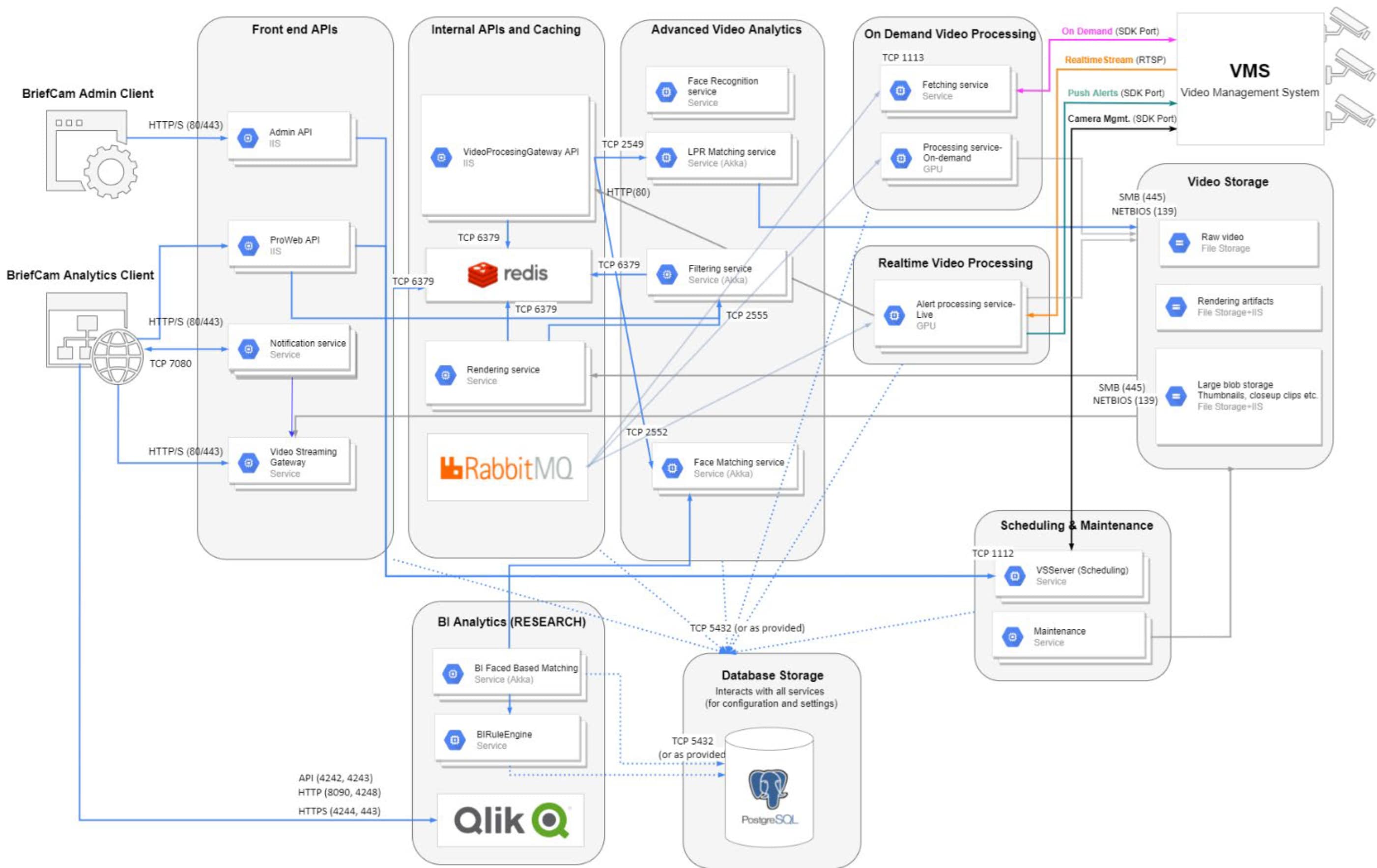
The BriefCam Video Analytics platform is implemented using a microservices architecture that supports feature deployment and licensing flexibility. The features of the solution are packaged into a set of seven server roles that can be deployed in an all-in-one server configuration for proofs-of-value or various multiserver configurations to meet performance and HA goals. BriefCam recommends deploying the application using an HA architecture to ensure business continuity even when some components fail. Designing the right solution for your production environment requires balancing cost, complexity, and the level of risk from a system outage.
BriefCam is driven by a microservices architecture, enabling scalability, flexibility, and redundancy.
The full microservices implementation is described in the BriefCam Microservices Architecture white paper. To obtain copies of BriefCam manuals, reach out to your BriefCam representative. The implementation developed for this design guide was a single-site environment. While all the BriefCam microservices were available for configuration after installation, the following subset were used during testing.
BriefCam microservices
Alert Processing Server
The Alert Processing Server is the service responsible for real-time video processing (RESPOND and Continuous RESEARCH).
Fetching Service
The Fetching Service is responsible for fetching the recorded video footage from the VMS, storing it in the storage and making it available for BriefCam's Processing Server. By default, BriefCam's Fetching service uses two workers to fetch the videos from the VMS. The workers fetch five-minute video chunks.
Filtering Service
The Filtering Service is responsible for handling in-memory object filtering for various scenarios in all the modules (REVIEW, RESPOND, and RESEARCH).
Lighthouse Service
The Lighthouse Service is the seed node of BriefCam's Akka cluster. Its main roles are:
Registering new services that join the cluster.
Providing service-discovery capability for all the other services in the cluster.
Notification Service
The Notification Service is responsible for managing all aspects of notification and message delivery between the client application and server-based components.
Rendering Service
The Rendering Service is responsible for:
Generating visual and video artifacts for the web client, such as rendering the synopsis videos, visual layers, exports and original videos.
Validating uploaded video files before processing.
VS Server
The VS Server service is responsible for various maintenance and monitoring related activities:
Watchdogs the RESPOND tasks in case of a task failure.
Creates RESPOND tasks when a rule is created or modified by the user.
Provides a live image for the RESPOND task configuration wizard.
Provides the list of cameras for the camera activation dialog of the Web Admin.
Sends the outbound alerts to the outbound API and also sends alerts to the VMS clients that have real-time alerts integration (level 2a or above).
Triggers the data maintenance activity.
Clears inactive sessions.
Web Applications
BriefCam Web Services drive the main functionality for the web client and APIs. The service is stateless in nature, using the database and shared storage as its stateful backend. There are multiple web services that are provided by the component for both end users and administrators.
Ipsotek
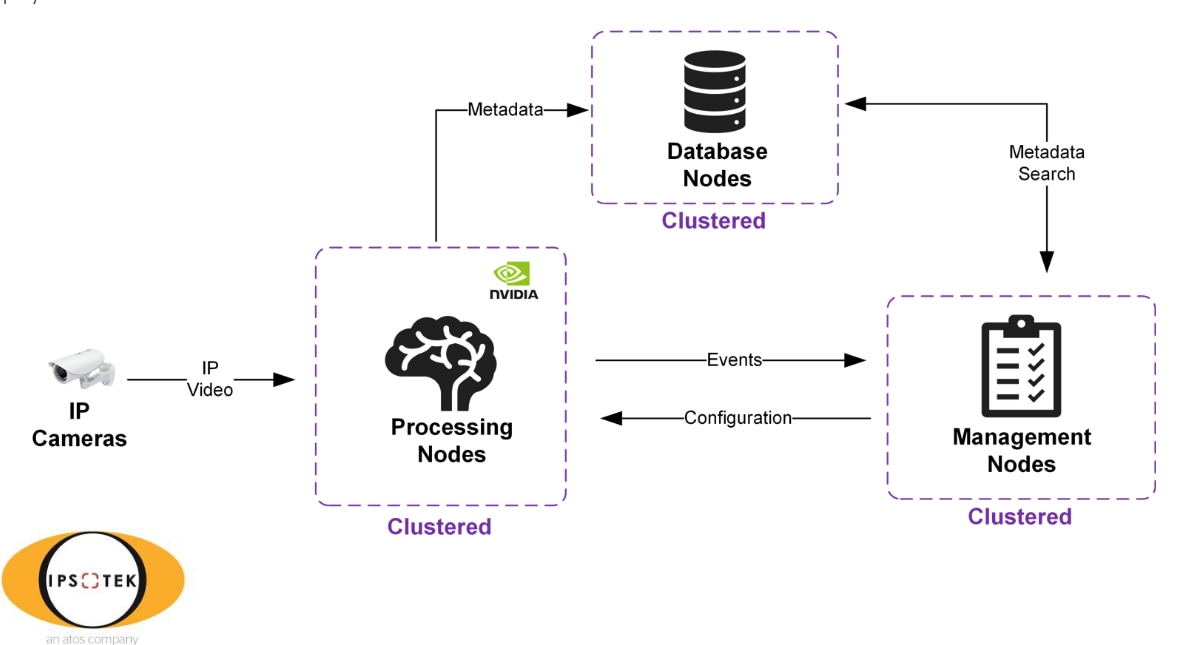
The Ipsotek VISuite system architecture consists of Management Nodes, Processing Nodes, and Database Nodes that are interconnected as shown in the Figure below. There are also services that manage rules and user interfaces, perform Video Analytics, and provide event and metadata storage, respectively. These roles could be deployed in a distributed manner and/or co-exist on the same physical or virtual server.
Figure 3. Ipsotek VISuite system architecture
The functions of the major roles in the diagram above are:
Management Node
Central administration of the Ipsotek Cluster. Multiple nodes run in an Active/Passive manner using a Windows failover cluster.
Processing Node
Node where CV analytics is performed. Multiple processing nodes exist across the cluster. Workload is balanced across the nodes.
Database Node
Storage location for all Ipsotek configuration and metadata. Multiple nodes can be added together to form a cluster.
The following guidelines have been collected from previous Dell testing, customer field experience, and partner documentation. We met all of these guidelines during this testing.
Virtual Machines
Each VM is configured to the specifications provided by Ipsotek.
Each processing node can use a full A16 card.
Uses a maximum of two processing nodes per node.
CPU
Do not over allocate vCPUs.
Storage
All Ipsotek nodes leverage cluster managed local storage for operating system and auxiliary drives. For Azure Stack HCI that is Storage Spaces Direct pools or volumes.
Data is protected according to the hypervisor storage policy that provides maximum performance and protection with the trade-off of lower usable capacity. For Azure Stack HCI that is three-way mirroring.
Networking
Sufficient bandwidth is needed at the processing nodes to consume the total of all configured inbound camera streams.
Solution Architecture Overview
Solution Architecture Overview
Azure Stack HCI
Azure Stack HCI provides flexible, scalable, and secure solutions to organizations wanting to consolidate virtualized workloads using a hybrid cloud solution strategy. We acquired a 5-node cluster of Dell AX750 Azure Stack nodes with the 22H2 operating system (build 20349.1970) with NVIDIA GPU support. Local storage for the cluster is a total of 120 1.6TB SSD all flash drives to meet the performance needs and scaling of demanding computer vision and VMS workloads.
Before you purchase hardware and deploy the Azure Stack HCI operating system:
Plan your physical network requirements and host network requirements.
Choose drive type and capacity.
Plan volumes to meet your storage performance and capacity requirements.
We used our knowledge of implementing AI systems with VMS and Computer Vision capability to choose a configuration for our Dell AX nodes for Azure Stack HCI with the following components.
1 x Mellanox ConnectX-5 Dual Port 10/25GbE SFP28 Adapter, PCIe Low Profile, V2
1 x Broadcom 57414 Dual Port 10/25GbE SFP28, OCP NIC 3.0
Networking
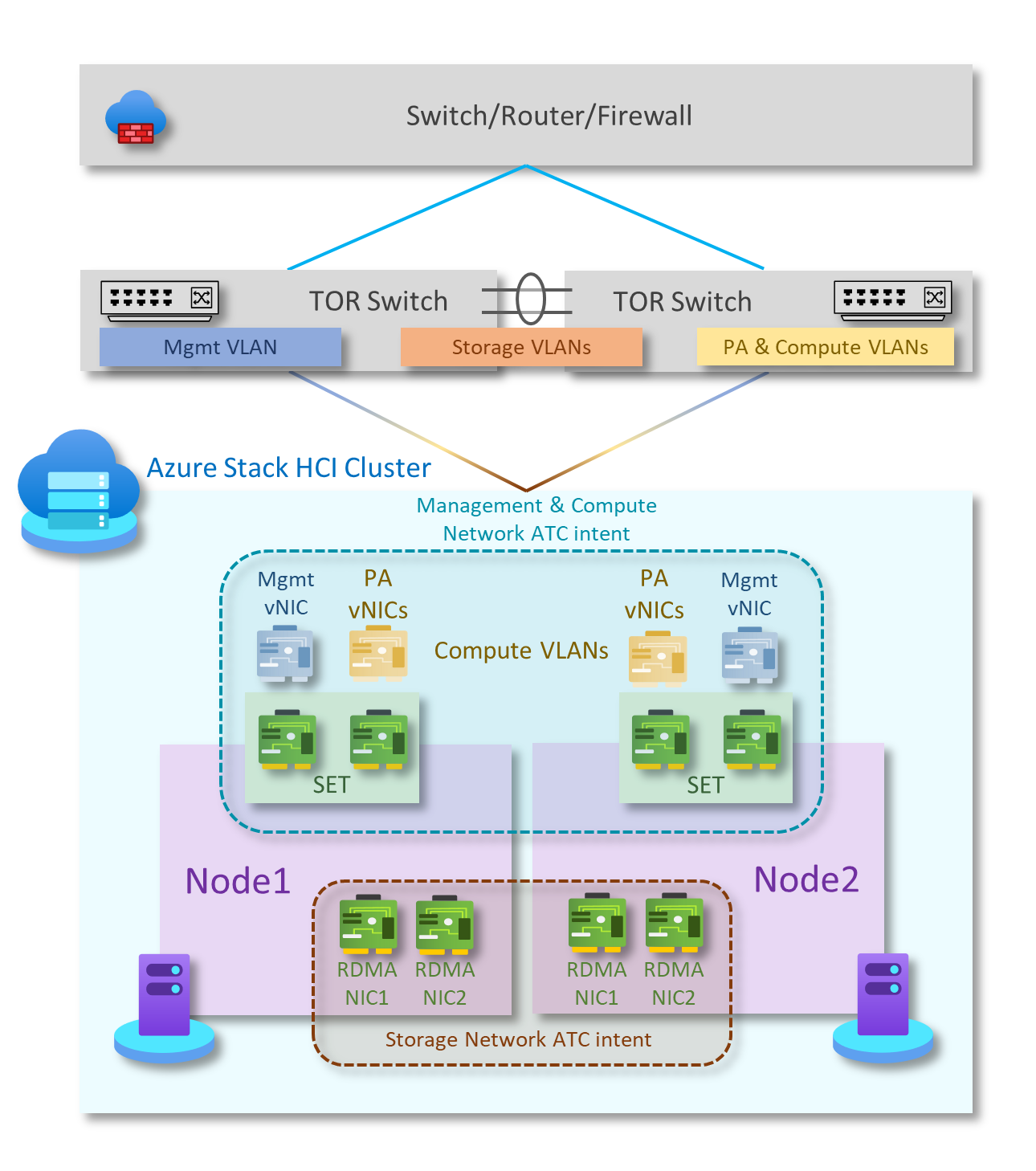
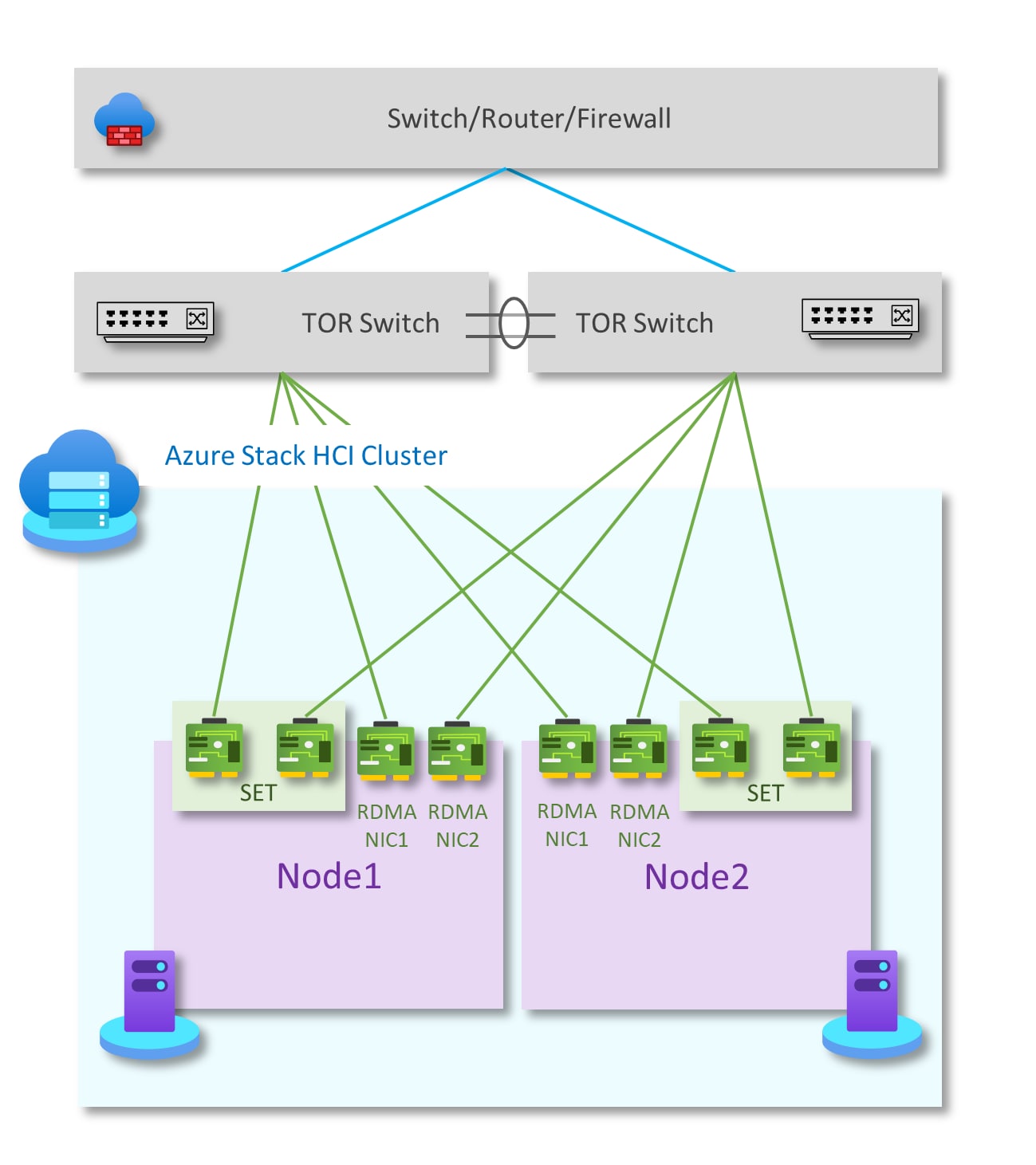
Microsoft has documented a wide range of networking options for deployment of one and two node clusters. For enhanced network performance and/or clusters with more than two nodes, the preferred option is storage switched, non-converged, two TOR switches.
The diagram below shows the logical network components of this pattern:
Figure 4. Logical network components
There are several important features supported by the physical connectivity components required for this pattern including:
The cluster is implemented with two TOR switches for northbound/southbound traffic.
Two teamed network cards are used to handle management and compute traffic connected to two TOR switches. Each NIC is connected to a different TOR switch.
Two RDMA NICs in standalone configuration are connected to a different TOR switch for storage traffic.
Figure 5. Logical network components for restricted firewall
Azure Stack HCI requires periodic connectivity to Azure. If your organization's outbound firewall is restricted, you must request firewall changes including new outbound endpoints and internal rules and ports. There are required and recommended endpoints for the Azure Stack HCI core components, which include cluster creation, registration and billing, Microsoft Update, and cloud cluster witness access if needed.
Storage
Storage Spaces Direct is the software-defined storage feature used in Azure Stack HCI and Windows Server that enables administrators to transform internal storage drives on a cluster of physical servers (2 to 16 nodes) into a software-defined storage pool. The resulting storage pool supports caching, tiering, and erasure coding across columns. Storage Spaces Direct leverages features available in Windows Server, including Failover Clustering, Cluster Shared Volumes (CSV), the Server Message Block (SMB) 3 protocol, and Storage Spaces. It also introduces a new storage technology called Software Storage Bus. Software Storage Bus establishes a software-defined storage fabric across the cluster so all servers can connect to each other's local drives, replacing costly and restrictive Fibre Channel or Shared SAS cabling.
When configuring Storage Spaces, Direct is required during the cluster creation process when using Windows Admin Center. Creating the cluster using PowerShell, the Enable-ClusterStorageSpacesDirect cmdlet is run after the cluster is created and host networking is defined. In either case, setup only requires the specification of a FriendlyName for the storage pool. All other settings will happen automatically, including creating a Cluster Performance History disk, configuring Storage Spaces Direct caches, and tiering if using a mix of drive types in the cluster.
The following PowerShell command highlights how Storage Spaces Direct isolates the administrator from the details of how a storage pool is implemented:
As noted above, the five Dell Azure Stack HCI nodes were configured with 24 x 1.6TB SSDs. After we created the cluster and the storage pool was built, we used the following command to get the details of our storage pool:
For our test cluster, the output from the above command shows a total size of 174.88 TB. This is close to the 190 TB of raw storage of our 5 nodes before subtracting overhead for management.
Storage Spaces Direct provides software-based fault tolerance for data distributed across servers to provide resiliency similar to hardware-based RAID. As with RAID, Storage Spaces provides options associated with the techniques used to provide data protection that involve tradeoffs between fault tolerance, storage efficiency, and computing complexity. The options can be grouped into "mirroring" and "parity/erasure coding."
Once the pool is available, administrators can create volumes from that pool of storage for use by virtual machines to store data. The volumes are built with the CSV file system. Servers consume these CSV volumes as if they are mounted locally. Volumes use one of the integrated fault tolerance features of Storage Spaces Direct to ensure that data stays online and accessible even if a drive fails or the entire node goes offline.
Fault tolerance and storage efficiency
As described above, creating a storage pool during cluster creation with either WAC or PowerShell defines a set of addressable read/write sectors without fault protection. Volume creation using the space in the pool is the first opportunity for administrators to address the trade-offs between space efficiency and data protection. The options are based on the concepts of either "mirroring" or "parity." The latter is sometimes called "erasure coding."
Mirroring
Mirroring uses multiple copies of all data by stripping file sectors across disks and servers. In two-way mirroring, the two copies of a file sector are written to different physical hardware (different drives in different servers) that are presumed to be unlikely to fail together. This protection method prevents data loss in the event of a single drive or single-server failure. Microsoft recommends three-way clustering for clusters with more than two nodes when using mirroring.
Three-way mirroring requires at least three servers to define three independent hardware fault domains. Because there are three fault domains, the system can tolerate at least two simultaneous hardware problems (drive or server). For example, during the reboot of one server, if another drive or server fails, all data remains safe and continuously accessible. Since three-way mirroring writes three copies of everything, its storage efficiency is 33.3 percent. Writing 1 TB of data will use at least 3 TB of physical storage pool capacity.
Parity encoding
Parity encoding, often called a form of erasure coding, is a technique for achieving fault tolerance in data storage and transmission. It leverages bitwise arithmetic, specifically XOR (exclusive OR) operations, to create parity data. Parity encoding is an effective method for ensuring data integrity and fault tolerance in storage systems. It is a relatively simple yet powerful technique to create redundancy, allowing for data recovery in the case of partial data loss.
Mirror-accelerated parity
Volumes can be protected through a combination of mirroring and parity. Writes are first placed in the mirrored portion of the storage and then are gradually moved into the parity portion in the background. The advantage of the approach is that the system uses mirroring to accelerate erasure coding. You need at least four servers to use three-way mirroring with dual parity. The storage efficiency of mirror-accelerated parity depends on the proportions that you choose. It will, however, be better than using all mirroring and less than with all parity.
Storage summary
Microsoft recommends using mirroring for most performance-sensitive workloads. We followed that guidance for the VMS and CV testing we describe later in this paper. For large clusters with a mixture of performance-sensitive workloads, Storage Spaces Direct with Azure Stack HCI allows administrators to create volumes using different levels of data protection including three-way mirroring and several options for mirror-accelerated parity.
Mirror-accelerated parity (MAP) reduces the footprint of the volumes in the storage pool. For example, a three-way mirror volume would use 30 TB in the pool for every 10 TB of volume size. To reduce the overhead in footprint, create a volume with mirror-accelerated parity. Using MAP reduces the footprint from 30 TB to 22 TB when using only four servers, mirroring the most active 20 percent of data and using more space-efficient parity to store the rest. Storage Spaces Direct gives users a range of ratio options of parity and mirrors to match the performance compared with the capacity tradeoff for a range of workloads.
Using GPUs
Microsoft offers two options for using graphics processing units (GPUs) with clustered virtual machines (VMs) running on the Azure Stack HCI operating system to provide GPU acceleration to workloads:
Discrete Device Assignment (DDA), also referred to as GPU pass-through
GPU Partitioning.
In GPU pass-through mode, an entire physical GPU is directly assigned to one VM, bypassing any host drivers. In this mode of operation, the GPU is accessed exclusively by the GPU driver running in the VM to which it is assigned. The GPU is not shared among VMs.
GPU partitioning allows you to share a physical GPU device with multiple virtual machines (VMs). With GPU partitioning or GPU virtualization, each VM gets a dedicated fraction of the GPU instead of the entire GPU.
The NVIDIA A16 GPUs installed in our test cluster support DDA and GPU Partitioning configurations. Neither option is currently supported with Live migration. VMs configured with GPUs must be placed where host GPU resources are available and restarted during cluster maintenance or in the event of a failure.
We chose to configure the allocation of GPUs to VMs using GPU partitioning. We used NVIDIA vGPU software, a graphics virtualization platform that provides virtual machines (VMs) access to NVIDIA GPU technology. The releases of the NVIDIA vGPU Manager and guest VM drivers that you install must be compatible. Installing an incompatible guest VM driver release for the release of the vGPU Manager will result in the NVIDIA vGPU's failure to load.
The following NVIDIA vGPU Manager and guest VM driver release combinations are compatible.
NVIDIA vGPU Manager with guest VM drivers from the same release
NVIDIA vGPU Manager with guest VM drivers from different releases within the same major release branch
NVIDIA vGPU Manager from a later major release branch with guest VM drivers from the previous branch
You must also use a compatible version of the NVIDIA License System with the chosen release of NVIDIA vGPU software.
Validation
Validation
Our testing was designed to simulate several customer scenarios to validate that the VMS and CV applications perform efficiently and without conflict on the Azure Stack HCI infrastructure.
Deploy CV/VMS applications on Azure Stack HCI
Milestone Systems
The Milestone Systems VMS was first application deployed across the Azure cluster. Both of our CV applications integrate with the Milestone directory server so this order of installation is preferred.
Milestone consists of:
Management Nodes
Database Nodes
Multiple recorder nodes
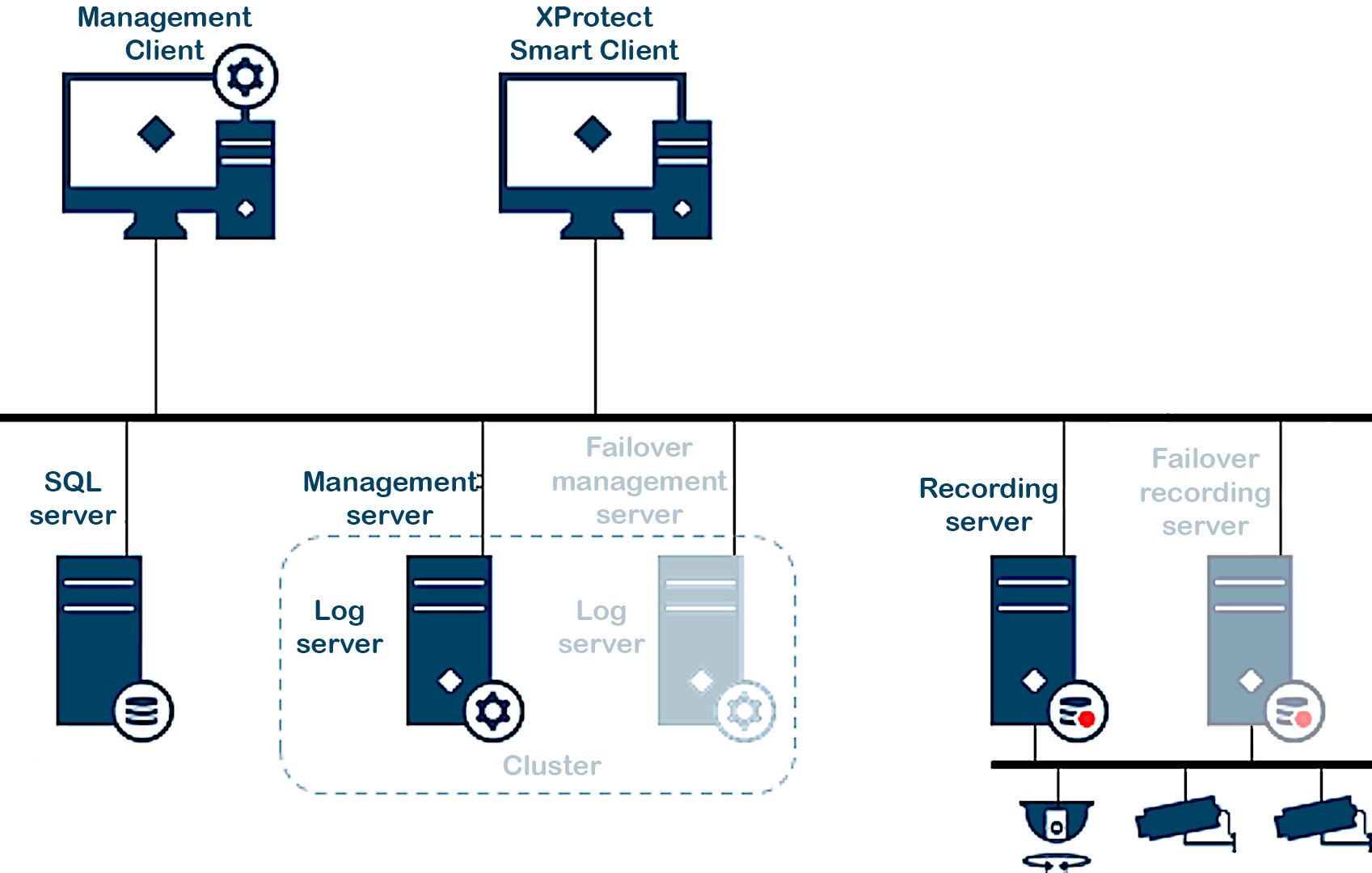
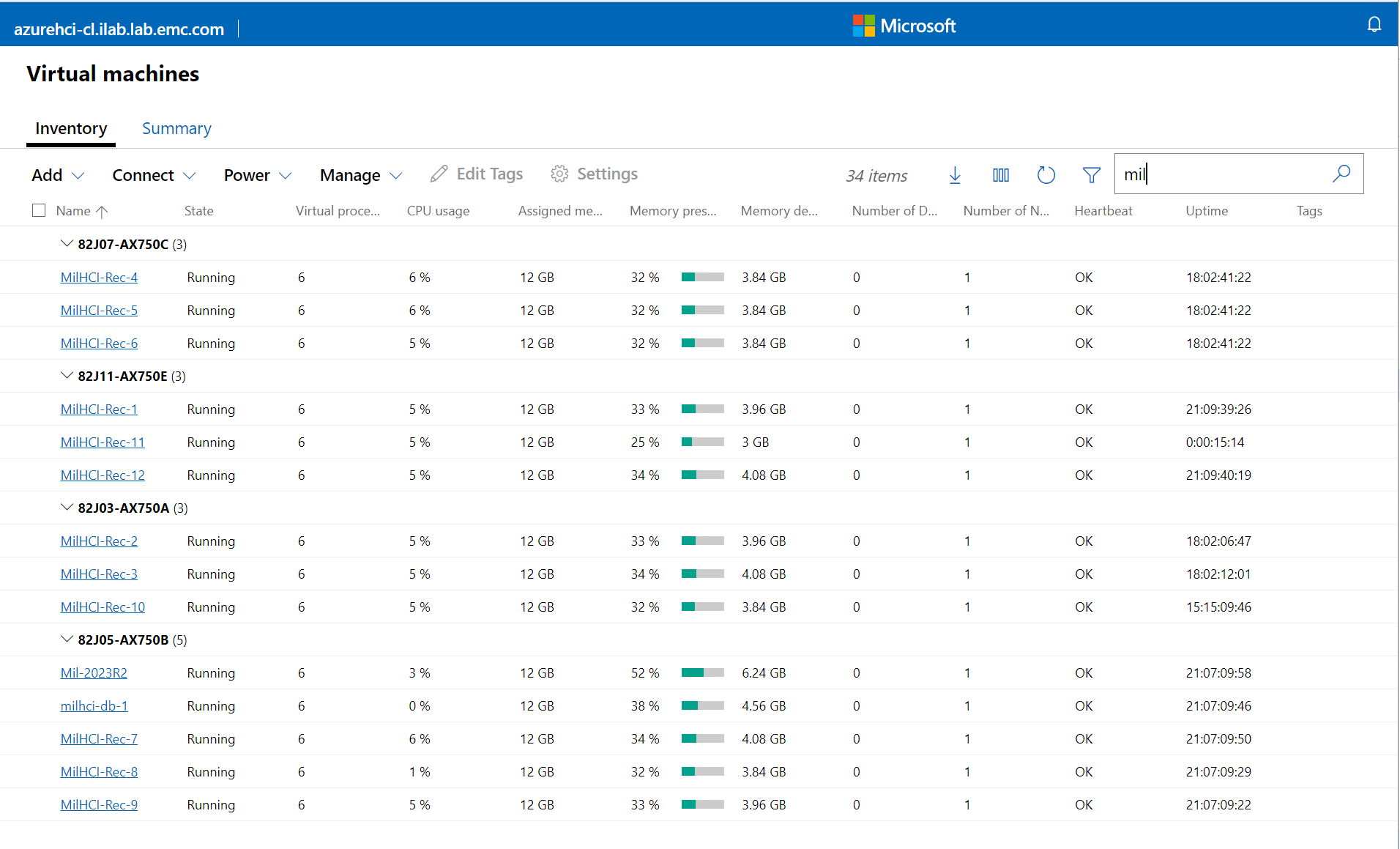
One configuration we tested for the distribution of a Milestone VMS across our Azure cluster is shown below:
Figure 6. Milestone VMS deployment on an Azure cluster
BriefCam
We tested the BriefCam 2023 M1 version of the product with the Milestone integration components. BriefCam consists of multiple types of servers:
Database
Management Web Console
Multiple Processing Nodes (with GPU)
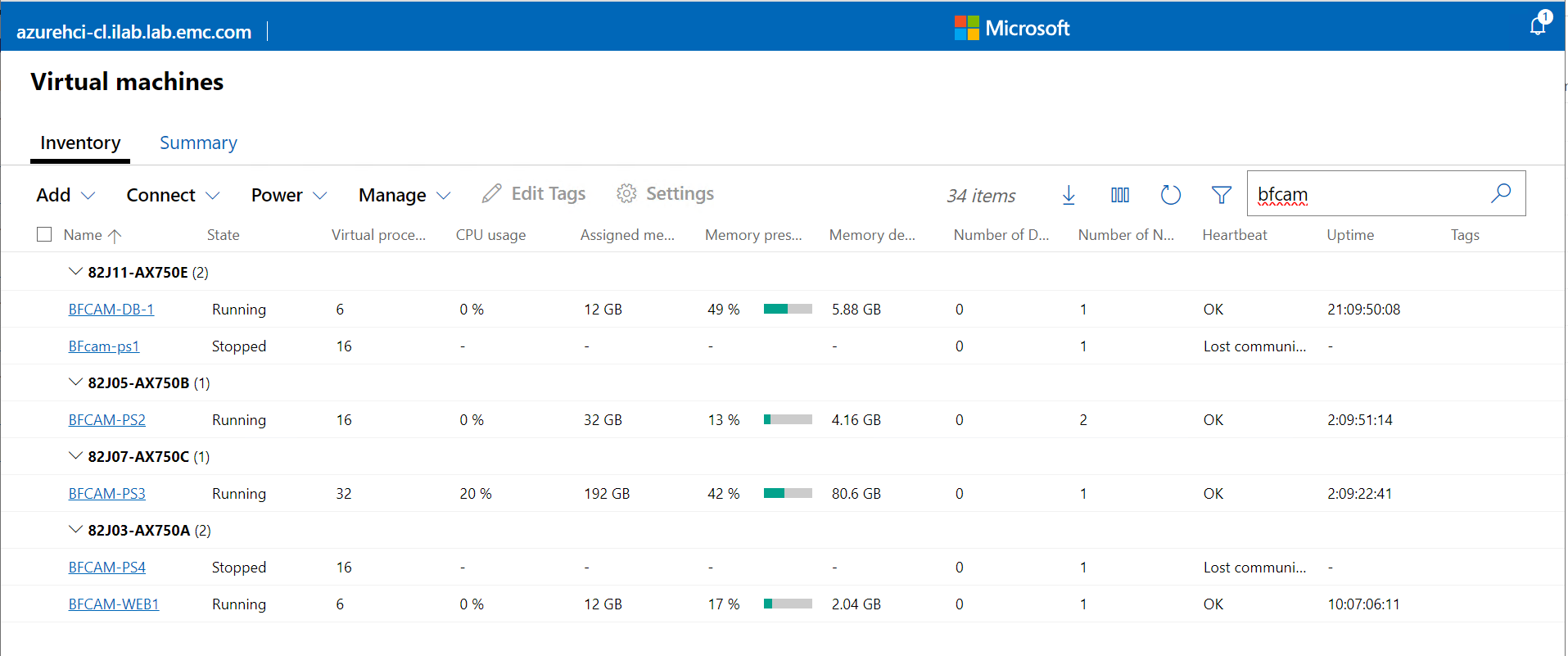
One configuration we tested for a BriefCam deployment on a five-node Azure Stack HCI cluster looks as follows:
Figure 7. BriefCam deployment on an Azure cluster
Ipsotek
The Ipsotek CV application consists of multiple types of servers:
Database Node
Management Node
Multiple Processing Nodes (with GPU)
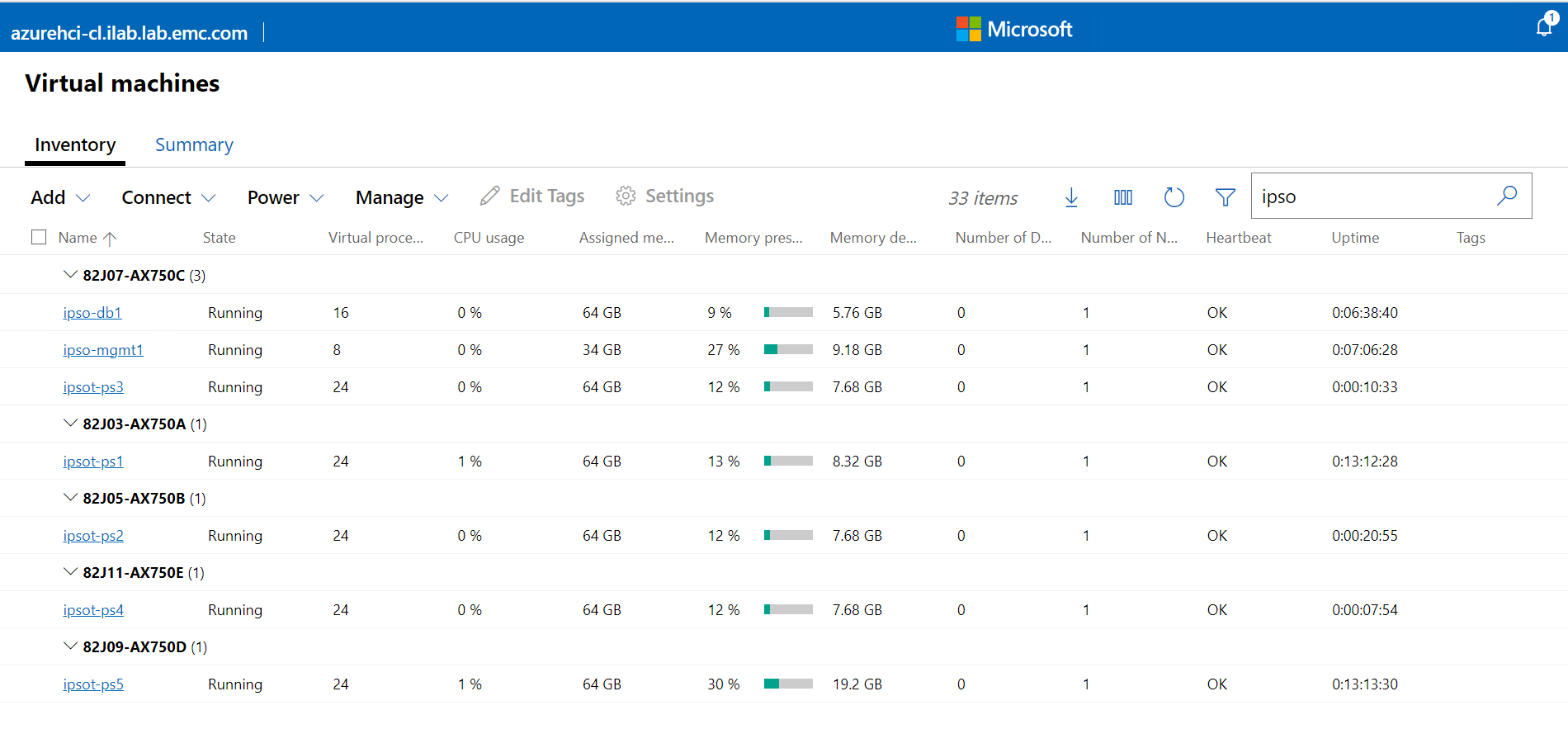
An example of how Ipsotek can be deployed across an Azure cluster looks as follows:
Figure 8. Ipsotek deployment on an Azure cluster
Findings
The Milestone VMS and both CV systems were successfully deployed on Azure Stack HCI.
All systems functioned as expected.
All VMs migrate freely around the cluster.
Performance on Azure Stack HCI
It is important to understand how the workload looks while running on the Azure Stack Infrastructure. To do this Live Optics was used and a days worth of data was recorded.
Results
Findings
The system was not overloaded during the session.
The workload was balanced across the cluster.
As per design there is sufficient capacity for one Azure Server to go offline for maintenance.
Connect Azure Stack HCI to PowerScale
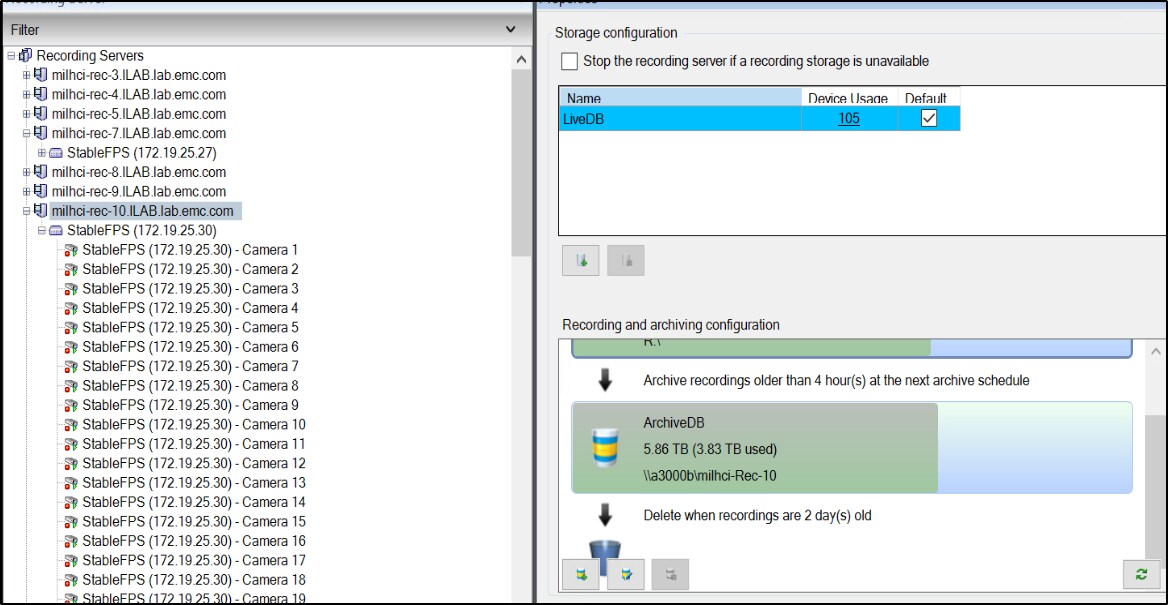
A question that we looked to answer is how do we still leverage the massively scalable PowerScale for offline video storage. High-volume video is typically saved locally for regulatory and cost saving purposes. To investigate this, we configured the long-term storage for the Milestone VMS.
Results
To test the connectivity from the Azure Stack to a PowerScale the Archive storage was configured using the typical SMB storage protocol.
Figure 9. PowerScale configured as Archive storage
Findings
All the use cases tested were successful and ran without errors or performance concerns . All simulated video was successfully streamed to the local Milestone Tier 1 storage, which is processed by both Ipsotek and BriefCam, and archived to the connected on-premises PowerScale without any warnings, errors, or failures.
The Milestone Tier 1 storage using Storage Spaces Direct three-way mirroring performed well with respect to latency and capacity for holding live data prior to archiving.
Conclusions
Conclusions
Our experience working with Microsoft Azure Stack HCI for hosting enterprise applications for video management and computer vision AI revealed the depth of the platforms innovation and a focus on ease of deployment and management. Below are some of the take-aways from this project:
Azure Stack HCI is a flexible, scalable, on-premises, hyperconverged infrastructure (HCI) stack delivered as an Azure service that provides an attractive option to customers looking to consolidate virtualized workloads.
Our Azure Stack HCI cluster was built on validated hardware from Dell Technologies that ensured predictable performance and reliability. Solutions from Dell Technologies are designed for rapid deployment and minimal maintenance, allowing for scalability that supports business growth.
Incorporating core Windows Server technologies like Hyper-V for virtualization and Storage Spaces Direct (S2D) for storage made it easy for experienced Windows engineers to optimize the platform for enterprise applications.
Windows Admin Center for Azure Stack HCI streamlined our platform management, including the ability to monitor and manage the HCI environment and Azure services like registration and billing.
We were able to show how sensitive data and applications that require high levels of security, performance, and compliance can be hosted on-premises or in a private cloud, where the organization has more control. A hybrid cloud allows organizations to keep latency-sensitive applications and data on-premises while leveraging the cloud for other services.
Azure Stack HCI uses a consumption-based pricing model that aligns with Azure's billing practices. Operational benefits include simplified updates and a unified management portal, reducing the operational overhead for IT teams.
Pursuing a hybrid cloud strategy offers a range of benefits that align with the diverse needs of modern enterprises, especially those operating in dynamic and data-intensive sectors. Microsoft Azure Stack HCI represents a comprehensive solution for organizations that want the option to implement hybrid cloud computing while maintaining control over on-premises infrastructure. The platform's scalability, security, and integration with Azure services make it a leading choice for enterprises pursuing a hybrid cloud strategy.
In summary, Azure Stack HCI solutions from Dell Technologies offer a versatile and balanced hybrid cloud approach, allowing organizations to capitalize on the strengths of both on-premises and cloud environments. This flexibility is essential for AI computer vision environments where efficiency, security, compliance, and innovation are keys to sustaining competitive advantage.