Day One Best Practices
Performance Best Practices
PowerMax: Adding Storage LUNs and ASM Disk Groups
How storage is configured can directly influence database performance. This best practice validates the number of storage LUNs and ASM disk groups used to optimize database performance.
|
Category |
PowerMax Storage |
|
Product |
PowerMax |
|
Type of best practice |
Performance Optimization |
|
Day and value |
Day 1, Highly recommended |
Overview
To determine if a best practice provides value, it had to be tested against a baseline configuration of the database to validate performance. Table 1 shows the baseline storage groups and LUNs configuration. A one-to-one relationship from parent storage group to child storage group to LUN exists in this baseline configuration, with exception for SAGE_GRID. The SAGE_GRID parent storage group has three LUNs: ORA-OCR1 through ORA-OCR3. These groups are added for the normal redundancy configuration of the grid infrastructure’s voting disks and OCR. This streamlined configuration simplifies database storage management and has other benefits.
Another benefit of this baseline storage configuration is that it followed the principle of separating database files into dedicated storage groups. For example, the Data files are separate from the Redo files, providing the capability to analyze storage performance for different parts of the database. This granularity in storage group design facilitates activities like storage replication and snapshots. Both replication and snapshots only require part of the database to be protected or copied. Not having to replicate or snapshot the temporary files and the flash recovery area (FRA) can save disk space, help with replication, and improve network bandwidth.
Table 1: Baseline storage group configuration
|
Parent storage group |
Child storage group |
LUNs |
Volume size (GB) |
Notes |
|
SAGE_DB1 |
DB1_DATA |
ORA-DATA1 |
1,000 |
Data files |
|
|
DB1_REDO |
ORA-REDO1 |
50 |
Online Redo log files |
|
|
DB1_ARCH |
ORA-ARCH1 |
100 |
Archived Redo log files |
|
SAGE_GRID |
|
ORA-OCR1 |
50 |
Grid infrastructure |
|
|
|
ORA-OCR2 |
50 |
|
|
|
|
ORA-OCR3 |
50 |
|
|
SAGE_FRA |
|
ORA-FRA |
100 |
Flash recovery area |
|
SAGE_TEMP |
|
ORA-TEMP1 |
500 |
Temporary files |
Table 2 shows the optimized PowerMax storage configuration. All the parent and child storage groups remain intact, but additional LUNs are added. Using multiple LUNs for the most active portion of an Oracle database can improve performance. The primary benefit of using multiple storage LUNs is that the operating system creates an I/O queue path per LUN. The following table shows the optimized PowerMax storage configuration for the Oracle database. In the optimized storage configuration, DATA, REDO, and ARCH have four LUNs per child storage group. Compared to the baseline configuration, there are four times the number of I/O queue paths.
Table 2: Optimized PowerMax storage configuration
|
Parent storage group |
Child group |
LUNs |
Volume size (GB) |
Notes |
|
SAGE_GRID |
DB1_GRID |
ORA-OCR1 |
50 |
Grid Infrastructure |
|
ORA-OCR2 |
50 |
|||
|
ORA-OCR3 |
50 |
|||
|
SAGE_DB1 |
DB1_DATA |
ORA_DATA1 |
1,000 |
Archived Redo log files |
|
ORA_DATA2 |
1,000 |
|||
|
ORA_DATA3 |
1000 |
|||
|
ORA_DATA4 |
1000 |
|||
|
DB1_REDO |
ORA_REDO1 |
50 |
Online Redo log files |
|
|
ORA_REDO2 |
50 |
|||
|
ORA_REDO3 |
50 |
|||
|
ORA_REDO4 |
50 |
|||
|
DB1_ARCH |
ORA_ARCH1 |
100 |
Archived Redo log files |
|
|
ORA_ARCH2 |
100 |
|||
|
ORA_ARCH3 |
100 |
|||
|
ORA_ARCH4 |
100 |
|||
|
SAGE_FRA |
|
FA1 |
100 |
Flash Recovery Area |
|
SAGE_TEMP |
|
TEMP1 |
500 |
Temporary files |
Once the additional LUNs are created, these LUNS can be added to the ASM disk groups. Initial sizing of the ASM disk groups should reach a management and capacity balance. If the disk groups are sized too small, it may require frequently adding additional groups. Fewer large disk groups result in excessive underutilized storage capacity.
Recommendation
Results from validating the best practice of adding additional storage groups showed a significant performance improvement. Test findings showed increases in:
- New Orders per Minute (NOPM)
- Transactions per Minute (TPM)
- PowerMax IOPS
- Server CPU utilization
Decreases were seen in the following:
- DB File Sequential Read
- Log File Parallel Write
NOPM and TPM are metrics from the TPC-C benchmark that indicate performance. If NOPM and TPM increase when compared to the prior test, this suggests the best practice improved performance. As this was the first best practice, the comparison was against the baseline. Test results from validating this best practice show a significant increase in NOPM and TPM.
An increase in PowerMax IOPS indicates improved performance. By creating four times the number of LUNs for DATA, REDO and ARCH, the number of queue paths also increased. The additional queue paths allowed more data to be serviced by the PowerMax storage array, resulting in an increase in PowerMax IOPS and improved storage efficiency.
Server processor utilization can be impacted by the response time of other systems, like storage. For example, if storage response times are slow the processors will have idle wait times. The number and length of storage wait times in part determines if the processors are relatively idle or efficiently busy. The results show an increase in server CPU utilization, delivering improved performance and greater processor efficiencies.
DB File Sequential Read and Log File Parallel Read Write are database metrics that indicate database performance. A decrease in the amount of time for both metrics means the database is reading database files and log files faster. The results show a decrease in both Oracle database metrics and improved performance in reading data files and writing log files.
Overall, the best practice of increasing the number of storage groups is highly recommended and should be considered as a Day 1 practice, as part of initial data provisioning.
Implementation Steps
Before adding additional three LUNS/volumes to each ASM disk group, we performed the following tasks to present the additional volumes to the guest VM RHEL OS where the Oracle database resides.
- Present these volumes to the ESXi host and created the corresponded datastores based on these volumes
- Created the hard disks from these data stores and presented these hard disks to the guest VM RHEL OS as block devices.
- Create a single partition on each of these devices
- Created udev rules to assign Linux 0660 permission and ownership of these devices to the grid user and create alias name such as ‘/dev/oracleasm/disks/ora-data2’ for each device.
After performing these tasks, the following table shows the device names, their corresponding storage groups, and the ASM disk groups.
Table 3: Storage groups, data stores, devices and ASM disk groups
|
Storage group |
Child group |
Data store |
Device name |
Disk group name |
|
Sage_GRID |
DB1_GRID |
SG_GRID1_C1 |
/dev/oracleasm/disks/ora-ocr1 |
GRID |
|
SG_GRID1_C2 |
/dev/oracleasm/disks/ora-ocr2 |
|||
|
SG_GRID1_C3 |
/dev/oracleasm/disks/ora-ocr3 |
|||
|
Sage_DB1 |
DB1_DATA |
SG_DB1_D1 |
/dev/oracleasm/disks/ora-data1 |
DATA |
|
SG_DB1_D2 |
/dev/oracleasm/disks/ora-data2 |
|||
|
SG_DB1_D3 |
/dev/oracleasm/disks/ora-data3 |
|||
|
SG_DB1_D4 |
/dev/oracleasm/disks/ora-data4 |
|||
|
DB1_REDO |
SG_DB1_R1 |
/dev/oracleasm/disks/ora-redo1 |
REDO |
|
|
SG_DB1_R2 |
/dev/oracleasm/disks/ora-redo2 |
|||
|
SG_DB1_R3 |
/dev/oracleasm/disks/ora-redo3 |
|||
|
SG_DB1_R4 |
/dev/oracleasm/disks/ora-redo4 |
|||
|
DB1_ARCH |
SG_DB1_A1 |
/dev/oracleasm/disks/ora-arch1 |
ARCH |
|
|
SG_DB1_A2 |
/dev/oracleasm/disks/ora-arch2 |
|||
|
SG_DB1_A3 |
/dev/oracleasm/disks/ora-arch3 |
|||
|
SG_DB1_A4 |
/dev/oracleasm/disks/ora-arch4 |
|||
|
Sage_FRA |
|
SG_DB1_FA |
/dev/oracleasm/disks/ora-fra |
FRA |
|
Sage_TEMP |
|
SG_DB1_TM |
/dev/oracleasm/disks/ora-temp1 |
TEMP |
For the baseline configuration, each ASM disk group of DATA, REDO, and ARCH only has a single volume. For example, DATA disk group has one volume: ‘/dev/oracleasm/disks/ora-data1’. To add the additional three volumes to the ASM disk groups, DATA, REDO, and ARCH, we need to ensure that all four LUNs in the same disk group are the same size. Perform the following SQL statement in the ASM instance to add the three ASM disk groups, DATA, REDO, and ARCH:
SQL> ALTER DISKGROUP data ADD DISK
'/dev/oracleasm/disks/ora-data2' NAME DATA_0001,
'/dev/oracleasm/disks/ora-data3' NAME DATA_0002,
'/dev/oracleasm/disks/ora-data4' NAME DATA_0003;
SQL> ALTER DISKGROUP redo ADD DISK
'/dev/oracleasm/disks/ora-redo2' NAME REDO_0001,
'/dev/oracleasm/disks/ora-redo3' NAME REDO_0002,
'/dev/oracleasm/disks/ora-redo4' NAME REDO_0003;
SQL> ALTER DISKGROUP arch ADD DISK
'/dev/oracleasm/disks/ora-arch2' NAME ARCH_0001,
'/dev/oracleasm/disks/ora-arch3' NAME ARCH_0002,
'/dev/oracleasm/disks/ora-arch4' NAME ARCH_0003;
You can run these SQL statements to add volume to ASM disk groups while the database is still running. However, it is preferable to run these statements outside of the database workloads’ peak time, as adding disk volume operations results in data rebalancing and may cause a significant performance overhead. The rebalancing power is defined by the ASM_POWER_LIMIT initialization parameter (default value = 1, range to 1024). The higher the limit, the faster a rebalance operation may complete, and the rebalance results in more performance overhead.
To monitor the status of the rebalancing operation, run this SQL statement to check the operation status:
SQL> select INST_ID, OPERATION, STATE, POWER, SOFAR, EST_WORK, EST_RATE, EST_MINUTES from GV$ASM OPERATION;
INST_ID OPERA STAT POWER SOFAR EST_WORK EST_RATE EST_MINUTES
---------- ----- ---- ---------- ---------- ---------- ---------- -----------
1 REBAL WAIT 1 0 0 0 0
1 REBAL RUN 1 14185 179546 7085 23
1 REBAL DONE 1 0 0 0 0
In this example, the output shows three rebalancing operations: the first is done (bottom), the second is running (middle), and the third is waiting (top). For the second row, the report shows:
- EST_WORKD=179,546 - estimated number of Allocation Units that must be moved
- SOFAR = 14,185 - number of Allocation Units that have been moved so far
- EST_RATE=7,085 - number of Allocation Units that are moved per minute
- EST_MINUTES= 23 - estimated amount of time (23 minutes) that the remainder of the operation is expected to take
Additional Resources
This best practice was referenced from the Deployment Best Practices for Oracle Database with Dell EMC PowerMax.
PowerMax: Storage Directors
The PowerMax 2000 provides multiple front-end connections used for connectivity from the storage array to the PowerEdge servers. In this best practice, we increase the number of front-end connections to optimize storage performance.
|
Category |
PowerMax Storage |
|
Product |
PowerMax front-end connections |
|
Type of best practice |
Performance Optimization |
|
Day and value |
Day 1, Highly recommended |
Overview
PowerMax storage arrays use bricks that enable customers to add more power, performance, and capacity to an existing array. Each PowerMax brick has two engine directors. Directors support multiple functions including front-end I/O modules. The front-end I/O modules provide connectivity to the array using various interfaces including Fibre Channel SCSI, Fibre Channel NVMe, iSCSI, and others.
There are four front-end I/O modules per director. In the baseline configuration, two of the four total directors were used. The following table shows that all four front-end I/O modules were used on director 2 and two front-end modules were used on director 4. The two other front-end modules on director 4 were reserved for replication. Each front-end module was a 32 Gbps Fibre Channel connection and in the baseline connection a total of six were used.
Table 1: Directors and ports used
|
Director number |
Port number |
Connected |
HBA number and port |
|
1 |
1 |
|
|
|
2 |
|
|
|
|
3 |
|
|
|
|
4 |
|
|
|
|
2 |
1 |
Connected |
HBA 1, Port 1 |
|
2 |
Connected |
HBA 1, Port 2 |
|
|
3 |
Connected |
HBA 2, Port 3 |
|
|
4 |
Connected |
HBA 2, Port 4 |
|
|
3 |
1 |
|
|
|
2 |
|
|
|
|
3 |
|
|
|
|
4 |
|
|
|
|
4 |
1 |
Connected |
HBA 1, Port 1 |
|
2 |
Connected |
HBA 1, Port 2 |
|
|
3 |
Reserved for replication |
|
|
|
4 |
Reserved for replication |
|
For this best practice two additional directors were added (1 and 3) with all the front-end I/O modules used for a total of eight more connections to the server. The following table shows the two directors and eight ports that were added (highlighted in darker gray):
Table 2: Additional directors added
|
Director Number |
Port number |
Connected |
HBA Number and Port |
|
1 |
1 |
Connected |
HBA 1, Port 1 |
|
2 |
Connected |
HBA 1, Port 2 |
|
|
3 |
Connected |
HBA 2, Port 3 |
|
|
4 |
Connected |
HBA 2, Port 4 |
|
|
2 |
1 |
Connected |
HBA 1, Port 1 |
|
2 |
Connected |
HBA 1, Port 2 |
|
|
3 |
Connected |
HBA 2, Port 3 |
|
|
4 |
Connected |
HBA 2, Port 4 |
|
|
3 |
1 |
Connected |
HBA 1, Port 1 |
|
2 |
Connected |
HBA 1, Port 2 |
|
|
3 |
Connected |
HBA 2, Port 3 |
|
|
4 |
Connected |
HBA 2, Port 4 |
|
|
4 |
1 |
Connected |
HBA 1, Port 1 |
|
2 |
Connected |
HBA 1, Port 2 |
|
|
3 |
Reserved for replication |
|
|
|
4 |
Reserved for replication |
|
With the additional directors and front-end ports, this best practice showed the greatest improvement of all the storage recommendations. Doubling the connections to the database server provided substantial improvements.
Recommendation
Adding additional directors and front-end I/O ports enabled more connections between the database servers and the PowerMax 2000 storage array. Test findings showed substantial improvements for:
- New Orders per Minute (NOPM)
- Transactions per Minute (TPM)
- PowerMax IOPS
- Log File Parallel Write
There were also significant improvements for Server CPU utilization and DB File Sequential Read.
Both TPC-C metrics NOPM and TPM showed a substantial improvement: the number of orders completed and transactions processed increased significantly. Correspondingly, array IOPS also increased significantly.
Both DB File Sequential Read and Log File Parallel Read Write times showed a substantial decrease, indicating faster response times.
Overall, the best practice of adding PowerMax directors and front-end I/O modules can optimize performance by providing more communication pathways between the database server and storage. The recommendation is to implement this best practice as a Day 1 activity, as it is a highly recommended configuration that optimizes database performance.
Implementation Steps
In a typical SAN configuration, the server HBA ports (initiators) and the storage director front-end ports are linked to a SAN switch. A software process in the SAN switch creates zones, pairing the server HBA ports (initiators) and the storage director ports (targets).
The following outlines the implementation steps:
- Two separate fabrics or Fibre Channel switches are used for high availability and load balancing
- To reach maximum throughputs, we zoned the server HBA ports (initiators) with the ports of multiple directors. The following figure shows the total 14 I/O paths for each server that are connected between the four initiators and the 14 targets.
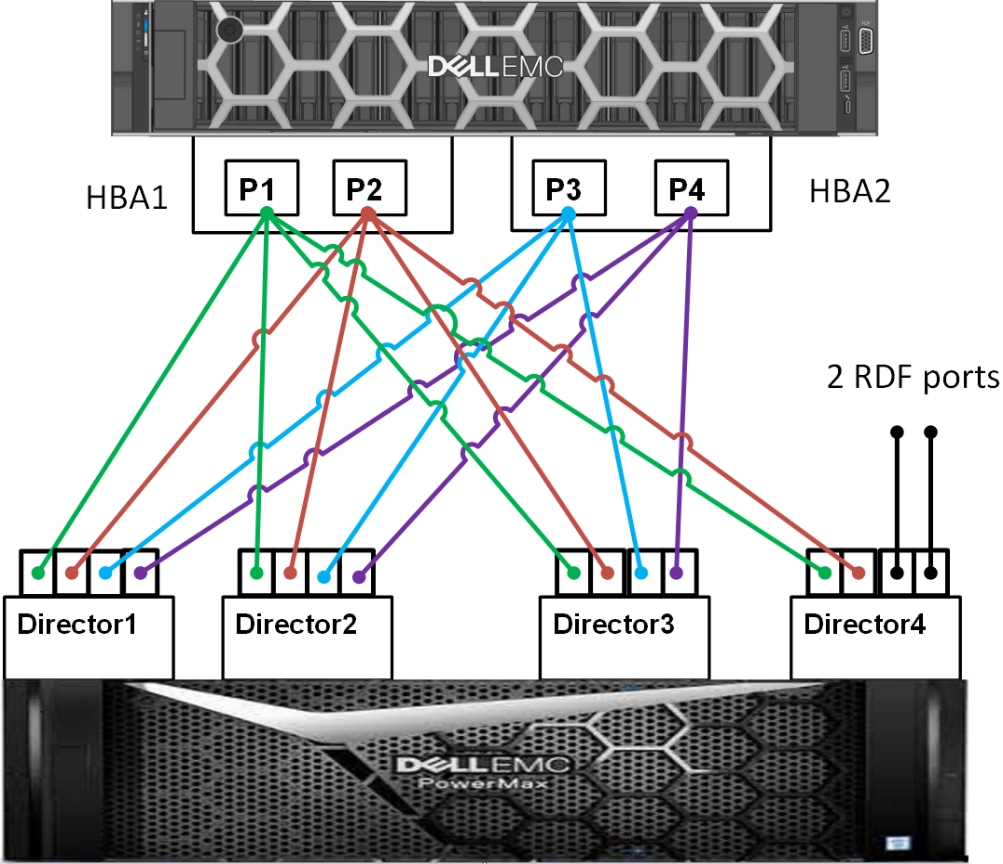
Figure 1: I/O paths for each server
In order to fully utilize these 14 physical I/O paths, in Unisphere for PowerMax we created a storage port group that includes all the 14 front-end ports:
- Click Hosts-> Port Groups-> Create
- Provide the Port Group Name
- Select Port Group Type Fiber
- Select all the Dir:Port entries
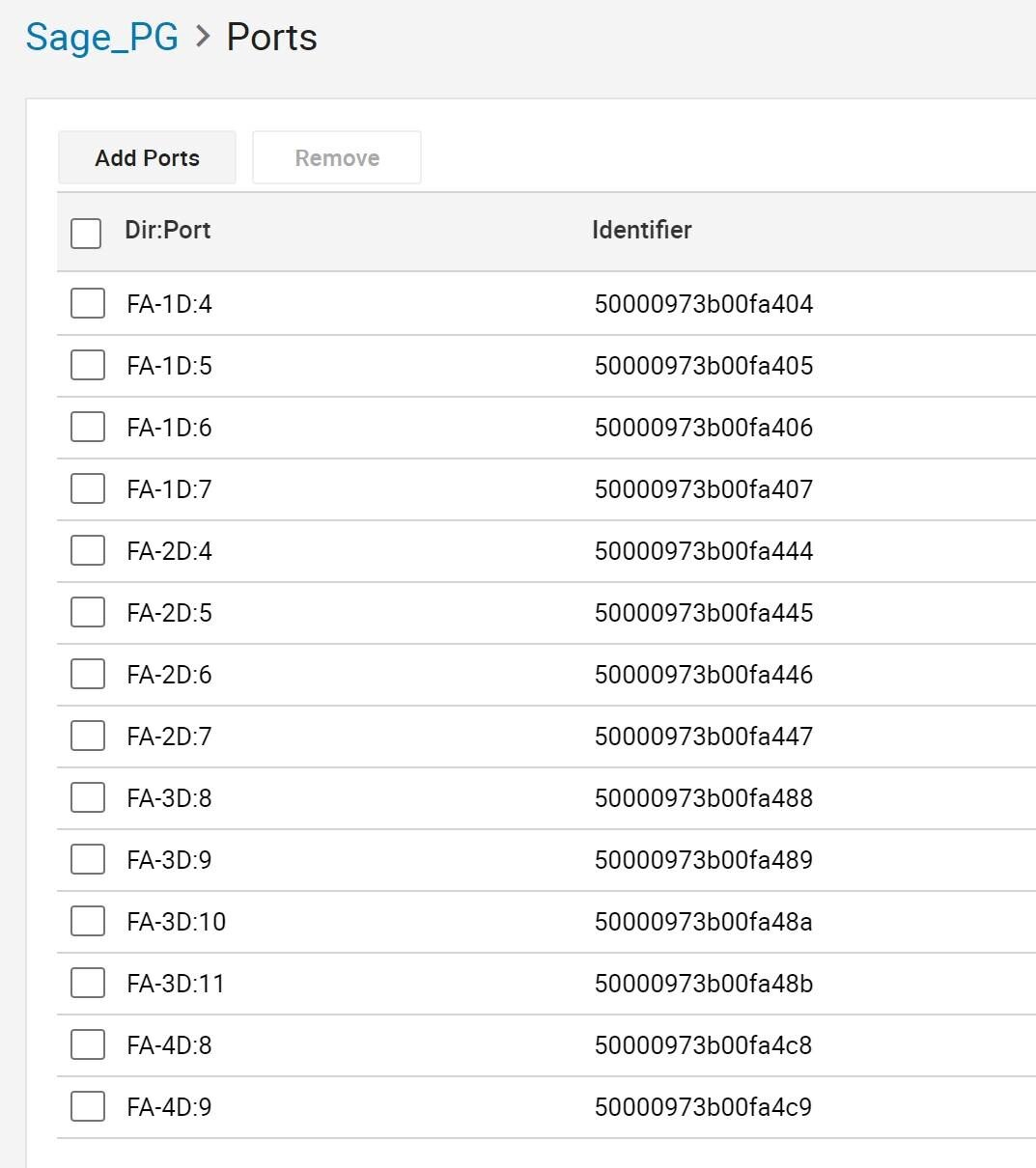
Figure 2: Creating a storage port group
We created mask views to assign the storage groups to hosts and port groups.
Click Masking Views > Create Masking View. For example, to create the mask view SG_DB1_MV, we used the following:
- Host: Sage_Oracle which contains all the initiators of HBA ports of the hosts
- Port Group: Sage_PG which contains all the 14 front-end director ports
- Storage Group: DB1_DATA which contains all the storage volumes for DATA, REDO and ARCH for the database DB1
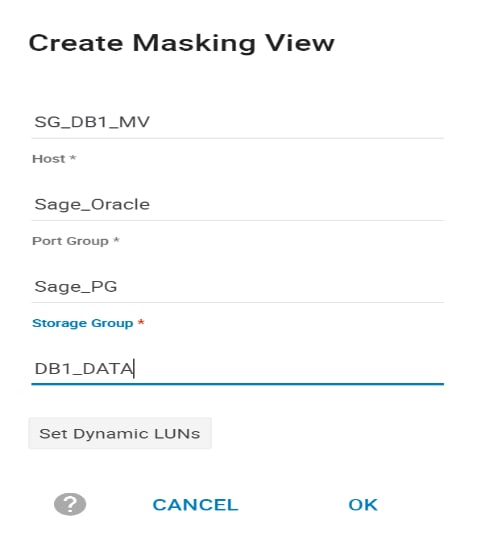
Figure 3: Creating a masking view
Additional Resources
This best practice was referenced from the Deployment Best Practices for Oracle Database with Dell EMC PowerMax.
VMware ESXi: Round Robin Path Policy
Round Robin path policy defines how to balance I/O load across active storage paths. In this best practice, the Round Robin path policy will be changed to optimize performance.
|
Category |
PowerMax Storage |
|
Product |
VMware ESXi |
|
Type of best practice |
Performance Optimization |
|
Day and value |
Day 1, Highly Recommended |
Overview
At the hypervisor layer, ESXi controls the flow of data to and from the server. There are several configuration choices including Most Recently Used (MRU), Fixed, and Round Robin. In this best practice, changes are made to the Round Robin path policy to optimize data path usage between the PowerEdge servers and the PowerMax storage.
Round Robin automatically rotates through all available paths to distribute the data flow. As PowerMax has all active paths to storage, Round Robin will rotate data across those pathways. By default, Round Robin sends 1,000 I/O operations across one path before using the next path. In this best practice, we change the default of 1,000 to 1. With a Round Robin IOPS limit of 1, the paths to storage will be rotated more frequently, thus providing a positive impact upon storage performance.
Recommendation
Changing the Round Robin Path Policy to 1 showed a significant performance improvement. Test findings showed significant improvements for:
- New Orders per Minute (NOPM)
- Transactions per Minute (TPM)
- PowerMax IOPS
- DB File Sequential Read
- Log File Parallel Write
NOPM and TPM increased when compared to the prior test, indicating the change to the Round Robin path policy improved performance. Server CPU utilization also increased.
An increase in PowerMax IOPS indicates more efficient use of I/O paths to storage. Optimal path usage benefits the database as the response times for reads and writes decrease.
Server processor utilization can be impacted by default settings that are not optimized. In this case, the default Round Robin setting of 1,000 I/O before moving to the next path was impacting performance. Changing the Round Robin setting to 1 I/O before moving to the next path resulted in a more frequent path switch rate, thereby improving performance. An increase in server CPU utilization indicates reduced storage wait time and more efficient processor utilization.
Both DB File Sequential Read and Log File Parallel Read Write are database metrics that indicate database performance. A decrease in both metrics shows the database is receiving data faster.
Overall, the best practice of changing the Round Robin path policy from 1,000 I/Os to 1 is highly recommended and should be considered as a Day 1 practice as part of initial data provisioning.
Implementation Steps
To configure Round Robin I/O operations from 1,000 to 1, login into the ESXi SSH console and run the following command using esxcli:
for i in `esxcfg-scsidevs -c |awk '{print $1}' | grep naa.xxxx`; do esxcli storage nmp psp roundrobin deviceconfig set --type=iops --iops=1 --device=$i; done
Verify the change using the following command:
esxcli storage nmp device list
Additional Resources
This best practice was referenced from the VMware Multipathing policies in ESXi/ESX and Adjusting Round Robin IOPS limit from 1000 to 1.