Dell AppSync: Integration with Oracle Database Server
AppSync Overview
Executive summary
Oracle Database Server is at the heart of some of the largest enterprise applications in the world. This application stores critical data that represents tremendous value to countless organizations. Dell AppSync supports many versions of Oracle Database Server and can provide unprecedented protection for critical data.
See the Dell AppSync Support Matrix for the latest supported versions of AppSync.
Introduction
This white paper reflects functionality up to AppSync version 4.x. It explores the internal management aspects of Dell AppSync with a strong focus on Oracle Database Server integration. AppSync integrates directly with Oracle and the underlying host operating system. It includes copy create, mount, recovery, and restore operations.
This document shows how AppSync interacts with unique database environment of Oracle to provide value-add functionalities like database and log-consistent copy automation, database repurposing, backup protection, and data redundancy. Basic knowledge of AppSync and Oracle concepts are required to benefit from this detailed white paper.
Audience
This white paper is written for Oracle DBAs and technologists who want an in-depth understanding of how AppSync interacts and integrates with Oracle Database Server.
Revisions
|
Date |
Description |
|
June 2022 |
Updated for AppSync 4.4.x release. |
We value your feedback
Dell Technologies and the authors of this document welcome your feedback on this document. Contact the Dell Technologies team by email.
Authors: Andrew Sirpis, Tobin Joseph, Lester Wells
Note: For links to other documentation for this topic, see the AppSync Info Hub.
Overview
This overview provides general information about AppSync components and their roles as a basis for more specific discussions that follow. For a complete overview of AppSync, see the AppSync User and Administration Guide at https://www.dell.com/support/home/us/en/04/product-support/product/appsync/overview.
AppSync is composed of three main components:
- AppSync server: Stores all information about users, hosts, storage systems, copies, and ongoing operations.
- AppSync user interface: Allows customers to interact with and control the product. This component includes a command-line interface and REST API support.
- AppSync plug-in: Enables interaction with the application and storage layers to create, mount, restore, or expire copies of mission-critical data.
The AppSync plug-in interacts with the Oracle application and issues commands and queries. This ability ultimately affects Oracle and the storage environment to make it possible for AppSync to create, mount, and restore copies. The AppSync plug-in resides on the Oracle production host where the Oracle Database Server is running, and any host that must serve as a mount host.
There are several AppSync components that deal with a specific aspect of the environment. The storage services component and the application plug-in are the primary focus of this white paper.
Operations
The AppSync Oracle application plug-in manages the interface between AppSync and the Oracle database. Some of the key operations that AppSync performs include:
- Discovering Oracle databases and objects: Enables AppSync to present a choice of application objects to copy.
- Subscribing Oracle databases to service plans: Enables policy-driven protection of Oracle databases using the underlying array technology.
- Running service plans: Enables you to run scheduled or on-demand SLA-driven plans which allow for protection, mount, and mount with recovery of copied Oracle databases.
- Full discovery of Oracle objects: Decomposes databases into datafiles, file systems, or raw volumes, and then puts them into storage (for example, LUNs).
- Communication with the Oracle database: Prepares for the consistent copy operation and resumes normal production operations.
- Creation of the copy: Uses the native storage array technology to create the copy where the Oracle database resides.
- Mount and recover of copies: Helps mount the copy as part of the job. Optionally, after the copy has been created and mounted, AppSync automatically recovers the copy.
- Restoring copies: Restores a copy to revert to a specific point in time at which the copy was taken.
The following sections provide detailed information about how AppSync performs these tasks.
Value proposition
AppSync allows customers to select the Oracle objects to copy, provides steps to copy, mounts the copies, and recover the copies. To perform this process, AppSync helps you define the various workflows through a UI, command-line interface, or through REST API commands. The copy management options differ based on types of use cases or required workflows. The following sections outline three possible scenarios and the value proposition that AppSync offers with each scenario.
Operational recovery
At its core, AppSync as a product enables quick and reliable protection of vital application data. AppSync helps create consistent copies of databases useful for proactively preparing situations where unexpected downtime or disasters occur, and one or more databases must be restored quickly. AppSync offers array-level recovery, but also integrates with the application layer, providing a robust protection solution. Operational recovery means that you can choose and maintain a series of copies on the array and then select a restore operation for these copies. This solution can offer the lowest recovery time objective (RTO) because you can create, and restore from, many points in time. This streamlined process contrasts with restoring from the traditional nightly backup plan, which would require you to apply excessive amounts of logs for recovery and for extending the recovery process.
Backup acceleration
Many customers use AppSync to create a copy of a production Oracle database and mount that copy to another host. Then, they run a backup against that mount host to an alternate location other than the primary storage array. This action reduces the load on the production server by offloading the backup processes to a nonproduction mount host.
For this scenario, the copy that is created should be roll-forward capable. This helps to restore the production database later to any point in time using the archived Oracle logs applied after the restore.
Oracle backup technology provides a hot backup mode, which ensures the consistency of the data, even while the database remains online. To support the noninvasive backup use case, customers can choose to create a copy with Oracle online in hot backup mode.
Repurposing
A third use-case workflow is to create copies of the production Oracle database. This ability helps to mount and repurpose the copy for activities such as test and development, offline reporting, performance testing, training, and so on. To accomplish this result, AppSync offers an entire area of the product to create and manage repurposed copies. These copies can be multigenerational, where you can repurpose a first generation or second generation that is removed from production. AppSync can create a copy directly from production, placing the database in hot backup mode as required, and then enables you to create many second-generation copies of that copy. This provides many copies of the same environment, simultaneously. There are many use cases which this ability addresses, such as creating a gold copy, that is not changing under production load, for several developers to reference and refresh from. Another use case for multigeneration copies is data masking, where the first-generation copy is mounted, the sensitive data is masked, and then it is unmounted. Finally, a second-generation copy is created and presented to developers. This action prevents the developers from having access to sensitive data.
We do not recommend creating or refreshing second-generation copies if the first-generation copy has been mounted and recovered. Upon recovery, the data in the first-generation copy undergoes some change. Since a second-generation copy is a storage-level copy (a true crash-consistent copy), it does not involve quiescing of the production database. Any changes made to first generation during recovery can impact the consistency and recovery of the second-generation copy. This scenario usually leads to recovery failures during mounting and recovery of second-generation copies. For this reason, it is also imperative that the first-generation copy is not mounted at the second-generation copy is created.
Configuring the Oracle Environment
Oracle database discovery with AppSync
It is important to follow configuration best practices when setting up an Oracle environment in anticipation for AppSync. This section includes design best practices to ensure smooth operation after AppSync is configured.
AppSync relies on the /etc/oratab file for discovering Oracle databases on a UNIX host. The file is present as part of Oracle Restart functionality, and it contains entries in the format $ORACLE_SID:$ORACLE_HOME:<N|Y>. An entry is automatically created if databases are created using the Oracle dbca utility. However, databases that are created using scripts must use the srvctl add database command to add an entry in the /etc/oratab file.
The following are best practices for avoiding any discovery challenges with AppSync:
- Avoid creating a duplicate entry or an entry in an incorrect format.
- Ensure the $ORACLE_HOME value matches the exact home location from where the database has been started. This factor is important if a soft link is used as ORACLE_HOME (common in SAP with Oracle environments).
- In Oracle RAC databases, Oracle adds the database name instead of the ORACLE_SID in the /etc/oratab file. You are not required to add entries for individual RAC instances because AppSync determines the actual instance on each of the RAC nodes that are registered with it.
- If a database is deleted on the host, you must remove the corresponding entry the /etc/oratab file also. AppSync continues to display the database in an offline state if the entry in the /etc/oratab file persists post deletion of the database.
- If the database ID or DBID of a database is changed on the host, but the database name remains the same, AppSync recognizes it as a new database altogether. This scenario leads the AppSync UI to display two entries with the same name. If you intend to remove the old entry, you must remove all copies and subscriptions from the old database, and comment out the entry in the /etc/oratab file (using a #). Then, in the AppSync UI > Copy Management, you must run the Oracle Discover Databases option. Both the entries are removed from the UI. Next, remove the # preceding the entry in the /etc/oratab file, and rerun a discovery. Only the new database is visible thereafter.
- AppSync adds an entry in the /etc/oratab file for a mounted and recovered database using the srvctl add database command. This operation can succeed for Oracle 11g R2 configurations only when Oracle Grid is installed on the mount host.
- If an entry corresponding to a database is deleted from the /etc/oratab file, AppSync treats that database as deleted. It either marks that database as pending delete, if copies and subscriptions are present, or removes the entry from UI.
Understanding the Oracle layout to identify objects for copy
When copying a file system that is on a logical volume, AppSync copies, mounts, and restores by volume group.
Copies that are based on volume groups have the following characteristics:
- All the devices in the volume group are copied.
- All the devices in the volume group are imported.
- On restore, all the devices in the volume group are restored.
- This concept applies not just to volume groups, but to ASM diskgroups and VNX, Unity XT family, XtremIO, and RP consistency groups. All disks that are part of that group are protected and restored if applicable.
- When using the default hot backup archive logs and optionally the Fast Recovery Area (FRA), these must not share the same file system, volume group, RP or array consistency group, datastore, or volume (LUN) as the datafiles, control files, or redo logs.
- If the control files, redo logs, and archive logs or FRA share the same features as above, clear the option for hot backup method. This method does not protect the archive logs or FRA.
For example, assume there are two file systems on two different devices, and both devices reside in a single volume group. It is impossible to restore one of the file systems because all file systems belonging to the same volume group are restored. The process begins with all the logical volumes being exported from the production data server. After the restore, all the volumes are imported to the production data.
In this example, the datafiles, including the control files and redo logs, are part of one volume group (VG1), and the archive logs and optionally the FRA files, make up another volume group (VG2). If you choose to copy only the datafiles, the redo logs are automatically copied because they are part of the same volume group. Similarly, while copying the archive logs, for example when using the hot backup option, the archive logs and FRA, or other files in VG2, are managed together.
Note: If other file systems that are not part of the Oracle database environment share the same volume group as the datafiles or archive logs, they become affected entities. This instance can cause mount and restore issues because AppSync is not aware of the other file systems or environments. For AppSync versions 3.7 and later, these affected entities are detected, and a warning appears in the UI.
If you choose to restore only the datafiles, the redo logs are also restored because they are part of the copy. Similarly, when you restore the archive logs, all items in that VG must be restored together.
AppSync versions 3.7 and later provide an option to select archive log destinations for copies created using hot backup. Earlier AppSync versions can protect all the archive log destinations. This scenario could result in storage overhead because all destinations contain copies of the same archive log files. This option is useful when you want to reduce the storage footprint of or for an Oracle copy.
Mounting an Oracle Copy
Mounting a copy
AppSync can mount Oracle databases to an alternate mount host, or mount them to an alternate location on the same production host. This section describes considerations regarding these mount options.
Most often, the copies that AppSync creates are mounted to an alternate host, which is known as a mount host. This allows processing to occur on the database without impacting the production database. The mount host can also serve as a mount point for backup operations to an alternate location. The processing can range from backing up the copy to tape, running queries for reporting, testing, or other activities that an offline copy of the database facilitates. As this copy is mounted on a different location, it does not affect the performance of the production database.
The mounting options to service any of these needs are varied and can be extensive. The following sections detail some of the possible mount scenarios.
The AppSync plug-in on the mount host performs the following:
- Performs storage-specific operations against the copy, enabling it to be visible and ready to use on the mount host
- AppSync uses dynamic LUN masking. The host does not see the target devices ahead of time, except in special cases such as RecoverPoint.
- Imports any volume groups or mounts any file systems or ASM diskgroups
- Optionally restores and recovers the Oracle database and opens it
- Optionally runs any post mount scripts
Production host mount details
A special case of the mount functionality is a production mount. This capability is part of the AppSync feature that allows users to mount copies back to a production host, and to an alternate location on that host. Usually, this process would be used to save the overhead of having an extra mount host. In other cases, it could enable recovering a file or object which was damaged on the production database, rather than requiring a restore operation of the entire database. This is known as a surgical restore. In such cases, it is simple to mount a copy to an alternate path on the same production host, selecting necessary objects to manually recover to the production database (restoring at the object level). Otherwise, AppSync restores at the LUN or VG or CG level.
Oracle objects imported during a mount
The following objects are imported to the mount host during a mount operation:
- Datafiles: The datafiles making up the database being mounted are included in the copy operation along with their respective one or more file systems, devices, volumes, or ASM diskgroups metadata. The datafiles include one or more corresponding UNDO tablespaces for each respective instance. However, the temp files and temporary tablespaces are not copied or backed up.
- Control files: The devices containing the current control files are included in the copy operation along with their respective one or more file systems, devices, volumes, or ASM diskgroups metadata. These objects are imported at the time of recovery and backup operations of the mount to be used.
- Online redo logs: The devices containing the online redo logs are included in the copy operation along with their respective one or more file systems, devices, volumes, or ASM diskgroups metadata. These objects are imported at the time of mount to be used for recovery and backup operations.
- Archive logs: If default hot-backup mode is used, the devices containing the archive logs are included in the copy operation along with their respective one or more file systems, devices, volumes, or ASM diskgroups metadata.
- Init file parameters: AppSync captures all initialization parameters that are associated with the database instance and copies them during mount in the form of an init file. This action is completed regardless of whether the production instance is using a spfile or pfile.
- Fast Recovery Area: If the Fast Recovery Area (FRA) is included in the copy, AppSync imports it during the mount operation. If you are including the FRA in the copy, the best option is to use hot backup mode with a mount read-write or read-only without database rename.
Note: Flashback commands are not integrated into AppSync and must be performed manually on the database. To perform a flashback command, shut down the instance, bring the database to a mounted state or startup mount, and run the flashback command manually. See Oracle documentation for more details.
Mount operation
The mount operation is how the copy is processed on the mount host. This action can be a copy that is mounted and left alone, cataloged with RMAN, repurposed, or presented with scripts for manual recovery scenarios. Often, all that is required of AppSync is to mount the copy to an alternate location or host. Once it is complete, a third-party backup utility can apply its own processing to complete a backup to an alternate location. However, there are other mounting scenarios that require AppSync to perform an automated application recovery of the Oracle database. In other words, it presents a copied database environment that is ready for processing at an alternate location. Different scenarios require this procedure in different ways, and AppSync can accommodate different types of scenarios and needs.
The AppSync Oracle plug-in considers many parameters when performing these different mounting operations which are depicted in the following sections.
Mount on standalone server
This process is the simplest form of mounting. It performs no database recovery and does not generate any scripts. It is used for manual mount operations where the intended use of the mounted copy falls outside the primary backup of AppSync or recovery use cases. These use cases could include a granular restore using RMAN, or most often, mounting a copy so another application can copy it off primary storage. This option is not supported if the production database resides on ASM disk groups, because there are no file systems to mount. For ASM, you must use one of the following options.
Mount on standalone server and create RMAN catalog entry
RMAN cataloging prerequisites
- The RMAN catalog database must exist and must have network connectivity to the mount host.
- The tnsnames.ora file on the mount host must contain a tnsalias that points to the RMAN catalog database where AppSync should catalog the copy.
- Before you mount a copy that must be cataloged, you must create the catalog and catalog owner.
- Register the production database in the RMAN catalog before mounting the copy.
- The Oracle version running the RMAN catalog database must be equal to or greater than the highest Oracle version of all production databases that are registered to that catalog.
Choosing the option to catalog with RMAN
When choosing to catalog with RMAN, AppSync performs the following operations:
- It starts the Oracle instance on the mount host and brings the database to a mounted state.
- The database remains unopened.
- AppSync automatically catalogs the components of the mounted Oracle copy in the RMAN recovery catalog using the following RMAN commands:
catalog datafilecopy
catalog archivelog
- AppSync automatically uncatalogs the same components of the Oracle copy from the RMAN recovery catalog when the copy is unmounted.
- Components that are cataloged include:
- Datafiles
- Archive logs
This cataloging allows administrators to use the following RMAN capabilities along with the mounted copy:
- View the contents of one or more cataloged copies using RMAN commands such as:
list datafilecopy all;
- Copies content RMAN cataloging allows the following operations to be possible from the RMAN command-line utility:
- Perform RMAN individual file restore from the mounted copy. If a datafile has been lost or damaged, you can restore it using the following RMAN command:
restore/recover datafile X
- Perform RMAN individual tablespace restore from the mounted copy. If a tablespace has been lost or damaged, you can restore it using the following RMAN command:
restore/recover tablespace X
- Perform RMAN block-level recovery from the mounted copy. For example, you can recover a corrupt block using the following RMAN command:
blockrecover datafile X block Y
See the Oracle RMAN documentation for more help with commands and syntax. RMAN restore operations are possible if the AppSync copy stays mounted or accessible to the production host.
Skip datafile
AppSync can help you skip cataloging datafiles. This setting is available under the RMAN Settings section after you set the RMAN-specific connection settings. This setting is not enabled by default, meaning that AppSync catalogs the datafiles.
Using the BCT file with RMAN incremental backups
The Block Change Tracking (BCT) file can improve incremental backup performance by avoiding complete scans of the data blocks of the source of the backup. In this case, the source of the backup would be the AppSync copy which was mounted to a host with the Create RMAN Catalog Entry option.
While AppSync does not integrate directly with RMAN backups, it facilitates its integration by cataloging the backup. AppSync gets the database to a mounted state and adjusts the datafile paths before cataloging with RMAN. It copies the BCT file to the mount host and adjusts its location by using the alter database rename file SQL*Plus command.
- If change tracking is enabled, RMAN uses the change tracking file to identify changed blocks for incremental backup, thus avoiding the need to scan every block in the datafile.
- The first level 0 incremental backup still has to scan the entire datafile. Later incremental backups that use this level 0 as parent will take advantage of the change tracking file.
- Using change tracking in no way changes the commands used to perform incremental backups.
- One change tracking file is created for the whole database. By default, the change tracking file is created in DB_CREATE_FILE_DEST. You can also specify the name and location of the block change tracking file.
Unmounting a copy cataloged with RMAN
Whenever AppSync unmounts an Oracle copy that is mounted using the RMAN Catalog option, the copy is uncatalogued from RMAN to indicate that it is no longer available for the recovery operation.
Notes and Restrictions
While integrating with RMAN, the following restrictions apply to the Catalog with RMAN mount option:
- Copies that are created without hot backup mode are not eligible for integration with RMAN.
- Copies that are mounted with RMAN integration cannot be renamed using the database rename option of AppSync.
- Read-only copies cannot be cataloged using RMAN.
- AppSync can be configured to skip the cataloging of Oracle datafile. This can be accomplished by specifying this option in the mount dialog.
- Add backup control file must be selected during create copy.
Mount as standalone and recover database
The most common mount operation in AppSync is to mount and recover the database on a mount host. AppSync applies redo and archive logs if hot backup mode was selected, or recovers the database using the online redo logs if hot backup mode was not used. AppSync presents a mounted database matching the point in time when the copy was created.
There are several options that are covered in the Recovery Settings section, which allows you to customize the behavior of this operation using AppSync.
Mount on standalone server and prepare scripts for manual database recovery
The manual recovery option is similar to the file system mount option because it does not start the Oracle instance and does not recover the database. It prepares some steps for you to manually recover the database, if required.
- It performs the initialization file modifications necessary to adjust to the various path changes affecting components of the Oracle database
- If ASM is involved, AppSync mounts and renames any ASM diskgroups as necessary.
- It generates scripts, as follows:
- Step-1_DatabaseRename.sql
- Step-1_DatabaseFileRename.sql
- Step-2_RecoverDatabase.rman
- Step-3_RecoverDatabase.sql
- Step-4_OpenDatabase.sql
See AppSync User and Administration Guide for more details.
This option is used when the database must not be recovered or started and you want to preserve the original unaltered state of the copy, but also have some expanded recovery options available if required.
Mount settings
This section details selected mount options that are related to Oracle and provides guidance to help users decide how to configure the copy mount. Some options are dependent upon the intended use case. Settings such as the host to choose, options when RecoverPoint or VPLEX are part of the environment, and other aspects that are not related to Oracle are not described. See the AppSync User and Administration Guide for more details on the various settings.
Choosing the appropriate mount operation and mount path, however, are critical because Oracle must have a proper location for mounting, especially when recovering.
Mount to path
There are three types of mount-path options which are applicable for file systems only, and not for ASM-managed environments. Depending on the host mounting to, some may not apply.
- Default Path: Indicates a root path /appsync-mounts, for UNIX hosts, which serve as a mount point, and the original mount point is appended to this location. If this root path is not acceptable, replace the words Default Path with the root mount point of preference. This default option can apply when the copy is mounted back to the same production host, alternate node of a cluster, or to an alternate location.
- Mapped Path: Customizes specific file-system targets to change, rather than changing the root mount point. For instance, changing /prd/db1 and /prd/db2 to /test/db1 and /test/db2.
- Same as original path: Is only available if mounting to an alternate mount host, uses the same mount points and paths as the original source system.
The alternate path options mount file systems to different locations from where they were originally located on the production host. You can achieve this result by changing the default path of the mount point, or using the mapped path in the mount phase dialog or mount wizard. This option only applies to file systems and has no effect on ASM diskgroups.
You can use these options to resolve path conflicts when several copies containing the same file system are mounted on the same host. Also, when the production host is the mount host, the alternate path option is critical, to avoid collisions with the original production data. For this reason, the alternate path feature is mandatory if the mount host is the production host.
Recovery settings
There are different settings which only apply when recovering the database, or when creating scripts that are used manually to recover the database. These settings include choosing Read-only or Read-write, as seen in Figure 1 and Figure 2, respectively. None of these options apply when mounting as a file system (no recovery), and if they apply when creating an RMAN catalog entry, it is depicted. Settings are depicted as to which type of mount operation they apply: RMAN cataloging, recovery, preparing scripts for manual recovery, or RAC cluster recovery.
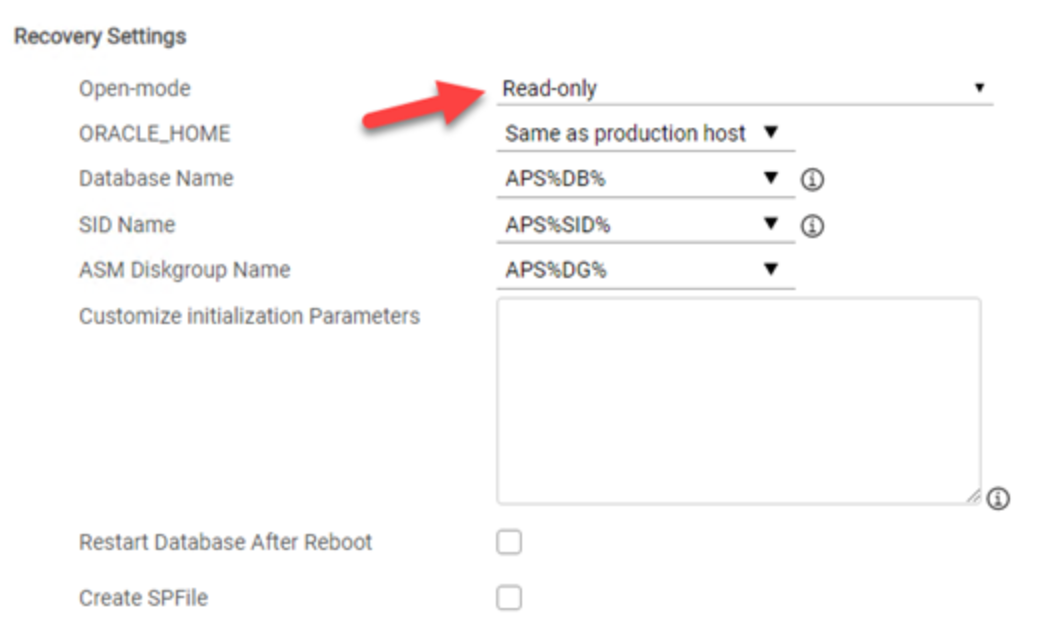
Figure 1. Recovery Settings: Read-only
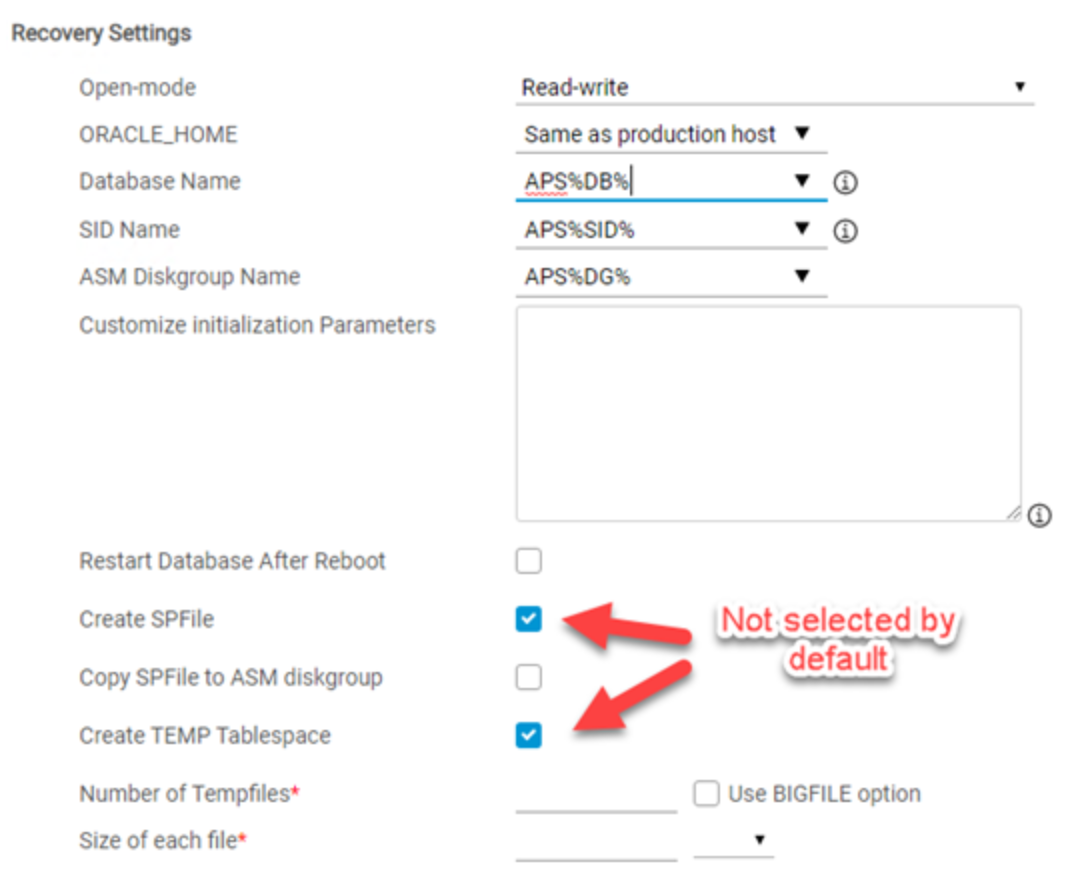
Figure 2. Recovery Settings: Read-write
- Open-mode: Only applies when recovering the database copy. Oracle can be recovered in two types of modes as mentioned below:
- Read-only: Opens the database in read-only mode, thus not allowing any changes to the copy, other than what is required for the recovery to take place.
This mode is used when the user wants to examine data on the mount host, but not alter it in any way.
The copy itself is altered, in that it has been recovered and logs have been applied.
The data that the database contains is not changed.
- Read-write: This mode is almost identical to the read-only mode because AppSync performs the same steps to bring up the instance, and updates the paths to the relevant components.
The major difference relates to how AppSync opens the database at the end of the mount operation. As the name suggests, AppSync opens the database in read-write mode, thus allowing further changes to the database once it is mounted.
In general, copies that have been mounted and recovered should not be restored to the production database, whether the reset logs clause was used or not. Whenever a database is mounted, there is a possibility that the data may have changed in undesired ways during the mount. This mode is mostly used in repurposing situations where restore is not part of the scenario, such as when working in a testing and development environment.
- ORACLE_HOME: Applies when creating an RMAN catalog and all recovery types. Specify the ORACLE_HOME path parameter, which is strictly used when there is no reliable way for AppSync to validate the accuracy of the selected ORACLE_HOME directly that is used by the mount host. This reason is because it differs from the production host in some way. Verify the value for this parameter before changes are made.
AppSync relies heavily on the ORACLE_HOME of the mount host to:
- Find the SQL*Plus utility and run recovery scripts.
- Connect to the Oracle instance being started on the host.
- Check the Oracle version.
- Copy the initialization file in the dbs subdirectory.
- Access any Oracle utilities that are located in the ORACLE_HOME/bin directory.
- Failure to provide an accurate ORACLE_HOME results in a range of errors that may not always be easy to diagnose.
- Database Name: Only applies when recovering the database copy. The database rename feature is a common option, typically used in repurposing use cases which allows the database to be renamed to something else. This functionality allows multiple copies of the same database to co-exist on a single host and under a single ORACLE_HOME. The %DB% token in the mount options dialog indicates you may insert a prefix or suffix or both. It is also possible to use a new name for the entire database.
- SID Name: Only applies when recovering the database copy. The SID rename feature is rarely used by itself because it is associated with database rename. The SID rename changes the name of the Oracle instance (process) that is started on the mount host. You can accomplish a SID rename by renaming the initialization file and some key parameters inside it, such as the instance_name. Adding the prefix and or suffix is possible, however, you must work within the Oracle eight-character limit on the SID because it will be truncated as part of the recovery.
Since an Oracle SID manages an Oracle database, users often choose to change both for consistency. However, the SID rename operation does not alter the copy in any way.
Note: AppSync creates directories that are based on the SID name when performing mounts. You can use the SID rename action to allow several copies that are mounted on a host to avoid directory structure collisions, but with no plan to start the database. In such cases, the use of SID rename is necessary to avoid clashes of directory structures that have the SID name that is embedded. It can also be necessary to avoid overwriting files containing the SID name, such as the initialization file or password file.
One example in which SID rename is useful has mounts to the production host. For example, a database that is called PROD, with a corresponding SID called PROD, can have a copy that is mounted onto the same production host, yet to an alternate path, without starting it. Select the Mount on standalone server and prepare scripts for manual database recovery option and choose to rename the SID. For example, renaming the SID to PROD2 informs AppSync that the database copy must not be started. The alternate SID name, PROD2, is provided so the directory structure does not collide, or clash with PROD. To start PROD2 on the production host, rename the database, to prevent a database clash with PROD at startup time.
- ASM Diskgroup Name: Applies when creating an RMAN catalog and all recovery types. AppSync offers the ability to rename ASM diskgroups using the original name as a token - %DG%.
In the mount settings, you can apply a prefix or postfix to this value to alter the name of the diskgroups as part of the mount. For example, diskgroups that are named DG1, DG2, and DG3, can be renamed to NEWDG1, NEWDG2, and NEWDG3 respectively, by changing this parameter to NEW%DG%. - Customize Initialization Parameters: Applies when creating an RMAN catalog and all recovery types. Use the AppSync Console to enter customized initialization parameters for mounting Oracle data. When the mount operation runs, these parameters are appended to the copy of the initialization parameters that are used with the mounted database.
AppSync internally overrides certain init parameters to apply the database changes that are required to mount or recover the database copy with the options that you specify. The parameters that are specified in customize initialization parameters window should be used to customize any parameters that must have a different value than production. We recommend that you refrain from overriding init parameters that AppSync itself overrides, such as the following parameters:
- log_archive_dest_<n>
- dbname
- db_create_file_dest
- db_create_online_log_dest_<n>
- control_files
- local_listener
- remote_listener
- db_recovery_file_dest
- Restart database after reboot: Applies only when AppSync recovers the database. This check box allows AppSync to add an entry for auto starting Oracle after the mount host is rebooted.
- Create SPFile: Only applies to when AppSync recovers the database in a standalone environment, not applicable with RAC. This option creates the SPFile on the mount host. If selected, optionally copy the SPFile to the ASM diskgroup, if applicable.
- Advanced Recovery Settings: Applicable for standalone recovery only. Other recovery options include creating up to three additional control files, using Automatic Diagnostic Repository (ADR), changing the DBID, or disabling archive log mode.
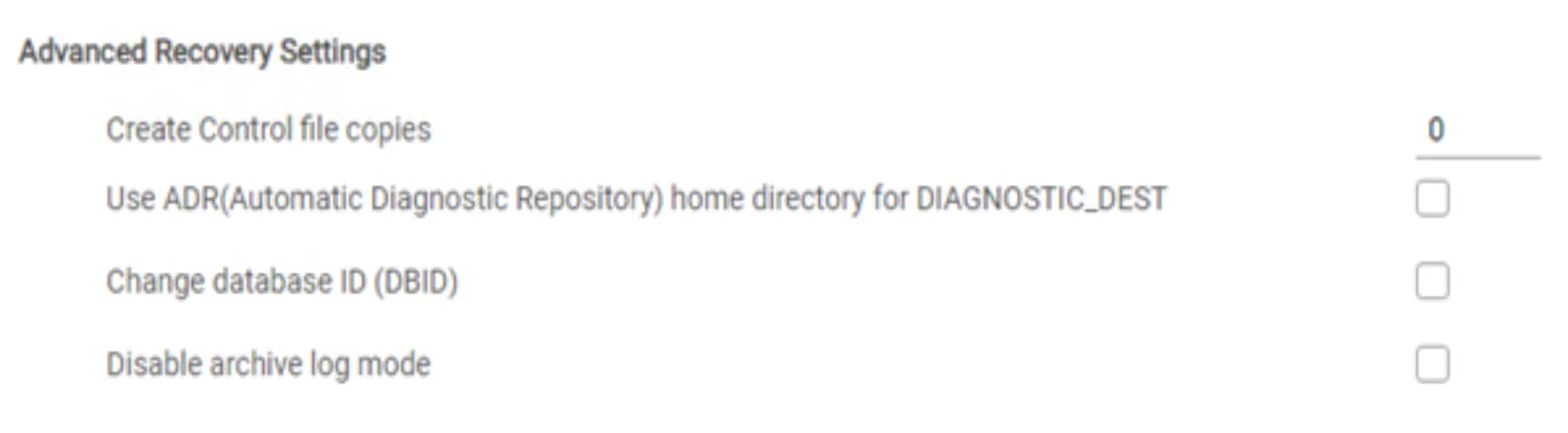
Figure 3. Advanced Recovery Settings
For all recovery types of options, see AppSync User and Administration Guide.
Turning a copy into production Oracle database
As of AppSync versions 3.5 and later, a mounted and recovered Oracle database copy can be discovered on a mount host and then protected as if it were a production Oracle database instance. See the knowledge base article at https://support.emc.com/kb/501266 to understand the considerations and restrictions. If you do not have access to the article, contact customer support. We do not recommend creating repurposed copies from such databases.
Unmount Oracle Copy
Retry recovery
Copy management requires you to unmount and expire copies over time. Unmounting an Oracle copy is the opposite of mounting a copy. When you perform an unmount, AppSync completes the following actions:
- Shuts down the running database that it has started. If the Mount and generate Scripts for Manual recovery or Mount Filesystem modes are used, AppSync does not shut down the database. You must perform this action manually.
- Dismounts the mounted ASM diskgroups, if ASM is part of the environment. See the section ASM Model with AppSync for details.
- Unmounts file systems if file systems are part of the environment.
- Deports or exports third-party volume groups.
- Updates the AppSync server with the necessary information that is required for AppSync to perform a restore or another mount later. This action is critical and contains information regarding paths, such as datafile paths. If a datafile was mounted using an alternate path, the control file was updated with the new path. Any subsequent mount operations must consider previous path changes to maintain an accurate chain of events.
An ASM instance user with SYSASM privileges is required to perform tasks in AppSync. The ASM instance user information provided is used during the mounting phase to perform the ASM_diskstring and ASM_diskgroup operations during mount and unmount operations. In cases where SYSASM privileges are revoked from the ASM instance user before the unmount operation, the operation fails.
Starting with AppSync versions 3.7 and later, you can retry recovery of a mounted and recovered copy without having to unmount the copy. This ability saves time that is spent in removing the target devices from the host and ESX rescans, if VMware hosts are involved.
You can use this feature in the following cases:
- You retry recovery with a different set of options like changing the open mode, specifying a different database name or SID or ASM diskgroup, or adding customized initialization parameters.
- You retry recovery if it fails to recover the copies during the initial mount operation. This action reduces the time that is taken for the unmount and remount operations. This action is used if there is a recovery failure due to a user or host issue, as recovery can be retried after rectifying the problem.
- Recovery mode remains fixed across retries. For example, if the copy was first mounted and recovered as RAC database, you cannot attempt to retry recovery with recover as the standalone database option.
- This option is also available for repurposed copies.
ASM model with AppSync
The AppSync Oracle plug-in interacts with the ASM instance to discover, mount, and dismount ASM diskgroups. On the production system, during a copy or restore operation, AppSync interacts with the ASM instance serving the database.
For the copy operation, AppSync checks if an ASM rebalancing operation is in progress for any of the diskgroups that are involved. It fails protection if an ongoing operation does not complete within an hour. This check is mandatory to ensure copy consistency by guaranteeing that there are no data movements between the disks of the diskgroups that are protected by AppSync. AppSync does not have control over an ongoing, or user initiated rebalancing operation. However, it sets the ASM_power_limit parameter to 0 to prevent any new operation from triggering dynamically, while protection is in progress. The original value of the parameter is restored once protection is completed.
For the mount and recovery operations, AppSync uses UDEV rules based nomenclature in Linux, and mknod in IBM AIX, for making target devices available to the ASM instance of the mount host. AppSync adds /dev/emc-appsync-* to the ASM_diskstring parameter of the mount host ASM instance for recognizing the devices AppSync mounts.
Key points on setting ASM_diskstring parameter on LINUX mount hosts include setting the parameter correctly in order to ensure that the ASM instance sees only one path to the target devices. Duplicate paths lead to diskgroup mount failures. The key points are as follows:
- The /dev/emc-appsync-* paths are UDEV rules-based NAME parameters, for Red Hat Enterprise Linux 6.x, or UDEV rules-based SYMLINK+ parameters, for Red Hat Enterprise Linux 7.x.
- Avoid an empty ASM_diskstring parameter. This step can be validated using asmcmd dsget command that is run as grid user.
- Avoid nested diskstrings like /dev/* and /dev/ASM-disks*.
- Avoid generic diskstrings like /dev/*, /dev/mapper/*, and /dev/emcpower/*. Generic diskstrings always lead to conflicting paths because the target device is presented using the generic path and the /dev/emc-appsync-* path.
- The standard convention for ASMLIB devices is ORCL:*, however, AppSync can work with /dev/oracleasm/disk/* also. Only one of the above conventions can be used for an ASM instance.
- The standard convention for ASMFD devices is AFD:*.
The steps that are performed during mount are summarized as follows:
- Connect to the ASM instance on the mount host using SQLPlus and as a user with SYSASM privileges using the command:
connect / as SYSASM;
- Fetch the path of ASM disks on the mount host using the query:
select path from v$ASM_disk;
- Set the ASM_diskstring parameter to the ASM disks retrieved in the query above. In the example below, it is assumed that Path1 and Path2 were the diskstrings present on the mount host before the current copy was mounted and the ORCL:* disks are of the copy being mounted.
alter system set ASM_diskstring = 'Path1','Path2',
'/dev/emc-appsync-*’ scope=both;
- Fetch the ASM diskgroups on the mount host using the following query:
select name from v$ASM_diskgroup;
- Set the ASM_diskgroups parameter to the ASM diskgroups retrieved in the query above. In the example below, it is assumed that DiskGroup1 and DiskGroup2 were the diskgroups present on the mount host before the current copy was mounted and DG1 and DG2 are the diskgroups of the copy.
alter system set ASM_diskgroups = DiskGroup1,DiskGroup2,DG1,DG2 scope=both;
- Mount the diskgroups in the copy using the following command:
alter diskgroup DG1 mount;
alter diskgroup DG2 mount;
AppSync automatically performs these steps during mount in Read-only and Read-write operations. For the mount option Mount on standalone server and prepare scripts for manual database recovery, you must perform the steps above manually, if the database should be recovered on the mount host.
Similarly, during unmount, the following steps are performed:
- Connect to the ASM instance on the mount host using SQL*Plus and as a user with SYSASM privilege using the command:
connect ASM_username/password as SYSASM;
- Fetch the ASM diskgroups on the mount host using the query:
select name from v$ASM_diskgroup;
- Dismount the diskgroups of the mounted copy using the command:
alter diskgroup DG1 dismount;
alter diskgroup DG2 dismount;
- Set the ASM_diskgroups parameter to the ASM diskgroups excluding those of the mounted copy. In the example below, it is assumed that DiskGroup1 and DiskGroup2 were the diskgroups present on the mount host before the current copy was mounted.
alter system set ASM_diskgroups = DiskGroup1,DiskGroup2 scope=both;
- Fetch the path of the ASM disks on the mount host using the following query:
select path from v$ASM_disk;
- Set the ASM_diskstring parameter to the ASM disks excluding the ones of the mounted copy. In the example below, it is assumed that Path1 and Path2 were the diskstrings present on the mount host before the current copy was mounted.
alter system set ASM_diskstring = 'Path1','Path2' scope=both;
AppSync automatically performs these steps during the unmount process if the copy was mounted in Read-only or Read-write with recovery mode.
For the mount option Mount on standalone server and prepare scripts for manual database recovery, you must perform the steps above manually.
ASMLIB volumes ignored during mount
If an ASM disk contains an ASMLIB volume header, this header is ignored during mount because the disks mounted by AppSync are blocked against ASMLIB. This action does not change the physical structure of the disk in any way and preserves the ASMLIB volume name if it must be restored back to production.
Note: For the mount-to-production-host scenario, production Oracle ASM disk groups cannot be mounted after a host reboot due to conflicting ASMLIB disks. This result occurs if the udev rules that mask the devices of an AppSync mounted copy do not get loaded after a reboot leading to conflict between the production ASMLIB devices and the devices of the mounted copy. If udev rules are not loaded, the devices of the mounted copy are exposed through their ASMLIB header, because that information is present on the replicated device and is not hidden by the udev rules. The ASM instance consists of two ASMLIB disks with the same name and is confused. This issue can be addressed either by unmounting and remounting the copy in AppSync or by manually reloading the udev rules. Follow standard commands based on Linux version.
Support for mounting a RAC ASM copy to a target RAC
The following requirements must be satisfied to mount a copy as a RAC database:
- The database must reside on ASM diskgroups
- One or more nodes of the target Grid cluster must be added to AppSync. AppSync only mounts to the nodes which are already added. AppSync does not require the mount Grid cluster be the same size as the original production cluster.
Restore an Oracle Copy
Restore Oracle copies with AppSync
This section describes the restore of Oracle copies.
AppSync creates copies of Oracle databases and supports restoring the database back to production. For details about restoring objects from a copy, see the section Oracle Objects that are Restored.
The basic restore operations are as follows:
- Shut down the database that is to be restored.
- Dismount or deport the underlying ASM DGs or Volume Groups or Filesystems (whatever applicable).
- Perform the array-level restore of the data. The production storage is overwritten by the data in the copy.
- Import or remount back the ASM DGs, Volume Groups, or Filesystems (as applicable).
- Manually perform the database recovery process, post-restore. AppSync does not automate this process, and the database administrator must manually perform it.
Affected entities
Oracle plug-in of AppSync analyzes the database and its logical layout on the storage array. For example, if the database is composed of five tablespaces, all included in the copy, AppSync ensures that all the underlying datafiles, file systems, and volume groups are discovered. When a job runs, AppSync maps the source data to the target devices based on the particular job selection and copies the data.
Note: The granularity of restore operations is tightly linked to the underlying storage layout on which the database is built.
Keep in mind that even two distinct file systems might be associated if they are built on volumes with a common volume group. AppSync copies at the volume group level because portions of a volume group cannot be extracted. The restore granularity matches the granularity that is dictated by the storage layout on which the database is built.
Oracle objects that are restored
The previous section stressed the importance of storage layout when it comes to restore considerations. This section explains what logical objects get restored and under what circumstances. The options available for restore granularity are:
- Data only: Includes datafiles, control files, and redo logs. The init or spfile are not restored. You can use the alert log to rebuild the init file if it is lost.
- Archive logs only.
- Both data and archive logs: Will restore everything above in the data and archive log but will also include the pfile or spfile.
Oracle Data Guard Support
Physical standby
Oracle Data Guard is a disaster recovery solution where a primary database copies its archived redo logs over a network connection to a standby database.
AppSync supports these types of standby databases:
- Physical Standby
- Snapshot Standby
These types of standby configurations can be opened in one of the following two modes:
- Active Standby Mode: When a Standby database is in read-only or read-write mode.
- Passive/Non-Active Standby Mode: When a Standby database is in mounted mode.
AppSync supports Oracle Data Guard configurations for the primary or source database and the Physical Standby or target database which is open in Active or Passive/Non-Active Standby mode. A Physical Standby database open in Active Standby mode means that the standby database can be opened in read-only mode while logs are being applied to it. This allows the database to be queried for information while the logs are being applied. Snapshot Standby configurations also allow the database to be open in read-write mode. A Passive/Non-Active Standby mode setting means that the database is started in mounted mode, and logs are applied in the background.
In a Physical Standby environment, the archive logs are applied as they come in. A Physical Standby has a 1:1 mapping in terms of the file and storage layout from primary to standby. A typical primary-to-standby (source-to-target) Data Guard configuration can be seen in Figure 4. A Physical Standby database can be open in both read-only or mounted mode which means it can be either an Active Standby or Passive/Non-Active Standby configuration.
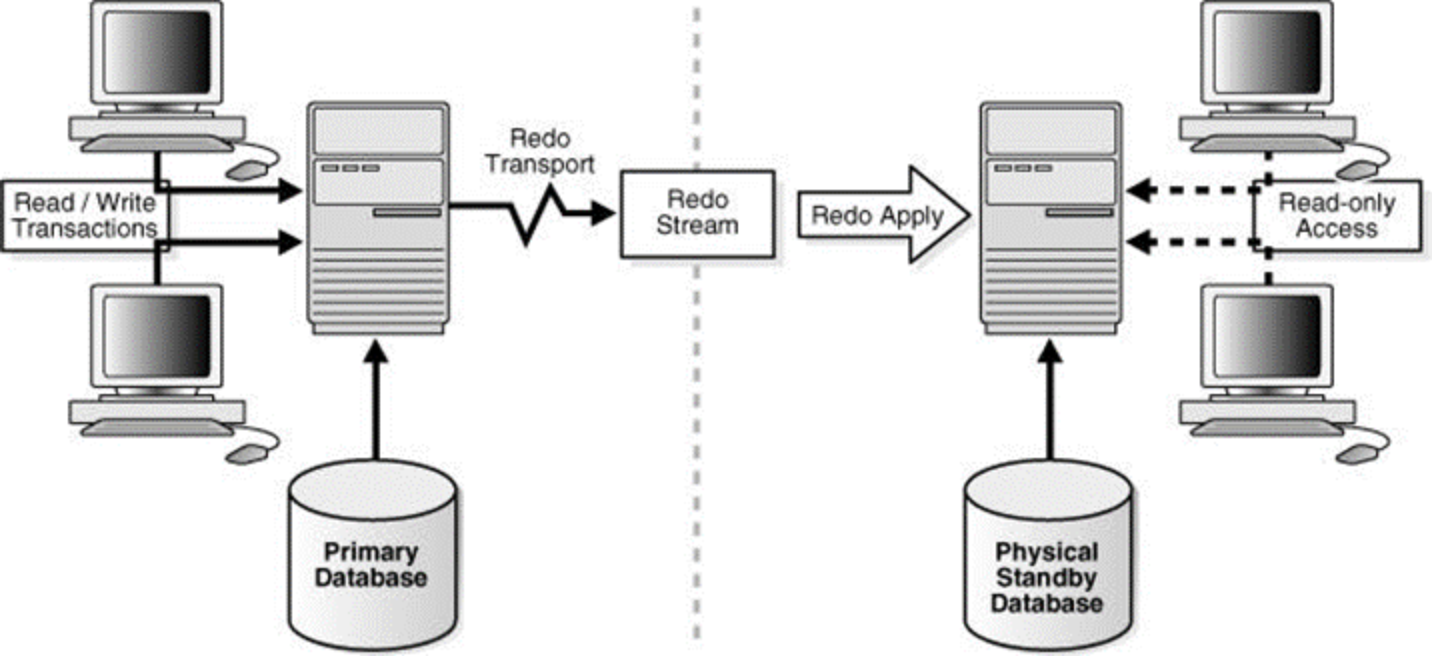
Figure 4. Oracle Data Guard layout
Snapshot Standby
In a Snapshot Standby environment, the archive logs are not applied as they come in and are pooled or stored in the archive log directory of the standby until they are all applied. A snapshot standby has a 1:1 mapping in terms of the file and storage layout from primary to standby. A Snapshot Standby database is typically open in read-write or Active Standby mode for accessing the data. However, it has to switch back to mounted mode in order for the pooled archive logs to be applied to the database.
Data Guard relationship view
The Data Guard relationship information is displayed in the right pane of AppSync when you highlight a specific database line. The Data Guard Relationship properties appear if there are databases that are configured with Data Guard present. The column displays information about the database, including the type of database, the primary database it is associated with, and the corresponding open mode of the database. In the following figure, proddb is a primary database, while standdb is the corresponding Standby database. The standdb is in standby nonactive mode.
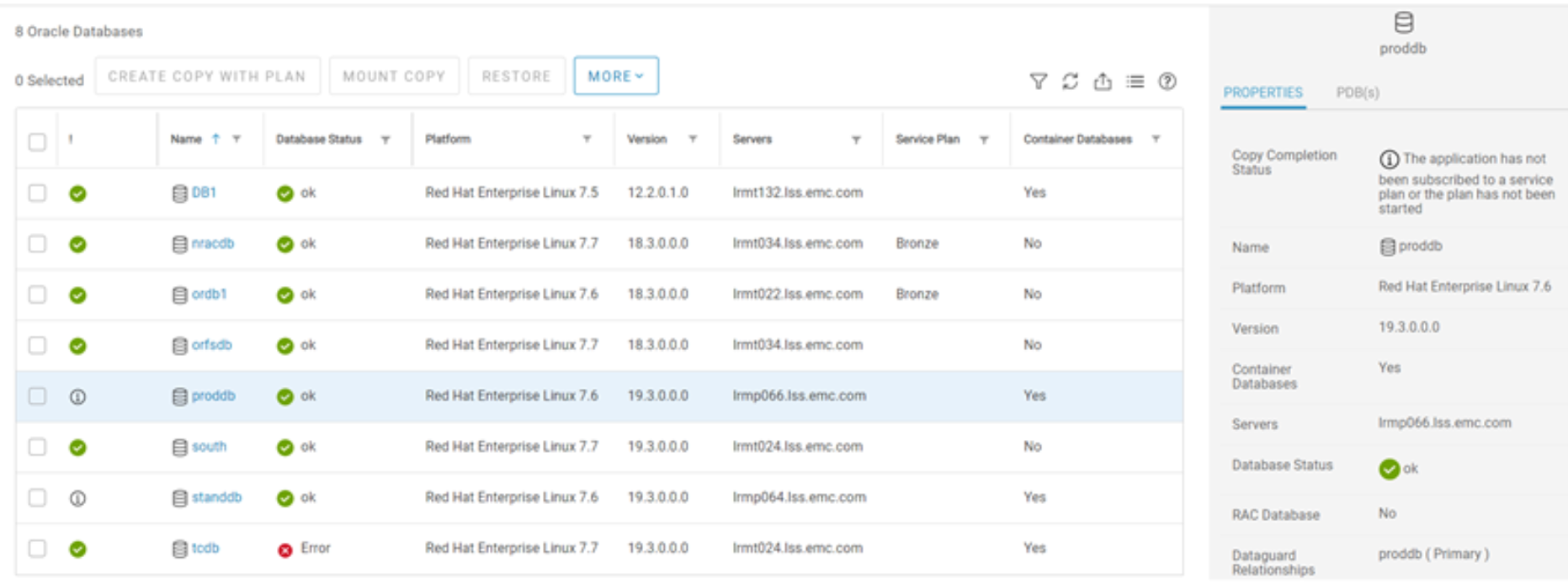
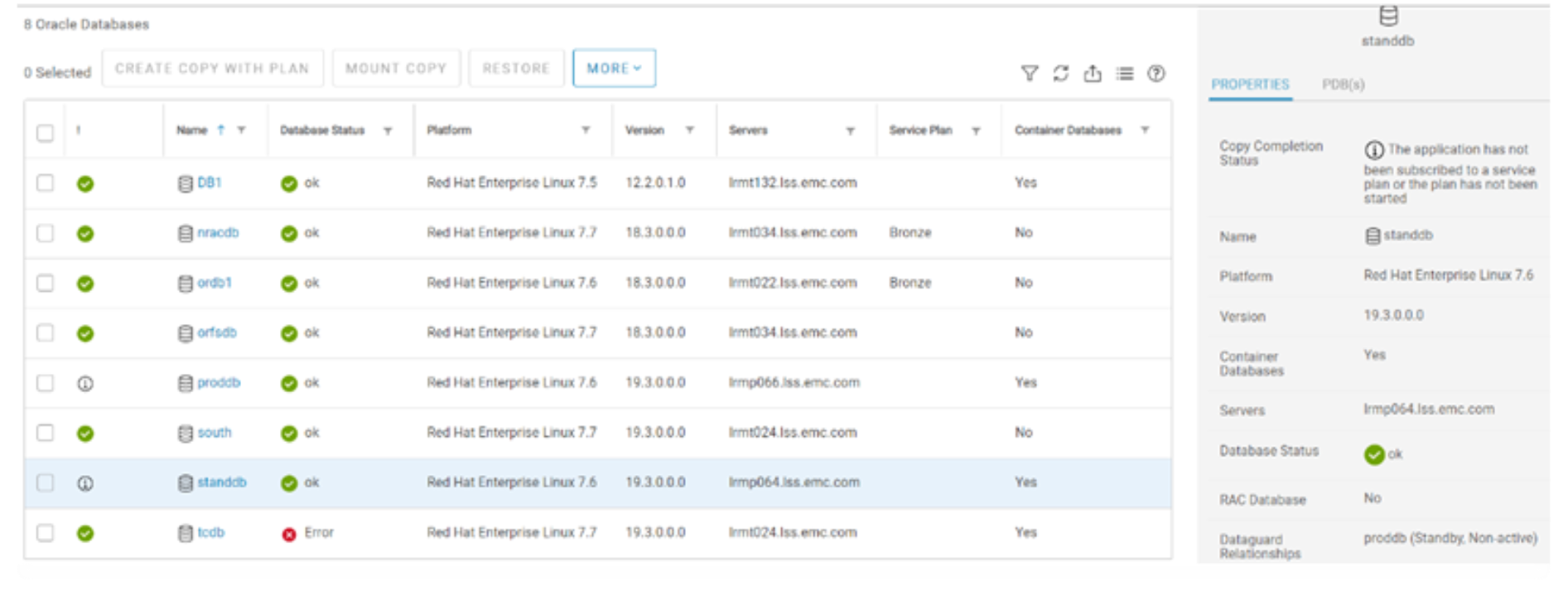
Figure 5. Data Guard relationship
Oracle Data Guard considerations
There are some considerations that must be accounted for when using Data Guard databases with AppSync. These considerations apply during operations with the protection and repurposing workflows, include mounting, recovery, and restore.
- Protection or repurposing: For a database in an Oracle Data Guard configuration, only a primary database can be protected using the hot backup mode. Standby databases cannot be protected using hot backup mode. Oracle does not allow a Standby database to enter hot backup mode. A Standby database that is in open in Passive/Non-Active Standby mode can be protected without using hot backup, without having to change the open mode of the database. This only applies to Data Guard databases however, and not regular Oracle standalone databases.
- Mount or recovery: Operations like mounting and recovery of copies work the same way for Oracle Data Guard databases as they do for regular Oracle Standalone databases. When a Primary or Standby database is mounted, and then recovered, it loses all its Data Guard properties and behaves like a Standalone Oracle database on the host where it is mounted.
- Restore: For a database in an Oracle Data Guard configuration, the restore operations work the same way as it does for Oracle Standalone databases. Only Primary databases, in a Data Guard environment, can be restored using AppSync. Standby databases cannot be used for restoring purposes.
Troubleshooting
Discovery failure or status displayed as offline
This section provides information about how to troubleshoot certain issues that customers may encounter when using AppSync with Oracle.
For automatic discovery of Oracle databases, several Oracle queries are run at the start of the copy. Whenever AppSync operations fail with Oracle SQL errors, it is important to get the results of those queries.
- Ensure that the Oracle database is up and running. Connect to the database as sysdba and run the following SQL commands:
sqlplus / as sysdba
select * from dba_data_files;select instance_name, status, database_status from v$instance;
- The database must be open in read-write mode.
- Ensure that a valid entry must be present in the /etc/oratab file if the database does not appear in AppSync UI.
Failures during copy creation
- Ensure that the database is open and is in read-write mode.
- Ensure that there are no ongoing ASM rebalancing operations on any of the ASM diskgroups that are participating in protection. AppSync does not stop an existing rebalancing operation but prevents one from initiating during its copy cycle.
- Ensure that no other application is trying to freeze the database simultaneously.
- Ensure that hot backup is selected only for databases that have archive logs configured and do not share volumes, volume groups, or consistency groups with control files or redo logs.
- Ensure that all components of the database reside on the same Dell primary storage array or appliance. AppSync cannot protect federated environments.
Latest supported feature set
AppSync versions 3.9 and later support discovering, mapping, protecting, and repurposing Oracle Container Databases or CDBs. The same workflows are supported with CDBs as with standalone databases, the only exception being RecoverPoint environments. See the latest AppSync Support Matrix for up-to-date information. The figure below shows the Container Database column with the Yes or No status. AppSync versions 3.9 and later allow the user to view the PDBs or Pluggable Databases contained within the CDB or Container Database. If you highlight the database line, you can see the details of the related PDBs on the right-side pane if applicable.
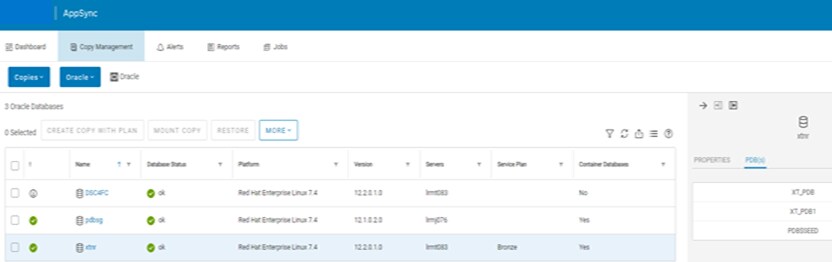
Figure 6. Container database or pluggable database
AppSync does require that all PDBs of a CDB reside on the same storage array. All PDBs within a CDB must be in Read_Write mode for hot backup. This requirement includes all PDB instances on all RAC nodes, otherwise no hot backup option can be used. PDB$SEED is the exception and is always protected, which is mandatory for recovery purposes. Affected entities are detected by AppSync at the CDB level.
For example: If pdb1 on CDB1 shares a file system with pdb2 on CDB2, when AppSync attempts to restore CDB1, it detects that the second CDB is an affected entity and requires it to be shut down manually before a restore.
Note: It is best to not share file systems between different PDBs/CDBs.
Workflows at the PDB granularity level are not supported with the AppSync 4.0 release but are at the CDB level. AppSync versions 4.1 and later offer the ability to restore at the pluggable database (PDB) level. This ability allows restoring one or more PDBs at a time.
The figure below shows the ability to restore at both the CDB and PDB level. If PDB is selected, you will see the available PDBs that AppSync has discovered to restore, and one or more at a time can be checked. Note that Oracle 12cR2 is the minimum version of Oracle required for AppSync to support a PDB restore. Check the AppSync Support Matrix for the latest details.
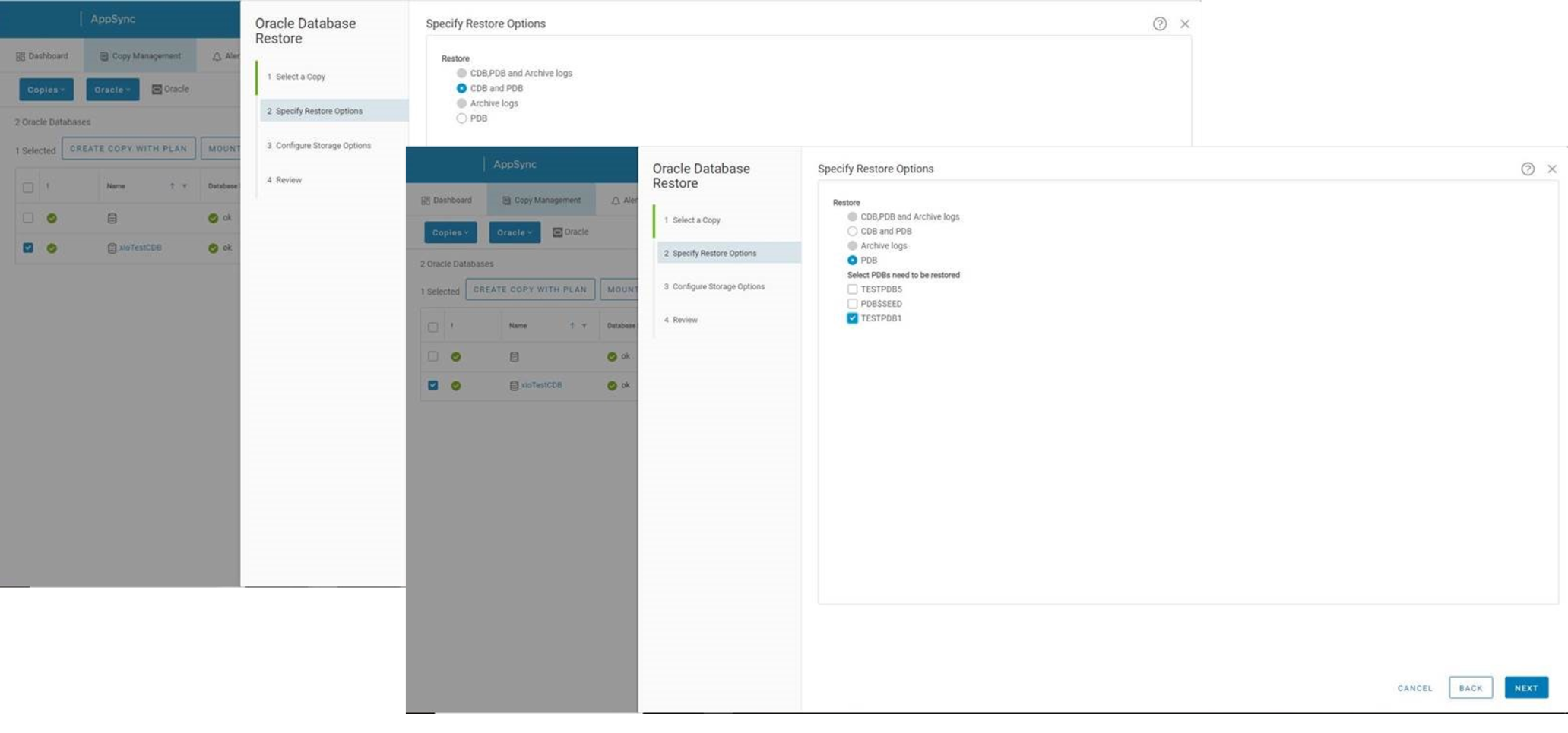
Figure 7. PDB level
AppSync versions 3.9 and later can discover FlexASM type instances. They require at least one available RAC node of an ASM instance in order to place the database in hot backup mode. If an ASM instance is down on one node, AppSync detects another node for a running ASM instance and then sets it for further processing. AppSync only supports creating copies on nodes where both the database and ASM instance are available. Mount and recovery only work if the ASM instance is up and running. You have the option to clear any node or nodes selected during mount that do not have both the database and ASM instances running.
- If standalone, ASM must be up and running on at least that one node.
- If using Grid, an ASM instance can run on any of the RAC nodes as long as cluster services are online on all remote nodes—cluster services must be running on all nodes.
Clear any node selection during mount that does not have both database and ASM instances running. As shown in the figure below, you can choose to have AppSync mount on All servers in cluster or select only a few servers.
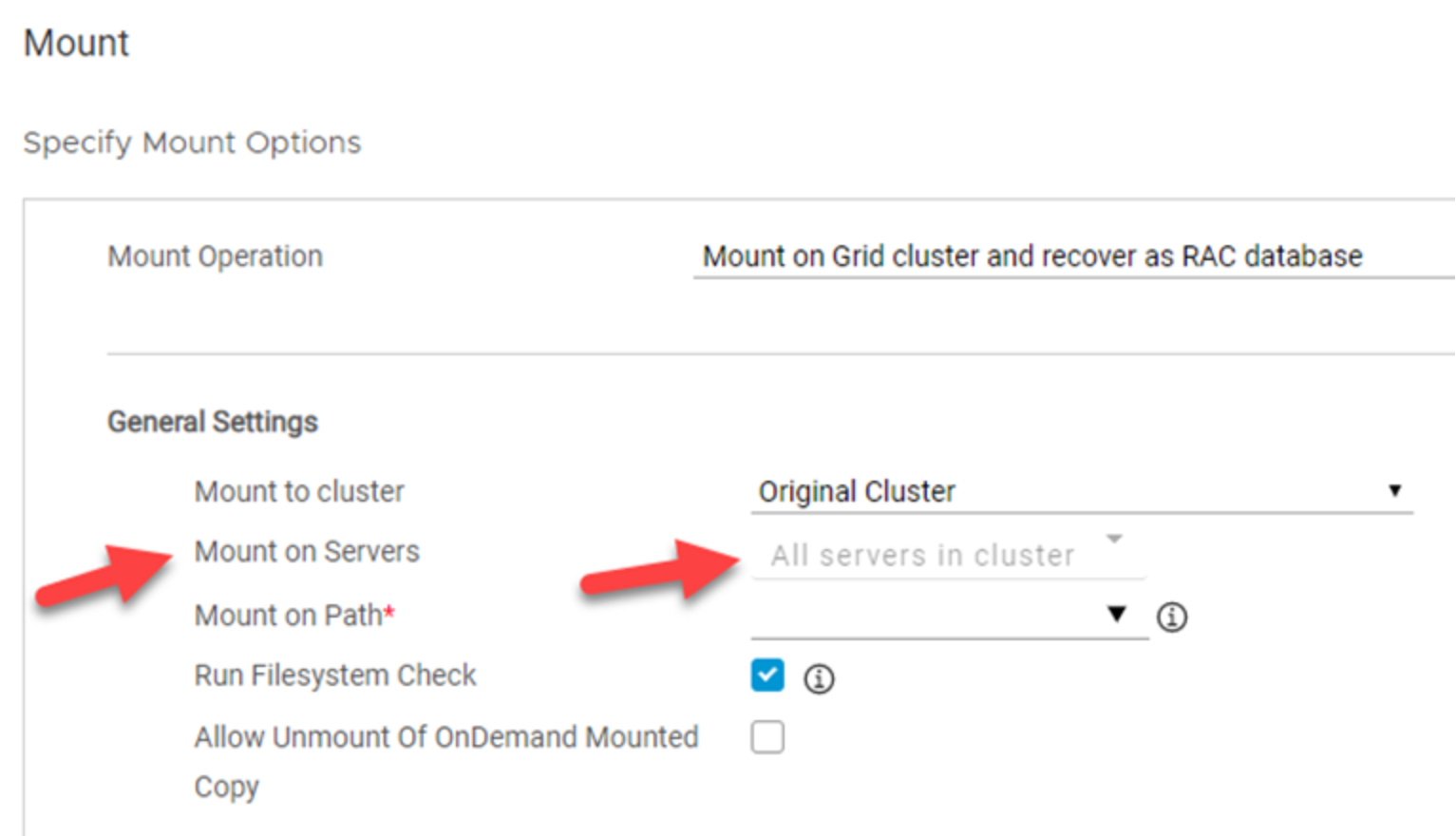
Figure 8. Mount on Servers
AppSync versions 3.9 and later support Oracle databases that are created on advanced format 4K ASM storage devices. This support includes XtremIO and SC Series arrays, but always check the AppSync Support Matrix for the latest information.
AppSync versions 4.0 and later support the ability to restore an Oracle database to a selected node of Oracle RAC. Previous versions of AppSync supported only restoring to the same node on which the copy was created. This feature is important because it allows the user to recover in an environment where the source node could have gone offline. The figure below shows the restore option in the UI.
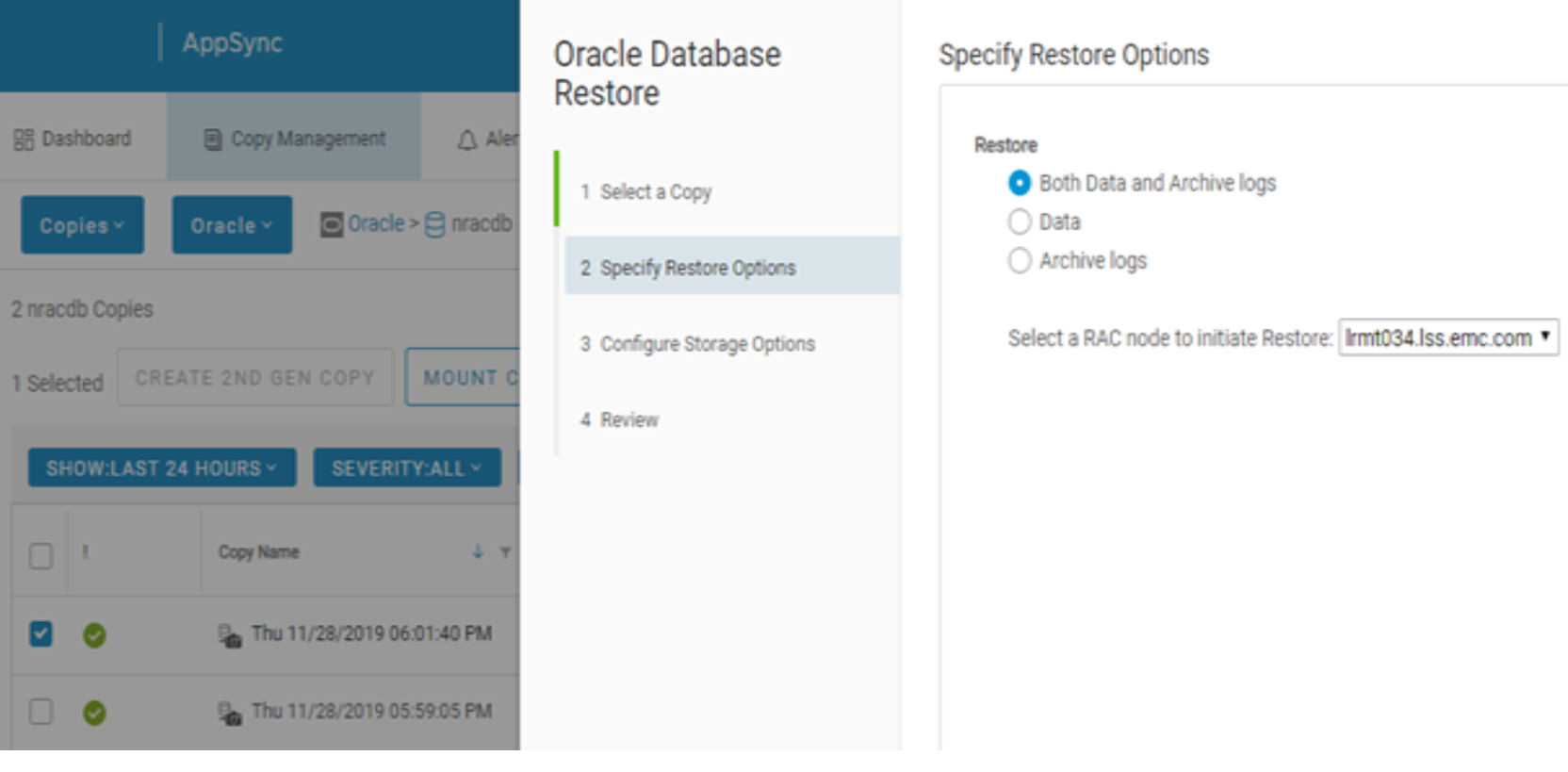
Figure 9. Restore options
AppSync 4.2 and higher Oracle service plan settings allow the user to choose which Oracle RAC (real application cluster) host or node the AppSync copy is taken on. This ability can be very beneficial if users want to offload busy hosts or have certain hosts undergoing maintenance. The UI now shows which host the service plan will run on in the details pain in the subscriber’s section. After highlighting the bronze service plan line (Figure 10) and on the subscriber’s pane, there are two servers that are taking the copy of the racdb database (Figure 11). Shown in Figure 11, AppSync is able to take copies on either host 52 or 51. If you click edit after checking the box, you can choose any host or any of the selected hosts (Figure 12). If you choose any host AppSync will decide the node to run the protection on based on which one responds faster. If any of the selected hosts is chosen and both hosts have been selected manually, the arrow keys can be clicked to change the priority. This allows the user to determine the host priority AppSync uses for the copy protection. Note you can only see the priority of which host will take the copy in the edit menu. The details pain just shows what hosts are available to take the copy and not the priority that you defined.
As shown in Figure 13, when creating a repurposing workflow, you have the same options on host priority for Oracle copies.
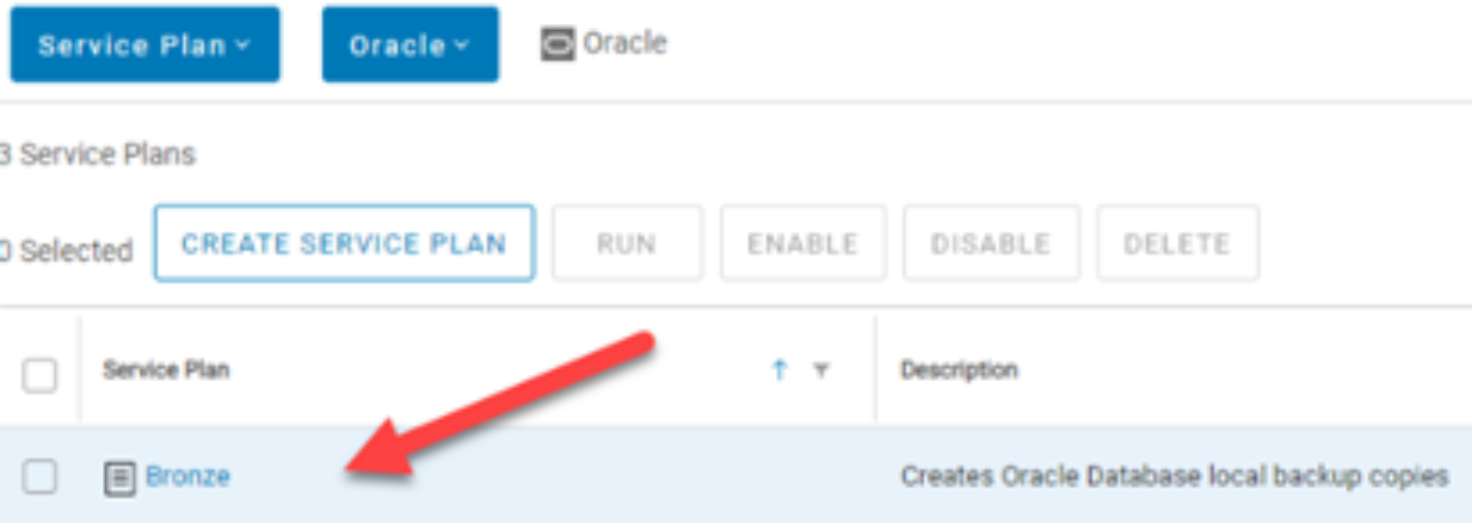
Figure 10. Service Plan
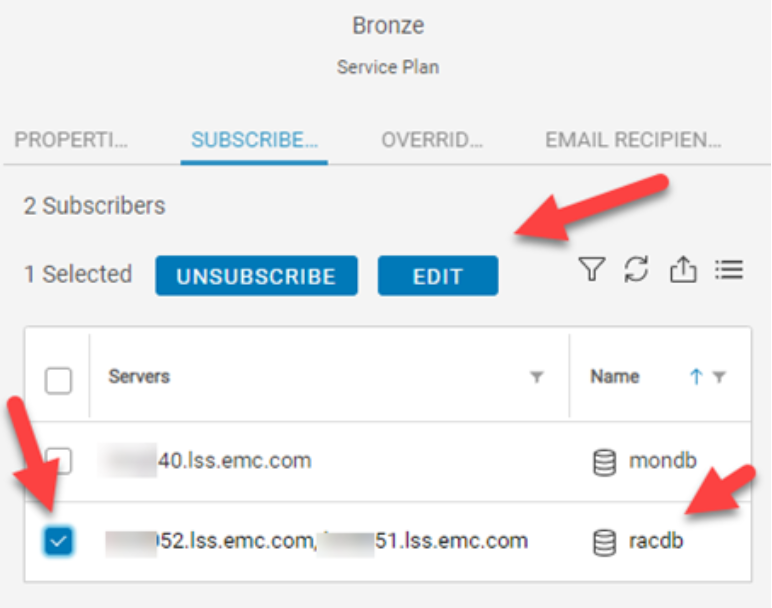
Figure 11. Subscribers
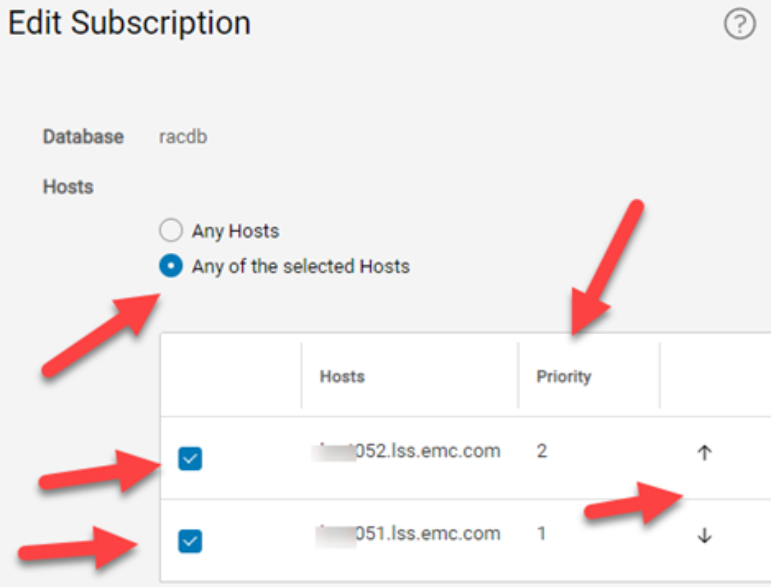
Figure 12. Edit subscription
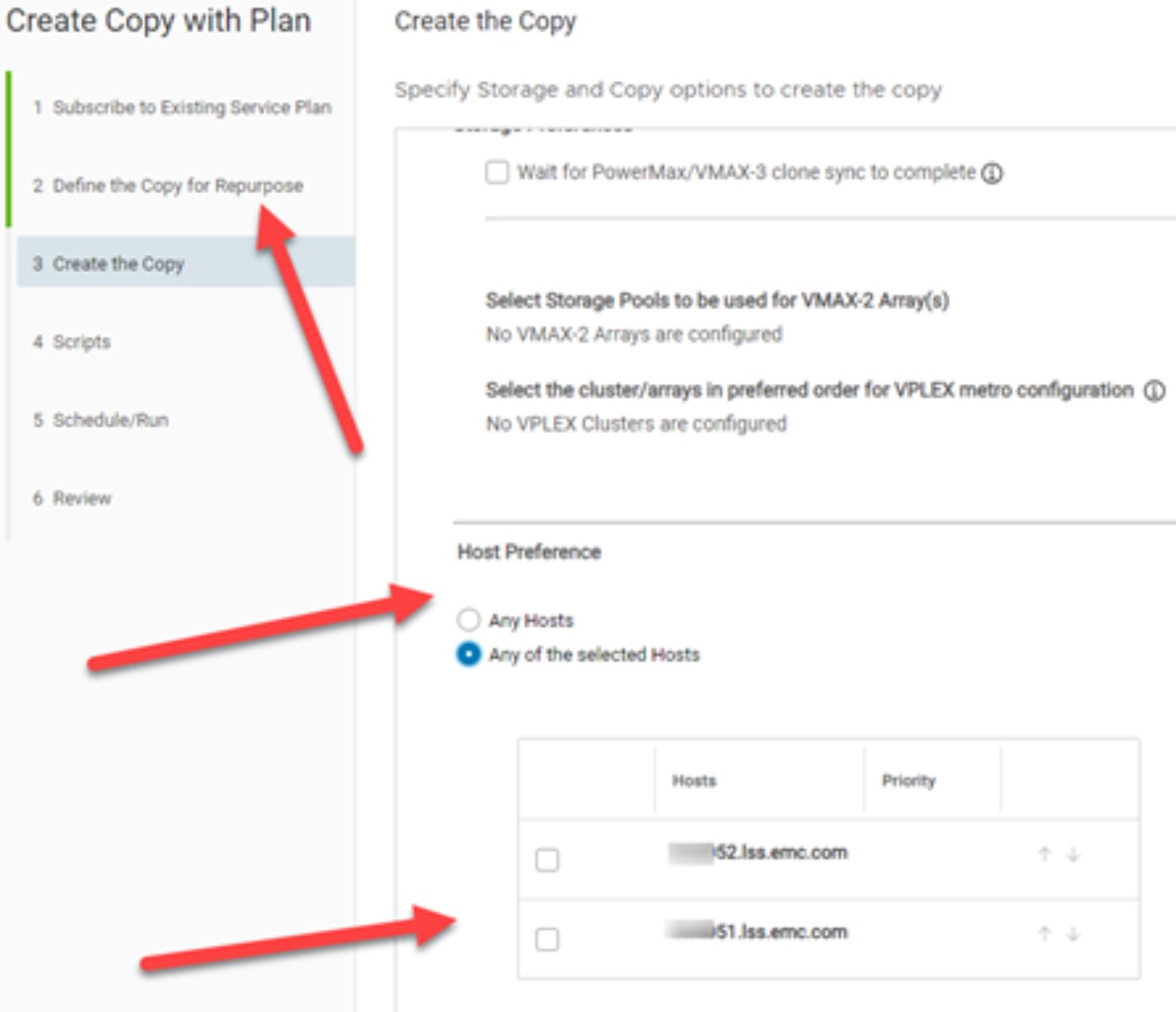
Figure 13. Repurposing priority
AppSync versions 4.2 and later show the Automatic Storage Management (ASM) disk groups on the right-side pane of AppSync when a particular Oracle database is selected, if it uses ASM. This makes it easy to determine the back-end layout for your particular Oracle databases from within the AppSync UI. Notice the ASM Disk Group tab and associated names in the following figure.

Figure 14. ASM
AppSync versions 4.3 and later allow AppSync to work with Oracle without requiring the oratab file. This oratab file is a requirement that Oracle themselves have moved away lately with their newer releases. Oracle database upgrades sometimes even modified the oratab file and this caused issues for some AppSync users. AppSync now has a new wizard that is presented when the user clicks Discover Databases as shown in the following figures.
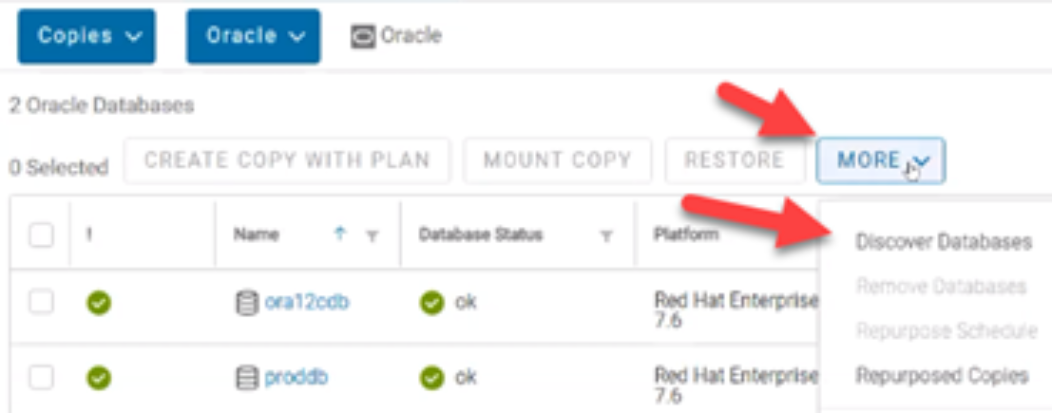
Figure 15. Discover database
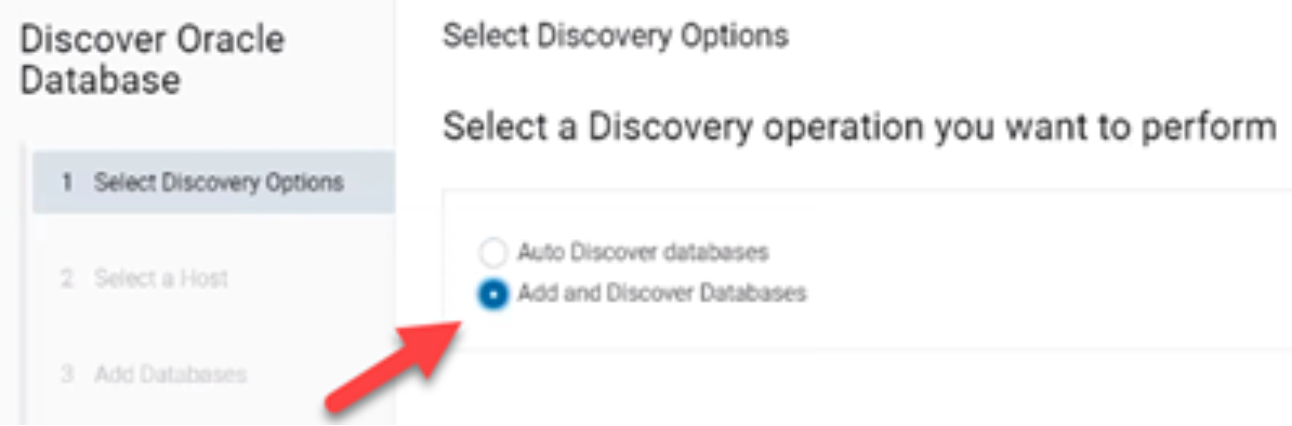
Figure 16. New wizard
If you do not want to rely on the oratab file, select the Add and Discover Databases option as shown in the above figure.
Next, select a host to perform the Oracle database discovery on, shown in the following figure.
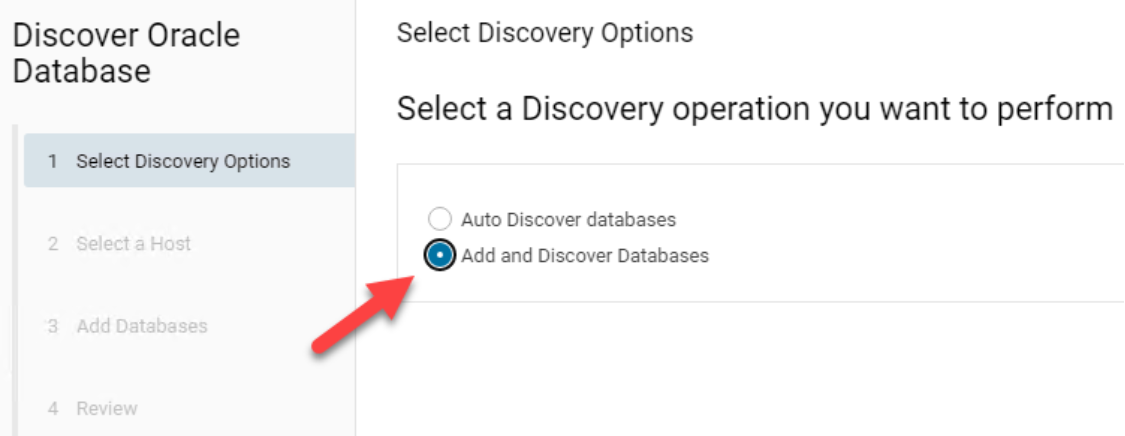
Figure 17. Select Oracle host
Next, click the ADD DATABASES button, and enter in the Oracle/ASM Sid and Oracle or Grid home location as shown in the following figure.
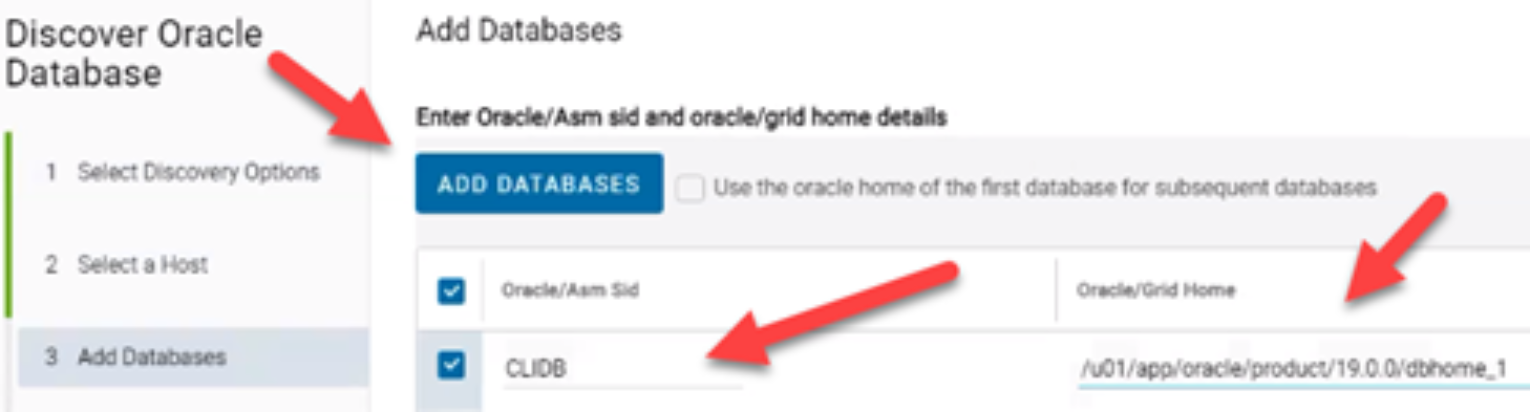
Figure 18. Add databases
Lastly, you can review your entries and click Finish.
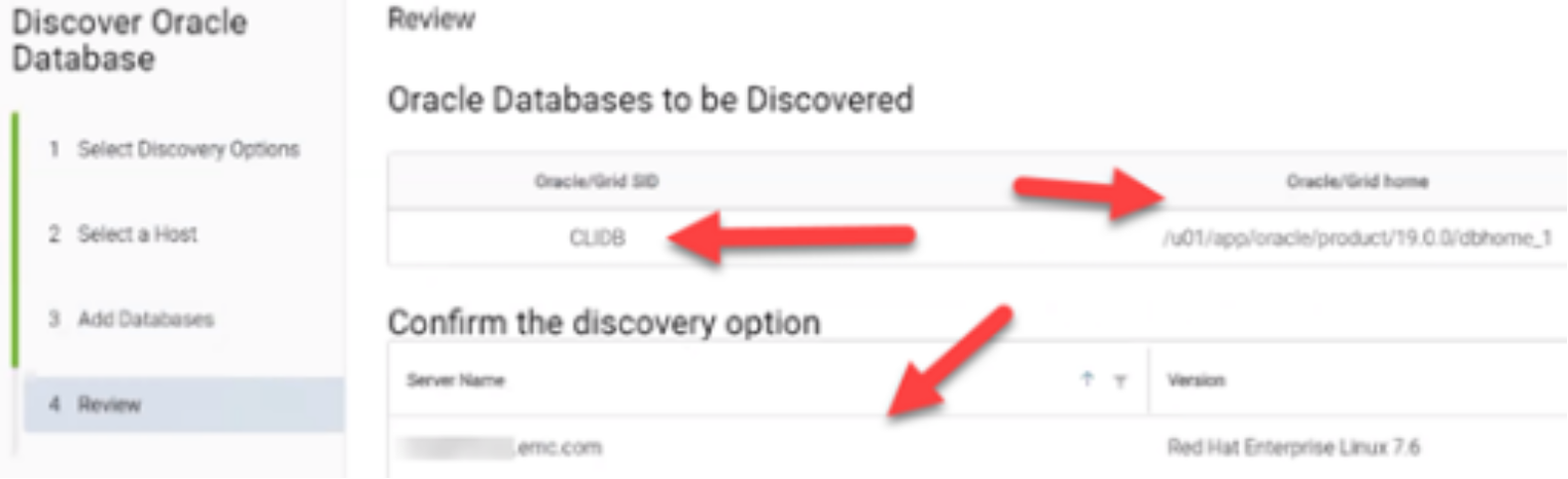
Figure 19. Review
After the discovery finishes, the CLIDB database was successfully added to AppSync.
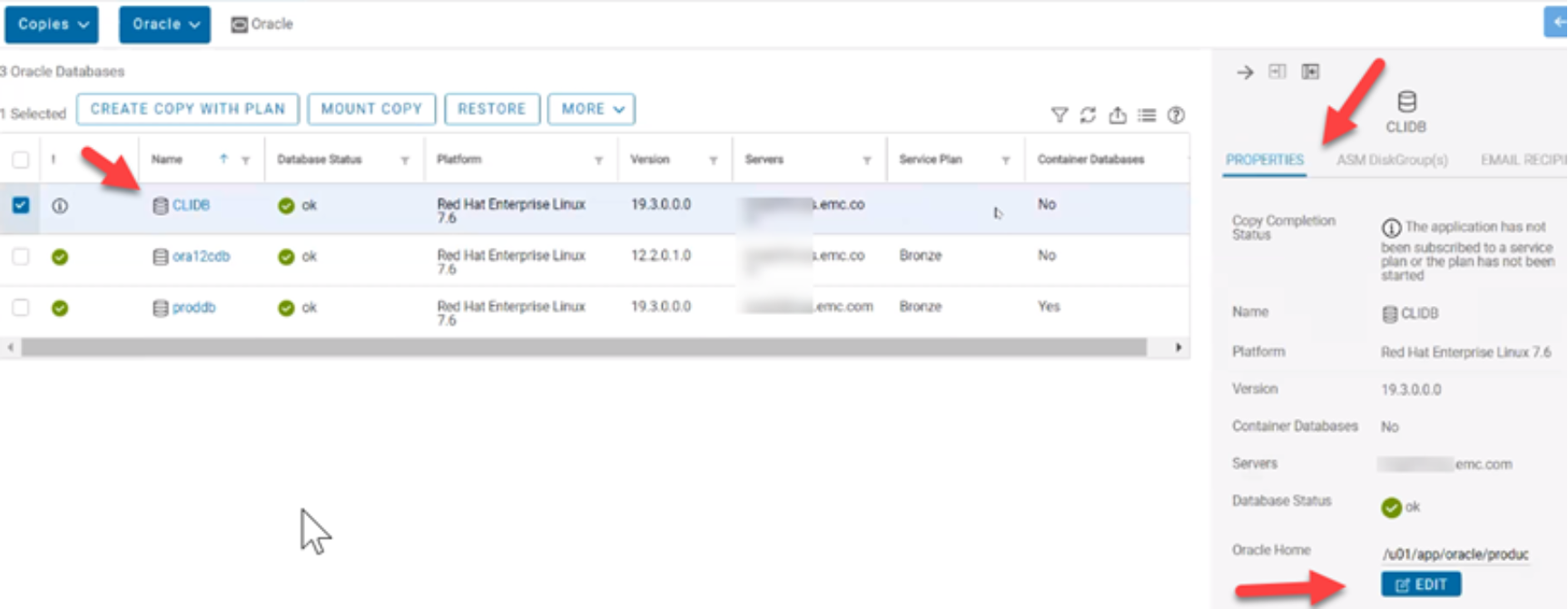
Figure 20. Finished
To conclude this feature, by selecting the host server that the database is running on and entering the SID and home directory location, AppSync can discover the databases without relying on the oratab file. If you click the b button, you can modify the Oracle home directory to update it.
Note the details show that the database was not discovered automatically on the pane on the right side of the above figure. You can remove manually added databases using the remove option from the More dropdown box. This action will not work if the database is subscribed to a service plan. Auto-discovered Oracle databases are automatically removed if the entries are deleted from the oratab file, the copies are expired, and the associated databases are unsubscribed from the service plan.
AppSync versions 4.3 and later offer users more granular recovery so they can recover to a specific point in time if wanted. The easiest way to explain this feature is to use the following example: A user wants to back up their database once a day at 3:00 am. After two days, they have two copies. One copy is for July 3, and one copy is for July 4, both at 3: 00 am. The customer wants to recover the database to July 3 at 6: 00 pm. Neither AppSync copy would help in this scenario in previous versions.
With AppSync versions 4.3 and later, you can mount the data volume from July 3 at 3:00 am and then mount the archive logs from July 4. Once the volumes are mounted the user replays, the archive logs the data files to bring the database forward to 6:00 pm on July 3. This is a manual process of recovery on the host and will only work with on-demand mounts, this will not work with a service plan automatic mount. This feature also requires that the data, archive, and redo logs do not share any underlying storage.
The following figure shows that AppSync enables mounting the data logs if that is the only required step. The selectable check boxes allow the user to decide what filesystems they want to mount. This feature is useful for filesystem-based databases, the mount on a standalone server option would not be beneficial with Oracle ASM and disk groups, because only the storage devices would be mounted by AppSync and not the disk groups.
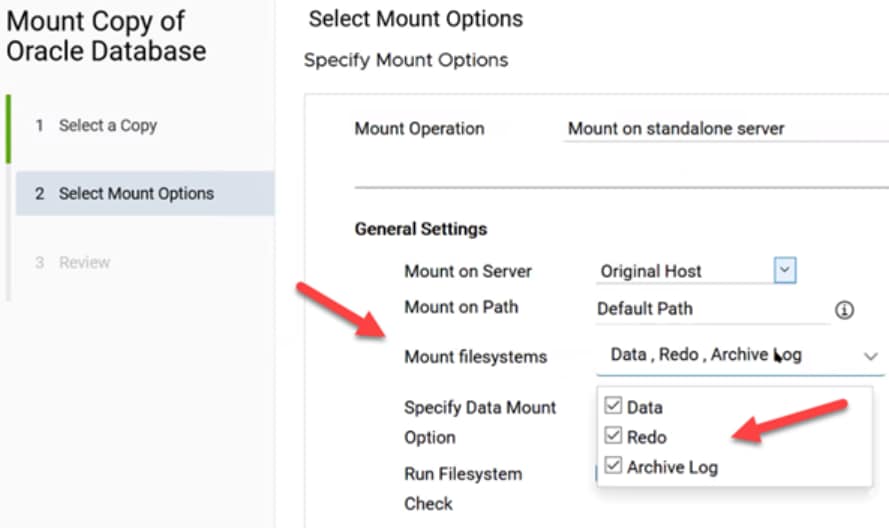
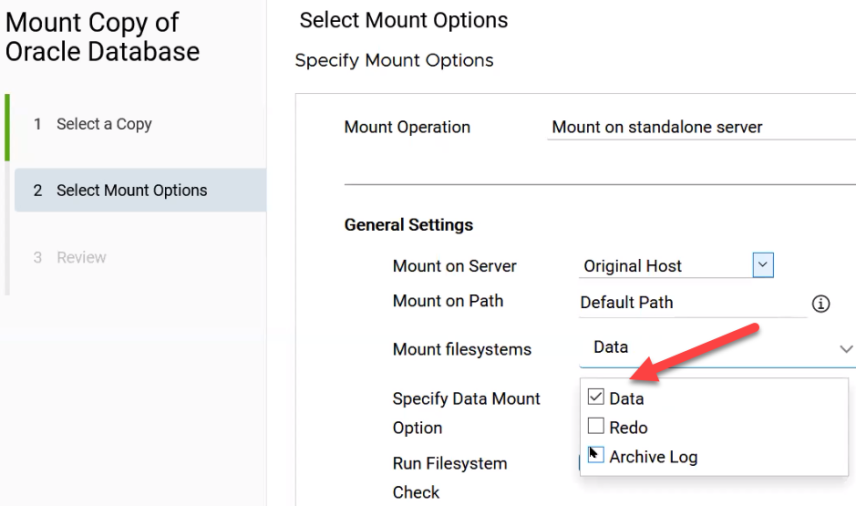
Figure 21. Oracle granular recovery
AppSync versions 4.3 and later can Restore a copy, excluding the redo logs as shown in the following figure. Once the copy has been mounted by AppSync, the user would manually start the Oracle database with SQL*PLUS as shown in Figure 23. Once the database is started, recovered, and opened, it is ready for use. To omit the redo logs from the restore, they must be on separate disk, or the option will not be available as shown in the following figure.
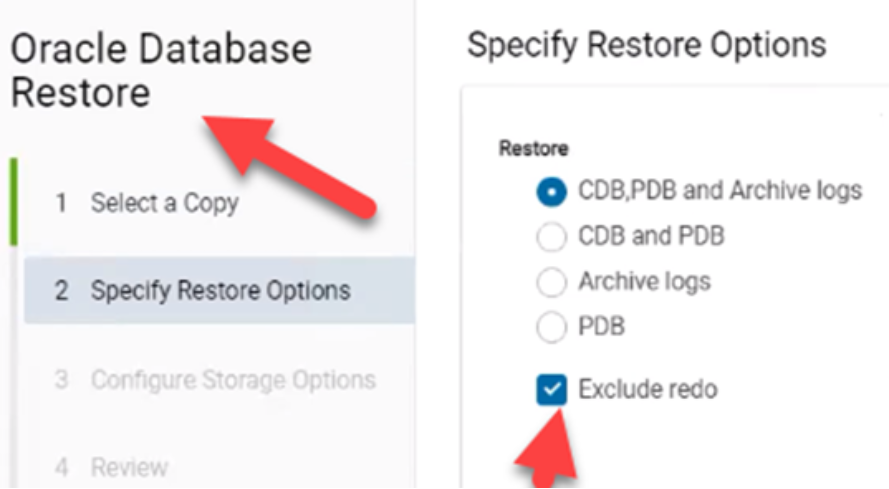
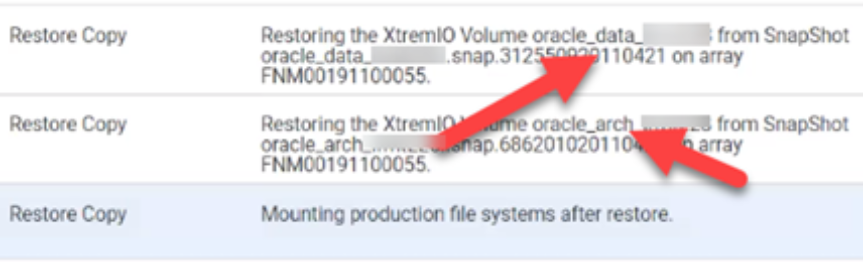
Figure 22. Oracle restore
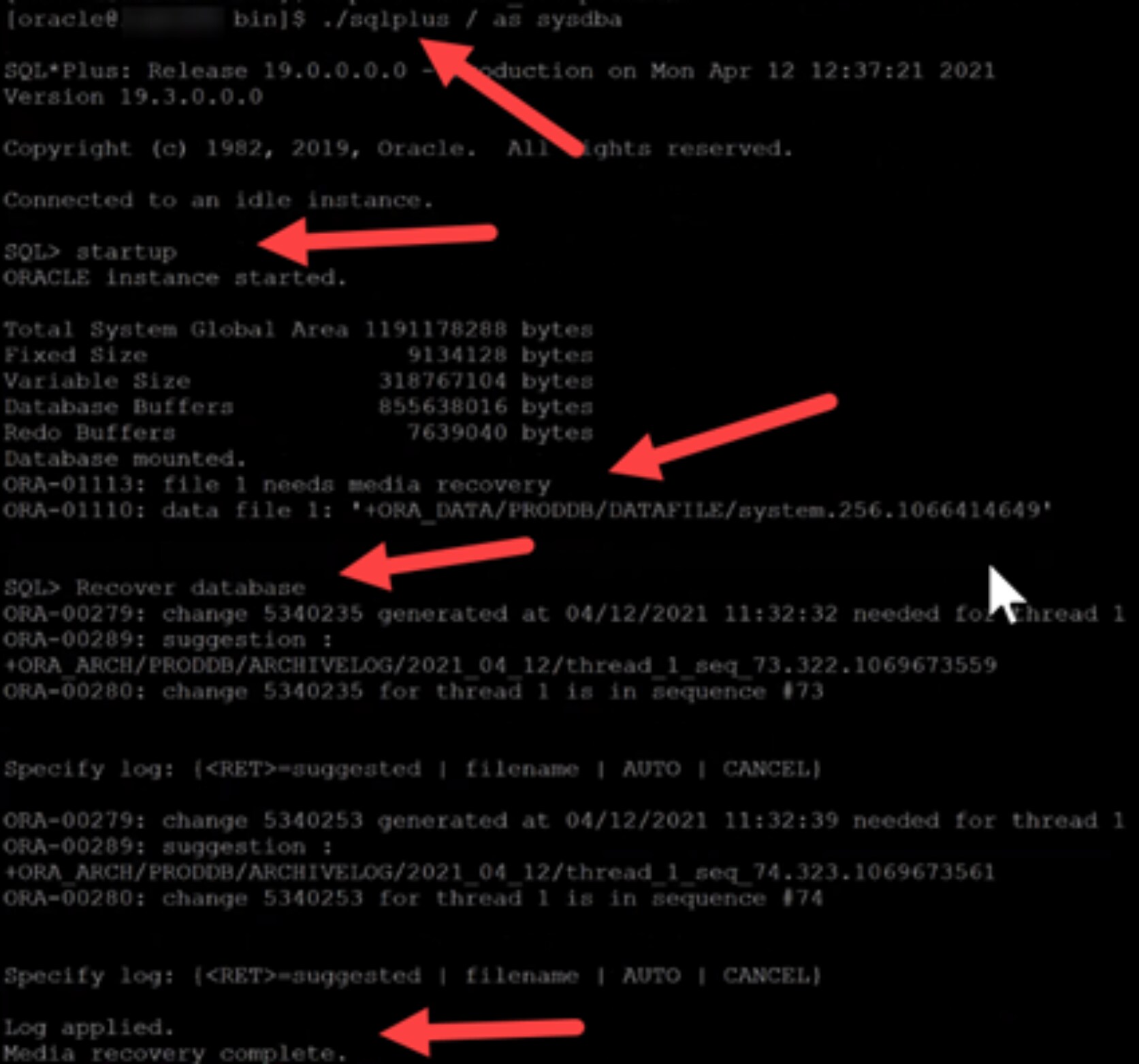
Figure 23. SQL*PLUS
AppSync versions 4.4 and later allow end users to take frequent independent archive log backups, for Oracle databases. This can help reduce the RPO or recovery point objective. In Figure 24, when you create the copy part of the service plan wizard, you check the box enable archive log backup and set the options below. These options include scheduling the archive log backup to run immediately after the database backup or on a schedule, such as every four hours as shown in the example. You also choose the minimum retention period, which in this example is 7, the default value. This means that AppSync will keep the archive log for 7 days, and this can be adjusted up or down to meet user’s needs. This feature is available for hot backup and no-hot backup, Oracle types.
As shown in Figure 26, in the Oracle copies menu, you now have a new Archive Log Backups tab, outlined in green. This option allows you to click the Create Archive Log Backup Using Plan button, also in a green box, to start the wizard and create the copy.
Once this process has completed, you can create further on-demand copies from either this wizard or from the service plan page. Selecting the option to Run Archive Log Backups from the More menu, shown in Figure 27. Figure 26 also shows how you can select an archive log copy, and expire, mount, or unmount it.
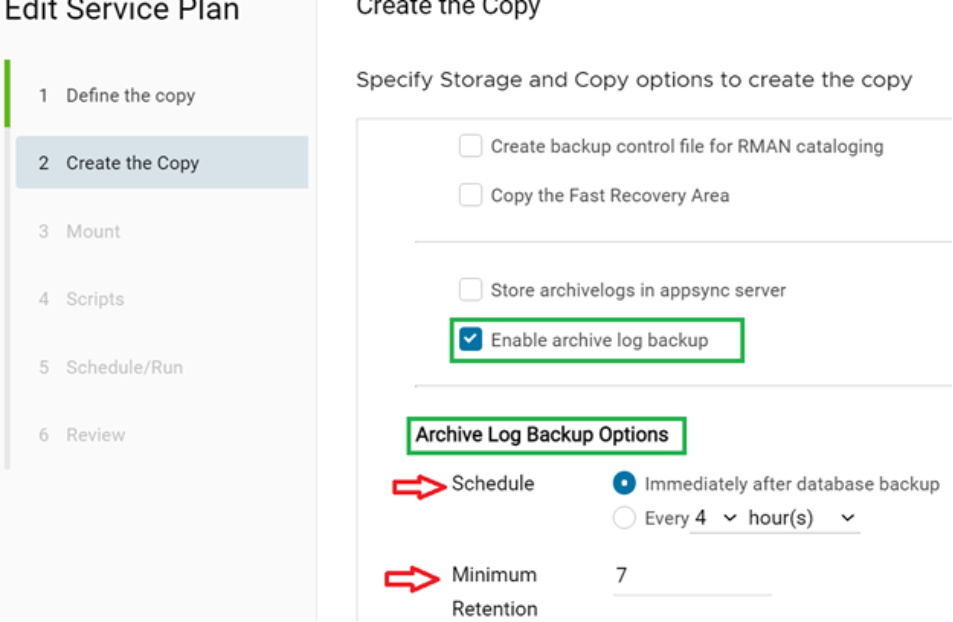
Figure 24. Archive log
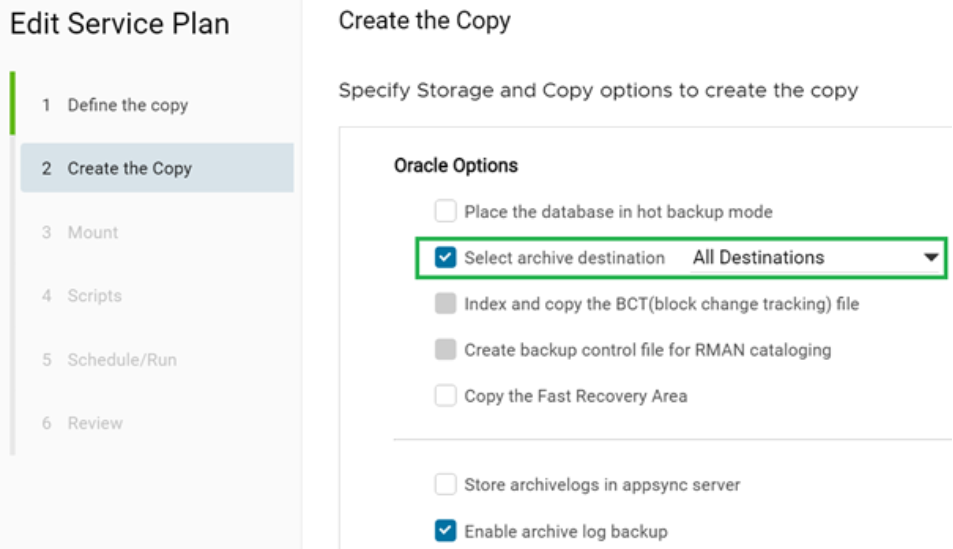
Figure 25. Protect archive
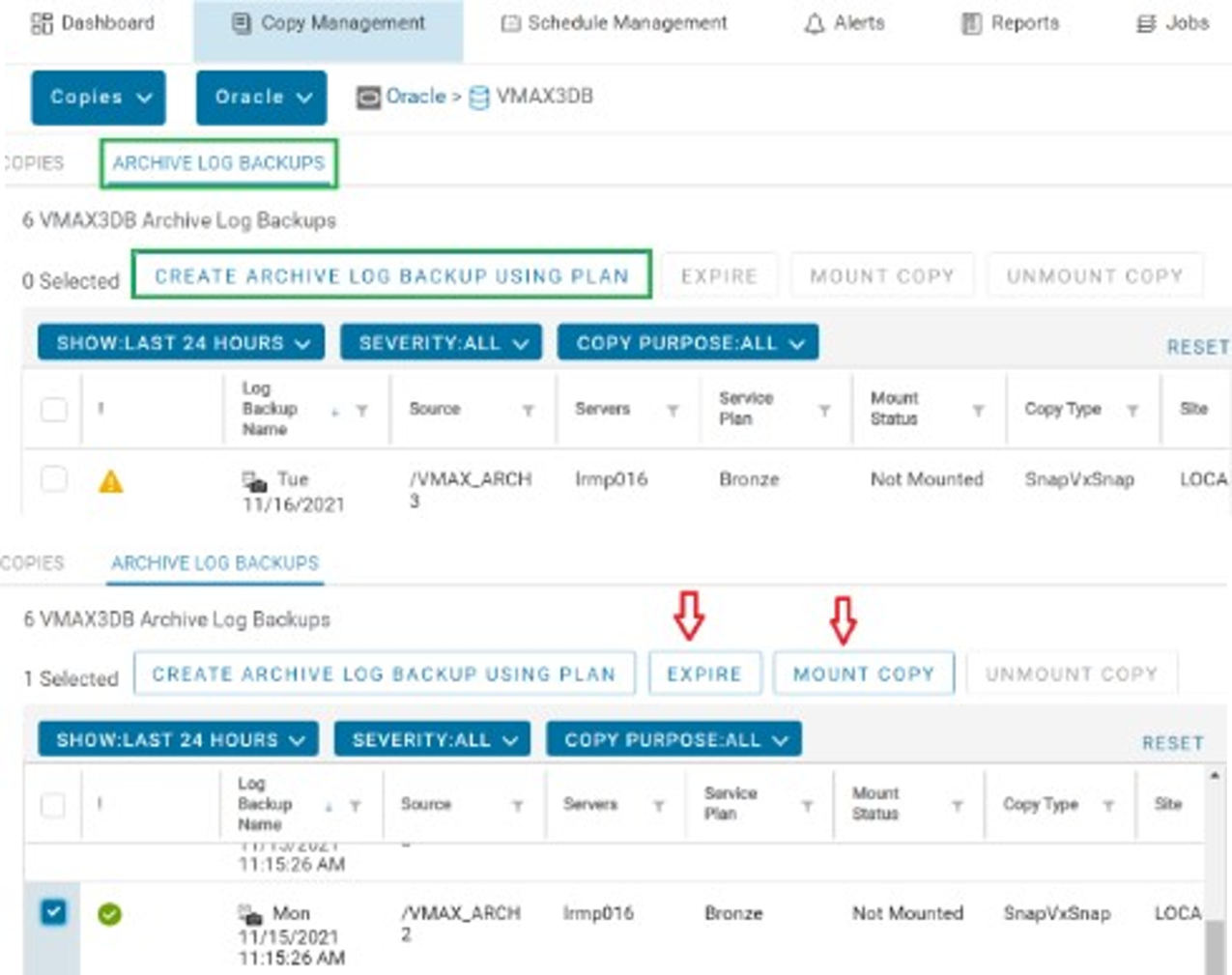
Figure 26. Copies menu
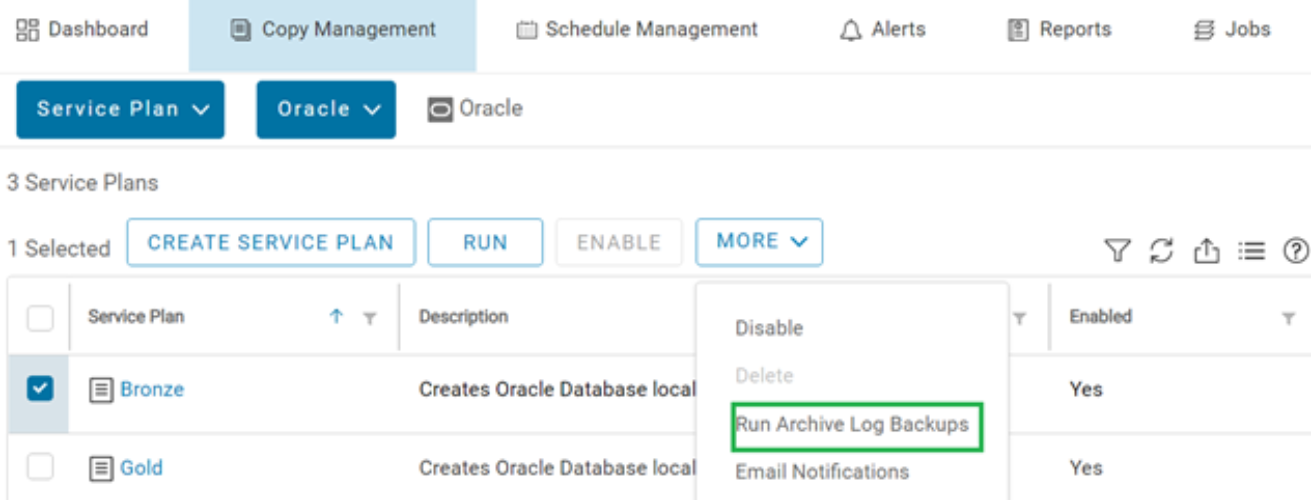
Figure 27. Archive log backups
AppSync versions 4.4 and later allow you to take Oracle archive log backups independent of the database copy. For example, you could take an Oracle database copy once a day, and take incremental archive log copies every four hours. This configuration allows you to bring the database copy to any point in time by first mounting the data volume from the full copy and then mounting the chosen archive log copy. This action results in getting the chosen point in time, with as much granularity as possible, for the recovery. AppSync now also shows the options for From SCN, To SCN, and From Timestamp to To Timestamp. This denotes the availability of archive logs in the volume. The system change number (SCN) stands is the Oracle internal clock. When you select an Oracle copy in AppSync, from the created copies page, you can view the detailed properties pane on the right side of the UI. The following figure shows an example of this feature.
In another use case, if you decide to use crash-consistent copies instead of putting the Oracle database into hot backup mode, the archive log will not be protected by AppSync by default. AppSync versions 4.4 and later allow you to enable the archive log backups along with the crash-consistent copy.
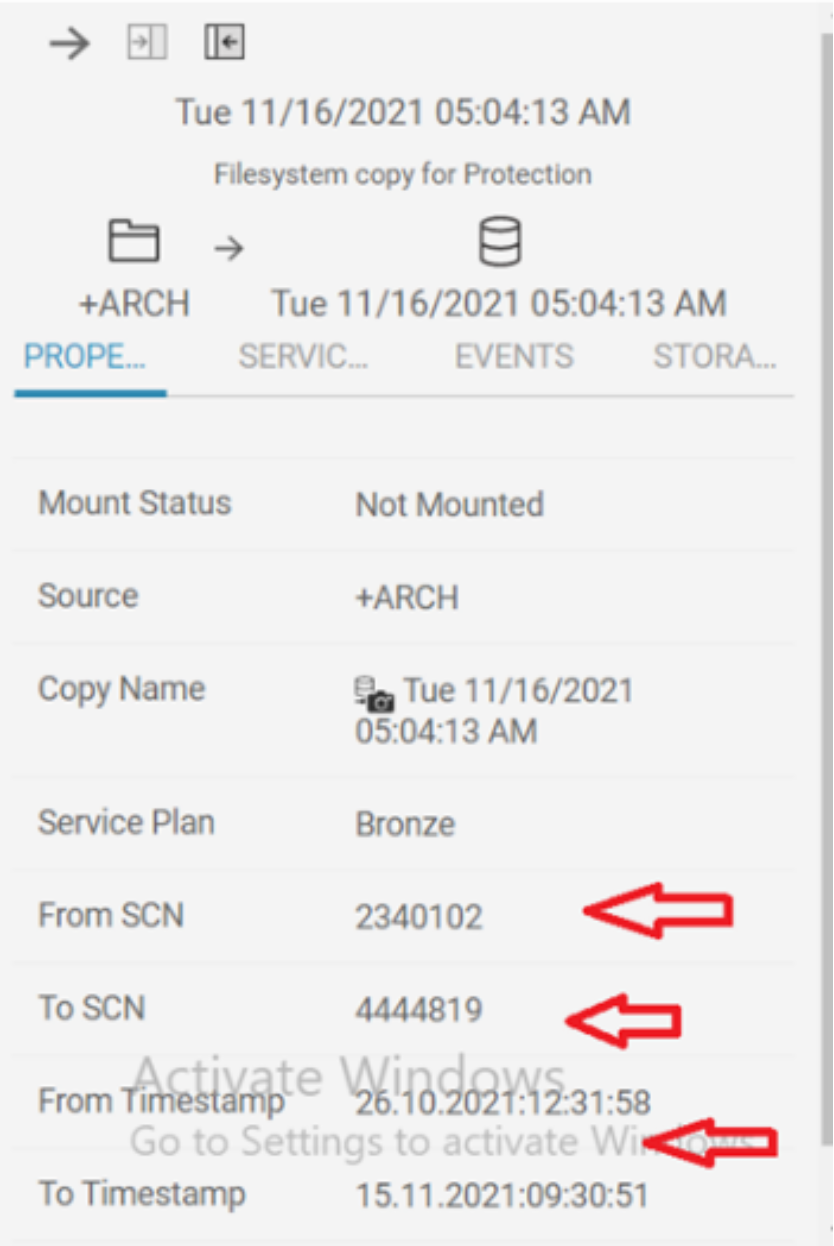
Figure 28. SCN
Conclusion
Conclusion
This white paper explained how to use AppSync with Oracle Database Servers, including how to configure Oracle environments for optimal copy creation. The paper also described the details that are associated with creating a service plan to copy Oracle data with AppSync. These details include how to create a copy, plus important information about setting credentials, discovering the Oracle environment, planning the copy layout, and so on. It reviewed consistency aspects, and advanced Oracle subjects such as copying the Flash Recovery Area (FRA), copying data stored under an Automatic Storage Management (ASM) instance, Data Guard support, and restoring Oracle data in varied Oracle configurations. These aspects include turning a previous copy into production and making new copies from it.
This document also described various mounting techniques in detail, including specifics of how AppSync performs mounts. This detail includes a mount to the production host and the various mounting options that can affect future restores of the mounted copy. Finally, a troubleshooting section provided solutions to some common issues encountered managing Oracle with AppSync.
References
Dell Technologies documentation
The following Dell Technologies documentation provides other information related to this document. Access to these documents depends on your login credentials. If you do not have access to a document, contact your Dell Technologies representative.
The following Dell Technologies documentation provides additional and relevant information. Access to these documents depends on your login credentials. If you do not have access to a document, contact your Dell Technologies representative.