Dell Unity XT: Oracle Database Best Practices
Executive summary
Overview
Audience
Revisions
We value your feedback
Introduction
Unity XT overview
I/O module options
Dynamic storage pools
Dell Unity features
Dell Unity features
FAST VP
FAST cache
Data reduction
Data at Rest Encryption
Host I/O limits
Unity REST API and CLI
Dell Unity Service Scripts
Dell Unity can run service commands from the Unity service account. Some service commands provide more ability to monitor and manage Unity. Some service commands provide the ability to:
- In unified configurations, determine the current setting of Unity’s rsize and wsize of the NFS buffer. Knowing the current setting of Unity’s rsize and wsize is useful when configuring and tuning Oracle dNFS.
- Check NFS network performance metrics.
Service commands are intended for the Storage Administrator, field services, and support personal. Since the scripts require a lower level of system control, use care when processing the scripts.
NOTE: Users should be familiar with Linux, Unity installed hardware, and the Unity operating system. Some service scripts must not be run without the approval from your authorized service representative or support personnel. Contact your service representative or support for guidance in using the service commands.
Service commands are run from Unity’s service account and require SSH to be enabled in Unity. The service account password is initially defined when Unity is deployed and configured. By default, the password is the same as the admin password but can be changed during deployment.
When connecting to Unity using SSH, the SSH client should use Unity’s Unisphere’s IP address.
Once connected to the service account, to see a list of available service commands, type svc_help.
The remainder of this section shows several use cases with several service commands:
- Enable/disabling/viewing nfs.transChecksum in Unity when using Oracle direct nfs (dNFS)
- Display/change Unity’s current nfs v3 buffer sizes
Unity’s nfs.transChecksum parameter
To use Oracle dNFS with Unity storage, use NFS protocol NFSv3, and enable Unity’s nfs.transChecksum parameter (set to 1). This parameter ensures that each transaction carries a unique ID and avoids the possibility of conflicting IDs that result from the reuse of relinquished ports.
Determine if nfs.transChecksum is enabled or disabled
To display the current value of nfs.transChecksum, perform the following service command in an ssh session to the IP address of Unisphere:
svc_nas <NAS Server name> -param -facility nfs -info transChecksum
This service command will return a number of parameters and their current value. If the value returned for parameter current_value is 0, then nfs.transChecksum is disabled. If its value is 1, then nfs.transChecksum is enabled.
Enable Unity’s nfs.transChecksum
To enable nfs.transChecksum, shutdown all Oracle resources that reside on the NAS Server where the nfs.transChecksum will be enabled. Then proceed with the following steps:
- Record the current nfs.transChecksum value (see Determine if nfs.transChecksum is enabled or disabled)
- Perform the following service command to change the value of nfs.transChecksum to 1 which will enable nfs.transChecksum.
svc_nas <NAS Server name> -param -facility nfs -modify transChecksum -value 1
- Perform the following service command to verify that the value of nfs.transChecksum was changed. The service command will return a number of parameters. If parameter current_value is 1, then nfs.transChecksum was changed correctly.
svc_nas <NAS Server name> -param -facility nfs -info transChecksum
- Perform the following service command to restart the NAS server that had its transChecksum value changed.
svc_nas <NAS Server name> -restart
Disable Unity’s nfs transChecksum
To disable nfs.transChecksum, shutdown all Oracle resources that reside on the NAS Server where the nfs.transChecksum will be enabled. Then, perform the following to disable nfs.transChecksum:
svc_nas ORA-ASM-NAS -param -facility nfs -info transChecksum
svc_nas <NAS Server name> -param -facility nfs -modify transChecksum -value 0
svc_nas ORA-ASM-NAS -param -facility nfs -info transChecksum
svc_nas <NAS Server name> -restart
svc_nas ORA-ASM-NAS -param -facility nfs -info transChecksum
Note: Only disable nfs.transChecksum if Oracle dNFS will no longer be used. nfs.transChecksum ensures that each database transaction carries a unique ID and avoids the possibility of conflicting IDs that result from the reuse of relinquished ports.
Unity’s nfs.v3xfersize parameter
It may be advantageous to change the size of Unity’s nfs buffer. When mounting a Unity NFS filesystem on a client, the filesystem should be mounted with wsize and rsize equal to the size of the Unity NFS buffer.
Display Unity’s current nfs v3 buffer sizes
To display the current size and range of Unity’s NFSv3 I/O transfer buffer size, process the following service command.
svc_nas <NAS server name> -param -facility nfs -info v3xfersize
The output from this command is helpful when configuring NFS, especially when using Oracle dNFS. When mounting the NFS filesystem serviced by the Unity NAS Server, set the rsize and wsize to the value of parameter current_value reported by the Unity service command:
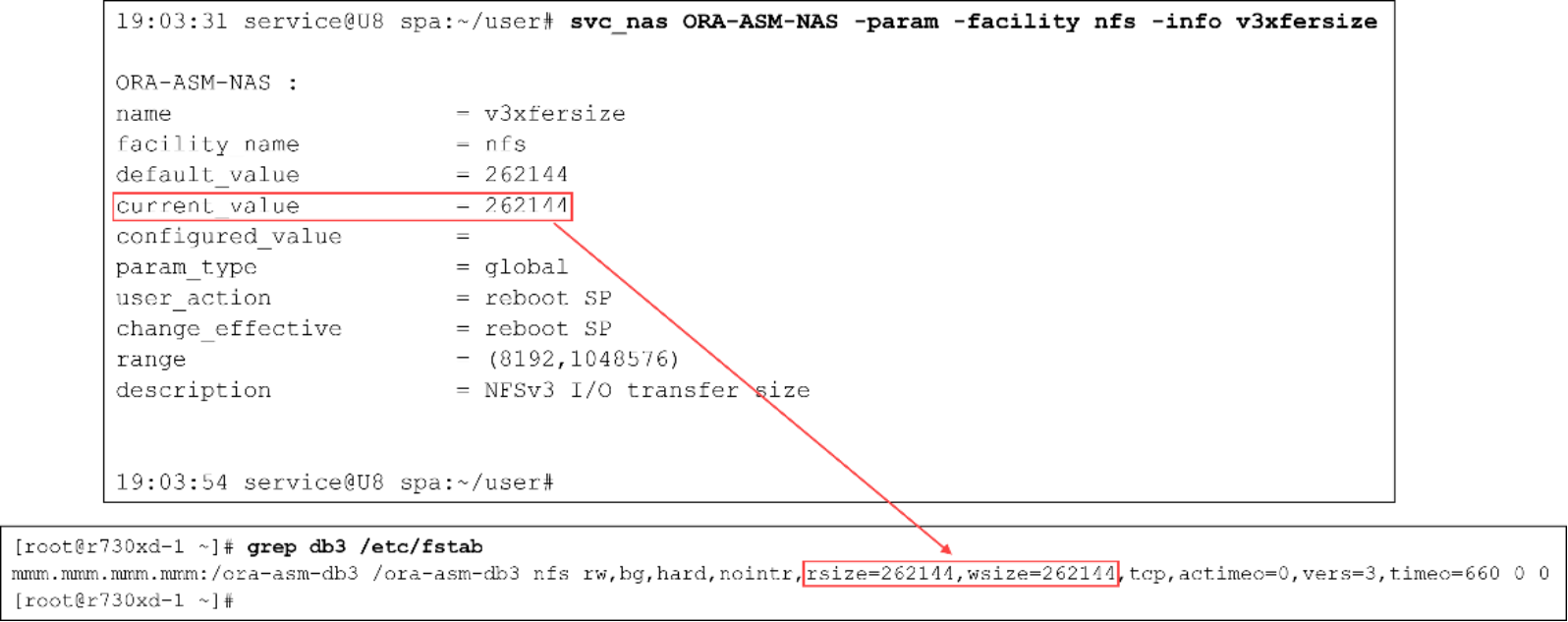
Figure 1. Mount the filesystem on the client and set w/rsize to Unity’s NFS buffer size.
It is recommended to test these changes in a nonproduction environment before changing them in production.
Changing Unity’s nfs v3 buffer sizes
To change the size of Unity’s NFSv3 I/O transfer buffer, perform the following steps.
Notes:
1) Contact your Dell Technologies service representative for guidance in this process.
2) The process will change the buffer sizes for all NAS servers on SP A and SP B, and will require a reboot of both the local and peer SPs.
- Perform the following service command and record the value of nfs.v3xfersize’s parameter “configured_value”.
svc_nas <NAS name> -param -facility nfs -info v3xfersize
- Change the NFSv3 buffer size by performing the following service command. Set the value of v3xfersize’s parameter “configured_value” to <new-value>, the new wanted size.
svc_nas ALL -param -facility nfs -modify v3xfersize -value <new-value>
- Verify the change was recorded and configured correctly by performing the following service command. The returned value of parameter “configured_value” should be set to the new value.
svc_nas <NAS name> -param -facility nfs -info v3xfersize
- Reboot the local SP by performing the following service command.
svc_shutdown -r
- After the reboot, what was the peer SP will become the primary SP. Perform the following service command to verify that parameter “configured_value” on the new primary SP is the value set in step 2.
svc_nas <NAS name> -param -facility nfs -info v3xfersize
- Make the new value active by rebooting the new local SP. To reboot the SP, perform the following service command (SP A will again become the new local SP)
svc_shutdown -r
- Verify the nfs.v3xfersize buffer size, parameter current_value, is active on SP A, SP B, and on all NAS Servers. To verify, perform the following service command.
svc_nas ALL -param -facility nfs -info v3xfersize
Oracle database design considerations
Oracle database design considerations
OLTP workloads
OLAP or DSS workloads
Mixed workloads
Storage pools
Testing and monitoring
Deploying Oracle 21c databases on Dell Unity storage
Deploying Oracle 21c databases on Dell Unity storage
ORACLE_HOME and ORACLE_BASE_HOME
Linux setup and configuration
Oracle databases are commonly deployed on Linux operating systems. The following subsections describe best practices when working with Dell Unity storage systems on Linux operating systems.
Discovering and identifying Dell Unity LUNs on a host
After creating and enabling host access of the LUNs in the Dell Unity system, the host operating system needs to scan for these LUNs before they can be used. On Linux, install the following rpm packages which contain useful utilities to discover and identify LUNs: sg3_utils and lsscsi.
Identifying LUN IDs on Dell Unity storage
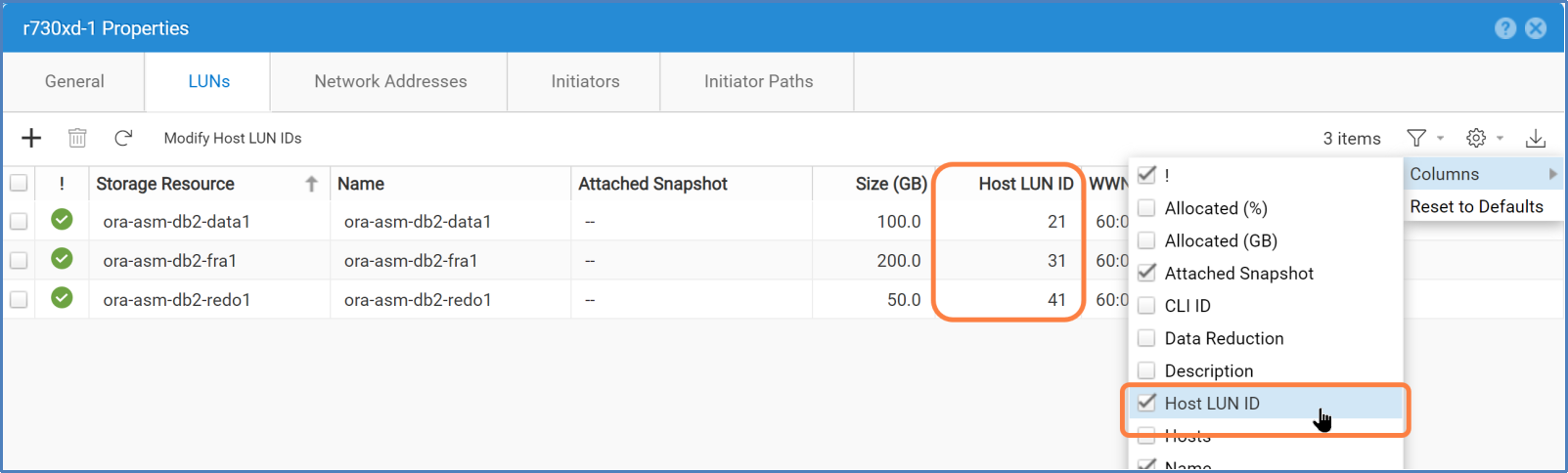
When creating a LUN, if the Host LUN ID is not specified, Dell Unity automatically assigns LUN IDs, starting from 0 and incrementing by 1 thereafter. LUN 0 typically represents the first LUN allowed access to a host.
Perform the following in Unisphere to view the LUN ID information:
- In Unisphere’s navigation menu under ACCESS, click Hosts.
- Click the checkbox associated with the name of the host.
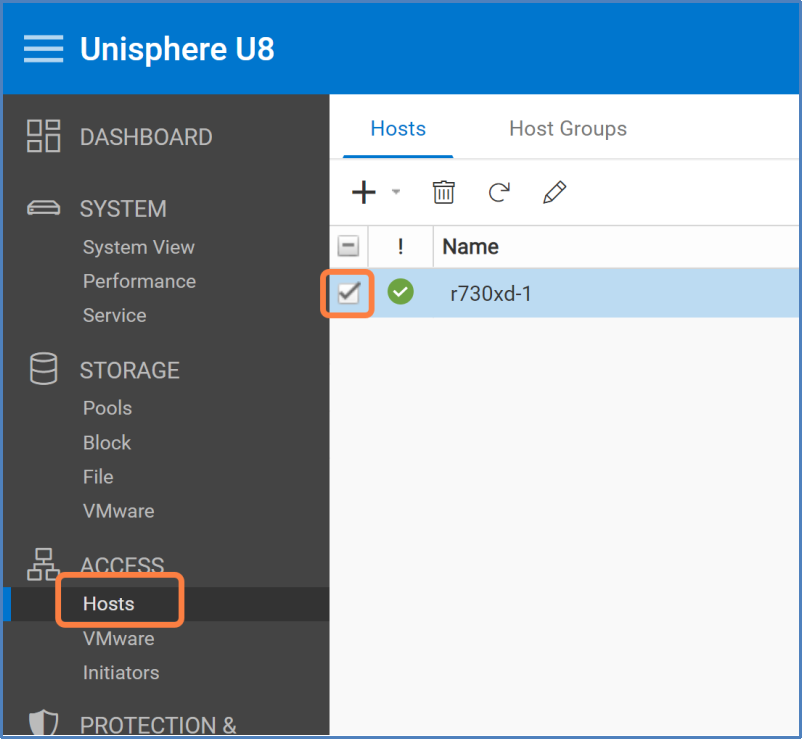
- Click Host Properties (pencil icon) > LUNs tab.
- If column Host LUN ID is hidden from the default view, click the columns filter (gear icon) > Columns > Host LUN ID.
Scanning for LUNs
LUNZ is known as a host LUN and is not a real LUN. LUNZ appears on the Linux operating system for making the Dell Unity system visible to the host when no LUNs are assigned to the host. LUNZ always takes up ID 0 on the host. Any I/Os sent down the LUNZ paths result in errors.
To see if there are any LUNZ on the system, run the lsscsi command.
# lsscsi|egrep DGC
[13:0:0:0] disk DGC LUNZ 4201 /dev/sde
[13:0:1:0] disk DGC LUNZ 4201 /dev/sdaf
[14:0:0:0] disk DGC LUNZ 4201 /dev/sdd
[14:0:1:0] disk DGC LUNZ 4201 /dev/sdag
[snipped]
If the host detects LUN ID 0 and LUNZ, run rescan-scsi-bus.sh with the --forcerescan option. LUNZ will be removed and allows the real LUN 0 to show up on the host. For example:
# /usr/bin/rescan-scsi-bus.sh --forcerescan
# lsscsi |egrep DGC
[13:0:0:0] disk DGC VRAID 4201 /dev/sde
[13:0:1:0] disk DGC VRAID 4201 /dev/sdaf
[14:0:0:0] disk DGC VRAID 4201 /dev/sdd
[14:0:1:0] disk DGC VRAID 4201 /dev/sdag
[snipped]
When the Dell Unity LUNs have nonzero IDs, use -a option instead.
# /usr/bin/rescan-scsi-bus.sh -a
Note: Omitting the --forcerescan option might prevent the operating system from discovering LUN 0 because of the LUNZ conflict.
Identifying LUNs by WWNs
The most accurate way to identify a LUN on the host operating system is by its WWN. The Dell Unity system assigns a unique WWN for each LUN. WWN information can be found using the same steps in Identifying LUN IDs on Dell Unity storage. However, instead of using column HOST LUN ID, use WWN.
Querying WWNs using scsi_id command
To query the WWN on a Linux operating system, run the following commands against the device file.
# /usr/lib/udev/scsi_id --page=0x83 --whitelisted --device=<device>
Where <device> can be one of the following:
- Single path device (/dev/sde)
- Linux multipath device (/dev/mapper/mpathe)
- Dell PowerPath device (/dev/emcpowerc)
The string returned by the scsi_id command indicates the WWN of the Dell Unity LUN, prepended with a 3:
36006016010e0420093a88859586140a5
Querying WWNs using multipath command
If the system has Linux device-mapper-multipath software enabled, the multipath command displays the multipath device properties including the WWN. For example:
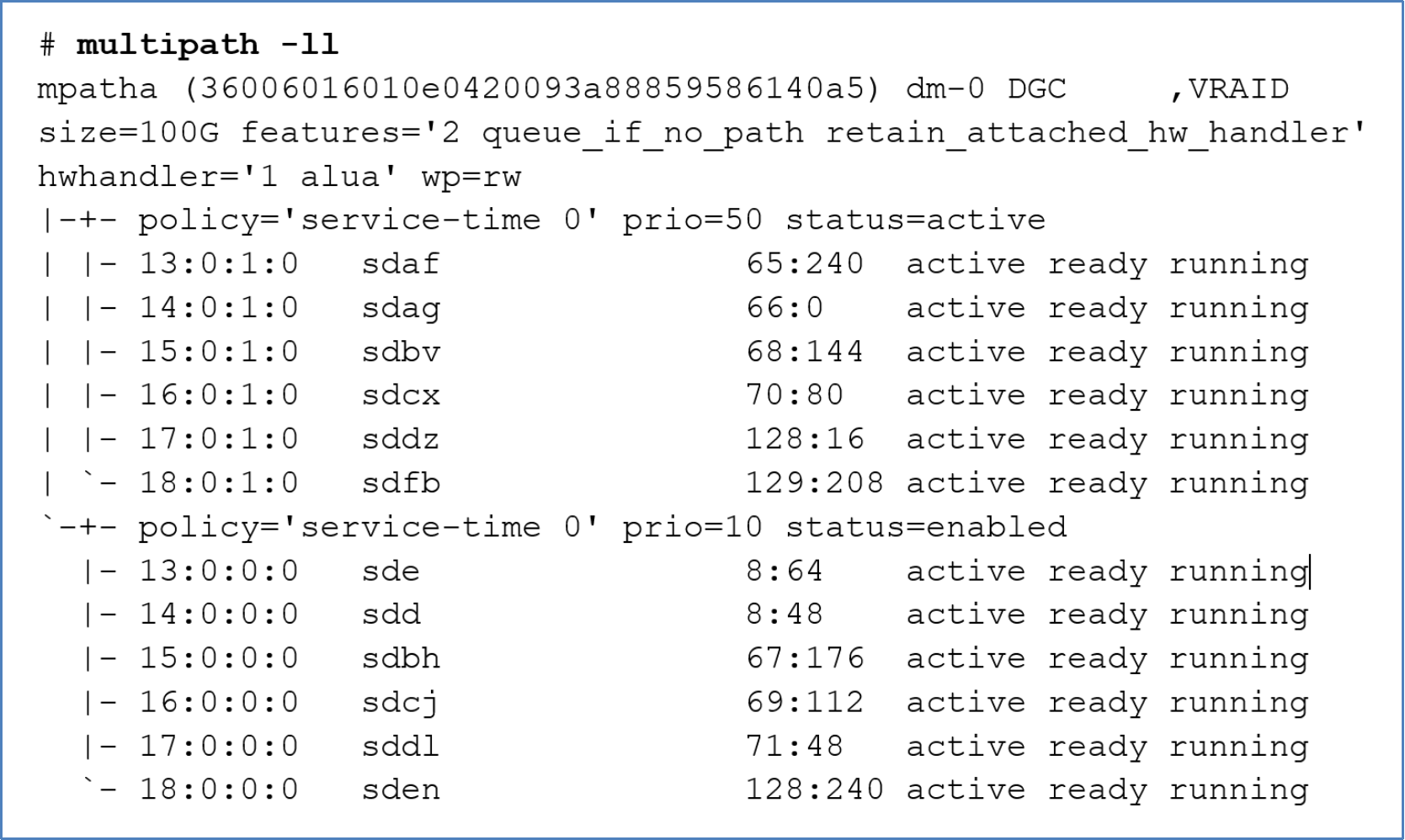
Figure 2. multipath -ll
Querying WWNs using powermt command
Similarly, when PowerPath is enabled on the system, the powermt command displays the multipath device properties including the WWN.
# powermt display dev=all
Multipathing
Multipathing is a software solution implemented at the host operating system level. While multipathing is optional, it provides path redundancy, failover, and performance-enhancing capabilities. It is recommended to deploy the solution in a production environment or any environments where availability and performance are critical.
Main benefits of using an MPIO solution
- Increase database availability by providing automatic path failover and failback
- Enhance database I/O performance by providing automatic load balancing and capabilities for multiple parallel I/O paths
- Ease administration by providing persistent user-friendly names for the storage devices across cluster nodes
Multipath software solutions
There are a few multipath software choices available to choose from. It is up to the administrator's preference to decide which software solution is best for the environment. The following list provides a brief description of some of these solutions.
- Native Linux multipath (device-mapper-multipath)
- Dell PowerPath
- Symantec Veritas Dynamic Multipathing (VxDMP)
The native Linux multipath solution is supported and bundled with most popular Linux distributions in use today. Because the software is widely and readily available at no additional cost, many administrators prefer using it compared to other third-party solutions.
Unlike the native Linux multipath solution, both Dell PowerPath and Symantec VxDMP provide extended capabilities for some storage platforms and software integrations. Both solutions also offer support for numerous operating systems in addition to Linux.
Only one multipath software solution should be enabled on the host, and the same solution should be deployed in a cluster on all cluster hosts.
See the vendor's multipath solution documentation for more information. For information about operating systems supported by Dell PowerPath, see Support for PowerPath | Overview | Dell US.
Connectivity guidelines
The following list provides a summary of array-to-host connectivity best practices. It is recommended to review the documents, Configuring Hosts to Access Fibre Channel (FC) or iSCSI Storage and Dell Unity: High Availability.
- Have at least two FC/iSCSI HBAs or ports to provide path redundancy.
- Connect the same port on both Dell Unity storage processors (SP) to the same switch because the Dell Unity system matches the physical port assignment on both SPs.
- Use multiple switches to provide switch redundancy.
Configuration file
To ease deployment of the native Linux multipath, it comes with a set of default settings. The default settings list storage models from different vendors including the Dell Unity system. The default settings allow the software to work with the Dell Unity system without additional configuration. However, these settings might not be optimal for all situations and should be reviewed and modified if necessary.
The multipath daemon configuration file needs to be created on newly installed systems. A basic template can be copied from /usr/share/doc/device-mapper-multipath-<version>/multipath.conf to /etc/multipath.conf as a starting point. Any settings that are not defined explicitly in /etc/multipath.conf would assume the default values. The full list of settings (explicitly set and default values) can be obtained using the following command. Specific Dell Unity settings can be found by searching for DGC from the output. The default settings generally work without any issues.
# multipathd –k"show config"
Creating aliases
It is generally a good idea to assign meaningful names (aliases) for the multipath devices though it is not mandatory. For example, create aliases based on the application type and environment it is in. The following snippet in the multipaths section assigns an alias of ORA-DATA-00 to the Dell Unity LUN with WWN 36006016010e04200271a8a594a34d845.
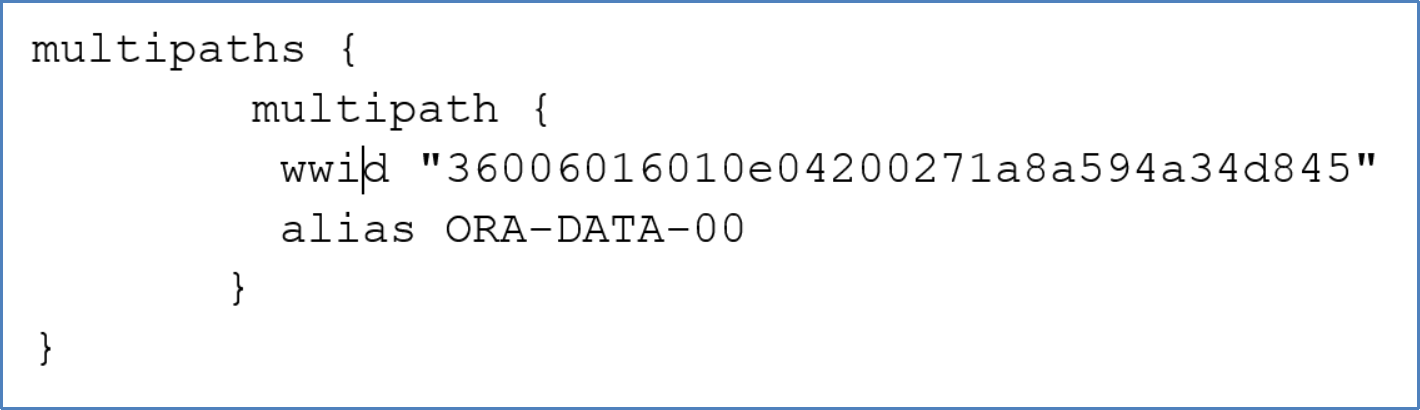
Figure 3. Multipath device configuration
Asymmetric Logic Unit Access
Dell Unity systems support ALUA for host access. ALUA allows the host operating system to recognize optimized paths from nonoptimized paths. Optimized paths are the ones connected to the LUN’s SP owner, and they are assigned a higher priority. The default multipath settings reflect the support of the ALUA feature on Dell Unity storage. The following example shows LUN ORA-DATA-00 with 12 paths divided into two groups. The optimized paths have a priority of 50, and nonoptimized paths have a priority of 10.
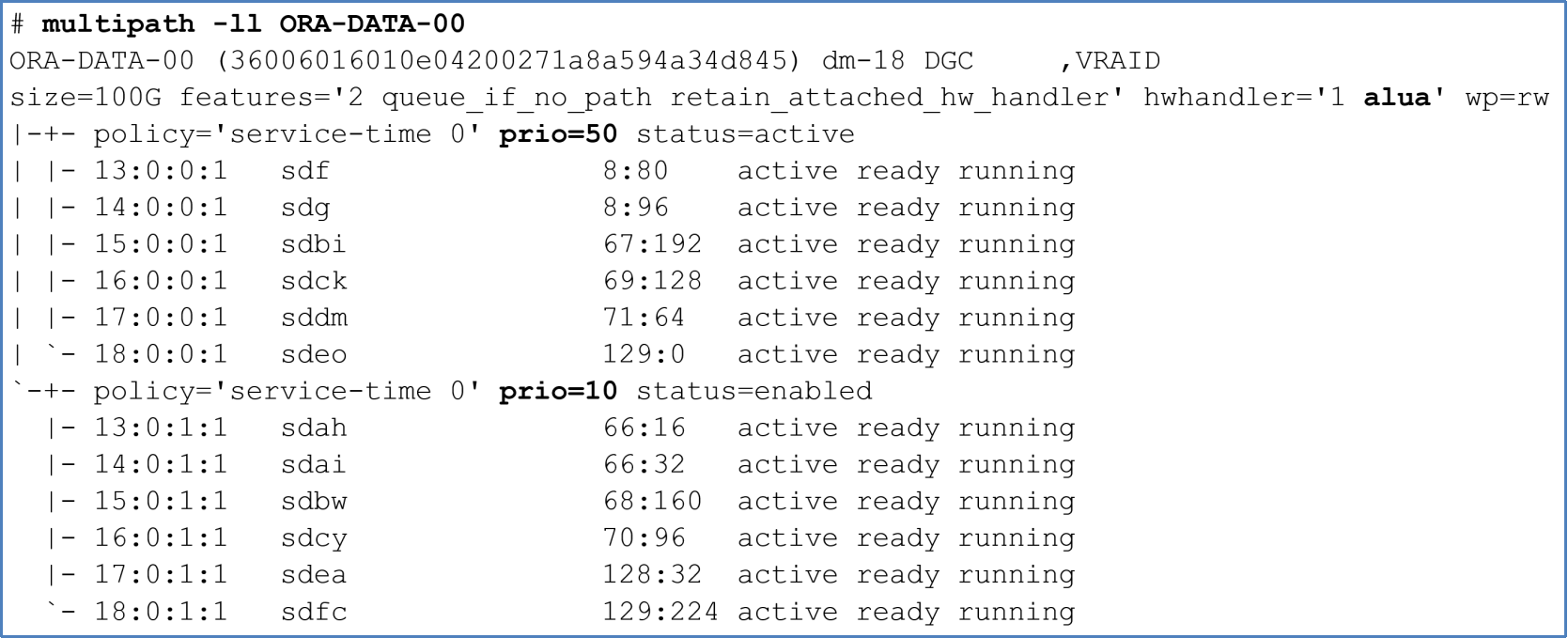
Figure 4. Optimized and nonoptimized multipath paths
I/Os are sent down the optimized paths when possible. If I/Os are sent down the nonoptimized paths, the peer SP redirects the I/Os to the primary SP through the internal bus. When the Dell Unity system senses large amounts of nonoptimized I/Os, it automatically trespasses the LUN from the primary SP to the peer SP to optimize the data paths.
LUN partition
A LUN can be used as a whole partition or it can be divided into multiple partitions. Certain applications, such as Oracle ASMLib, recommend partitioning over whole LUNs. Dell Technologies recommends configuring whole LUNs without partitions wherever appropriate because it offers the most flexibility for configuring and managing the underlying storage.
See sections Oracle Automatic Storage Management and File systems on choosing a strategy to grow storage space.
Partition alignment
When partitioning a LUN, it is recommended to align the partition on the 1 MB boundary. Either fdisk or parted can be used to create the partition. Only parted can create 2 TB or larger partitions.
Creating partition using parted
Before creating a partition, label the device as GPT. Then, specify the partition offset at sector 2048, which will be a 1 MB offset from the beginning of the device. The following command labels device /dev/mapper/orabin-std and creates a single partition that consumes the entire LUN. Once the partition is created, the partition file, in this example /dev/mapper/orabin-std1, should be used for creating a file system or ASMLib volume.
parted --script /dev/mapper/orabin-std mklabel gpt mkpart primary 2048s 100% quit ;
Note: parted might issue a misalignment warning which can be safely ignored.
Partitioned devices and filesystems
When creating a file system, create the file system on a properly aligned partitioned device.
# mkfs.ext4 /dev/mapper/orabin-std1
I/O scheduler for Oracle ASM devices
The function of the disk I/O scheduler is to order, delay, or merge I/O requests submitted to a storage device to achieve performance improvements with throughput and latency. There are several different I/O schedulers that can be used in Linux. Each provides a different method for managing I/O requests. The recommended I/O scheduler will depend on several factors. Some factors are: Operating system version, UEK version, Oracle version, storage media used in the storage array, and type of database processing.
Oracle Linux 8 has four different I/O schedulers:
none: Implements a first-in-first-out (FIFO) scheduling algorithm. When high-performance SSDs are used, or when a CPU-bound system with fast storage exists, the 'none' scheduler is recommended. Scheduler ‘none’ is the default I/O scheduler.
mq-deadline: Sorts queued I/O requests into read or write batches. Batches are then performed in increasing logical block address (LBA) order so that writes are organized by location to storage. mq-deadline is suitable for most use cases, but is suited best for traditional hard drive storage with a SCSI interface, and where write operations are mostly asynchronous.
kyber: Tunes itself by analyzing each I/O request to obtain the least amount of latency for each request. kyber is recommended, as an alternative to the 'none' scheduler, for high-performance SSDs or CPU-bound systems with fast storage.
bfq: Prioritizes on providing lowest latency rather than maximum throughput. bfq is recommended for copying large files, systems with traditional hard drive with a SCSI interface, and desktop or interactive activities.
For additional use cases, see Red Hat Enterprise Linux 8, Optimizing system throughput, latency, and power consumption.
Earlier Linux versions implemented I/O schedules: noop, deadline, and cfq.
Before changing the default I/O scheduler in production, review the latest Oracle documentation and confer with Oracle support for recommended values. Then change the scheduler in a test environment, simulate production activity, and monitor performance before changing the value in production.
To verify the I/O schedule, use the following commands:
# egrep "*" /sys/block/sd*/queue/scheduler
/sys/block/sdaa/queue/scheduler:[none] mq-deadline kyber bfq
/sys/block/sdab/queue/scheduler:[none] mq-deadline kyber bfq
/sys/block/sdac/queue/scheduler:[none] mq-deadline kyber bfq
<snippet>
To set the I/O schedule persistently, create an udev rule that updates the devices. See the section Linux dynamic device management (udev) for more information about using udev to set persistent ownership and permission.
The following example shows setting the deadline I/O scheduler on all /dev/sd* devices. The rule is appended to the 99-oracle-asmdevices.rule file.
# cat /etc/udev/rules.d/99-oracle-asmdevices.rules
ACTION=="add|change", KERNEL=="sd*", RUN+="/bin/sh -c '/bin/echo mq-deadline > /sys$env{DEVPATH}/queue/scheduler'"
# udevadm control --reload-rules
# udevadm trigger
Oracle Automatic Storage Management
Dell Technologies and Oracle recommend using Oracle Automatic Storage Management (ASM) to manage Dell Unity LUNs for the database and clusterware. This section reviews the general guidelines and additional considerations for an Oracle database.
Preparing storage for Oracle ASM
LUNs intended for Oracle ASM must have their user and group ownership and permissions set correctly. Group and ownership must be set to the group and owner of the ASM instance. Permissions must be set to read/write. For example, if user grid with primary group oinstall is the owner of the ASM instance, grid:oinstall should be assigned to the LUNs. There are different methods to set the ownership and permissions and keep these settings persistent across host reboot.
Persistent device ownership and permissions
Persistent device ownership and permission can be managed through various software. Some of the commonly used software is:
- Linux dynamic device management (udev)
- Oracle ASMLib
- Oracle ASMFD
Linux dynamic device management (udev)
The Linux udev facility comes with every Linux distribution and is easy to set up for persistent device ownership and permission by creating rules in the udev rule file. System rule files are in directory /usr/lib/udev/rules.d, and user-defined rule files are in directory /etc/udev/rules.d. There are many ways to define a device in the rule file. Two examples are provided as follows.
Example 1: Set device ownership and permission by WWNs
Define a rule for each Dell Unity LUN using its unique WWN. With this approach, each LUN requires an udev rule. Rules are defined in /etc/udev/rules.d/99-oracle-asmdevices.rules. The following example shows an udev rule that sets grid:oinstall ownership and 660 permission on a dm (multipath) device that matches the WWN 36006016010d04200b584ce59557ba84a.
# cat /etc/udev/rules.d/99-oracle-asmdevices.rules
KERNEL=="dm-*",PROGRAM=="/lib/udev/scsi_id --whitelisted --device=/dev/$name",RESULT=="36006016010d04200b584ce59557ba84a",ACTION=="add|change",OWNER="grid",GROUP="oinstall",MODE="0660"
<snippet>
# udevadm control --reload-rules
# udevadm trigger
If PowerPath is used, change KERNEL=="dm-*" to KERNEL=="emcpower*".
Example 2: Set device ownership and permission by device name pattern
The udev rule can be simplified if multipath device aliases are created with a consistent string pattern. For example, use prefix ORA- in all multipath device aliases for LUNs intended for Oracle ASM. A single udev rule can be used to set ownership and permission on all ORA* multipath devices. See section Creating aliases.
# cat /etc/udev/rules.d/99-oracle-asmdevices.rules
KERNEL=="dm-*",ENV{DM_NAME}=="ORA*",OWNER="grid",GROUP="oinstall",MODE="0660"
# udevadm control --reload-rules
# udevadm trigger
The advantage of this approach is that only multipath.conf needs to be updated when new LUNs are added to the system for Oracle ASM.
Oracle ASMLib
Oracle ASMLib simplifies storage management and reduces kernel resource usage. It provides device file name, ownership, and permission persistency and reduces the number of open file handles required by the database processes. No udev is required when ASMLib is used.
When LUNs are initialized with ASMLib, special device files are created in the /dev/oracleasm/disks folder with proper ownership and permission automatically. When the system reboots, the ASMLib driver restarts and re-creates the device files. ASMLib consists of three packages:
- oracleasm-support-version.arch.rpm
- oracleasm-kernel-version.arch.rpm
- oracleasmlib-version.arch.rpm
Each Linux vendor maintains their oracleasm kernel driver (oracleasm-kernel-version.arch.rpm). With Oracle Linux, the kernel driver is already included with Oracle Linux Unbreakable Enterprise Kernel. For more information about ASMLib and to download the software, go to http://www.oracle.com/technetwork/topics/linux/asmlib/index-101839.html.
The ownership of the ASMLib device's is defined in configuration file /etc/sysconfig/oracleasm which is generated by running:
/etc/init.d/oracleasm configure
If necessary, update file /etc/sysconfig/oracleasm to reflect proper ownership and the disk scanning order.
# cat/etc/sysconfig/oracleasm
# ORACLEASM_ENABLED: 'true' means to load the driver on boot.
ORACLEASM_ENABLED=true
# ORACLEASM_UID: Default user owning the /dev/oracleasm mount point.
ORACLEASM_UID=grid
# ORACLEASM_GID: Default group owning the /dev/oracleasm mount point.
ORACLEASM_GID=oinstall
# ORACLEASM_SCANBOOT: 'true' means scan for ASM disks on boot.
ORACLEASM_SCANBOOT=true
# ORACLEASM_SCANORDER: Matching patterns to order disk scanning
ORACLEASM_SCANORDER="dm"
# ORACLEASM_SCANEXCLUDE: Matching patterns to exclude disks from scan
ORACLEASM_SCANEXCLUDE="sd"
# If the physical block size of block devices is 4K, then
# uncomment the following line:
#ORACLEASM_USE_LOGICAL_BLOCK_SIZE=true
# However, if the physical block size is 512, then
# uncomment the following line:
#ORACLEASM_USE_LOGICAL_BLOCK_SIZE=false
This configuration file indicates grid:oinstall for the ownership, and it searches for multipath devices (dm) and excludes any single path devices (sd).
If PowerPath devices are used, set ORACLEASM_SCANORDER to “emcpower” rather than to “dm”:
ORACLEASM_SCANORDER="emcpower"
Note: The asterisk (*) cannot be used in the value for ORACLEASM_SCANORDER and ORACLEASM_SCANEXCLUDE.
Oracle requires the LUNs to be partitioned for ASMLib use. First, create a partition with parted, and then use oracleasm to label the partition. ASMLib does not provide multipath capability and relies on native or third-party multipath software to provide the function. The following example shows creating an ASMLib device on a partition of a Linux Multipath device. Command oracleasm writes the ASMLib header to /dev/mapper/mpathap1 and generates the ASMLib device file in /dev/oracleasm/disks/DATA01 with ownership as indicated in /etc/sysconfig/oracleasm.
# oracleasm createdisk DATA01 /dev/mapper/mpathap1
Oracle ASM Filter Driver
Oracle ASM Filter Driver (ASMFD) is a kernel module that sits between the operating system kernel and Oracle ASM. Oracle intends to replace Oracle ASMLib with ASMFD and recommends using ASMFD in Oracle 12c and above. ASMFD includes all the ASMLib benefits of storage device name, ownership, and permission persistency, and better kernel usage by reducing the number of open file handles. Also, it provides storage protection by rejecting non-oracle I/Os and hence prevents inadvertent overwrite of the ASM disks.
In a cluster environment, without ASMFD, when a cluster node is fenced, the host must be rebooted to ensure the integrity of the data. With ASMFD, the fenced node does not need to be rebooted. It is possible to restart the clusterware stack which reduces the time to recover the node.
Unlike ASMLib, ASMFD comes with the Grid Infrastructure software and there is no additional software to download. Starting with Oracle ASM 12c Release 2, the installation and configuration for Oracle ASMFD have been simplified by integrating the option into the Oracle Grid Infrastructure installation. Administrators need to select the option Configure Oracle ASM Filter Driver during the Grid installation.
The installation of ASMFD automatically creates an udev rule file in /etc/udev/rules.d/53-afd.rules that sets the afd devices with the proper ownership and permission. Do not attempt to modify or delete this file directly. Use command asmcmd adf_configure to make updates instead.
# cat /etc/udev/rules.d/53-afd.rules
#
# AFD devices
KERNEL=="oracleafd/.*", OWNER="grid", GROUP="oinstall", MODE="0775"
KERNEL=="oracleafd/*", OWNER="grid", GROUP="oinstall", MODE="0775"
KERNEL=="oracleafd/disks/*", OWNER="grid", GROUP="oinstall", MODE="0664"
Either whole LUNs or LUN partitions can be used for ASMFD devices. Dell Technologies recommends using whole LUNs because of certain restrictions with partitions which affect database availability during storage expansion. See the section Expand Oracle ASM storage for more details.
The following example shows creating an ASMFD device on a Linux multipath device. The asmcmd afd_label command writes the ASMFD header to /dev/mapper/mpathb and generates the ASMFD device file in /dev/oracleafd/disks/DATA01. The udev rule ensures the afd devices are set to grid:oinstall and 0664 permission.
# asmcmd afd_label DATA01 /dev/mapper/mpatha
The other advantage of using ASMFD is that it supports thin-provisioned disk group starting in Oracle release 12.2.0.1.
To find out which operating system platforms ASMFD is supported on, see Oracle KB Doc ID 2034681.1 at Oracle Support.
For more information about installing and configuring ASMFD, refer to the Oracle Automatic Storage Management Administrator’s Guide.
Setting the asm_diskstring ASM instance parameter
ASM instance parameter asm_diskstring tells ASM the location of the ASM devices. During the Grid Infrastructure installation, it defaults to null and it should be updated to reflect the correct location of the device files.
Table 4. Example of asm_diskstring setting
|
Device files managed by |
asm_diskstring setting |
|
Linux native multipath |
asm_diskstring=’/dev/mapper/ORA*’ |
|
Dell PowerPath |
asm_diskstring=’/dev/emcpower*’ |
|
Oracle ASMLib |
asm_diskstring=’ORCL:*’ |
|
Oracle ASMFD |
asm_diskstring=’AFD:*’ |
Oracle ASM guidelines
Dell Technologies and Oracle recommend using Oracle ASM as the preferred storage management solution for either single-instance or Real Application Clusters (RAC) databases. ASM takes the place of the traditional Linux Logical Volume Manager (LVM) and file system and manages the disks and disk groups where Oracle datafiles reside.
Benefits of using Oracle ASM
ASM offers many advantages over the traditional Linux LVM. The main benefits include:
- Automatic Oracle file management
- Online Oracle data files rebalance across ASM disks
- Online addition and removal of ASM disks without downtime
- Single solution for both volume and file management integrated with Oracle software
- Improved I/O performance because ASM stripes all files across all disks in a disk group
- Transparent integration with Dell Unity system features such as snapshots, thin-provisioning, thin clones, compression, and Data at Rest Encryption
ASM disk and disk group guidelines
When creating an Oracle ASM disk group, consider the following guidelines:
- For ultimate flexibility and maintaining configuration consistency, create separate disk groups for each of the following:
- Create a disk group for the Oracle Cluster Registry (OCR) and voting files.
- Create a disk group for Grid Infrastructure Management Repository (GIMR).
- Use one or more disk groups for database datafiles for each database.
- Use a disk group for a fast recovery area for each database.
- Configure a database which can span across multiple and exclusive disk groups to optimize the storage and snapshot configuration for each individual database.
- Create LUNs for an ASM disk group with the same capacity and services, such as compression, consistency group, and snapshot schedule.
- Use fewer but larger LUNs to reduce the number of objects to be managed.
- Create a minimum of two LUNs for each disk group. Distribute the LUNs evenly on both Dell Unity storage processors to allow even I/O distribution to both processors, to maximize the performance and I/O bandwidth for the environment.
- To take an array-based snapshot on a multivolume Oracle database, ensure that all LUNs belonging to the same database are snapped together. To snap the LUNs together, group the LUNs in a Consistency Group (see more information in section Consistency group).
- While ASM can provide software-level mirroring, it is not necessary because data protection is integrated in Dell Unity RAID protection. Use External Redundancy for ASM disk groups to enable substantial storage savings, reduce overall IOPS from ASM, and results in better I/O performance.
- When creating datafiles on ASM disk groups, set an initial size of each datafile and specify the autoextend clause to include an extent size for growth. Dell Unity system allocates storage for the initial datafile size and as data are written to datafiles. When needed, more space is allocated in the amount of autoextend size. An example of the Oracle SQL*Plus CREATE TABLESPACE statement is shown in the following:
create tablespace DATATS
datafile '+DATADG'
size 10G
autoextend on
next 1024M
maxsize unlimited;
- By default, each LUN has unlimited I/O limits in the Dell Unity system. When a database requires higher performance and another does not, consider creating different host I/O limit policies in Dell Unisphere that limit I/O performance based on IOPS and bandwidth. Assign the policy to the LUNs corresponding to the level of performance required. The host I/O limit is applied on the LUN level.
- Starting with Oracle 12c releases, ASMFD supports thin provision ASM disk group. The feature allows unused space to be released back to the Dell Unity system after deleting or shrinking the datafiles. To enable the feature, set the THIN_PROVISIONED attribute to 'TRUE' on the Oracle SQL*Plus ALTER DISKGROUP command. For example:
ALTER DISKGROUP DATADG
SET ATTRIBUTE 'THIN_PROVISIONED'='TRUE';
- When ASM rebalances the disk group, data is moved to higher performing tracks of spinning disks during the compact phase. Since the Dell Unity system virtualizes the physical storage devices, and with the use of the flash devices, there is no real benefit to compacting the data. Starting with Oracle 12c, it is possible to disable the compact phase on individual disk group by setting the _rebalance_compact attribute of Oracle SQL*Plus command ALTER DISKGROUP to 'FALSE'.
ALTER DISKGROUP DATADG
SET ATTRIBUTE '_rebalance_compact'='FALSE';
For more information about ASM compact phase rebalancing, see Oracle KB Doc ID 1902001.1 on Oracle Support.
Table 5 demonstrates an example of how ASM disk groups are organized. Figure 5 illustrates the storage layout on the database, ASM disk group, and Dell Unity system levels.
Table 5. Example ASM disk group configuration
|
Database |
ASM disk group |
Number of LUNs |
LUN size |
Dell Unity consistency group |
Description |
|
Clusterware |
GIDATA |
2 |
10 GB |
N/A |
Clusterware-related information such as the OCR and voting disks |
|
Grid Infrastructure Infrastructure Management Repository |
MGMT |
2 |
50 GB |
mgmt_cg |
In 12cR2, a separate disk group created for the GI Managemnt Repository data. |
|
Test database (testdb) |
DATADG |
2 |
200 GB |
testdb_cg |
Disk group that holds the database files, temporary table space, and online redo logs; contains system-related table spaces such as SYSTEM and UNDO Contains only testdb data |
|
Test database (testdb) |
FRADG |
2 |
100 GB |
testdb_cg |
Disk group that holds the database archive logs and backup data Contains only testdb logs |
|
Development database (devdb) |
DATA2DG |
2 |
200 GB |
devdb_cg |
Disk group that holds the database files, temporary table space, online redo logs; contains system-related table spaces such as SYSTEM and UNDO Contains only devdb data |
|
Development database (devdb) |
FRA2DG |
2 |
100 GB |
devdb_cg |
Disk group that holds the database archive logs and backup data Contains only devdb logs |
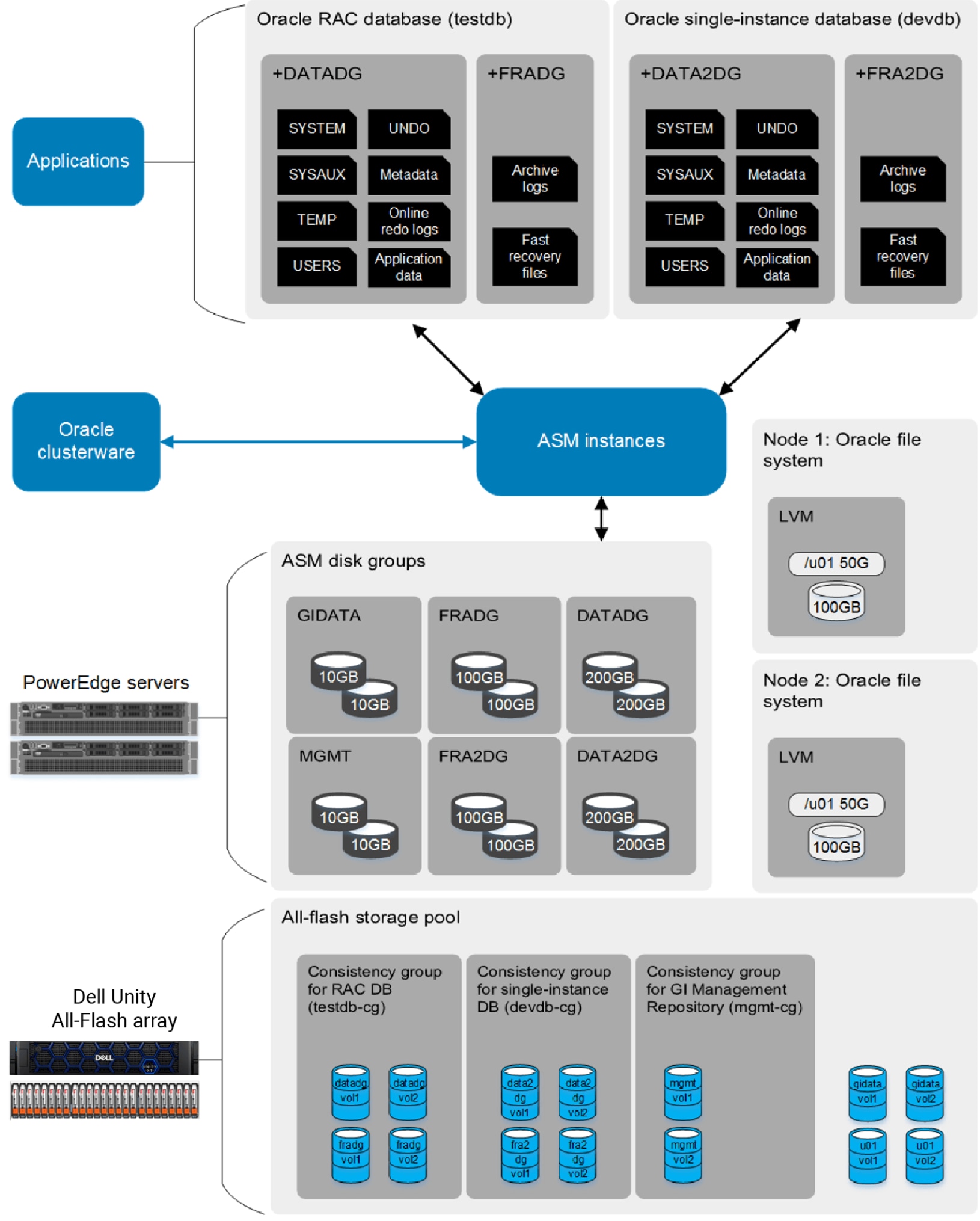
Figure 5. Oracle ASM storage layout on the Dell Unity System
Consistency group
For performance reasons, it is common for a database to span multiple LUNs to increase I/O parallelism to the storage devices. Dell Technologies recommends grouping the LUNs into a consistency group for a database to ensure data consistency when taking storage snapshots. The Dell Unity system snapshot feature is a quick and space-efficient way to create a point-in-time snapshot of the entire database. Section Data protection and recovery discusses using Dell Unity system snapshots and thin clones to reduce database recovery time and create space-efficient copies of the database.
In Figure 5, for example, the RAC database consists of disk group +DATADG and +FRADG. All ASM volumes in those disk groups are configured in a single consistency group, testdb_cg. The single instance database consists of disk groups +DATA2DG and +FRA2DG. The ASM devices of both disk groups are configured in a consistency group, devdb_cg.
The consistency group feature allows taking a database-consistent snapshot across multiple LUNs. On the database side, use the ALTER DATABASE BEGIN BACKUP clause before the snapshot is taken and END BACKUP clause after the snapshot is taken.
Note: Storage snapshots taken on a multiple-LUN database without a consistency group might be irrecoverable by Oracle during database recovery.
Expand Oracle ASM storage
As the storage consumption grows over time, it is necessary to increase and grow the existing storage capacity both in the Dell Unity system and in the database. It is most desirable to add capacity online with minimal business interruptions. The Dell Unity system has the flexibility to expand the current storage system with no interruption to the application. The following nondisruptive operations can be performed online in Unisphere:
- Adding flash devices
- Expanding the storage pool
- Increasing the size of existing LUNs
- Creating and adding new LUNs to existing hosts
The following subsections discuss the different ways to increase ASM storage capacity.
Increase Oracle ASM storage by adding new LUNs
More storage capacity can be added to an ASM disk group by adding new LUNs to the disk group. The advantage of this method is that the process is relatively simple and safe because no changes are made to the existing LUNs.
The following outlines the general process:
- Create LUNs in Unisphere.
- Ensure the size of new LUNs and other features such as compression, and that the consistency group matches the existing LUNs.
- Allow access to new LUNs to the host systems.
- Perform a SCSI scan on the host system (see section Discovering and identifying Dell Unity LUNs on a host).
- Configure multipath for the new devices (see section Multipathing).
- Prepare the LUNs for ASM (see section Preparing storage for Oracle ASM).
- Add the LUNs to the ASM disk group.
Since ASM automatically rebalances the data after new LUNs are added, it is recommended to add the LUNs in a single operation to minimize the amount of rebalancing work. The following example shows the SQL*Plus ALTER DISKGROUP ADD DISK statement to add multiple devices to a disk group.
ALTER DISKGROUP DATADG
ADD DISK 'AFD:DATADG_VOL1',
'AFD:DATADG_VOL2'
REBALANCE POWER 10
NOWAIT;
- Verify the status and capacity of the disk group with the Linux ASM command asmcmd.
asmcmd lsdsk -gk -G datadg
asmcmd lsdg –g datadg
- If the existing LUNs are in a consistency group, add the new LUNs to the same consistency group.
Note: Adding or removing LUNs in a consistency group is not allowed when there are existing snapshots of the consistency group. To add or remove LUNs in a consistency group, delete all snapshots and retry the operation.
Increase Oracle ASM storage by resizing current LUNs
The Dell Unity system can extend the size of existing LUNs online. However, depending on the operating system, disk partition configuration, and Oracle software chosen, resizing ASM disks online might not be possible. Customers should consult with each vendor to fully understand the capability and limitations of their software.
Note: Resizing LUNs on the operating system can cause loss of data or corruption. It is recommended to back up all data before attempting to resize the LUNs.
Resize ASM devices without ASMFD and ASMLib online
When not using ASMFD or ASMLib, and only using whole LUNs, it is possible to resize the devices online on a wide range of operating systems and Oracle versions. Customers should consult with each vendor to fully understand the capability and limitations of their software.
The following outlines the general steps to resize ASM devices online when ASMFD or ASMLib are not used to manage the ASM devices.
- Take manual snapshots of LUNs that are going to be expanded. See the section Data protection and recovery for more information about taking snapshots and recovering from snapshots.
- Expand the size of existing LUNs in Unisphere.
- Perform a SCSI scan on the host system and refresh the partition table on each LUN path and reload multipath devices.
- In Linux, if dm-multipath devices are used, reload the multipath devices
multipathd -k"resize map DATA03"
If PowerPath is used instead of dm-multipath, the new size is automatically updated.
- Verify the new LUN size.
- If dm-multipath is used, use the following Linux commands:
# multipath -ll ORA-TEST3 | egrep size
size=400G features='2 queue_if_no_path retain_attached_hw_handler' hwhandler='1 alua' wp=rw
# multipath -ll ORA-TEST3 | awk '/sd/ {print $(NF-4)}' | xargs -i fdisk -l /dev/{} | egrep "^Disk"
Disk /dev/sdfd: 429.5 GB, 429496729600 bytes, 838860800 sectors
Disk /dev/sdff: 429.5 GB, 429496729600 bytes, 838860800 sectors
Disk /dev/sdfh: 429.5 GB, 429496729600 bytes, 838860800 sectors
[snipped]
- If PowerPath, use the following Linux commands:
# fdisk –l /dev/emcpowerc
# powermt display dev=all|awk '/sd/ {print $3}'|xargs -i fdisk -l /dev/{}|egrep "^Disk"
- To determine the maximum size of the LUN, run asmcmd lsdsk and extract the OS_MB value. Use this value with the ALTER DISKGROUP RESIZE DISK clause.
# asmcmd lsdsk –k
Inst_ID Total_MB Free_MB OS_MB Name Failgroup Site_Name Site_GUID Site_Status Failgroup_Type Library Label Failgroup_Label Site_Label UDID Product Redund Path
1 204800 409464 409600 TEST3DG_0000 TEST3DG_0000 00000000000000000000000000000000 REGULAR System UNKNOWN /dev/mapper/ORA-TEST3
2 204800 409464 409600 TEST3DG_0000 TEST3DG_0000 00000000000000000000000000000000 REGULAR System UNKNOWN /dev/mapper/ORA-TEST3
Total_MB represents the current size before the resize operation.
OS_MB represents the new maximum size ASM can expand to.
- Using SQL*Plus, resize the ASM device.
ALTER DISKGROUP TEST3DG
RESIZE DISK TEST3DG_0000
SIZE 409600M
REBALANCE POWER 10;
- Verify the new ASM device size. After the resize operation completes, run asmcmd lsdsk to confirm the Total_MB value matches the OS_MB value.
# asmcmd lsdsk -k
Inst_ID Total_MB Free_MB OS_MB Name Failgroup Site_Name Site_GUID Site_Status Failgroup_Type Library Label Failgroup_Label Site_Label UDID Product Redund Path
1 409600 409464 409600 TEST3DG_0000 TEST3DG_0000 00000000000000000000000000000000 REGULAR System UNKNOWN /dev/mapper/ORA-TEST3
2 409600 409464 409600 TEST3DG_0000 TEST3DG_0000 00000000000000000000000000000000 REGULAR System UNKNOWN /dev/mapper/ORA-TEST3
Run asmcmd lsdg to confirm the Total_MB value on the disk group has increased.
# asmcmd lsdg
Inst_ID State Type Rebal Sector Logical_Sector Block AU Total_MB Free_MB Req_mir_free_MB Usable_file_MB Offline_disks Voting_files Name
1 MOUNTED EXTERN N 512 512 4096 4194304 409600 409464 0 409464 0 N TEST3DG/
2 MOUNTED EXTERN N 512 512 4096 4194304 409600 409464 0 409464 0 N TEST3DG/
Resize ASM devices with ASMFD
When Oracle 12.2 and newer ASMFD is used with ASM devices, it is possible to resize the ASM device online without impacting the database. For Oracle version 12.1, the option afd_refresh is not available.
Resize ASM devices online:
The following outlines the general steps to resize ASM devices with ASMFD online.
- Take manual snapshots of LUNs that are going to be expanded. See the section Data protection and recovery for more information about taking snapshots and recovering from snapshots.
- Expand the size of existing LUNs in Unisphere.
- Perform a SCSI scan on the host system and refresh the partition table on each LUN path and reload multipath devices.
- In Linux, if dm-multipath devices are used, reload the multipath devices
multipathd -k"resize map ORA-TEST3"
If PowerPath is used instead of dm-multipath, the new size is automatically updated.
- Verify the new LUN size.
- If dm-multipath is used, use the following Linux commands:
# multipath -ll ORA-TEST3 | egrep size
# multipath -ll ORA-TEST3 | awk '/sd/ {print $(NF-4)}' | xargs -i fdisk -l /dev/{} | egrep "^Disk"
- If PowerPath is used, use the following Linux commands:
# fdisk –l /dev/emcpowerc
# powermt display dev=all|awk '/sd/ {print $3}'|xargs -i fdisk -l /dev/{}|egrep "^Disk"
- Refresh the ASMFD devices.
# asmcmd afd_refresh
- To determine the maximum size of the LUN, run asmcmd lsdsk and extract the OS_MB value. Use this value with the ALTER DISKGROUP RESIZE DISK clause.
# asmcmd lsdsk –k
- Using SQL*Plus, resize the ASM device.
ALTER DISKGROUP DATADG
RESIZE DISK DATA03
SIZE $OS_MB
REBALANCE POWER 10;
- Verify the new size in the ASM device and disk group. After the resize operation completes, run asmcmd lsdsk to confirm the Total_MB value matches the OS_MB value.
# asmcmd lsdsk -k
Run asmcmd lsdg to confirm the Total_MB value on the disk group has increased.
# asmcmd lsdg
Resize ASM devices offline:
As mentioned previously in this section, the online resize capability of ASMFD is available in Oracle 12.2. With Oracle 12.1, either restart the host to refresh the LUN size, or restart the clusterware, ASM instance, and the AFD driver on the host to minimize the outage window. In a cluster environment, refreshing the LUN size can be done in a rolling fashion to further minimize the impact of the outage.
- Follow step 1 to step 5 in section Resize ASM devices without ASMFD and ASMLib online.
- Stop all databases on the host.
- Stop CRS.
# crsctl stop crs
- Reload the AFD driver.
# afdload stop
# afdload start
- Rescan the AFD devices.
# asmcmd afd_scan
- Restart CRS.
# crsctl start crs
- Restart the databases.
- Continue with step 6 to step 8 in section Resize ASM devices without ASMFD and ASMLib online.
- Repeat the process on other cluster nodes.
Another alternative to restarting the node or software is to unlabel and label the AFD devices. The database associated with the devices must be stopped, and the disk groups and devices must be unmounted before they can be relabeled. This approach increases the risk of data loss and corruption and requires extra caution.
Resize an ASM device with ASMLib
ASMLib required partitioned LUNs. To increase the size of the partition after expanding the LUN, the partition is first removed and then re-created with the new size. The database associated with the device will be impacted.
The following outlines the general steps to resize ASM devices with ASMLib online.
- Take manual snapshots of LUNs that are going to be expanded. See the section Data protection and recovery for more information about taking snapshots and recovering from snapshots.
- Expand the size of the existing LUNs in Unisphere.
- Perform a SCSI scan on the host system, refresh the partition table on each LUN path, and reload the multipath devices.
# rescan-scsi-bus.sh --resize
- In Linux, if dm-multipath devices are used, reload the multipath devices
multipathd -k"resize map TEST67_ASMLIB"
If PowerPath is used instead of dm-multipath, the new size is automatically updated.
- Verify the new LUN size.
- If dm-multipath is used, use the following Linux commands:
# multipath -ll TEST67_ASMLIB | egrep size
# multipath -ll TEST67_ASMLIB | awk '/sd/ {print $(NF-4)}' | xargs -i fdisk -l /dev/{} | egrep "^Disk"
- If PowerPath is used, use the following Linux commands:
# fdisk –l /dev/emcpowerc
# powermt display dev=all|awk '/sd/ {print $3}'|xargs -i fdisk -l /dev/{}|egrep "^Disk"
- Stop the database across the cluster.
$ srvctl stop db -d demodb
- Use SQL*Plus to dismount the disk group on all cluster nodes.
ALTER DISKGROUP TEST67_ASMLIBDG DISMOUNT;
- In Linux, remove and re-create the partition.
parted /dev/mapper/TEST67_ASMLIB rm 1
parted /dev/mapper/TEST67_ASMLIB mkpart primary 2048s 100%
- In Linux, rescan the LUNs on all cluster nodes.
rescan-scsi-bus.sh –resize
- In Linux, if using dm-multipath, refresh the multipath device on all cluster nodes.
multipathd -k"resize map TEST67_ASMLIB"
If PowerPath is used instead of dm-multipath, the new size is automatically updated.
- Update the partition on all cluster nodes.
partprobe /dev/mapper/TEST67_ASMLIB
parted /dev/mapper/TEST67_ASMLIB u GB p
parted command should show the new size.
- Rescan and list the ASMLib devices on all cluster nodes.
oracleasm scandisks
oracleasm listdisks
- Using SQL*Plus to mount the disk group on all cluster nodes.
ALTER DISKGROUP TEST67_ASMLIBDG MOUNT;
- Run asmcmd lsdsk to extract the OS_MB value to determine the maximum LUN size.
# asmcmd lsdsk –k –g –G TEST67_ASMLIBDG
- Use SQL*Plus to resize the ASM device.
ALTER DISKGROUP TEST67_ASMLIB
RESIZE DISK TEST67_ASMLIB
SIZE $OS_MB
REBALANCE POWER 10;
- Verify the new size in the ASM device and disk group. After the resize operation completes, run asmcmd lsdsk to confirm the Total_MB value matches the OS_MB value.
# asmcmd lsdsk -k
Run asmcmd lsdg to confirm the Total_MB value on the disk group has increased.
# asmcmd lsdg
- Restart the database.
$ srvctl start db -d demodb
Space reclamation
Dell Unity system supports the SCSI TRIM/UNMAP feature which allows operating systems to inform which data blocks are no longer in use and can be released for other uses. For space reclamation to work, the LUNs must be thin provisioned in the Dell Unity system and the Linux kernel, and Oracle ASM must also support the feature. The TRIM/UNMAP feature has been introduced in Linux kernel 2.6.28-25 and newer. With Oracle 12.2 ASMFD, thin-provisioned ASM diskgroups allow deleted space in datafiles to be reclaimed.
To verify the availability of the feature on the Linux operating system, query /sys/block/$disk/queue/discard_granularity. If the value is zero, it means the device does not support discard functionality. For example, since device sdx has a non-zero discard_granularity value, its free space will be reclaimed with TRIM/UNMAP.
# cat /sys/block/sdx/queue/discard_granularity
8192
Prepare ASM disk group for space reclamation
- Ensure LUNs are thin provisioned in the Dell Unity storage system.
- Create datafiles with an initial size and enable autoextend on the datafiles.
- Set the THIN_PROVISIONED attribute to 'TRUE' on the disk group.
Reclaim space in ASM disk group
The following outlines the general steps to reclaim storage space in Oracle ASM.
- Delete rows, tables, objects, or tablespaces.
- Use SQL*Plus to enable the ROW MOVEMENT attribute on the tables.
ALTER TABLE <$TABLE_NAME> ENABLE ROW MOVEMENT;
- After deleting objects in a table, run SQL*Plus command ALTER TABLE SHRINK SPACE to repack the rows, move the high water mark, and release unused extents in the datafiles.
ALTER TABLE <$TABLE_NAME> SHRINK SPACE;
- Determine the high water mark (HWM) of each datafile and prepare the resize statements using the following script provided by Oracle. The original post can be found in the following Oracle article: https://asktom.oracle.com/pls/apex/f?p=100:11:0::::P11_QUESTION_ID:766625833673
# cat find_datafile_hwm.sql
set verify off line 200 pages 100
column file_name format a50 word_wrapped
column smallest format 999,990 heading "Smallest|Size|Poss."
column currsize format 999,990 heading "Current|Size"
column savings format 999,990 heading "Poss.|Savings"
break on report
compute sum of savings on report
column value new_val blksize
select value from v$parameter where name = 'db_block_size'
/
select file_name,
ceil( (nvl(hwm,1)*&&blksize)/1024/1024 ) smallest,
ceil( blocks*&&blksize/1024/1024) currsize,
ceil( blocks*&&blksize/1024/1024) -
ceil( (nvl(hwm,1)*&&blksize)/1024/1024 ) savings
from dba_data_files a,
( select file_id, max(block_id+blocks-1) hwm
from dba_extents
group by file_id ) b
where a.file_id = b.file_id(+)
/
column cmd format a85 word_wrapped
select 'alter database datafile ''' || file_name || ''' resize ' ||
ceil( (nvl(hwm,1)*&&blksize)/1024/1024 ) || 'm;' cmd
from dba_data_files a,
( select file_id, max(block_id+blocks-1) hwm
from dba_extents
group by file_id ) b
where a.file_id = b.file_id(+)
and ceil( blocks*&&blksize/1024/1024) -
ceil( (nvl(hwm,1)*&&blksize)/1024/1024 ) > 0
/
The prior script generates the following output.
VALUE
--------------------------------------------------------------------------
8192
Smallest
Size Curr Poss.
FILE_NAME Poss. Size Savings
---------------------------------------------- -------- ------ --------
+DATADG/DEMODB/DATAFILE/system.257.952265543 841 850 9
+DATADG/DEMODB/DATAFILE/demots.289.952606307 16,328 17,014 686
+DATADG/DEMODB/DATAFILE/undotbs1.259.952265593 12,932 24,708 11,776
+DATADG/DEMODB/DATAFILE/undotbs2.265.952265669 37 1,024 987
+DATADG/DEMODB/DATAFILE/demots.337.952606345 17,220 17,652 432
+DATADG/DEMODB/DATAFILE/demots.320.952606331 16,712 17,462 750
+DATADG/DEMODB/DATAFILE/sysaux.258.952265577 2,008 2,030 22
+DATADG/DEMODB/DATAFILE/users.260.952265593 1 5 4
--------
sum 14,666
8 rows selected.
CMD
-------------------------------------------------------------------------------------
alter database datafile '+DATADG/DEMODB/DATAFILE/system.257.952265543' resize 841m;
alter database datafile '+DATADG/DEMODB/DATAFILE/demots.289.952606307' resize 16328m;
alter database datafile '+DATADG/DEMODB/DATAFILE/undotbs1.259.952265593' resize
12932m;
alter database datafile '+DATADG/DEMODB/DATAFILE/undotbs2.265.952265669' resize 37m;
alter database datafile '+DATADG/DEMODB/DATAFILE/demots.337.952606345' resize 17220m;
alter database datafile '+DATADG/DEMODB/DATAFILE/demots.320.952606331' resize 16712m;
alter database datafile '+DATADG/DEMODB/DATAFILE/sysaux.258.952265577' resize 2008m;
alter database datafile '+DATADG/DEMODB/DATAFILE/users.260.952265593' resize 1m;
8 rows selected.
- To resize the datafiles, copy and paste the ALTER DATABASE RESIZE statements associated with the datafiles. For example, the previous statements in bold shrink only the demodb tablespace that resides in the DATADG disk group.
- Use the following SQL*Plus command to manually rebalance the disk group.
ALTER DISKGROUP DATADG REBALANCE POWER 10;
- Confirm the release of the space in Unisphere by observing the Capacity and Space Used information on the LUN properties page. It might take several minutes to see the changes depending on the amount of data and how busy the system is at the time.
Note: Deleted space is not released until either the datafiles are deleted or shrunk and a rebalance operation is run against the ASM disk groups.
Linux LVM
File systems
Dell Unity file storage
Introduction
Dell Unity front-end Ethernet connectivity for file storage
Dell Unity x80F storage systems support NAS connections on multiple 10 GbE and 25 GbE ports. In an Oracle NFS environment, 25 Gb/s is recommended for the best performance. Starting with OE version 4.4, the ports on the embedded 4-port network card and optional Ethernet I/O modules that are used for NAS servers, replication, and import. These ports can be configured to a custom MTU size from 1280 through 9216.
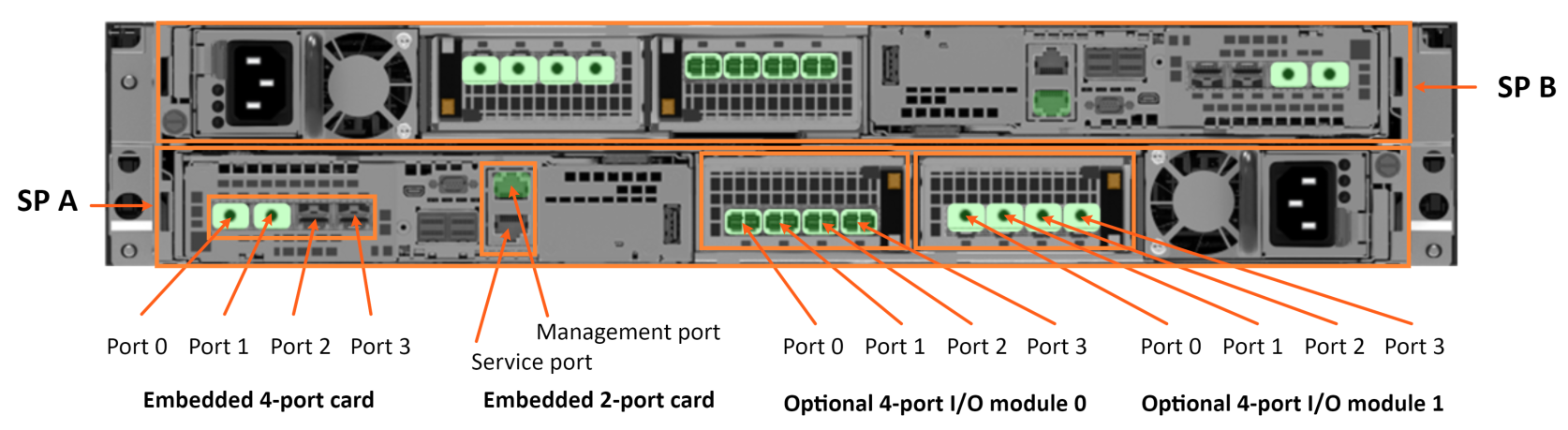
Figure 6. Dell Unity 480F, 680F, and 880F front-end Ethernet ports
Ports from iSCSI interfaces must still use 1500 or 9000 for MTU. Ports with custom MTU sizes can be configured for link aggregations and fail-safe networking (FSN), if the MTU size matches on all ports. See section 2.1 Interfaces of Dell Unity: NAS Capabilites for more information. For more information about Jumbo frames/MTU 9000, see the sections:
- Jumbo frames,
- Viewing the MTU size of Unity interfaces, and
- Changing the MTU size of Unity’s interface ports
Consideration should be given to configure highly available Unity network interfaces when the interfaces are used by an Oracle database. For more information about highly available Unity interfaces, see the sections: Dell Unity NAS servers, and Configuring LACP—NAS server.
Note: See the note in section Dell Unity file system and Oracle ASM disks regarding using NFS with Oracle ASM.
For more information, see the Dell Unity: NAS Capabilities, Dell Unity: Best Practices Guide, and Dell Unity: Service Commands documents.
Obfuscated IP addresses and network information
For security reasons, all network configuration information (IPv4 and IPv6 IP addresses, subnet, CIDR, gateway, VLAN, and MAC addresses) has been redacted with character strings. When applying the content of this paper, replace the given character strings with the appropriate network information from your target environment.
Table 7. Obfuscated IP addresses and network information used in this paper
|
NAS server interfaces |
NAS server network IP address |
Host interface |
Host interface IP address |
Usage |
|
|
|
eno3 |
www.www.www.www |
Public network |
|
4-Port card, Ethernet Port 0 |
mmm.mmm.mmm.mmm |
eno3 |
www.www.www.www |
Public network traffic and NFS traffic |
|
Link Aggregation Ocp 0 0 ( 4-Port card, Ethernet Port 0, 4-Port card, Ethernet Port 1) |
mmm.mmm.mmm.mmm |
bond1 ( |
xxx.xxx.xxx.xxx |
dNFS control traffic |
|
Link Aggregation Iom 1 0 ( Iom 1, Ethernet Port 0, Iom 1, Ethernet Port 1) |
ddd.ddd.ddd.ddd |
enp131s0f0 |
yyy.yyy.yyy.yyy |
dNFS channel 0 – application data traffic |
|
Link Aggregation Iom 1 2 ( Iom 1, Ethernet Port 2, Iom 1, Ethernet Port 3) |
fff.fff.fff.fff |
enp3s0f0 |
ttt.ttt.ttt.ttt |
dNFS channel 1 – application data traffic |
|
Network component |
Obfuscated string |
|
|
Broadcast |
bbb.bbb.bbb.bbb |
|
|
Subnet (network ID) |
nnn.nnn.nnn.nnn |
|
|
Subnet mask |
sss.sss.sss.sss |
|
|
CIDR |
cc |
|
|
Gateway |
ggg.ggg.ggg.ggg |
|
|
VLAN |
vvv |
|

Figure 7. Unity NAS Server link aggregated network interfaces
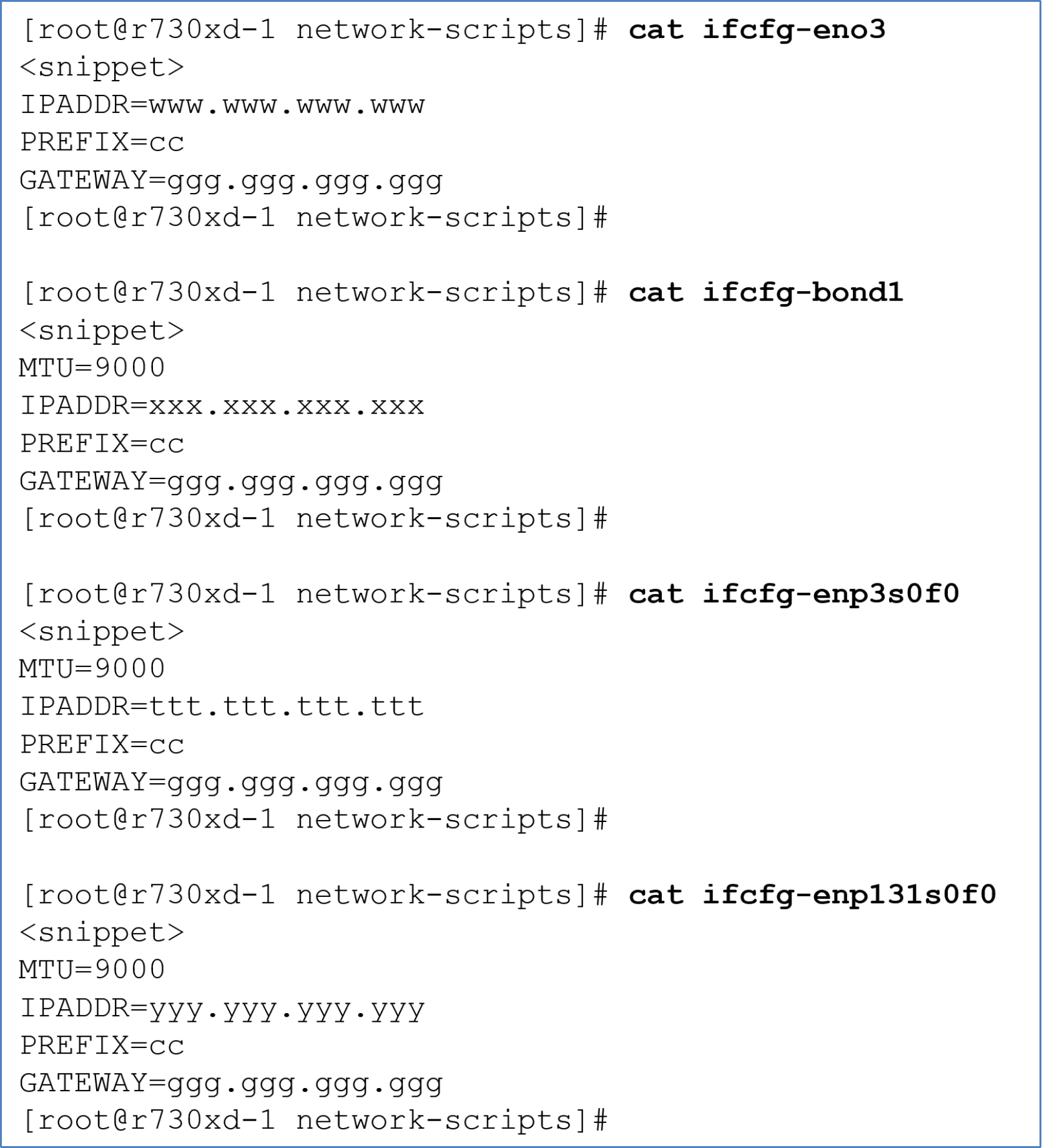
Figure 8. Snippets of interface configuration files from the NFS client
Dell Unity NAS servers
Dell Unity NAS servers are assigned to a single SP. All file systems serviced by a NAS server will have their I/O processed by the SP on which the NAS server is resident or current. If multiple NAS servers are required, load balance NAS servers by creating them on SP A and SP B such that the front-end NFS I/O is distributed evenly between SPs. Because both SPs can be used simultaneously, do not overprovision either of the SPs so that the peer SP does not become overloaded if an SP failover occurs.
Because each NAS server is logically separate, NFS clients of a NAS server cannot access data on another NAS server. Logically separate NAS servers can provide database isolation and protection across multiple NFS clients (database servers).
Unity NAS servers must have one or more interfaces that are created on one or more Ethernet ports from either the onboard embedded four port card or optional I/O modules. Should a failure occur on a single-link Unity network, the system does not initiate an SP failover to the peer SP. In an Oracle environment, such a failure would cause the database to appear unresponsive. Therefore, Dell Technologies recommends configuring highly available NAS Server networks for Oracle environments.
Highly available Unity network interfaces can be configured either as link aggregations or fail-safe networks. Link aggregations combine multiple Ethernet ports from either the onboard four-port card or optional I/O modules into one logical link. Link aggregations provide link redundancy and increased bandwidth. If a link in the link aggregate fails, traffic is automatically routed to surviving links in the link aggregate. For information about creating a link aggregation, see the section Unity link aggregation configuration.
Fail-safe networking (FSN) was made available starting with OE version 4.2.1. FSN is a high availability feature that extends link failover by supporting switch-level redundancy. FSN can consist of Ethernet ports, link aggregations, or both.
For more information about link aggregations, FSN, or high availability and redundancy, reference the Dell Unity: NAS Capabilities, and Dell Unity; High Availability white papers on Dell Technologies Info Hub,
For brevity, Unity NAS Server network interfaces configured as Fail-safe networks are not discussed in this document.
Supported NFS protocols
Dell Unity storage supports NFSv3 through NFSv4.1, including secure NFS.
All Dell Unity OE versions support Oracle dNFS in single-node configurations. Starting with OE version 4.2, Oracle Real Application Clusters (RAC) are also supported.
Unity 4.2 and newer versions, and Oracle dNFS starting with Oracle 12c have support for NFSv3, NFSv4, and NFSv4.1 protocols, with the following exceptions:
- Unity does not support directory delegation and parallel NFS (pNFS), and
- Unity 4.2 and new versions supports Oracle dNFS with NFSv3 protocol.
Therefore, do not configure pNFS in Oracle, and use the NFSv3 protocol if dNFS is used.
Note: pNFS refers to a protocol to access an NFS server, while dNFS refers to a driver built into the Oracle Disk Manager (ODM).
Creating a NAS server and adding a link aggregation network interface
This section assumes a link aggregation has been created.
To create a NAS server in Unity, perform the following steps in Unisphere:
- Select File > NAS Servers > +
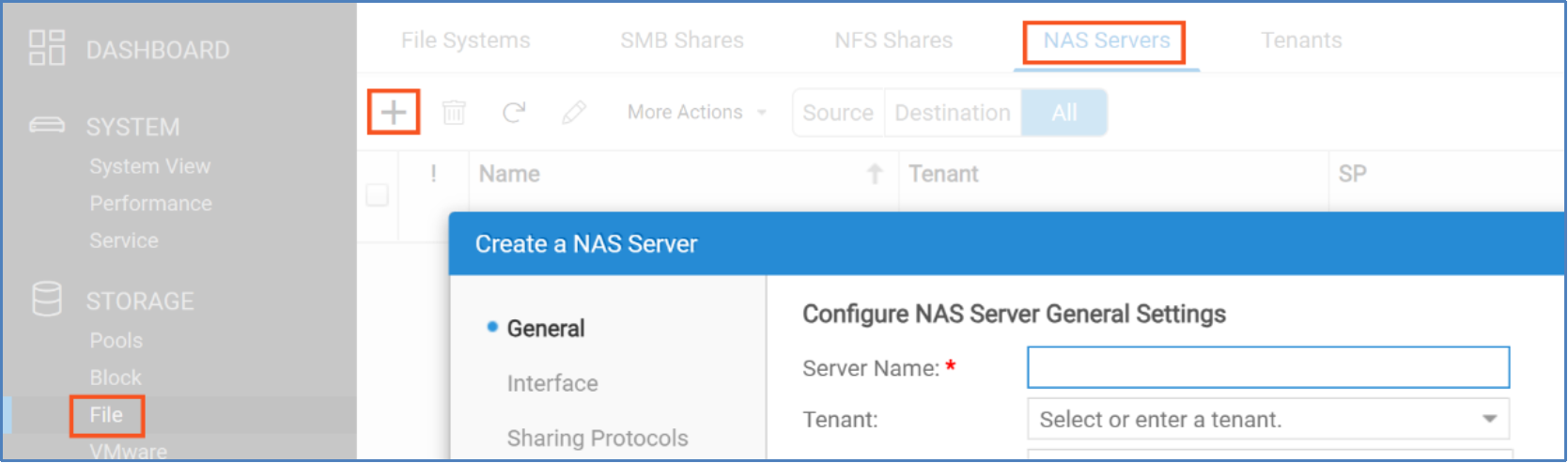
Figure 9. Starting the “Create a NAS Server” wizard
- Supply the general information for the NAS server, then select Next.
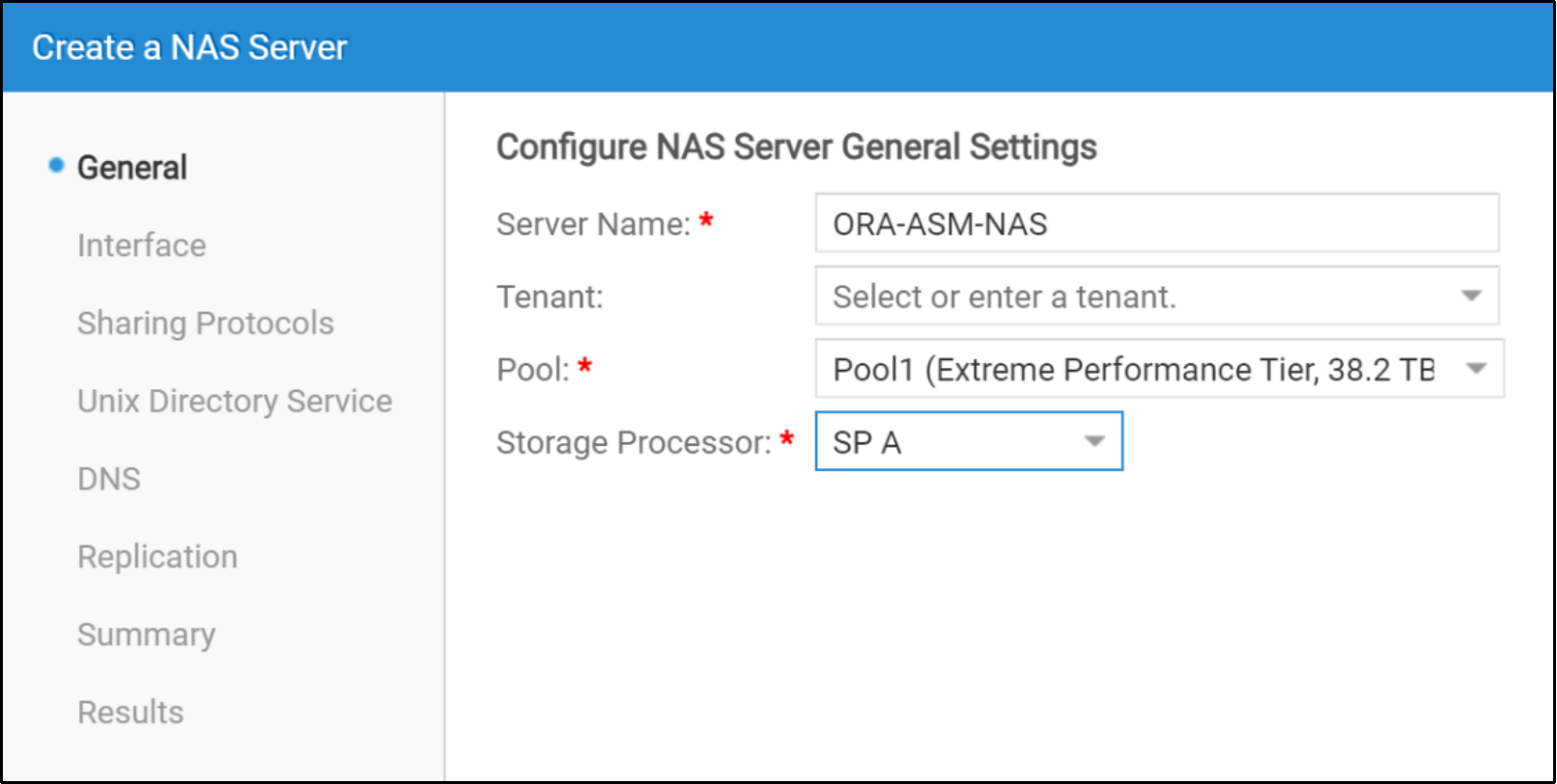
Figure 10. Specify general settings for a NAS Server
- When prompted for Ethernet Port, select the appropriate Unity interface. The selected interface will become the preferred interface for the NAS Server. Should the NAS server only have a preferred interface, the preferred interface is used for controlling and managing the NAS server and NFS share, and NFS data traffic. The IP address associated with the interface is used to mount and manage the NAS share on the NFS client. If the NAS Server will be hosting an Oracle database, Dell Technologies recommends selecting a link aggregation.
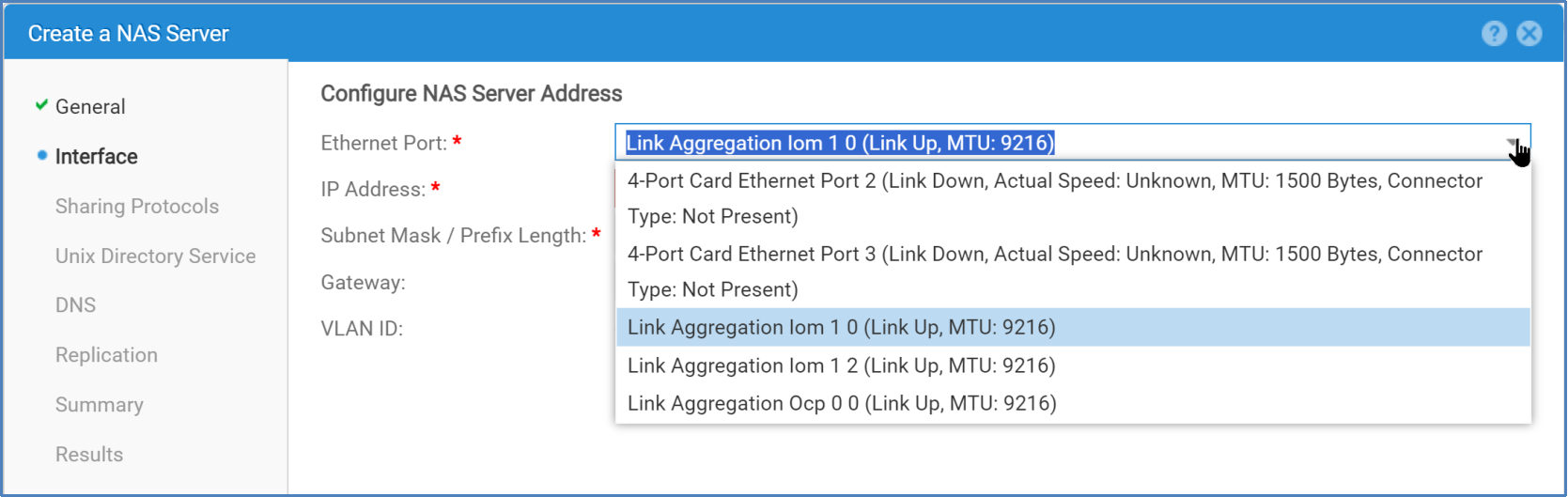
Figure 11. Specifying a network interface for the NAS Server
If no Link Aggregations appear in the list of available interfaces, it is because no Link Aggregations have been configured in Unity. For information about creating link aggregations in Unity, see the section Creating Unity link aggregations.
Notes:
1) The Ethernet switch interfaces that are cabled to the port members of a Unity Link Aggregation must be members of a port channel on the switch. See Figure 54 and Figure 55 in the section Unity link aggregation and Ethernet switch port channel configuration.
2) Dell Technologies recommends using two TOR switches for redundancy in production environments. The lab that we used for this paper is configured with a single TOR switch.
3) When you select the Ethernet Port interface, Unity will automatically assign the corresponding Ethernet Port from the peer SP to the peer SP interface.
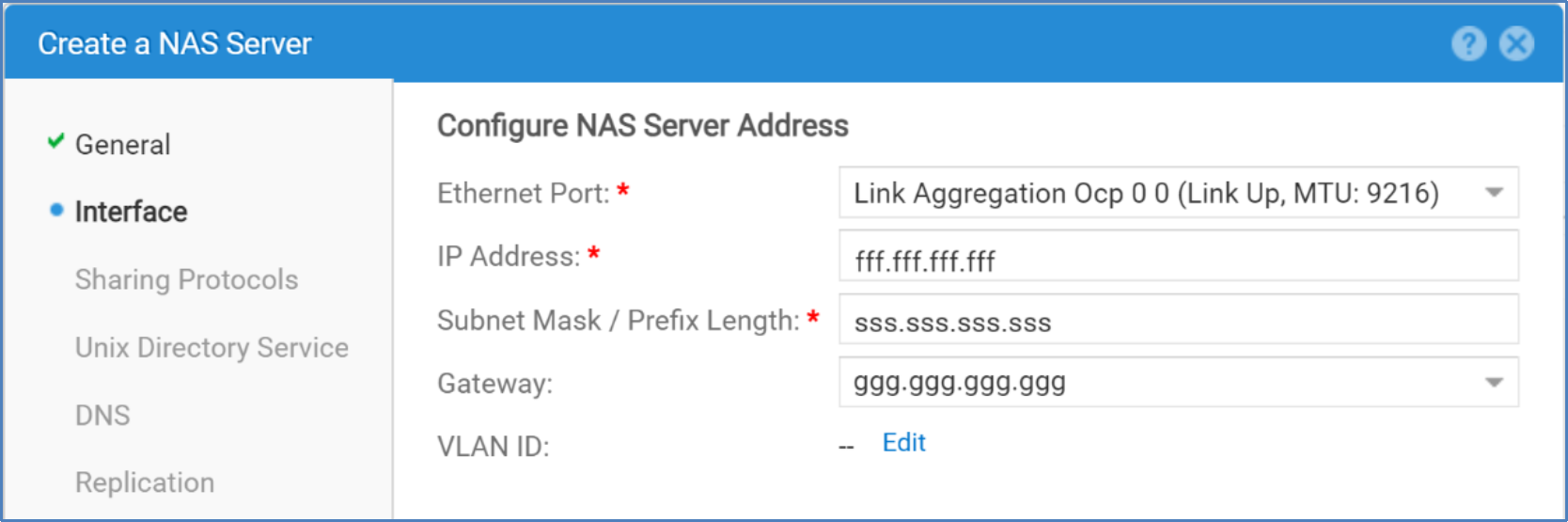
Figure 12. Specifying an interface and network information for the NAS Server interface
Note: Specifying a value for VLAN ID instructs Unity to tag the network frames with the specified VLAN ID. If you are unsure if a VLAN ID should be specified, ask the Network Administrator responsible for the candidate IP address of this Unity NAS server interface.
If you select Edit to the right of VLAN ID, the following cautionary note will be displayed.
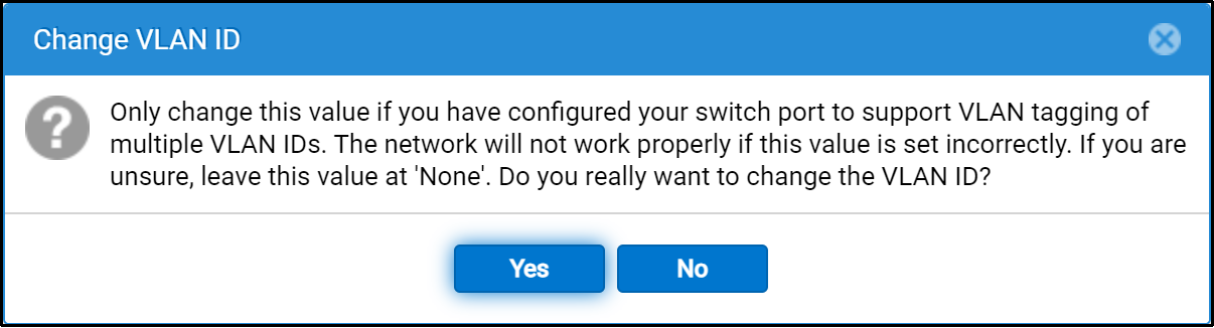
Figure 13. Cautionary note on specifying a VLAN ID.
Our lab uses VLANs, and tagged switch interfaces cabled to the Unity interfaces. Therefore, Edit > Yes was selected and the appropriate VLAN ID for our environment was specified (see Figure 14).
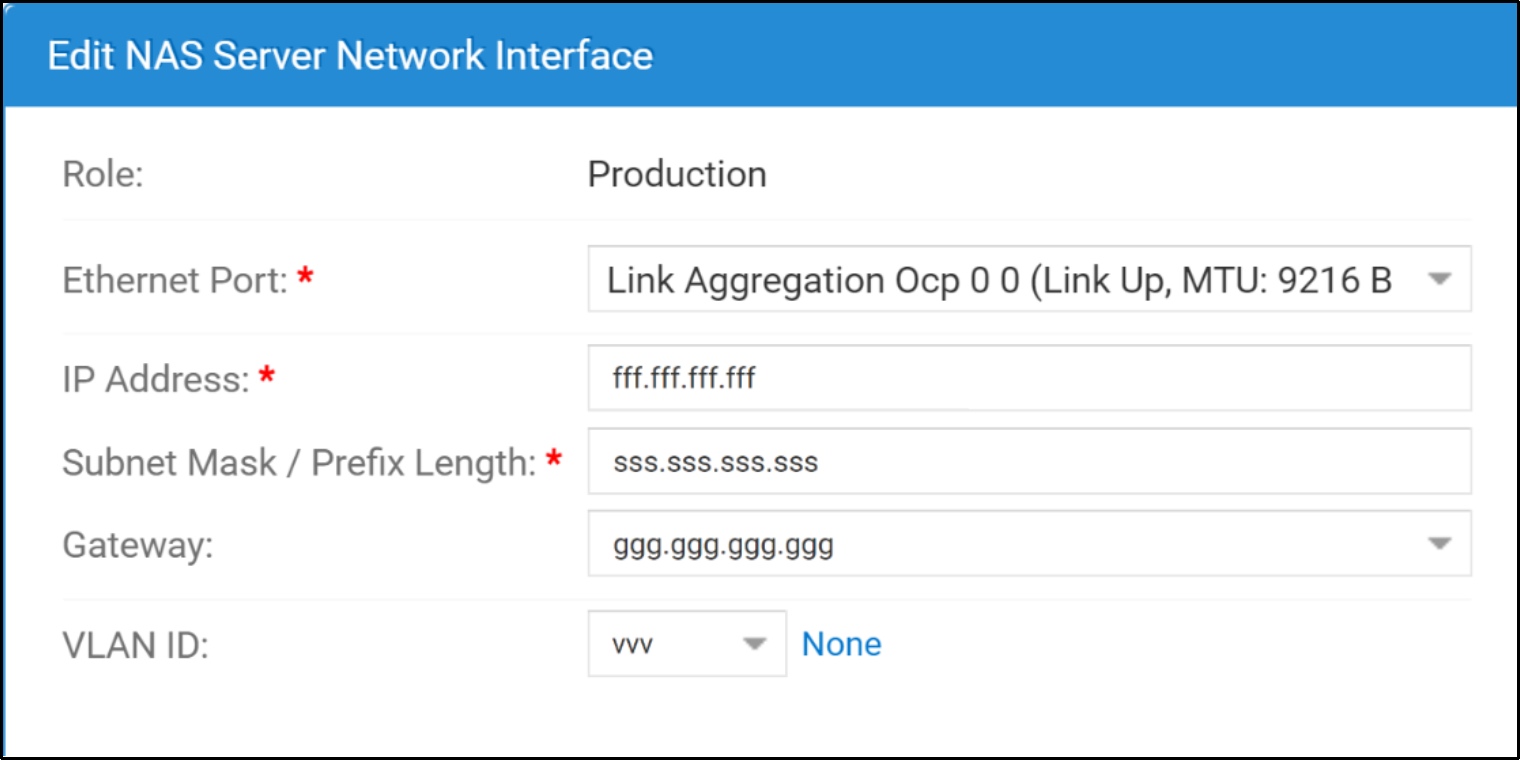
Figure 14. Specifying a VLAN ID.
VLAN ID should be set to None if:
- VLANs are not used, or
- VLANs are used, but the switch interfaces connected to the Unity interfaces of SPA and SPB chosen for this NAS Server are untagged to the VLAN ID.
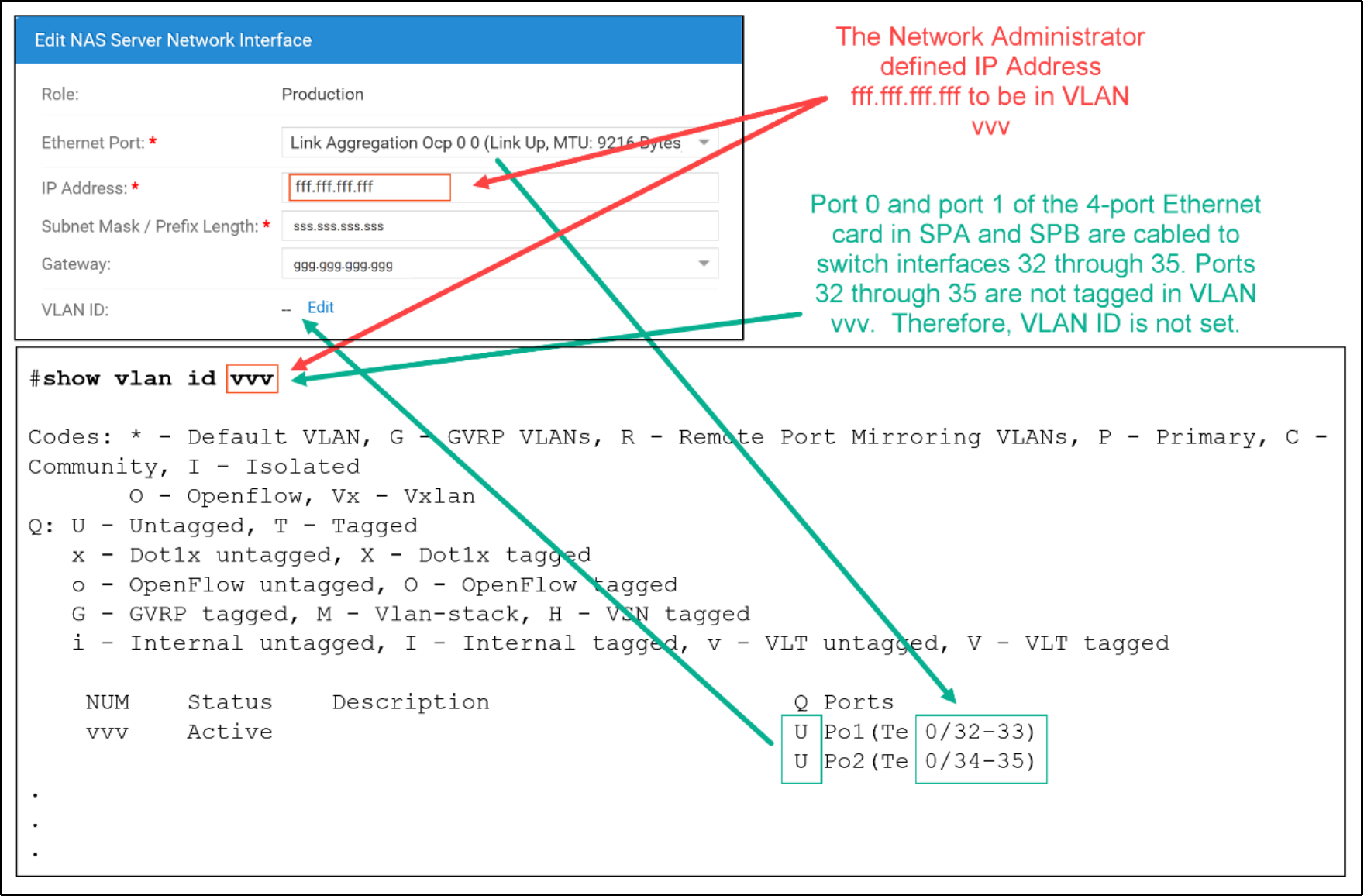
Figure 15. No VLAN ID specified if the corresponding switch port channel is untagged
If the switch interfaces connected to the Unity interfaces are tagged to the VLAN of the IP address (fff.fff.fff.fff) of the Unity interface, set the VLAN ID (see Figure 16).
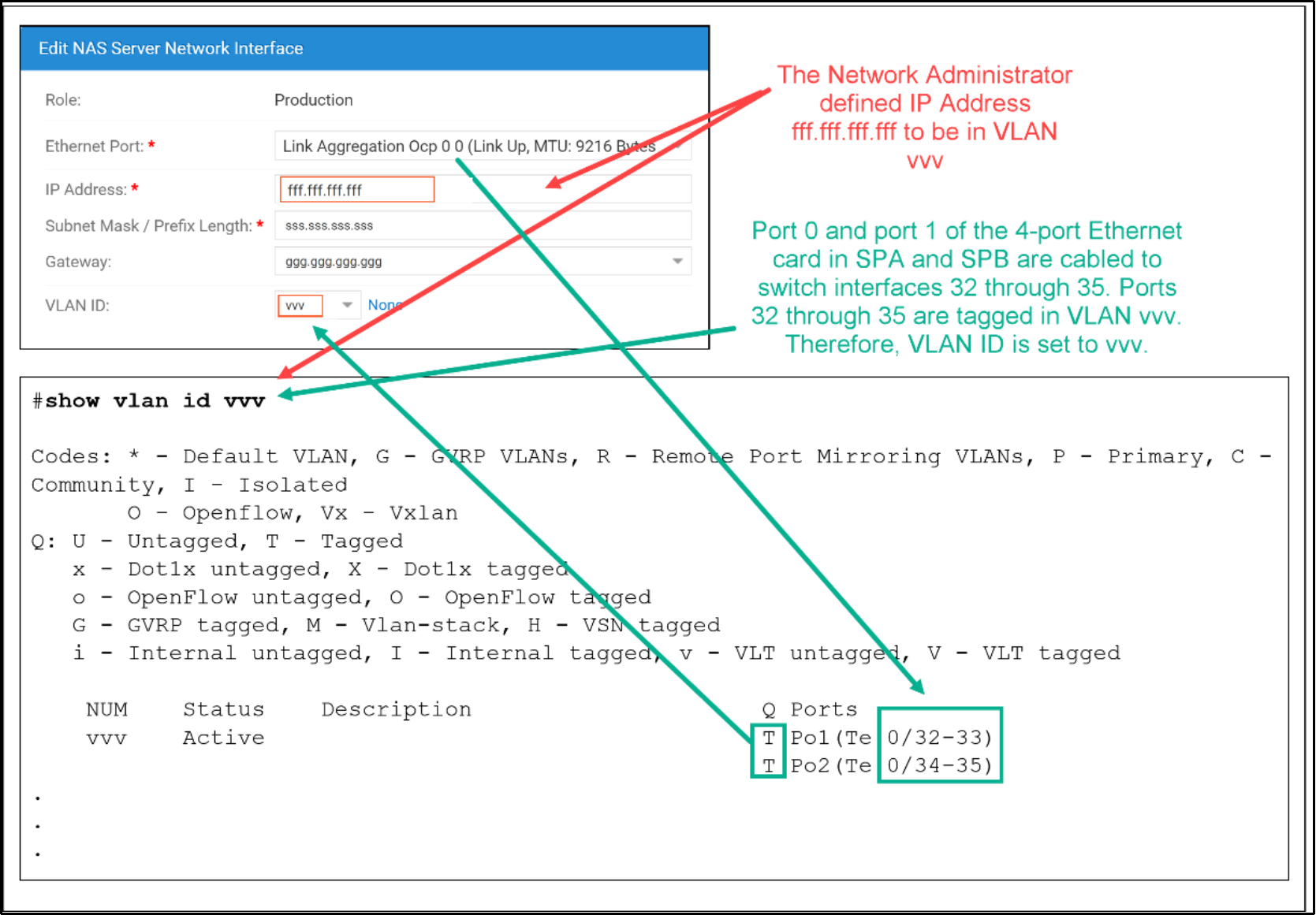
Figure 16. VLAN ID specified if the corresponding switch port channel is tagged in the specified VLAN.
- Select NFS protocol NFSv3.
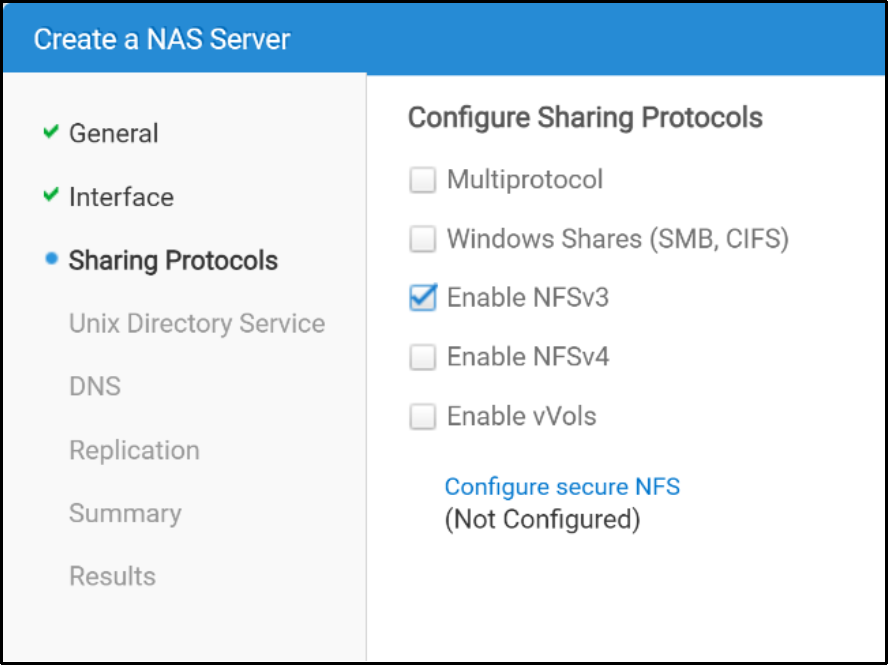
Figure 17. Defining sharing protocols for the NAS Server
- Only configure a UNIX Directory Service, DNS, and Replication if they are needed.
- After configuring all components of the NAS Server, the Create a NAS Server wizard will display a summary of your request. If the request is correct, click Finish.
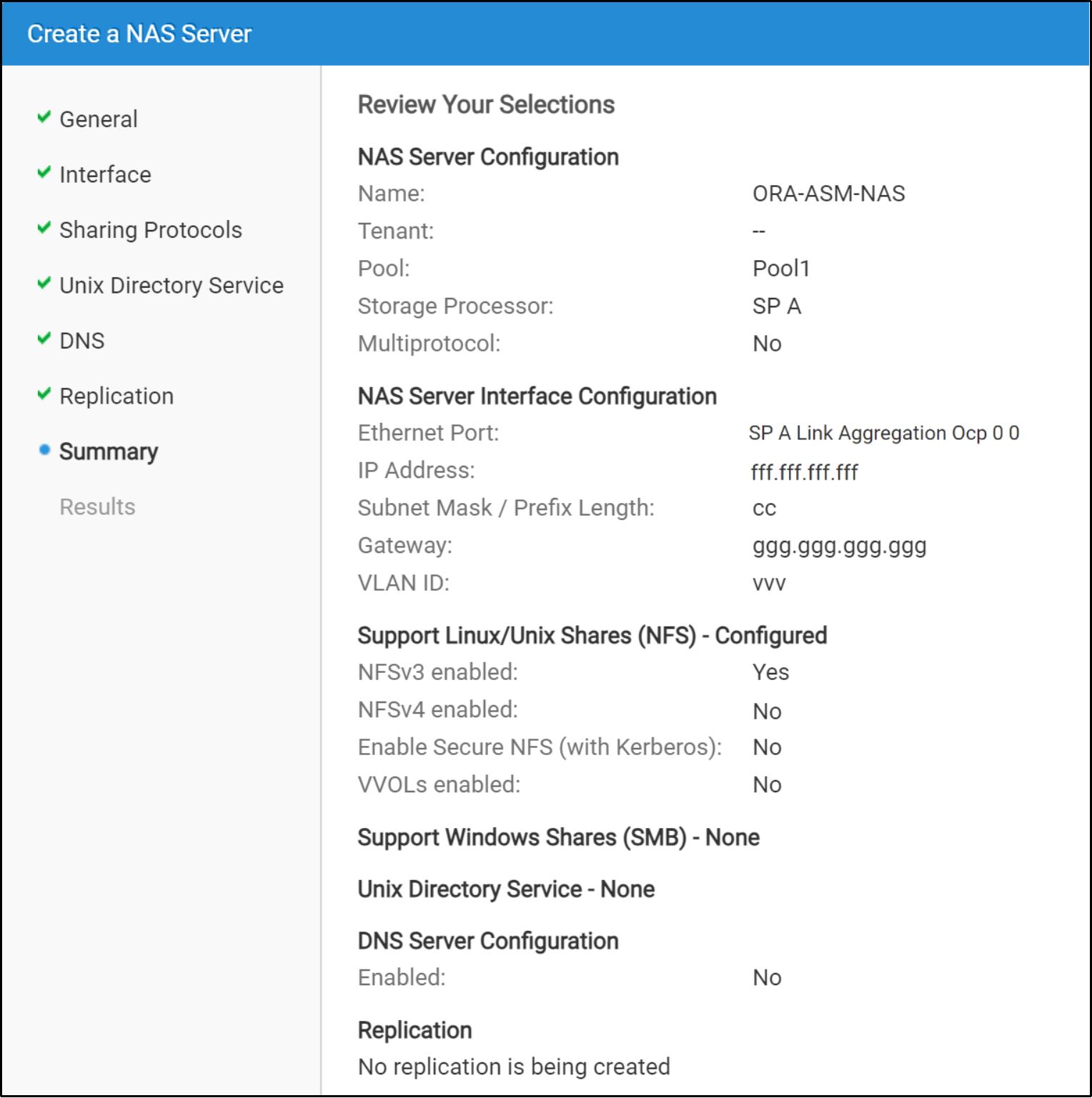
Figure 18. Summary of request to create a NAS Server
After a NAS server is created, the Dell Unity NFS file systems and then Dell Unity NFS shares can be created. See sections Dell Unity NFS file system for more information.
To increase throughput on the NAS server, additional interfaces (single or link aggregate) can be added to the NAS server. For information about adding more network interfaces to a Unity NAS server, see the section: Adding additional interfaces to Unity NAS Servers.
Adding additional interfaces to Unity NAS Servers
There are several use cases for using multiple interfaces in a Unity NAS Server. Two of them are:
- Increasing throughput, and
- Using dedicated interfaces for NFS control traffic and NFS data traffic for Oracle dNFS channels. For more information see the sections: Ethernet networks and dNFS, and Multiple client interfaces for dNFS.
If either of these use cases exist, consider adding one or more interfaces to the Unity NAS Server. Extra interaces added to the NAS server are added as a nonpreferred network interface.
To add additional interfaces to the Unity NAS Server, perform the following in Unisphere:
- Select File > NAS Servers > double-click the NAS server name > Network > Interfaces & Routes > +.
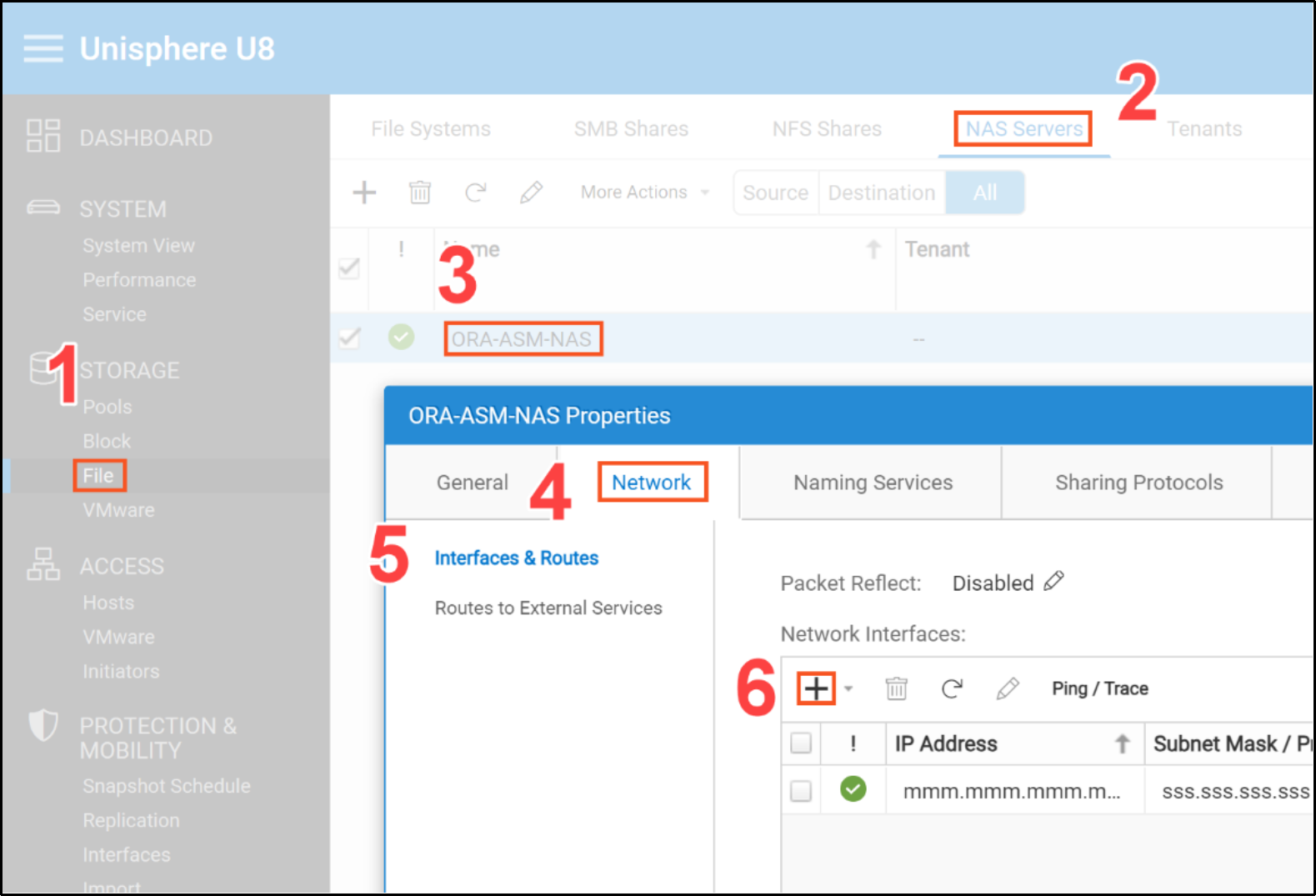
- Select either Production IP Interface or IP Interface for Backup & Test.
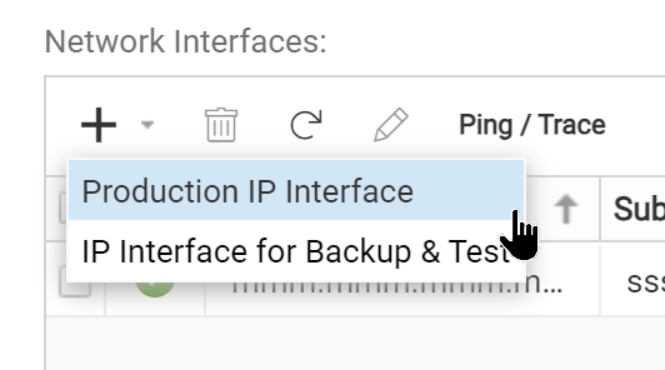
Note: NAS server interfaces can be either configured as production, or backup and DR testing interfaces. The type of interface dictates the type of activity that can be performed. Table 8 displays the characteristics of the interface types.
Table 8. NAS server interface types
|
Interface type |
Characteristics |
|
Production |
|
|
Backup and DR test |
|
- When prompted for Ethernet Port, select the appropriate Unity interface.
Note: To avoid a network interface single point of failure, Dell Technologies recommends selecting a highly available network interface when the NAS Server is used to host an Oracle database.
Figure 19. Specifying a network interface for the NAS Server
If no highly available interface appears in the list of available interfaces, it is because no highly available interface has been configured in Unity. For information about creating Unity link aggregations, see the section Configuring LACP—NAS server Creating Unity link aggregations.
Notes:
1) Ethernet switch interfaces that are cabled to the Unity Link Aggregation port members must be members of a switch port channel. See Figure 21 and the section Unity link aggregate and Ethernet switch port channel configuration.
2) Dell Technologies recommends using two TOR switches for redundancy in production environments. The lab that we used for this paper is configured with a single TOR switch. Also, see the note in the section Dell Unity file system and Oracle ASM disks regarding redundancy considerations.
3) When you select the Ethernet Port interface, Unity automatically configures the same interface on the peer SP.
- Specify the network IP address, subnet mask, and gateway.
- Specify the VLAN ID if the environment requires it.
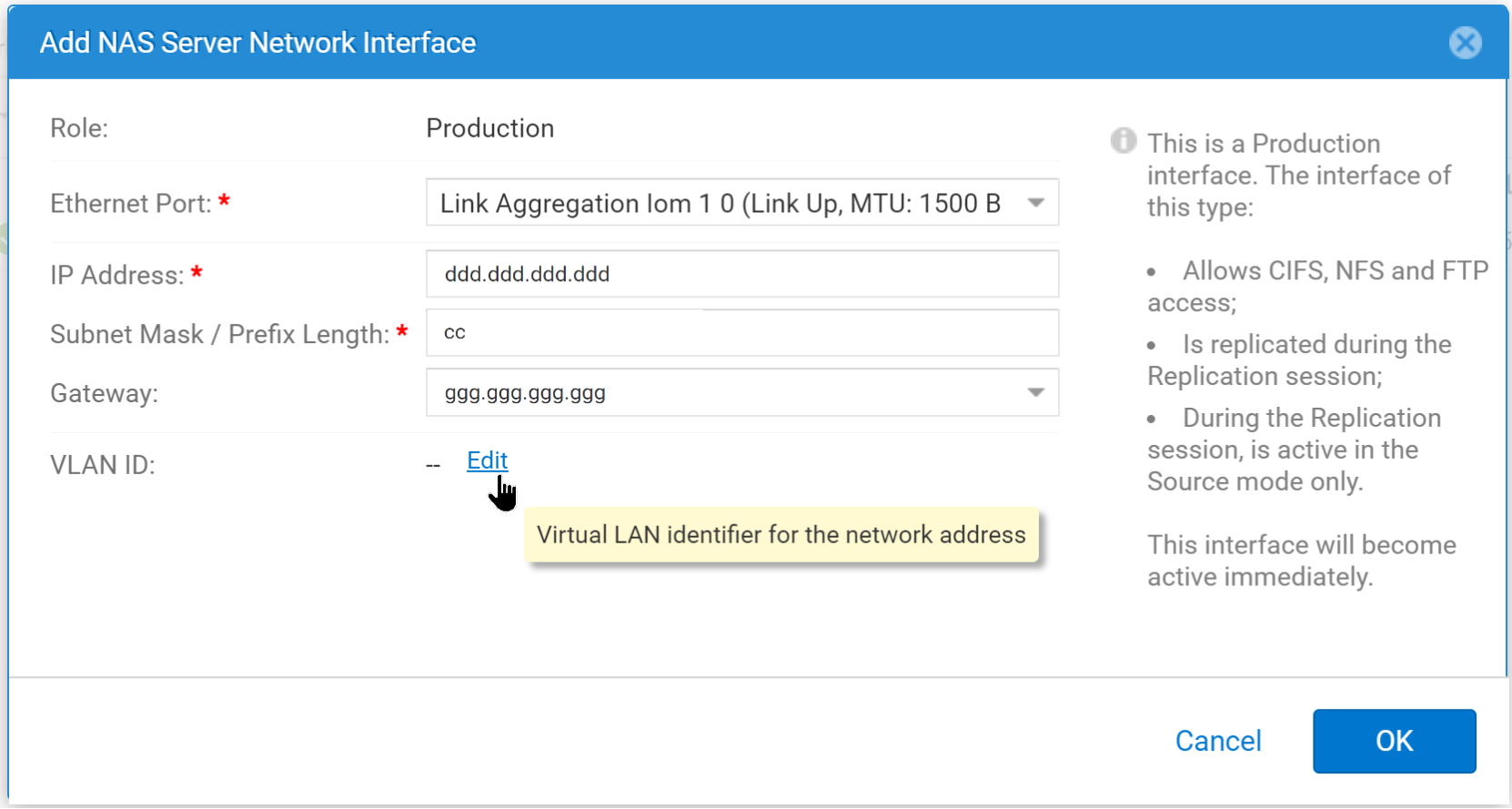
Figure 20. Specifying network information for the interface
Note: For more information about specifying a VLAN ID, see step 4 in the section Creating a NAS server and adding a link aggregation network interface.
- Select OK.
Repeat this section if additional link aggregate network interfaces are needed in the NAS Server.
The NAS Server interfaces in Figure 21 were configured for this paper:
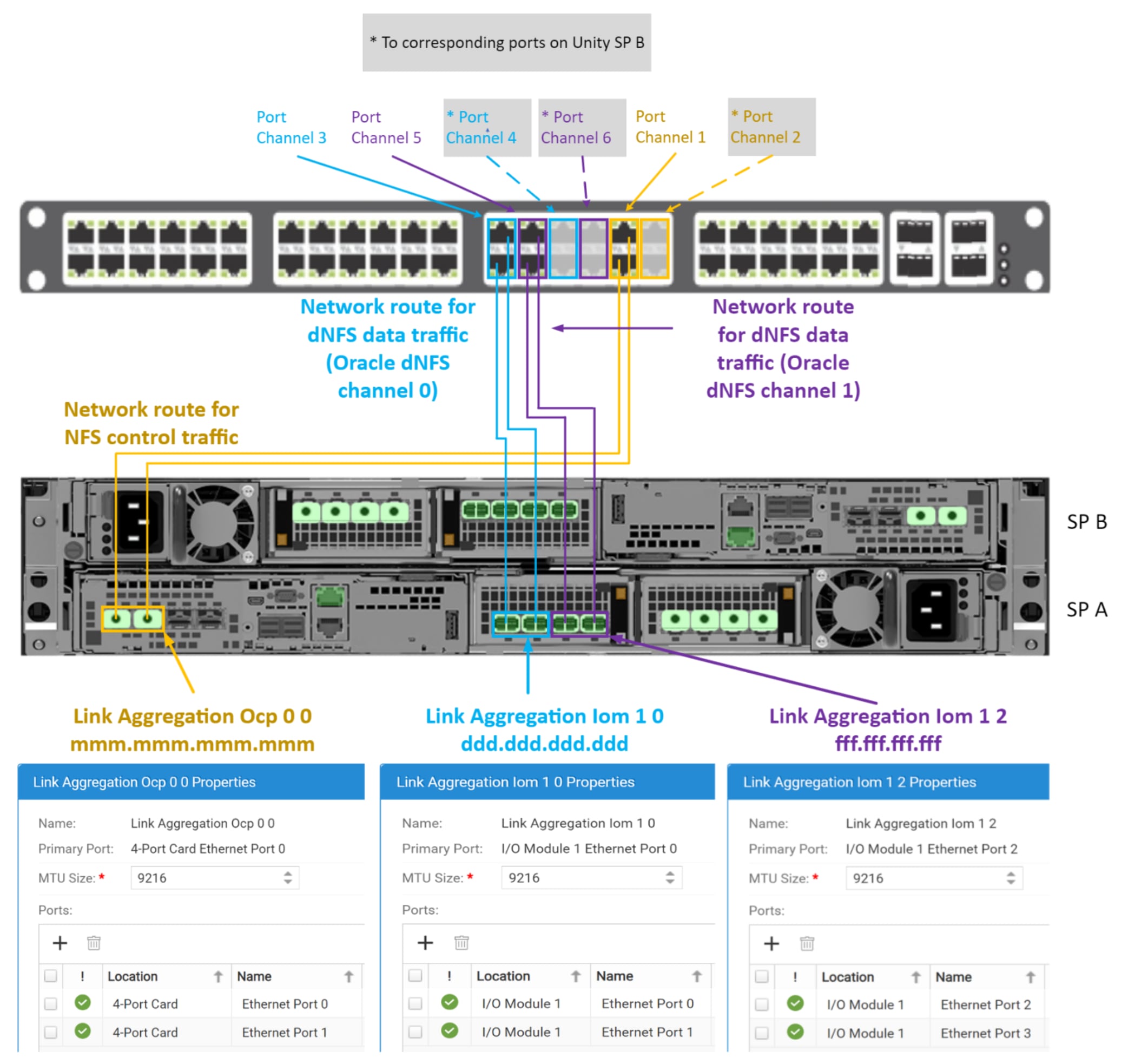
Figure 21. NAS server interfaces and switch port channels
Link Aggregation Ocp 0 0 is the preferred interface, while Link Aggregation Iom 1 0 and Link Aggregation Iom 1 2 are nonpreferred interfaces.
Dell Unity NFS file system
Dell Unity NAS file systems are well suited for Oracle. They provide scalability, large system size, flexible file system, storage efficiency, security, isolation, availability, recoverability, virtualization, and performance.
Scalability
Dell Unity file systems provide scalability in several areas, including maximum file system size, which makes Dell Unity storage ideal for Oracle environments. Dell Unity OE version 4.2 increases the maximum file system size from 64 TB to 256 TB for all file systems. File systems can also be shrunk or extended to any size within the supported limits. Dell Technologies recommends configuring storage objects that are 100 GB at a minimum and preferably 1 TB in size or greater.
Storage efficiency
Dell Unity storage supports thin-provisioned file systems. Starting with Dell Unity OE version 4.2, Unisphere can also create thick file systems. When using Dell Unity file storage with Oracle, consider using thin-provisioned file systems. Dell Unity also provides increased storage flexibility with manual or automatic file system extension and shrinking with reclaim.
Quotas
Dell Unity includes full-quota support to allow administrators to limit the amount of space that can be consumed from a user of an NFS file system or directory. When working with Oracle, quotas are not usually necessary. If deciding to use quotas, carefully consider their impact on managing the Oracle environment.
Unity NFS file systems can host Oracle datafiles that exist on ASM (Figure 22), file system (Figure 23), or both.
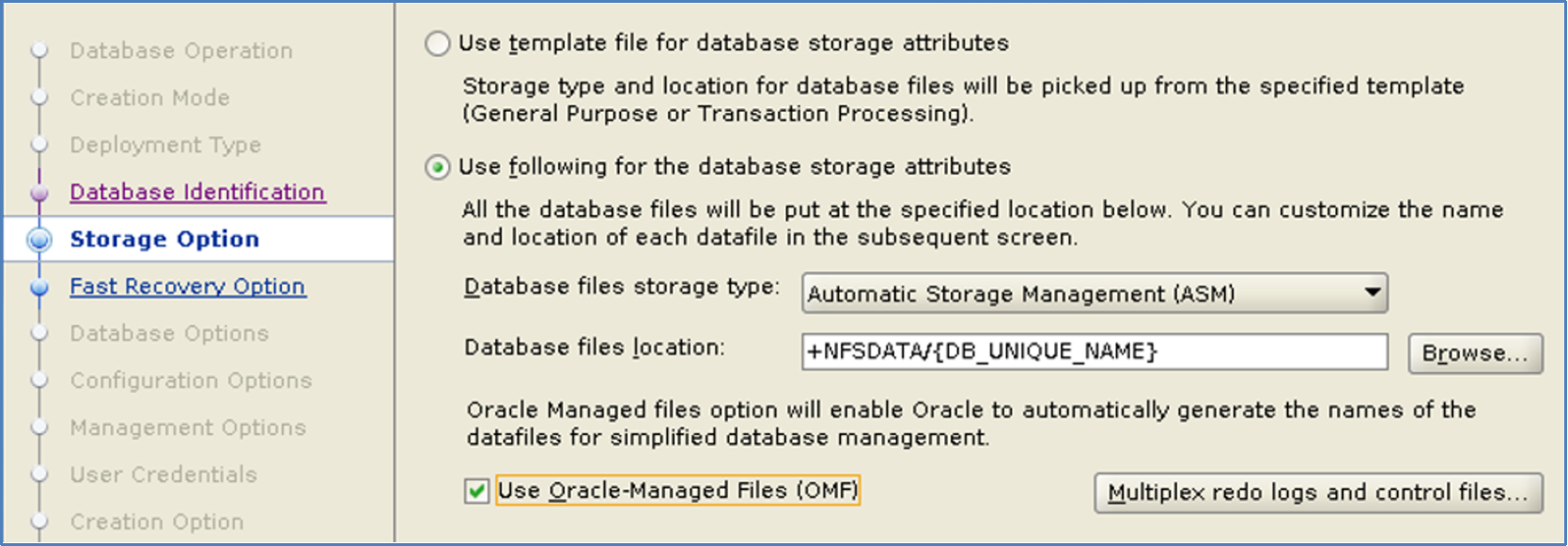
Figure 22. Using ASM disk groups on an NFS file system.
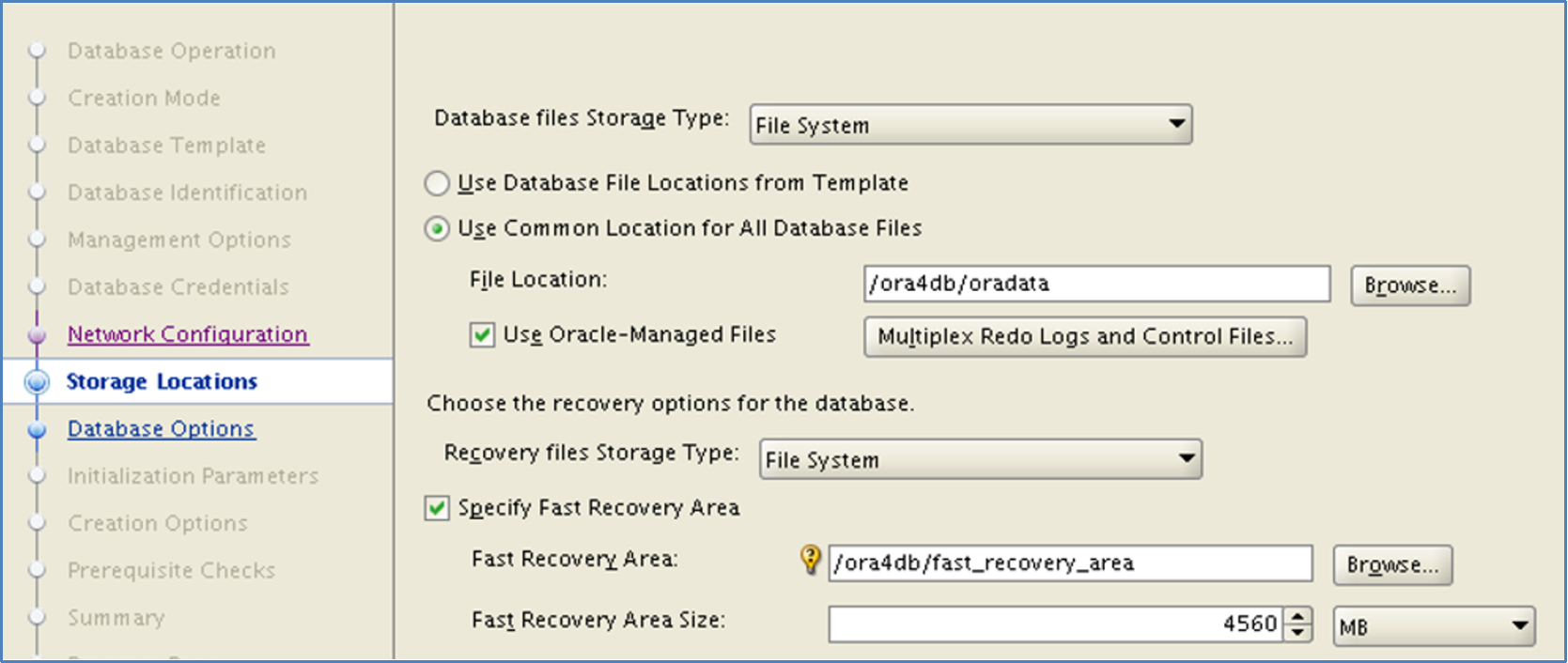
Figure 23. Using a file system for Oracle datafiles
Creating a Unity NFS File System and initial NFS share
To create a Unity NFS file system, perform the following steps in Unisphere:
- Select File > File Systems > +.
- Set the protocol to Linux/Unix Shares (NFS).
- Set NAS Server to the NAS Server that will host the file system. Click Next.
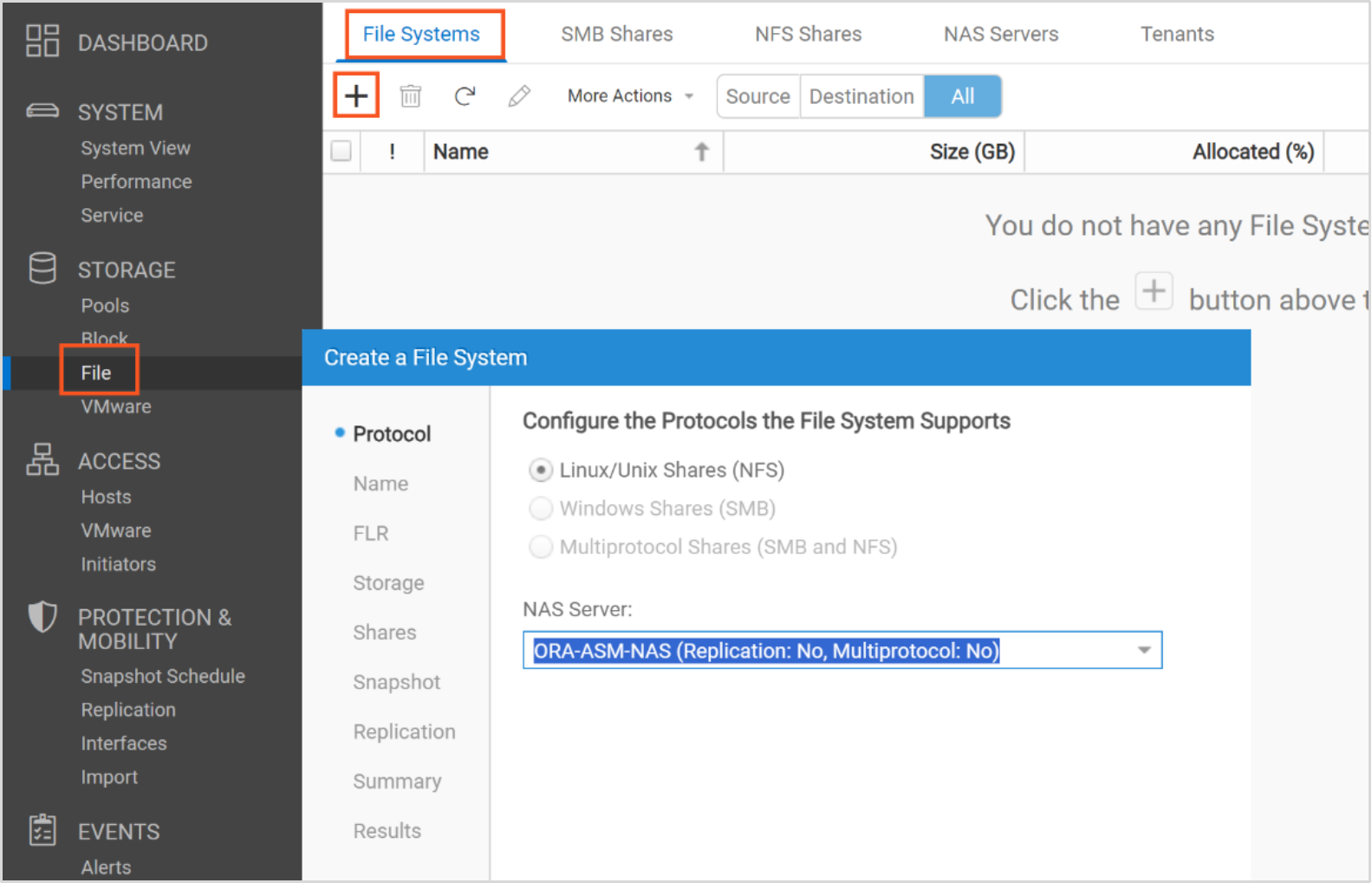
- Set Name: to the name of the file system. Provide an optional description. Then click Next.
- Ensure that File-level Retention is Off. Click Next.
Note: Do not use file-level retention (FLR) on a file system if it will be used by an Oracle database. FLR prevents the modification or deletion of locked files until a specified retention date is reached. When the retention date is reached, the files on the file system can either be deleted or relocked. The files cannot be modified or changed to append only. This type of FLR is known as Write Once, Read Many (WORM).
- Select the storage pool where the file system will reside.
- Set the size of the file system. Select Next.
- Select checkbox NFS Share (Linux/Unix).
- Set Name to the wanted NFS share path name. Then, select Next.
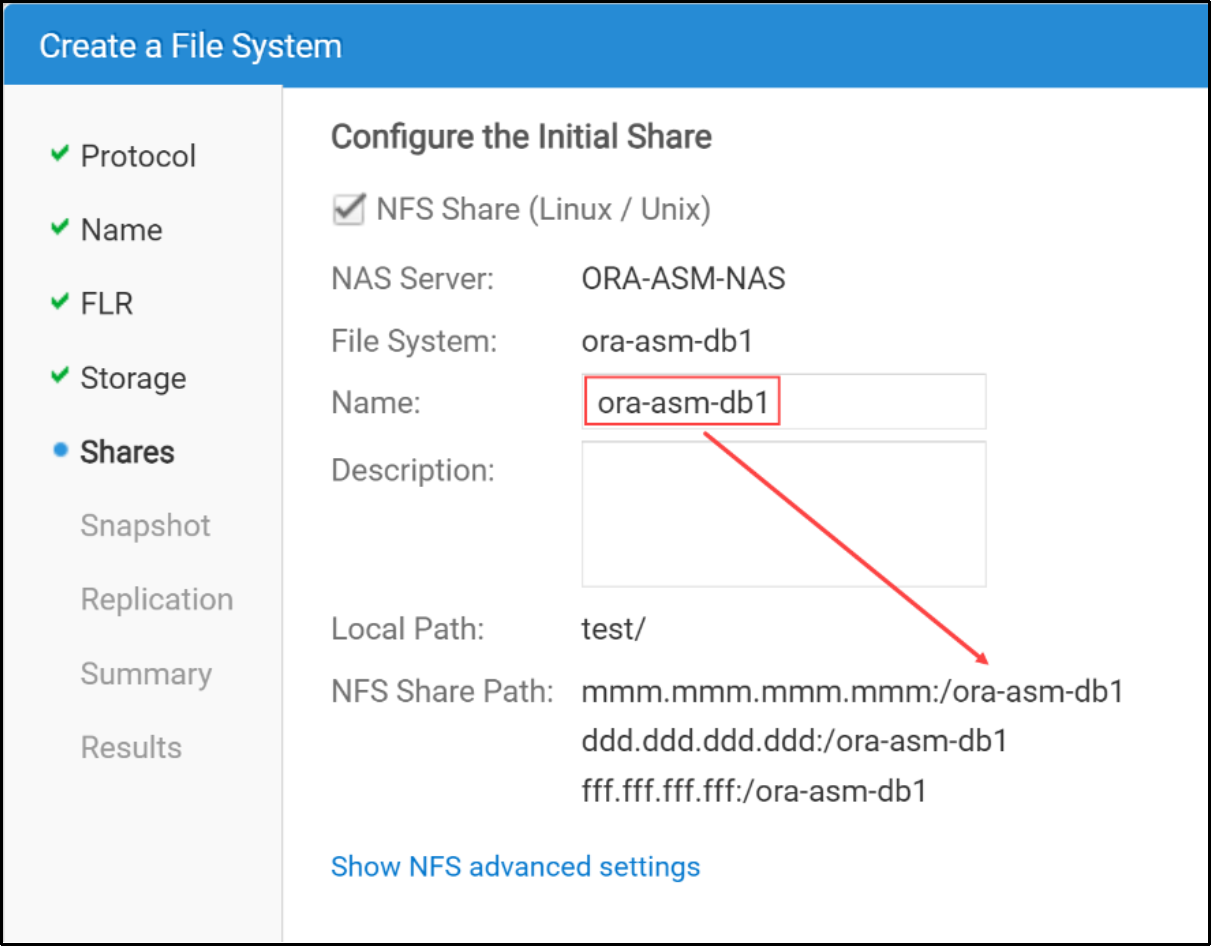
Note: Click Show NFS advanced settings. Make sure the checkbox Allow SUID is selected.
- When prompted to configure access, set Default Access: to Read/Write, allow Root.
Note: By default, the file system will be exported so that all NFS clients can see it. If the file system should be restricted to certain NFS clients, select +ADD HOST, then add the list of NFS clients where the NFS file system access is allowed. Then, select Next.
- Configure an optional snapshot schedule. Click Next.
- Configure an optional replication mode and RPO. Click Next.
- Review the request to create the file system. If the request is correct, click Finish.
- Select Close.
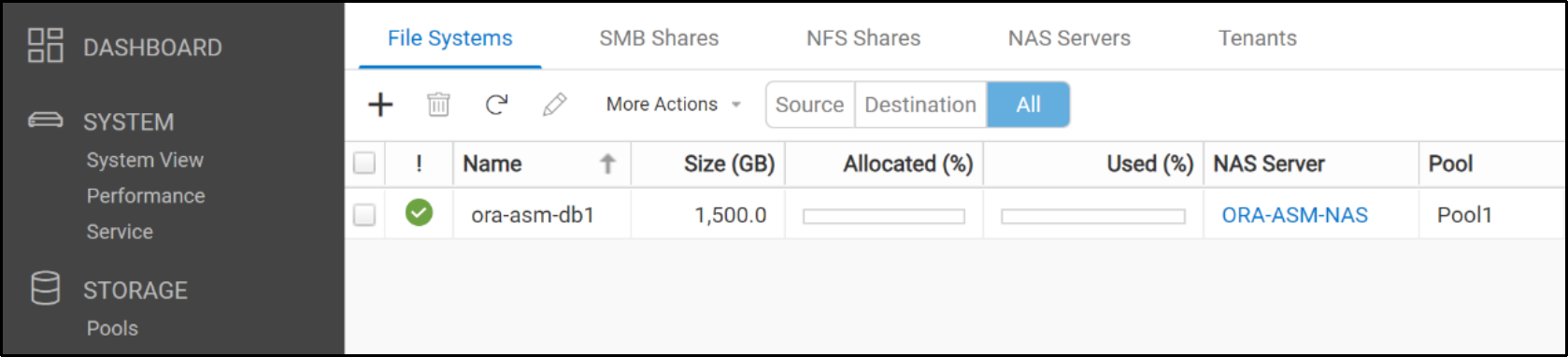
Verify access to the Unity NFS export
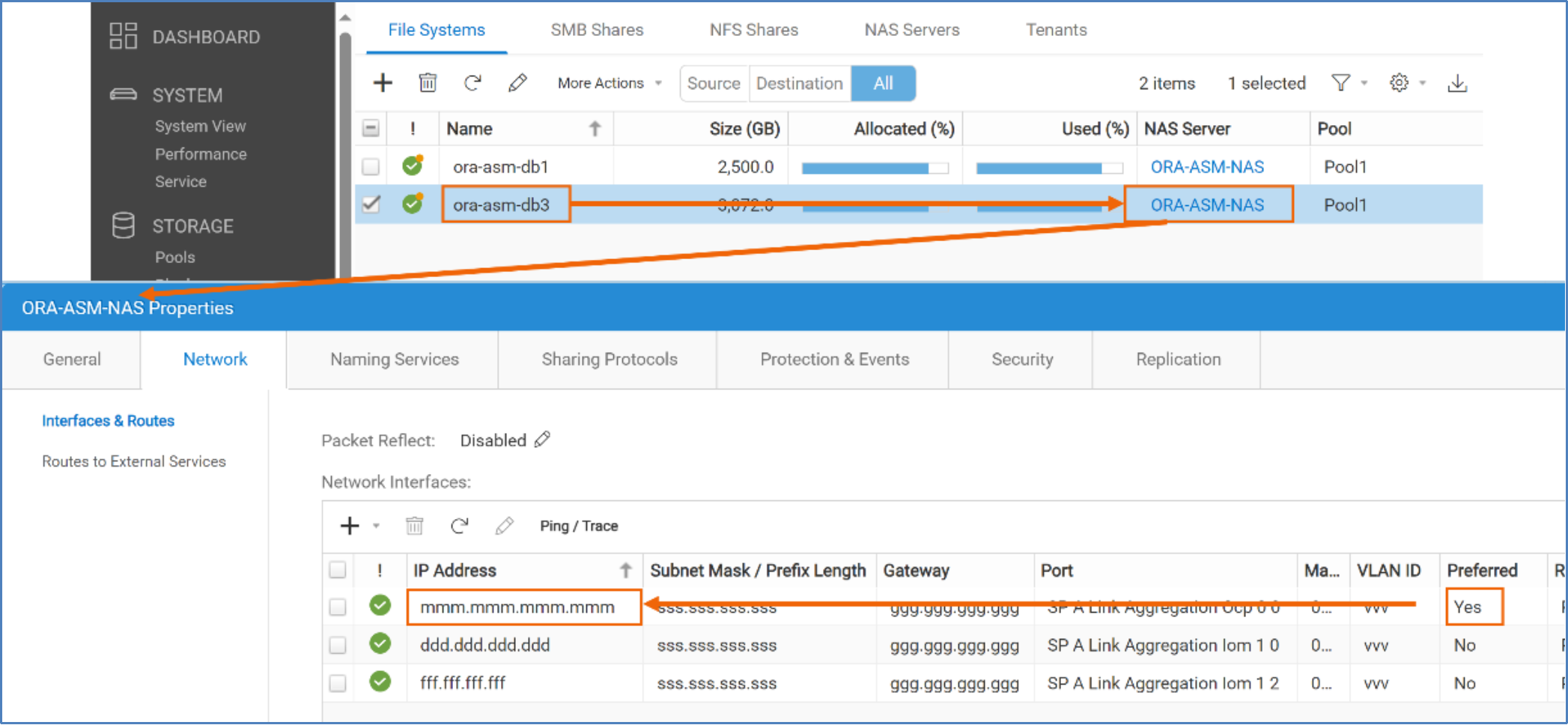
After a Unity NFS file system and NFS share have been configured, verify that the database server has access to the NFS export through all the interfaces. To verify access, use the Linux showmount command on all the IP addresses shown in the list of Exported Paths interfaces (see Figure 24). If any of the IP addresses do not have access to the NFS export, resolve the issue before configuring the NFS client and Oracle dNFS.
Log in as root to the NFS client and perform showmount using all the IP addresses to verify that the client can see the NFS export and file system:
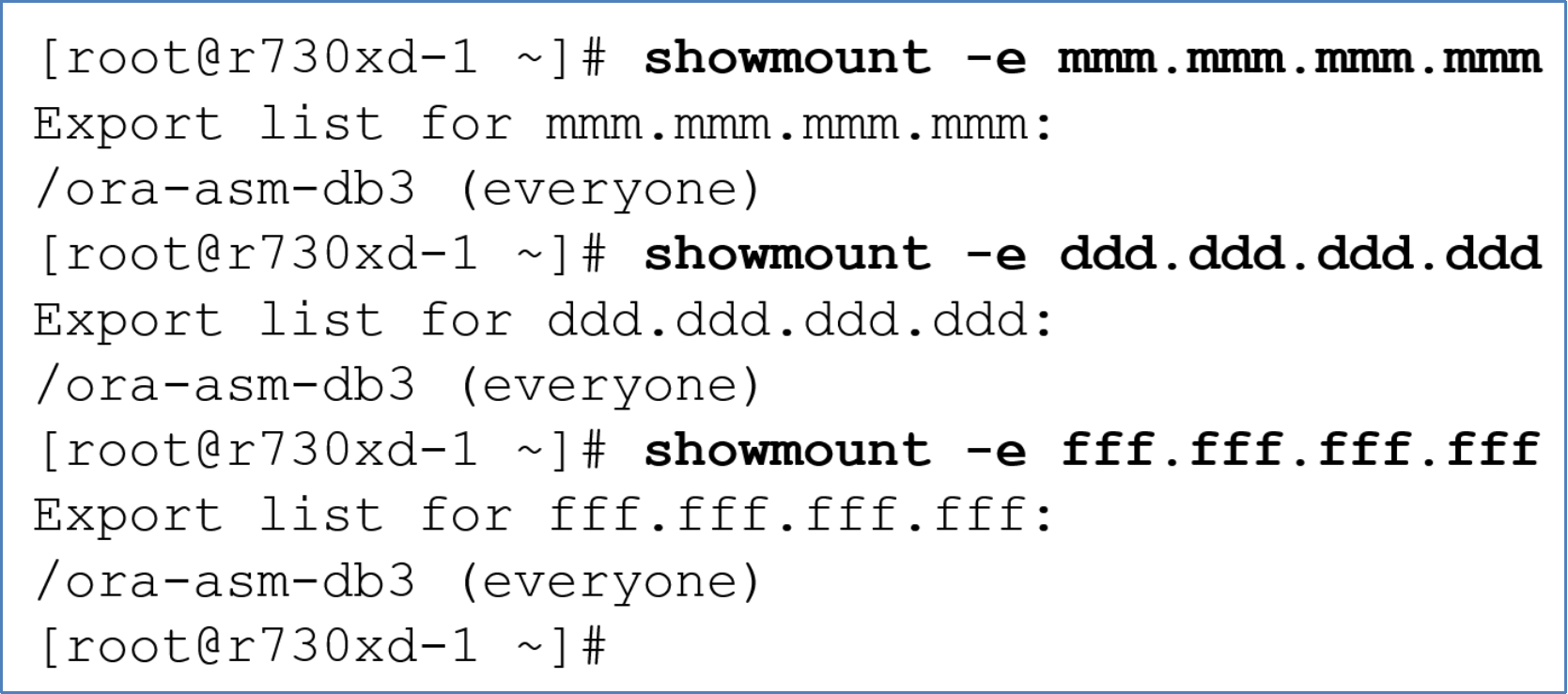
Figure 24. Verifying NAS exports are accessible
Dell Unity file system and Oracle ASM disks
When using NFS storage with Oracle, Oracle recommends using Oracle Direct NFS (dNFS) rather than native kNFS.
Note: According to Oracle, caution should be exercised when considering using NFS storage in an Oracle database that uses ASM. In general, such configurations should be avoided or at least carefully considered. The issue is that to prevent data corruption, NFS file systems must be hard-mounted. Hard mounting means that the database or an ASM instance must wait indefinitely when an NFS server, or the communications link it operates over, becomes unavailable. NFS on ASM might be reasonable in some situations. See Oracle MOS note doc ID 1620238.1, “Creating File Devices On NAS/NFS FileSystems for ASM Diskgroups.” Using highly available interfaces in the Unity NAS Server will help reduce the possibility of running into this situation.
To create ASM disks on Unity file systems, use the following process (change values where necessary):
- Log in to the NFS client (database server) as root.
mkdir /ora-asm-db3
chmod 770 /ora-asm-db3
chown grid:oinstall /ora-asm-db3
- Mount the Dell Unity NFS export using the IPv4 address of the preferred network interface of the NFS Export Path and NFS protocol vers=3.

Note: see the subsections: Overview, and Mount options for NFS shares in the section Oracle Direct NFS, and the section Dell Unity Service Scripts for information about wsize and rsize.
chmod 770 /ora-asm-db3
chown grid:oinstall /ora-asm-db3
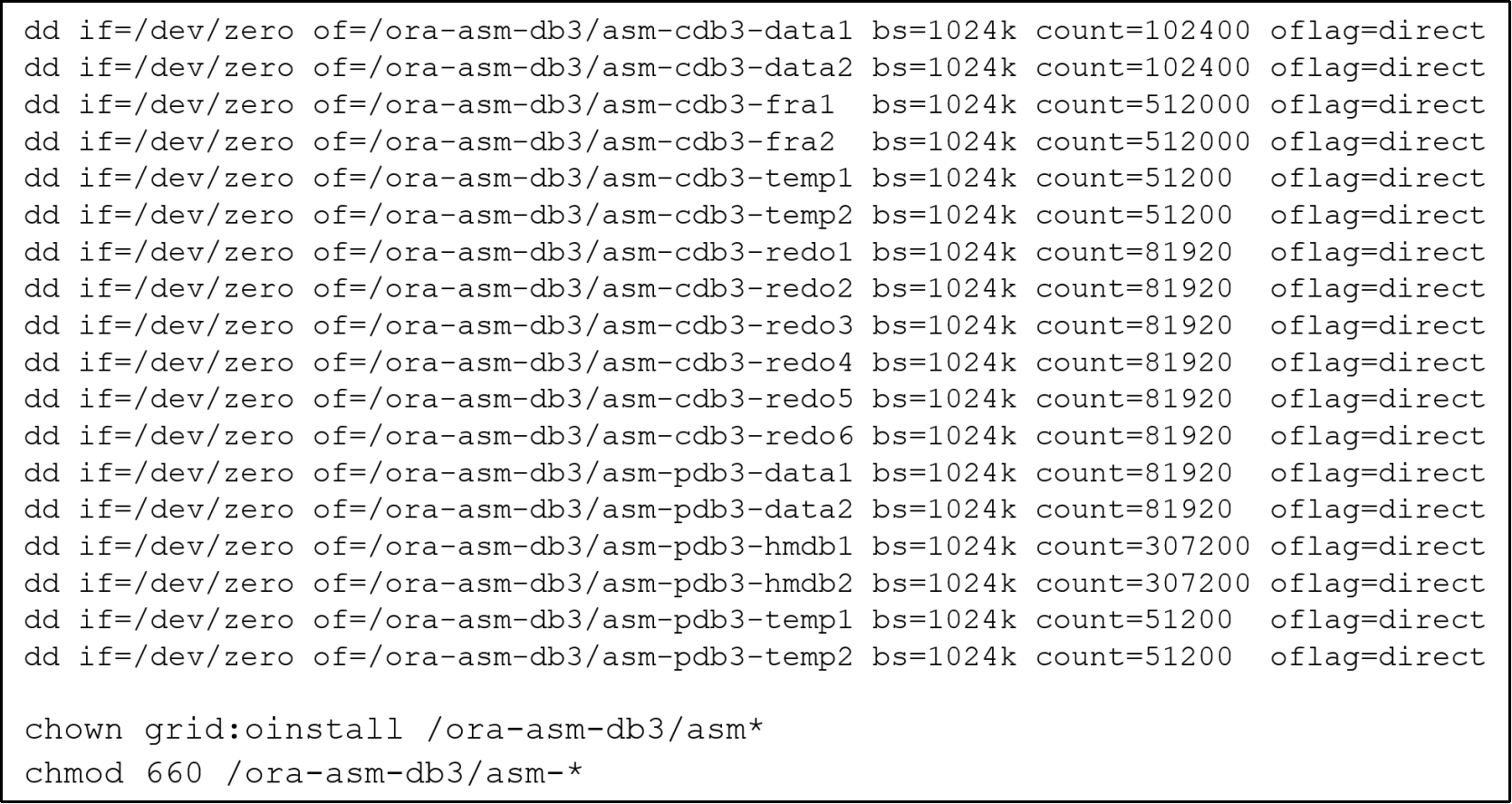
Creating ASM disk groups using ASM disks residing on Unity file shares
ASM disk groups can be created on multiple NFS shares residing on different NAS servers. Spanning ASM disks across multiple NAS servers might provide improved load balancing and flexible capacity planning. However, to use snapshots for a database, all disk groups containing the database must reside on a single NAS server as snapshots are not supported across multiple NAS servers.
To create ASM disk groups on Unity NFS exports, follow these steps.
- Log in to the Linux grid user and make sure that the environment is set to the +ASM instance.
- Start asmca.
- Update the ASM Disk Discovery Path, to include the location and name of the ASM disks created previously. The location and name used for the ASM disk devices created were: /ora-asm-db3/asm-*.
This example uses asmca to change the Disk Discovery Path string:
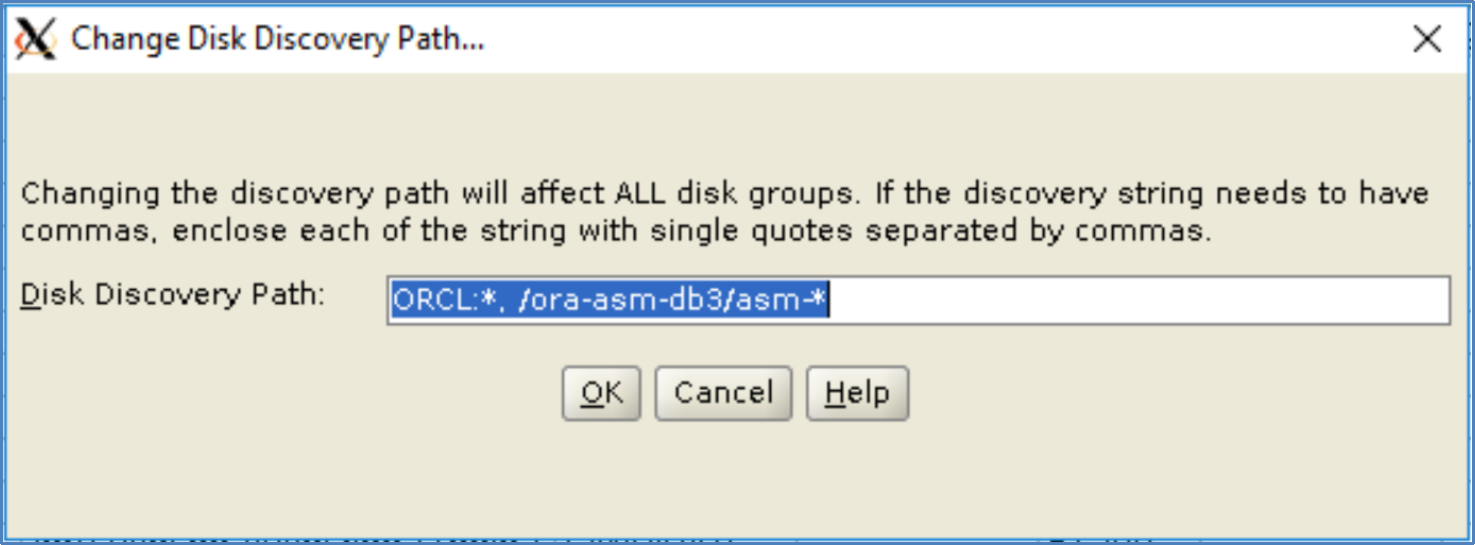
Note: In this example, ORCL:* is in the Disk Discovery Path because part of the Oracle environment relies on block devices managed by ASMLib.
asmca displays the available disks in the disk discovery path. If the ASM disks created previously are missing, check the ownership and permission of the disks.
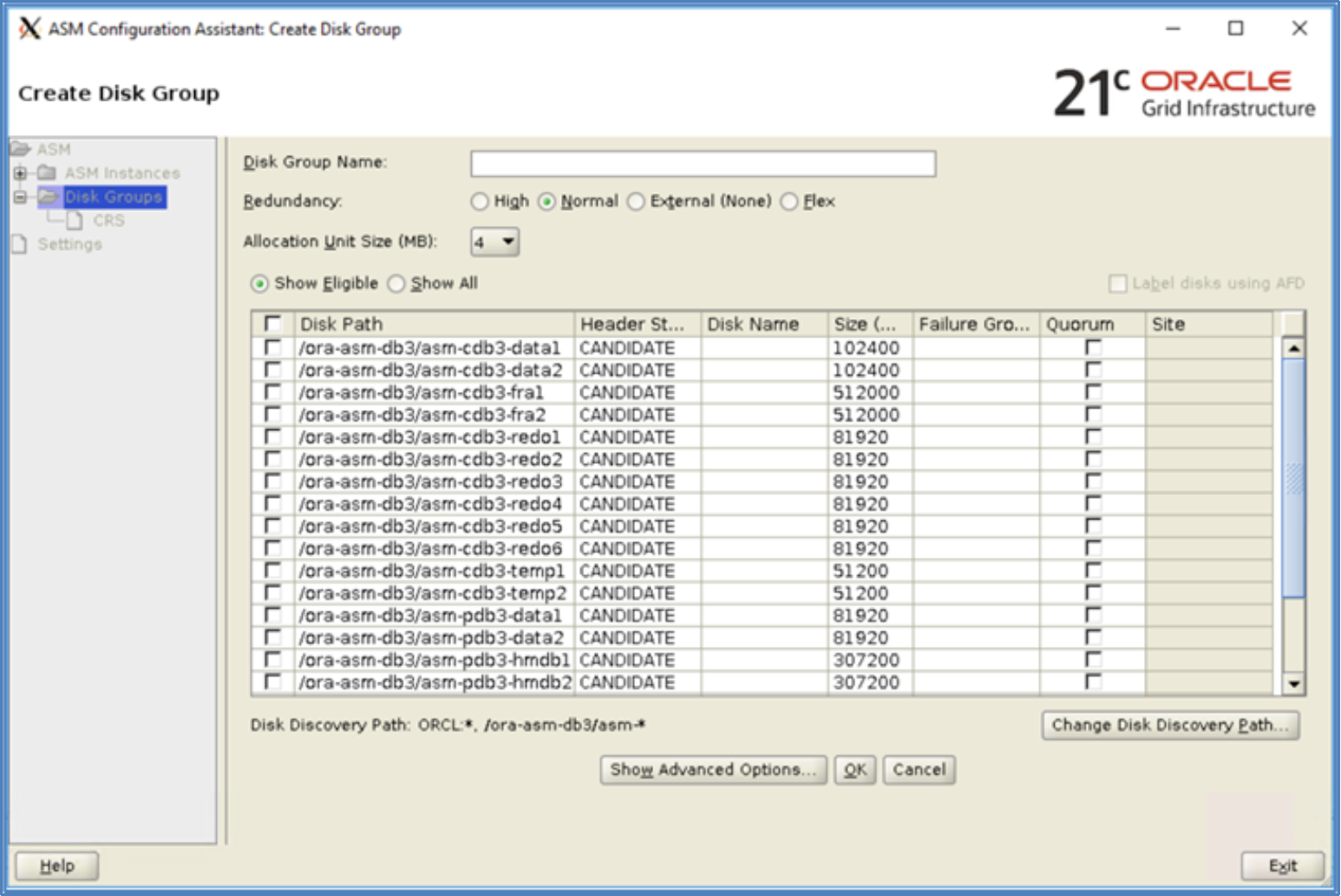
- Create the ASM disk groups with either asmca or SQL*Plus. A partial SQL*Plus example follows.

Oracle Disk Manager
Introduction
NFS traffic
NFS supported storage option
Oracle Direct NFS
Overview
Benefits of dNFS
Creating NFS client mount points
Mount options for NFS shares
Ethernet networks and dNFS
Jumbo frames
In Ethernet networking, a unit of data is referred to as a frame. Jumbo frames are frames having more than 1500 bytes of data known as a payload. Commonly, jumbo frames refer to frames that carry a payload up to 9000 bytes. To ensure the frame size of a packet stays the same size as it traverses through the network, the frame size must be set the same, end-to-end in the infrastructure. If the frame size is not consistently defined end-to-end, the maximum frame size used will be governed by the smallest frame size value defined, end-to-end, in the network path.
Jumbo frames are supported and recommended by Oracle when dNFS is used. Using jumbo frames allows the network stack to bundle payloads into larger frames and reducing TCP overhead. The frame size of any frame can vary depending on the immediate needs of the network session established between the NFS client and NFS server.
Frame size is defined by setting the maximum transmission unit (MTU). By default, Unity NAS File interfaces and Unity Ethernet interfaces are set to MTU 1500, but can support a maximum of 9216. See Figure 25.
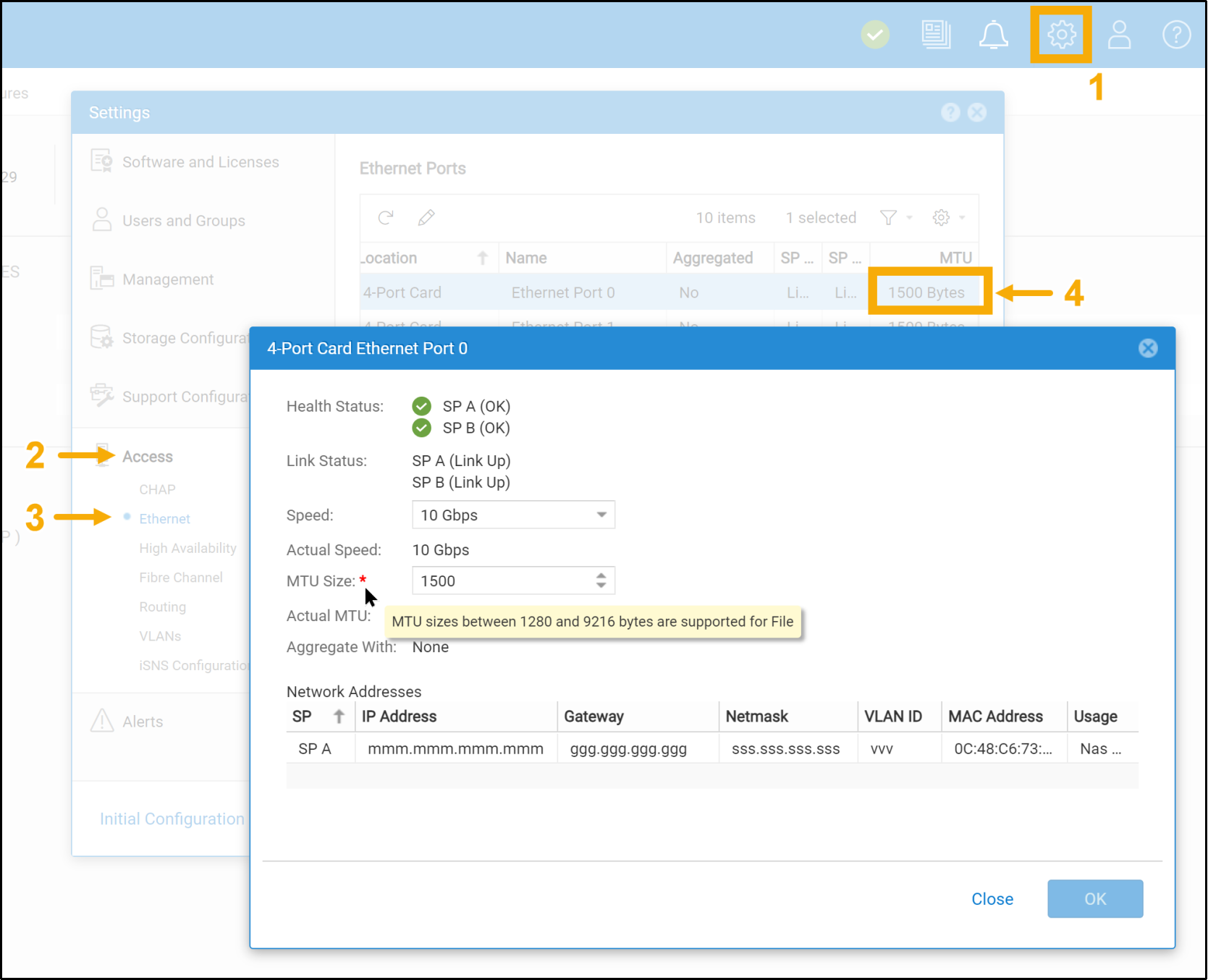
Figure 25. Unity MTU range
MTU 9000 might be acceptable for heavy dNFS work loads, but it should be evaluated in a nonproduction environment before changing it in production. Dell Unity best practices recommend, if possible, configuring jumbo frames (MTU 9000). For more information, see the document: Dell EMC Unity: Best Practices Guide (delltechnologies.com)
Viewing the MTU size of Unity interfaces
Changing the MTU size of Unity’s interface ports
Single network path for dNFS
For the simplest dNFS network configuration, a single network path can be configured. The single network path in Figure 26 is used for the database server public network and network traffic between the NAS server and NFS client. A benefit of this configuration is its simplicity, however it creates a single point of failure for NFS and potentially not enough bandwidth to support general network and NFS traffic. For these reasons, Dell Technologies does not recommended using this network configuration for a critical, highly available database having high transaction rates.
The remainder of this section covers two different single network path configurations:
- Single network path for both public network and NFS traffic
- Single dedicated network path for both NFS control and data traffic
Single client network path for both public network and NFS traffic
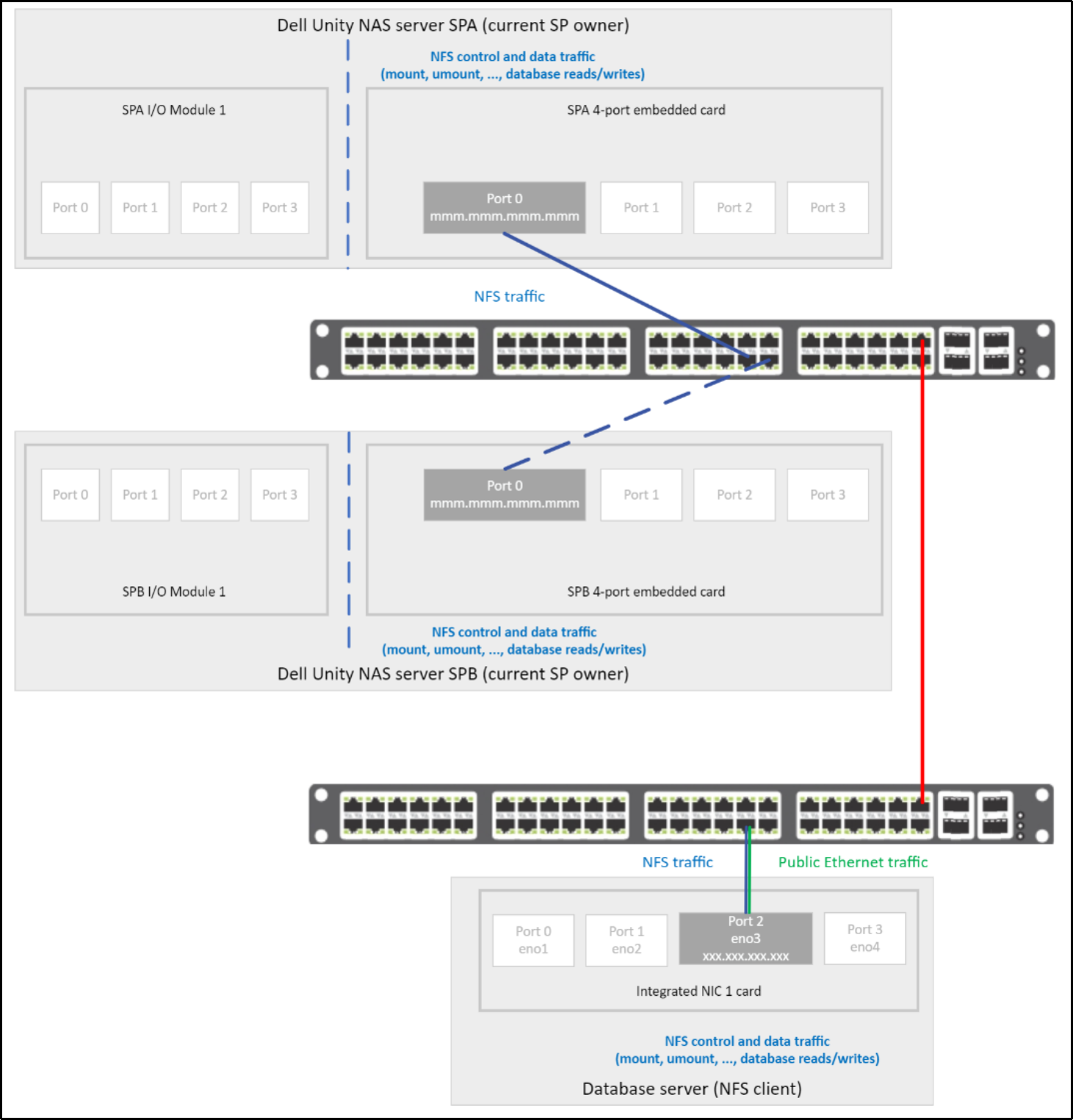
Figure 26. Single Ethernet path between the NFS client and Dell Unity NAS server
Note: Figure 26 represents a network route between a single interface in Dell Unity and a single interface on the database server. This route is intended to be used by NFS control and data traffic, and public network traffic. For information about creating network routes and using specific network routes for certain network traffic, see the following sections: Shared subnets, Static routing, dNFS without oranfstab, and dNFS with oranfstab.
The following figures show:
- NAS server and interface,
- NFS share (export),
- Unity NAS file system, and
- NFS client interface configuration
using this path:
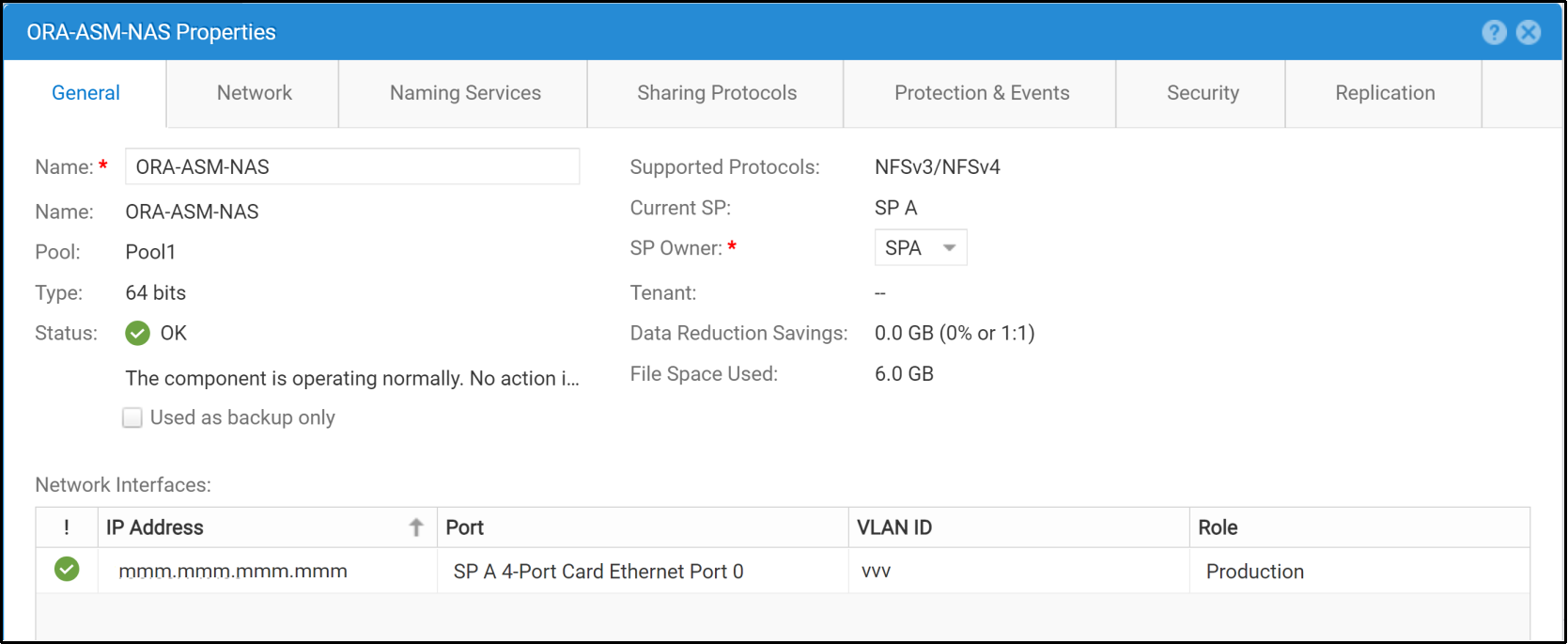
Figure 27. Dell Unity NAS server with a single Ethernet path for NFS traffic
Note: See Dell Unity NAS servers for information about setting VLAN ID.
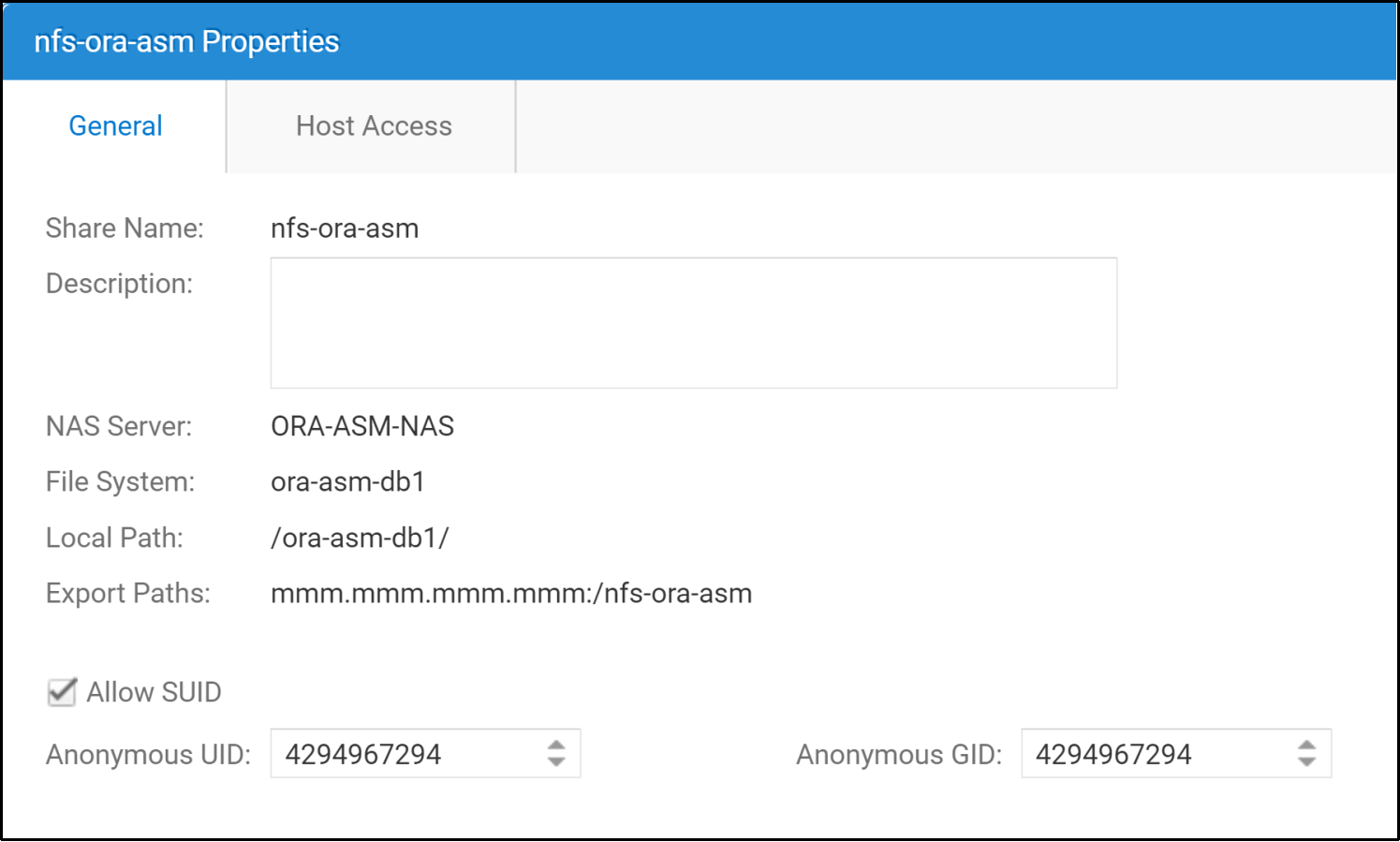
Figure 28. Dell Unity NFS share
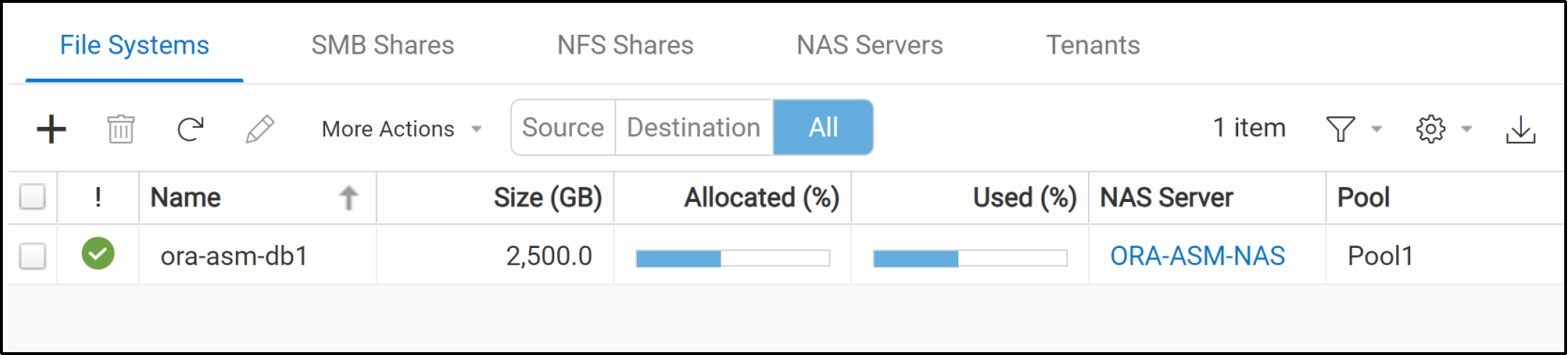
Figure 29. Dell Unity file system
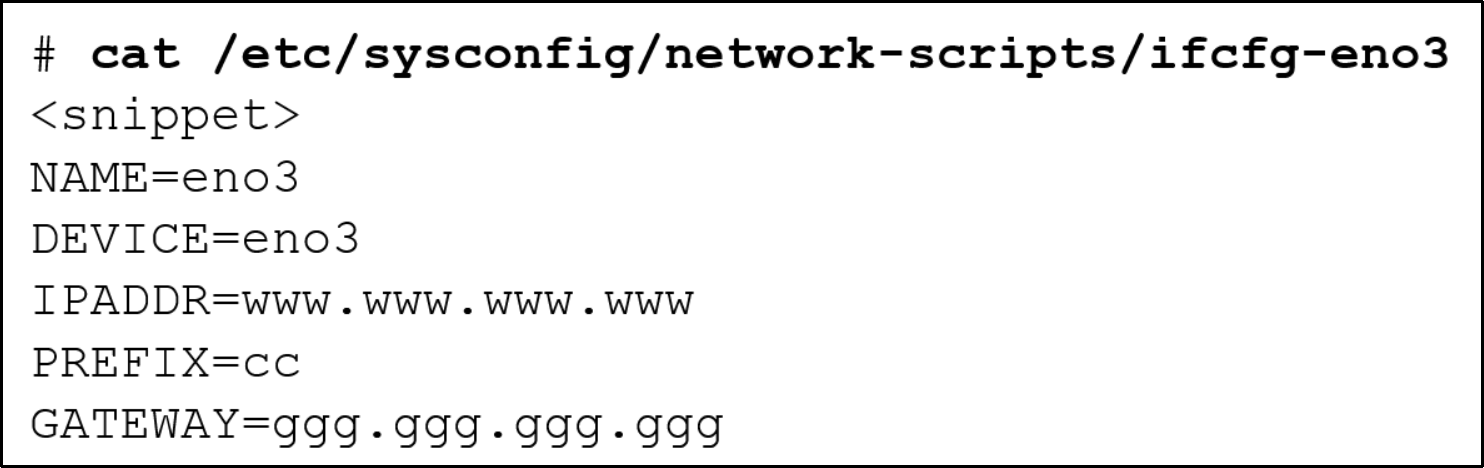
Figure 30. NFS client Ethernet interface configuration
dNFS uses two kinds of NFS mounts: the native operating system mount of NFS (known as a kernel kNFS mount) and the Oracle database NFS mount (dNFS mount). When a single network path is used for dNFS, file oranfstab is not necessary because Oracle dNFS gleans the required information for the mounted NFS share from file /etc/mtab.

Figure 31. /etc/mtab entry for the Unity NFS export
If dNFS is unable to find the necessary information in /etc/mtab, control is handed back to the database and file access is attempted through kNFS.
Single dedicated network path for both NFS control and data traffic
To reduce the potential of running out of bandwidth on a single interface, consider moving NFS traffic to a different interface on the database server. Moving NFS traffic to a different interface requires an additional IP address and an additional switch interface.
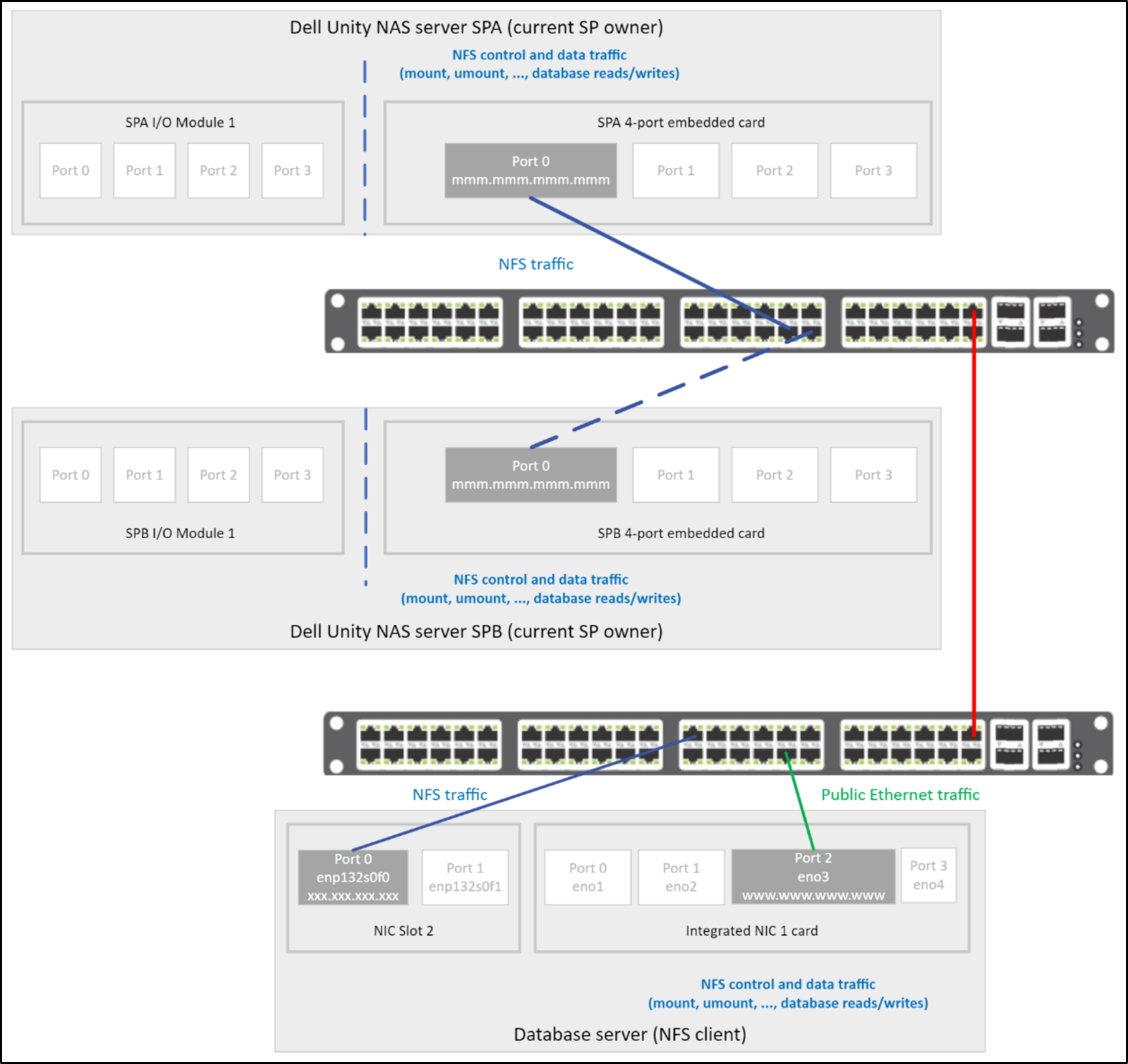
Figure 32. NFS traffic on a dedicated single network path
If this additional IP address is in the same subnet used by any other NIC interface in the database server, see sections Static routing and Oracle dNFS configuration file oranfstab.
Note: A single point of failure for NFS and the potential of running into NFS bandwidth issues exists with this configuration.
Multiple client interfaces for dNFS
If multiple network paths are intended for NFS traffic, consider using one path for NFS control/management traffic and the remaining NFS paths for NFS data traffic. This ensures that NFS data traffic flows through the paths intended for NFS data traffic, and NFS control traffic to flow through the path intended for NFS control traffic.
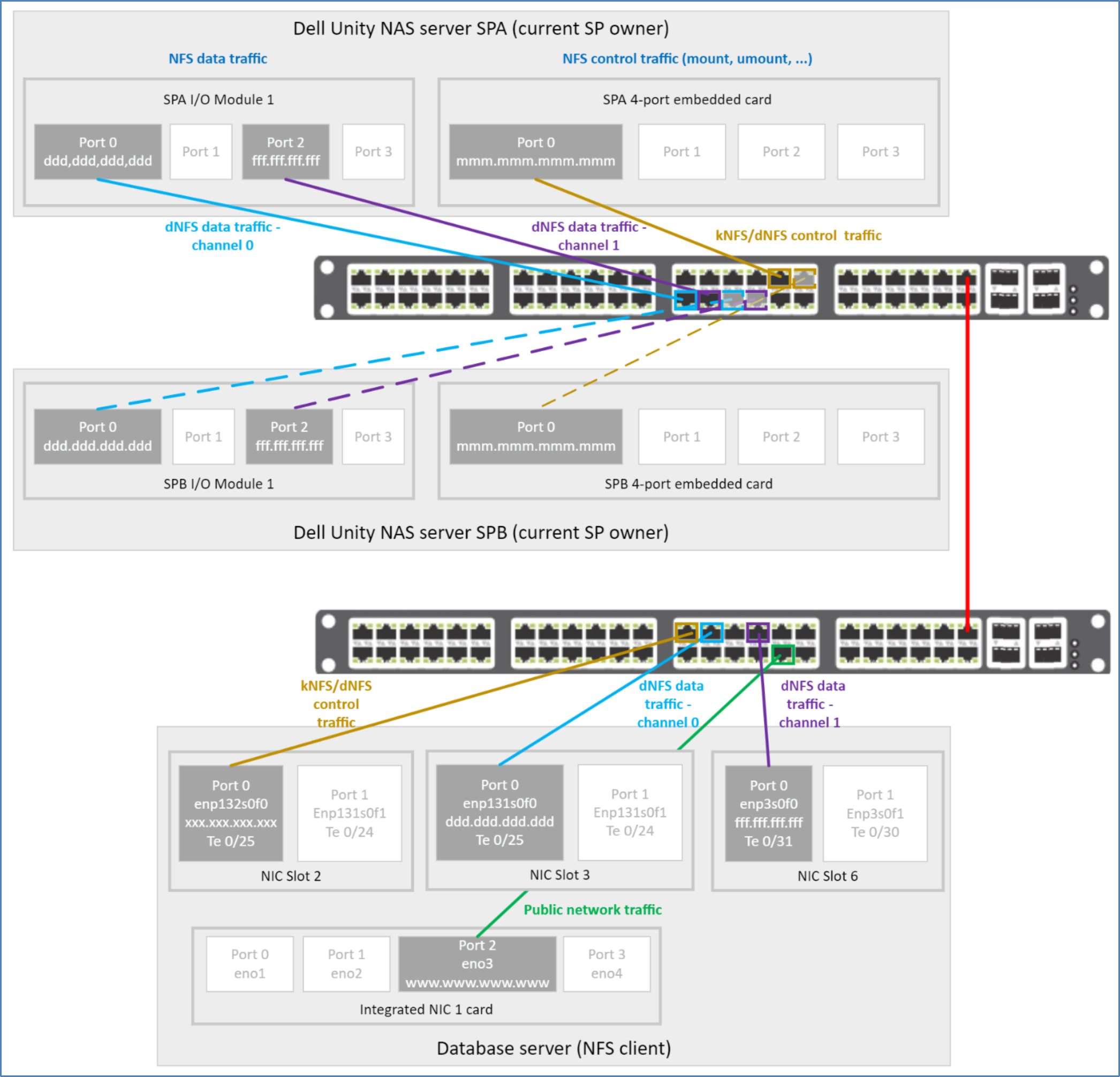
Figure 33. Multiple network routes for NFS control and data traffic
When multiple dNFS paths exist for data traffic and one of the paths fail, dNFS reissues requests over any of the remaining dNFS data paths, improving database availability. Multiple data paths also provide Oracle the ability to automatically tune the paths to the NFS storage devices. Because dNFS implements multipath I/O internally, Oracle recommends not configuring LACP and channel-bonded interfaces on the database server (NFS client) for dNFS data traffic.
Configuring LACP – NAS client
In environments requiring high availability, bonded NIC interfaces for NFS control traffic are recommended.
NFS and channel-bonding configuration
If an unbonded interface is used for the NFS mount on the NFS client, or NFS filer (see Figure 33), NFS control traffic can be blocked if the interface is down. This blocked NFS traffic causes the database to appear unavailable in certain operations.
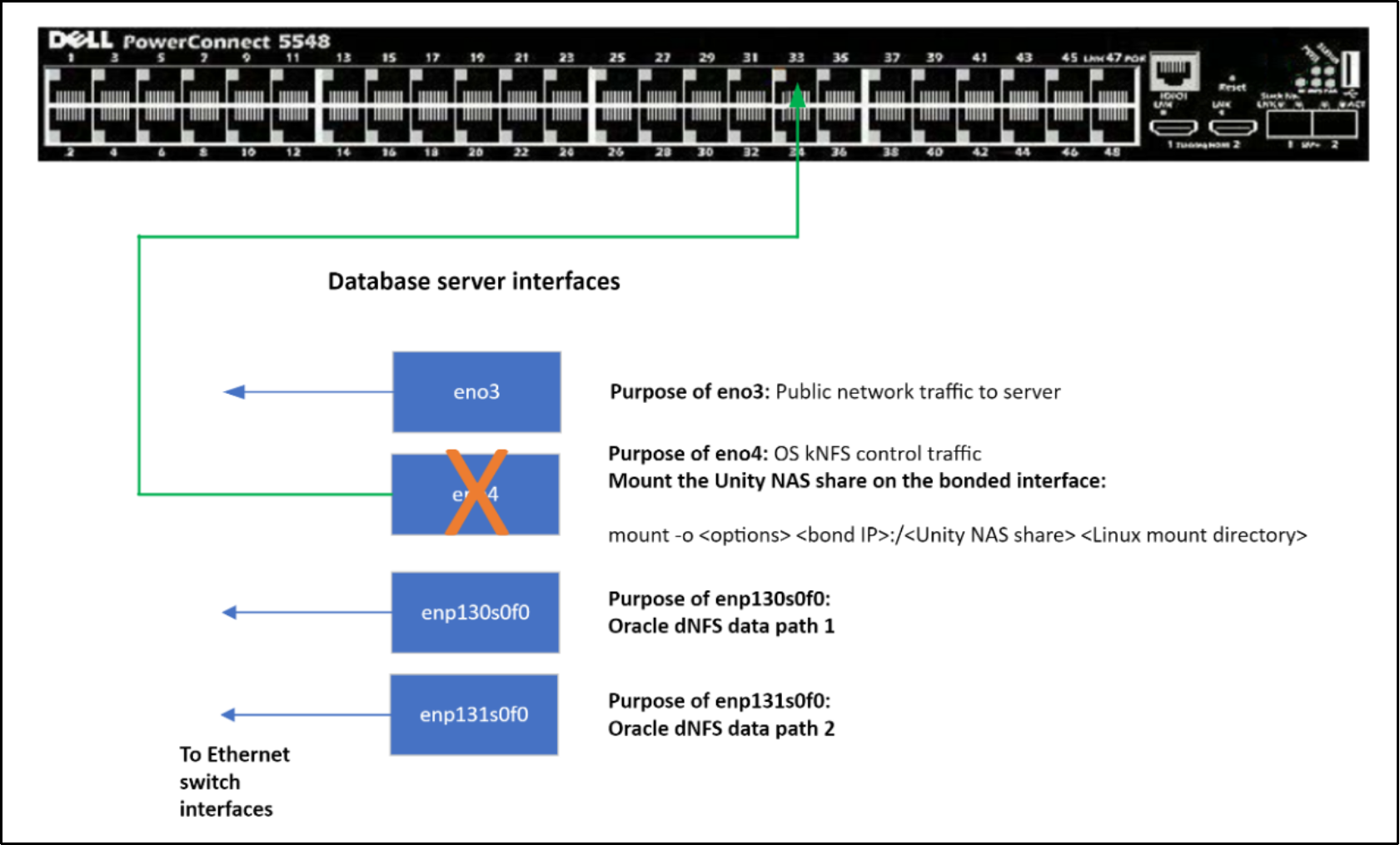
Figure 34. Single point of failure – single interface for NFS control traffic
To mitigate this single point of failure:
- configure LACP on multiple interfaces to create a bonded interface on the NFS client,
- create a link aggregate interface on the Unity NAS server, and
- create and channel-bonded interfaces for NFS control/management traffic on the switches connected to the database server and Unity array (see Figure 35).
Also, consider configuring LACP on Unity interfaces used for NFS data traffic, and port channels on the switch connected to the Unity interfaces. Using bonded interfaces on the database server for dNFS data traffic is not recommended by Oracle. Also see the note in the section Dell Unity file system and Oracle ASM disks regarding network redundancy considerations.
The bonded interface can be shared with other network traffic like public network traffic or even traffic from an Oracle RAC interconnect. LACP needs to be configured on multiple interfaces to create a channel-bonded interface. Be mindful that NFS control or metadata traffic is minimal compared to NFS data traffic, so using 1 GbE interfaces for the bonded interface of NFS control traffic may suffice.
When LACP is configured on the NFS client interfaces for NFS control traffic, a port channel must be configured on the Ethernet switch interfaces connected to the LACP client interfaces.
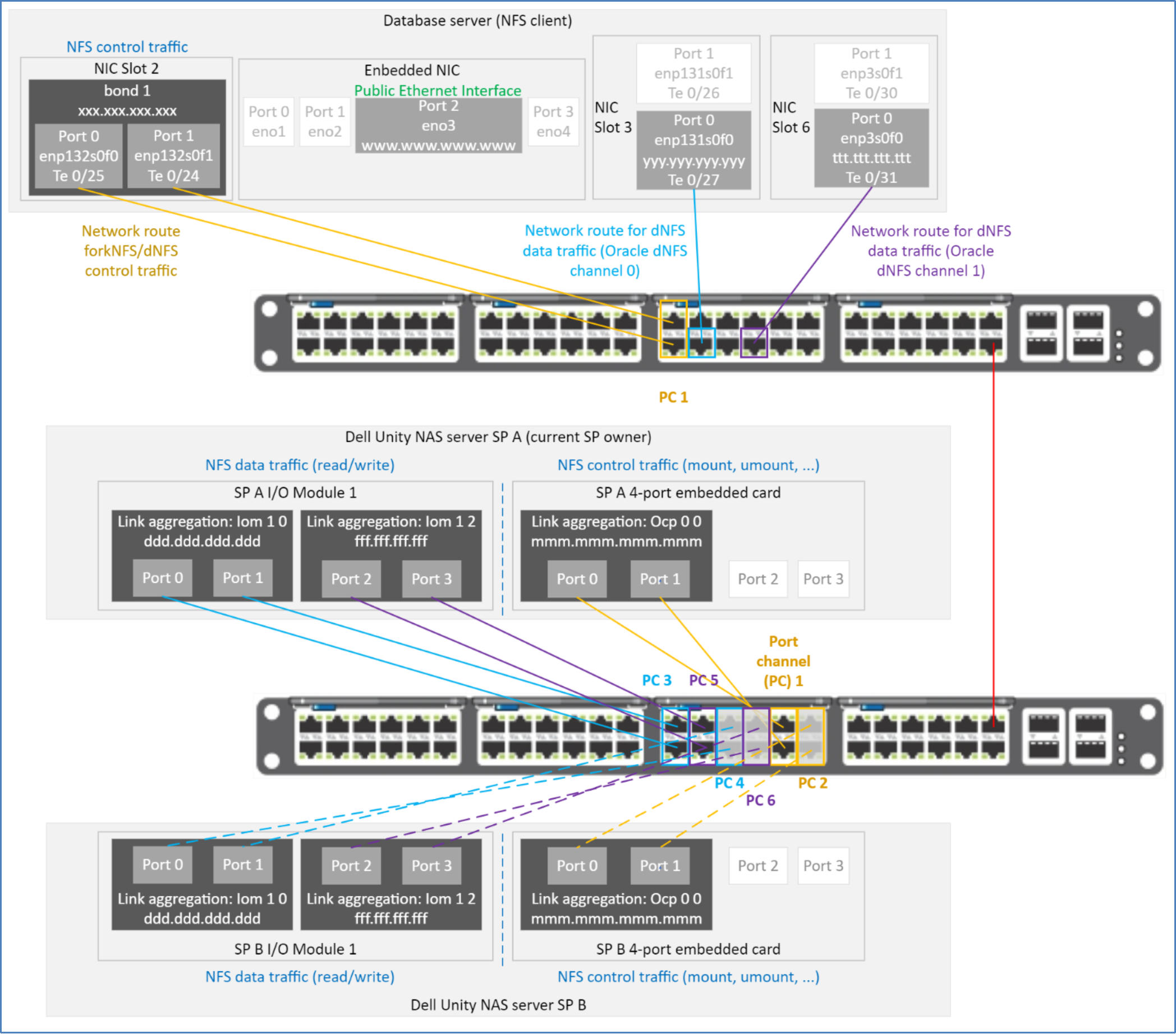
Figure 35. Network routes using bonded interfaces
When configuring dNFS with multiple network paths, if possible, use a unique network for each path. When multiple unique networks are not available, a different IP address from the same subnet can be used for each of the network paths. For more information, see the section Shared subnets.
Shared subnets
If multiple network paths are needed for dNFS/kNFS control traffic and dNFS data traffic, Oracle recommends that each path uses a separate subnet. However, using separate subnets may not always be possible.
This section discusses the use of subnet sharing on network paths for Oracle dNFS.
When configuring dNFS to use a subnet that is shared with another network interface, additional configuration, including IPv4 network routing filter and static routing, is required.
According to Oracle, if any IP address used by dNFS is from a subnet on another NIC interface, the following additional configuration changes must be made:
- Use dontroute in oranfstab
- Configure static routing for each of the network paths used by dNFS
Note: For more information about dontroute and oranfstab, see Oracle Database—Database Installation Guide.
For more information about shared subnets, see
- The section Static routing
- How to Setup Direct NFS Client Multipaths in Same Subnet (Doc ID 822481.1)
- How to configure DNFS to Use Multiple IPs (Doc ID 1552831.1)
Ipv4 network routing filters
Linux 8 follows the recommendations of ingress filtering for multihomed networks (http://tools.ietf.org/html/rfc3704). These routing filters must be relaxed for multiple NIC interfaces in the same server to use the same subnet. Before configuring network interfaces to use the same subnet, ensure that you relax routing filters.
Before installing Oracle, if the Oracle 21c preinstall rpm is used to configure the operating system, routing filters will be relaxed appropriately.
With OL 8u8, rp_filter is set to 2 for all network interfaces including the default interface. A value of 2 (loose filtering) is acceptable. Should no filtering (rp_filter = 0) or strict filtering (rp_filter = 1) be needed, see Oracle Grid Infrastructure—Grid Infrastructure Installation and Upgrade Guide, and My Oracle Support Doc ID 1286796.1.
If dNFS multipathing is needed and there is only one subnet, loose filtering (rp_filter = 2) needs to be set.
Setting rp_filter to an incorrect value can cause interconnect packets to be blocked or discarded in a RAC configuration.
Table 10. Reverse path filtering
|
rp_filter value |
Description |
|
0 |
No filtering |
|
1 |
Strict filtering |
|
2 |
Loose filtering |
To verify that IPv4 routing filters have been relaxed, look at the rp_filter settings in /etc/sysctl.conf. The values should be 2.

Figure 36. Loose Ipv4 rp_filter
If IPv4 reverse path filtering is not set, add or change the IPv4 rp_filters in /etc/sysctl.conf and make them active.
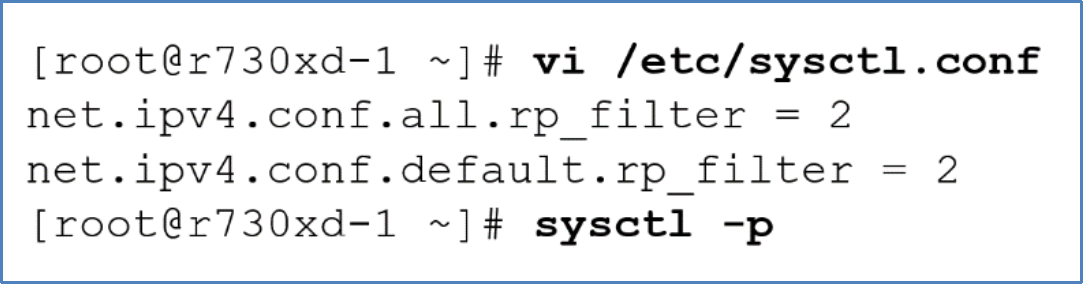
Figure 37. Loose IPv4 rp_filter
Starting with OL kernel 2.6.31, Oracle RAC systems that use multiple NICs for the private interconnect must have parameter rp_filter set appropriately.
For information about channel bonded interfaces for NFS control traffic, see Oracle MOS notes:
- How to Setup Direct NFS Client Multipaths in Same Subnet (Doc ID 822481.1)
- How to configure DNFS to Use Multiple IPs (Doc ID 1552831.1)
Static routing
When dNFS traffic must route traffic to an IP address from a subnet already in use on the NFS client, static routing must be configured. A static route must be defined for each of the network addresses from a shared subnet and used by dNFS as a route. This requirement includes defining a static route for dNFS data traffic should it use the same subnet as dNFS control traffic. If static routes are not defined, automatic load balancing and performance tuning of dNFS will not operate as expected per the dNFS path definitions in file oranfstab.
The remainder of this section provides two examples of static routing. The first example considers two interfaces sharing a subnet, and the second example considers four network interfaces sharing a subnet.
Shared subnet on multiple interfaces with single dedicated dNFS data path
The following figure illustrates a scenario where an NFS client has two interfaces. Interface enp132s0f0 is intended to be dedicated to dNFS traffic, and interface eno3 is for general public Ethernet traffic. Both interfaces use a network IP address from the same subnet, and default routing is defined. Figure 38 shows dNFS traffic flowing through interface eno3 rather than the intended interface enp132s0f0 when default routing is used.
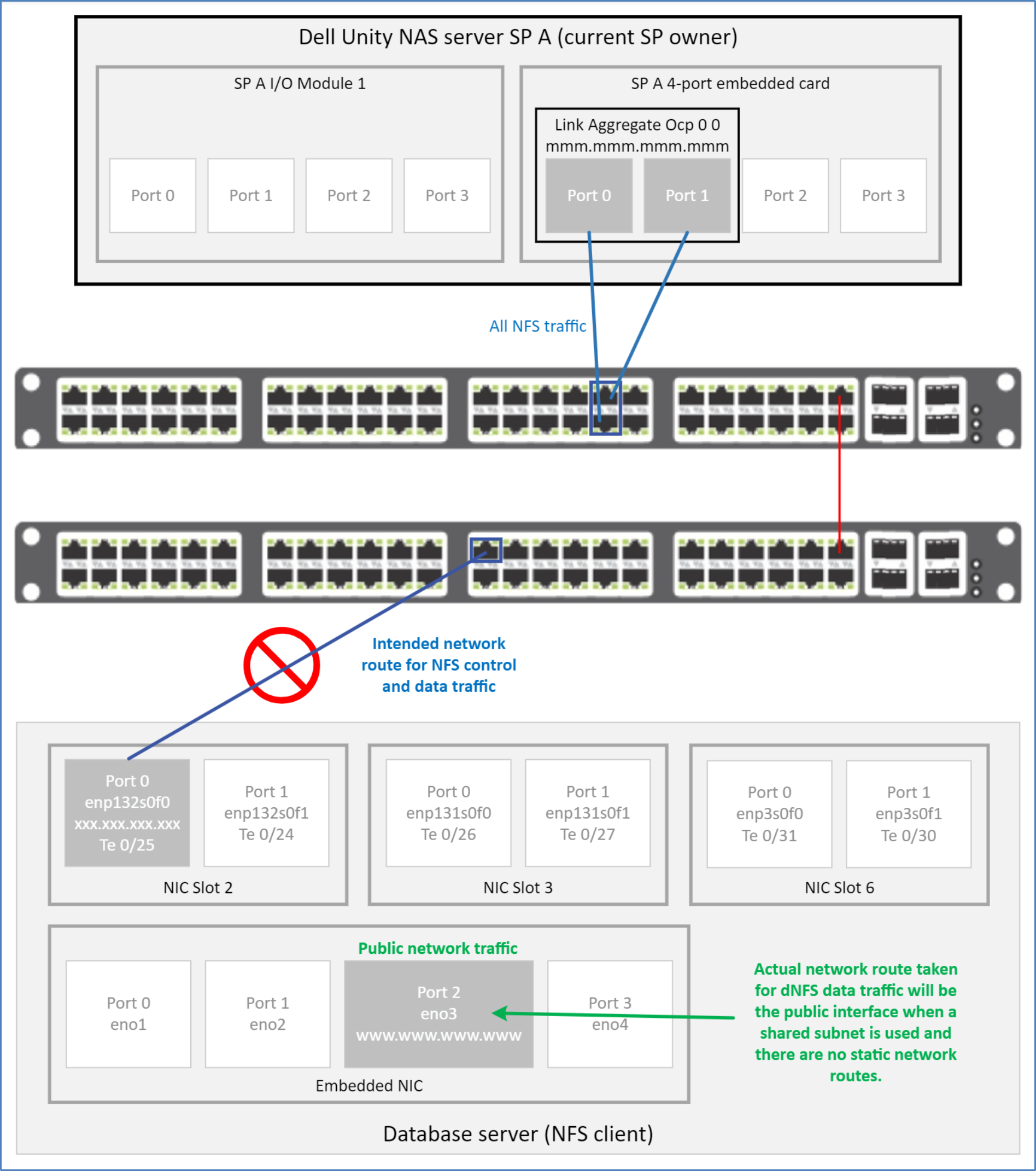
Figure 38. Incorrect network route taken by dNFS data traffic on a shared subnet with default routing
The following two figures show the corresponding routing table for Figure 38.

Figure 39. Default routing—netstat -r: single interface for dNFS on a shared subnet not used

Figure 40. Default routing—ip -4 route: dedicated single interface for dNFS on shared subnet not used
If default routing and IP addresses from the same subnet are used, the operating system searches the routing table for the route that best matches the destination address and mask. The operating system will use the best-matched route found. Because interfaces eno3 and enp132s0f0 share the same subnet (nnn.nnn.nnn.nnn) and CIDR (cc), the operating system considers both entries as best-matched. When multiple best-matched entries exist, the operating system selects the top-most best-matched entry for the route. Because interface eno3 is the top-most best-matched entry in both Figure 39 and Figure 40, the operating system will use interface eno3 to route dNFS data traffic to the target. However, as shown in Figure 38, interface enp132s0f0 should be the interface used for that traffic.
To mitigate this traffic misdirection, a static route must be added to the operating system routing table. The static route forces the operating system to send dNFS data traffic between the IP addresses specified in the static route. In this case, the static route is:
- IP address (xxx.xxx.xxx.xxx) of interface enp132s0f0, and
- IP address (mmm.mmm.mmm.mmm) of link aggregate Ocp 0 0 on the Unity base enclosure 4-port card
To add a static route between interface enp132s0f0 and Unity link aggregate Ocp 0 0, run the ip route add or nmcli connection modify Linux command from Linux user root. Specify interface enp132s0f0 and parts of the network configuration (IP address, CIDR, and gateway) of Unity’s link aggregate Ocp 0 0:
ip route add mmm.mmm.mmm.mmm dev enp132s0f0
or
nmcli connection modify enp132s0f0 +ipv4.routes \ "mmm.mmm.mmm.mmm/cc ggg.ggg.ggg.ggg"
To verify that the static route appears in the routing table, run either:
- netstat -r
- ip route
- nmcli connection show
command and filter for enp132s0f0. See Figure 41.
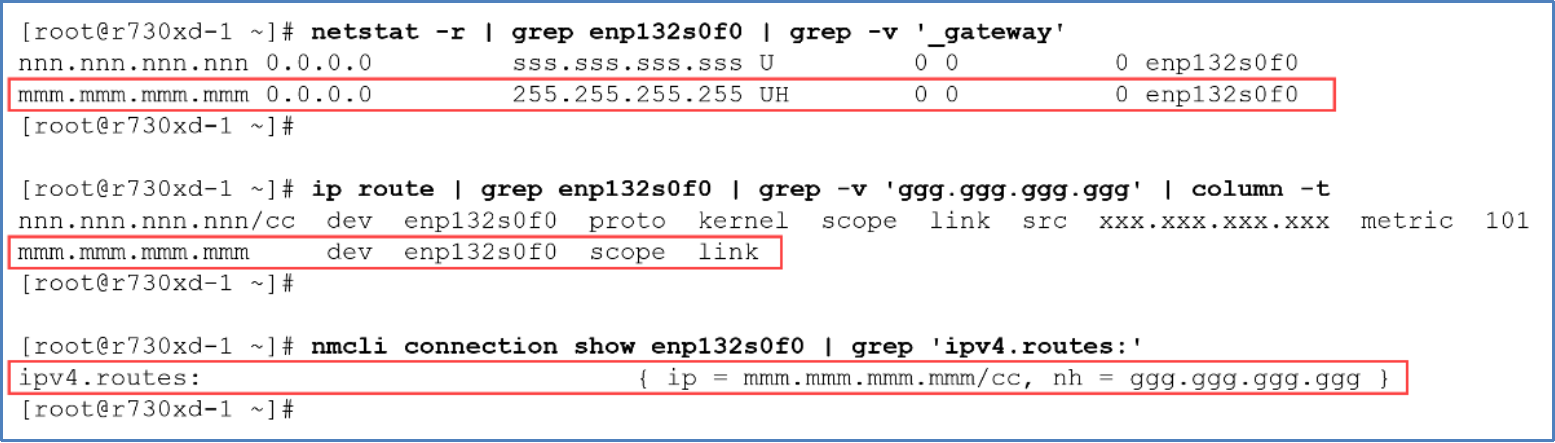
Figure 41. Static route between enp132s0f0 and Unity Link aggregate Ocp 0 0
Because the static route defines a specific destination address (mmm.mmm.mmm.mmm) rather than the subnetwork IP address, the operating system considers the specific destination address as best-matched and uses it. The static route forces Ethernet traffic from interface enp132s0f0 (xxx.xxx.xxx.xxx) to Unity (mmm.mmm.mmm.mmm), as shown in Figure 42.
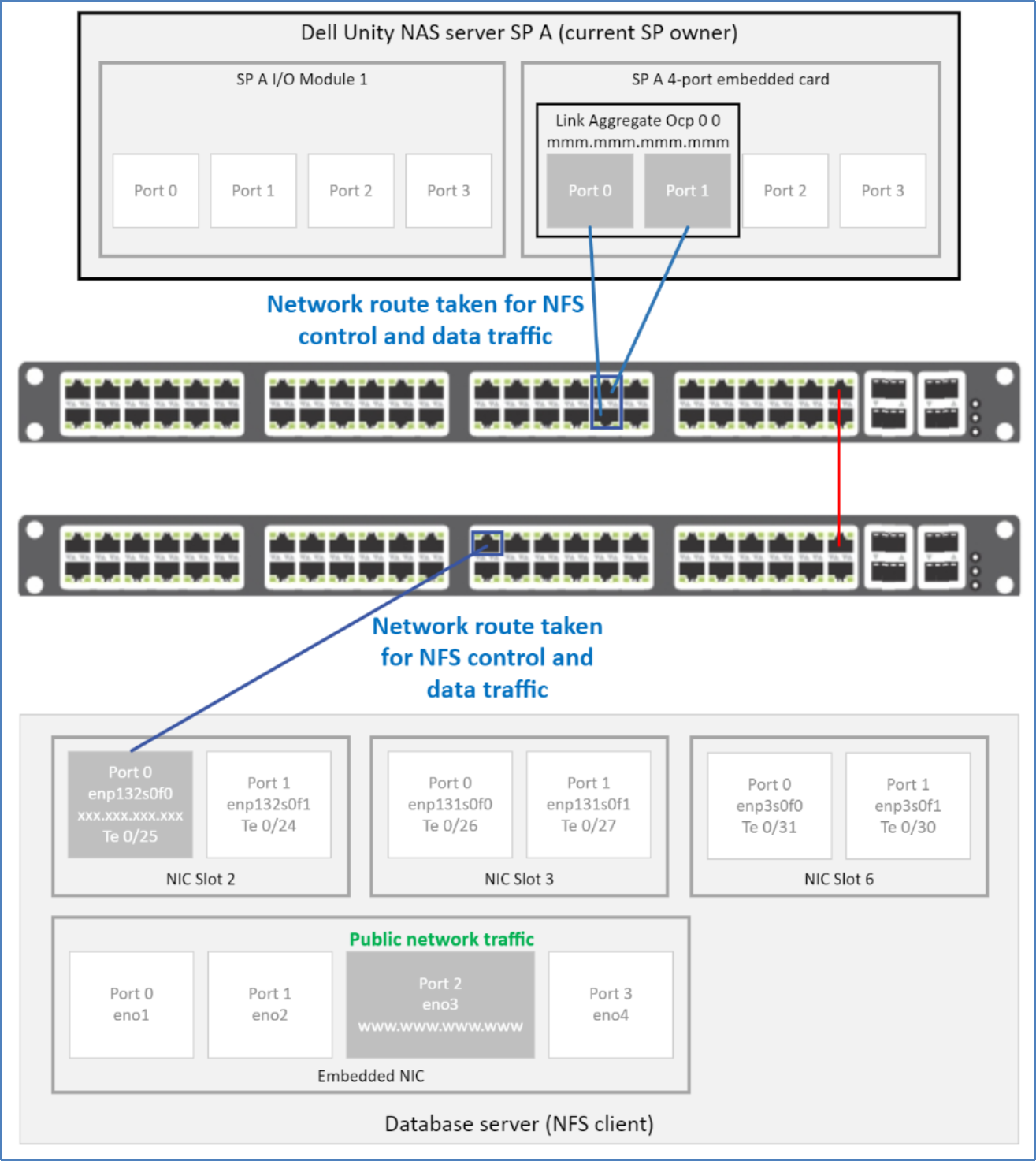
Figure 42. Static route—correct path taken for dNFS data traffic
Manual changes to the routing table are not persistent across server reboots. If static routes should be persistent, consider creating routing configuration files. For more information, see the section Persistent static routes.
Shared subnet on multiple interfaces with multiple dedicated dNFS data paths
This example illustrates how static routing changes the paths taken on multiple interfaces configured with IP addresses from the same subnet with default routing (See Figure 43). NFS client Ethernet interfaces configured are:
- Interface bond1 is intended to be dedicated to kNFS/dNFS control traffic.
- Interfaces enp131s0f0 and enp3s0f0 are intended to be dedicated to dNFS data traffic.
- Interface eno3 is intended for general public Ethernet traffic.
Figure 43 shows that dNFS data traffic flows through interface eno3 rather than intended interfaces enp131s0f0 and enp3s0f0.
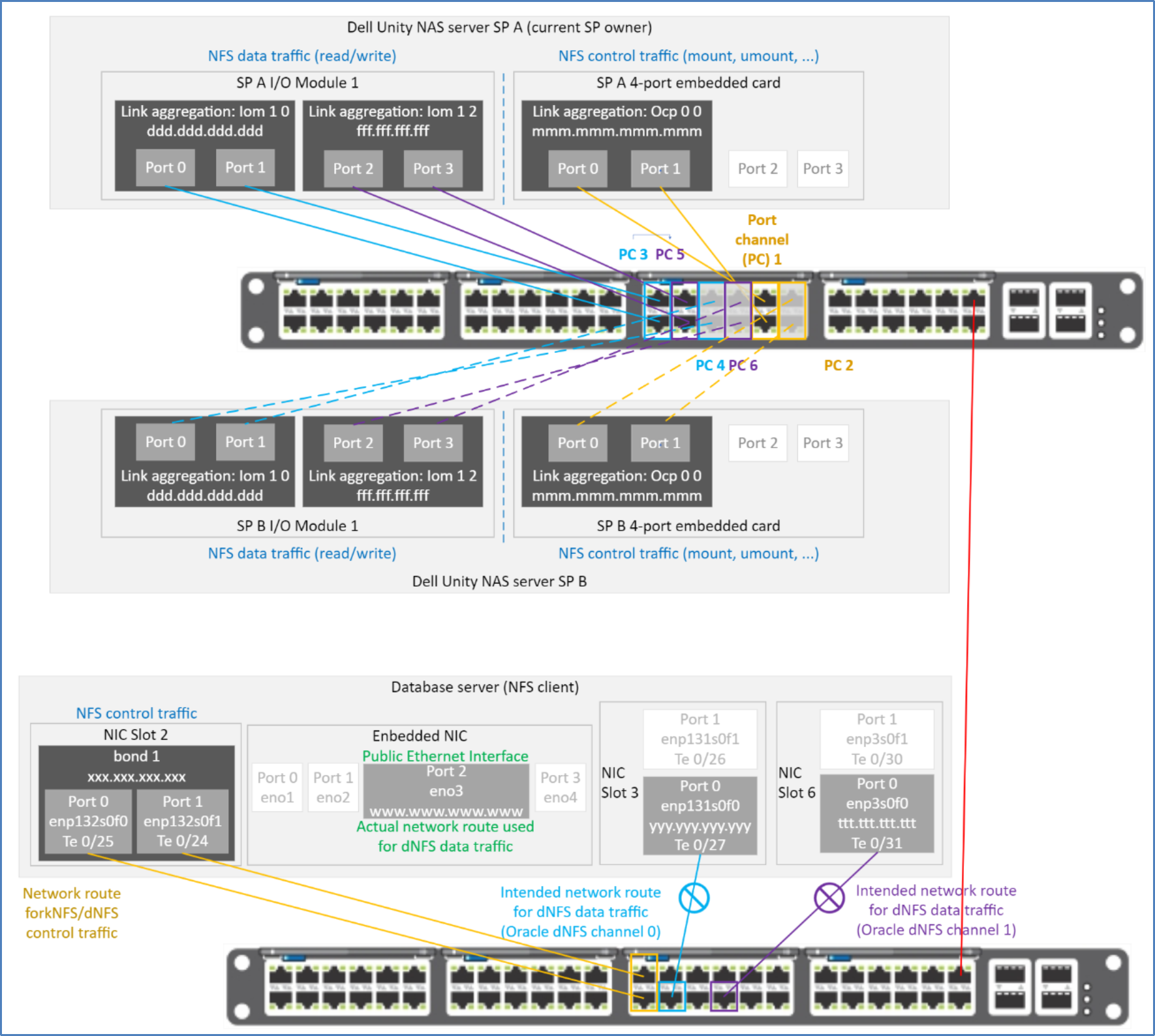
Figure 43. Incorrect network route taken by dNFS data traffic on a shared subnet with default routing
The following two figures show the corresponding routing table for Figure 43.
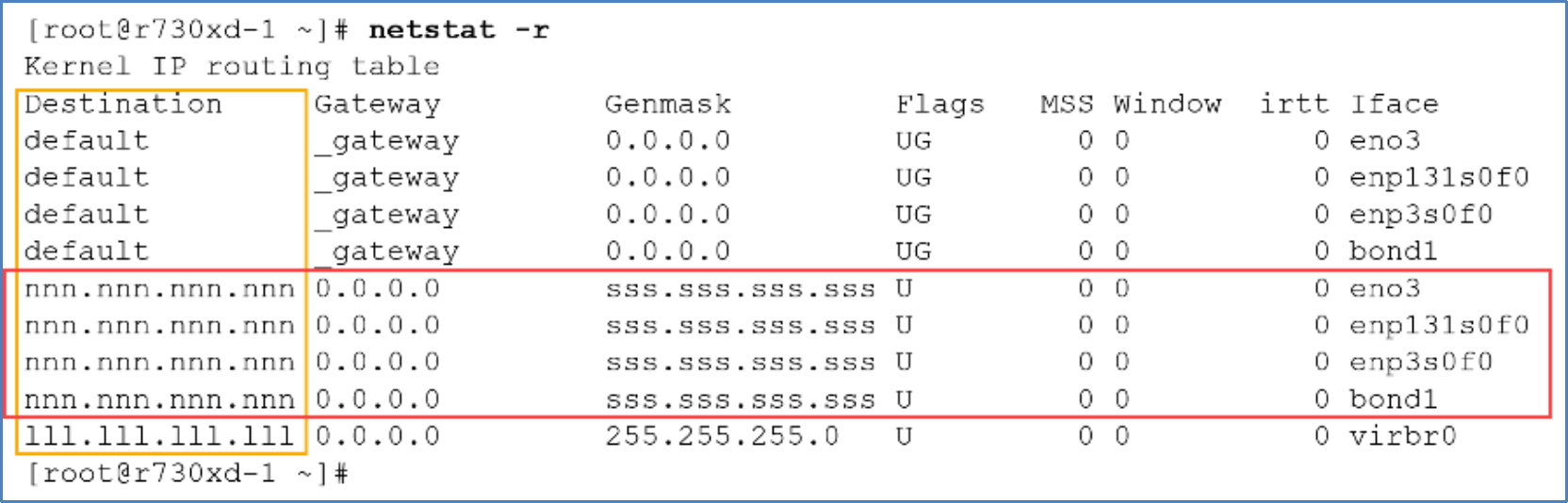
Figure 44. Default routing—netstat -r: traffic routed through interface eno3
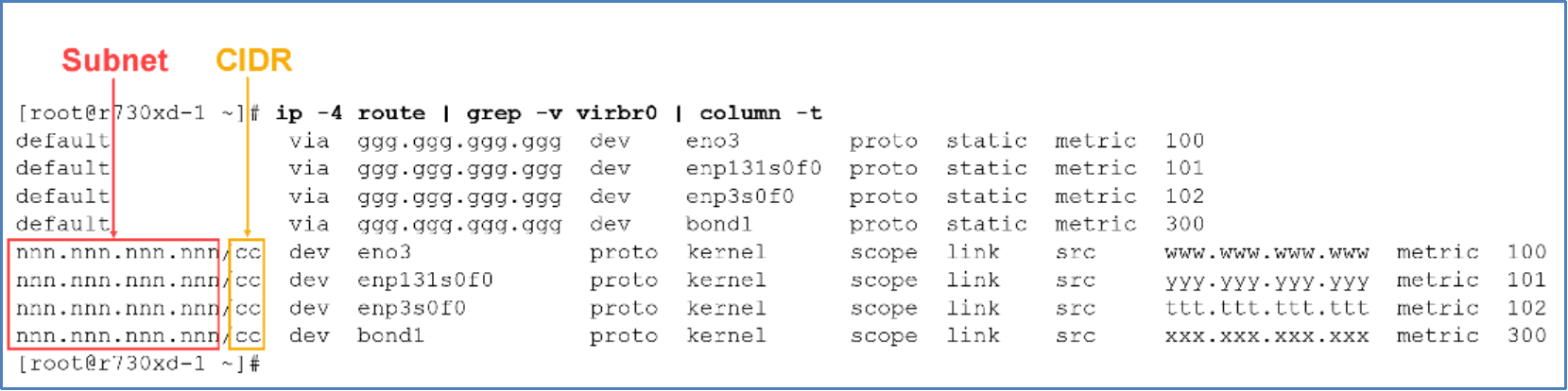
Figure 45. Default routing—ip -4 route: traffic routed through interface eno3
Figure 45 shows interface eno3 having the same subnet and CIDR as interfaces enp131s0f0, en3s0f0, and bond1. Since interface eno3 is the top-most best-matched entry in the routing table, all dNFS traffic flows through eno3.
To mitigate this traffic misdirection, static routes must be added to the operating system routing table. The static route forces the operating system to send dNFS traffic between the IP addresses specified in the static route. In this case, the static routes are:
- IP address (xxx.xxx.xxx.xxx) of interface bond1 of the database server, and IP address (mmm.mmm.mmm.mmm) of Unity’s Link aggregate Ocp 0 0 on the base enclosure 4-port card
- IP address (yyy.yyy.yyy.yyy) of interface enp131s0f0 and IP address (ddd.ddd.ddd.ddd) of Unity’s Link Aggregate Iom 1 0 0 on the IoModule1 4-port card
- IP address (ttt.ttt.ttt.ttt) of interface enp3s0f0 and IP address (fff.fff.fff.fff) of Unity’s Link Aggregate Iom 1 2 0 on the IoModule1 4-port card
To direct Ethernet traffic to flow through the three routes listed above, the following static routes are needed:
ip route add mmm.mmm.mmm.mmm dev bond1
ip route add ddd.ddd.ddd.ddd dev enp131s0f0
ip route add fff.fff.fff.fff dev enp3s0f0
Once the static routes are defined, the operating system chooses them because they best fit the destination and subnet mask/CIDR of the destination interface (see Figure 46).
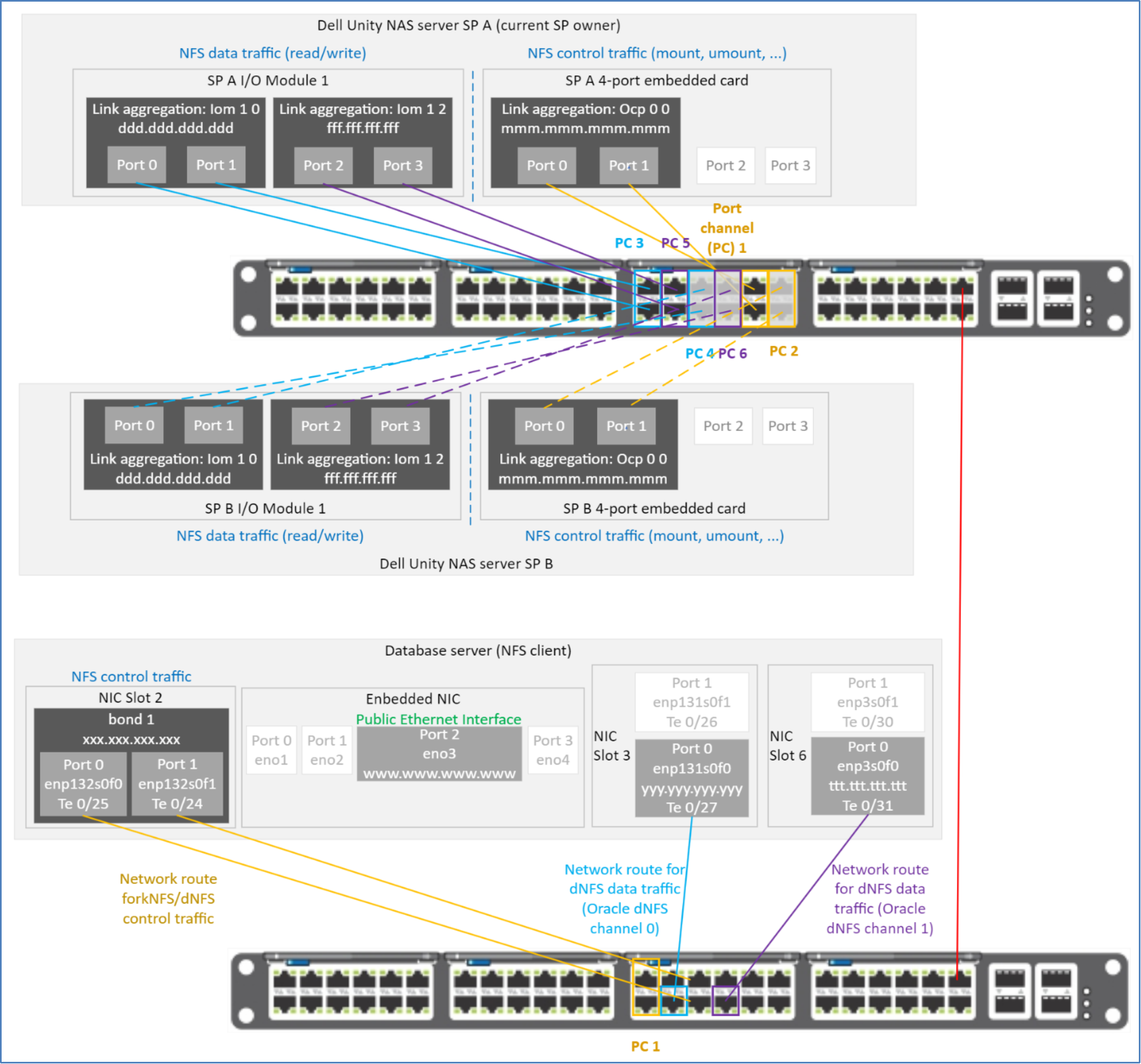
Figure 46. Static route—correct path taken for dNFS data traffic
Manual changes to the routing table are not persistent across server reboots. If static routes should be persistent, consider creating routing configuration files. For more information, see the section Persistent static routes.
To verify that the static routes appear in the routing table, run either:
- netstat -r
- ip route
- nmcli connection show
and filter on the interface name:
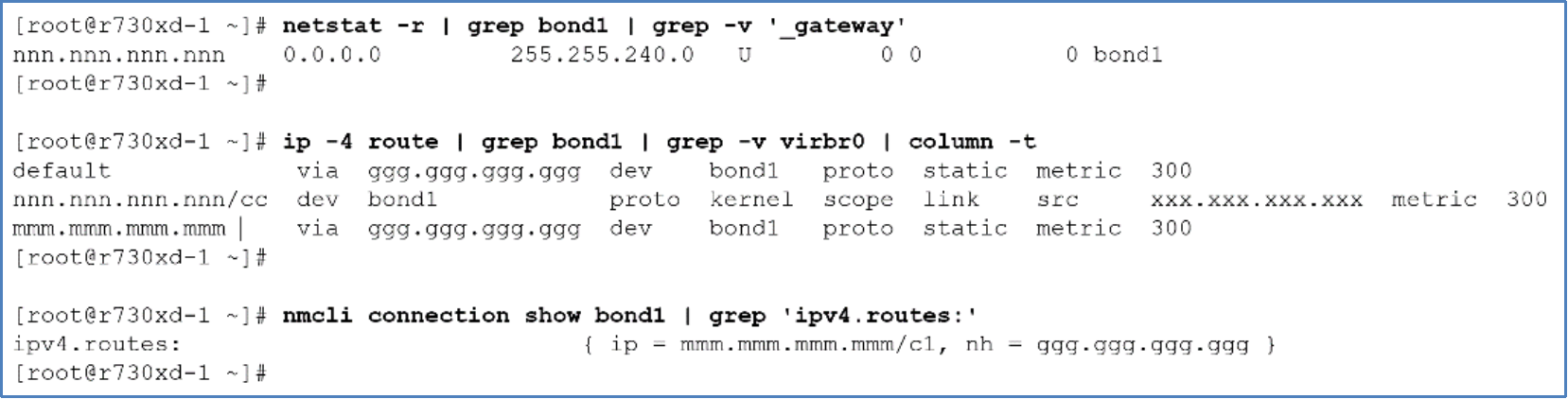
Figure 47. Static route between database server interface bond1 and Unity link aggregate Ocp 0 0
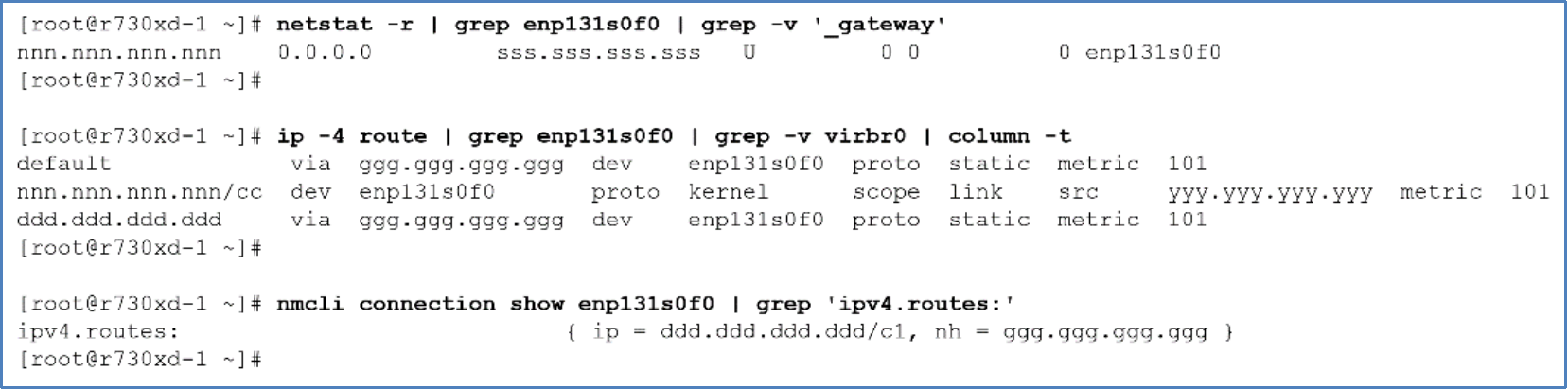
Figure 48. Static route between database server interface enp131s0f0 and Unity link aggregate Iom 1 0 0
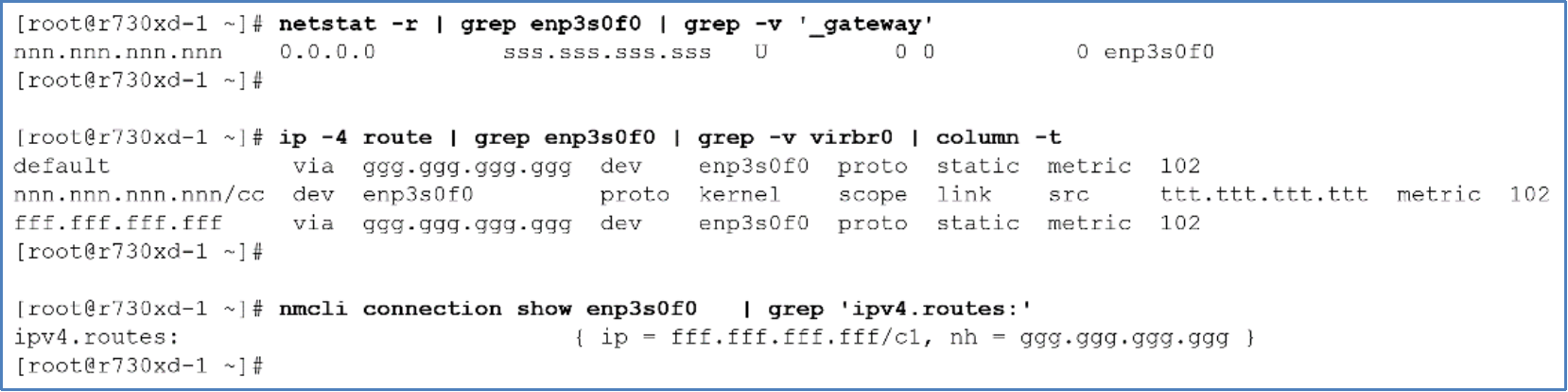
Figure 49. Static route between database server interface enp3s0f0 and Unity link aggregate Iom 1 2 0
Persistent static routes
To ensure that static routes persist across server reboots, create a static route configuration file in directory /etc/sysconfig/network-scripts for each of the static routes. Name the static route configuration file route-<NAS client interface>, substituting <NAS client interface> with the name of the network interface.
The following static route configuration files define the routes shown in Figure 50:
[root@r730xd-1 network-scripts]# cat route-bond1
ADDRESS0=mmm.mmm.mmm.mmm
NETMASK0=255.255.255.255
GATEWAY0=ggg.ggg.ggg.ggg
[root@r730xd-1 network-scripts]#
[root@r730xd-1 network-scripts]# cat route-enp131s0f0
ADDRESS0=ddd.ddd.ddd.ddd
NETMASK0=255.255.255.255
GATEWAY0=ggg.ggg.ggg.ggg
[root@r730xd-1 network-scripts]#
[root@r730xd-1 network-scripts]# cat route-enp3s0f0
ADDRESS0=fff.fff.fff.fff
NETMASK0=255.255.255.255
GATEWAY0=ggg.ggg.ggg.ggg
[root@r730xd-1 network-scripts]#
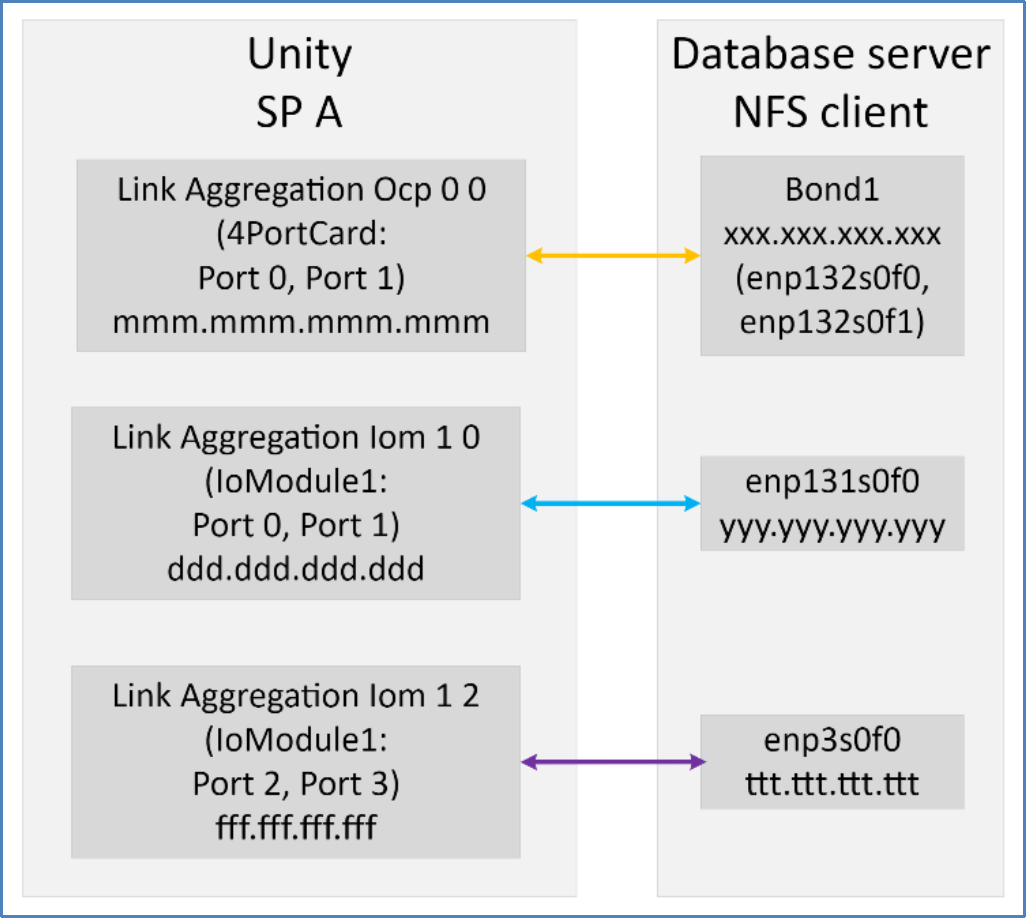
Figure 50. Static routes for dNFS data and kNFS control traffic
Configuring LACP—NAS server
Prior to OE 4.2.1, only ports belonging to the same I/O modules or onboard Ethernet ports could be used in a link aggregation. Starting with OE 4.2.1, link aggregations can be created with ports between I/O modules and the onboard Ethernet ports (see Figure 6). This requirement was added to provide greater flexibility and options to configure high availability in Unity NAS server connectivity. All ports in the link aggregation must have the same speed, MTU, and duplex setting.
The Unity ports configured in a link aggregate must be cabled to switch interfaces that are configured as a port channel (see Figure 21 or Figure 52).
Unity link aggregation configuration
Link aggregations can be defined across two, three, or four ports, on the same card or I/O modules, or between the card and I/O modules within the same SP. Ports in that configuration must have the same speed, duplex, and MTU. For more information, see the Unity documentation.
Link aggregations need to be created before specifying them when configuring a Unity NAS server.
Note: Dell Technologies recommends using two TOR switches for redundancy. The lab used for this paper used only a single TOR switch.
When a link aggregate interface is configured in Unisphere, the candidate ports for the link aggregate must be cabled and configured in both SP A and SP B. The candidate ports must be cabled to the appropriate port channels on the Ethernet switch (see Figure 21).
The following figures show three link aggregations (Ocp 0 0, Iom 1 0, and Iom 1 2). Each of the link aggregations is mirrored on both SP A and SP B.
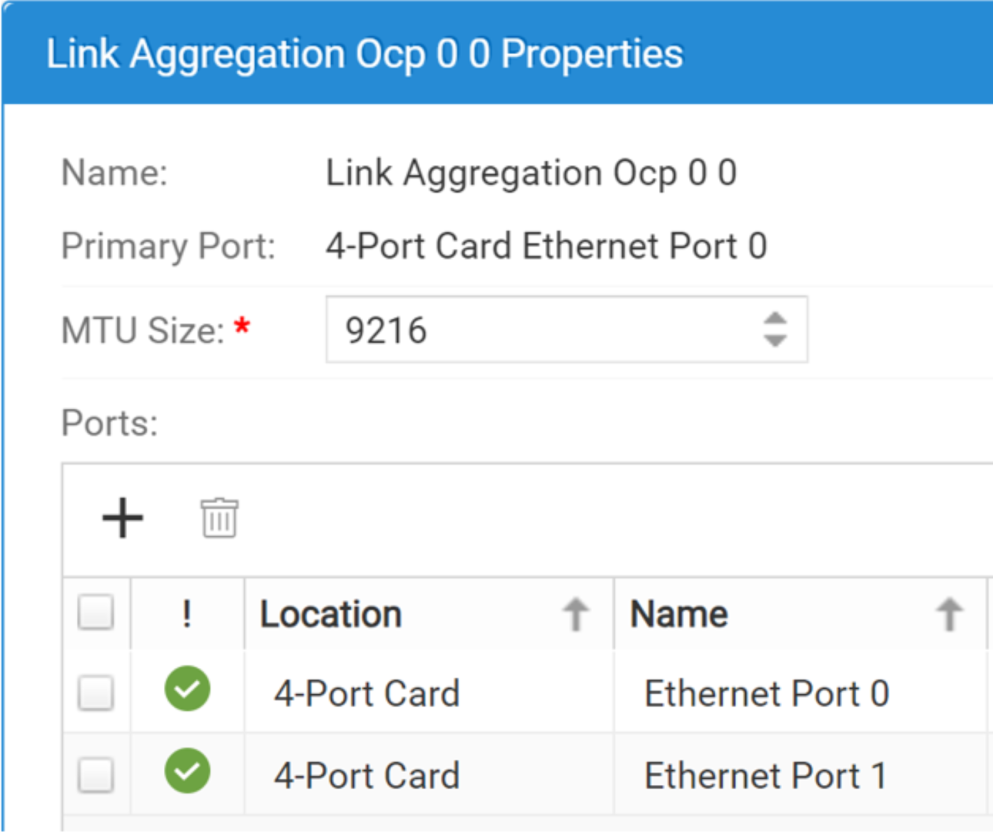
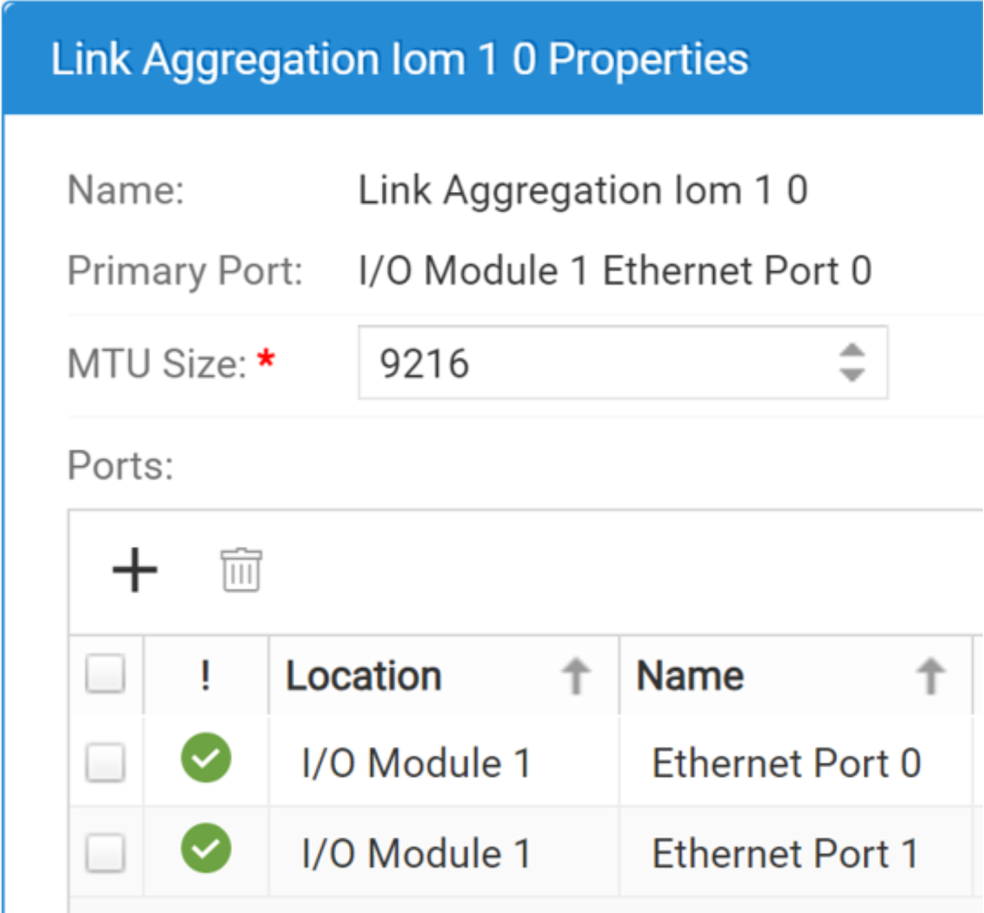
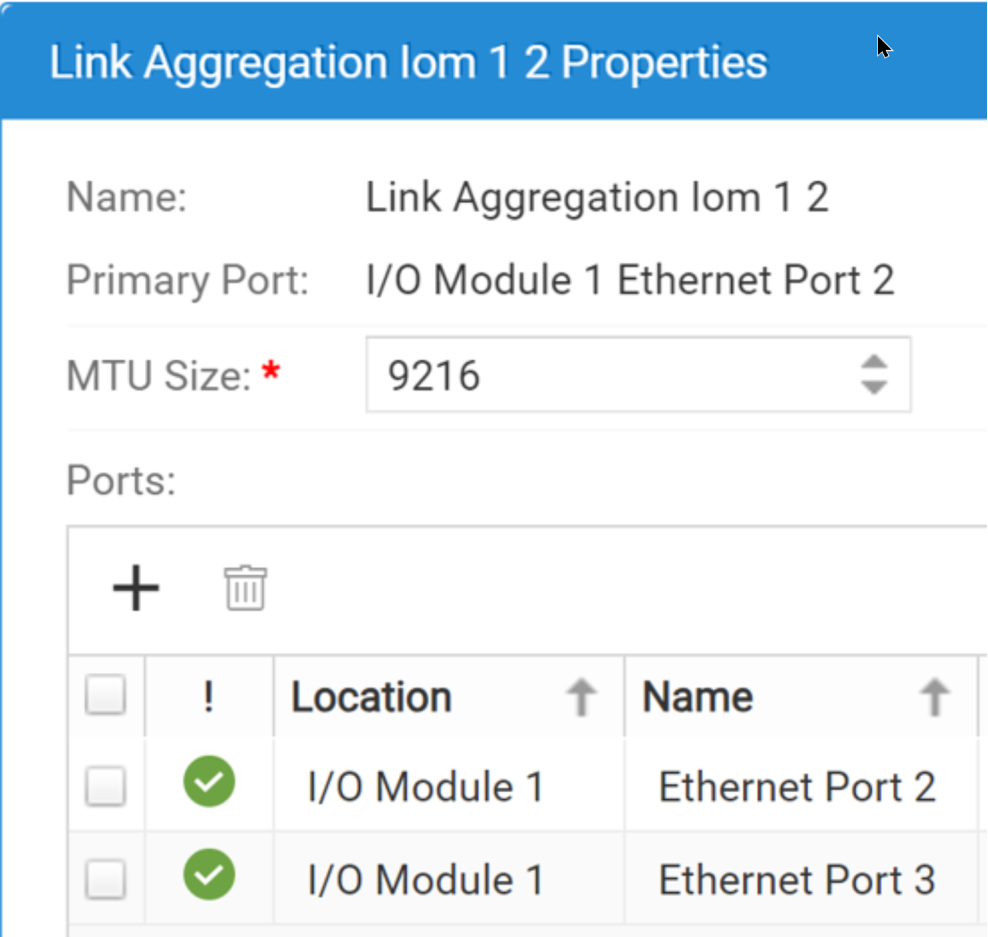
Figure 51. Unity link aggregations
The mirrored link aggregations are necessary because, in failover, the peer SP uses the ports residing on the peer SP that mirror the ports being used on the primary SP.
The number of switch interfaces required for a Unity link aggregate is double the number of interfaces in the Unity link aggregate. If a Unity link aggregate contains two interfaces, four switch interfaces are required: two switch interfaces for the two interfaces in SP A and two switch interfaces for the two interfaces in SP B. Figure 52 shows the interface mappings between Unity link aggregated interfaces and the Ethernet switch port channels used in this paper.
Note: Dell Technologies recommends using two TOR switches for redundancy. The lab used for this paper used only a single TOR switch. Using one switch is not recommended.
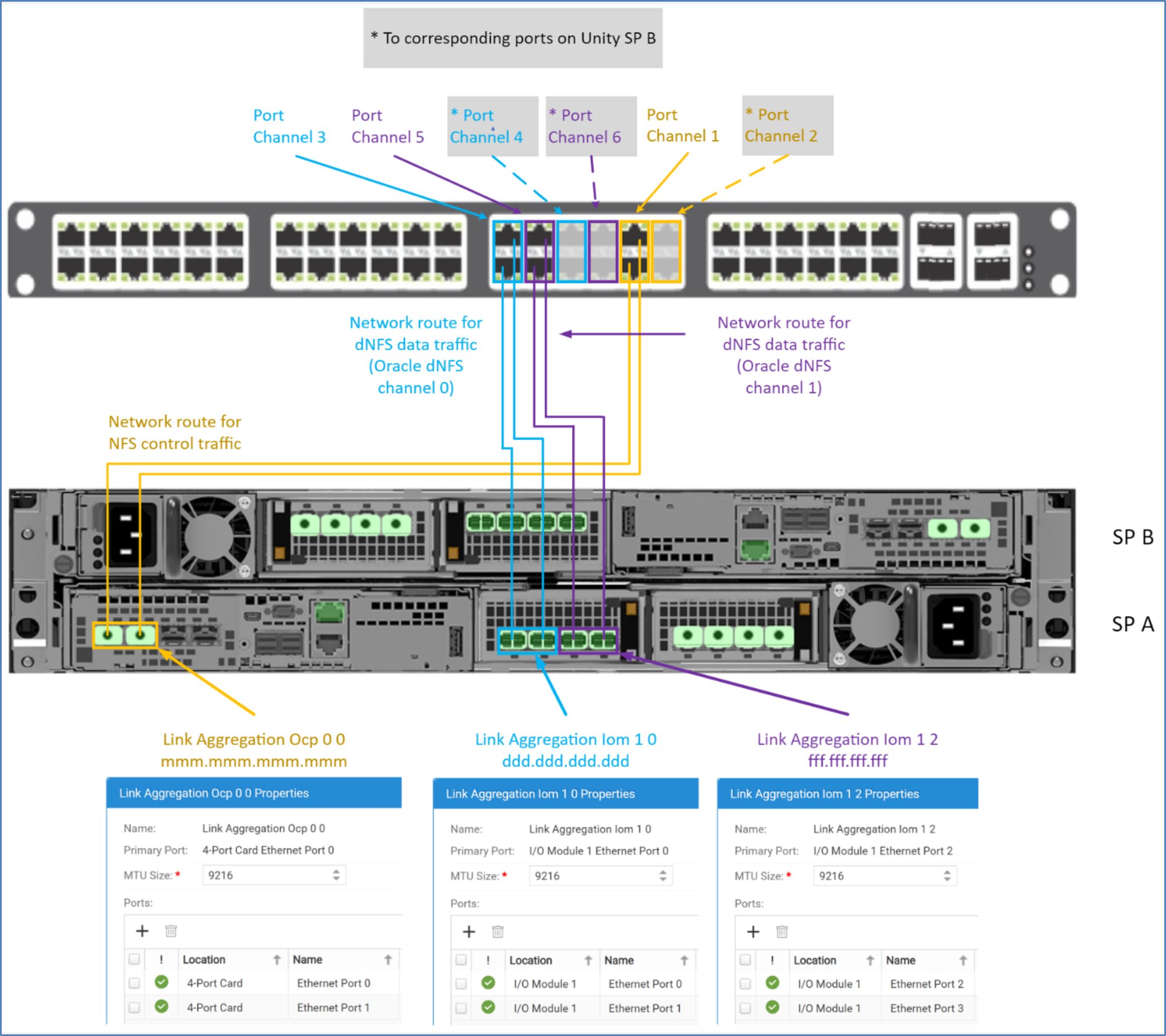
Figure 52. Interface mappings: Unity and Ethernet switch
Creating Unity link aggregations
To configure Unity link aggregations, perform the following steps in Unisphere:
- Log in to Unisphere.
- Select the gear icon (Settings wizard).
- Under Access, select High Availability. Then click the plus sign (Add) under Link aggregations.
- Optional: For ease of selecting the primary ports for the Link Aggregation, click column heading Location to sort the ports.
- Locate and select the port that will be used as the primary port of the link aggregation, then click Next.
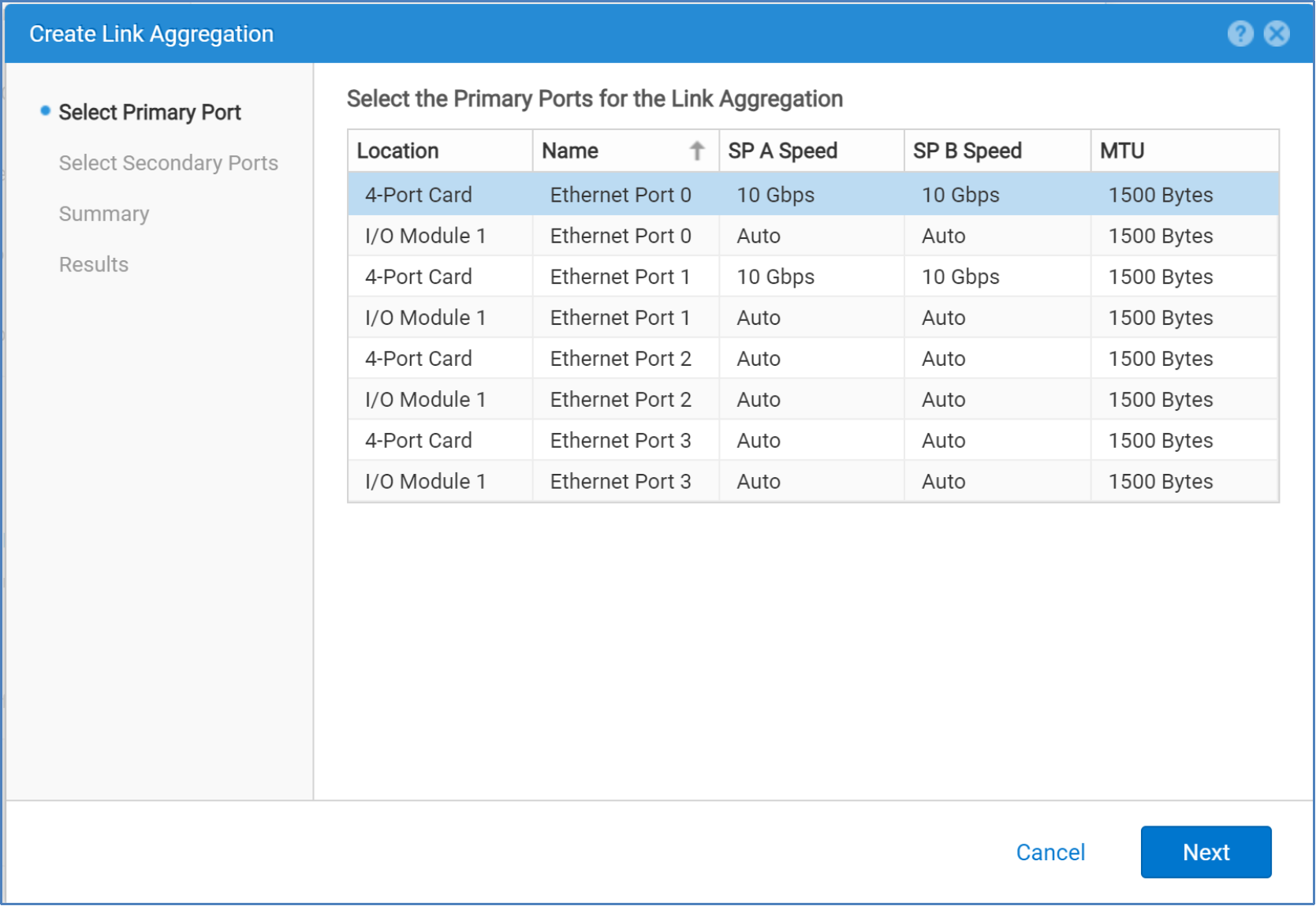
- Locate and select the checkbox of the port that will be used as the secondary port of the link aggregation, the click Next.
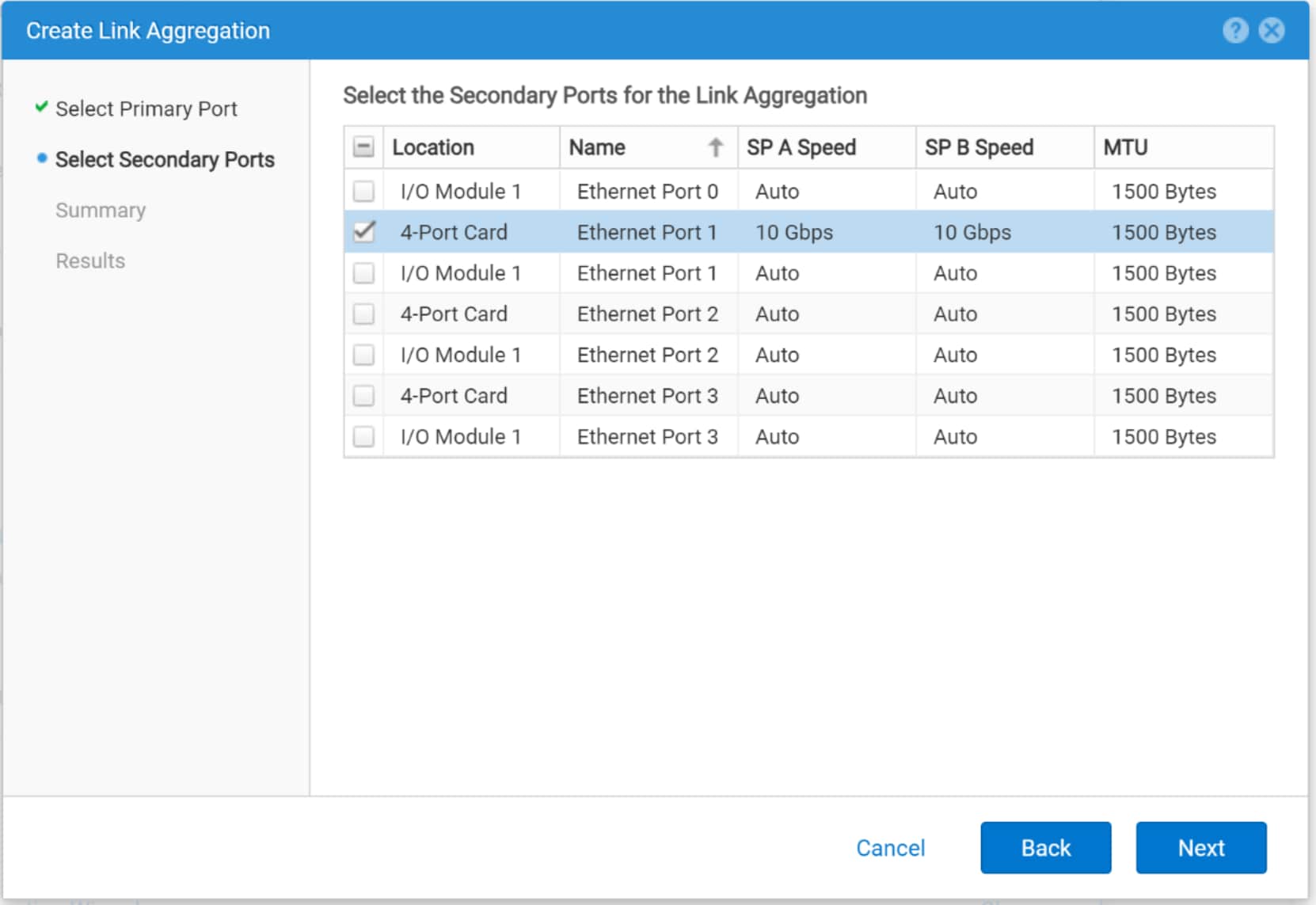
- Review the request and click Finish if the request is correct.
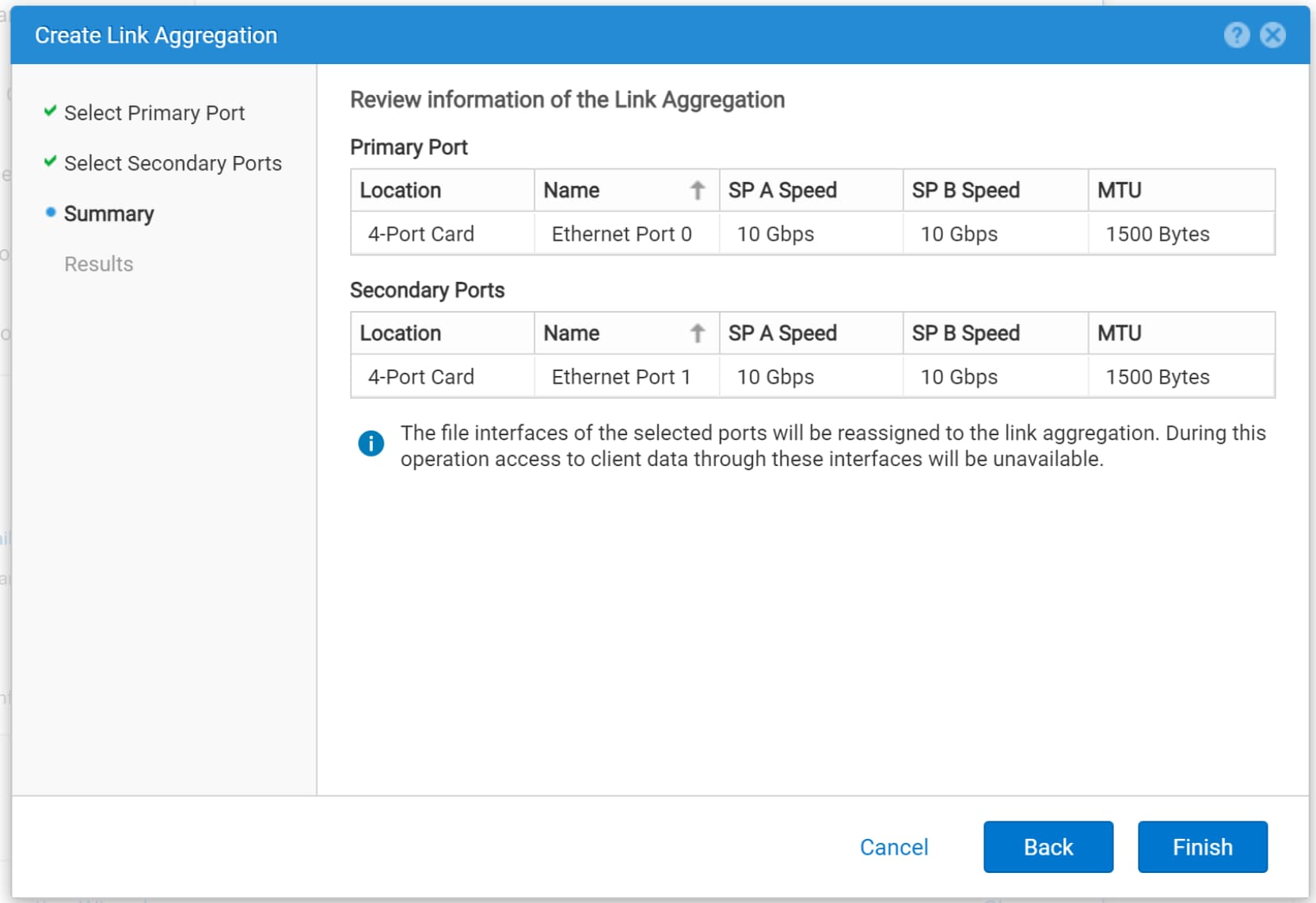 The Create Link Aggregation wizard displays the new link aggregation.
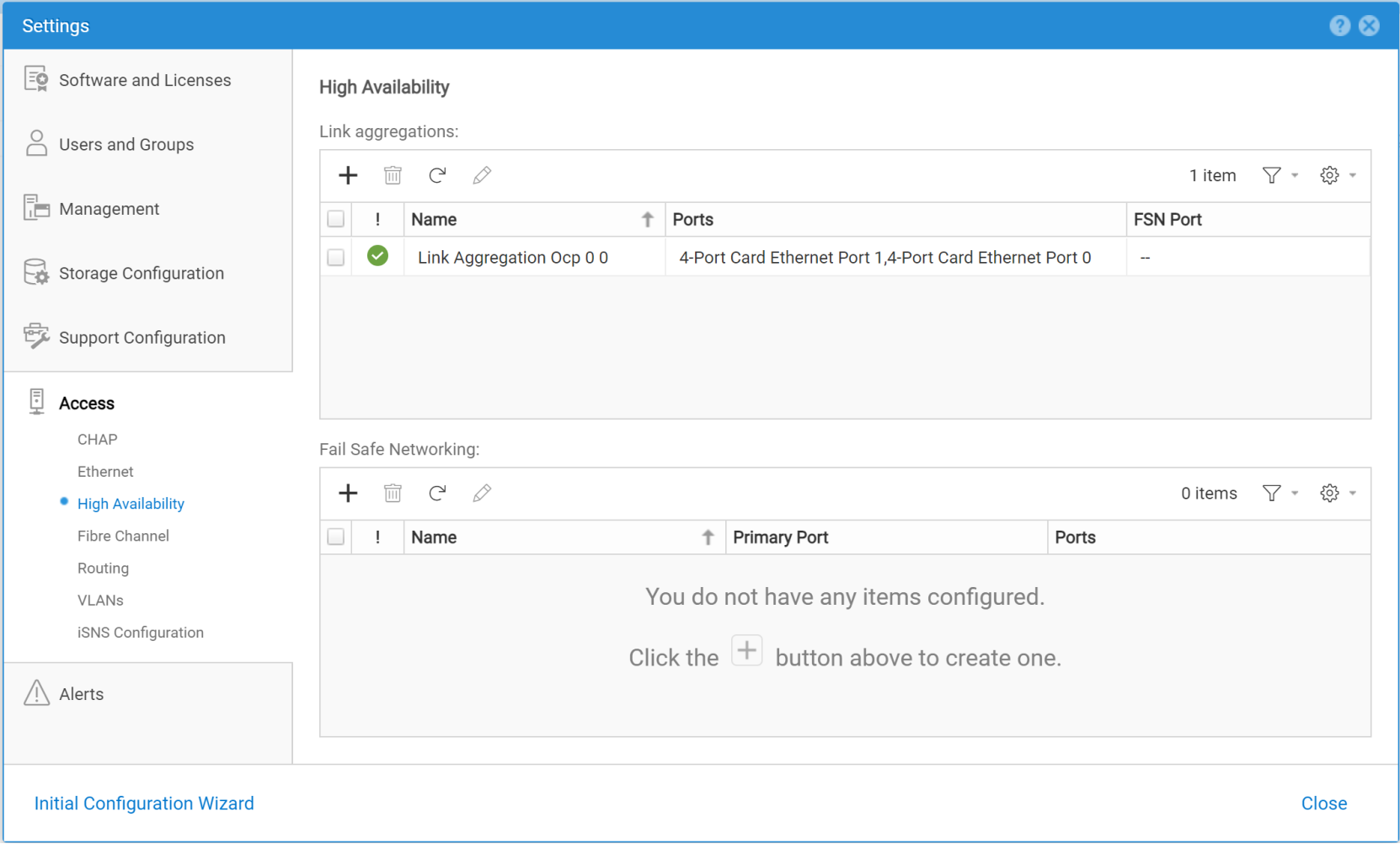
- After the link aggregation is created, click Close.
By default, the link aggregate is created with MTU 1500. Oracle recommends using Jumbo frames (MTU 9000). See section Jumbo frames for additional information.
Repeat the above steps as necessary to create additional link aggregations. Figure 53 shows the three link aggregations used in this paper.
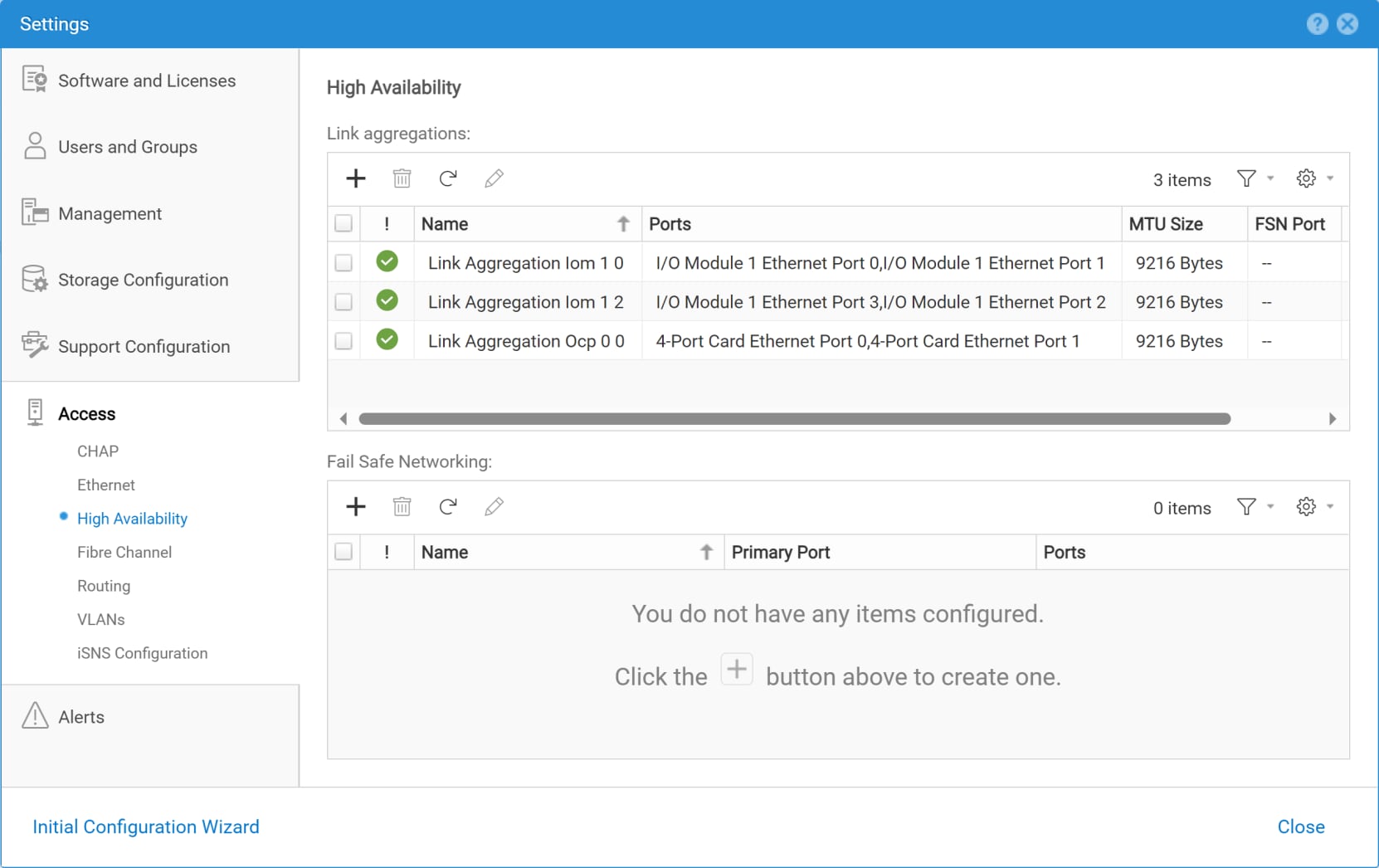
Figure 53. Three link aggregations
After a link aggregation is created, it can be used as a NAS server network interface. For information about creating a NAS server and assigning a link aggregation as the interface, see Creating a NAS server and adding a link aggregation network interface.
Unity link Aggregation and Ethernet switch port channel configuration
If NFS control traffic will flow through a bonded NFS client (database server) NIC interface and a link aggregate in Dell Unity storage, Ethernet switch ports must use LACP.
Figure 54 illustrates an example of switch interfaces and port channels in a Dell Networking S5000 switch cabled to the Unity array. The port channels will be used for NFS control traffic. Port channel 1 will be used for Dell Unity SP module A and port channel 2 will be used for Dell Unity SP module B.
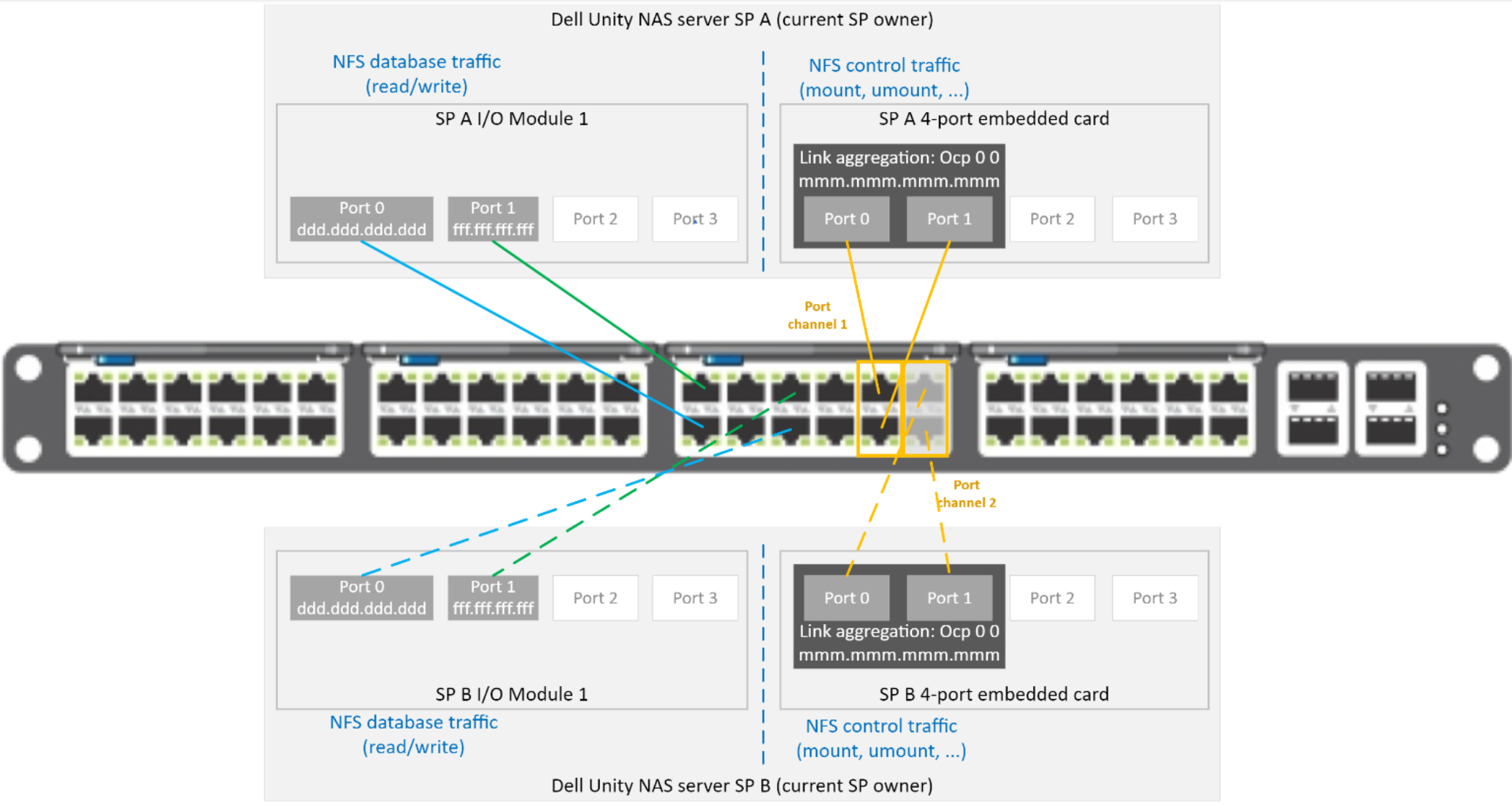
Figure 54. Cabling between Dell Unity and an Ethernet switch – single port channel per SP
Figure 55 illustrates an example of multiple port channels. Port channels 1, 3, and 5 are configured for SP A. Port channels 2, 4, and 6 are configured for SP B. While SP A is healthy, NFS control traffic flows through port channel 1 and dNFS data traffic flow though port channels 3 and 5. On failure of SP A, NFS control traffic will flow through port channel 2 and dNFS data traffic will flow through port channels 4 and 6.
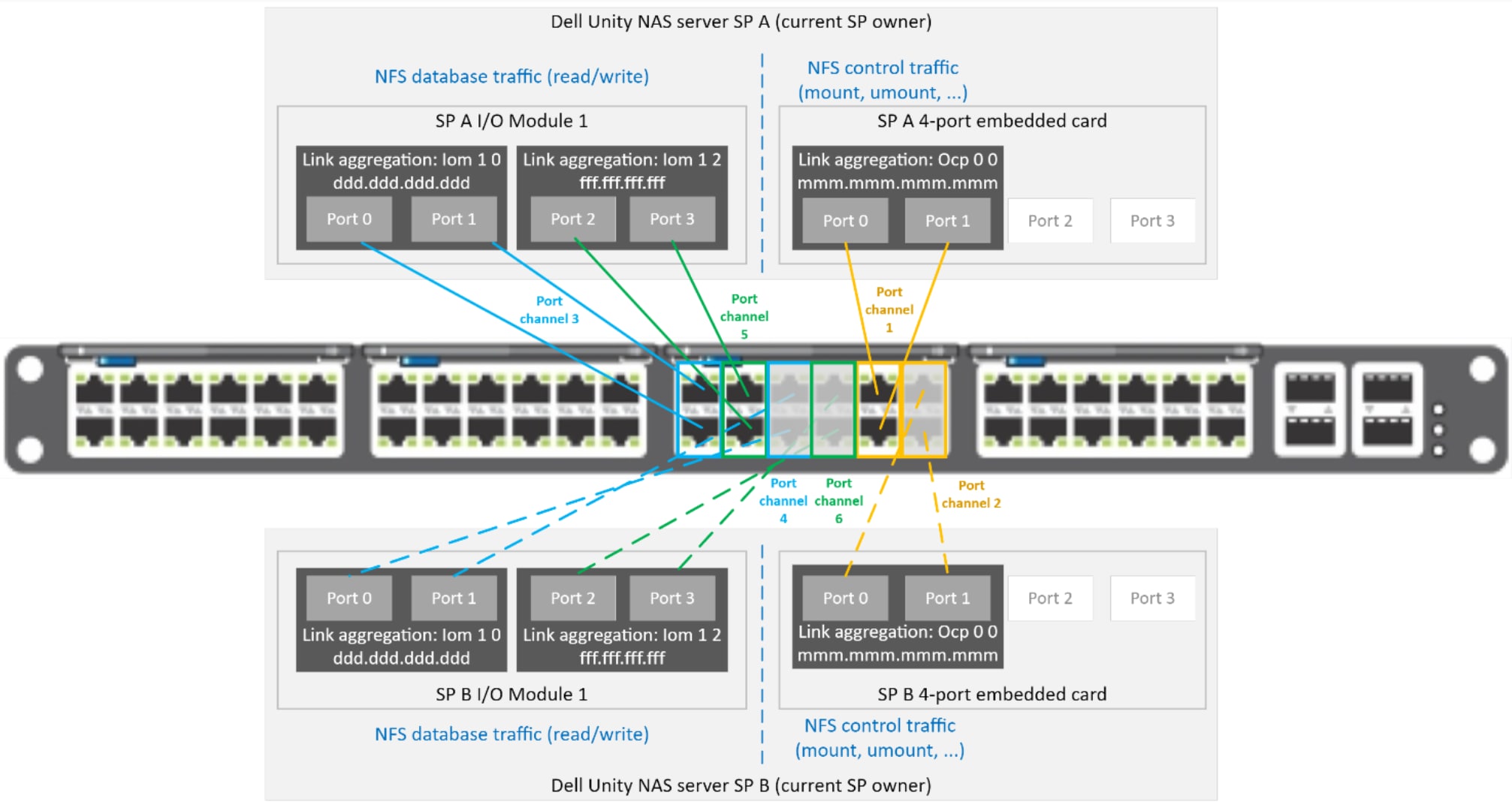
Figure 55. Cabling between Dell Unity and an Ethernet switch – multiple port channels
Oracle dNFS configuration file oranfstab
File oranfstab is optional. If it exists, it defines:
- Mount points that are available to dNFS
- One or more NAS server stanzas
- For each NAS server stanza, the network paths that dNFS should use for dNFS data traffic
oranfstab can reside in either /etc, $ORACLE_BASE_HOME/dbs or $ORACLE_BASE_CONFIG/dbs. If oranfstab resides in /etc, it will be global to all databases running on that server regardless of which $ORACLE_HOME the databases are running from. If oranfstab resides in $ORACLE_BASE_HOME/dbs, oranfstab it is global to any database running from the corresponding $ORACLE_HOME. If $ORACLE_HOME is shared between RAC nodes, all RAC databases running from the shared $ORACLE_HOME will use the same $ORACLE_BASE_HOME/dbs/oranfstab.
For more information about ORACLE_BASE_HOME and ORACLE_CONFIG_HOME, see Oracle 21c Database Installation Guide.
dNFS searches for mount entries in the following order and uses the first matching entry as the mount point:
- $ORACLE_BASE_HOME/dbs/oranfstab
- $ORACLE_BASE_CONFIG/dbs/oranfstab
- /etc/oranfstab
- /etc/mtab
If a database uses dNFS mount points configured in oranfstab, Oracle first verifies kNFS mount points by cross-checking entries in mtab and oranfstab. If a match does not exist, dNFS logs a message and fails to operate.
Benefits of using oranfstab
oranfstab provides dNFS with metadata to be able to perform multipathing. dNFS multipathing provides:
- Increased dNFS bandwidth
- Automatic dNFS data traffic load balancing
- Automatic dNFS channel failover
If any of these features are needed, file oranfstab is required.
When oranfstab is configured, dNFS automatically performs load balancing across all specified available channels in oranfstab. Also, if one channel fails, dNFS reissues I/O commands over any remaining available channel specified for that NAS server.
oranfstab directives
The following table shows the available parameters for oranfstab.
|
Directive/attribute |
Description |
|
server |
The name of the NAS server. If Kerberos authentication is used for the PowerStore NAS server, the value of the server must be the fully qualified name of the NFS server. See Creating a NAS server and adding a link aggregation network interface. When KERBEROS is used, the value of the server is used to create a service principal for Ticket Granting Service (TGS) requests from the Kerberos server. oranfstab may contain more than one server stanza. Note: When Kerberos is not used, Dell Technologies recommends setting this value to the name of the NAS server in Unity. However, the value can be any unique string of alphanumeric characters. For more information, see the Oracle documentation. |
|
local |
A key:value entry. key is local. Value is the IP address of an interface on the database server that should be used for dNFS data traffic. The operating system ifconfig command can be used to display the available interfaces and IP address configured on each interface. Up to four key:value entries of local can be supplied for each NAS server defined in oranfstab. A corresponding path value must exist for each local value. |
|
path |
A key:value entry. Key is path. Value is the IP address of a bonded network interface on the Unity NAS server that will host the NFS shares serviced by dNFS on the database server. Unity Unisphere can be used to display the available bonded network interface IP address. Up to four key:value entries of path can be supplied for each NAS server defined in oranfstab. A corresponding local value must exist for each path value. |
|
export |
NFS export path from Unity NAS server. |
|
mount |
The mount point of the NFS export on the database server. |
|
mnt_timeout |
Optional. Number of seconds the dNFS client should wait for a successful mount before timing out. Default is 600. |
|
nfs_version |
NFS protocol version used by the dNFS client. Valid values are: NFSv3, NFSv4, NFSv41, and pNFS. Default: NFSv3. Unity only supports NFSv3 with oracle dNFS, so do not configure Unity or Oracle dNFS to use NFS4, NFSv4.1, or parallel NFS (pNFS). |
|
security_default |
Optional. Specifies the default (sys) security mode applicable for all the exported NFS server paths for a NAS server entry in oranfstab. The value of oranfstab attribute security defines the security level. |
|
security |
Optional. The security level using Kerberos authentication protocol with the dNFS client. The value can be specified per export-mount pair. |
|
dontroute |
Specifies that outgoing messages should not be routed by the operating system but instead sent using the IP address to which they are bound. See the note that follows this table. |
|
management |
Directs the dNFS client to use the management interface for SNMP queries if SNMP is running on a separate management interface on the NAS server. Default: value of oranfstab server parameter. |
|
community |
The community string for use in SNMP queries. Default: public. |
Note: dontroute is a POSIX option, which sometimes does not work on all Linux systems when multiple paths in the same subnet are used. Dell Technologies recommends investigating and testing the usage of dontroute and operating system static routes.
Single server stanza
The following oranfstab file was used for this paper. It defines one NAS server with two dNFS data paths:
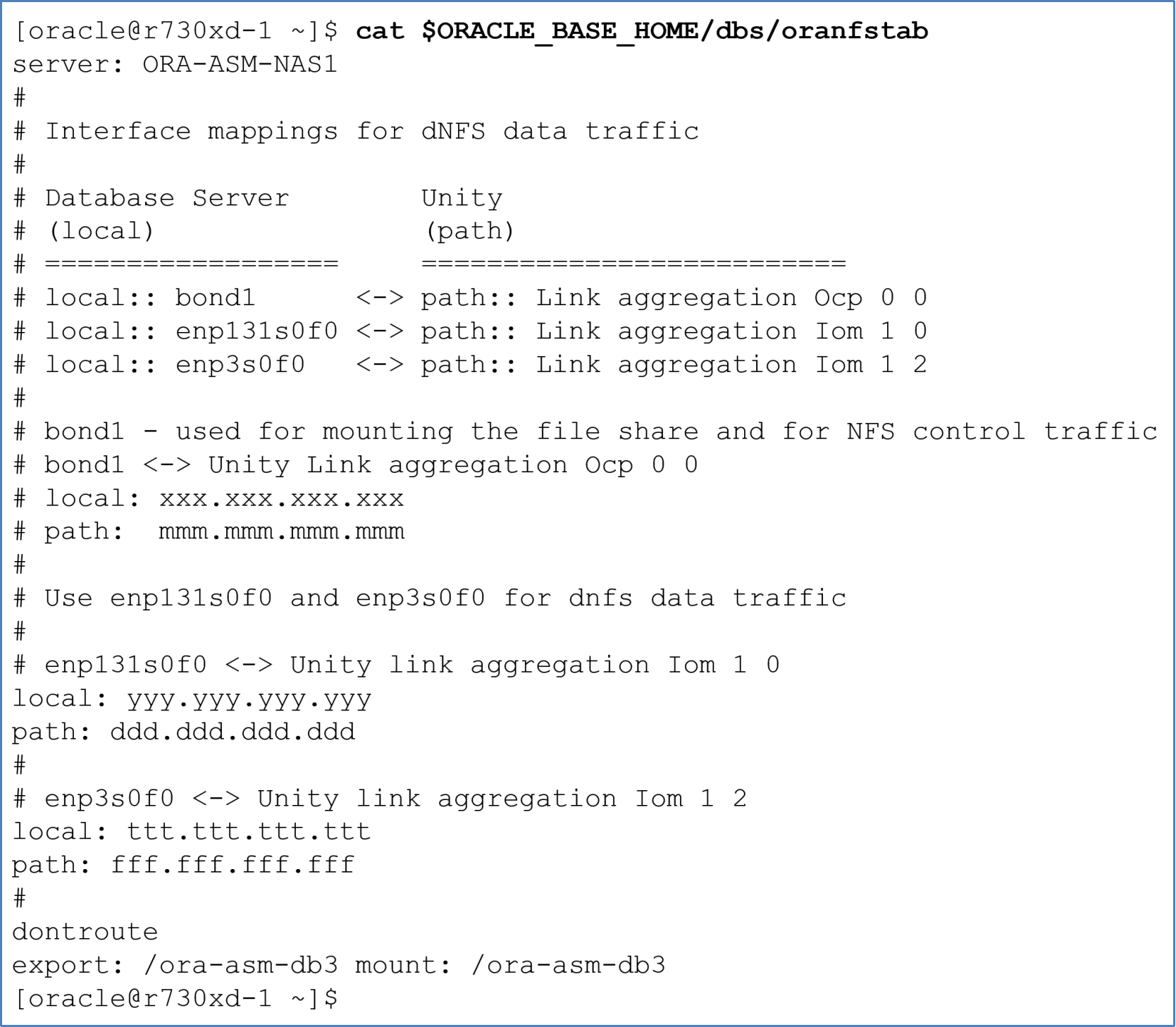
Figure 56. Single NAS server in oranfstab
The following example shows an Oracle instance using two channels for NAS server ORA-ASM-NFS1.
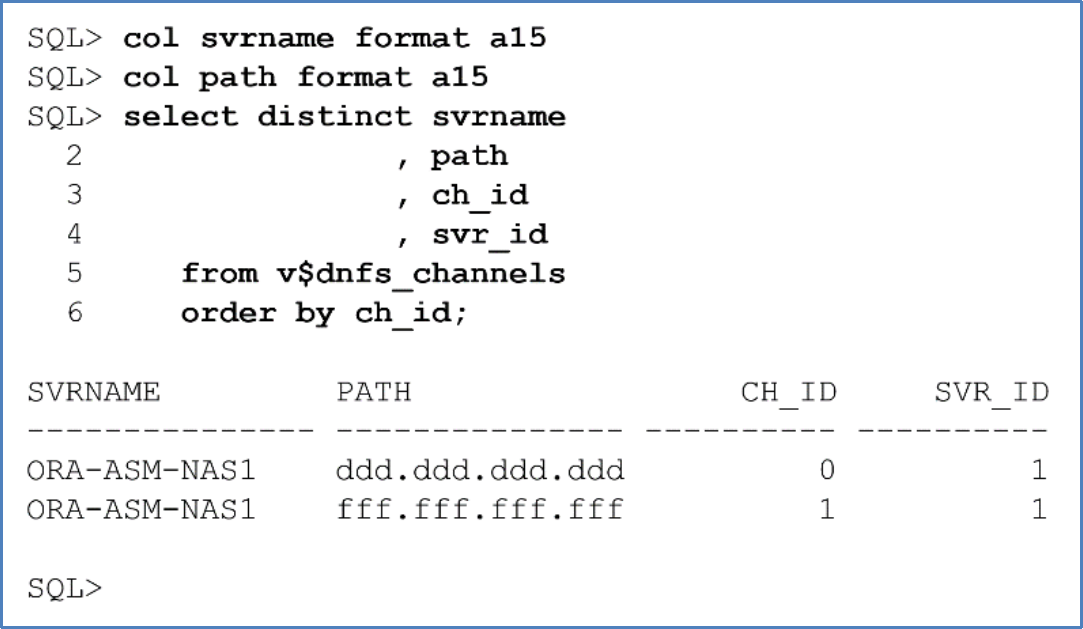
Figure 57. Displaying the dNFS channels
Multiple server stanzas
The following oranfstab file contains two dNFS data paths to two NAS servers. Each NAS server services a different database.
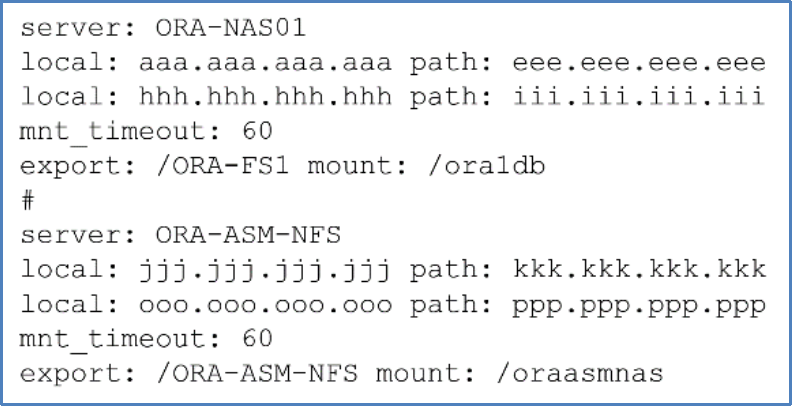
Figure 58. Multiple NAS servers in oranfstab
Enabling and disabling Oracle dNFS
dNFS without oranfstab
If oranfstab does not exist, dNFS creates a single dNFS channel for entries found in /etc/mtab that are required for the running database. This single dNFS channel is used for both dNFS control and dNFS data traffic. The local IP address used for the dNFS channel is the IP address used to mount the NFS share. In Oracle, the dNFS channel has a name equal to the local IP address of the mount entry in /etc/mtab.
Note: If oranfstab is not used, dNFS load balancing and scaling are not available. For more information, see Benefits of using oranfstab.
Figure 59 shows the mount point, /etc/fstab, and /etc/mtab entries for the single NFS share used in this paper:
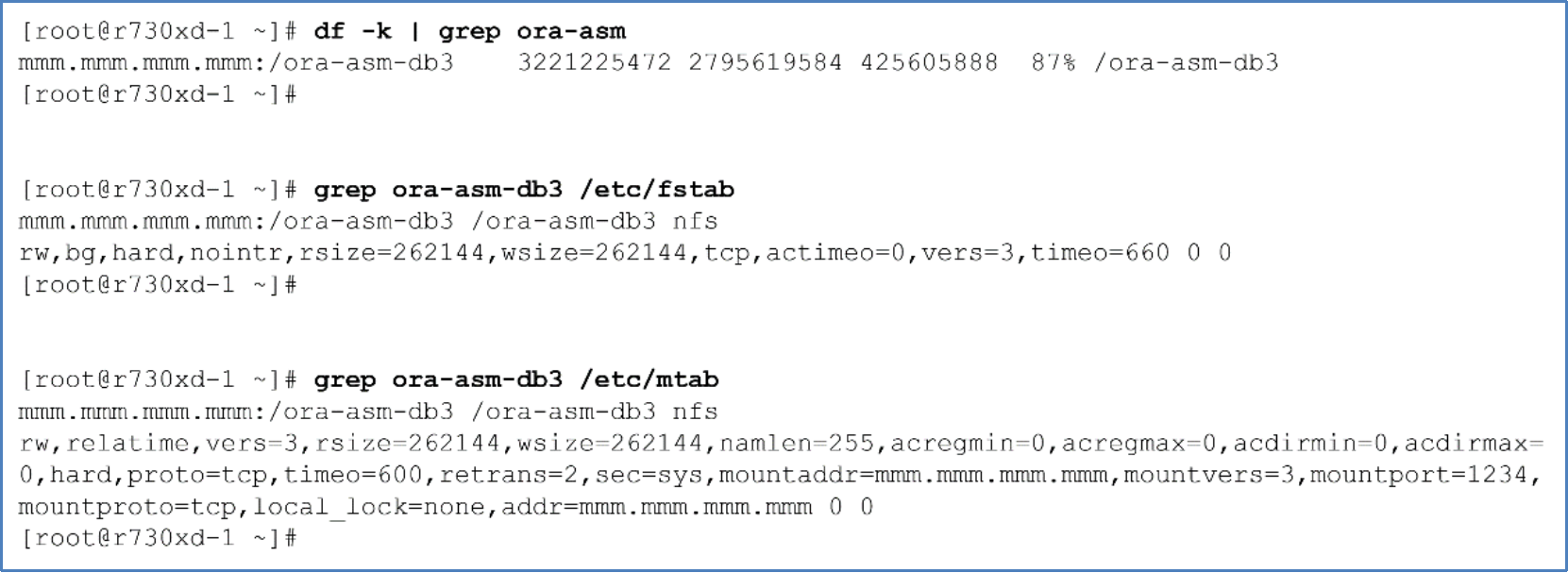
Figure 59. Mount point, /etcfstab, /etc/mtab entries for Unity NFS share
Figure 60 shows Oracle referring to the name (filer) of the single channel as the IP address used to mount the Unity NFS export. Because a local:path IP address mapping is not defined in file oranfstab for the mount IP, dNFS reports the local IP in the alert log as a null value. In this case, dNFS uses the IP address used to mount the NFS share for dNFS data traffic.
![Should the "local:path" IP address mapping not exist in oranfstab, the database instance alert.log will identify the local address as a null value ([]) and the filer name will be set to the IP address used to mount the Unity NFS file share.](https://i.dell.com/assetlink/img/global/-dl12uft8-original.png)
Figure 60. Database using mount IP address for dNFS control and data traffic
If multiple channels to a NAS server are needed for increased dNFS bandwidth, automatic dNFS data traffic load balancing, or automatic dNFS channel failover, the file oranfstab is required. dNFS automatically performs load balancing across all specified channels defined in oranfstab. If one channel fails, dNFS reissues I/O commands over any remaining available channel for that NAS server.
dNFS with oranfstab
When oranfstab exists, dNFS control traffic uses the IP address used to mount the NFS share. dNFS data traffic is balanced across the local:path IP address mappings of the NAS server stanza specified in oranfstab to which the database belongs. local IP addresses are set to the IP address of the Ethernet interfaces on the database server that are to be used for the database. path IP addresses must be the IP addresses of the Unity NAS server network interfaces.
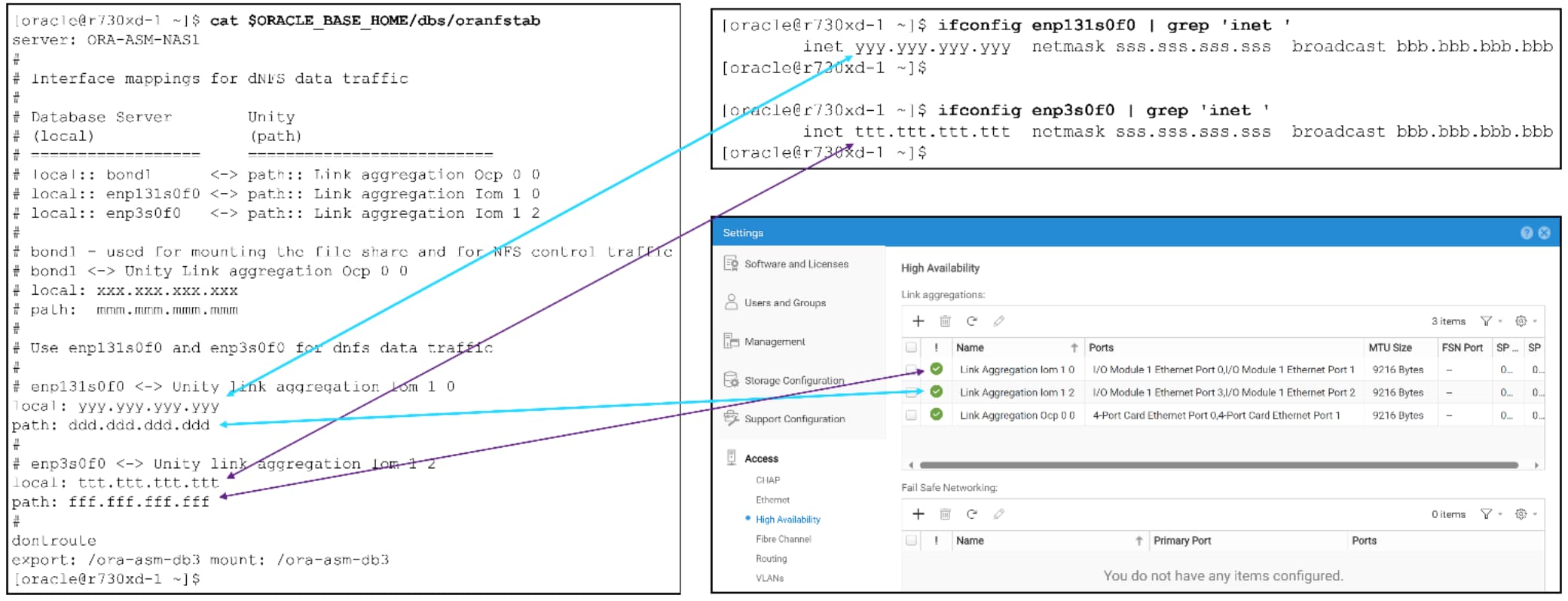
Figure 61. dNFS local:path IP address mappings
A dNFS channel for each of the local:path IP address mappings is created in the database instance. For each channel, the value of the NAS server name in oranfstab is recorded in the dNFS channel metadata.

Figure 62. dNFS filer name is the value of SERVER in oranfstab
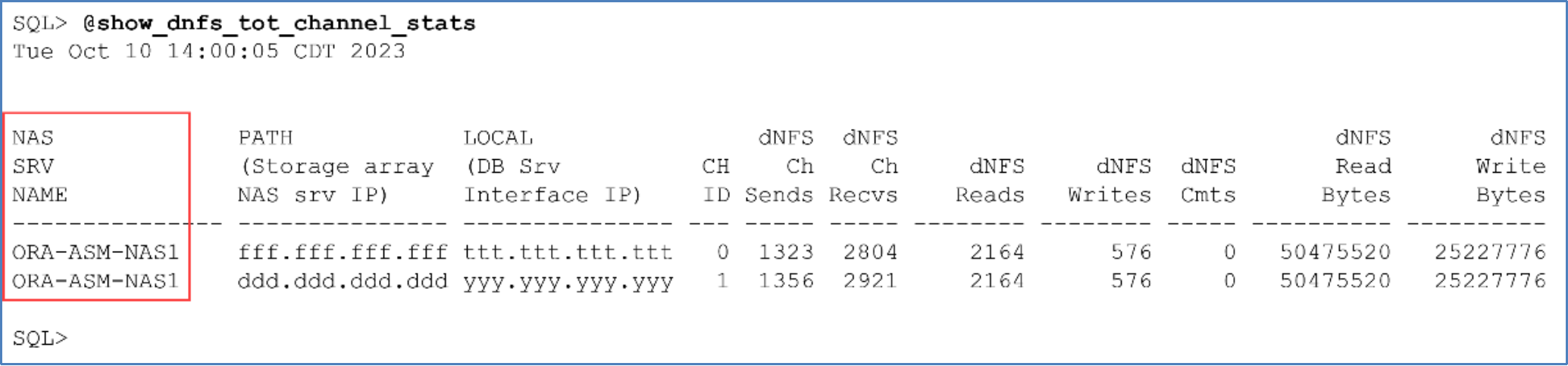
Figure 63. dNFS NAS server name is the value of SERVER in oranfstab
dNFS and network verification checks
This section discusses the following topics:
- Verifying the database is using dNFS
- Displaying database files that dNFS has opened
- Verifying the instance is using the configured dNFS network endpoints
- Verifying Linux network routes are being used for dNFS data traffic
Verifying the database is using dNFS
To verify that the database instance is using dNFS, check the database alert log for the string running with ODM. If the string is found, as shown in Figure 64, the instance was started with the ODM library containing the direct NFS driver:

Figure 64. Check if the database instance is running with the ODM library
Displaying database files that dNFS has opened
The database compares the datafile names with the NFS mount to see if the datafiles can be used by dNFS. Any datafile that dNFS has open resides in v$dnfs_files. To verify that dNFS has opened files residing on the NFS share, run the following SQL*Plus command:
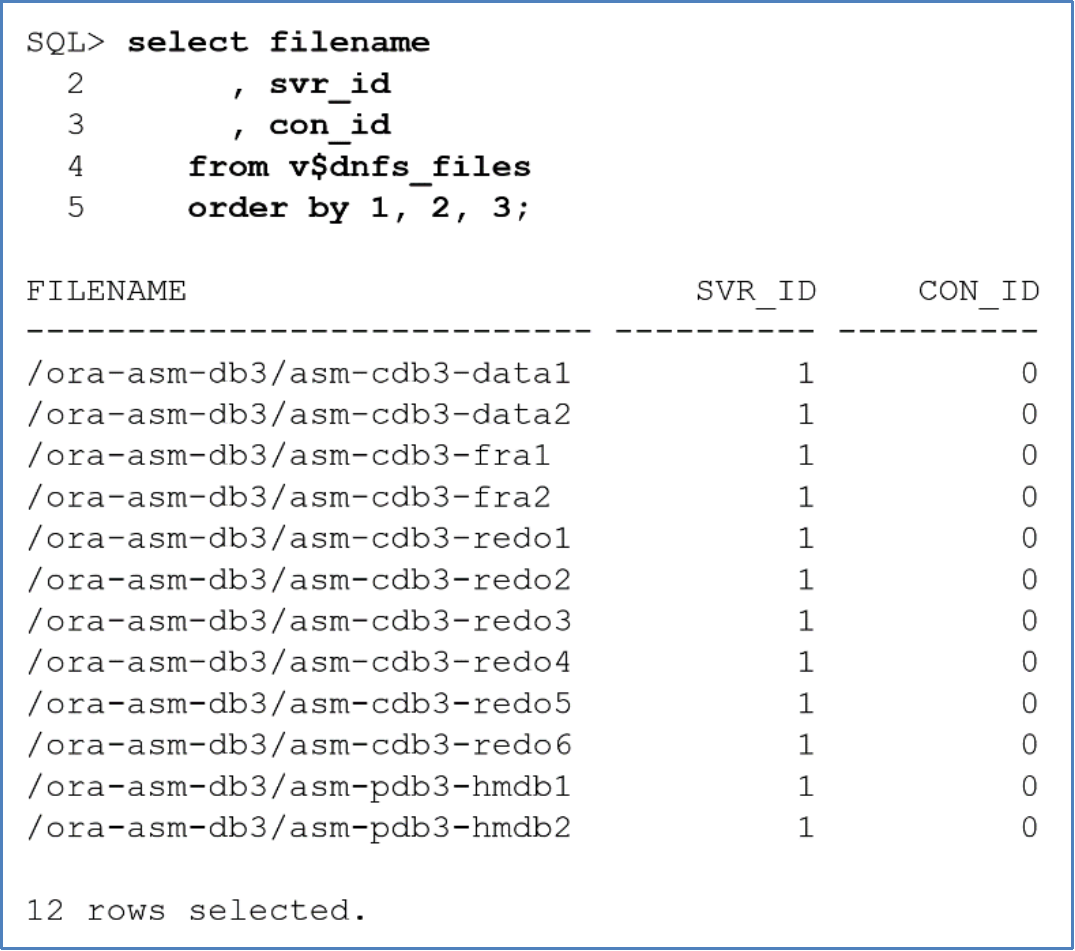
Figure 65. Displaying database files that dNFS has open
Note: Only database files that dNFS has open will be displayed in v$dnfs_files.
Verifying the instance is using the configured dNFS network endpoints
To verify the correct network endpoints are being used with dNFS, look for the string Direct NFS: channel id in the database alert log. The path and local IP addresses shown in the alert log should match all the local:path mappings in file oranfstab for the appropriate NAS server hosting the database.
If Oracle automatically detects the local host interface because oranfstab is not defined, ensure that the chosen interface is intended to be used for the dNFS channel.
Figure 66 shows that the database instance created a dNFS channel for each local:path mapping specified in oranfstab:
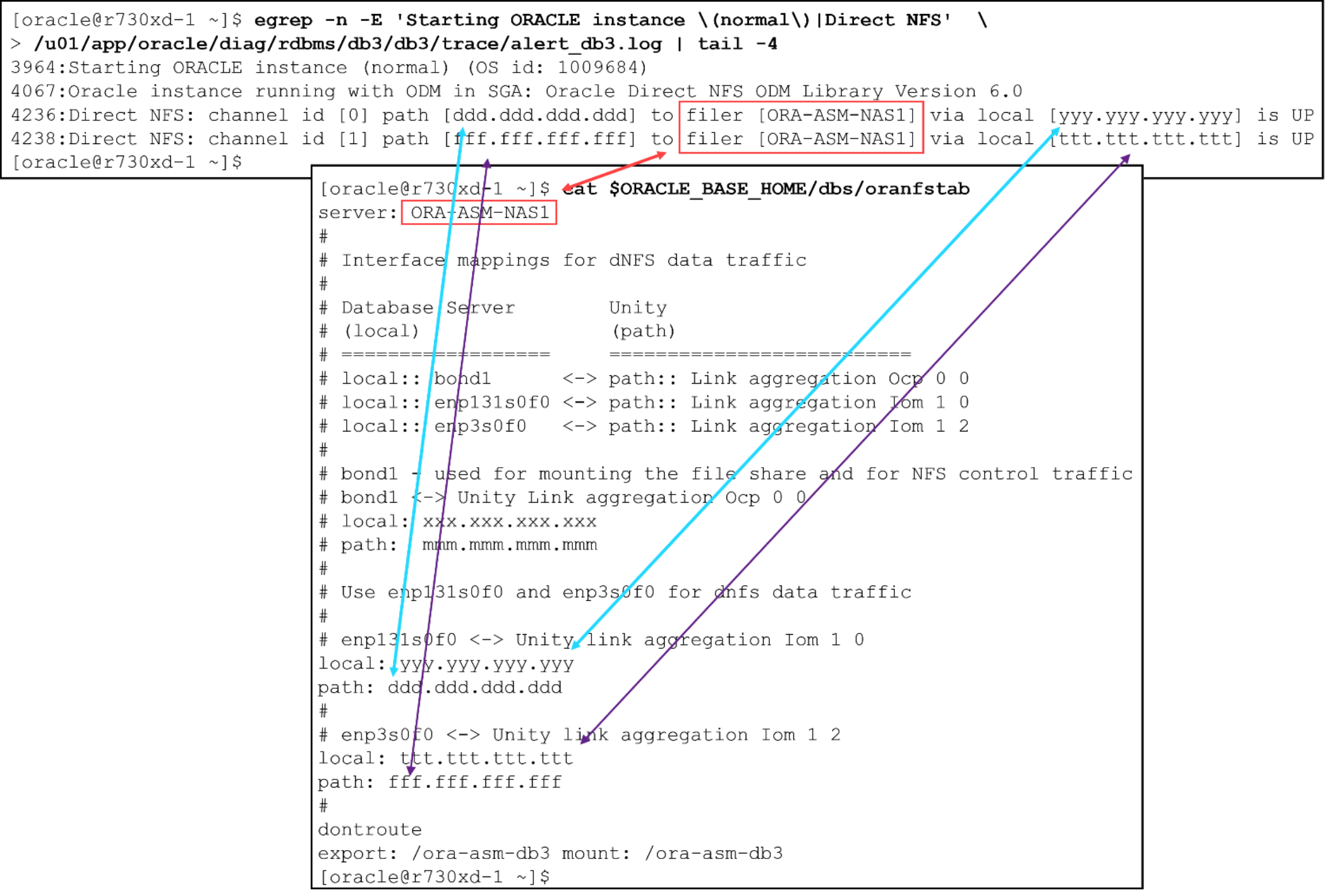
Figure 66. dNFS channels and corresponding oranfstab local:path mappings
Verifying Linux network routes are being used for dNFS data traffic
If the operating system network routes are set up correctly for dNFS, a traceroute from the database server can reach the NAS network interface in Unity. Also, netstat should report increasing TX/RX metrics on the interfaces intended for dNFS during database activity.
If dNFS is enabled but oranfstab is not configured, the Ethernet traffic for dNFS will reside on the interface used to mount the NAS share.
With or without oranfstab, dNFS activity will be displayed as changes to RX-OK and TX-OK values from netstat.
Figure 67 shows two hops between the endpoints in the routes:
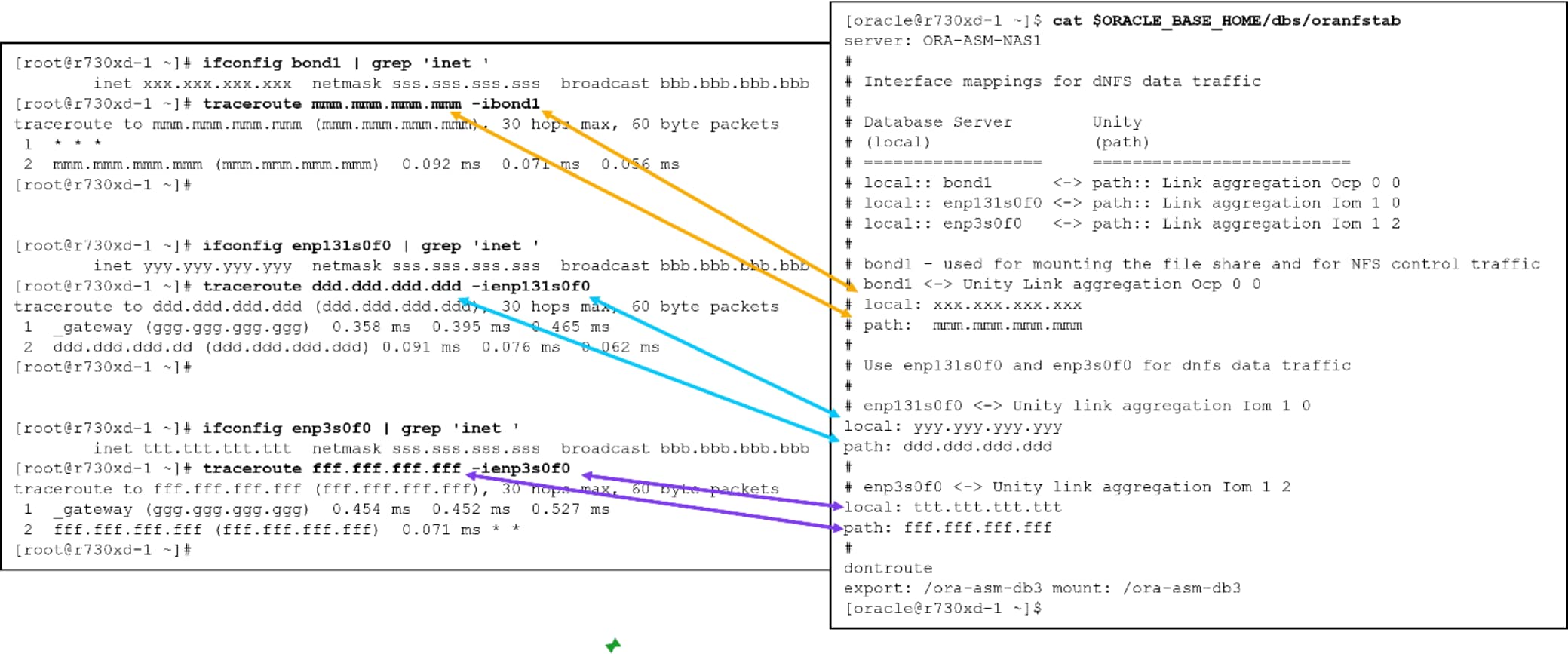
Figure 67. Traceroutes between Unity NAS link aggregation interfaces and database server network interfaces
Figure 68 shows netstat send/receive (TX/RX) statistics for the database server Ethernet interfaces. The statistics can be monitored during database activity to ensure that the interfaces for dNFS traffic have TX/RX activity.
eno3 is the public Ethernet interface. Low values of RX and TX for eno3 are a good indication that the public Ethernet interface is not used by dNFS.
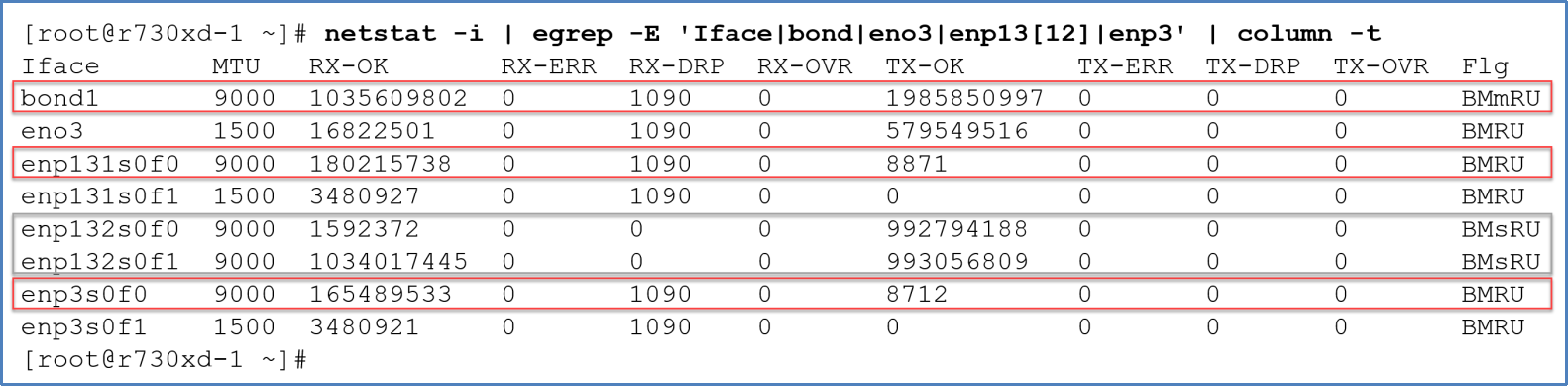
Figure 68. Netstat statistics of Ethernet interfaces used by xNFS and dNFS
Note: The netstat statistics are counters that are only reset with a system boot.
The following SQL*Plus output shows dNFS send/receive (TX/RX) statistics for each dNFS channel. If dNFS is correctly configured, all channels appear in the output, and have read and write activity.
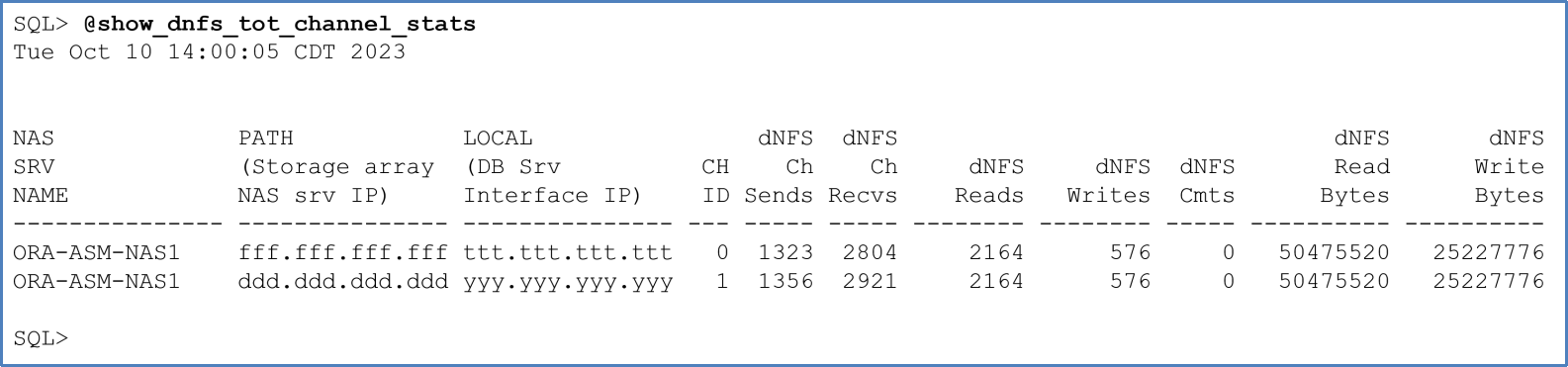
Figure 69. Current dNFS statistics
Oracle dynamic dNFS views
Data protection and recovery
Introduction
Restoring from a snapshot
With the restore method, the data of the original LUNs are replaced in place on the original server where the snapshot was taken. The restore method is the simplest and fastest recovery method because there is no copying data, and no configuration or modification is required. The overall process to restore a snapshot is described as follows.
- Terminate all user connections and shut down the database to be restored.
- In Dell Unisphere, identify and select the snapshot in the LUN Snapshots properties page or in the Consistency Group Snapshots properties page.
- Choose Restore from the More Actions drop-down menu.
- After the restore operation is completed, restart the database on the host.
- Oracle automatically performs database recovery during the startup.
- Verify the data in the database.