Dell Validated Design for Technical Computing Core
Introduction
Executive summary
The Dell Validated Design for Technical Computing (TC) Core provides a compelling foundation for workload-optimized, rack-level systems. Crafted with flexibility in mind, this solution offers a robust set of building block options for compute, networking, and storage—empowering customers to design a TC architecture tailored to their unique needs.
This new branding emphasizes a refined focus on HPC workloads in two categories of CPU-centric and GPU-centric applications. Categorizing these solutions into Core DVD for CPU-intensive tasks and AI DVD for GPU-driven applications underscores Dell’s commitment to addressing the diverse and evolving needs within the realm of TC.
This branding not only highlights Dell’s continued dedication to HPC but also clarifies a strategic pivot towards optimizing performance across a broader spectrum of computational challenges, ensuring Dell remains at the forefront of innovation in a rapidly advancing field.
This document focuses on traditional, technical, and CPU-centric workloads, such as modeling, simulation, and data-intensive applications. The TC Core delivers a validated, high-performance platform that caters to customers seeking dedicated systems. This white paper delves into the architectures optimized for these traditional TC workloads, presenting a baseline design that serves as a versatile starting point for custom configurations. Rigorous performance benchmarking, conducted by Dell, provides the data-driven insights needed to make informed decisions. With the TC Core as the foundation, organizations can confidently deploy workload-optimized solutions that drive efficiency and productivity, positioning them for success in the dynamic TC landscape.
Document purpose
The purpose of this document is to provide design guidance for TC core systems focused to run TC-centric workloads. A design approach that implements building blocks provides flexibility in architecture choices to best meet customer-specific needs.
Note: The contents of this document are valid for the described software and hardware versions. For information about updated configurations for newer software and hardware versions, contact your Dell Technologies sales representative.
Audience
This document is intended for solution architects and IT operations personnel considering system architectures to meet their system requirements to support compute-centric workloads.
Business challenges
Customer challenges
The convergence of HPC, AI, and data analytics has driven many infrastructure teams to seek HPC systems that support both compute-centric and data-centric usages with a single pool of resources. Other infrastructure teams, however, may prefer HPC clusters focused either on traditional HPC workloads for simulation and modeling or data-centric workloads for AI and data analytics.
Many customers spend excessive time and resources considering many design choices. These include the network architecture, storage architecture, file systems, server configurations, CPUs, accelerators, memory, hard drives, operating systems, runtime user-level libraries, workload managers, applications, and benchmarking to specify, build, and tune clusters optimized for their needs.
Solution overview
Introduction
This document provides information about the following:
- Options for customers to address infrastructure challenges by leveraging Dell’s Validated Designs to optimize design architectures that specific requirements while saving time, resources, and cost.
- Designing HPC compute-centric workloads using building block options for servers, networking, and storage to provide flexibility in design architecture.
- Establishing baseline designs for traditional HPC workloads as starting points.
- Conducting performance benchmarking.
- Utilizing NVIDIA Bright Cluster Manager software to build and manage clusters as a single entity.
- Describing the functional components and building block options.
Table 1. Building block components
|
Functional component type |
Building block component options |
|
Management servers |
AMD: R6625 Intel: R660, R760 |
|
Compute servers |
AMD: R6625 Intel: C6620, R660 |
|
Storage |
PowerScale F900 Dell HPC BeeGFS |
|
Networking |
NVIDIA Mellanox NDR: QM9790 PowerSwitch N3248TE-ON |
|
InfiniBand Gateway |
Custom Configured Dell PowerEdge R760 Gateway |
|
Cluster Management Software |
NVIDIA Base Command™ Manager10 |
Solution architecture
Figures 1 and 2 illustrate overall solution architectures with two different storage options, BeeGFS and PowerScale F900. Both storage options can be added through the InfiniBand Gateway and QM9790 switch.
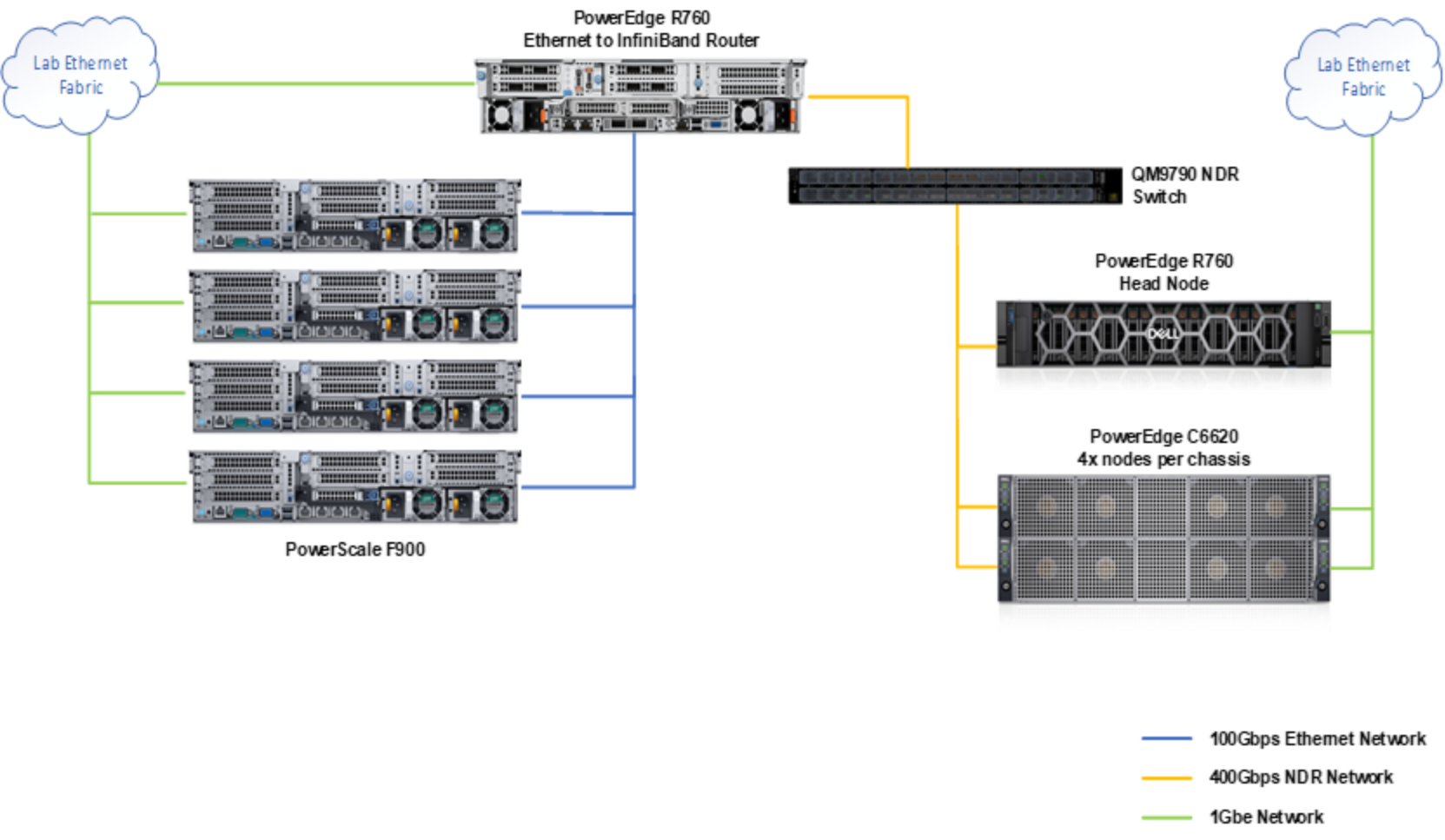
Figure 1. F900 Storage solution architecture
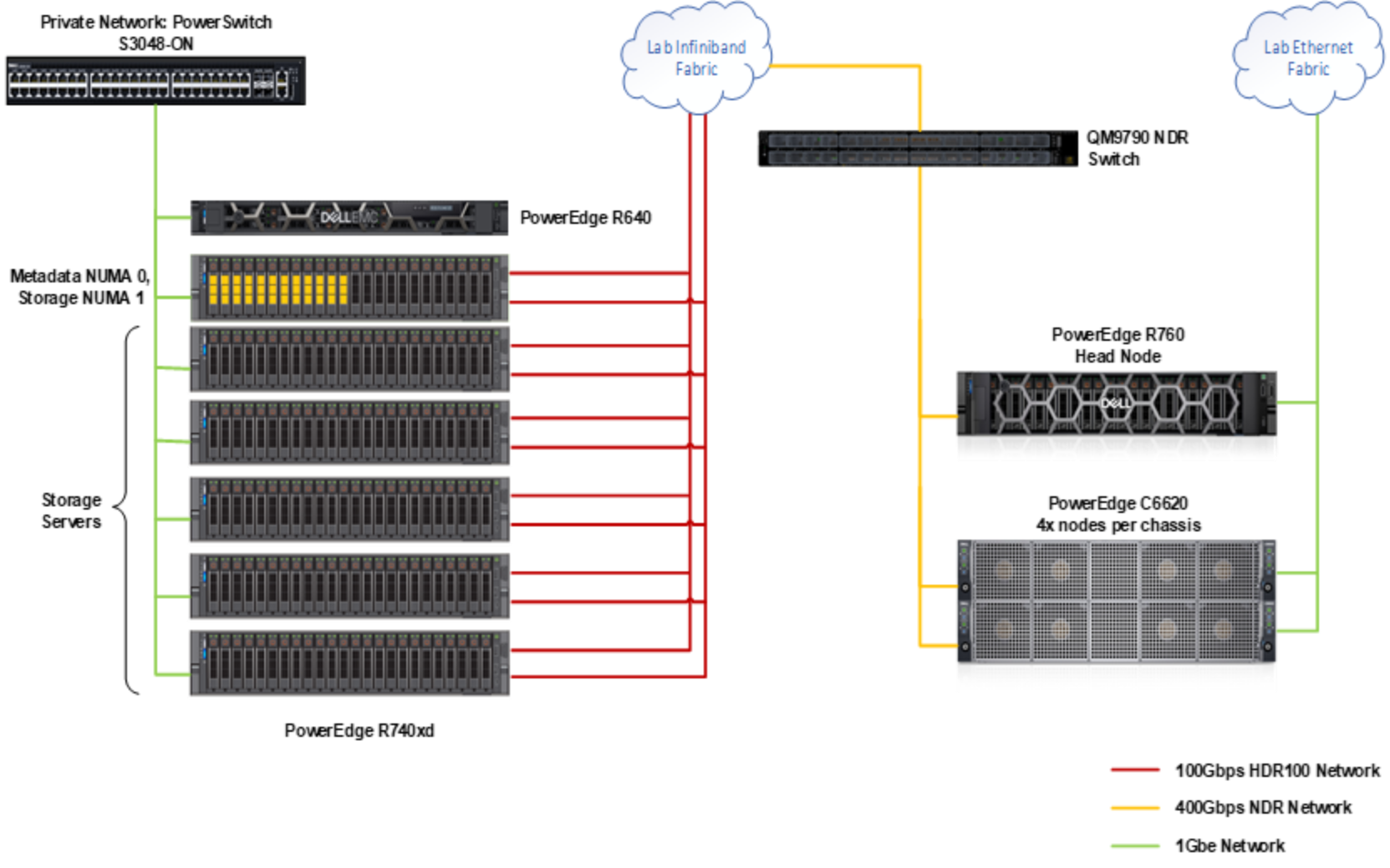
Figure 2. BeeGFS Storage solution architecture
Management servers
The management servers play a critical role in handling non-compute services within a cluster, such as administration and user access. These servers typically function as either management nodes or login nodes, and their configuration and quantity depend on the cluster's size and requirements.
The baseline configurations for infrastructure nodes are based on the R6625 (AMD) and R660 (Intel) servers. Density is not a concern because infrastructure nodes are a small fraction of the overall cluster, and therefore regular 1U or 2U systems can be used. Typically, clusters have matching platform architectures for both infrastructure and compute servers for ease of administration. Login nodes specifically benefit from being of the same architecture as application nodes.
Compute servers
Compute servers are the main computational resource in a TC cluster, designed to handle the preferred workloads. The ideal compute configurations vary based on the specific applications and customer objectives. Available configurations include heterogeneous options, which are favored in environments with diverse workloads. For instance, many applications in a traditional TC setting are CPU-only. An organization concentrating on traditional TC and some deep learning would benefit from a configuration that combines dense compute servers with a few GPU-based servers.
Table 2 provides a list of the available compute platforms, featuring options with varying densities and compute types (including GPU support). These platforms include both AMD-based and Intel-based options, allowing for selection tailored to customer needs and workload requirements.
Table 2. Compute server configuration option
|
Platforms |
Networking |
|
Dell PowerEdge R6625 Dell PowerEdge R660 Dell PowerEdge C6620 |
NVIDIA® ConnectX®-7 NDR200 InfiniBand™ adapter NVIDIA® ConnectX®-7 NDR InfiniBand adapter |
Storage
Dell provides a diverse portfolio of general-purpose and high-performance storage solutions. This solution features two distinct storage systems:
- PowerScale Isilon F900 (Figure 1): This system offers an all-NVMe storage solution using the OneFS file system. It consists of four F900 nodes, each connected by a 100 GbE network to a PowerEdge R760. The R760 functions as a router, aggregating the 4x 100 GbE links into a single 400 Gb/s NDR connection, which is accessible to the client nodes.+
- Dell Validated Design for BeeGFS High Performance (Figure 2): This solution is designed with all-NVMe storage and consists of six PowerEdge R740xd servers, each equipped with 24 drives. These servers are connected to the fabric by HDR-100 connections.
An initial performance assessment was conducted using IOZone to evaluate the N-N sequential performance of both storage solutions. These preliminary tests are not comprehensive but provide a baseline for expected performance. The F900 system achieved a write speed of 9.9 GB/s, and a read speed of 4.5 GB/s. The BeeGFS solution attained a write speed of 88.5 GB/s, and a read speed of 90.9 GB/s. A possible reason for the deviation in performance between the two solutions could be attributed to the overhead from Ethernet to InfiniBand through the R760 router. A direct connection from the F900 solution to the client nodes by Ethernet would likely yield improved results with less denser systems than C-series servers. For more information about this validated design, see the Dell Technologies Info Hub.
System networks
Most TC clusters are equipped with two networks: management networks and high-speed, low-latency networks. The management network, typically Gigabit Ethernet, is connected to every server in the cluster and is used for provisioning, managing, and monitoring. This network can also facilitate iDRAC access using either the Shared LOM or dedicated iDRAC ports, depending on the server configuration. The Dell PowerSwitch N3248TE-ON Ethernet switch is recommended as the starting point for these networks and can be stacked to accommodate larger clusters.
High-speed, low-latency fabrics serve as the communication backbone of TC Core clusters, handling network traffic generated by workload applications for communication and storage. For these purposes, an NDR NVIDIA InfiniBand fabric is recommended. Most systems use NVIDIA QM9790 64-port NDR InfiniBand switches to build this fabric, with the exact number of switches required depending on the blocking factor and the size of the cluster.
Cluster management software
The software suite is used to configure and manage the cluster. The recommended cluster management software is NVIDIA Base Command Manager.
Reference system
System configuration
Performance benchmarking was carried out in the Dell HPC and AI Innovation Lab using the system configuration detailed in Table 3, which represents a scaled-down version of the baseline design:
Table 3. Benchmark system configuration
|
Compute node |
|
8x PowerEdge C6620 Dual Intel Xeon Platinum 8592+ – Liquid Cooled 512 GB RAM 16x 32 GB 5600 MTps DIMMs NVIDIA Mellanox Connect-X7 NDR Host Channel Adapter (HCA) NVIDIA Mellanox QM9790 NDR Switch |
Table 4. BIOS configuration
|
BIOS Option |
Setting |
|
Logical Processor |
Disabled |
|
Virtualization Technology |
Disabled |
|
System Profile |
Performance |
|
Sub NUMA Clustering |
2-way |
The software versions used for the SCRU reference system are listed in the following table:
Table 5. Software versions for benchmarks
|
Component |
Version |
|
Operating System |
Red Hat Enterprise Linux 8.9 |
|
Kernel |
4.18.0-513.5.1 |
|
Mellanox OFED |
23.10-2.1.3.1 LTS |
|
NVIDIA Base Command Manager |
10 |
|
HPL |
2.3 |
|
HPCG |
3.1 |
|
STREAM |
5.10 |
|
OSU |
7.2 |
Benchmark disclaimer
Benchmark results depend on the workload, specific application requirements, and system design and implementation, leading to varying relative system performance. These results should not replace specific customer application benchmarks for critical capacity planning or product evaluation decisions.
All performance data in this report was obtained in a rigorously controlled environment. Results in other operating environments may vary significantly. Dell Technologies does not guarantee or represent that users will achieve similar performance results.
Performance
Introduction
Four specific applications—HPL, HPCG, STREAM, and OSU—were tested on the reference system as described in the Table 3.
High Performance Linpack (HPL) is a classic TC benchmark that has been used to measure system size and performance for many years (TOP500). It is a portable implementation of the Linpack benchmark and performs an LU factorization on a large matrix to measure the floating point execution rate.
High Performance Conjugate Gradients (HPCG) is designed to complement HPL with data access and compute patterns that more closely match current workloads in TC.
STREAM measures sustained memory bandwidth with four different kernels: Copy, Scale, Add, and Triad. Triad is the most frequently requested metric of these four kernels.
OSU Micro-Benchmarks are a suite of network benchmarks that can test many aspects of the network performance such as latency, bandwidth, message rate for point-to-point tests and collectives.
Single server performance
The performance metrics for three of the benchmarks on a single server are shown in the following table:
Table 6. Single node benchmark results
|
HPL (TFLOPs) |
HPCG (GFLOPs) |
STREAM (MB/s) Triad Avg |
|
8.15 |
117.90 |
626478.50 |
The OSU benchmarks consist of a suite of tests conducted on two servers connected by a single NVIDIA Mellanox QM9790 NDR Edge Switch. The Point-to-Point benchmarks include latency (osu latency), bandwidth tests (both unidirectional and bi-directional), and MPI (multiple bandwidth or message rates).
In this two-socket system, one CPU has direct access to the network interface card (NIC) through a local PCI slot, while the other CPU accesses the NIC remotely by the first CPU, which is directly connected to the NIC.
Figure 3 represents local and remote latencies with various message sizes ranges from 1 B to 4 MB. Similarly, unidirectional and bi-directional bandwidths are illustrated in Figures 4 and 5.
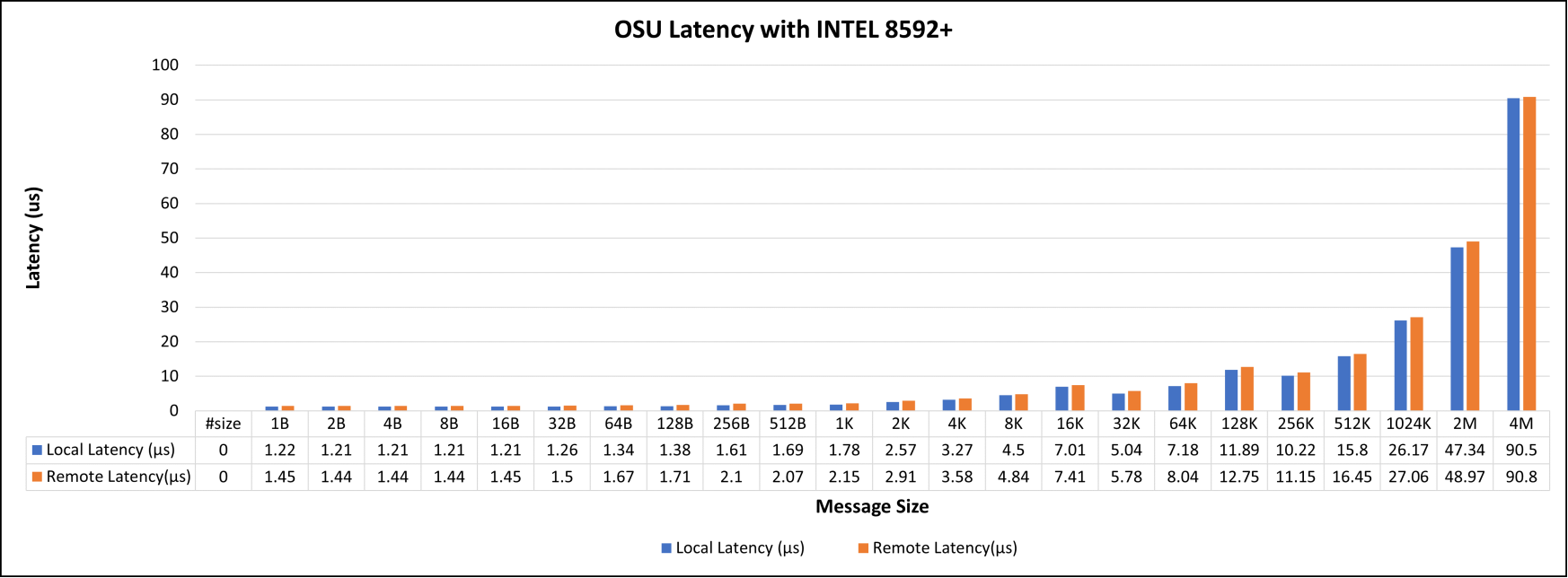
Figure 3. OSU local and remote latency tests with Intel 8592+
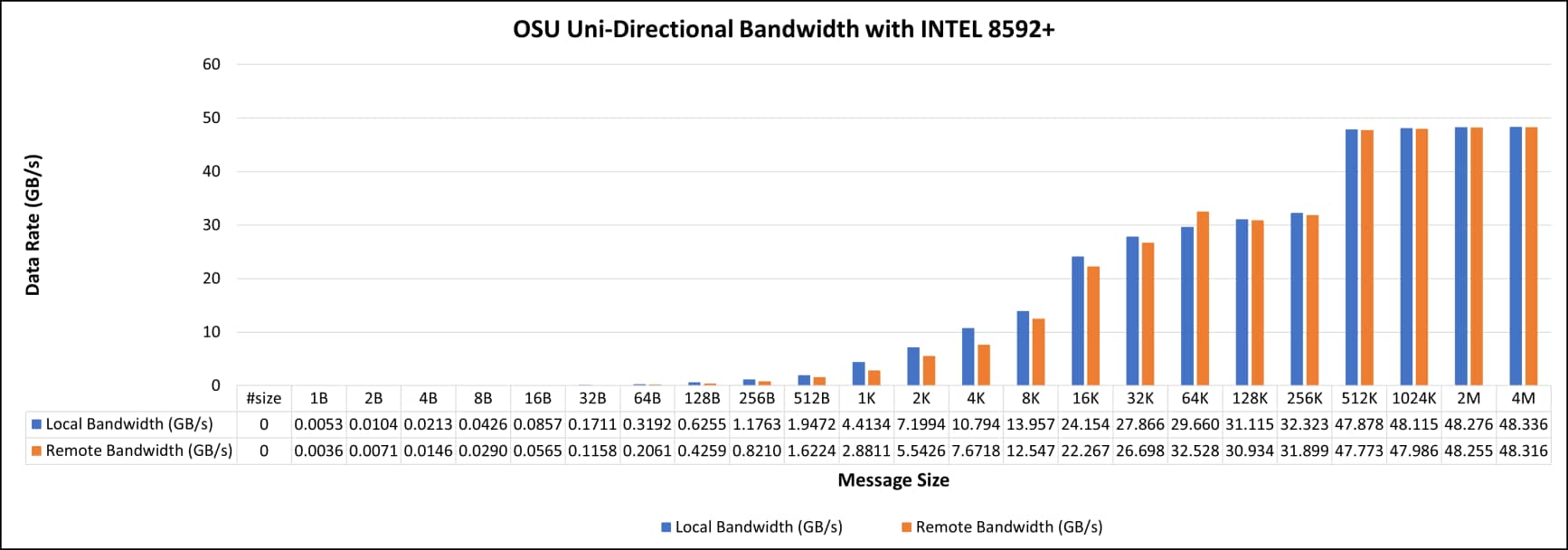
Figure 4. OSU Uni-Directional Bandwidth with Intel 8592+
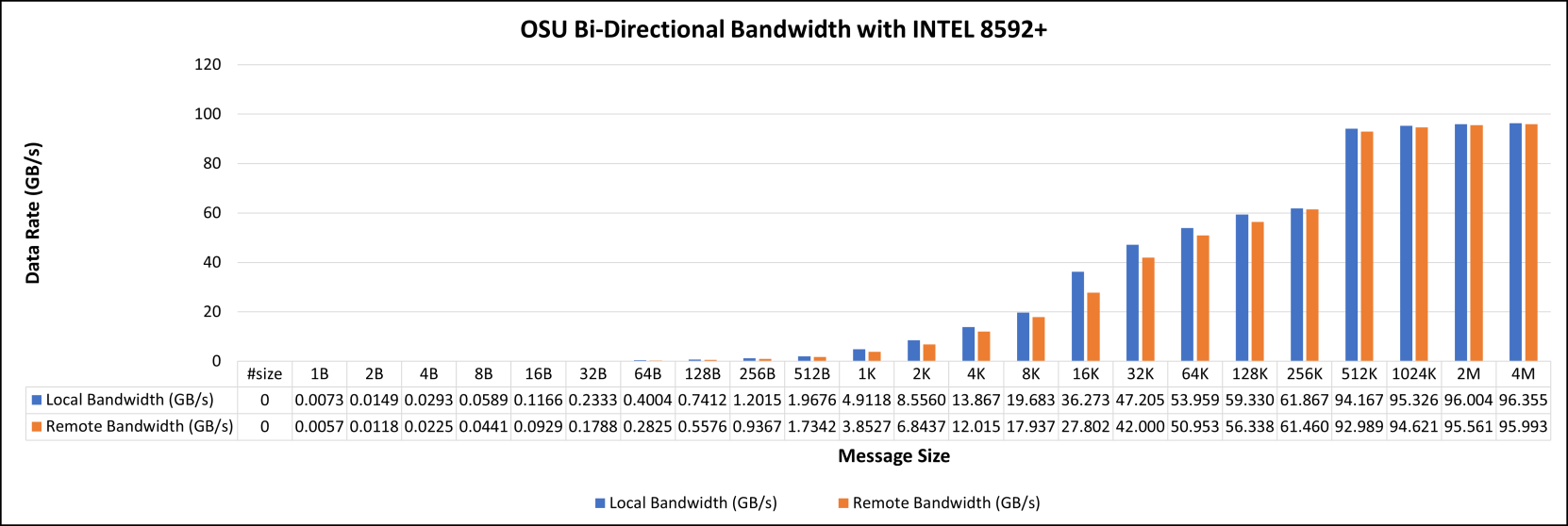
Figure 5. OSU bi-directional bandwidth with Intel 8592+
Message bandwidth and rate with various message sizes are illustrated in Figure 6.
Tag Matching (TM) technology causes a notable behavior change at the message size of 1 K. TM is the process of finding the corresponding buffer from the matching list to a given message. TM Offload (TMO) pushes the head of the matching list to the NIC to perform TM on it. The threshold for using TMO is set to 1 K in the tested compute nodes. The smaller than 1 K buffers will not be posted to the NIC, and hence SW will complete the TM. Therefore, two groups of messages go through different message processes and show different characteristics of bandwidth.
Hardware TM offload is disabled by default in the adapter, which you can enable by setting UCX_RC_TM_ENABLE=y.
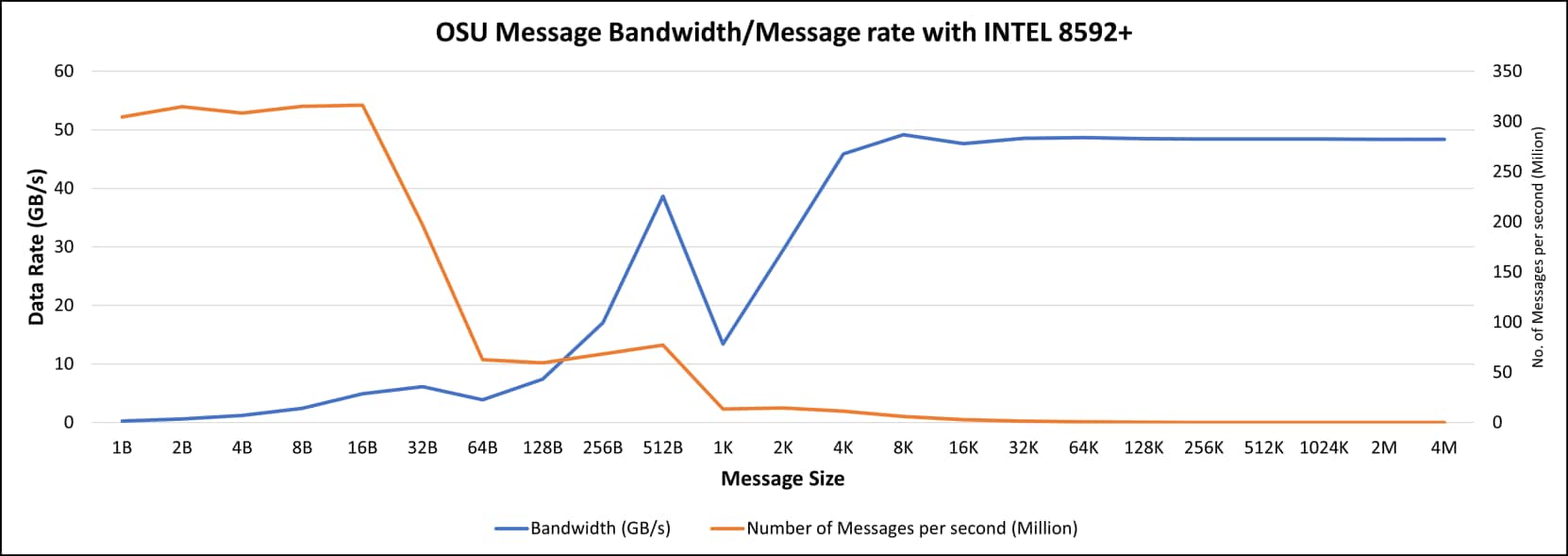
Figure 6. OSU message bandwidth and message rate with Intel 8592+
Multi-server scalability
The following figure shows the parallel scalability of HPL and HPCG using up to eight servers. Performance is presented relative to the performance of a single server.
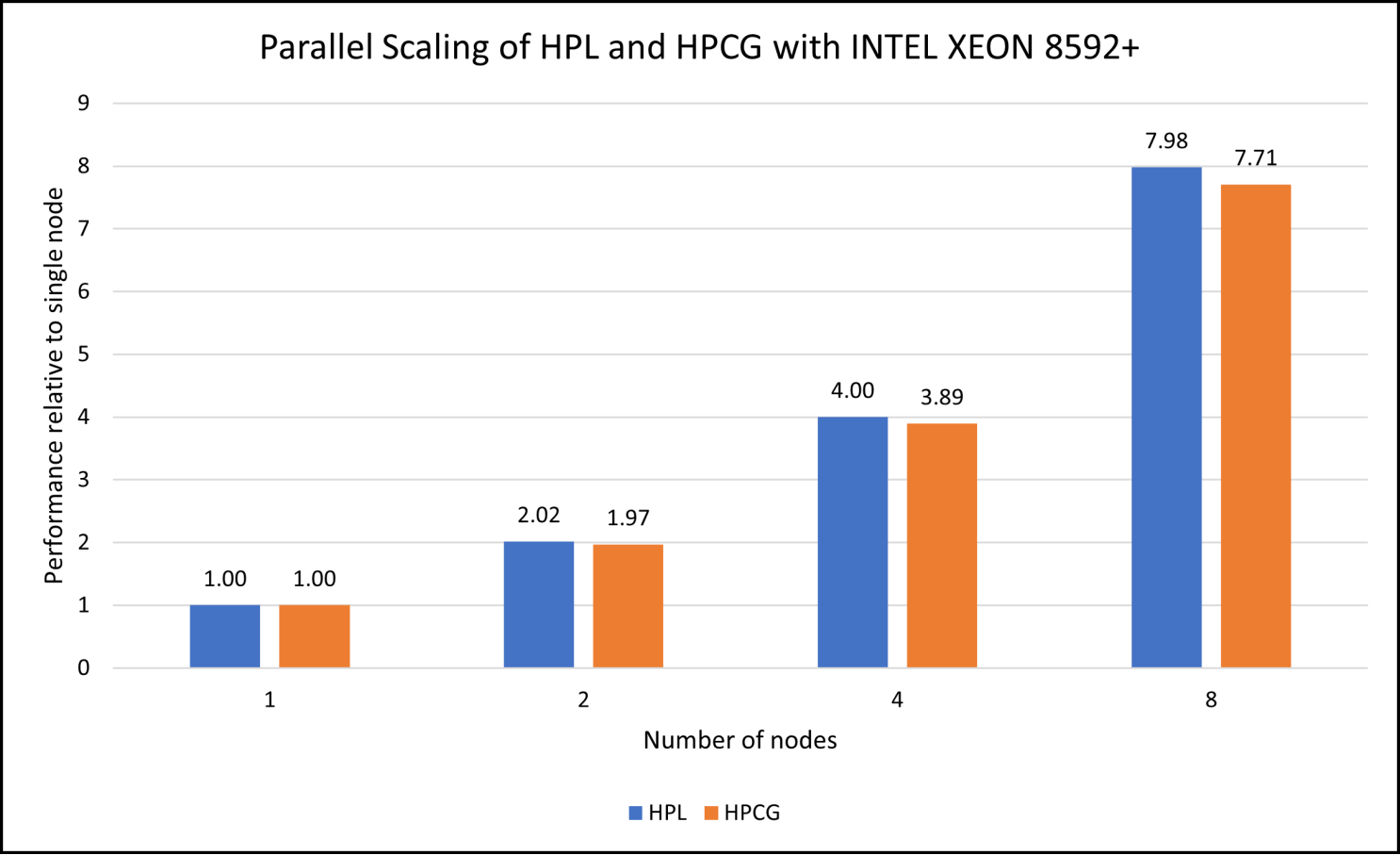
Figure 7. Parallel scaling of HPL and HPCG with Intel platforms and dual Intel Xeon Platinum 8592+
Conclusion
Conclusion
This white paper highlights the Dell Validated Design for TC Core with NVIDIA (Mellanox) networking. The Dell Validated Design performs as intended and offers a highly customizable solution tailored to specific customer workloads. It simplifies the decision-making process by addressing all major aspects of cluster design, including administration and management, compute, storage, networking, and software.
We value your feedback
Dell Technologies and the authors of this document welcome your feedback on the solution and the solution documentation. Contact the Dell Technologies Solutions team by email.
References
Benchmark documentation
The following list includes links to the benchmarks used in this document: