Design Guide—Cybersecurity for Computer Vision Solutions
Introduction
Introduction
Secureworks Overview
The Dell Validated Designs for Smart Transportation
Validation design concepts and requirements
Design concepts
Validation Requirements
Solution architecture
Secureworks overview
Architecture
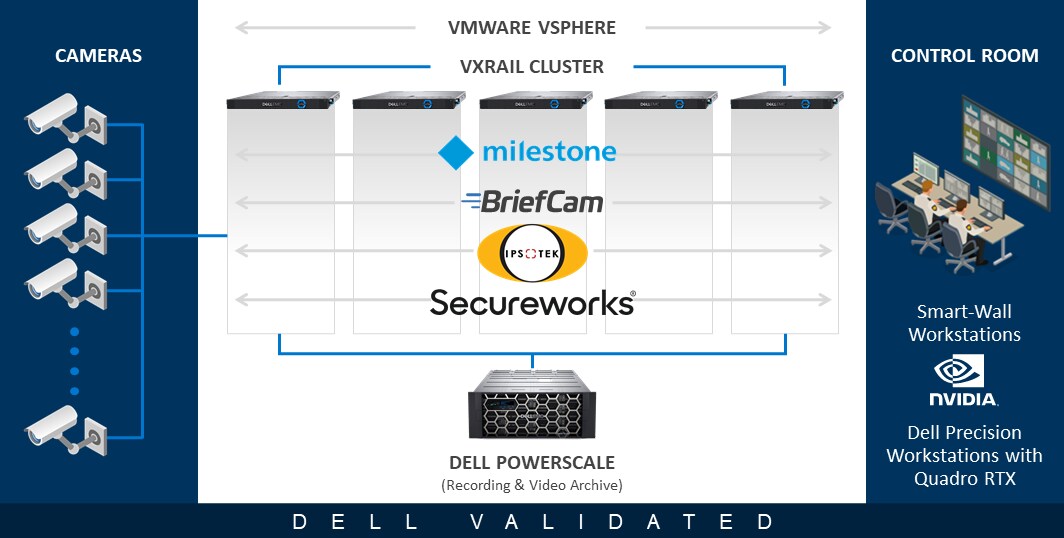
The first step of the validation process was installing and configuring the Secureworks cybersecurity components on the Virtualized Computer Vision for Smart Transportation platform. The VDR product is responsible for processing all vulnerability scans of the system. The primary VDR onsite component is conveniently delivered as a virtual appliance. The XDR threat detection functionality was integrated by installing the Red Cloak host agent on both the physical and virtual machine hosts for the VMS and CV workloads. Both the XDR cloud gateway aggregation point for Red Cloak agents and the VDR virtual appliance were deployed as virtual machines on the same common VxRail cluster alongside the VMS and CV application VMs as shown below.
Secureworks Taegis VDR
Secureworks Taegis VDR provides comprehensive vulnerability assessment using a self-improving, machine learning (ML) model-based asset discovery and scanning approach. Secureworks Taegis VDR's Contextual Prioritization better informs organizations of all the unmitigated system vulnerabilities in addition to which vulnerabilities present the most risk to your enterprise.
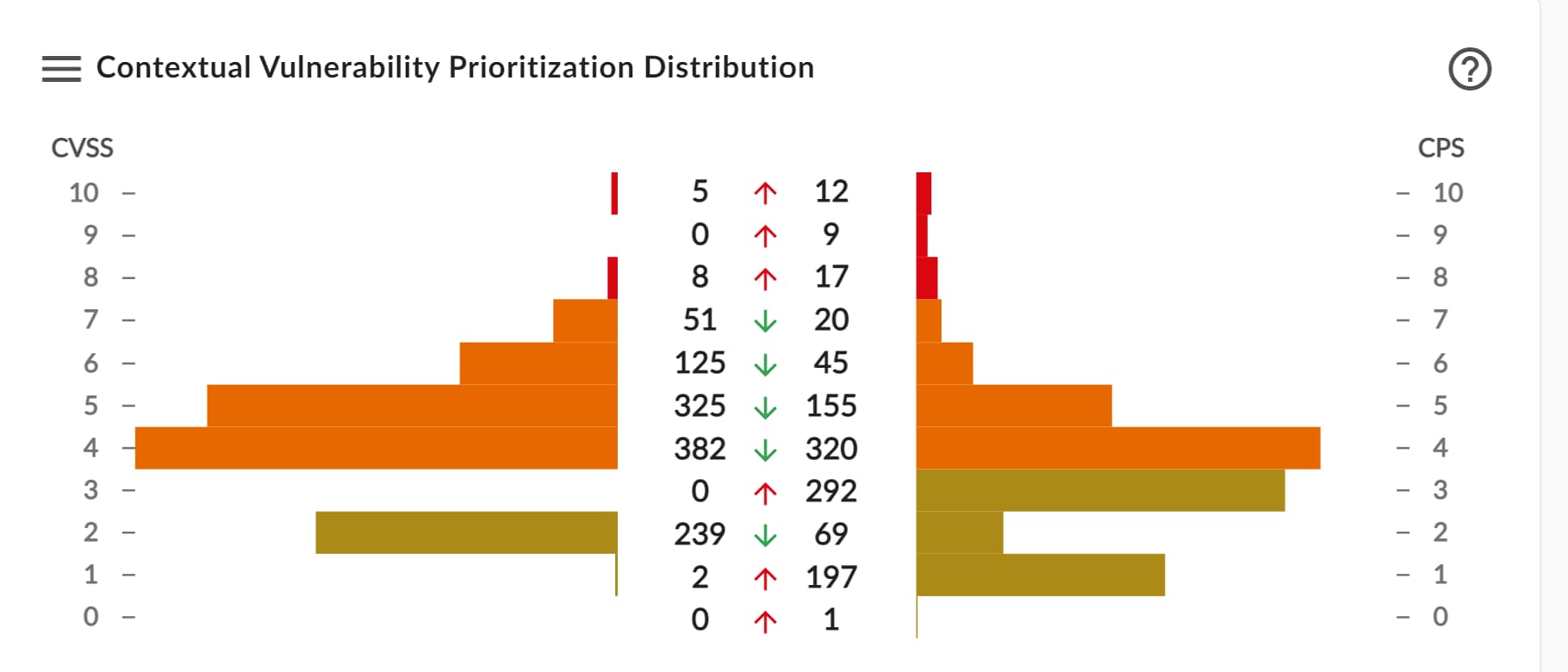
VDR runs scans on a schedule to periodically check the infrastructure for vulnerabilities. The scan results provide a detailed cloud-hosted reporting dashboard complete with remediation suggestions. This approach ensures that potential exposure risks are identified quickly and targeted for remediation.
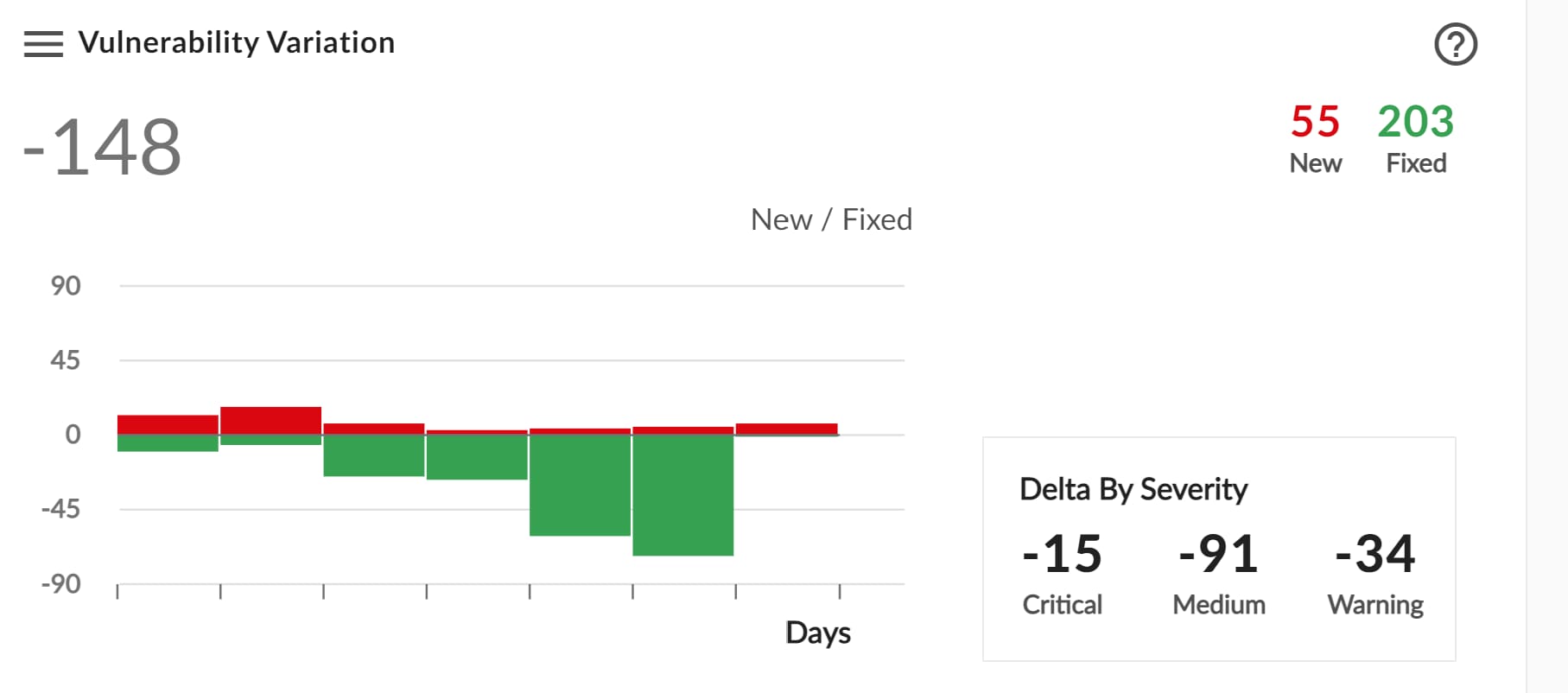
Taegis VDR architecture
The VDR virtual appliance runs the scanning service, collects vulnerability data, and communicates results to the cloud-based reporting service. In environments where a corporate firewall prevents scanning infrastructure from a service on the public side of the firewall, Secureworks provides an edge-installable appliance that can be deployed in the data center on the private side of the firewall. This edge service can then connect to selected open ports on the firewall capable of communicating to the cloud and allowing the service to scan servers in your infrastructure that are also protected by a firewall.

Secureworks Taegis XDR
The application of artificial intelligence (AI) technology is changing the way security is managed in many important ways. For example, machine learning algorithms powering Secureworks Taegis XDR security analytics software to help detect both known and unknown threats.
The Taegis XDR product is designed to:
- Detect active threats in real-time
- Gain more trust in alerts
- Streamline collaboration on investigations
- Automate the proper response actions
However, AI can create additional unnecessary work if it is applied inexactly or applied in an inappropriate domain area. Secureworks takes a highly selective approach to the deployment of AI applications including real-time supervision of all machine learning algorithms to ensure accuracy. XDR automatically analyzes and correlates telemetry from endpoint devices, network traffic, and many other supporting cloud devices used in modern application environments. The product's integrated detectors use machine learning algorithms to constantly search data and systems to identify malicious activity and even subtle behavioral clues present in your environment. The result is that many routine changes in the application stack or program operations will not generate alter noise and reduce your threat visibility.
The XDR product has extensive integrations with products, endpoints, APIs, and more. Each integration pushes data to the XDR cloud dashboard that analyzes the information and displays results. For a more comprehensive overview, see the online documentation Secureworks Taegis XDR - At a Glance.
Taegis XDR architecture
The XDR product is an Amazon Web Services (AWS) hosted offering accessible from any data center or edge location. The XDR platform supports multiple endpoint technologies and collectors to aggregate the information needed to make reliable and timely alerting decisions. We validated the implementation and features of two options for communication with AWS for this Design Guide:
- Secureworks Collector
- Red Cloak Endpoint Agents
The agents and collectors that are deployed in a customer's infrastructure must be able to send data to the Secureworks managed AWS service for analysis. This may require specific ports to be opened in the remote site's firewall to allow access to AWS. The Secureworks Red Cloak agents used in this validation are proxy-aware enabling traffic to be routed to AWS using a proxy server. This approach simplified our deployment and avoided having to open additional ports for each VM that had the Red Cloak agent installed.
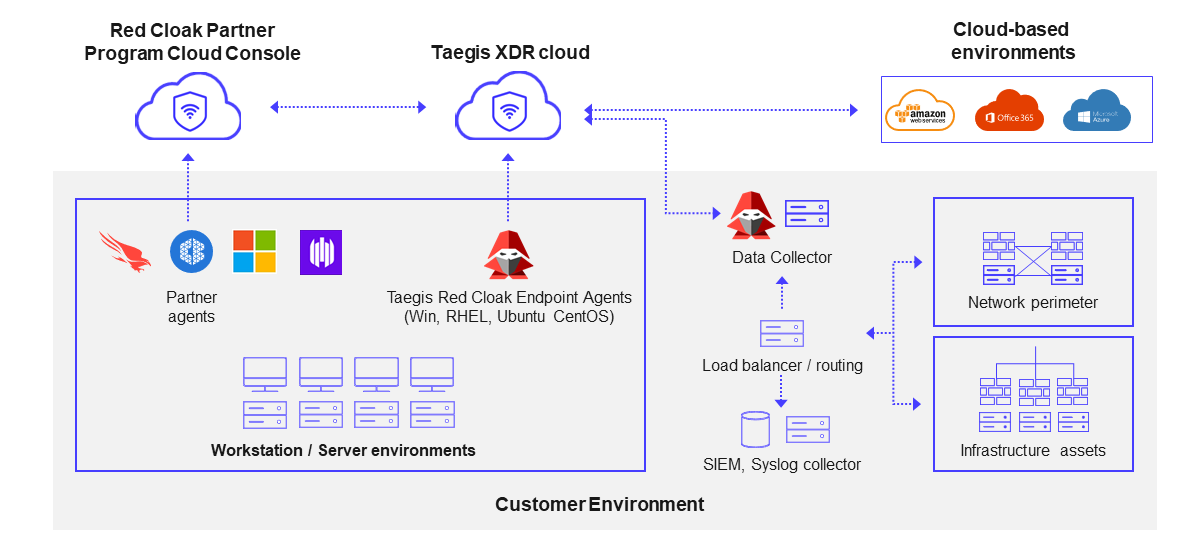
Secureworks Collector
The Secureworks Collector is an appliance with software that collects and aggregates security information from many sources in a data center. The Collector can be used to aggregate data from multiple virtual machines, servers, and other equipment hosted at a site and then forward that data to the Secureworks XDR service in AWS. The information gathered and forwarded by the Collector is sent in a secure channel to the XDR service for processing and display on the AWS-hosted service dashboard.
The benefit of this architecture is that only a single firewall port is required to be open for the Collector to communicate with the XDR service in AWS. Due to the security requirements of most environments, it is not feasible to configure access from every monitored device directly to AWS. The Secureworks collector addresses this problem for systems that run in a secured environment like the engineering lab used for this validation.
Red Cloak Endpoint Agent
The increasing use of endpoint attacks by hackers trying to enter companies' infrastructures requires that security professionals focus specifically on detecting and shutting down those activities immediately. The Red Cloak solution is especially critical for catching attacks that do not use malware. Once inside a network, attackers often evade traditional endpoint security controls by leveraging compromised credentials and tools native to the target's environment, such as remote access services, endpoint management platforms, and other legitimate system tools.
To give organizations the earliest possible warning of compromise, the Red Cloak agent searches for forensic evidence of malicious activity while continuously collecting information about what is happening on the device, such as what programs are running, what commands are being performed, network connections, thread injection, memory inspection and more. The Red Cloak agent supports a large set of device monitoring options including both Windows and Linux operating systems. The agent can be installed on both virtual machines and servers that require enhanced monitoring.
The Red Cloak Endpoint Agent collects a wide variety of endpoint telemetry used for analysis to identify threats and their associated behavior signatures. The following is a partial list of the types of information gathered by the Red Cloak agent that is continuously captured and sent back to the Secureworks XDR service for analysis:
- Processes and command-line parameters
- Thread injection events
- Files such as binaries, executables, DLLs, and so forth
- Registry modifications
- Network connections
- DNS requests
- Windows Logs
- Disk and Memory artifacts
Because the solution can blend these multiple views of dynamic system activity beyond the obvious indicators such as IP addresses and domain names, it is constantly adapting to uncover the behaviors and techniques of cyber adversaries.
Validation
Computer vision platform
Integration validation
Performance validation
This section describes the performance validation of both Secureworks VDR and XDR. We describe the details of our approach and the corresponding results. Our objective was to estimate the magnitude of the additional load created on our VxRail system under test (SUT) when we added vulnerability and threat detection scanning concurrently with a normal VMS plus CV workload. To be able to recommend this solution architecture to our customers and partners, we needed to ensure that none of the critical VMS and CV workloads would be significantly impacted by adding the additional Secureworks services on the common platform.
We first configured all the applications on a single VxRail cluster including the previously validated Smart Transportation applications plus the Secureworks VDR virtual appliance and XDR Red Cloak agents installed on 10 systems. All simulated camera streaming applications were hosted outside of the VxRail SUT. We initiated a comprehensive simulation of both VMS recording and computer vision analysis workloads while capturing our baseline metrics for comparison with the remaining scenarios. The Secureworks XDR and VDR scans were added independently (VDR only and XDR only) and simultaneously (both VDR and XDR) for our impact analysis. We then assessed the additional resource consumption impacts of Secureworks' vulnerability and threat monitoring scanning.
Testing coverage
The VxRail cluster used for our earlier CV platform validation consists of 5 nodes running dozens of VMs running application roles and infrastructure management. Our Secureworks testing was completed on a total of 10 systems that comprise a representative sample of the various roles used in the system. For example, we only choose 1 of the 4 available alert processing servers from the two CV application vendors included in the original platform designs.
The complete list of servers included in the validation testing is as follows:
| Server number | Name | Role | Application type |
| 1 | Genetec Directory Server | Central Management Node | VMS |
| 2 | Genetec Archiver | Video Archiver | VMS |
| 3 | Milestone XProtect Management | Central Management Node | VMS |
| 4 | Milestone XProtect Recorder | Video Archiver | VMS |
| 5 | Milestone XProtect Database | SQL Server | VMS |
| 6 | Ipsotek Processing Node | AI Workload (with GPU) | CV |
| 7 | Ipsotek Database | CV | |
| 8 | BriefCam Services | Administration Services/APIs | CV |
| 9 | BriefCam Alert Processor | AI Workload (with GPU) | CV |
| 10 | BriefCam Database | PostgreSQL | CV |
Note: The Genetec and Milestone servers did not run concurrently during testing on the VxRail cluster for this validation.
Test scenarios
The VMS and CV systems hosted on the VxRail were processing a comprehensive simulated workload load before initiating any Secureworks scanning. The full details of the simulated workload are described in previously published Computer Vision for Transportation Design Guides referenced several times earlier in the document. To give an indicative example of the scale of the baseline workloads, we had 12 Milestone XProtect recorders processing 70 camera streams each. The two CV application servers we included in our sample were processing real-time alerting on between 30 and 40 of the camera streams being recorded by Milestone XProtect.
The following steps were performed for metrics collection on each of the 10 servers in the sample identified in the table above.
- 1 hour of BASELINE metrics collection
- 1 hour of the VDR ONLY scenario metrics collection
- 1 hour of the XDR ONLY scenario metrics collection
- 1 hour of the XDR AND VDR running simultaneously scenario metrics collection
This resulted in over 40 hours of performance data recorded at 10-second intervals capturing dozens of metric attributes per server.
Testing procedure
The charts below show resource utilization metrics collected from the Windows Performance Monitor data collector. We use a PowerShell script and configuration file to control the list of counters collected and the duration of the data collection window. This eliminates the resource overhead of connecting with Remote Desktop Protocol tools to run data collection interactively. The charts included below were developed using Python data analysis tools including Pandas and seaborn charting.
Testing results
The four color line charts below have the x-axis labeled Time Interval. The Time Interval is the number of 10-second intervals that have passed since the beginning of the test. A Time Interval of 360 is equivalent to a total collection duration of 60 minutes (6 ten-second intervals per minute times 60 minutes).
The four colored lines (blue, gold, green, and red) each represent one of the four 1-hour testing scenarios listed above.
| Line color | Test scenario |
| Blue | Baseline |
| Green | VDR only |
| Red | XDR only |
| Gold | Both VDR and XDR |
CPU performance
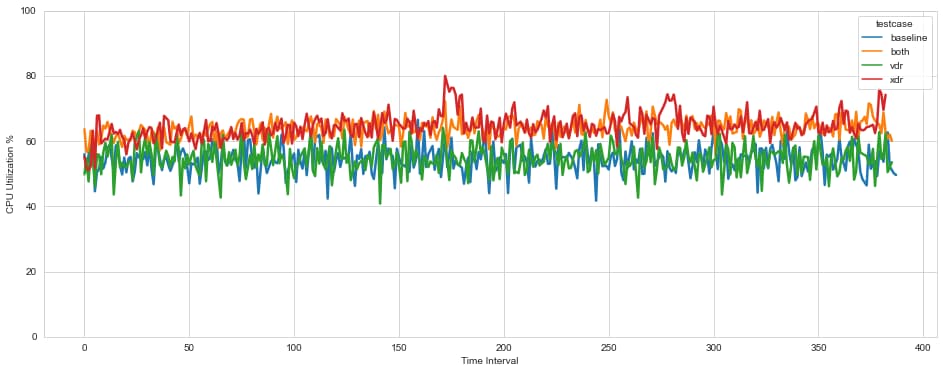
The chart below is from one of the 10 servers tested that represent the general shape of the data we collected. All 10 of the servers showed similar patterns.
- Findings
-
- VDR scanning (blue line compared to green line) shows no discernible impact on CPU utilization.
- XDR scanning with the Red Cloak Agent (red line compared to blue line) shows a sustained increase in CPU utilization.
- BOTH VDR and XDR scanning (gold line compared to red line) are consistent with the individual results that XDR accounts for most, if not all the increase.
- This behavior is consistent and representative of the other nine servers tested.
- Overall
-
- Due to the increased XDR CPU consumption, further analysis is needed to understand the impact.
CPU performance deep dive
This analysis provides more insight into the CPU Utilization metrics for all 10 servers we tested comparing the XDR ONLY scenario to the BASELINE. The goal is to create a distribution of increased CPU utilization to show the relative percentage of total test time associated with higher levels of CPU utilization increase attributed to XDR activity.
We collected two hours of testing data for this analysis, one hour of BASELINE workload and one hour of BASELINE workload plus XDR scanning. The data was collected every 10 seconds. We then subtracted the BASELINE time series from the BASELINE PLUS XDR time series at each 10-second interval. We grouped the data by counting the measured differences between 0 and 5 percent to get the total number of 10-second intervals where the CPU increase was in the 0-5% range. That data is presented in the center column of the table below. The right column converts the minutes to % of the time using 60 minutes for the total test.
The first row shows that the CPU % utilization increased between 0 and 5% for 21 minutes of the 60-minute test or 35% of the test time. The bottom row of data shows that an increase in CPU utilization of 30-35% was only observed for 2 minutes or 4% of the hour.
| Additional CPU usage for XDR (%) | Test duration (minutes) | Test duration (%) |
| 0-5 | 21 | 35 |
| 5-10 | 12 | 20 |
| 10-15 | 11 | 18 |
| 15-20 | 6 | 10 |
| 20-25 | 3 | 5 |
| 25-30 | 5 | 8 |
| 30-35 | 2 | 4 |
| Total minutes: 60 | Total: 100 |
- Findings
-
- 55% of the time the CPU increase impact is between 0-10% when running XDR.
- 17% of the time the CPU increase impact is over 20% when running XDR.
- Overall
-
- The overhead of running XDR is generally less than 10%.
- A new Taegis XDR agent is being released by Secureworks that will replace the "Red Cloak" agent and has a lower CPU overhead.
Memory performance
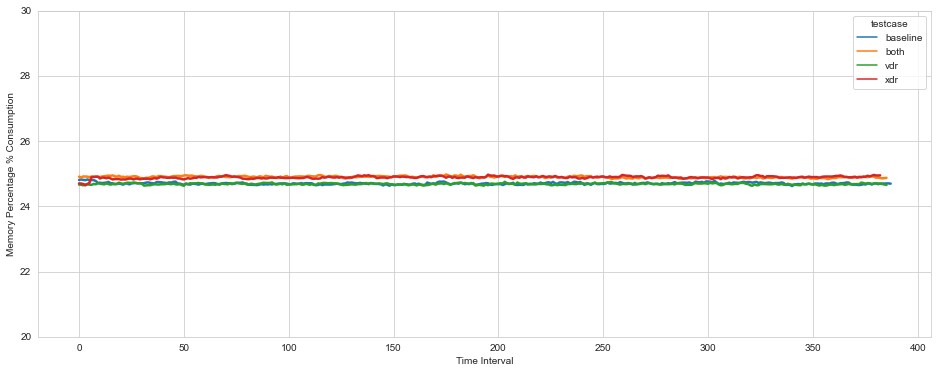
The chart below is from one of the 10 servers tested that represent the general shape of the data we collected. All 10 of the servers showed similar patterns.
- Findings
-
- The y-axis scale covers only a 4% difference between tic marks, so the increase in memory utilization (<200 MB) was negligible when enabling XDR
- VDR scanning had no noticeable impact on the percentage of memory consumed.
- Overall
-
- These memory consumption results were consistent for all the servers tested.
- Memory consumption by VDR and XDR should have no impact on system sizing guidance and is consistent with the research expectations prior to testing.
Network performance
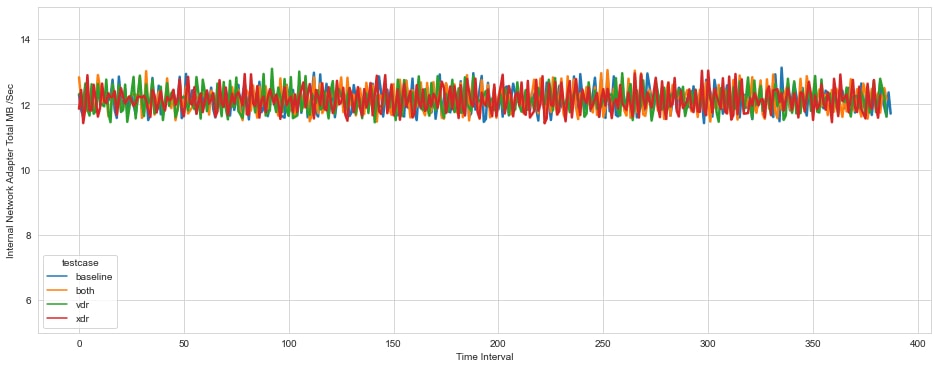
The chart below is from one of the 10 servers tested that represent the general shape of the data we collected. All 10 of the servers showed similar patterns.
- Findings
-
- The impact on network consumption from running both XDR and VDR scanning simultaneously shows the least change of any metric comparison in this testing.
- These network consumption results were consistent for all the servers tested.
- Overall
-
- Network consumption by VDR and XDR should have no impact on system sizing guidance.
Disk performance
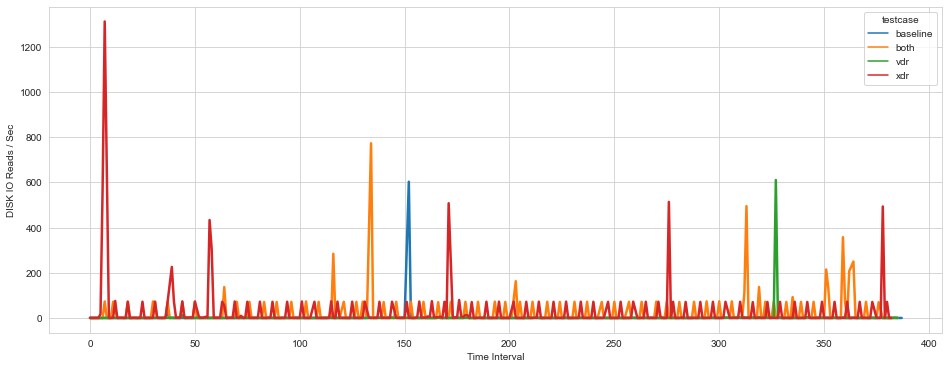
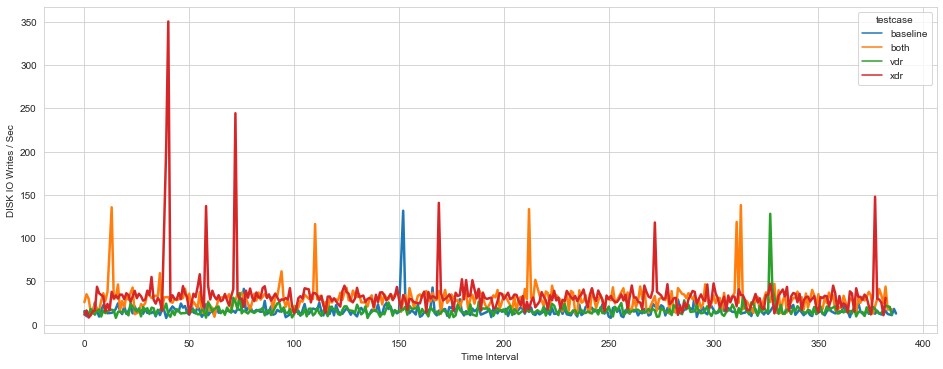
The charts below are from one of the 10 servers tested that represent the general shape of the data we collected. All 10 of the servers showed similar patterns.
- Findings
-
- A minor increase in Reads/sec and Writes/sec was observed when XDR was enabled.
- Disk operations spike periodically but only for very short durations. This is expected behavior as the operating system flushes caches to disk.
- No additional disk operations were observed when VDR scanning was active.
- Overall
-
- A very minor increase in Reads or Writes with XDR scanning.
- For systems with VSAN configured with SSD disks, there is no impact on sizing recommendations.
Overall conclusions and summary
- Our testing of VDR scanning shows no impact on the CPU utilization and therefore could be enabled for all servers without impacting sizing guidance.
- Our testing of the XDR Red Cloak agents shows a noticeable impact on CPU utilization but was less than 10% for approximately 50% of the total testing duration. Secureworks is soon to release a new agent through online distribution which is expected to reduce this overhead significantly.
- There is no significant impact on Memory utilization from either VDR or XDR that will impact sizing guidance.
- There is no significant Network impact of running VDR or XDR that will impact sizing guidance.
- There is no significant impact on Disk IO when running VDR or XDR that will impact sizing guidance.
Overall, the benefits of protection provided by VDR and XDR are significant and should be enabled on your Computer Vision for Smart Transportation environments to provide robust cybersecurity protection.
Vulnerability detection
This section describes our findings from using the VDR vulnerability capability to analyze the different types of infrastructure components used in the Computer Vision for Smart Transportation platform. For this testing, the appropriate IP ranges for our lab equipment were made available to the Auto Discovery feature accessed through the Secureworks VDR online portal. The tool then imports any active IPs in those ranges and performs an assessment including assigning a category to the devices. No device passwords are required for logging in to any of the detected servers or devices before scanning.
Virtual machine
Any virtual machine with an IP address can be autodiscovered or added manually and scanned. The VMS and CV resources used during this testing were predominantly Windows-based.
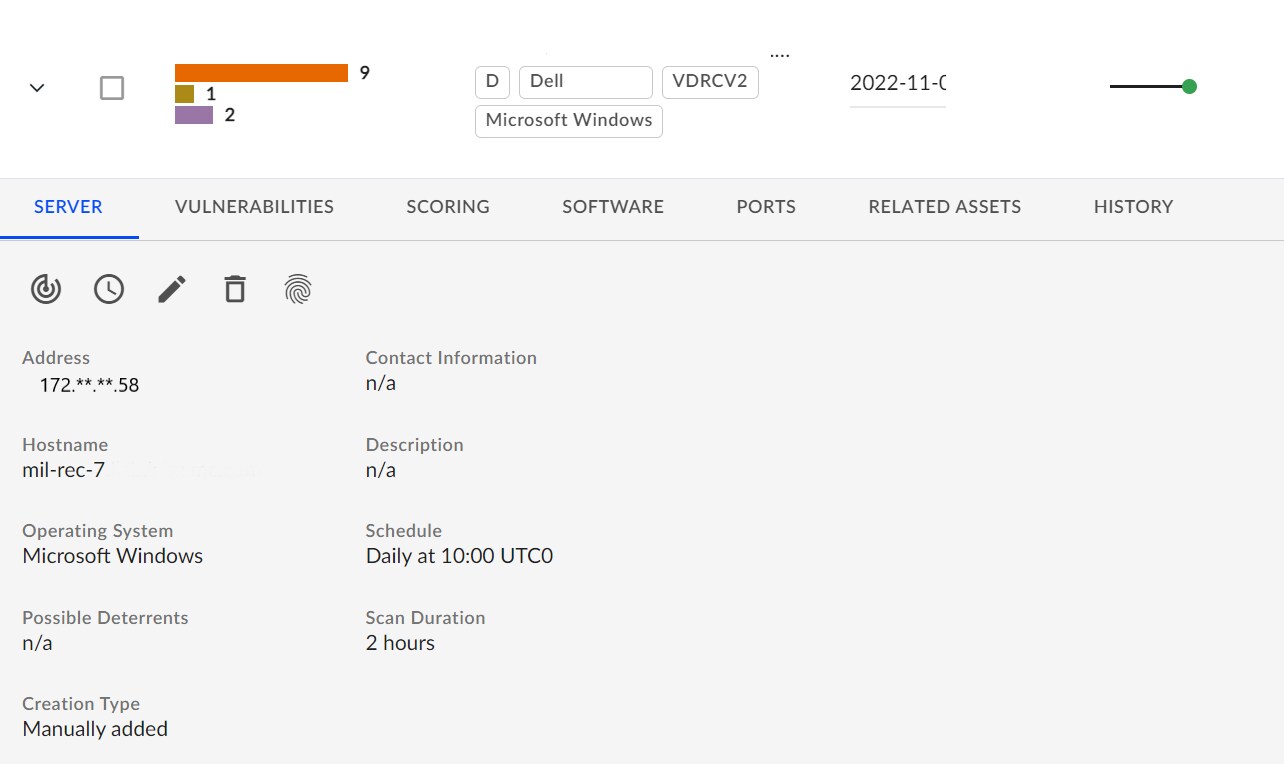
The following figure is a sample output from the scan of a Windows server in the lab:
- Comments
-
- This Windows 2019 server was fully patched prior to being discovered and scanned by VDR.
- Zero new critical issues were identified. Critical issues typically need immediate attention.
- Some medium-priority issues exist and should be reviewed with a security professional on your team. An example issue identified from the scan above was that Remote Desktop was enabled. This is permitted in our lab for this system since it is located in a protected environment.
- Scanning Linux servers is a similar process and should look consistent with these results for systems with fully up-to-date patches.
Application
VDR scans were performed on all machines used by the VMS Systems (Genetec/Milestone) and CV Systems (Ipsotek/Briefcam). The results were similar since they all reside on fully patched Windows 2019 Server virtual machines.
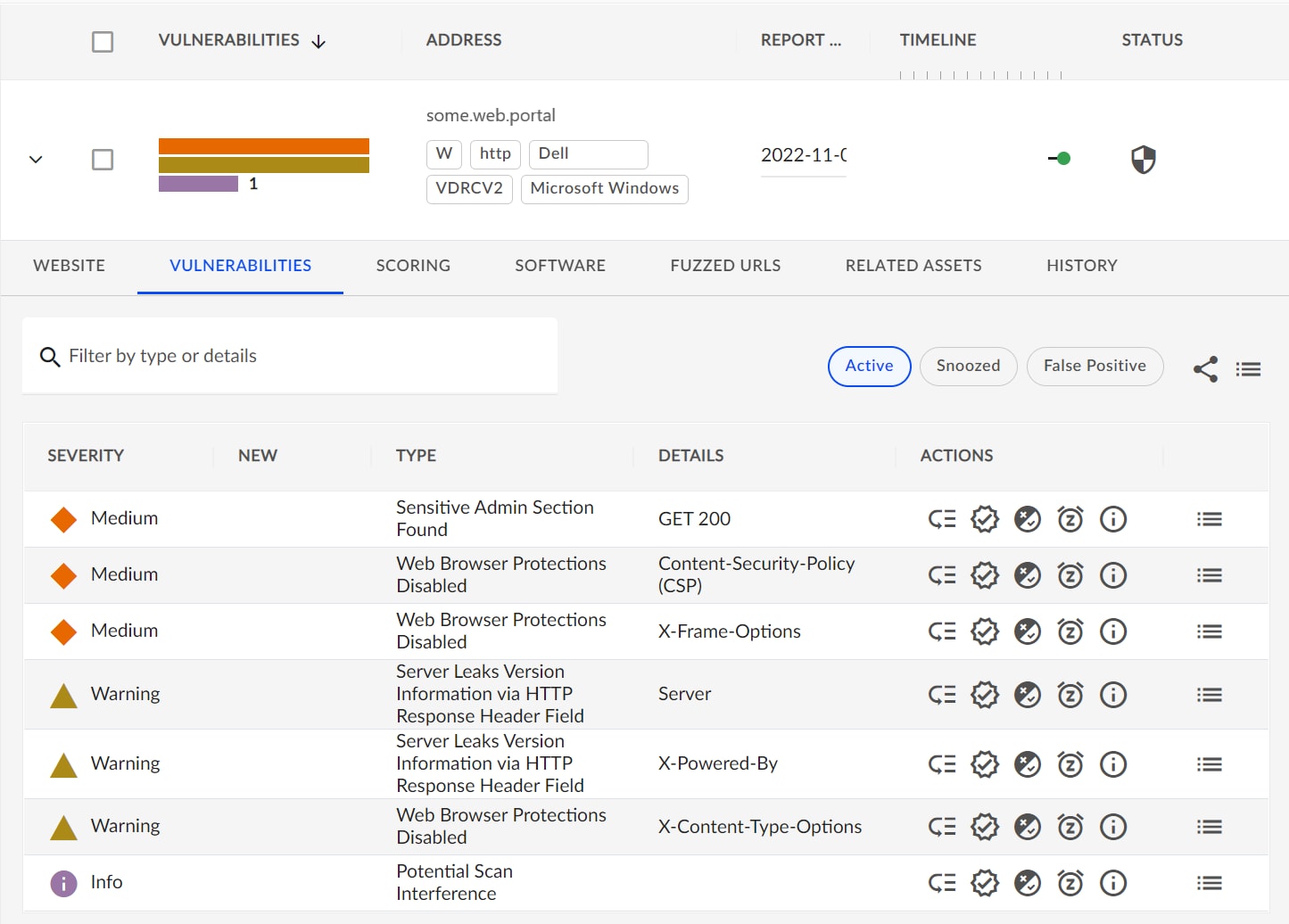
The one noticeable variation that was observed resulted from the VDR capability to detect web portals that are running on a server. Many application vendors ship products with an integrated web console for system administration. A few of the servers in our testing have web portals, and therefore those were also assessed for any vulnerabilities.
The following figure is a sample from a machine with a web portal:
- Comments
-
- A full list of exposed web portal URLs was identified for the server.
- Zero Critical items were raised for the system shown above.
- VDR scanning is capable of identifying code libraries (such as Javascript) that are used in web portals which may also have vulnerabilities.
- If anything new or unexpected is contained in the result of a scan, consult with a security professional on your team, and engage the product vendor to discuss.
Cameras
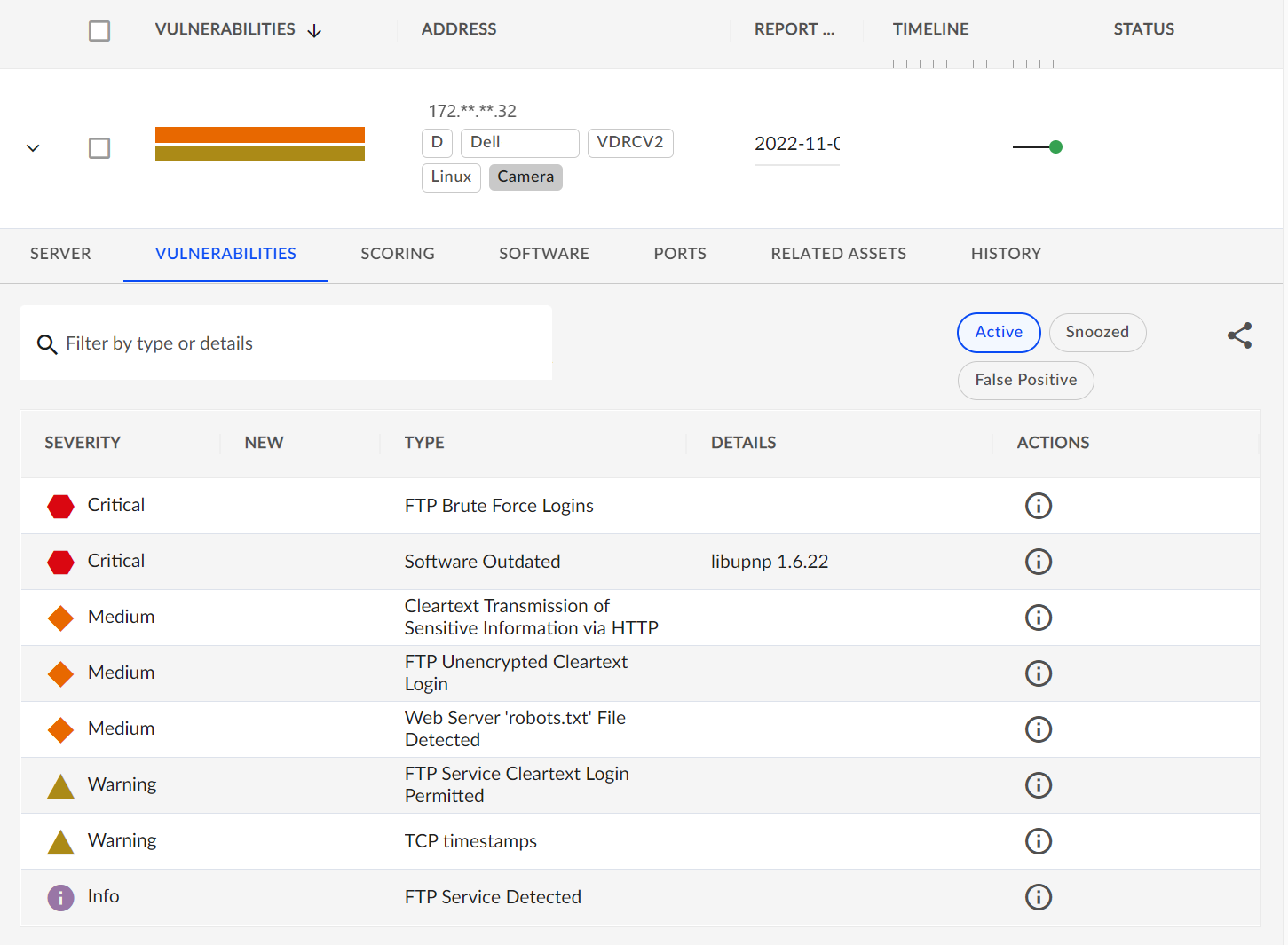
Our testing scope included a task to determine if it would be possible to use VDR to scan IP cameras. We have multiple IP cameras from various hardware vendors in the lab. This is the first time Secureworks was used to scan IP cameras, therefore, it was unclear the type of results we would get. The results we achieved were encouraging. The full IP range that covers our physical IP camera hardware was configured for autodiscovery in the VDR console. Every camera scanned had vulnerabilities reported.
The following figure is a sample from one of the cameras:
- Comments
-
- For this camera, two critical issues were identified:
- There is an FTP login user configured that uses a common user/password combination that was easily detected during the scan. A configuration step was skipped during the installation which caused the issue. The password can and should be changed.
- A software library used by the camera was out of date and has a known vulnerability.
- After the initial scan, the camera was updated to the latest available firmware and still has one critical item relating to the "libupnp" software library.
- Most of the scanned cameras have a web console available for administration. These were also scanned for vulnerabilities and can be reviewed under the "Related Assets" section.
- When critical issues are found, it is important to reach out to the camera vendor to get the latest patching package.
- For this camera, two critical issues were identified:
Note: The result of this research shows that IP cameras do present a significant security risk even when fully patched. Older unpatched cameras will likely have more vulnerabilities.
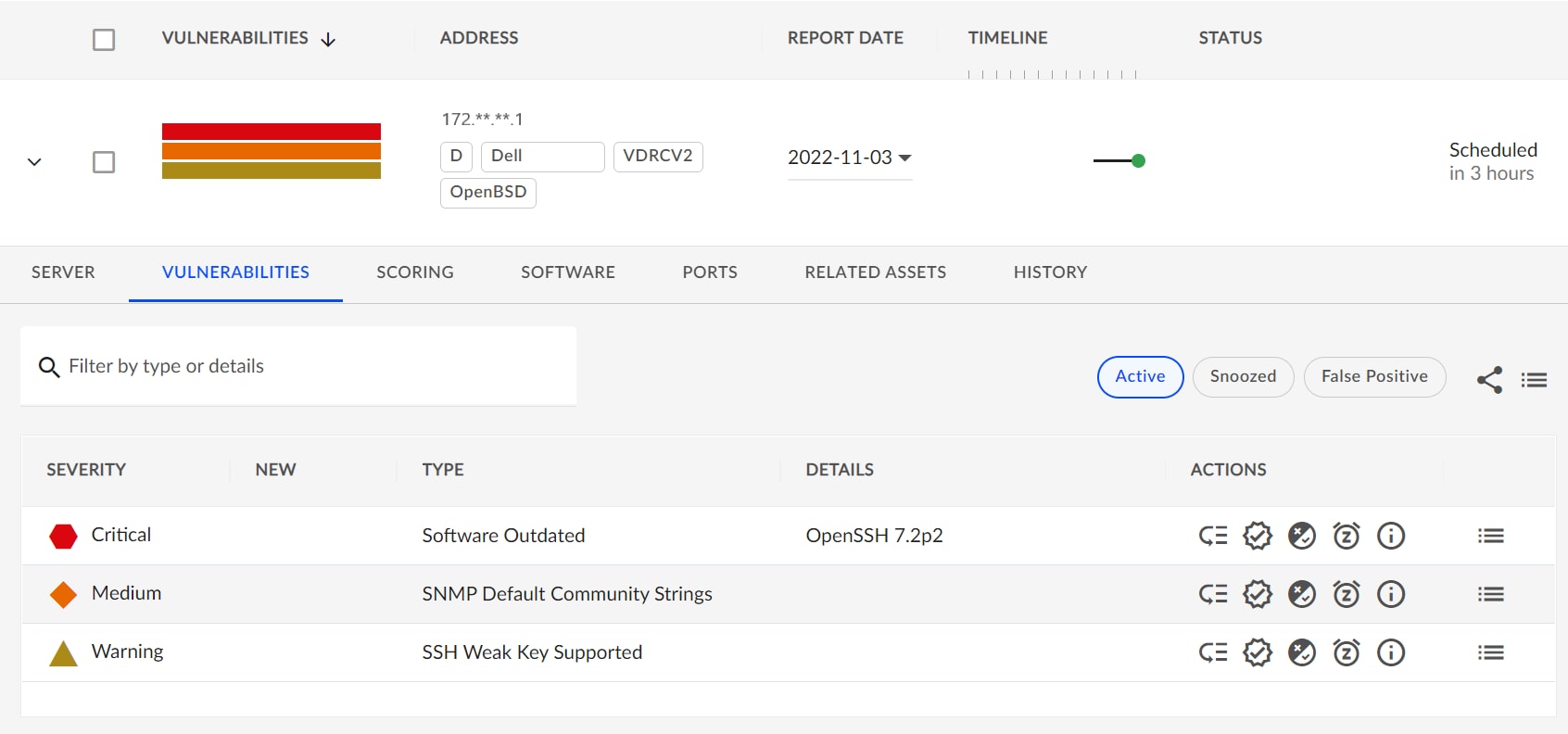
Network switches
VDR will also scan any network switches that are in the IP ranges entered in the web portal. Most network switches run an operating system that VDR can identify and scan.
The following figure shows a sample of a network switch scan that identified a range of issues:
- Comments
-
- A critical issue was identified in the version of SSH that is used on the switch. This was resolved with the latest update from the vendor.
- The switch operating system was identified as Open BSD.
- If issues still exist after updating to the latest software then reach out to your vendor for guidance.
Hypervisor
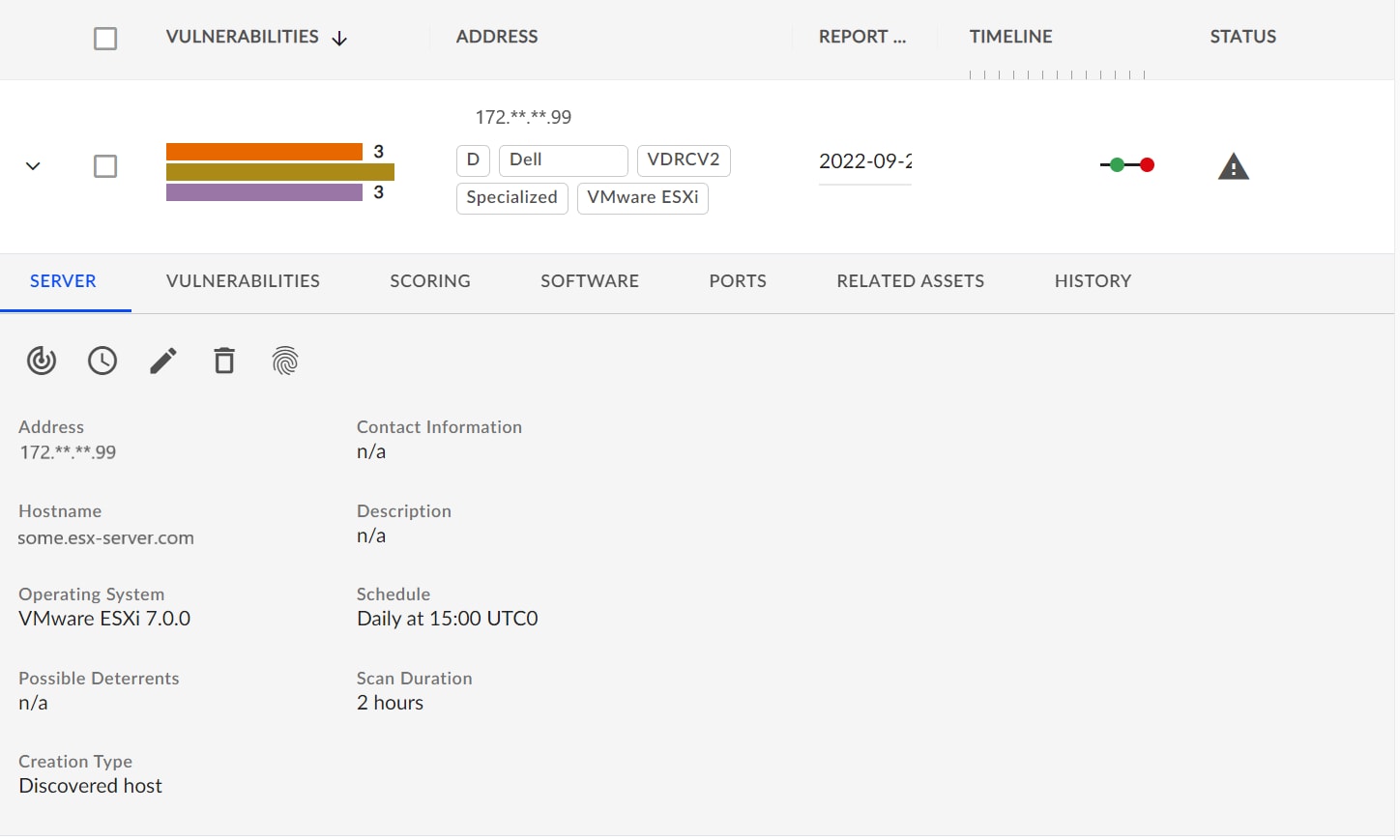
It is important to scan all parts of the environment to assess any vulnerabilities including VMware ESXi hosts.
The following figure shows a sample output from an ESXi server scan:
- Comments
-
- Zero vulnerabilities were found on the ESXi servers in the testing lab.
- The scan output above is for a server that has not been upgraded to the latest ESXi 7.0.3 version but still does not have any critical issues.
- The medium-priority items above should also be investigated with your security team to ensure these are not a concern in your environment. Each item has remediation information shown in the VDR portal.
Sizing the solution
Sizing the solution
Backup and restore operations
Backup and restore operations
Monitoring the solution
Monitoring the solution
VxRail platform monitoring
The VxRail platform has extensive monitoring options out of the box with vCenter. Any shortage of resources will be identified as an alert and action can be taken.
To gain additional insights into the infrastructure during our testing, we used vRealize Operations.
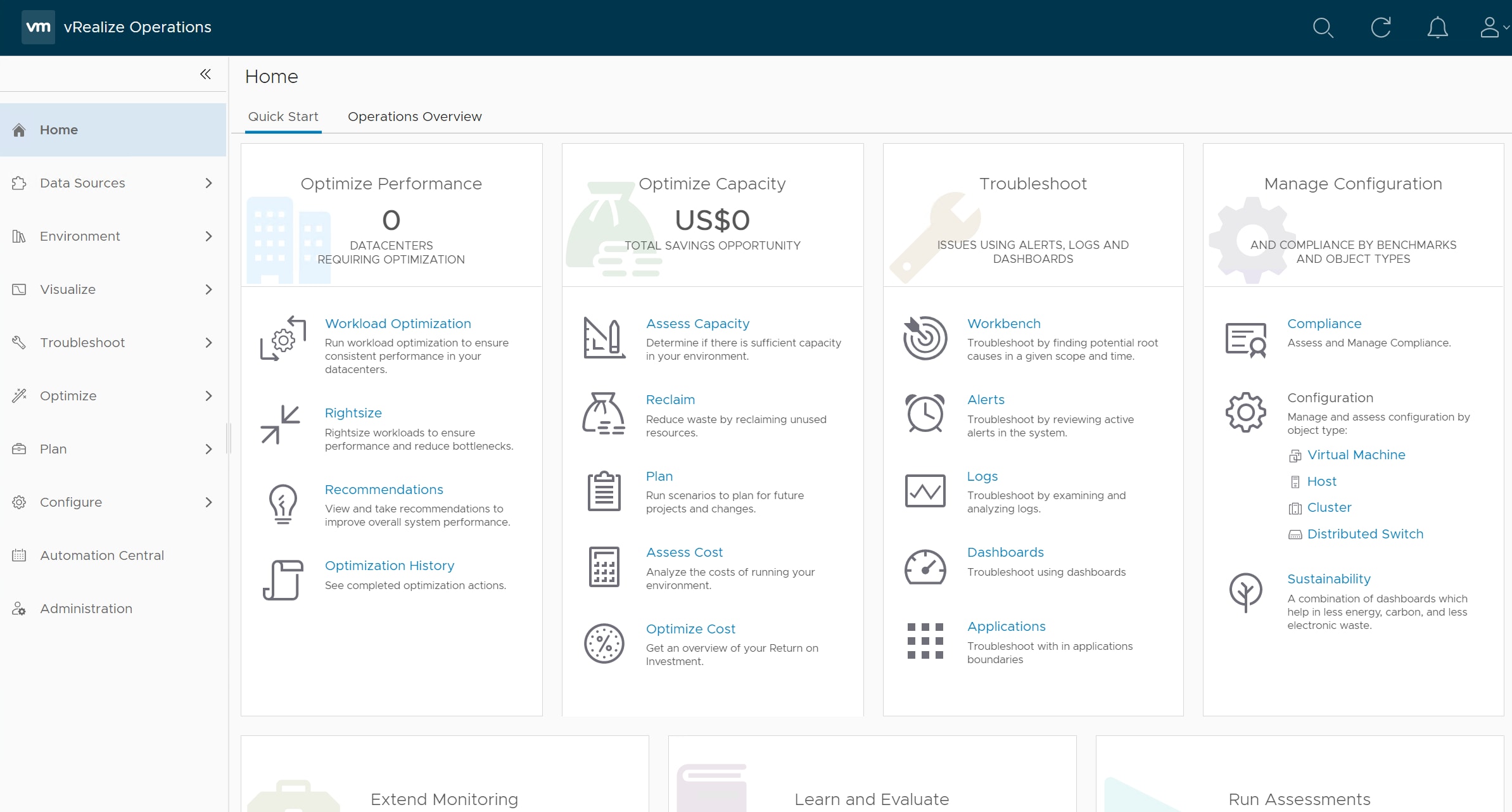
By using vRealize Operations, we could get reports across multiple VMs and total system-wide performance easily. The tool also supports analyzing system-wide resource utilization across the cluster including CPU, GPU, networking, vSAN storage, and memory usage that is only possible with a common hyperconverged platform like the Dell Computer Vision for Smart Transportation platform.
The VxRail Manager Health view also displays information about the hardware components of your appliance. A graphical representation of the appliances in your cluster makes it easy to navigate for event and status information. The Health view can be used to view the following:
-
Appliances in the cluster: View appliance status and information such as ID, serial number, and so forth.
-
Individual appliance components: Drill down to see the status and information for components such as disks, compute nodes, and power supplies.
With the VxRail Manager plug-in for vCenter Server, all VxRail Manager features are integrated and accessible from the vCenter Server. Users can benefit from these valuable capabilities on a familiar management interface. With the VxRail Manager plug-in, the vCenter Server can manage the physical hardware of the VxRail cluster.