Design Guide—Modern Data Stack with Red Hat OpenShift Container Platform on Intel

Oct 20, 2026
Design Guide—Modern Data Stack with Red Hat OpenShift Container Platform on Intel This design guide provides architecture and design information for the Dell Validated Design for Analytics — Modern Data Stack with Red Hat® OpenShift® Container Platform, Apache Spark, Kafka, and open table formats like Delta Lake and Iceberg, with Starburst.

Revision history

Revision history

Table 1. Document revision history
Part number Release date Description of changes
H19748.1 May 2024 Updated all references of "data lakehouse" to "modern data stack."
H19748 October 2023 Initial release of the Dell Validated Design for Analytics — Modern Data Stack with Red Hat OpenShift Container Platform, Delta Lake, and Starburst

Introduction

Solution introduction

Overview

A modern data stack is an open data management architecture that combines the best aspects of a data lake and a data warehouse in a single platform.

A traditional data lake tends to be flexible and cost-effective by storing data in its raw or natural form typically unstructured or semistructured. A data warehouse is a more advanced repository of data for reporting and analysis that tends to store data that is more structured. The data has typically been cleansed or operationalized for better data quality, often the result of extract-transform-load (ETL) or extract-load-transform (ELT) operations.

Data analytics usage is increasingly widespread and changing in nature. Those trends, coupled with the requirement to access large amounts of disparate data by many different users, require a modern, integrated approach to data access. A modern data stack combines the best of data lakes and data warehouses, supporting business intelligence and machine learning technologies in one platform. The platform can store all types of data and provide it with a cloud-like, multiresource, and self-service interface for data scientists and other users.

The Dell Validated Design for Analytics — Modern Data Stack has been developed to address the needs of organizations deploying advanced analytics. It incorporates the concepts of a modern data stack architecture together with a container platform using decoupled compute and storage.

This document provides design guidance for data analytics infrastructure managers and architects by describing a predesigned, validated, and scalable architecture for advanced analytics on Dell hardware infrastructure.

Document purpose

This document describes a validated design and a reference architecture for a modern data stack platform that combines Dell infrastructure, Red Hat® OpenShift® Container Platform, Starburst query engine, and open-source technologies: Delta Lake and Apache Iceberg. Together they address the needs of organizations deploying advanced analytics and AI workloads.

This design guide can be read alongside the associated white paper Dell Validated Design for Analytics – Modern Data Stack with Red Hat OpenShift Container Platform. The white paper discusses the benefits of a modern data stack compared to data lakes and data warehouses. It also provides a more general overview of a modern data stack concept and its components.

Note: The contents of this document are valid for the described software and hardware versions. For information about updated configurations for newer software and hardware versions, contact your Dell Technologies sales representative.

Audience

This document is intended for enterprises with data lakes or a data lake strategy interested in empowering their organizations to act more quickly, effectively, and efficiently on their data. Audience roles include:

  • Data and application administrators
  • Data engineers
  • Data scientists
  • Hadoop administrators
  • IT decision-makers

A modern data stack can assist more traditional analytics customers looking to modernize their data collection. It can also help analytics systems to get more value from their data or standardize their data for modern analytics workloads.

Design Guide introduction

This document presents the key concepts of the solution, namely the modern data stack architecture with open table formats, the container platform, and the use of decoupled compute and storage. It describes the solution architecture and components, including Dell infrastructure and node configurations that support the functions of the modern data stack. The Dell storage configuration options for the modern data stack are described, including PowerStore for container runtime storage, PowerScale for HDFS object storage, and ECS and ObjectScale for S3 object storage.

In addition to the modern data stack, the container platform architecture and components are described. The container platform in this validated design is Red Hat OpenShift – the industry-leading hybrid cloud application platform powered by containers and Kubernetes. Other industry-leading container platforms, such as SUSE Rancher or Symcloud, could also be options.

Going beyond the Dell hardware infrastructure and Red Hat OpenShift Container Platform, other software components that were validated include the Starburst query engine, Apache Spark, Apache Kafka, and open table formats like Delta Lake and Apache Iceberg.

Lastly, guidelines are presented for sizing and scaling the solution based on various workload requirements.

CLI commands and PDF files

This document contains CLI command examples. Many PDF viewers add a line break to the end of each line of text in a PDF. Adobe Acrobat (Reader, Standard, and Pro) and other common PDF viewers, including the Google Chrome and Microsoft Edge web browsers, insert these line breaks.

As a result, when you copy commands that wrap across multiple lines in a PDF, the copied commands contain erroneous line breaks. If you copy and paste commands, the line breaks cause issues when you run the commands.

To address this known PDF limitation and ensure that copied commands do not contain unintentional line breaks, do one of the following:

  • Paste the copied commands into a text editor, and remove the line breaks.
  • Use the HTML version of this document when you copy commands.

Solution concepts

Introduction

The Dell Validated Design for Analytics — Modern Data Stack incorporates the concepts of a modern data stack architecture together with a container platform using decoupled compute and storage.

Concepts

Modern data stack architecture

Modern data stack architecture gained popularity in the late 2010s as an evolution of the well-established data warehouse and data lake architectures. The architecture provides the most significant capabilities of both data warehouses and data lakes in a single system, reducing cost and complexity without compromising functionality.

There is no formal definition of modern data stack architecture. It primarily describes a system that combines the open file formats and cost-effective scalable storage of data lakes with the ACID transactions and table-oriented schema definitions of data warehouses.

Modern data stack architecture is often based on a modern table format such as Delta Lake or Apache Iceberg. This format provides a table abstraction above the underlying storage layer in the modern data stack. The other key features of a modern data stack are:

  • ACID transaction support for inserts, updates, and deletes
  • Scalable metadata
  • Schema enforcement and evolution
  • Support for diverse datatypes ranging from unstructured to structured data
  • Data versioning or time travel capability
  • Support for SQL access
  • Support for direct table access through APIs such as DataFrames
  • Support for scalable storage using open file formats

Container platform

The Dell Validated Design for Analytics — Modern Data Stack is built on a container platform. This approach provides agility, flexibility, and scalability while supporting diverse analytics workloads.

The container platform abstracts the machine level details and host operating system dependencies, exposing them as a pool of compute, storage, and communications resources. The platform also provides application orchestration capabilities to streamline the deployment and management of analytics workloads.

The container platform used in this validated design is Red Hat OpenShift. The implementation details are described in Container platform implementation. Analytics workloads are packaged and distributed using standard Kubernetes methods including images, Helm charts, and operators.

Decoupled compute and storage

This validated design for data analytics decouples compute and storage resources. This approach provides increased resource utilization, increased flexibility, and lower costs.

The system supports independent provisioning of storage and compute and enables the use of heterogenous storage and compute resources. This design provides a better balance between storage and compute for varying workloads.

Decoupling also simplifies the life cycle and management of the system by allowing independent management, scaling, and upgrades of storage and compute resources.

The design also separates runtime storage from data lake storage. PowerStore storage with the Dell Container Storage Interface (CSI) drivers provides runtime storage. PowerScale with the HDFS protocol, or ECS or ObjectScale with the S3 protocol, provides data lake storage.

Data virtualization

Data has always been a vital part of every business. It is therefore valuable for businesses to be able to integrate, manage, access, and aggregate data from different sources regardless of their physical location or real-time structure.

Distributed databases and heterogeneous data stores can be viewed as a single database by virtue of data virtualization technologies. ETL on data is virtualized through data virtualization servers rather than physically performed with transformation engines. With this technology, users can access enterprise-wide data - including big data sources, traditional databases, cloud, and IoT - in a fraction of the time and cost required for physical warehousing.

In contrast to traditional data warehouses, data virtualization often does not require a comprehensive infrastructure since data are often unbroken in their data supply systems. Usually the cost of this approach is lower than for normal ETL, which requires that data be transformed into specific formats before being physically stored.

Dell Technologies has partnered with Starburst to offer its customers the ability to use data virtualization across multicloud environments. For data-driven organizations, Starburst's capability of querying data across any database makes the solution instantly actionable. With Starburst, you can run rapid analytic queries against data sources ranging from gigabytes (GBs) to petabytes (PBs) by using Trino, an open-source, high-performance distributed SQL engine.

Solution architecture

Architecture overview

The Dell Validated Design for Analytics — Modern Data Stack has been developed to address the needs of organizations deploying advanced analytics. It incorporates the concepts of a modern data stack architecture along with a container platform using decoupled compute and storage.

Design overview

The architecture has been designed to support the requirements of modern data analytics. It provides a scalable, flexible platform for multiple analytics workloads, and supports the use of a modern data stack architecture. The figure below illustrates the overall modern data stack platform architecture.
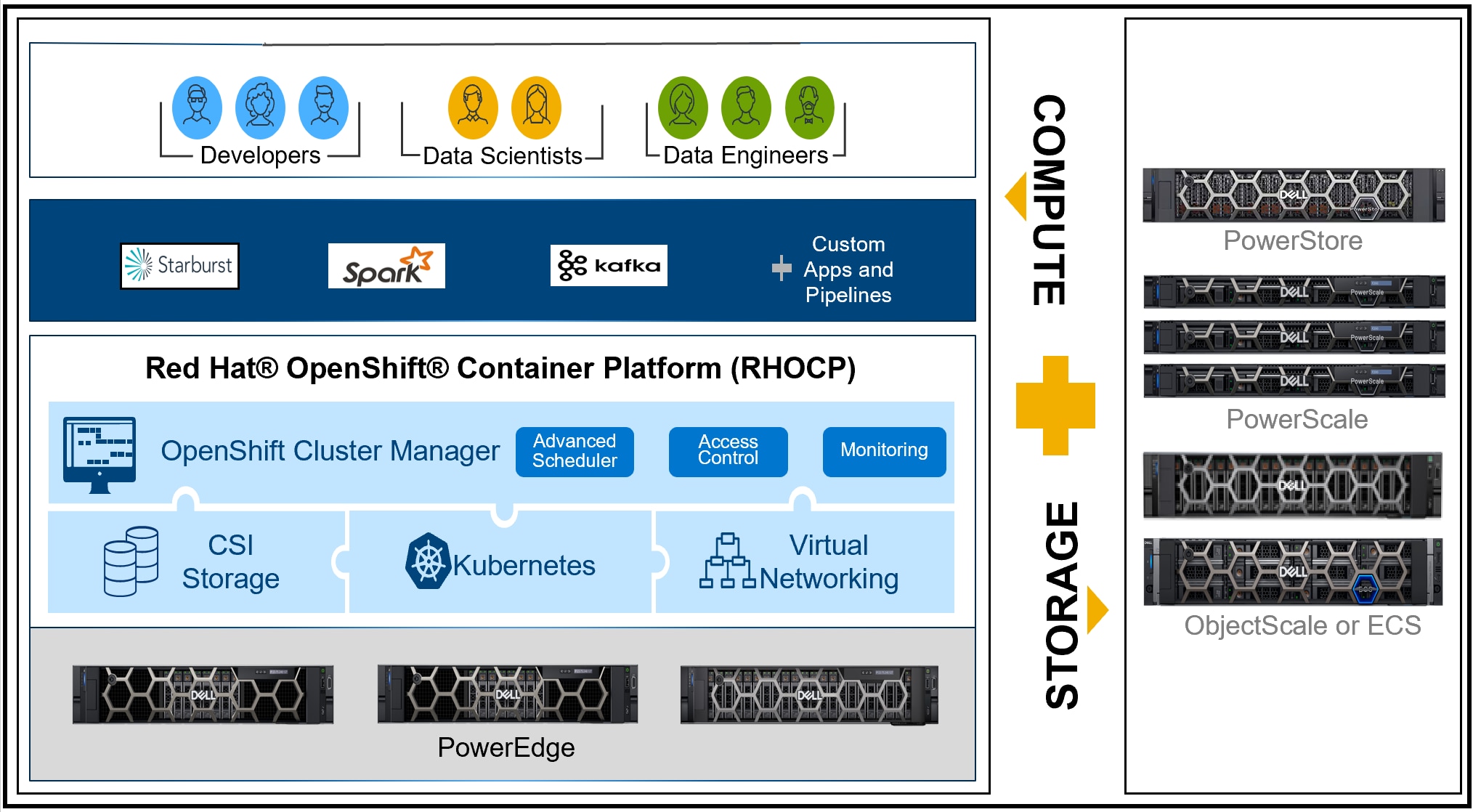
Figure 1. Modern data stack platform architecture
Modern data stack architecture diagram
Dell infrastructure
The infrastructure layer provides the core compute, storage, and network resources for the platform. For details about the recommended infrastructure, see Dell infrastructure. For additional sizing and scaling guidance, see Sizing the solution.
Red Hat OpenShift Container Platform
The OpenShift cloud-native platform, which is based on Kubernetes, is designed to enable developers to build, deploy, and manage applications across multiple environments consistently and securely. It provides developers with tools for building, deploying, and managing containers. Some of the key benefits of OpenShift include simplified application development, consistent deployment, management, security and compliance, and scalability and performance.
Applications and workloads
Applications and workloads are the components that provide the customer specified data analytics functions. For details about core applications used for modern data stack architecture, see Workload design. Design guides for other solutions running on this platform can be found on the Dell Info Hub for Data Analytics.

Platform features

The architecture provides scalability of compute, storage, and networking at the infrastructure layer, scalability of the control plane and runtime layers, and scalability of application workloads. Storage and compute are decoupled to support independent scaling, contingent upon application requirements. The network layer scales with infrastructure growth.

The architecture provides the flexibility to run multiple workloads on a single platform with resource management and operations management. Workloads can be containerized cloud native applications or can run in virtual machines.

The architecture also implements high-availability features at all levels. Redundant networking is used for the core platform, Elastic Cloud Storage (ECS), PowerScale storage, and ObjectScale storage. Cloud native workloads that are deployed on Kubernetes are replicated automatically when a node fails to match the original replica set requirement.

Overall, the architecture enables data analytics on structured, semistructured, and unstructured data on a single platform. It gives developers, data scientists, and data engineers a single interface for deployment of advanced analytic pipelines. It provides administrators with a production-grade platform that is based on the de facto standard Kubernetes ecosystem.

Dell infrastructure

Infrastructure overview

Dell infrastructure provides the compute, memory, storage, and network resources for the platform. Modern data stack on Dell infrastructure illustrates the required infrastructure components and their roles in the cluster.
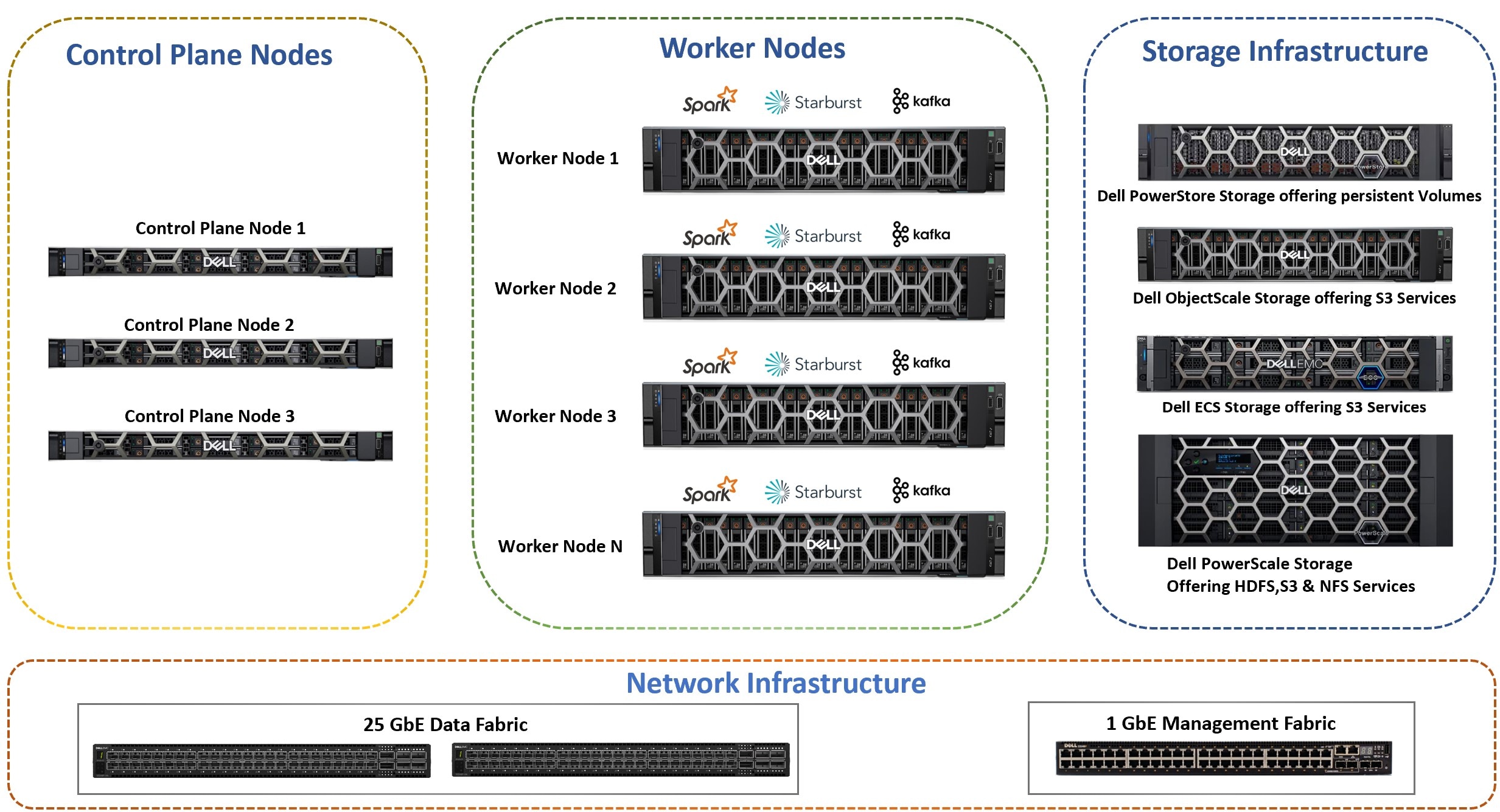
Figure 2. Modern data stack on Dell infrastructure
A diagram of the modern data stack platform on Dell infrastructure with OpenShift
Control plane nodes
Cluster control plane components make global decisions such as scheduling, and detecting and responding to cluster events. Such events can include starting a new pod when replicas are unsatisfied in a deployment.
Worker nodes
These nodes are used to run containerized workloads. The Kubernetes control plane controls each node through the kubelet agent. The kubelet connects to the control plane and synchronizes the node state with the cluster.
Storage infrastructure
Storage infrastructure provides the modern data stack storage layer. Dell ObjectScale, PowerScale, and ECS configurations are provided. You can use any of them as modern data stack storage. The CSI driver for Dell PowerStore has been incorporated into Kubernetes to provide persistent storage.
Network infrastructure
Network infrastructure provides the required connectivity between the server and storage infrastructure and the on-premises network.

The architecture is flexible and supports a wide range of infrastructure configurations. Dell Technologies recommends the following configurations for a general-purpose modern data stack environment running analytics workloads. Individual node configurations include node-specific guidance. More guidance for cluster level sizing and scaling is provided in Sizing the solution. Design guides for individual solutions on the platform may include more specific recommendations for those solutions.

Server infrastructure

The server infrastructure provides compute, memory, and some of the storage resources that are required to run customer workloads. A wide variety of PowerEdge server configurations are possible. The recommendations here support a wide variety of workloads typical in a modern data stack architecture implementation.


Modern data stack control plane node

Modern data stack control plane nodes support the core platform services that are defined in the Red Hat OpenShift Container Platform. Dell recommends the configuration in Modern data stack control plane node configuration as a starting point for these nodes.

Table 2. Modern data stack control plane node configuration
Machine function Component
Platform PowerEdge R660 server
Chassis 2.5 in chassis with up to 10 hard drives (SAS or SATA), two CPU slots, and PERC 12
Chassis configuration Riser configuration 2, three 16-channel, low-profile slots (two Gen5 and one Gen4)
Power supply Dual hot-plug, fault-tolerant (1+1), 1100 W mixed mode (100-240 Vac), Titanium, normal airflow (NAF) power supplies
Processor Intel Xeon Gold 6426Y 2.5 G, 16 C/32 T, 16 GT/s, 38 M cache, turbo, HT (185 W) DDR5-4800
Memory capacity 128 GB (eight 16 GB RDIMM, 3200 MT/s, dual rank)
Internal RAID storage controllers Dell PERC H965i with rear load bracket
Disk—SSD Two 1.6 TB 2.5 in hot-plug, mixed-use SAS SSDs with up to 24 Gbps 512e Federal Information Processing Standard (FIPS), three drive writes per day (DWPD)
Boot-optimized storage controllers BOSS-N1 controller card + with two M.2 960 GB SSDs (RAID 1)
Network interface controllers NVIDIA ConnectX-6 Lx dual port 10/25 GbE SFP28 adapter, PCIe low profile

Dell Technologies recommends the disk volume layout for this set of machines that are listed in Modern data stack control plane node volumes.

Table 3. Modern data stack control plane node volumes
Usage Volume type Physical disks Volume ID
Operating system and Red Hat OpenShift Container Platform RAID 1 Two 1.6 TB SAS SSDs 0
Note: Red Hat Enterprise Linux CoreOS controls the file system and partitions layouts during the installation process.

Three control plane nodes are required for production clusters to provide high availability for the control plane. For pilot testing, the control plane services that are defined in the Red Hat OpenShift Container Platform can be assigned to worker nodes instead of using dedicated control plane nodes.

Memory, storage, and processors have been sized to support all the required services in a production deployment.

The configuration includes two network ports to support high-availability (HA) networking. These ports can be from a single network card, or a pair of network cards for additional adapter level HA.

The operating system is installed on a 960 GB boot-optimized storage (BOSS) card.

General-purpose modern data stack worker node

Modern data stack worker nodes support the platform runtime services and customer workloads. The runtime services are defined in the Red Hat OpenShift Container Platform. User deployments define the workloads. Dell Technologies recommends the configuration in General-purpose modern data stack worker node configuration as a starting point for general-purpose workloads.

Table 4. General-purpose modern data stack worker node configuration
Machine function Component
Platform PowerEdge R660 server
Chassis 2.5 in chassis with up to eight SAS or SATA hard drives, three PCIe slots, and two CPUs
Chassis configuration Riser configuration 2, three low-profile 16-channel slots, (two Gen5 and one (Gen4)
Power supply Dual hot-plug, fully redundant (1+1), 1400 W, mixed mode power supplies
Processor Dual Intel Xeon Gold 6438Y 2 G, 32 C/64 T, 16 GT/s, 60 M Cache, turbo, HT (205 W) DDR5-4800
Memory capacity 768 GB (twelve 64 GB RDIMM, 4800 MT/s, dual rank)
Internal RAID storage controllers Dell PERC HBA355i with rear load bracket
Disk—SSD Two 1.6 TB hot-plug, mixed-use SAS SSDs with up to 24 Gbps, 512 2.5 in, Federal Information Processing Standard (FIPS) Self-Encrypting Drives (SEDs)
Boot-optimized storage cards BOSS-N1 controller card + with two M.2 960 GB SSDs (RAID 1)
Network interface controllers NVIDIA ConnectX-6 Lx dual port 10/25 GbE SFP28 adapter, PCIe low profile

Dell Technologies recommends the disk volume layout for this set of machines that are listed in General-purpose modern data stack worker node volumes.

Table 5. General-purpose modern data stack worker node volumes
Usage Volume type Physical disks Volume ID
Operating system RAID 1 Two M.2 960 GB SSDs 0
Data Simple Two 1.6 TB SSDs 1, 2
Note: Red Hat Enterprise Linux CoreOS controls the file system and partitions layouts during the installation process.

Volumes 1 and 2 provide node local storage, and can be used with the OpenShift Local Storage Operator to provide persistent storage through local volumes.

Dell Technologies recommends four worker nodes for a minimum deployment.

The configuration includes two network ports to support high-availability (HA) networking. These ports can be from a single network card, or a pair of network cards for additional adapter level HA.

Two M.2 960 GB SSDs in a RAID 1 configuration are used for the operating system volume.

The servers are not configured with a large amount of storage because the Dell CSI drivers provide runtime storage on PowerStore.

System memory has been sized to support all required services and common workloads. If the anticipated workloads are larger, memory can be increased.

The processors have been chosen to support compute intensive AI and ML workloads and include dual Intel Advanced Vector Extensions (AVX) units for maximum compute speed. Other processor choices are possible but should be made with memory requirements and overall power consumption in mind.

Storage infrastructure

Modern data stack storage can use the options that are shown in the following table:

Table 6. Modern data stack storage options
Storage option Protocol
PowerScale hdfs:// (with Spark) and s3a:// (with Starburst)
ECS s3a://
ObjectScale s3a://

You can use any combination of those systems depending on workload requirements.

Dell PowerStore provides application runtime storage. Dell Container Storage Module (CSM) is used for integrating PowerStore storage within the Red Hat OpenShift Container Platform environment.

Dell ObjectScale, ECS, and PowerScale are deployed as cluster-level systems. The node recommendations here can be used as guidance for new clusters, verification of compatibility with existing clusters, or expansion of existing clusters.


PowerScale infrastructure

Dell Technologies recommends the configuration in PowerScale configuration for storage in clusters using PowerScale for their primary modern data stack storage using HDFS.

Table 7. PowerScale configuration
Machine function Component
Model PowerScale H7000 (hybrid)
Chassis 4U node
Nodes per chassis Four
Node storage Twenty 12 TB 3.5 in. 4 Kn native sector size SATA hard drives
Node cache Two 3.2 TB SSDs
Usable capacity per chassis 600 TB
Front-end networking Two 25 GbE (SFP28)
Infrastructure (back-end) networking Two InfiniBand QDR or two 40 GbE (QSFP+)
Operating system OneFS 9.5.0.2

The recommended configuration is sized for typical usage as modern data stack HDFS storage.

Two Ethernet network ports per node are included for connection to the Cluster data network or a PowerScale storage network. Two additional network ports are included for connection to the PowerScale back-end network. These additional ports can be either InfiniBand QDR or 40 GbE, depending upon on-site preferences.

One PowerScale H7000 chassis supports four PowerScale H7000 nodes. This configuration provides approximately 720 TB of usable storage. At 85% utilization, 600 TB of HDFS storage is a good guideline for available storage per chassis.

This configuration assumes that the PowerScale nodes are primarily used for HDFS storage. If the PowerScale nodes are used for other storage applications or clusters, you must account for it in the overall cluster sizing. You can also use other PowerScale H7000 drive configurations.


ECS node

Dell Technologies recommends the configurations in ECS EX500 node configuration or ECS EXF900 node configuration for storage in clusters using ECS for their primary modern data stack storage using the s3a:// protocol.

Table 8. ECS EX500 node configuration
Machine function Component
Model ECS EX500
Chassis 2U node
Nodes per rack 16
Node storage 384 TB (twenty-four 16 TB NLSAS drives)
Node cache 960 GB SSD
Usable capacity per chassis Slightly less than 384 TB
Front-end networking Two 25 GbE (SFP28)
Infrastructure (back-end) networking Two 25 GbE (SFP28)

The ECS EX500 configuration provides a good balance of storage density and performance for modern data stack usage.

Two Ethernet network ports per node are included for connection to the Cluster data network or an ECS storage network. Two additional network ports are included for connection to the ECS back-end network.

Table 9. ECS EXF900 node configuration
Machine function Component
Model ECS EXF900
Chassis 2U node
Nodes per rack 16
Node storage 184 TB (twenty-four 7.68 TB NVMe drives)
Node cache N/A
Usable capacity per chassis Slightly less than 184 TB
Front-end networking Two 25 GbE (SFP28)
Infrastructure (back-end) networking Two 25 GbE (SFP28)

The ECS EXF900 configuration is an all-flash configuration and provides the highest performance for modern data stack usage.

Two Ethernet network ports per node are included for connection to the Cluster data network or an ECS storage network. Two additional network ports are included for connection to the ECS back-end network.


ObjectScale infrastructure

Dell Technologies recommends the configuration in ObjectScale all flash configuration for storage clusters that use ObjectScale for primary modern data stack storage using the S3:// protocol.

ObjectScale is high-performance containerized object storage that is built for the toughest applications and workloads-Generative AI, analytics, and more. ObjectScale is the evolution of Dell ECS enterprise object storage architecture. ObjectScale provides increased flexibility in infrastructure choices.

Customers can use either of the following options to deploy ObjectScale:

  • Software-defined storage to deploy ObjectScale software on Red Hat OpenShift
  • An XF960 appliance that is based on the latest generation of Dell PowerEdge servers
Note: Dell Technologies deployed ObjectScale on an OpenShift cluster in a lab environment for this Dell Validated Design.

This advanced system is designed as a distributed architecture, establishing a robust foundation for scalability across all nodes and ensuring unparalleled availability. The software component of ObjectScale offers an array of features that are engineered for optimal protection of data. It incorporates geo-replication capabilities contributing to enhanced data availability. Secure data access is another pivotal feature, ensuring stringent security measures are in place for data retrieval and modification.

Table 10. ObjectScale all flash configuration
Machine function Component
Platform PowerEdge R760 server
Nodes per rack 16
Chassis 2.5" chassis with up to 24 NVMe Direct Drives, two CPUs
Chassis configuration Riser configuration 3, half-length, two 2-channel full-height slots (Gen4), two 16-channel full-height slots (Gen5), and two 16-channel low-profile slots (Gen4)
Power supply Dual, hot-plug, fully redundant (1+1) 1100 W power supplies
Processor Intel Xeon Gold 6426Y 2.5 G, 16 C/32 T, 16 GT/s, 38 M cache, turbo, HT (185 W) DDR5-4800
Memory capacity 512 GB (sixteen 32 GB RDIMM, 4800 MT/s, dual rank)
Internal RAID storage controllers C30, no RAID for NVMe chassis
Disk—NVMe 24 6.4 TB Enterprise NVMe, mixed-use agnostic drive, U.2 Gen4 with carrier
Boot-optimized storage cards BOSS-N1 controller card + with two M.2 960 GB SSDs (RAID 1)
Network interface controllers NVIDIA ConnectX-6 Lx dual port 10/25 GbE SFP28 adapter, PCIe low profile
Node storage 153.6 TB (24 6.84 TB NVMe drives)
Front-end networking Two 25 GbE (SFP28)

The ObjectScale configuration is an all-flash configuration and provides the highest performance for modern data stack usage.

Two Ethernet network ports per node are included for connection to the Cluster data network or an ECS storage network.

PowerStore infrastructure

Dell PowerStore uses a single architecture for block, file, and Virtual Volumes (vVols) storage. It uses the latest technologies to achieve these disparate objectives without sacrificing the cost-effective nature of midrange storage. Dell Technologies recommends the configuration in PowerStore configuration for containers in clusters for their runtime storage Persistent Volume Claim (PVC).

The Dell PowerStore 5200T is used for provisioning dynamic persistent volumes. The services to support this storage are deployed with the Dell Container Storage Module (CSM) operator available within the Red Hat Marketplace. This storage is exposed to workloads running on the cluster through the Kubernetes CSI interface. Workloads that require PVCs use this storage. PVCs enable users to consume abstract storage resources. Users often require Persistent Volumes with different properties, such as performance. In a modern data stack environment, most of the data is stored on external storage. The external storage can be either HDFS provided by Dell PowerScale, or object storage provided by ECS or ObjectScale.

Table 11. PowerStore configuration
Machine function Component
Model Dell PowerStore 5200T
Chassis 2U node
Nodes per chassis Two
Memory capacity 1152 GB appliance DIMM (576 GB per node)
Drives 21 7.68 TB NVMe SSD
Four-port mezzanine cards 25 GbE optical four-port mezzanine card pair
Two-port mezzanine card (required for NVMe expansion) PowerStore 100 GB mezzanine card pair
Power supply Dual, 1800 W (200-240 V) power supply with C13/C14 power cables
Storage configuration Clustered storage
Integrated copy data management (iCDM) Dell AppSync for PowerStore
AppSync software AppSync Starter Pack for PowerStore
Software Services—Perpetual ProSupport AppSync for PowerStore software support-maintenance, 36 months
Install kits PowerStore base enclosure install kit

The Dell Technologies-recommended configuration is sized for running various workloads which are hosted on Red Hat OpenShift Container Platform to provision persistent volumes dynamically using Persistent Volume Claims. The Dell PowerStore CSM driver supports the three access modes which are listed below. These access modes have different capabilities.

The access modes are:

  • ReadWriteOnce—The volume can be mounted as read/write by a single pod.
  • ReadOnlyMany—The volume can be mounted read-only by many pods.
  • ReadWriteMany—The volume can be mounted as read/write by many pods.

See the Dell Technologies Container Storage Modules document PowerStore for more information about the Dell PowerStore Container Storage Module (CSM).

Network infrastructure

The network is designed to meet the needs of a high performance and scalable cluster, while providing redundancy and access to management capabilities. The architecture is a leaf and spine model that is based on Ethernet networking technologies. It uses PowerSwitch S5248F-ON switches for the leaves and PowerSwitch Z9432F-ON switches for the spine.

Physical networking in this architecture is straightforward since most of the advanced capabilities of the system are implemented using software defined networking. The logical network is described in Container platform implementation. This architecture has three physical networks, as shown in Physical network infrastructure.

iDRAC (or BMC) network
The iDRAC (or BMC) network is a secured and isolated network for switch and server hardware management, including access to the iDRAC9 module and Serial-over-LAN. This network optionally connects to corporate network management allowing more direct access to the hardware infrastructure. Each node on this network is assigned an individual IP address from the management address space.
Cluster data network
The Cluster data network is the primary network for internode communication between all server and storage nodes. Each server node on this network is assigned a single IP address on this network.
Core data center network
The Core data center network is the existing enterprise network. The Cluster data network is interfaced with this network through switching and routing allowing cluster services to be exposed to system users.
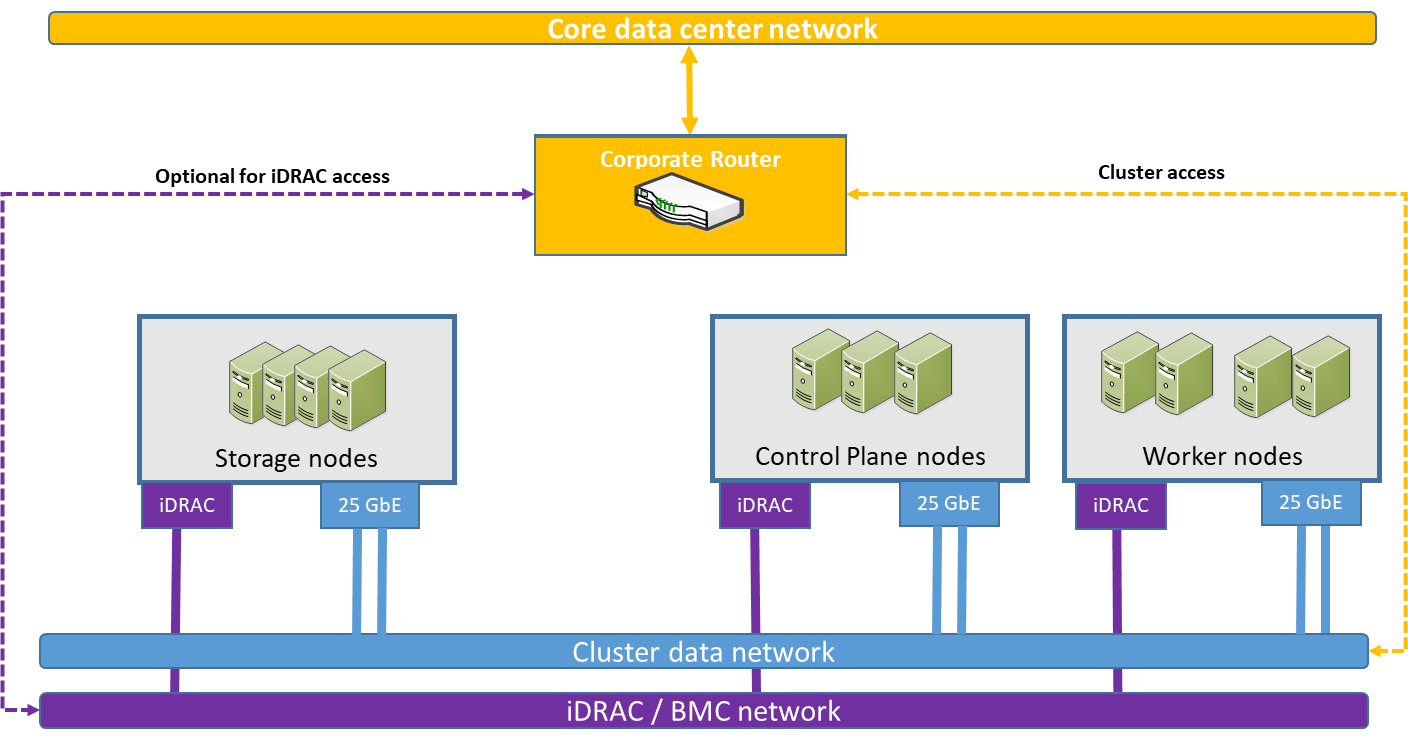
Figure 3. Physical network infrastructure
Modern data stack physical network infrastructure graphic

Management network fabric

The management network uses a PowerSwitch S3148 1 GbE switch for iDRAC connectivity and chassis management.

Cluster data network fabric

The Cluster data network uses a scalable, resilient, nonblocking fabric with a leaf-spine design as shown in Cluster data network connections. Each node on this network is connected to two S5248F-ON leaf switches with 25 GbE network interfaces. The switches run Dell SmartFabric OS10. SmartFabric OS10 enables multilayered disaggregation of network functions that are layered on an open-source Linux-based operating system.

On the server side, the two network connections are bonded and have a single IP address assigned.

On the switch side, the network design employs a Virtual Link Trunking (VLT) connection between the two leaf switches.

VLT technology enables a server to uplink multiple physical trunks into more than one S5248F-ON switch by treating the uplinks as one logical trunk. In a VLT environment, connected pair of switches acts as a single switch to a connecting server while all paths are active. It is possible to achieve high throughput while still providing resiliency against hardware failures. VLT replaces Spanning Tree Protocol (STP)-based networks, providing both redundancy and full bandwidth utilization using multiple active paths.

The VLT configuration in this design uses four 100 GbE ports between each Top of Rack (ToR) switch. The remaining 100 GbE ports can be used for high-speed connectivity to spine switches, or directly to the data center core network infrastructure.
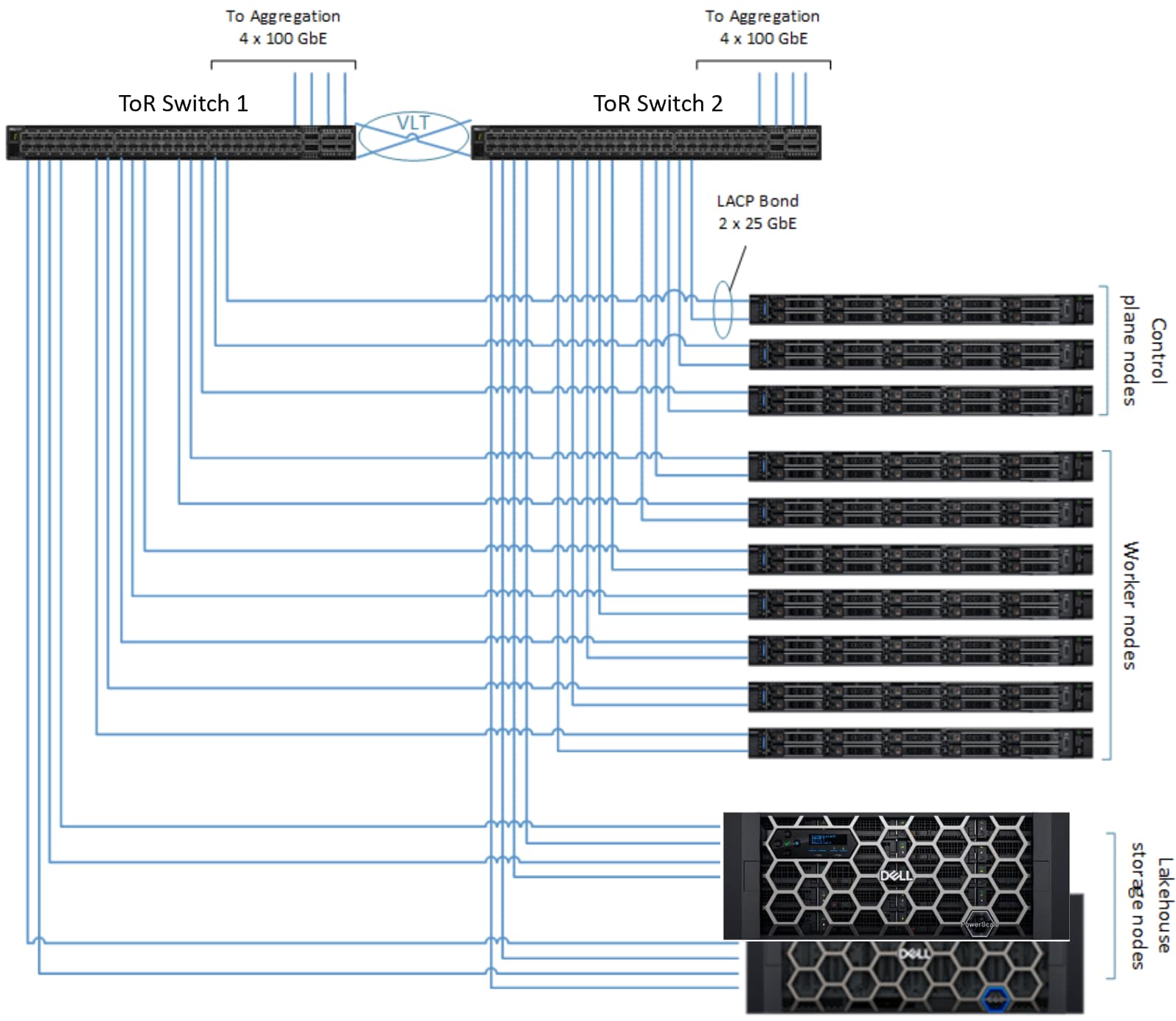
Figure 4. Cluster data network connections
Cluster data network connections graphic

Container platform implementation

Container platform overview

OpenShift Container Platform is an enterprise-grade declarative state machine that is designed to automate application workload operations based on the upstream Kubernetes project. In Kubernetes, declarative means that developers can code a configuration for an application or workload without knowing how that application is going to be deployed. OpenShift Container Platform is based on Kubernetes. It includes native support for cluster snapshots, which enable cluster backup and recovery. OpenShift Container Platform gives administrators and developers the tools that they require to deploy and manage applications and services at scale.

Note: The Dell Validated Design for Analytics — Modern Data Stack accentuates specific differences from the Dell Validated Design for Red Hat OpenShift Container Platform 4.12 on Intel-powered Dell Infrastructure upon which it is based. See the Red Hat OpenShift Container Platform 4.12 on Intel-powered Dell Infrastructure Design Guide for detailed information.

OpenShift advantages

Red Hat OpenShift Container Platform, built on top of Kubernetes, adds useful features such as:

  • Platform-level services, including building and packaging applications
  • Preconfigured, preinstalled, and self-updating monitoring stack
  • Integrated web console

Red Hat OpenShift Container Platform provides the following benefits for production-grade environments:

  • It eliminates the complexity of installing Kubernetes and adding authentication, management, logging, security, and networking.
  • It provides self-management capabilities that are not found in Kubernetes due to the tightly coupled toolchain:
    • The default containers-first operating system (Red Hat Enterprise Linux CoreOS)
    • A Kubernetes-first container run-time (CRI-O)
    • A rigorous testing and certification process for additional Red Hat and vendor middleware

Storage

The platform supports several different types of storage for ephemeral and persistent storage, and for modern data stack storage. The CSI Drivers by Dell implement an interface between CSI  (spec v1.5)-enabled Container Orchestrator (CO) and Dell storage arrays. It is a plug-in that is installed into Kubernetes to provide persistent storage using the Dell storage system. 

See Supported Storage Platforms for more information.


Persistent storage

Stateful applications create a demand for persistent storage. OpenShift Container Platform uses the Kubernetes persistent volume (PV) framework to enable cluster administrators to provision persistent storage for a cluster. Developers can use persistent volume claims (PVCs) to request PV resources without having specific knowledge of the underlying storage infrastructure.


CSI advantages

The Container Storage Interface (CSI) specification standardizes the exposure of block and file storage systems to workloads running on container orchestration systems such as Kubernetes. Kubernetes can now be readily extended to support any storage solution with CSI drivers that the vendor provides. Vendors can use an operator to manage the life cycle of their drivers directly, without waiting until the next core Kubernetes release.


Storage feature support

Dell CSI drivers enable a wide range of storage options to be employed with the OpenShift Container Platform. For information about the available CSI drivers, including their features and capabilities for each of the supported Dell storage options, see Container Storage Interface (CSI) Drivers Series.

Container Storage Modules

Dell CSMs are modules that enable simple and consistent integration and automation experiences, extending enterprise storage capabilities.

The following figure shows the Dell CSMs. The CSMs that are available on request as technical preview features, Encryption and App Mobility, are identified with an asterisk symbol.
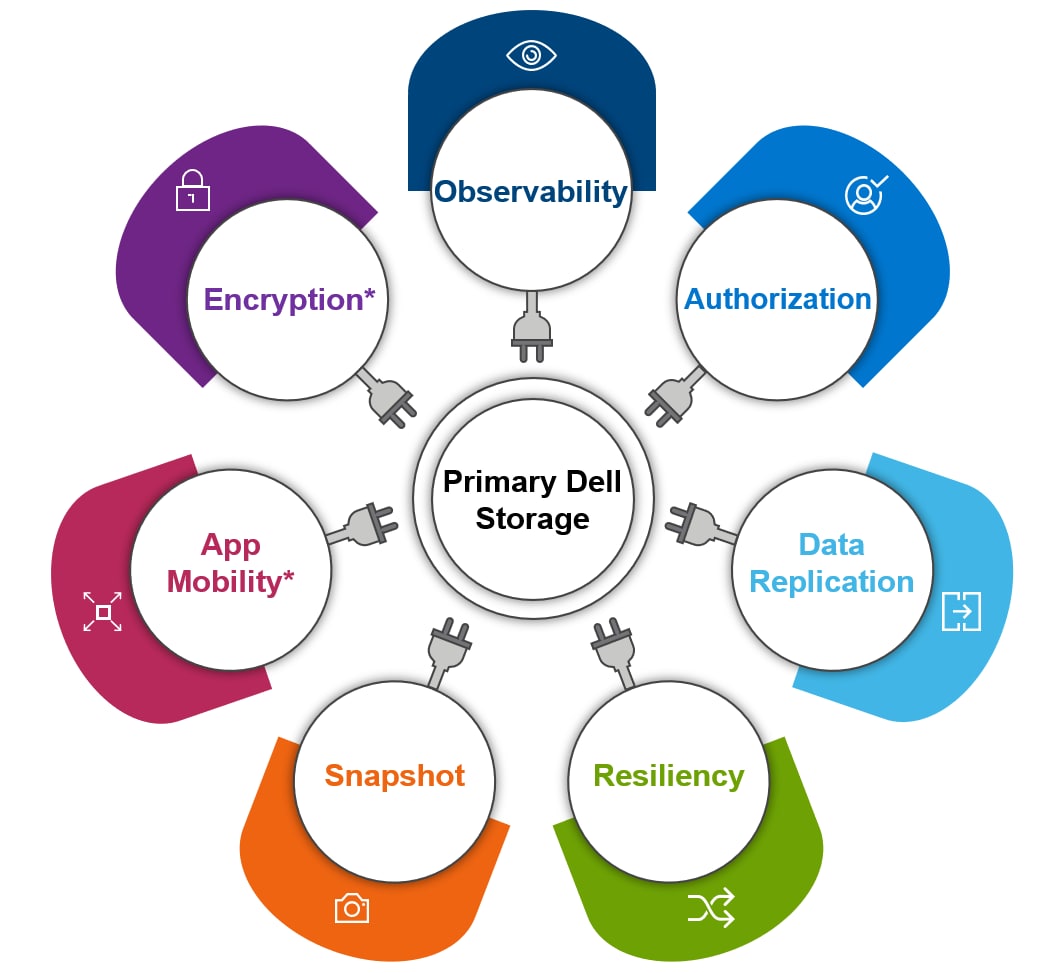
Figure 5. Dell Container Storage Modules
An illustration of Dell Container Storage Modules

CSMs expose enterprise features of storage arrays to Kubernetes so that the developers can use these features in their deployments efficiently and seamlessly. CSMs reduce the complexities of management, making it easier to consume enterprise storage. CSMs can automate daily operation tasks such as provisioning, snapshotting, replication, observability, authorization, application mobility, encryption, and resiliency. For more information and the support matrix, see Dell Technologies Container Storage Modules.

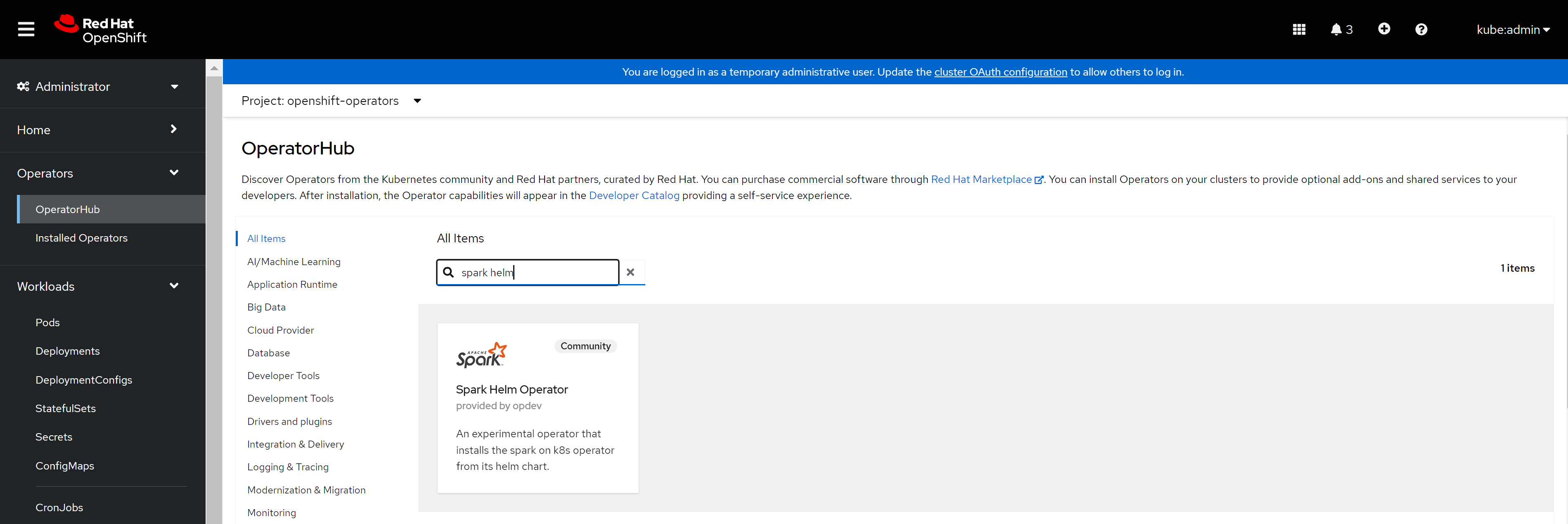
Modern data stack storage

The platform supports multiple options for modern data stack storage using the protocols that are shown in the table below.

Table 12. Modern data stack storage options
Storage option Protocol
PowerScale hdfs:// (with Spark) and s3a:// (with Starburst)
ECS s3a://
ObjectScale s3a://

These storage systems are managed and scaled independently from the core platform, providing a decoupled storage and compute architecture. It is also possible to use more than one of these choices in any deployment.

Applications can connect to one or more modern data stack storage options directly over the network from the application-level code:

  • The Apache Hadoop client libraries (hadoop-hdfs-client) provide the hdfs:// protocol.
  • The Apache Hadoop AWS libraries (hadoop-aws) provide the s3a:// protocol.
  • Other language libraries which implement the s3a:// or hdfs:// protocols.

Applications can access multiple modern data stack storage backends during:

  • Heterogenous queries
  • Scenarios like reading source data from one object system while loading it into a Delta Lake table on a different system

Iceberg and Delta Lake are limited to one backend storage system per table.

Depending on the application and its implementation, the images and application bundle may require that the necessary libraries be included. The application must handle authentication to any external storage.

Management and administration

All system administration and management are handled through a single web interface. This web console can be accessed using an optional Cluster System Admin Host (CSAH) deployed during Red Hat OpenShift Container Platform deployment. Operations can also be performed and automated through the command line.

You can view and manage your project data and perform administrative, management, and troubleshooting tasks through the OpenShift Container Platform web console. Within the openshift-console project, the web console is run as pods on the control plane nodes.

The platform also includes highly efficient monitoring and metrics collection of hardware components, pods, and applications. These features provide holistic observability of all platform activity in a single location.

See the Red Hat OpenShift Container Platform 4.12 on Intel-powered Dell Infrastructure Design Guide for more information.

Network

The platform uses software-defined networking (SDN) to handle communications for the cluster. SDN includes container-to-container connections, pod-to-pod connections, ingress to pod connections, and pod to external services like ObjectScale, PowerScale, and ECS. These network services are provided through the Kubernetes Container Network Interface (CNI) and supported by CNI-compatible network plugins.

Each physical node in the cluster is assigned an IP address for its connection to the Cluster data network. Each connection uses a pair of physical network ports that are bonded with IEEE 802.3ad Dynamic Link Aggregation. This configuration provides both load balancing across physical links, and fault tolerance if a link fails. All networking above this layer is software-defined and uses IP addresses that are private to the cluster.

When applications running on the cluster request IP addresses, the addresses are allocated from the tenants IP pool. The IP pool specifies both the range of addresses available and the CNI driver to use. Dell Technologies recommends using the OVN-Kubernetes network plug-in for most use cases, since it provides the best support for inbound access to applications from outside the cluster.

Inbound network access to applications is handled through a Kubernetes NodePort or LoadBalancer service. The NodePort or LoadBalancer configuration is specified in the application configuration and includes the external and internal port number mapping. Outbound network access from applications is handled through IP routing that is based on the destination.

See the Red Hat OpenShift Container Platform 4.12 on Intel-powered Dell Infrastructure Design Guide for more details about OpenShift Container Platform networking.

Workload design

Overview

Using Kubernetes as its backbone, OpenShift Container Platform provides an enterprise-grade declarative state machine for managing application workloads. Developers can specify, in code, a configuration for an application or workload without knowing how it can be deployed in a Kubernetes context. OpenShift Container Platform gives administrators and developers tools to deploy and manage applications and services at scale.

OpenShift Container Platform supports multiple application deployment strategies. However, this document uses only two of them:

  • Red Hat Marketplace OperatorHub
  • Building your own image or application
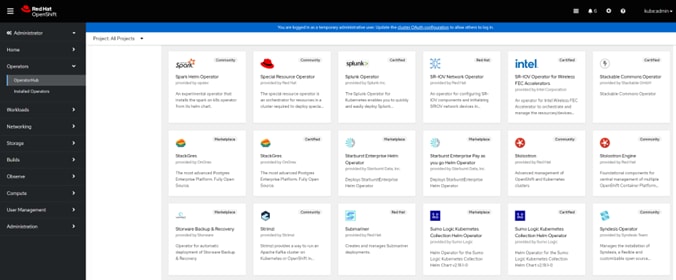
Figure 6. Red Hat Marketplace OperatorHub
A screenshot of the Red Hat Marketplace OperatorHub

Red Hat Marketplace OperatorHub enables administrators to deploy certified Red Hat software from an operator-based catalog onto OpenShift Container Platform. OperatorHub is integrated into the OpenShift Container Platform Web console interface. Cluster administrators who choose to use Red Hat-certified operators are entitled to commercial support.

Catalogs available on Red Hat Marketplace OperatorHub are classified into the following categories:

Red Hat operators
Red Hat products that Red Hat packages and ships
Certified Operators
Products from leading independent software vendors
Red Hat Marketplace
Certified software packages that can be purchased directly from the Marketplace
Community Operators
Relevant representatives in the Red Hat ecosystem maintain products in this category without any support from Red Hat.
Custom Operators
Self-added custom operators

See the Red Hat OpenShift Container Platform document Understanding OperatorHub for more details about OperatorHub.

See the Red Hat OpenShift Container Platform document Configuring the Cluster Samples Operator for more details about building your own operator.

Understanding containers and images

The concepts of containers and images are crucial when creating and managing containerized software. Containers are instances of container images running in real time, while images contain ready-to-run software. Containers in OpenShift Container Platform are based on OCI- or Docker-formatted container images. OpenShift Container Platform provides redundancy and horizontal scaling to a service packaged into an image by deploying the same image into containers across multiple hosts.

The podman or docker CLIs can also be used to build images. OpenShift Container Platform also provides builder images that help you create images by adding your code or configuration to existing images.

Once the image build process completes, you must push these images to the Image registry. A registry contains a collection of one or more image repositories, which contain one or more tagged images. OpenShift Container Platform can also provide its own OpenShift image registry for managing custom container images, similar to the Red Hat registry at registry.redhat.io.

Dell Technologies implemented and deployed workloads as part of the solution verification process. The following sections describe the implementations of three of these workloads.


Apache Spark

Spark can run on Kubernetes managed clusters. With this feature, Spark uses the native Kubernetes Scheduler which is more robust than the stand-alone scheduler that is packaged with Spark by default. It can be further enhanced with better resource allocation, monitoring, and logging, making Kubernetes an ideal Spark companion.

The process can be as simple as supplying Spark applications to Kubernetes with the spark-submit command. As a result, resources are created inside a Kubernetes pod and orchestration activities are passed to the Kubernetes API server and Scheduler.

An alternative solution is to use the Operator to manage and monitor your Spark jobs in a declarative manner. You do not have to check job statuses or log files, or track job versions, as it streamlines the process for tracking jobs. ML experts can take advantage of the best of both worlds when Spark and Kubernetes are used together.

See the Red Hat OpenShift Container Platform blog Getting Started running Spark workloads on OpenShift for more information.

The Spark operator available on Red Hat Marketplace OperatorHub helps managing the life cycle of Spark applications on a Kubernetes cluster. However, the operator available on Red Hat OperatorHub at the time of this release provides older versions of Spark and other dependencies that are required to run the Delta Lake stack. Dell Technologies has created its own customized image with the following versions:

  • Apache Spark 3.4.1
  • Apache Hadoop client libraries 3.3.4 (for HDFS access)
  • Apache Hadoop AWS libraries 3.3.4 (for S3 access)
  • Delta Lake 2.4.0 and 3.0.0rc1 libraries
  • Apache Iceberg 1.3.1
Figure 7. Spark operator
A screenshot of the Spark operator from Red Hat Marketplace

Several executors can be specified, along with their resource requirements, when running the spark-submit command. For example:

spark-submit \
--packages io.delta:delta-core_2.12:3.0.0,org.apache.hadoop:/
hadoop-aws:3.3.4,org.apache.hadoop:hadoop-common:3.3.4 \
--conf spark.sql.extensions=io.delta.sql.DeltaSparkSessionExtension \
--conf spark.sql.catalog.spark_catalog=org.apache.spark.sql./
delta.catalog.DeltaCatalog \
--master k8s://https://your-kubernetes-api-server:port \
--deploy-mode client \
--conf spark.kubernetes.driver.request.cores=1 \
--conf spark.kubernetes.executor.request.cores=1 \
--conf spark.kubernetes.executor.limit.cores=2 \
--conf spark.kubernetes.executor.request.memory=2g \
--conf spark.kubernetes.executor.limit.memory=4g \
--conf spark.executor.instances=4 \
local:///your-spark-python-script.py

In the example above Dell Technologies uses four Spark executors, each with one vCPU and 4 GB of memory.


Confluent Kafka

Apache Kafka is a widely used technology for event and data streaming, which is at the core of Confluent Platform. Kafka is designed for building next-generation, event-driven applications. It provides organizations with a secure, enterprise-ready platform for real-time and historical event processing.

The Kafka on Kubernetes platform helps solve data pipeline scaling issues. It reduces the onboarding time of publishers and subscribers from several weeks to a few days. Kafka clusters can be scaled on demand on the OpenShift Container Platform using the HorizontalPodAutoscaler (HPA).

Confluent for Kubernetes is a Red Hat Certified OpenShift Operator available in the Red Hat Marketplace OperatorHub. This operator includes standard Kafka components, including:

  • Kafka Broker
  • Kafka Schema Registry
  • Kafka REST proxy
  • Confluent Control Center
  • ZooKeeper (for runtime support)
  • ksqlDB
Figure 8. Confluent Kafka operator
A screenshot of the Confluent Kafka operator from Red Hat Marketplace

The persistent volume storage class that is derived from Dell PowerStore storage is used to fulfill Kafka pods Persistent Volume Claim (PVC) requirements. The number of cores and memory per broker can be configured using:

  • The OpenShift Web UI
  • The Kafka broker configuration YAML file, provided in the wizard while deploying Kafka brokers

Using Confluent Kafka, Dell Technologies built a sample ETL pipeline that demonstrates how to stream live data into Kafka topics. It also demonstrates how to subscribe to a Spark instance that includes Delta Lake and Iceberg libraries. The modern data stack is configured on top of Dell PowerScale, ECS, or ObjectScale storage to write data into Delta Lake or Iceberg formats.

Starburst

Starburst is a SQL-based Massively Parallel Processing (MPP) query engine for data lakes, data warehouses, and data meshes. Customers can address data silos and speed of access issues with enterprise and cloud solutions by Starburst. The Trino open-source query engine (formerly Presto) is the foundation of Starburst, which aggregates data from distributed data sources.Starburst provides access to over 50 enterprise data sources ranging from data lakes and warehouses to streaming systems, relational database systems, and more. Starburst Enterprise enables you to use different protocols for querying your different data sources, regardless of whether they are structured, semistructured, or unstructured.

See Starburst Connectors for more information about the list of available connectors.
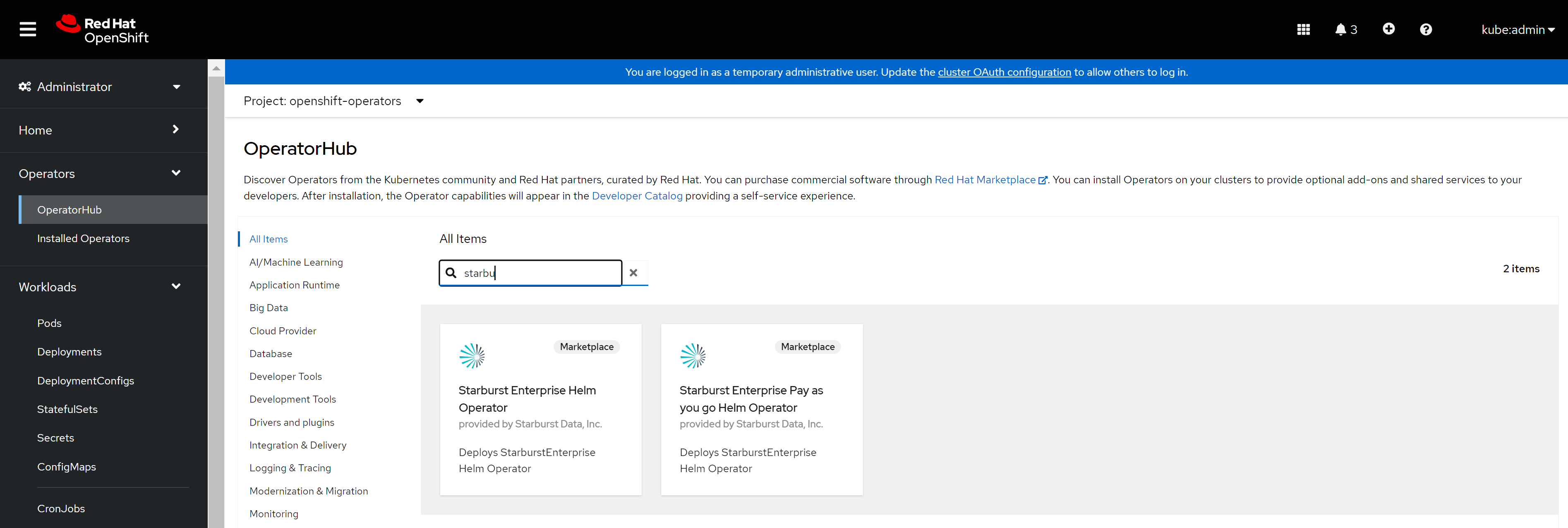
Figure 9. Starburst operators
A screenshot of the Starburst operator from the Red Hat Marketplace

The Dell Technologies and Starburst Multicloud Data Analytics solution uses the Starburst federated query engine to enable customers to:

  • Run their business intelligence, analytics, and data science workloads.
  • Access data spread across the enterprise.

This operator includes standard Starburst components:

  • Starburst Hive
  • Starburst Enterprise
    • Starburst Coordinator
    • Starburst Workers

See Multicloud Data Analytics with Dell Technologies Powered by Starburst for more information about the Dell Technologies and Starburst published referenced architecture.

Delta Sharing by Databricks

Delta Sharing enables open, secure data sharing without any vendor dependence. Databricks builds Delta Sharing into its Unity Catalog data governance platform. This platform enables a Databricks user (data provider) to share data with a person or group outside their organization (data recipient). Delta Sharing supports many open data formats besides SQL, and it can scale to support big data. Several features are available to consumers with support for the Delta Lake storage structure. Organizations can collaborate with customers, establish new partnerships, and generate new revenue by sharing and consuming data from external sources.

Note: Dell Technologies has previously validated Delta Sharing. Therefore, Delta Sharing component validation is beyond the scope of this document.

See the Dell Technologies blog Dell and Databricks Announce Multicloud Analytics and AI Solution for more information about the Dell Technologies and Databricks partnership.

See the Dell Technologies white paper Power Multicloud Data Analytics and AI using Dell Object Storage and Databricks for more information about Dell object storage and Databricks.

Modern data stack storage formats

Processing large amounts of data creates a significant amount of operational overhead after a while, especially when updates are made to existing data. This scenario is where a modern data stack can help, since it can process and upsert data incrementally. There are many features that Delta Lake and Iceberg provide on top of a data lake. One of the most powerful and useful features is to include relational database management system (RDBMS)-like features, such as ACID transactions, in a data lake. An existing data lake becomes a transactional data lake or modern data stack when any of these frameworks are added to it.

There are two common storage formats for big data workloads:

  • Delta Lake storage format
  • Iceberg storage format
Note: You must consider the specific requirements of the use case, the existing technology stack, and the application when selecting a storage format. With an understanding of the features, optimizations, and application suitability of these storage formats, organizations can make informed decisions about how to handle big data workloads.


Delta Lake storage format

Delta Lake is an open-source storage format, provides Atomicity, Consistency, Isolation, and Durability (ACID) transactions and scalable metadata management functionality. In addition to Parquet support for columnar storage, Delta Lake also offers Apache Avro support for data serialization. These features make it compatible with popular big data processing engines such as Apache Spark, Apache Hive, and Apache Presto.

Delta Lake offers several optimization features, including:

  • DeltaLog
  • Time Travel
  • Schema Evolution
  • Delta Cache

Iceberg storage format

Iceberg is another open-source storage format that provides ACID transactions and schema evolution for big data workloads. Iceberg is designed to work with large datasets, and supports common big data engines such as Apache Spark, Apache Hive, and Apache Presto.

Iceberg offers several optimization features, including:

  • Snapshot Isolation
  • Time Travel
  • Metadata Management
  • Columnar Storage

Software infrastructure validation

Introduction

The following sections detail the efforts that Dell Technologies undertook to ensure that the Dell Validated Design for Analytics — Modern Data Stack integrated hardware and software created a valid working design. Exhaustive testing of each hardware and software component was not performed. Dell Technologies verified that all the components work together as designed.

The following sections feature some of the tests that were performed and outline the goals and reasons for testing.

Software components

The software components and versions that are validated for the Dell Validated Design for Analytics — Modern Data Stack are listed in the tables below. The validated components may not precisely match the Dell Technologies-recommended configurations. For more information, email Analytics.Assist@dell.com, or contact your Dell Technologies sales representative.

Table 13. Validated PowerEdge R660 firmware
Component Version
PowerEdge BIOS 1.5.6
iDRAC 7.00.30.00
NVIDIA ConnectX-6 Lx 26.36.10.10
BOSS-S2 2.1.13.2017
System Complex Programmable Logic Device (CPLD) 1.0.7
Table 14. Validated PowerEdge R760 firmware
Component Version
PowerEdge BIOS 1.5.6
iDRAC 7.00.30.00
BOSS-S2 2.1.13.2017
NVIDIA ConnectX-6 Lx 26.36.10.10
System CPLD 1.0.7
Table 15. Validated software components
Category Component Version
Server operating system Red Hat Enterprise Linux CoreOS 4.12
Linux kernel 4.18.0-372.64.1.el8_6.x86_64
Server file system XFS N/A
Switch operating system Dell SmartFabric OS10 10.5.3.8
ECS software ECS 3.7
ObjectScale software ObjectScale 1.3.0
PowerScale operating system OneFS 9.5.0.2
Java Virtual Machine Open JDK 8 (8u232-b09)
Container engine Crio 1.x
Container platform base Enterprise Kubernetes 1.25.12
Container platform Red Hat OpenShift Container Platform 4.12
Data analytics engine Apache Spark 3.4.1
Modern data stack Delta Lake 2.4.0 and 3.0.0rc1
Modern data stack alternate table format Apache Iceberg 1.3.1
Data streaming distribution Apache Kafka 3.5.1
Data streaming platform Confluent Platform 7.5
SQL query engine Starburst Enterprise 422-e

Component validation

Platform validation

Dell Technologies tested the Delta Lake modern data stack that was deployed on the Red Hat OpenShift Container Platform. Dell Technologies also tested integrating Dell PowerScale, Dell ECS, and Dell ObjectScale software-defined storage with Delta Lake. This platform enables the running of various data analytics applications such as Spark, Kafka, and Starburst on OpenShift Container Platform with different storage systems.

Dell Technologies used Delta Lake 2.4.0 and 3.0.0rc1 with Spark 3.4.1 to validate all modern data stack functionality. All the features of Delta Lake with Spark were validated, including:

  • Atomicity, Consistency, Isolation, and Durability (ACID) transactions
  • Scalable metadata handling
  • Updates, deletes, and merges
  • Audit and time travel
  • Schema enforcement and evolution
  • Unified batch and streaming

Spark validation

These tests validate running a Spark bundle application on the OpenShift Container Platform using Delta Lake as its modern data stack storage. Dell Technologies used the Apache Spark 3.4.1 prebuilt Hadoop version with Delta Lake 2.4.0 and 3.0.0rc1.

Dell PowerScale, ECS, and ObjectScale acted as the modern data stack and Iceberg storage in order to access the data for read and write operations.

Data can be written to or read from Spark using different API protocols, such as:

  • Hadoop (hdfs://<IP>)
  • S3 object storage protocol (s3a://<bucket Name>/)
Note: Accessing the S3 storage was accomplished by using the hadoop-aws:3.2.3 library for accessing the data from ECS through the S3 API protocol.


Spark and Delta Lake on PowerScale

Dell Technologies tested running the Spark and Delta Lake image on top of Red Hat OpenShift Container Platform. The test validated the integration of Dell PowerScale storage as a primary data lake storage to store tables in Delta Lake format, and consisted of the following steps:

  1. Running Delta Lake with Spark required installing an additional package that is available from the Linux Foundation:
    /opt/spark/bin/pyspark --packages \
    io.delta:delta-core_2.12:2.4.0,org.apache.hadoop:hadoop-aws:3.3.4 --conf
    "spark.sql.extensions=io.delta.sql.DeltaSparkSessionExtension" --conf
    "spark.sql.catalog.spark_catalog=org.apache.spark.sql.delta.catalog.DeltaCatalog"
  2. Data was read from Spark using HDFS:
    >>> dfl = spark.read.format("delta").load('hdfs://<ip_address>/data/hdfs-test-table')
    >>> dfl.show(1)
  3. The data was overwritten and re-read from Spark using HDFS:
    >>> df2 = df1.write.format("delta").mode("overwrite").save("hdfs://<ip_address>data/hdfs-test-table1")
    >>> df3 = spark.read.format("delta").load('hdfs://<ip_address>/data/hdfs-test-table1')
    >>> df3.show(1)
Using PowerScale storage, Dell Technologies demonstrated that data in Delta Lake format can be read and written.

Spark and Delta Lake on ECS and ObjectScale

Dell Technologies tested running the Spark and Delta Lake image on top of Red Hat OpenShift Container Platform. The test validated the integration of Dell ECS and Dell ObjectScale storage as primary data lake storage to store tables in Delta Lake format, and consisted of the following steps:

  1. Running Delta Lake with Spark required installing an additional package that is available from Databricks:
    /opt/spark/bin/spark-shell --packages \
    io.delta:delta-core_2.12:2.4.0,org.apache.hadoop:hadoop-aws:3.3.4 --conf \
    "spark.sql.extensions=io.delta.sql.DeltaSparkSessionExtension" --conf \
    "spark.sql.catalog.spark_catalog=org.apache.spark.sql.delta.catalog.DeltaCatalog"
  2. Data was read from Spark using S3:
    sc.hadoopConfiguration.set("fs.s3a.access.key", "access key id")
    sc.hadoopConfiguration.set("fs.s3a.secret.key", "secret key")
    sc.hadoopConfiguration.set("fs.s3a.endpoint", "http://<s3api address: port>")
    sc.hadoopConfiguration.set("fs.s3a.aws.credentials.provider", \
    "org.apache.hadoop.fs.s3a.SimpleAWSCredentialsProvider") \
    spark.range(5).repartition(1).write.format("delta").save("s3a://<bucketname>/")
Using ECS and ObjectScale storage, Dell Technologies demonstrated that data in Delta Lake format can be read and written.

Spark and Iceberg on PowerScale

Dell Technologies tested running the Spark and Iceberg image on top of Red Hat OpenShift Container Platform. The test validated the integration of Dell PowerScale storage as a primary delta lake storage to store tables in Iceberg format, and consisted of the following steps:
  1. Initiate a spark-sql shell and load the Iceberg libraries, using a database on an HDFS file system. In this case, PowerScale:
    sh-5.1# /opt/spark/bin/spark-sql --packages \
    org.apache.iceberg:iceberg-spark-runtime-3.2_2.12:1.3.1 \
    --conf spark.sql.catalog.hadoop_prod.type=hadoop
    --conf spark.sql.catalog.hadoop_prod=org.apache.iceberg.spark.SparkCatalog
    --conf spark.sql.catalog.hadoop_prod.warehouse=hdfs://<hdfs iP:8020>/obs16g/\
    scalatest1/
  2. Create a table in the database and query it:
    spark-sql (default)> CREATE TABLE hadoop_prod.obs16g.table1 (id bigint, data string) USING iceberg; 

    Time taken: 1.884 seconds

    spark-sql (default)> INSERT INTO hadoop.obs16g.table1 VALUES (1, 'a'), (2, 'b'), (3, 'c');

    spark-sql (default)> INSERT INTO hadoop_prod.obs16g.table1 VALUES (1, 'a'), (2, 'b'), (3, 'c');

    Time taken: 1.282 seconds

    spark-sql (default)> select * from hadoop_prod.obs16g.table1;

    1 a

    2 b

    3 c

    Time taken: 0.469 seconds, Fetched 3 row(s)

    spark-sql (default)>
Using PowerScale storage, Dell Technologies demonstrated that data in Iceberg format can be read and written.

Spark and Iceberg on ECS and ObjectScale

Dell Technologies tested running the Spark and Iceberg image on top of Red Hat OpenShift Container Platform. The test validated the integration of Dell ECS and Dell ObjectScale storage as primary data lake storage to store files in Iceberg format, and consisted of the following steps:
  1. Initiate a spark-sql shell and load the Iceberg libraries, using a MySQL database on ECS:
    spark-sql --packages org.apache.iceberg:iceberg-spark-runtime-3.2_2.12:1.3.1 \ 
    --conf spark.sql.catalog.my_catalog=org.apache.iceberg.spark.SparkCatalog \
    --conf spark.sql.catalog.jdbc.warehouse=s3a://tgdba/iceberg \
    --conf spark.sql.catalog.jdbc.catalog-impl=org.apache.iceberg.jdbc.JdbcCatalog \
    --conf spark.sql.catalog.jdbc.uri=jdbc:mysql://<mysql pod IP>:3306/iceberg \
    --conf spark.sql.catalog.jdbc.jdbc.verifyServerCertificate=true \
    --conf spark.sql.catalog.jdbc.jdbc.useSSL=true \
    --conf spark.sql.catalog.jdbc.jdbc.user=admin \
    --conf spark.sql.catalog.jdbc.jdbc.password=XXXXX
  2. Create a table in the database and query it:
    spark-sql (default)> CREATE TABLE my_catalog.iceberg.table (id bigint, data string) USING iceberg; 
    23/09/14 05:32:40 WARN MetricsConfig: Cannot locate configuration: tried hadoop-metrics2-s3a-file-system.properties,hadoop-metrics2.properties
    Time taken: 2.772 seconds
    spark-sql (default)> INSERT INTO my_catalog.iceberg.table VALUES (1, 'a'), (2, 'b'), (3, 'c');
    23/09/14 05:33:36 WARN ObjectStore: Failed to get database global_temp, returning NoSuchObjectException
    Time taken: 2.741 seconds
    spark-sql (default)>

    spark-sql (default)> select * from my_catalog.iceberg.table;
    1 a
    2 b
    3 c
    Time taken: 0.469 seconds, Fetched 3 row(s)
    spark-sql (default)>
    =================================================================

    mysql> show databases;
    +--------------------+
    | Database |
    +--------------------+
    | iceberg |
    | information_schema |
    | performance_schema |
    +--------------------+
    3 rows in set (0.00 sec)

    mysql> use iceberg;
    Database changed
    mysql> show tables;
    +------------------------------+
    | Tables_in_iceberg |
    +------------------------------+
    | iceberg_namespace_properties |
    | iceberg_tables |
    +------------------------------+
    2 rows in set (0.00 sec)

    mysql> select * from iceberg_tables;
    +--------------+-----------------+------------+------------------------------------------------+
    | catalog_name | table_namespace | table_name | metadata_location | previous_metadata_location |
    +--------------+-----------------+------------+------------------------------------------------+
    | my_catalog | iceberg | table | s3a://tgbda/iceberg/iceberg/table/metadata/00001-7a0023bd-fda8
    -4bb5-96ec-0bf2d5728236.metadata.json | s3a://tgbda/iceberg/iceberg/table/metadata/00000-5929e3
    c5-c569-4ee6-a575-8d9801b6aa21.metadata.json |
    +--------------+-----------------+------------+------------------------------------------------+
    1 row in set (0.01 sec)
  3. Repeat the two steps above on PowerScale.
Using ECS and ObjectScale storage, Dell Technologies demonstrated that data in Iceberg format can be read and written.

Starburst Enterprise validation

Dell Technologies has tested deploying Starburst Enterprise on top of Red Hat OpenShift Container Platform. This test validates the integration of PowerScale, ECS, and ObjectScale as modern data stack storage. The S3 protocol was leveraged across all storage platforms for reading and writing data. The deployed Starburst instance includes a Hive metastore service that is used for Iceberg metadata.

See Starburst Iceberg catalog and Starburst Delta Lake catalog for Starburst connector information.


Starburst Iceberg catalog

The following is an example Starburst Iceberg catalog file.

iceberg: |- 

connector.name=iceberg

iceberg.file-format=PARQUET

iceberg.unique-table-location=true

iceberg.hive-catalog-name=iceberg

iceberg.catalog.type=HIVE_METASTORE

iceberg.max-partitions-per-writer=6000

hive.metastore.uri=thrift://<mysql pod IP>:9083

hive.metastore-timeout=2400s

hive.metastore.username=hive

hive.s3.path-style-access=true

hive.s3.ssl.enabled=false

hive.s3.endpoint=http://<enpoint IP>:9021

hive.s3.aws-access-key=XXXXXXXXX

hive.s3.aws-secret-key=XXXXXXXXXXXX

The figure below shows the Starburst Iceberg catalog in the Starburst Enterprise web UI.
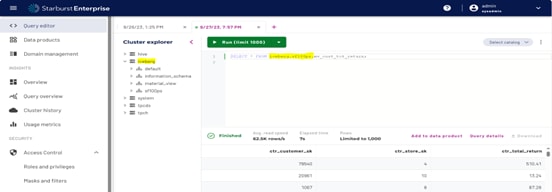
Figure 10. Starburst Iceberg catalog
A screenshot of the Starburst Iceberg catalog

Starburst Delta Lake catalog

The following is an example Starburst Delta Lake catalog:

delta: |- 

connector.name=delta-lake

delta.hive-catalog-name=delta

delta.enable-non-concurrent-writes=true

hive.metastore.uri=thrift://<endpoint IP>:9083

hive.metastore-timeout=2400s

hive.metastore.username=hive

hive.s3.path-style-access=true

hive.s3.ssl.enabled=false

hive.s3.region=us-east-1

hive.s3.endpoint=http://<endpoint IP>:9021

hive.s3.aws-access-key=XXXXXXXXX

hive.s3.aws-secret-key=XXXXXXXXXX

The figure below shows the Starburst Delta Lake catalog in the Starburst Enterprise web UI.
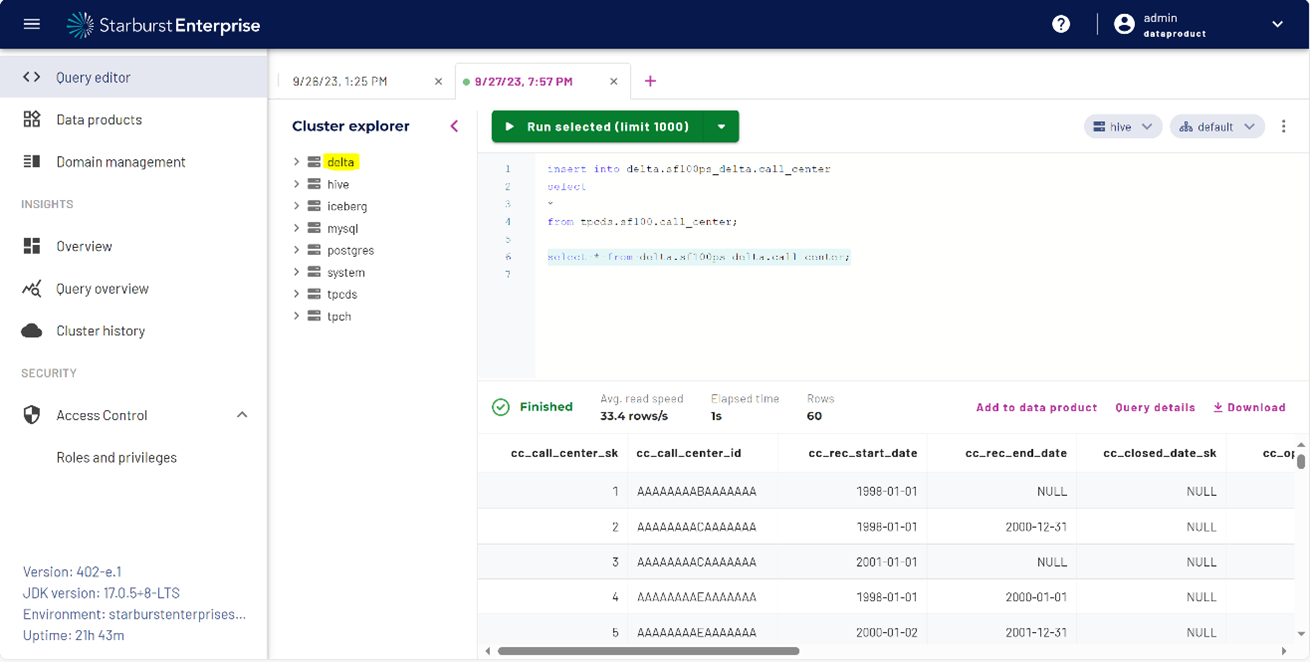
Figure 11. Starburst Delta Lake catalog
A screenshot of the Starburst Delta catalog

Kafka validation

This test validates deploying a Kafka application bundle on Red Hat OpenShift Container Platform. Dell Technologies has integrated Kafka with Spark to stream the input data from Kafka, perform data transformation on Spark, and store the result on Delta Lake. Kafka testing consisted of the following steps:
  1. Start a shell session on the Kafka broker:
    kubectl exec -it kakfa7-broker-01 /bin/bash
  2. Stream data from a comma-separated values (CSV) file:
    kubectl exec -it kakfa7-broker-01 -- /bin/bash -c "/usr/bin/Kafka-console-producer \
    --broker-list kakfa7-broker-01:9092 --topic test < /home/appuser/TestDataOne.csv"
  3. Run the following command from the Spark container:
    /spark/bin/pyspark --packages \
    io.delta:delta-core_2.12:2.4.0,org.apache.hadoop:hadoop-aws:3.3.4,\
    org.apache.spark:spark-sql-kafka-0-10_2.12:3.4.1 --conf
    "spark.sql.extensions=io.delta.sql.DeltaSparkSessionExtension" --conf
    "spark.sql.catalog.spark_catalog=org.apache.spark.sql.delta.catalog.DeltaCatalog"
Dell Technologies proved the basic functionality of Kafka for streaming the data, integrating Kafka with Spark for data processing, and loading the final data into Delta Lake.

High availability validation

This test validates deploying Red Hat OpenShift Container Platform in high availability (HA) mode. For a highly available Kubernetes cluster, Dell Technologies recommends configuring a Kubernetes cluster with a minimum of three control plane nodes.

Red Hat OpenShift uses the keepalived and HAProxy services to provide high availability to the Kubernetes API server. The keepalived service is responsible for managing a Virtual IP address (VIP) where all requests to the Kubernetes API server are sent. The HAProxy service is responsible for redirecting API server requests to instances of the API server running on each of the control plane nodes.

Dell Technologies has proved the basic Red Hat OpenShift Container Platform cluster HA functionality by manually simulating failover of a Kubernetes control plane node. When the primary manager node fails or becomes unhealthy, one of the secondary manager nodes takes over as primary.

Summary

All the tests ran successfully. They show that it is possible to integrate powerful software solutions with Dell hardware to create value greater than the individual parts.

The Dell Validated Design for Analytics — Modern Data Stack is a valuable solution for any group seeking to analyze large amounts of data. The ease and flexibility of integrating various vendor products into the solution bring great value to the enterprise.

Sizing the solution

Sizing and scaling overview

Cluster sizing and scaling are two different but related considerations. Sizing is concerned with ensuring the cluster meets the workload requirements for storage and processing throughput. Scaling is concerned with cluster growth over time as capacity needs increase.

The architecture is a parallel scale-out system with decoupled compute and storage. Some sizing requirements can be addressed through scaling while others must be addressed through node level sizing.

Sizing and scaling of a cluster are complex topics that require knowledge of the workloads. This section accentuates the main considerations that are involved but does not provide detailed recommendations for workload sizing. Design guides for specific workloads running on the platform include workload specific sizing guidance. Your Dell Technologies or authorized partner sales representative can help with detailed sizing calculations.

There are many parameters that are involved in cluster sizing. The primary parameters are:

Storage capacity
Storage capacity is usually the first parameter that is used to size a cluster. Calculating storage capacity is important and straightforward. However, storage capacity should be calculated while taking the other sizing parameters into account to maintain a balance between storage and processing capability. The use of decoupled storage and compute simplifies this consideration since the balance can be adjusted at any time during the life of the cluster.
Data volumes and growth rates
Data volume and growth rates each have multiple impacts on cluster sizing. data stack storage capacity should account for growth due to data ingestion and growth of ingest volumes over time. Data ingestion also impacts network utilization. Since the modern data stack storage is external to the cluster nodes, network bandwidth is required to access it. The processing throughput requirements must be considered as well as the data size.
Memory and processor capacity
Memory and processor requirements for jobs running on the cluster must be considered when sizing. Memory and processor capacity increases as nodes are added to the cluster. You can create heterogenous node configurations for workloads with specific requirements, which may be necessary.
Service-level agreements
Production cluster sizing must meet any performance requirements that SLAs specify. Critical path jobs that must meet a specific execution time or throughput may require adjusting the cluster sizing and balance between compute and storage accordingly. Overall cluster throughput is as important as storage capacity, and often influences the number of nodes independent of the required storage capacity.

Sizing guidelines

Cluster sizing

Example cluster configurations lists some cluster level starting points for possible deployments.

Table 16. Example cluster configurations
Configuration Proof of concept (POC) Pilot Small and medium business (SMB) Enterprise
Control plane nodes 0 3 3 3
Worker nodes 3 4 10 20
Available memory 2304 GB 3072 GB 7680 GB 15,360 GB
Available physical cores 192 256 640 1280
Note: The available resources in Example cluster configurations are approximate. These resources are available to user workloads and exclude resources that the core platform services consume.


Proof of concept

The proof of concept (POC) configuration is a minimal configuration for basic evaluation. In this scenario, three worker nodes host the control plane, runtime services, and workloads. This configuration provides limited resources for workloads but is adequate for basic functionality evaluation. More worker nodes can be added to this configuration. For anything larger than five workers, Dell Technologies recommends starting with, or upgrading to, the pilot configuration.

You can engage the Dell Technologies Customer Solution Centers to host POC testing. See Dell Technologies Customer Solution Centers for more information.


Pilot

The pilot configuration is a minimal production grade configuration. In this scenario three dedicated control plane nodes host the control manager roles, etcd, and the API server. Four worker nodes host the compute, along with any workloads. This configuration provides isolation between control plane and runtime functions. Dell Technologies recommends it for preproduction or development and test usage.

The pilot configuration can be scaled up by adding additional worker nodes to the existing cluster.


Small and medium business

The small and medium business (SMB) configuration is a small production grade configuration. Three control plane nodes host the control manager roles, etcd, and the API server. Ten worker nodes are available for any workloads. This configuration provides enough resources to support one or two teams running analytics workloads.

The SMB configuration can be scaled up by adding additional worker nodes to the existing cluster.

Enterprise

The enterprise configuration is a large production grade configuration. Three control plane nodes host the control manager roles, etcd, and the API server. Twenty worker nodes are available for any workloads. This configuration provides substantial resources for running analytics workloads supporting multiple teams.

Modern data stack storage sizing

The amount of expected data primarily determines modern data stack storage sizing. This aspect of the sizing is independent of the compute cluster sizing.

The available network bandwidth between the compute and storage clusters must also be considered. Bandwidth on the storage and compute clusters scales in direct proportion to the number of nodes. However, dense storage capacity is possible with ECS, ObjectScale, and PowerScale. Such density can result in a large storage capacity without enough bandwidth to support the data transfer requirements. An analysis of workload data transfer requirements is necessary to correctly size the storage for both capacity and bandwidth.

The architecture is not limited to a single type of modern data stack storage. PowerScale can be used with the HDFS protocol, or ECS and ObjectScale can be used with the S3 protocol. Any workload can reference any or all these storage types. It is also possible to use multiple external PowerScale, ECS, and ObjectScale storage systems.

The network architecture allows both compute and storage clusters to use the same fabric. This configuration enables the network bandwidth to scale as either storage or worker nodes are added. The bandwidth available to the external storage systems should also be considered when referencing external storage that is not connected to the core Cluster data network.

Control plane sizing

The control plane node sizing that Dell Technologies recommends in Modern data stack control plane node is adequate for all production clusters and should not be changed. The controller manager, API, and etcd services must be deployed on three individual nodes.

The control plane services also consume a small quantity of worker node resources. Sizing in this design guide allocates 49 GB and four cores to these services. Approximately 320 GB of storage for the control plane is also required on worker nodes. This space is allocated from the boot drives and does not impact available server storage for user workloads.

Worker node sizing

All the available cluster resources across all worker nodes are pooled and allocated on demand. This configuration provides an abstraction where workloads can be mapped to available resources independent of the physical node used. Accelerators are considered a resource, and any workload pod that requires accelerator resources must run on a node with an available accelerator.

The recommended worker node sizes in this design are based on general-purpose usage. These worker nodes can support various analytics workloads without modification. However, there are scenarios where it is appropriate to change the configurations to match the intended workloads.

Heterogenous node configurations are possible. A cluster can include nodes with different memory, compute, and storage sizes. The resources from all these nodes are added to the overall resource pool.

From a resource point of view, there is little difference between many small nodes and a few large nodes. If the nodes have enough resources to handle the largest expected pod resource request, the difference between nodes is transparent. However, three additional considerations are involved in this tradeoff; network bandwidth, fault zones, and operational overhead.

Available network bandwidth is proportional to the number of nodes. A few large nodes have less bandwidth than many small nodes, even if the aggregate memory and compute resources are the same. The bandwidth requirements for workloads should be factored into cluster and node sizing.

Fault zones are important for the overall reliability of the infrastructure. Although the cluster can continue running when a node fails, resources from that node are lost on failure. Large node configurations in a small cluster can have a substantial impact on available resources when the node fails, even if it is a temporary failure. Sizing should ensure the loss of a node only impacts a small proportion of the overall cluster capacity.

Operational overhead is another consideration for sizing. Every node entails some operational overhead in terms of maintenance and monitoring, so larger nodes can be more efficient. One larger node can also be more energy-efficient than several smaller nodes. Operational capacity should be part of the overall sizing effort.

For parallel, scale-out workloads like Apache Spark and Starburst Enterprise, the resources are allocated based on availability at the cluster level and multiple workload pods that are launched. As a result, workload pods can run on any physical node that can meet the resource requirements. Depending on the Spark job workload, many small pods or a few large pods may be appropriate. The container platform runtime is flexible in this aspect. It is possible to deploy Spark clusters dynamically based on the job itself, instead of requiring a fixed Spark cluster optimized for many types of jobs.

Some workloads such as Starburst may have large memory requirements that cannot be achieved by scaling out. You may have to increase the memory size in some or all nodes to account for the largest expected memory allocation for that workload.

The platform can support up to 250 pods and 2000 worker nodes in a single OpenShift cluster. Cluster and node sizing should aim for substantially fewer pods than this limit.

Workload sizing

The resources requirements for the intended cluster workloads must be factored into node and cluster sizing. Detailed sizing of workload requirements is complex. However, once workload requirements are known, the mapping into cluster requirements is straightforward. The flexibility of the platform also allows for ongoing adjustment and fine-tuning, so the sizing does not have to be exact.

Apache Spark is used here as an example of how workload sizing should be mapped to cluster requirements. Example Spark instance requirements summarizes the resource requirements for three sample Spark clusters.

Table 17. Example Spark instance requirements
Spark cluster resources Small instance Medium instance Large instance
Worker Cluster Worker Cluster Worker Cluster
Number of pods (Spark workers) 4 8 12
Memory (GB) 8 32 16 128 32 384
Cores 4 16 6 48 8 96
Modern data stack storage (GB) 2 8 8 64 2 24
Ephemeral storage (GB) 8 32 16 128 32 384

In the table above, three clusters with varying resource requirements and scale have been included. The resources for each Spark worker have been specified, and the expected number of worker pods is included. Based on these requirements, the total resource requirements for each cluster are calculated.

The amount of net new modern data stack storage that is required is used in the calculation. If the jobs are expected to process existing data, no additional storage is required. If the jobs generate data, significant storage may be required. In the large instance, only 24 GB of modern data stack storage was estimated, while the medium instance requires 64 GB. The medium instance is expected to generate more data than the large instance even though it uses fewer compute resources.

Based on these calculations, the cluster level resources can be determined. For this example, the pilot cluster configuration can support four medium Spark clusters before it runs out of cores, or it can support two large instances.

Scaling guidelines

Scaling overview

During the lifetime of the system, it usually becomes necessary to scale the platform to support larger workloads or increase compute and storage capacity. The architecture is designed to scale at the compute, storage, and workload levels. The design incorporates network scaling as part of the infrastructure scaling. Compute and storage can be scaled independently.

Compute scaling

Compute scaling is accomplished by adding additional nodes to the cluster. After physical installation and provisioning of the operating system, the Red Hat OpenShift Container Platform can be added from the OpenShift management interface or the Red Hat Hybrid Cloud Portal. The nodes become parts of the cluster. The control plane and network are automatically scaled as new nodes are added.

For more details of the node provisioning process, see Deployment options from the Dell Technologies document Red Hat OpenShift Container Platform 4.12 on Intel-powered Dell Infrastructure Implementation Guide.

Storage scaling

Storage scaling is accomplished by adding or upgrading nodes in the ECS, ObjectScale, or PowerScale storage cluster, using the storage cluster management tools.

Persistent volumes storage can be scaled by adding PowerStore, PowerMax, or Unity storage arrays.

Network scaling

This architecture scales network bandwidth as compute or storage nodes, such as ObjectScale nodes, are added. When scaling either compute or storage, you must consider any balance-related network bandwidth effects since the bandwidth increases as nodes are added.

Substantial changes in expected data transfer volumes should be considered to ensure that the available bandwidth on the compute and storage clusters is aligned.

Summary

Conclusion

The Dell Validated Design for Analytics — Modern Data Stack has been developed to address the needs of organizations deploying advanced analytics, and AI and ML workloads. It incorporates the concepts of a modern data stack architecture along with a container platform using decoupled compute and storage.

This document provides design guidance for data analytics infrastructure managers and architects by describing a predesigned, validated, and scalable architecture for advanced analytics and machine learning on Dell hardware infrastructure. Topics that were discussed include:

  • The cluster architecture that was designed for this application, including cluster server and storage infrastructure and its role in the system
  • The cluster physical and logical network designs
  • Details of the PowerEdge server; PowerScale, ECS, ObjectScale, and PowerStore storage; and PowerSwitch networking configurations
  • The recommended software infrastructure components that were used in the architecture, including the Red Hat OpenShift Container Platform, Starburst Enterprise, and open table formats - Delta Lake and Apache Iceberg
  • Examples of workload packaging, deployment, and validation, including Apache Spark, Apache Kafka, Starburst Enterprise, and Databricks Delta Sharing
  • Cluster sizing and scaling guidance

We value your feedback

Dell Technologies and the authors of this document welcome your feedback on the solution and the solution documentation. Contact the Dell Technologies Solutions team by email.

Authors: Dell Technologies Integrated Solutions Engineering, Technical Marketing, and Content Engineering and Translation teams

Note: For links to additional documentation for this solution, see the Dell Technologies Info Hub for Data Analytics.

This document may contain language from third-party content that is not under Dell's control and is not consistent with Dell's current guidelines for Dell's own content. When such third-party content is updated by the relevant third parties, this document will be revised accordingly.

References

Dell Technologies documentation

The following Dell Technologies documentation provides additional and relevant information. Access to these documents depends on your login credentials. If you do not have access to a document, contact your Dell Technologies sales representative.

Additional information can be obtained at the Dell Technologies Info Hub for Data Analytics. If you need additional services or implementation help, contact your Dell Technologies sales representative.

Red Hat OpenShift documentation

The following documentation on the Red Hat OpenShift documentation website provides additional and relevant information.

Table 20. Red Hat OpenShift documentation
Document type Location
Red Hat OpenShift product documentation Product Documentation for OpenShift Container Platform
OVN-Kubernetes network plug-in information About the OVN-Kubernetes network plug-in
OperatorHub information Understanding OperatorHub
Building a custom operator Configuring the Cluster Samples Operator
Blog about running Spark workloads on OpenShift Getting Started running Spark workloads on OpenShift

Dell Technologies Customer Solution Centers

Our global network of dedicated Dell Technologies Customer Solution Centers are trusted environments where world class IT experts collaborate with customers and prospects to share best practices; facilitate in-depth discussions of effective business strategies using briefings, workshops, or Proofs of Concept (PoCs); and help business become more successful and competitive.

Dell Technologies Customer Solution Centers reduce the risks that are associated with new technology investments, and can help improve speed of implementation.

All of the services of the Customer Solution Centers are available to all Dell Technologies customers at no charge. Contact your account team today to submit an engagement request.

Dell Technologies Info Hub

The Dell Technologies Info Hub is your one-stop destination for the latest information about Dell Solutions products. New material is frequently added, so browse often to keep up to date on the expanding Dell portfolio of cutting-edge products and solutions.

More information

For more information, including sizing guidance, technical questions, or sales assistance, email Analytics.Assist@dell.com, or contact your Dell Technologies or authorized partner sales representative.