Design Guide—SQL Server 2022 Database Solution with Object Storage on Dell Hardware Stack
Introduction
Business challenge
Solution introduction
Design guide introduction
Terminology
Solution architecture
Physical architecture
Dell solutions engineers validated two resilient architectural options for data analytics workloads:
- SQL Server 2022 on VMware Virtualization Platform
- SQL Server 2022 on RedHat OpenShift Containerized Platform
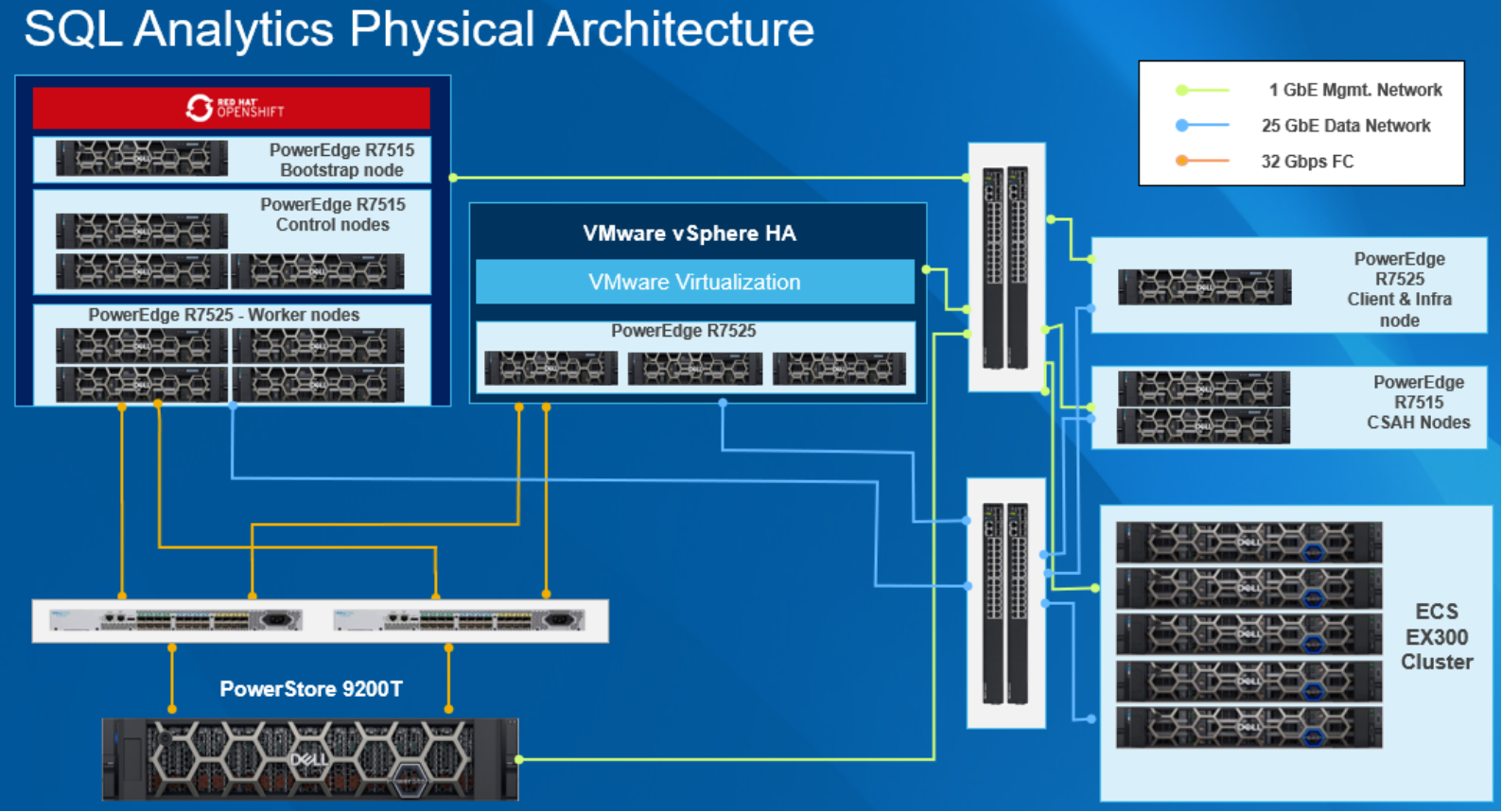 Figure 1. SQL Server 2022 database solution physical architecture.
Overview
The physical architecture design shown above demonstrates two separate database solution environments which connect with a shared Dell ECS unit and Dell PowerStore storage to process and save data.
The upper-left portion of the diagram shows a containerized environment based on a RedHat OpenShift Cluster. The central portion of the diagram illustrates an environment that uses VMware vSphere virtualization.
The clusters are connected to the Client and Infrastructure (C & I) node on the right side of the diagram and the Cluster System Admin Hosts (CSAH) nodes using Dell networking switches. Dell PowerSwitch 1 GbE and 25 GbE were used for network connectivity with the OpenShift and VMware vSphere HA clusters, and the same switches were also used to connect with a Dell ECS EX300 cluster for object storage.
The Dell PowerStore Storage is connected to both containerized and virtualized environments by Fiber Channel (FC) connectivity protocol with Dell Connectrix switches.
Server layers
Dell solutions engineers separate server layers into three groups based on their primary roles within the solution:
- A RedHat OpenShift containerized environment consisting of eight PowerEdge R7525 rack servers.
- A VMware vSphere based virtualized environment which consists of three PowerEdge R7525 rack servers.
- The C & I node, along with the CSAH nodes, consisted of PowerEdge R7515 and R7525 servers.
The Dell PowerEdge R7525 Rack Server is a highly adaptable rack server that delivers powerful performance and offers flexible configurations. The PowerEdge R7525 is a 2U rack server that supports up to:
- Two 2nd or 3rd Generation AMD EPYC processors, with up to sixty-four cores per processor
- Thirty-six DIMM slots supporting DDR4 RDIMM (2 TB), LRDIMM (4 TB), and bandwidth speeds of up to 3200 MT/S
- Twenty-four NVMe drives
- Three double-width 300 W GPUs, or six single-width 75 W GPUs
- 2400 W from Dual AC or DC power supply units
Storage layer
In the validated setup, two separate Dell storage units were used to process the different types of data.
- Dell PowerStore 9200T: Dell PowerStore achieves new levels of operational simplicity and agility, using a container-based architecture, advanced storage technologies, and intelligent automation to unlock data value. Based on a scale-out architecture and hardware-accelerated advanced data reduction, PowerStore is designed to deliver enhanced resource utilization and performance that keeps pace with application and system growth.
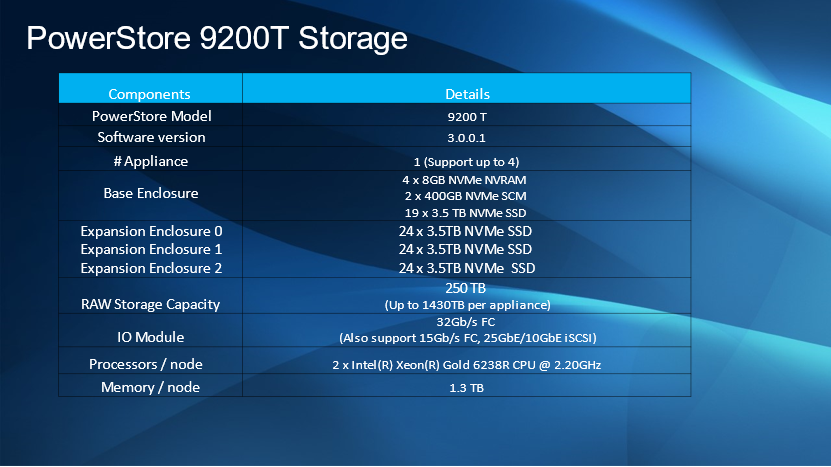 Figure 2. PowerStore 9200T configuration details
- Dell ECS EX300: Elastic Cloud Storage (ECS) provides a complete software-defined cloud storage platform supporting the storage, manipulation, and analysis of unstructured data on commodity hardware at scale. ECS can be installed on a set of qualified commodity servers and disks or deployed as a turnkey storage appliance. ECS offers the cost advantages of commodity infrastructure with the enterprise reliability, availability, and serviceability of traditional arrays.
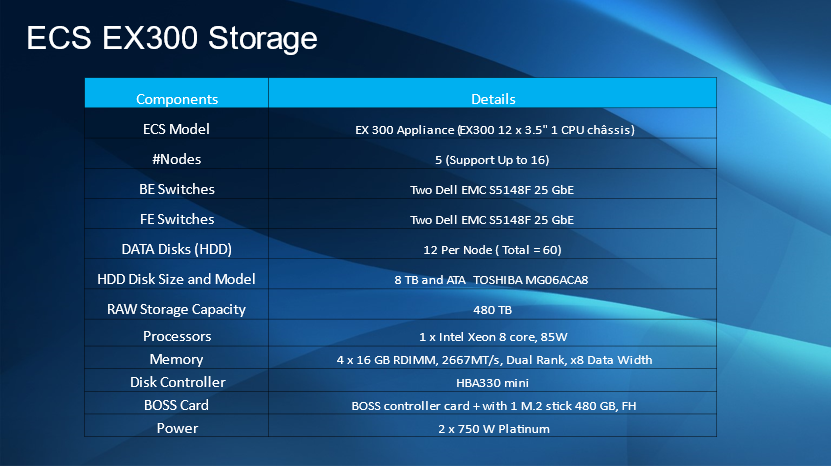 Figure 3. Dell ECS EX300 storage cluster configuration details
Figure 4 represents the logical construction of a storage design. Here storage containers are carved out of a Dell PowerStore storage pool that was presented to the ESXi layer using LUNs. It was mapped to vVOLs datastore and presented as a volume within the virtual machines. Those volumes were formatted and configured as XFS volumes. The operating system and the databases data and log files are placed on the XFS volumes.
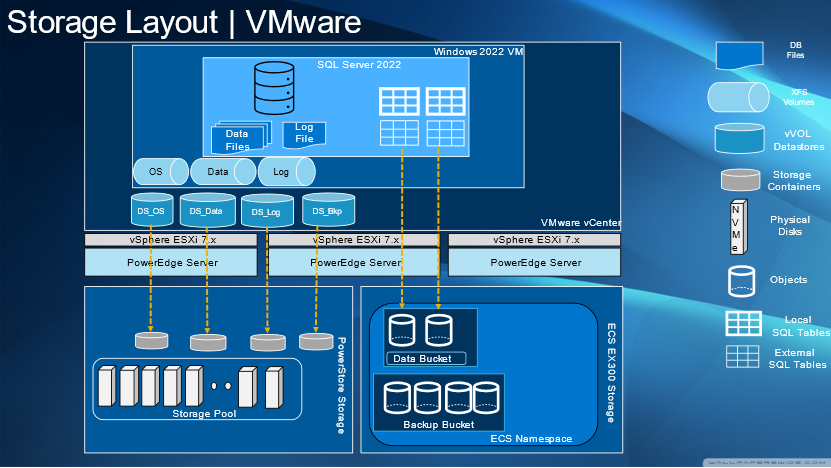 Figure 4. Storage layout and mapping for Dell validated solution
Furthermore, on Dell ECS storage, different buckets for data and backups were created and virtually mapped to SQL Server 2022 external tables and backupset.
The architecture’s network layer consists of:
- Two 25 GbE network switches: Connected to two 25 GbE ports on all physical nodes and client machine to route the workload network traffic.
- Two 1 GbE network switches: Connected to two 1 GbE ports on all physical nodes and client machine to manage network traffic.
- Two 32 Gbps Fiber channel switches: Connected to two 32 Gbps ports on all physical nodes to establish a Storage Area Network with manual zoning and CSI automated zoning
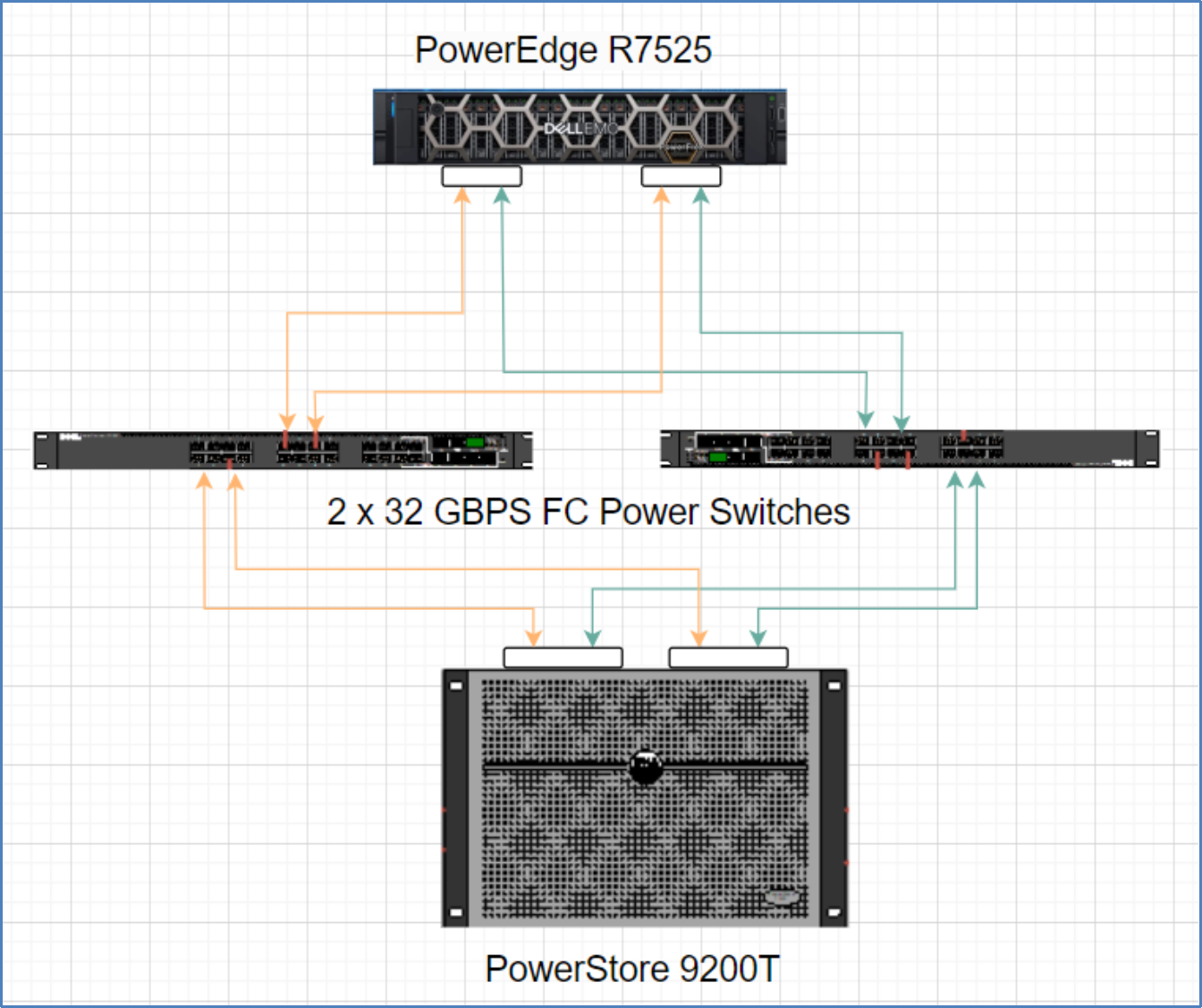 Figure 5. Fiber channel connectivity diagram for Dell PowerEdge and PowerStore
The fiber channel connectivity diagram shows an example of Fiber channel zoning for PowerEdge R7525 servers using PowerStore 9200T storage and two 32GBPS FC Power Switches. The diagram shows four 32GB front end PowerStore ports which are mapped to four 32 GB network card ports on the server ensuring that the servers have reliable storage access. Similarly, three R7525 servers are zoned with PowerStore to create a virtualized environment with four R7525 servers, the OpenShift worker nodes, to create the storage for the containerized environment.
Logical architecture
Virtualization design
In this setup, database files are stored within storage containers provided by the Dell PowerStore 9200T storage along with the local tables for the virtualized SQL instances. SQL Server 2022 also makes use of PolyBase and S3 to access and manipulate data stored in ECS bucket objects. This data can be stored in many different formats and allows both unstructured and semi-structured data to be stored alongside structured data.
In this setup, database files are stored within storage containers provided by the Dell PowerStore 9200T storage along with the local tables for the virtualized SQL instances. SQL Server 2022 also uses PolyBase and S3 to access and manipulate data stored in ECS bucket objects. This data can be stored in many different formats and allows both unstructured and semi-structured data to be stored alongside structured data.
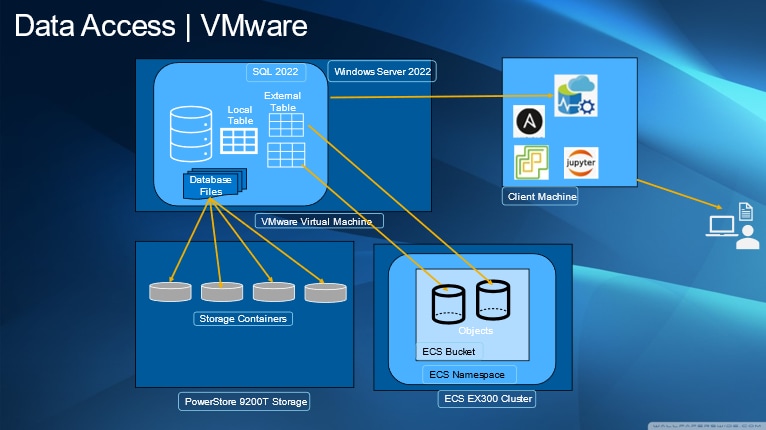 Figure 7. Virtualized environment data access pattern diagram
Container design
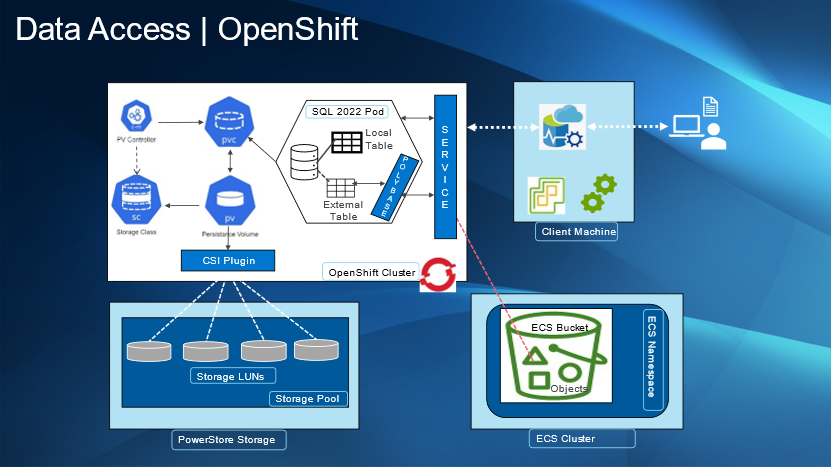 Figure 8. Data access pattern in containerized environments
The Dell CSI plugin allows for the creation of persistent volumes based on the storage’s LUNs in the PowerStore storage pool. It is required that the proper storage class is established for Dell CSI. This serves as the storage for the Microsoft SQL Server 2022 container instances and is where the local tables are stored. External tables are created using data found in the ECS Cluster using PolyBase for Microsoft SQL Server and the S3 for ECS. Data is contained entirely in ECS data buckets within a namespace. This data can be accessed and modified without being stored in the Microsoft SQL Server instance.
Software
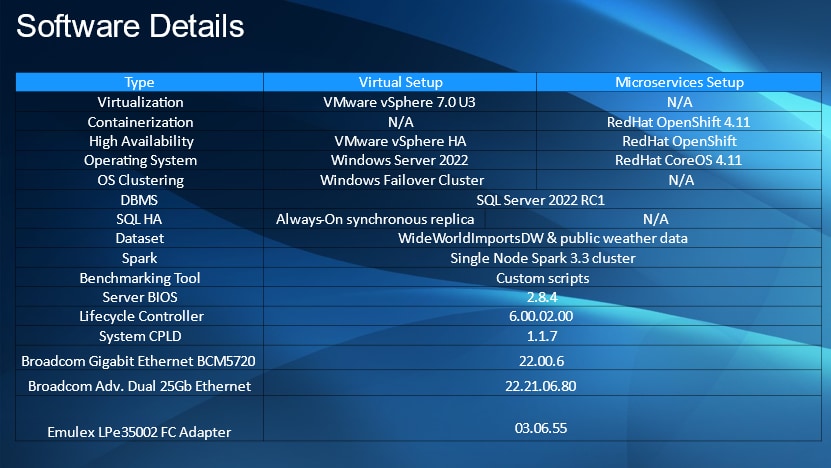 Figure 9. Dell validated database solution software details
General software details
Both set ups make use the same datasets and single node Spark 3.3 cluster. Custom scripts were used as the benchmarking tool in this setup. SQL Server 2022 RC1 was used as the data analytics engine in this solution. All servers were running with BIOS version 2.8.4, Lifecycle Controller version 6.00.02.00, and version 1.1.7 for the System Complex Programmable Logic Device (CPLD). The Broadcom Gigabit Ethernet BCM5720 was at version 22.00.6 and the Broadcom Advance Dual 25GB Ethernet 22.21.06.80. The Emulex LPe35002 FC Adapter is running on version 03.06.55.
Virtual setup software details
VMware vSphere 7.0 U3 serves as the basis for managing the hosts of the virtual setup which is crucial for running SQL Server on Windows Server 2022 instances. High Availability is provided by VMware’s vSphere HA and the servers are clustered using the Window’s failover cluster. SQL High Availability is provided for this setup through the Always-On synchronous replica feature.
Microservice setup software details
RedHat’s OpenShift is crucial for provisioning Linux containers for SQL Server and maintaining the high availability of these services. RedHat Core OS 4.11 is used as the base operating system for the containers. SQL Server is made highly available through replica sets deployed on Kubernetes and is the ideal setup for a microservice system.
Solution deployments
Overview
Initial setup
HAProxy LoadBalancer for Dell ECS storage
Certificate creation and installation
End to end encrypted communication between the ECS storage and the SQL Server 2022 instance is required to perform data virtualization. A local certificate authority was created and used to generate and sign a private certificate validating the authenticity of communication between the two interfaces.
Certificate creation
- Create the root SSL certificate and provide the password when prompted to generate the key file.
openssl genrsa -des3 -out certs/rootCA.key 2048
- Create a server.csr.cnf file based on the following format with appropriate environment details.
[req]
default_bits = 2048
prompt = no
default_md = sha256
distinguished_name = dn
[dn]
C=US
ST=Durham
L=Durham
O=Dell
OU=Bizapp
emailAddress=admin@proddc.sql
CN = sqlpool.proddc.sql
- Create a root CA certificate using the key generated in step one and the server.csr.cnf file. The expiration date for the certificate can be set using the -days parameter. This command will provide a rootCA.pem file. This .pem file can be deployed in Windows, Linux, or a container environment.
openssl req -x509 -new -nodes -key certs/rootCA.key -sha256
-days 1460 -out certs/rootCA.pem -config server.csr.cnf
Deploying the certificate in a Windows environment
Move the rootCA.pem file to a Windows host running a SQL Server instance. Open a PowerShell session as administrator and run the following command to add the provided certificate to the Windows “ROOT” certificate store.
certutil -addstore -f "ROOT" rootCA.pem
Deploying the certificate in a RHEL environment
- The .pem file must be converted to a .crt file using the following command.
openssl x509 -in rootCA.pem -inform PEM -out rootCA.crt
- Copy the rootCA.crt file to the folder “/etc/pki/ca-trust/source/anchors/” on Red Hat Enterprise Linux. Run the following command to install the certificate.
/bin/update-ca-trust
Mapping a certificate in a containerized environment
The process of mapping a certificate to a containerized environment is different from traditional OS environments. A ConfigMap based on the root certificate must be created and then mapped as a volume in the deployment script. This process is expanded upon in the SQL Server 2022 Deployment section.
Generating a SSL client certificate for LoadBalancer deployment
- The private key and the CSR for the client certificate are created using the following command.
openssl req -new -sha256 -nodes -out certs/server.csr -newkey rsa:2048 -keyout certs/server.key -config server.csr.cnf
- Create a v3.ext file in the following format with details that suit the environment.
authorityKeyIdentifier=keyid,issuer
basicConstraints=CA:FALSE
keyUsage = digitalSignature, nonRepudiation,
keyEncipherment, dataEncipherment
subjectAltName = @alt_names
[alt_names]
DNS.1 = sqlpool.proddc.sql
IP.1 = 10.230.87.43
- Now, create the Client certificate using the Root CA, CSR and the v3.ext file.
openssl x509 -req -in certs/server.csr -CA certs/rootCA.pem -CAkey certs/rootCA.key -CAcreateserial -out certs/server.crt -days 1460 -sha256 -extfile v3.ext
- Finally, combine the Client certificate and key for HAProxy LoadBalancer.
cat certs/server.key certs/server.crt > certs/combined.pem
Deploying a certificate on HAProxy LoadBalancer for Dell ECS
Once the certificate generation has been completed, the front-end definition in the HAProxy configuration file, “haproxy.cfg,” can be defined for HTTPS.
frontend https-in
bind *:443 ssl crt /etc/haproxy/combined.pem
reqadd X-Forwarded-Proto:\ https
# Define the hostnames
acl host_s3 hdr(host) -i -m dom sqlpool.proddc.sql
acl host_s3_ip hdr(host) -i -m dom 10.230.87.43
# Route to backend
use_backend s3_backend if host_s3
use_backend s3_backend if host_s3_ip
In this example, SSL is terminated at the HAProxy load balancer and thus certificates do not need to be created for the ECS nodes and the non-SSL ports of the ECS nodes will be used as defined in the HTTP backend section of the haproxy.cfg configuration file.
Once the changes in “haproxy.cfg” are processed, verify the configuration file, and restart the HAProxy service to activate the certificate and load balancing directives defined for “https-in”.
Validating SSL communication
There are multiple ways to validate encrypted communication through HTTPS to the Dell ECS storage cluster. In the use case section, SQL Server is used to access objects present on ECS storage with S3. However, to quickly validate that the communication is working, use the free “S3 Browser” application.
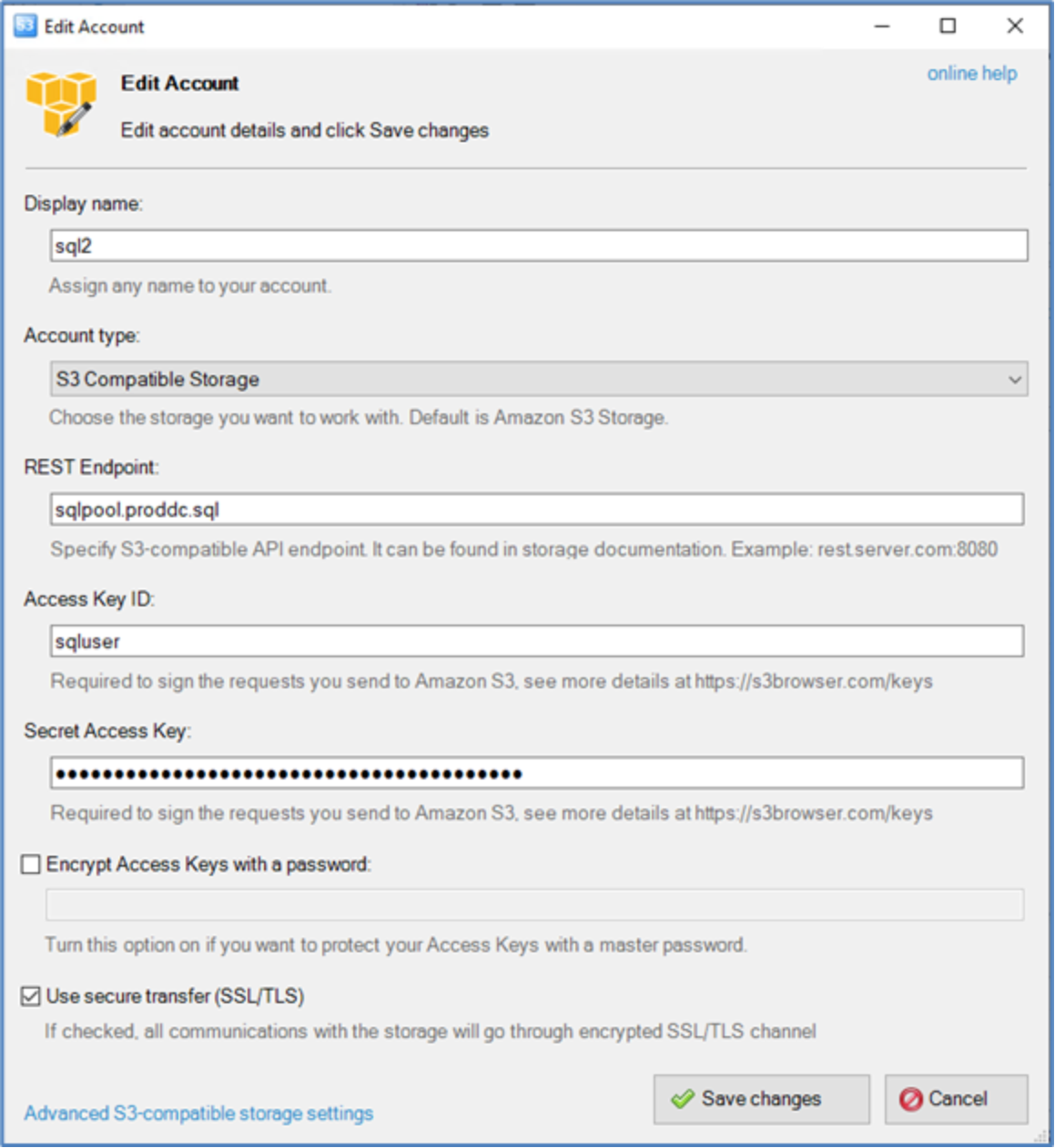 Figure 10. Connection settings for S3 Browser
The Access Key ID and Secret Access Key that are obtained from Dell ECS storage along with the rest endpoint for the HAProxy LoadBalancer are used for this communication. Make sure to select “Use secure transfer (SSL/TLS)”.
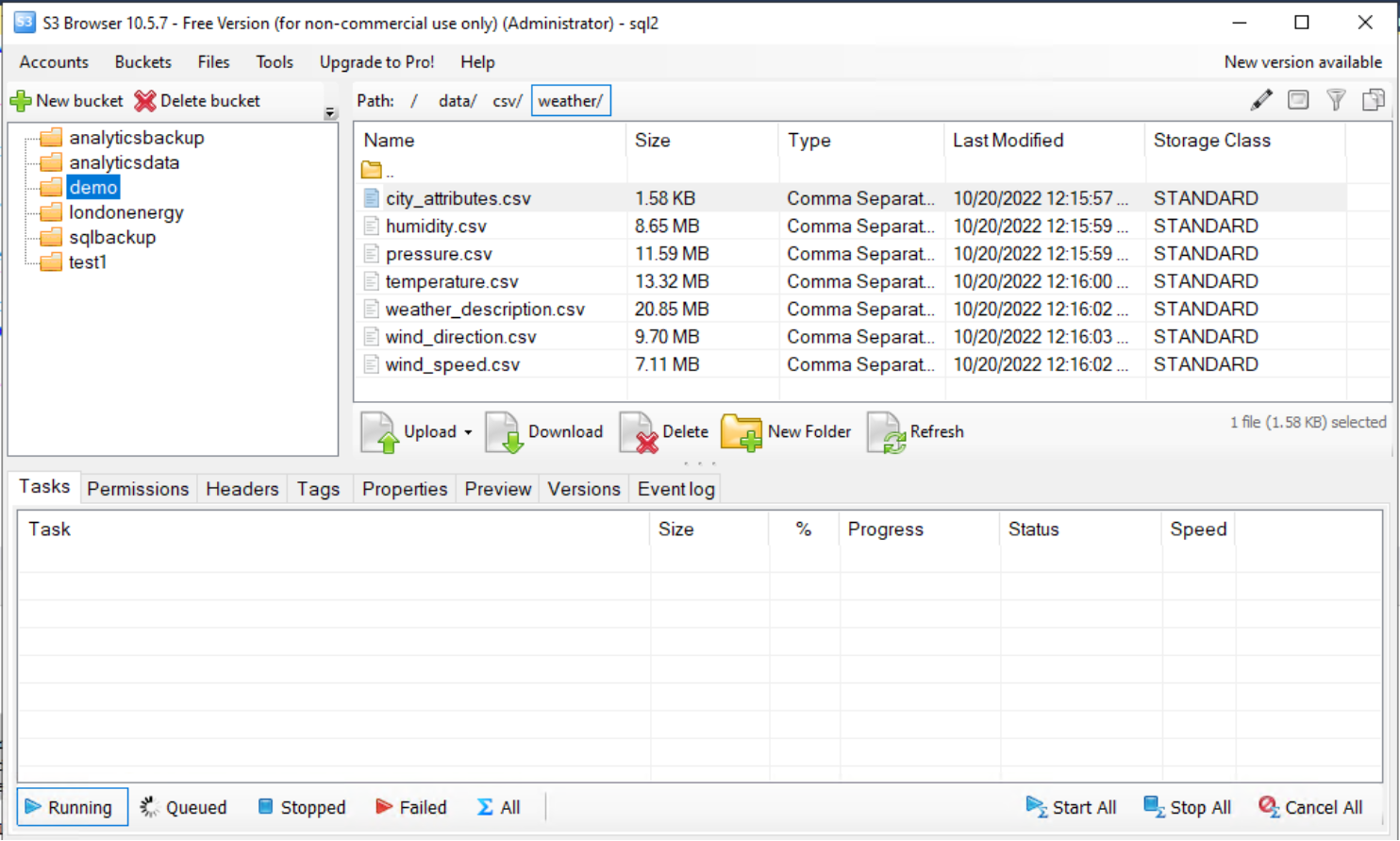 Figure 11. Browsing Dell ECS storage objects using S3 browser
Connect to ECS storage and browse through the buckets and objects within the applicable namespaces once an account has been created.
Setup access to Dell ECS storage cluster
ECS dashboard
After logging into the ECS Cluster, the dashboard page displays general cluster information including details about capacity, performance, CPU and memory usage details, nodes health, requests and more. This is a great tool for multiple administrators to remotely manage enterprise storage.
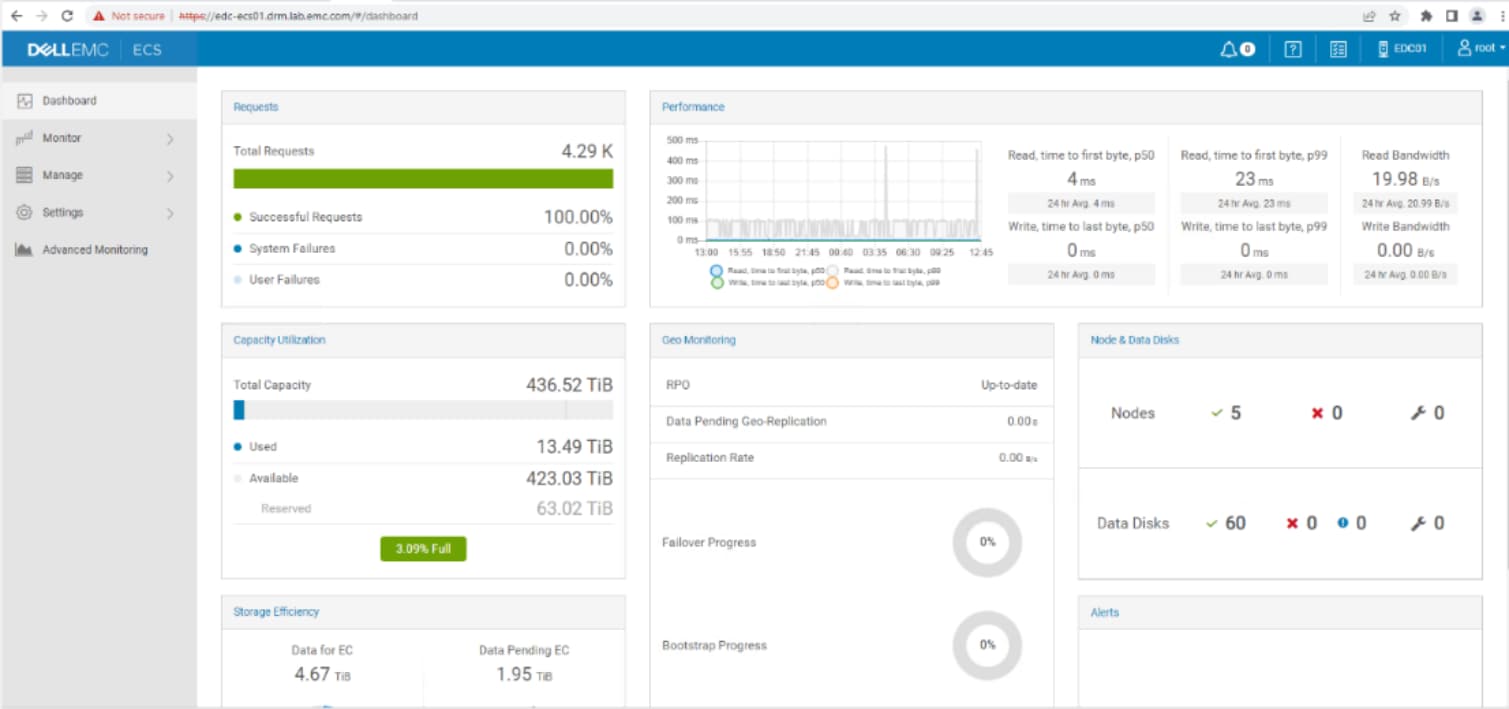 Figure 12. Dell ECS storage cluster dashboard
Namespaces in Dell ECS
Namespaces allow for the segregation of storage space which reduces coupling, and they enable ECS’s multi-tenancy feature. Unlike storage pools and replication groups, many namespaces can be created. However, a single namespace is appropriate for some environments. There are several beneficial use cases for namespaces:
- Providing unique namespaces for distinct business units.
- Separating data for use with specific applications.
- Creating unique namespaces for each reporting boundary. Buckets can also be reported on.
- Providing a unique namespace to each subscriber for a service. Dell ECS Test Drive is configured with a unique namespace being created for each user.
- As a workaround, namespaces can be used to allow the targeting of specific replication groups for legacy applications. Some legacy applications cannot access a specific storage pool so it may be necessary for these applications to use buckets that access storage pools using specific replication groups.
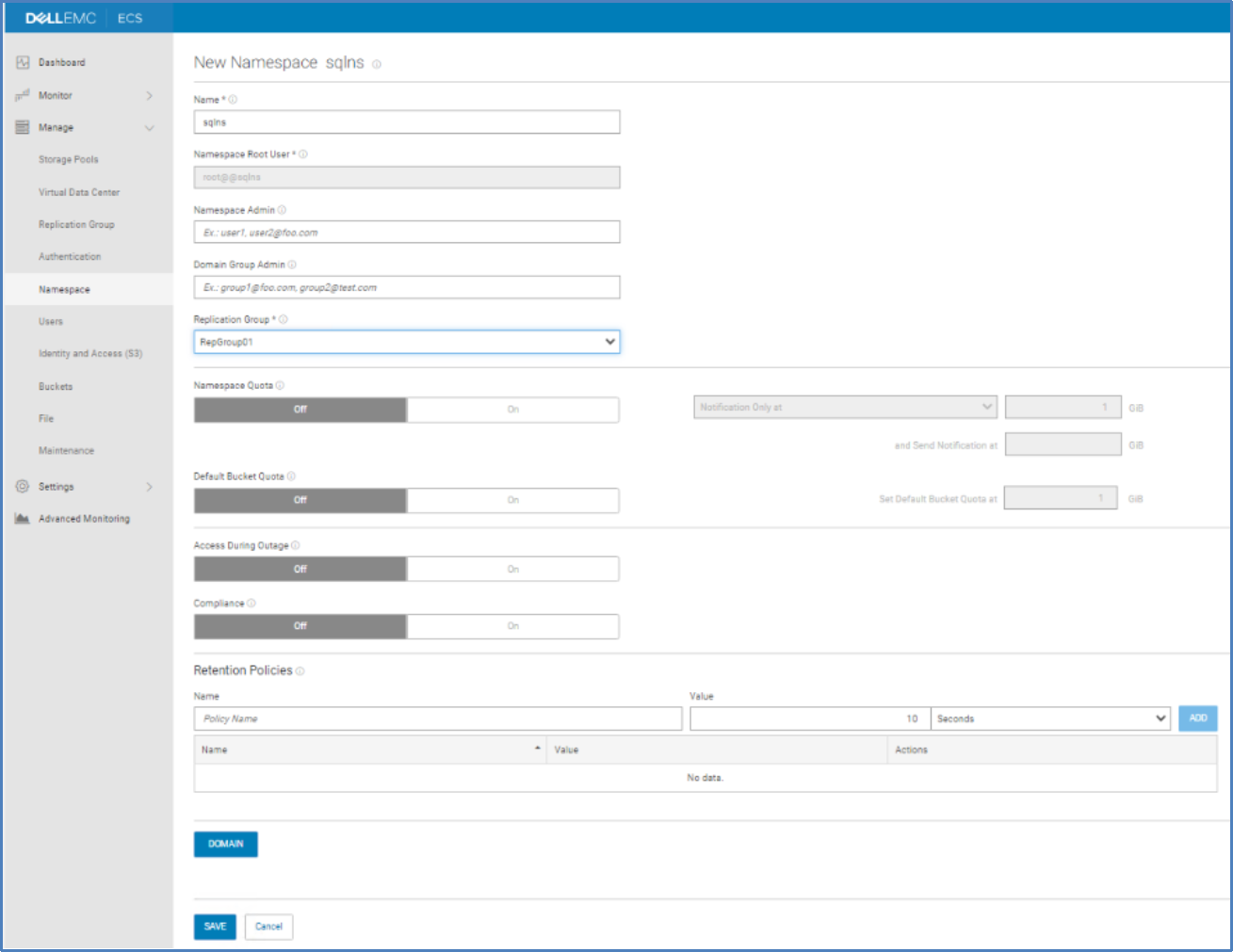 Figure 13. Dell ECS storage cluster namespace creation dialogue
ECS User creation
The following screenshots show steps to create a user in Dell ECS storage. Users can access the objects present in ECS storage.
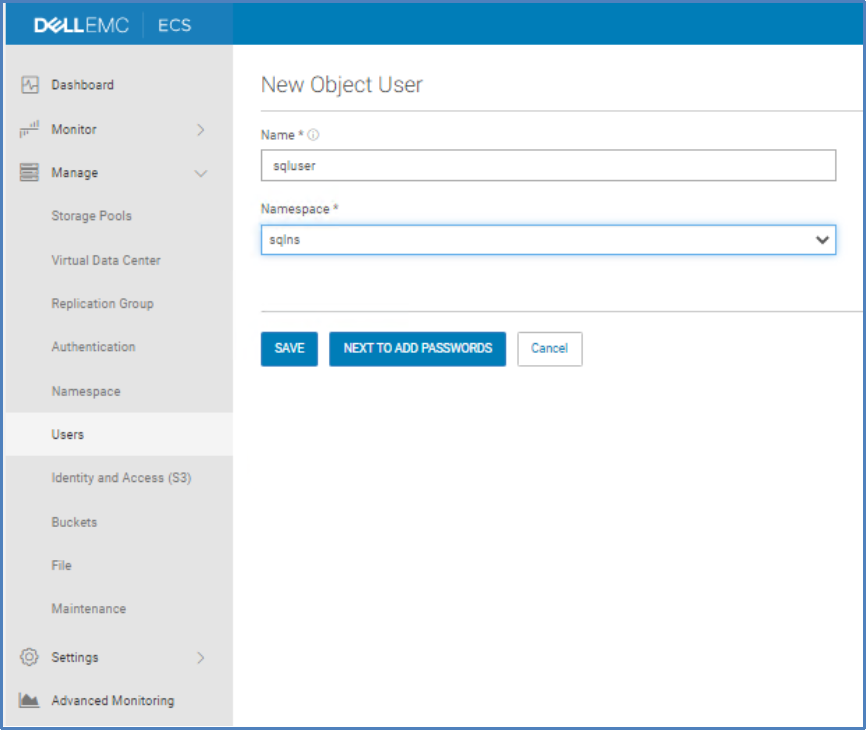 Figure 14. Dell ECS storage cluster namespace creation dialogue
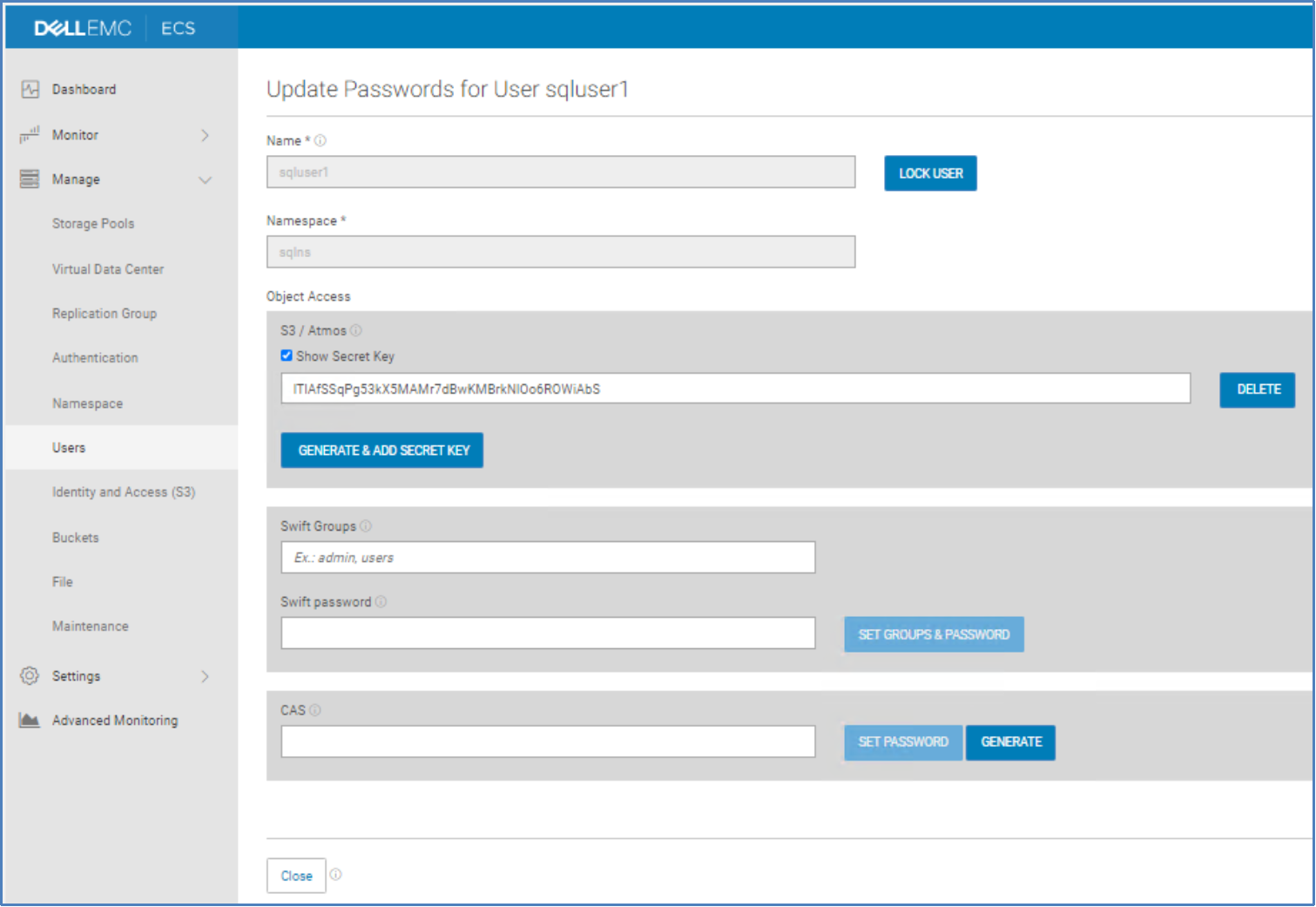 Figure 15. Update a user’s access token and password for the storage cluster
ECS bucket creation
Buckets contain objects created in a namespace and are sometimes considered a logical container for sub-tenants. Each namespace is created within a Replication Group (RG). The term ‘buckets’ has been adopted by ECS because that is what S3 calls containers. Buckets are global resources in ECS that can span multiple sites.
Bucket creation involves assigning it to a namespace and a Replication Group. The bucket level is where the ownership and file or CAS access is enabled.
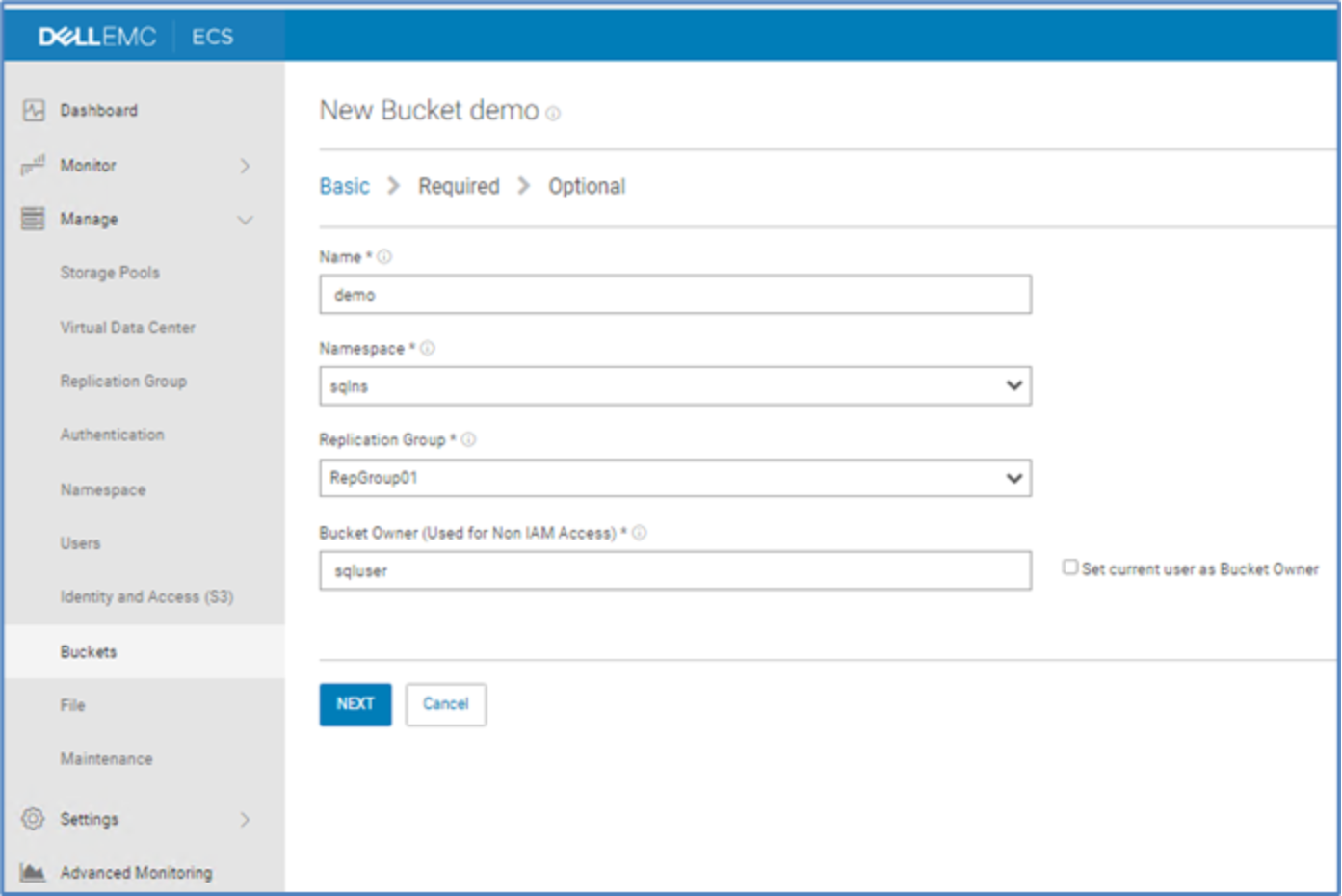 Figure 16. Dell ECS Bucket creation dialogue
Configuring vVols on Dell PowerStore Storage
Overview
vVols are a technology from VMware that offers a better way of provisioning, managing, and accessing virtual disks. The access and management of vVols is enabled through a software component called the vStorage APIs for Storage Awareness (VASA) provider, also known as a vendor provider. VASA providers are developed by storage vendors such as Dell. The vendor provider enables the creation of protocol end points which act as access points for hosts and storage systems. vVols offer multiple benefits such as:
• Storage policy-based management (SPBM) which allows the creation and application of policies based on storage tiers.
• Improved datastore management.
• Enhanced fine-grained storage operations and services.
For more information about the benefit of vVols, visit vSphere Virtual Volumes (vVols) and vVols Getting Started Guide.
Creating a new storage provider for PowerStore in VMware vCenter
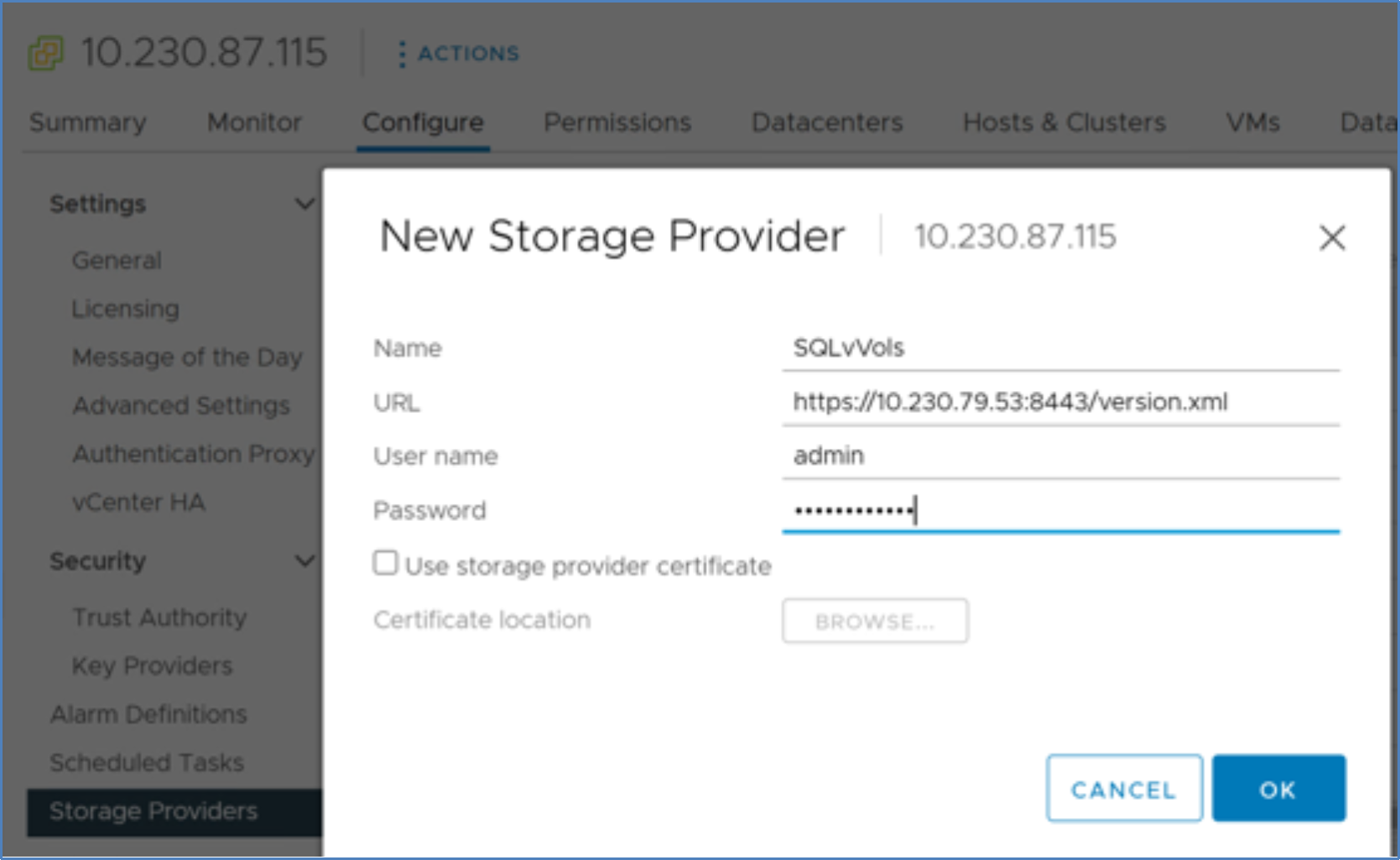 Figure 17. Creating a new storage provider for PowerStore in VMware vCenter
To use vVols, the VASA provider must be registered with vCenter. The storage capabilities are exported and presented to VMware based virtual infrastructure through the protocol end points enabled by VASA.
Storage Provider Registration procedure
- Login to vSphere client.
- Go to vCenter Server in the vSphere Web Client navigator.
- Click the Configure tab and click Storage Providers.
- Click the + Add icon to register a storage provider.
- Enter the connection details for the new storage provider, including the name, URL, and credentials.
- Click OK to complete the registration.
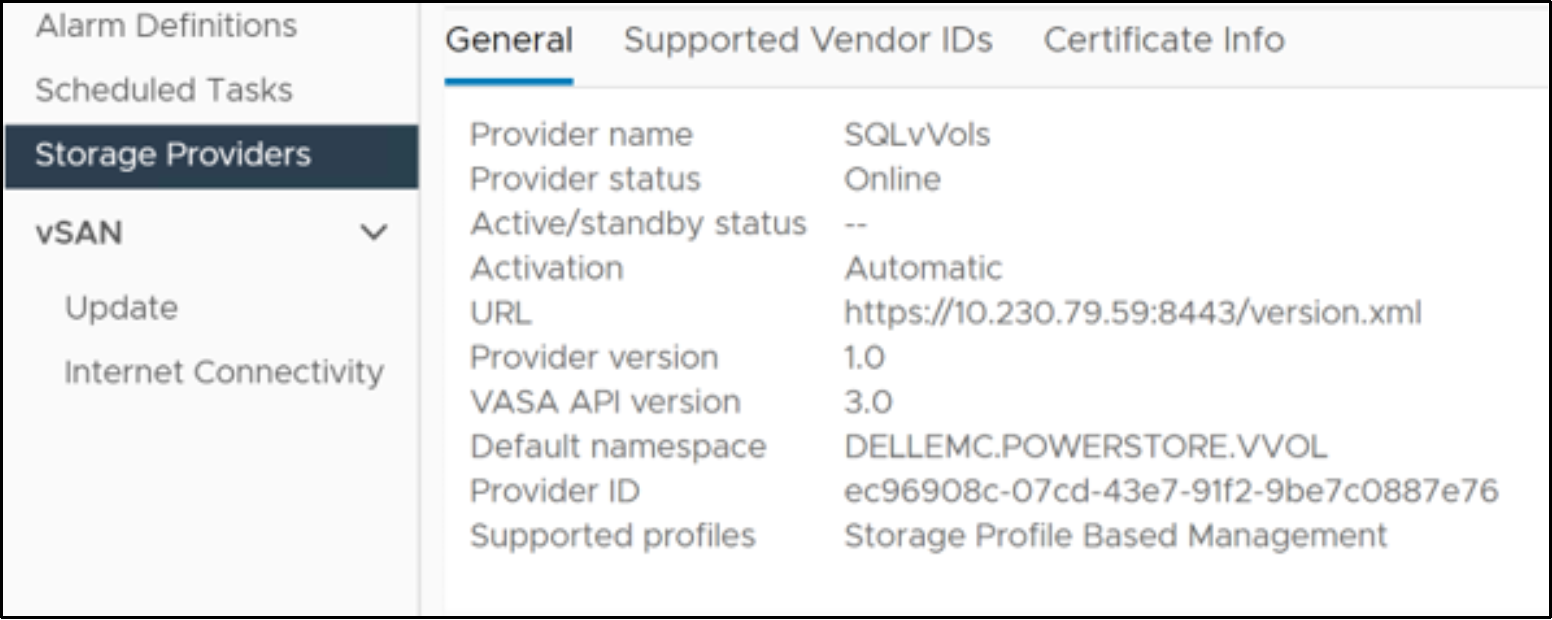 Figure 18. Storage provider registration summary
- The storage provider VASA has been successfully registered with the vCenter as shown in the above screenshot.
- Once the VASA is registered, create a vVol based datastore to use vVol based services.
Virtual Datastore Creation Procedure
- Log in to the vSphere Web Client.
- Select the host in the vSphere inventory.
- Right-click the host and select the storage menu.
Click New Datastore.
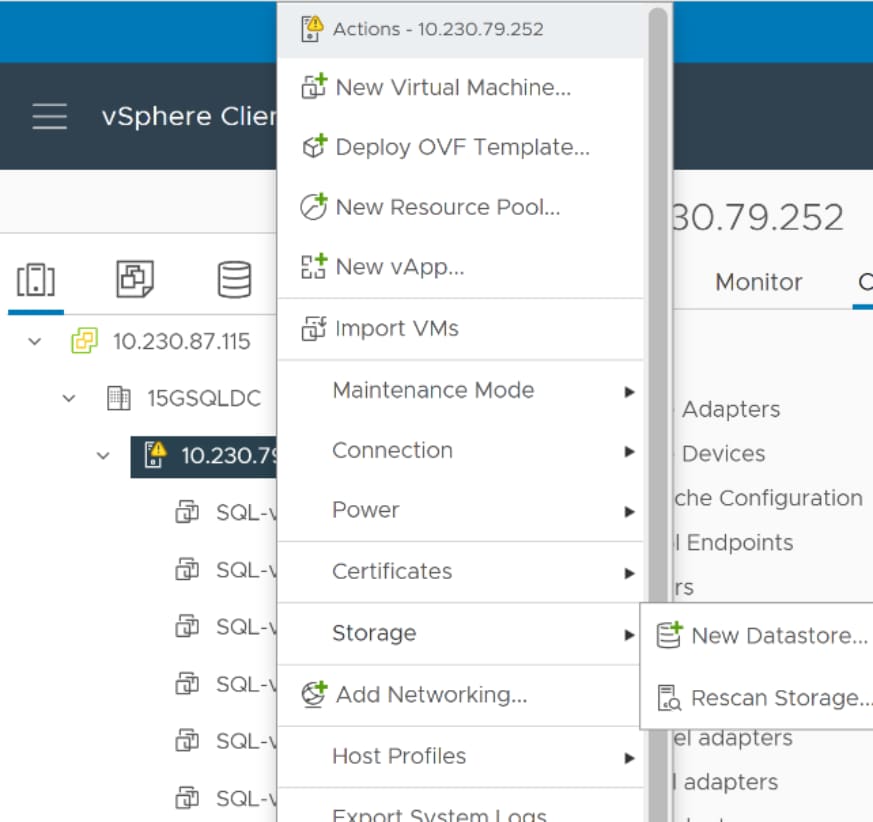 Figure 19. Creating a VMware vSphere datastore
Creating a VMware vSphere datastore
- Enter a unique datastore name.
- Select vVol as the virtual datastore type.
- Select the appropriate storage container referring to the previously registered VASA. This backing container will be used to host the virtual volumes.
- Click next to review the selections and click Finish.
- At the end of the procedure, the newly created datastore can be viewed on the host.
- To access the datastore on additional hosts, the datastore must be explicitly mounted on the required hosts based on system requirements.
- Once the datastore is present on the VMware vCenter, virtual disks can be carved out from the datastore and mapped to a given virtual machine.
Virtual environment setup
Dell solutions engineers deployed a virtual environment in accordance with the previously described architecture. For this setup, the following technologies from VMware were used:
- VMware vSphere
- VMware vCenter
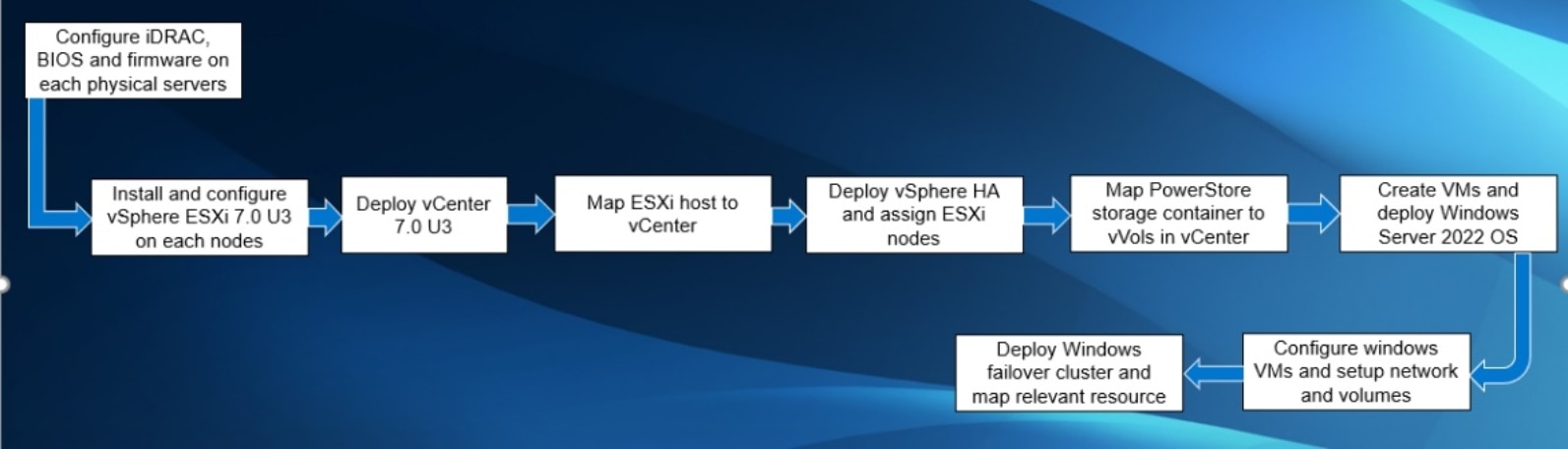
Figure 20. VMware environment deployment summary
VMware vSphere
Deploying VMware vSphere 7.x is ubiquitous among system administrators, and there exists many documents detailing the deployment of vSphere. This solution followed the installation guide for VMware vSphere ESXi 7.x on Dell EMC PowerEdge Servers.
VMware vCenter
A preexisting VMware vCenter was used with version 7.0U3 for the setup and validation process. However, Dell engineers have provided a step-by-step guide for deploying VMware vCenter 7.x on Dell servers.
Installing vCenter
- On a Windows machine or VM, locate the VMware-VCSA installer image.
- Mount the image, go to the vcsa-ui-installer folder, and double-click win32.
- Double-click installer.exe and select Install. Accept the terms of the license agreement.
- Leave the default (vCenter Server with an Embedded Platform Services Controller) selected and click Next.
- Enter the FQDN (Fully Qualified Domain Name) or IP address of the device that will host vCenter.
- Provide the server’s credentials.
- Configure the environment’s network.
- Select Finish when the settings are as wanted.
- The deployment will complete and go to the introduction page for vCenter.
- Select time synchronization mode on the Appliance Configuration page. Select the SSH access settings. The solution used has a local Network Time Protocol (NTP) server with SSH enabled.
- Select Create a New SSO Domain. Choose and confirm the password. Provide an SSO domain name and SSO site name.
- Click Next on the CEIP page. Then click Finish on the Ready to Complete page.
- Close the window once installation is complete.
- Using the vSphere web client, log in to the vCenter server using the credentials that were previously provided.
Creating the data center
- After logging into VMware vCenter®, go to Hosts and Clusters.
- Select the primary site management vCenter.
- Right-click the vCenter object and select New Datacenter.
- Enter a name for the new data center.
Adding hosts
- Right-click the data center and choose Add Host.
- Enter the FQDN or IP address of the PowerEdge R7525 host.
- Enter the root credentials for the server.
- Accept the server’s certificate.
- Proceed after reviewing the server details.
- Assign the license.
- Disable Lockdown mode.
- Click Finish to complete the process of adding a host.
- Repeat steps 1 through 8 to add additional hosts to the data center.
vSphere HA Cluster
An empty cluster needs to be created to enable the cluster for vSphere HA. After planning the resources and cluster’s networking architecture, use the vSphere Web Client to add hosts to the cluster and specify the vSphere HA settings. Follow the VMware documentation for detailed instructions for configuring the vSphere HA cluster.
Create a VMware vSphere template for Windows Server
The following article from Microsoft details the process of creating a VMware vSphere virtual machine (VM) template for Windows Server.
Create VM from VMware Template
Deploying a virtual machine from a template will create a virtual machine identical to the template. The new virtual machine has the virtual hardware, installed software, and other properties that are configured for the template. Please go to Deploying a Virtual Machine from a Template in the vSphere Web Client, for detailed instructions.
Create Windows Server 2022 Failover Cluster
The process of creating a Windows server failover cluster is documented by Microsoft.
Install and configure SQL Server Always-On Availability croup
The Always-On Availability Groups feature is a high-availability and disaster-recovery solution that provides an enterprise-level alternative to database mirroring. Introduced in SQL Server 2012 (11.x), this feature maximizes the availability of a set of user databases for an enterprise. An availability group supports a failover environment for a discrete set of user databases, known as availability databases, that fail over together. An availability group supports a set of read-write primary databases and one to eight sets of corresponding secondary databases. Optionally, secondary databases can be made available for read-only access and/or some backup operations.
An availability group fails over at the level of an availability replica. Database issues such as datafile loss, database deletion, and transaction log corruption don’t cause failovers. Microsoft documents their SQL Server 2022 Always-On availability group at this site.
Containerized environment set up
The architecture details a separate environment using RedHat OpenShift 4.11 to host containerized applications and refers to it as the containerized environment.
Environment setup
RedHat Openshift
RedHat provides step by step guidance for the installation and configuration of OpenShift on bare-metal servers.
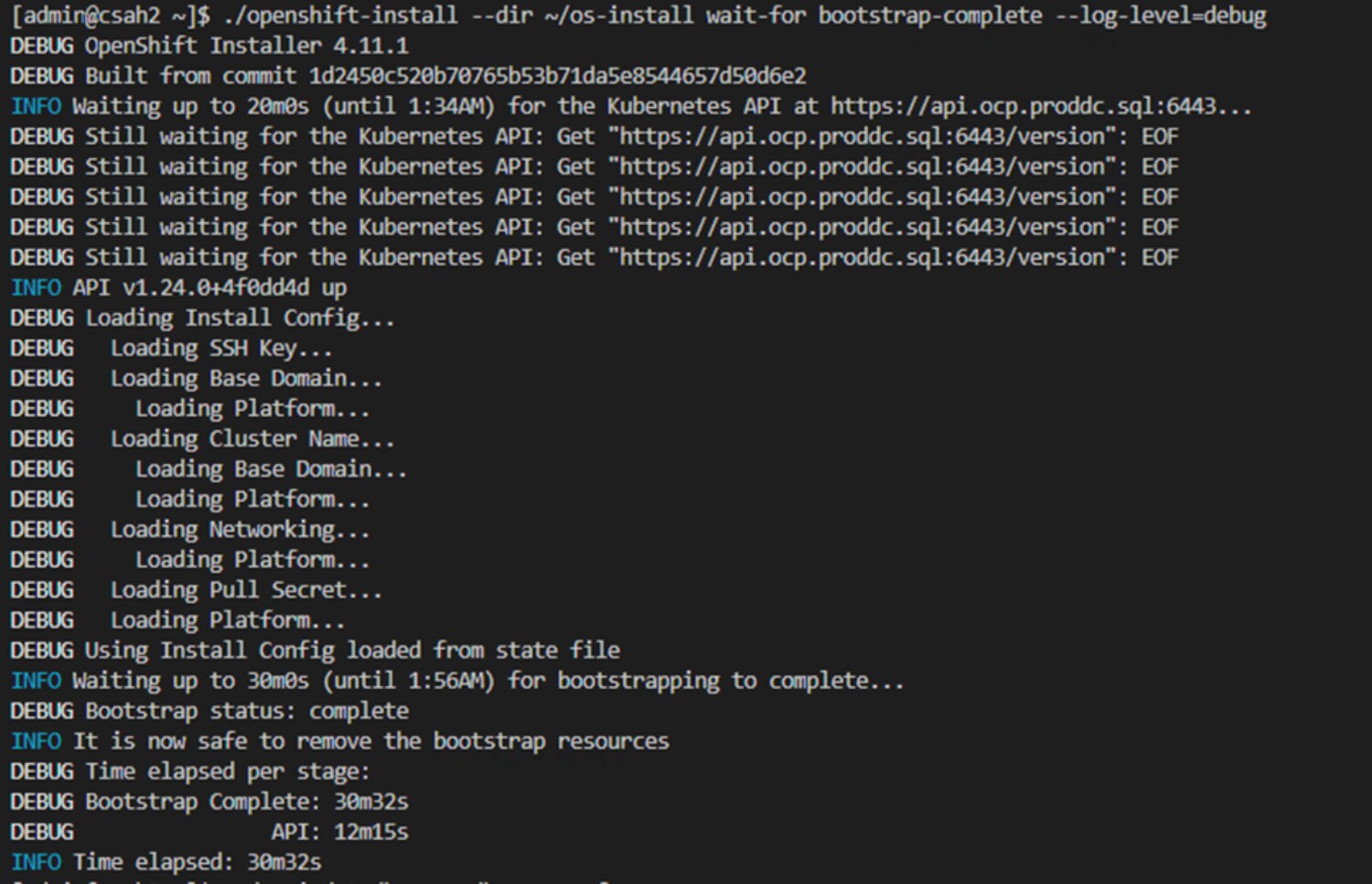
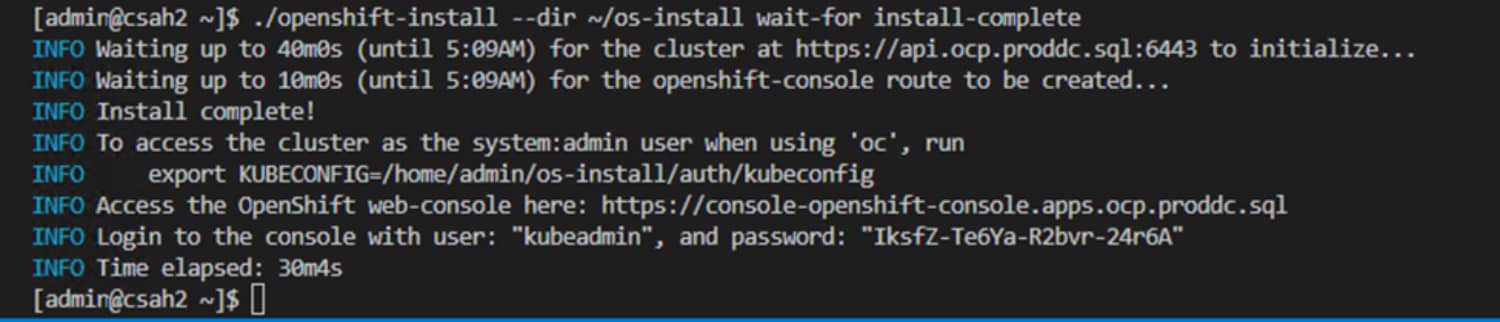 Figure 21. RedHat OpenShift deployment summary
With the cluster deployed, it is possible to view cluster information and manipulate the cluster’s settings through RedHat OpenShift web console.
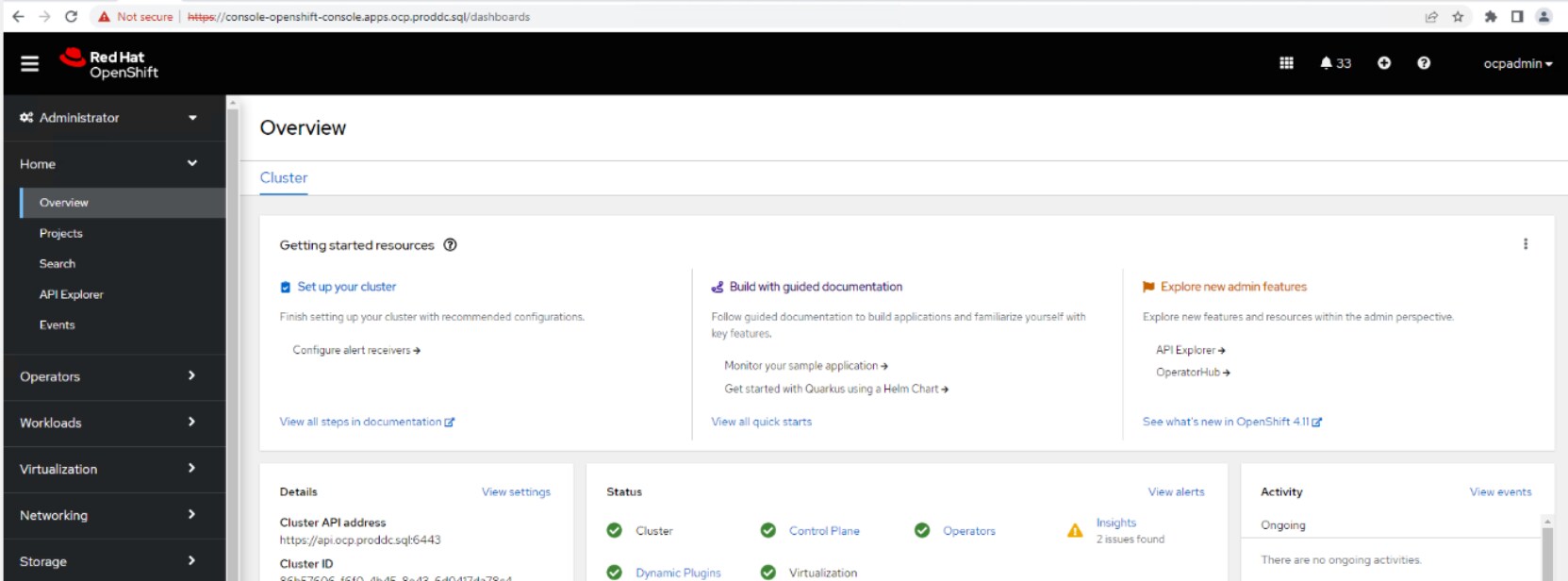 Figure 22. RedHat OpenShift cluster dashboard
Dell CSI Operator for PowerStore
With the OpenShift cluster up and running, the next step is to deploy the Dell CSI Operator so that the containerized environment can access persistent storage.
The Dell CSI Operator is a Kubernetes Operator, which is used to install and manage the CSI Drivers provided by Dell for various storage platforms. This operator is available as a community operator for upstream Kubernetes deployable through OperatorHub.io. It is also available as a certified operator for OpenShift clusters and can be deployed using the OpenShift Container Platform. Both these methods of installation use the OLM (Operator Lifecycle Manager). The operator can also be deployed manually.
The process of installing the Dell CSI operator for Dell PowerStore is captured in detail on the GitHub page for Installing CSI Driver for PowerStore via Operator.
After the successful deployment of the CSI Operator/Plugin for PowerStore on the OpenShift Cluster, a storage class with the name “dellemc-powerstore-sc” is configured within the OpenShift cluster. The name can be changed during the deployment process.
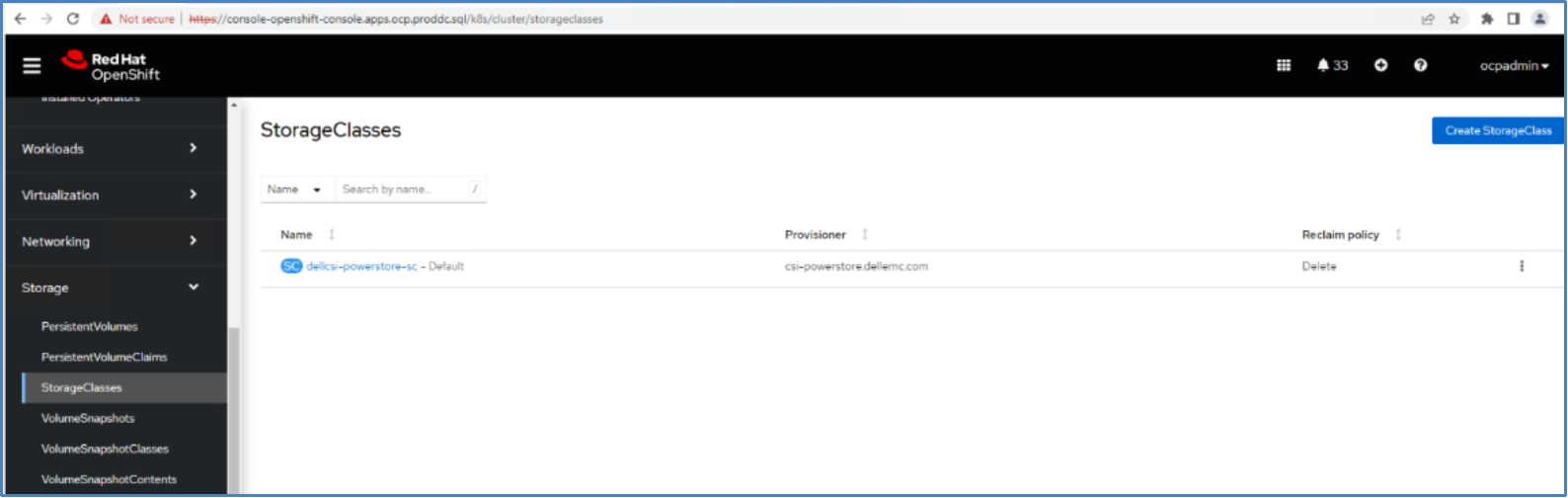 Figure 23. StorageClass in an OpenShift Cluster
The storage class will be used to create persistent volumes (PV) and persistent volume claims (PVC) which can be mapped to containers and pods to provide persistent storage to the application. Following is a reference for the storage class in OpenShift cluster.
SQL Server 2022 deployment
Deploying SQL Server 2022 in an OpenShift cluster is simple. The SQL Server 2022 image was modified to include PolyBase for the testing of potential use cases. PolyBase is not available by default and is used in this solution to enable data virtualization.
PolyBase Container Images
PolyBase is not currently installed and enabled by default in the published container image mcr.microsoft.com/mssql/server:2022-latest, so Dell engineers created a custom image with PolyBase installed. The following script is used to create a custom container image for SQL Server 2022.
FROM ubuntu:20.04
#Create file layout for SQL and set permissions
RUN useradd -M -s /bin/bash -u 10001 -g 0 mssql
RUN mkdir -p -m 770 /var/opt/mssql/security/ca-certificates && chgrp -R 0 /var/opt/mssql/security/ca-certificates
# Installing system utilities
RUN apt-get update && \
apt-get install -y apt-transport-https curl gnupg2 && \
curl https://packages.microsoft.com/keys/microsoft.asc | apt-key add - && \
curl https://packages.microsoft.com/config/ubuntu/20.04/mssql-server-preview.list > /etc/apt/sources.list.d/mssql-server-preview.list
# Installing SQL Server drivers and tools
RUN apt-get update && \
apt-get install -y mssql-server-PolyBase && \
apt-get clean && \
rm -rf /var/lib/apt/lists
RUN /opt/mssql/bin/mssql-conf traceflag 13702 on
# Run SQL Server process as non-root
USER mssql
CMD /opt/mssql/bin/sqlservr
Use the following command to build the docker container image:
docker build -t sql-custom-2022:latest
Change the image artifacts using the tag command.
docker tag sql-custom-2022:latest docker.io/sanran/sql-custom 2022:latest
Then push the newly created container image to docker’s public container registry.
docker push sanran/sql-custom-2022:latest
In this command, sanran refers to a username on the dockerhub.io public container registry. This container image can be pulled to run SQL Server 2022 with PolyBase pre-installed on any setup. More details about using SQL Server with PolyBase can be found in the Use Case section.
Mapping storage certificates with OpenShift
The certificate must be mapped so that the Kubernetes cluster can communicate with the Elastic Cloud Storage deployment. This can be done using the Kubernetes ConfigMap, which maps the certificate to a SQL container.
apiVersion: v1
kind: ConfigMap
metadata:
name: rootca-cert
namespace: demo
data:
rootCA.crt: |
-----BEGIN CERTIFICATE-----
MIID9zCCAt+gAwIBAgIUKeay3nw4sQe8QHbIlPr8q4vK7AMwDQYJKoZIhvcNAQEL
BQAwgYoxCzAJBgNVBAYTAlVTMQswCQYDVQQIDAJNQTESMBAGA1UEBwwJSG9wa2lu
dG9uMQ0wCwYDVQQKDAREZWxsMQ8wDQYDVQQLDAZCaXpBcHAxGDAWBgNVBAMMD0hB
.
---- certificate content -----
.
4/XHKa9DXk8g9pBvSpF7HC1DJRee7ZnJ6p4Vme9LyXjmA+OBzaovOU4i54iKwvkl
qXXlevx+E0KLy1QbhL9n49F2zi0SZRsjJ5+A5+gCz9CKhLL9b7VvsYqg/Ok40ZT8
to7ahH31PTtnrzM=
-----END CERTIFICATE-----
There is another way to deploy a ConfigMap within an OpenShift environment. When creating a ConfigMap this way, rootCA.crt is the certificate file that will be used.
oc create ConfigMap ca-s3lb --from-file=rootCA.crt
Persistent volume claim creation
A PersistentVolumeClaim (PVC) is a request for storage by a user. It is like a Pod, as Pods consume node resources and PVCs consume PV resources. Pods can request specific resource amounts (CPU and Memory). Claims can request specific amounts of storage and can be mounted with ReadWriteOnce, ReadOnlyMany or ReadWriteMany access modes.
To provide persistent storage to a container or pod, a persistent volume claim is created using the Dell CSI storage class. The following script provides an example of how to create a PVC that will be used by the SQL Server pods. This pvc yaml script creates a 500 GB volume in ReadWriteOnce access mode.
kind: PersistentVolumeClaim
apiVersion: v1
metadata:
name: new-sql-pvc-31445
namespace: demo
spec:
accessModes:
- ReadWriteOnce
resources:
requests:
storage: 500Gi
storageClassName: dellcsi-powerstore-sc
SQL Server 2022 secret creation
A Secret is an object that contains a small amount of sensitive data like a password, token, or key which might otherwise be put in a Pod specification or container image.
Secrets can be created independently of the Pods that use them, reducing the risk of the secrets data being exposed during the workflow of creating, viewing, and editing Pods.
To provide the SA password within the deployment file for the containers, a secret was created in OpenShift’s cluster environment using a base 64 encryption for the password.
apiVersion: v1
kind: Secret
metadata:
name: mssql-secret
namespace: demo
data:
MSSQL_SA_PASSWORD: QFZhbnRhZ2U0
type: Opaque
The deployment section provides a declarative update pattern for pods and replica sets. A preferred state is described, and the deployment controller changes the actual state to match the preferred state at a controlled rate. This allows high availability to be maintained, and it is possible to specify when resources should be destroyed, allowing cluster updates to occur without any loss of service in some cases.
This yaml script is used to deploy SQL Server 2022 on a Kubernetes cluster.
apiVersion: apps/v1
kind: Deployment
metadata:
name: new-sql-deployment
namespace: demo
spec:
replicas: 1
selector:
matchLabels:
app: mssql-31445
template:
metadata:
labels:
app: mssql-31445
spec:
terminationGracePeriodSeconds: 30
hostname: mssqlinst
securityContext:
fsGroup: 10001
containers:
- name: mssql
image: docker.io/sanran/sql-custom-2022:latest
resources:
requests:
memory: "128G"
cpu: "12000m"
limits:
memory: "128G"
cpu: "12000m"
ports:
- containerPort: 31445
env:
- name: MSSQL_PID
value: "Developer"
- name: ACCEPT_EULA
value: "Y"
- name: MSSQL_SA_PASSWORD
valueFrom:
secretKeyRef:
name: mssql-secret
key: MSSQL_SA_PASSWORD
volumeMounts:
- name: mssqldb
mountPath: /var/opt/mssql
- name: rootca-cert
mountPath: /var/opt/mssql/security/ca-certificates/rootCA.crt
subPath: rootCA.crt
readOnly: true
volumes:
- name: mssqldb
persistentVolumeClaim:
claimName: new-sql-pvc-31445
- name: rootca-cert
ConfigMap:
name: rootca-cert
Service creation
Services are an abstract way to expose an application running on a set of Pods as a network service. With OpenShift and Kubernetes there is no need to modify the application to use an unfamiliar service discovery mechanism. Pods are given IP addresses by Kubernetes. Pods can be load balanced and can share a single DNS.
A Service is an abstraction which defines a logical set of Pods and their access policy. The set of Pods targeted by a Service is usually determined by a selector (in this case it is “mssql-31445”). Specific ports can be specified for container port mapping.
kind: Service
apiVersion: v1
metadata:
name: mssql-service-31445
namespace: demo
spec:
type: NodePort
ports:
- port: 1433
targetPort: 1433
nodePort: 31445
selector:
app: mssql-31445
There are several types of services that can be created such as ClusterIP, NodePort, LoadBalancer, and ExternalName. This example creates a service of type NodePort. More details on the service and service types can be found on the Kubernetes website.
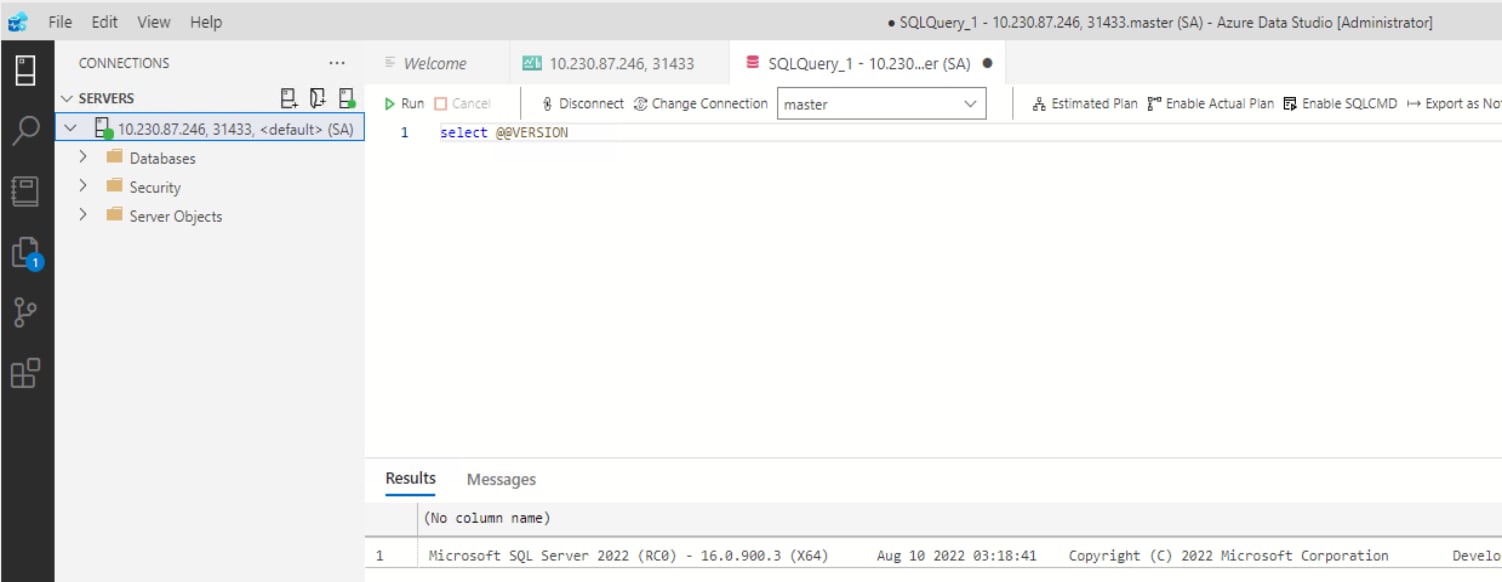 Figure 24. SQL Server 2022 connection using Azure Data Studio
Once the SQL Server pods are running successfully, these SQL Server pods can be connected to just like any SQL Server instance. The above screenshot shows a connection to a SQL Server 2022 instance running in an OpenShift cluster environment.
Many different tools can be used to connect to a SQL Server instance that is running in a pod. SQL Server Management Studio, PowerShell, Visual Studio, third-party SQL monitoring or development tools and other platforms will connect to the container instance as intended.
Use cases
Introduction
Backup and restore use case
T-SQL has been used to run backup and restore operations long before Microsoft SQL Server 2022. The newly introduced features allow BACKUP and RESTORE to have their locations set to external object storage which increases the reliability of backups by storing them across multiple fault domains while still maintaining accessibility. Database Administrators no longer need to be concerned about running out of storage capacity either, because Dell’s Elastic Cloud Storage can be scaled to meet their storage needs. Dell’s ECS is secure, and it requires the appropriate credentials to perform backup or restore operations for Microsoft SQL Server 2022 through the S3 protocol. This use case was validated by simulating how a backup and restore procedure would work using the S3 protocol and Dell ECS.
Credentials setup
The credentials used for connecting with S3 compatible storage require an appropriate storage URL and user credentials. Credentials that are created can be observed in the sys.credentials table. The following is an example of the process of creating credentials:
CREATE CREDENTIAL [s3://<ECS Bucket URL>]
WITH IDENTITY = ‘S3 Access Key’,
SECRET = ‘sqluser:<Username>/<Password>’;
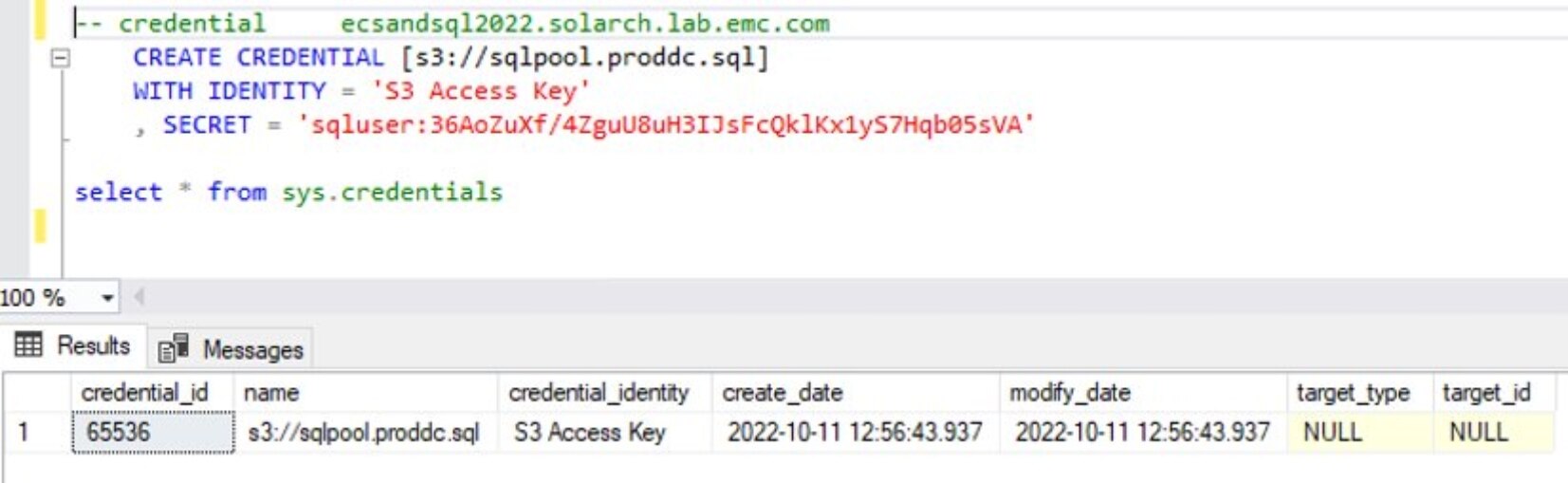
Backing up a Database to S3 Compatible Storage
Microsoft SQL Server 2022 allows users to directly store their backups in external object storage supported by the S3 protocol. A single query is all that is needed to back up the database to Dell’s Elastic Cloud Storage once the credentials have been confirmed. The query looks as follows:
BACKUP DATABASE <DatabaseName>
TO URL = ‘s3://<ECS Bucket URL>/<FolderName>/<Filename>
WITH FORMAT, COMPRESSION, STATS = 10,
NAME = ‘S3 backup to Dell ECS’;
The following snippet shows the process of backing up a database into Dell’s Elastic Cloud Storage using S3 and SQL:

Restoring a Database from S3 compatible storage
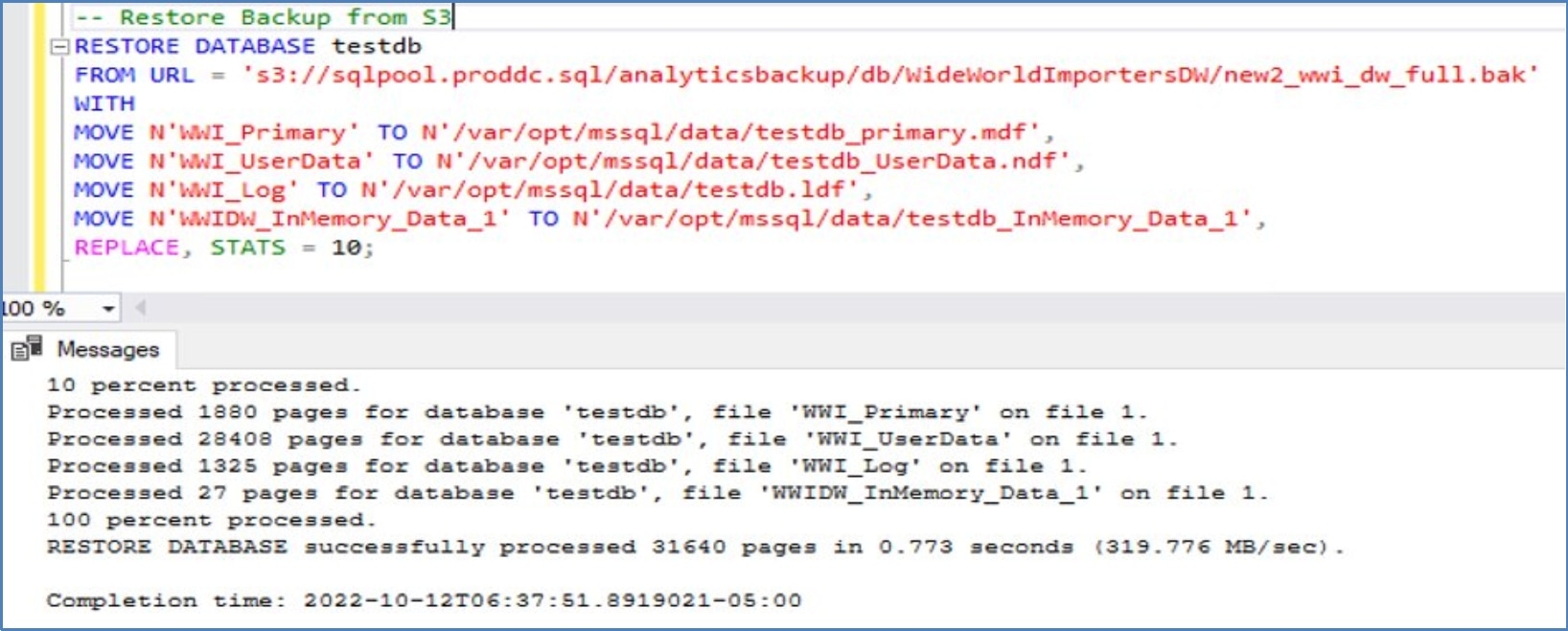
It is also possible to restore a database directly from a backup file located in external S3 compatible storage without copying the data locally. A single query can specify the location of the database file to restore and the destination for the restored database.
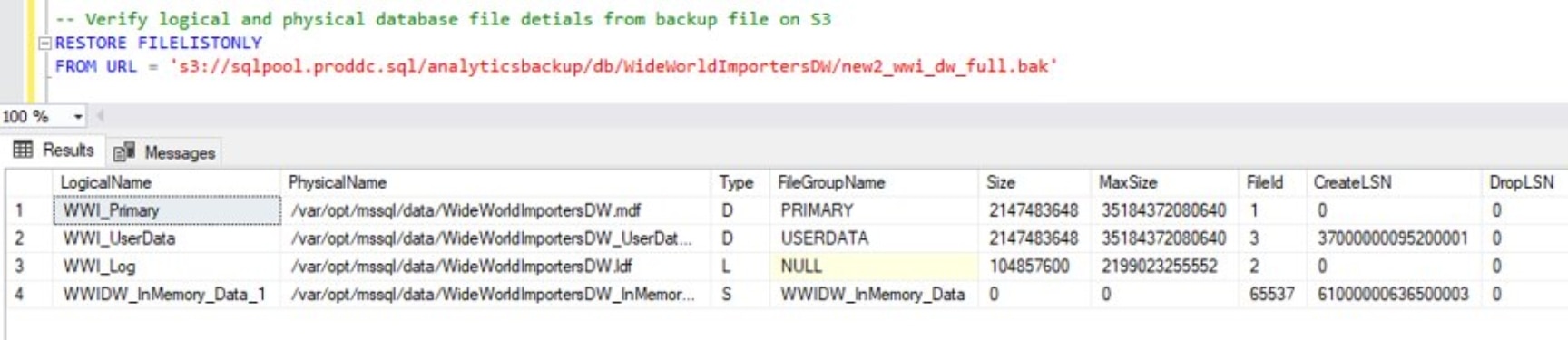
The RESTORE FILELISTONLY command can be used to verify that the backup files are available in object storage and the database admin can verify the sanctity of the backup file along with its metadata. This query can be used as follows:
RESTORE FILELISTONLY
FROM URL = ‘s3://<ECS Bucket URL>/<FolderName>/<Filename>;
The following image shows the results of running this query in Microsoft SQL Server 2022:
Use the following query to restore the database from a file located in object storage:
RESTORE DATABASE <DatabaseName>
FROM URL = ‘s3://<ECS Bucket URL>/<FolderName>/<Filename>
WITH
MOVE N’<LogicalName1>’ TO N’/var/opt/mssql/data/<Destination FileName1>,
MOVE N’<LogicalName2>’ TO N’/var/opt/mssql/data/<Destination FileName2>,
MOVE N’<LogicalName3>’ TO N’/var/opt/mssql/data/<Destination FileName3>,
REPLACE, STATS = 10;
Database restoration with a backup file in ECS is demonstrated below:
Data virtualization use case
Data virtualization does not require information about the data’s format and storage location which revolutionizes data retrieval and manipulation. This allows data integration to occur without needing to copy or move data that is stored in a separate location. A single virtual layer can span multiple storage formats and physical locations.
Accesing external data
Microsoft has added object storage access to the already existing PolyBase features in SQL Server 2022. This allows the use of data virtualization to take full advantage of the benefits of object storage. This new introduction allows for a SQL server instance to directly query data from SQL server and outside data sources. It even permits T-SQL to combine local and external data. This feature is not enabled by default, and it must be installed and enabled on the server instance to be used.
PolyBase
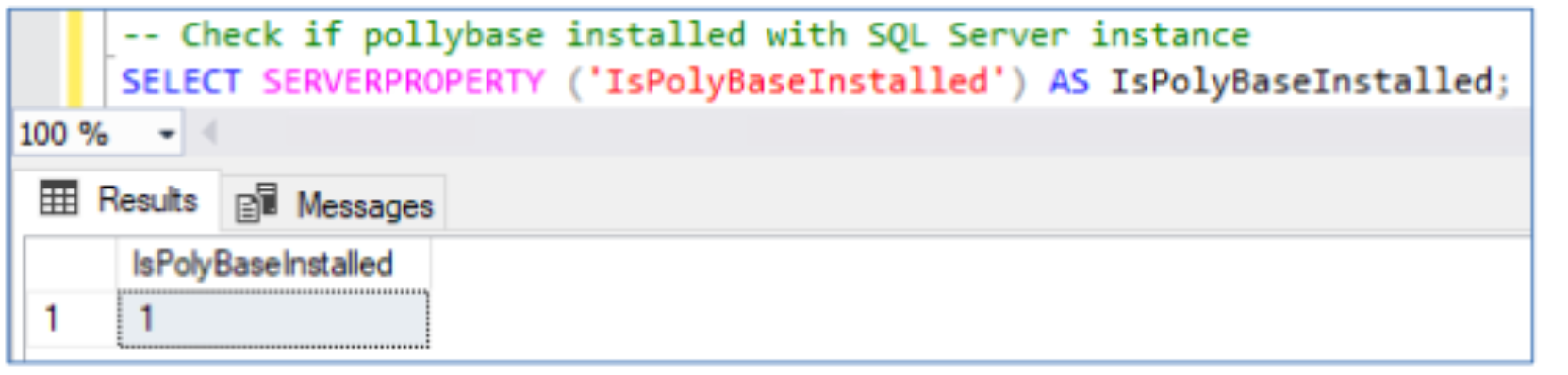
PolyBase’s installation status is checked with the following query:
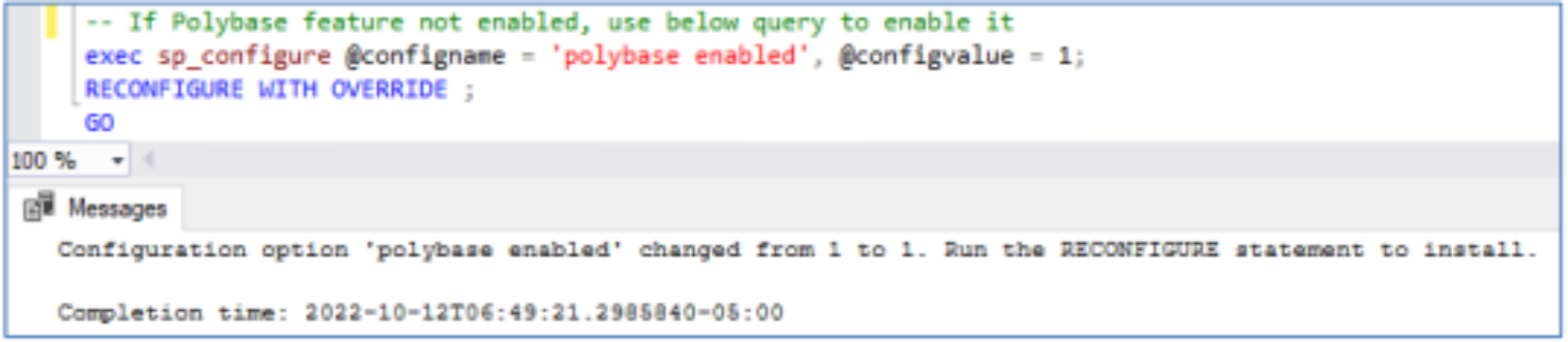
The following stored procedure is run to enable PolyBase:
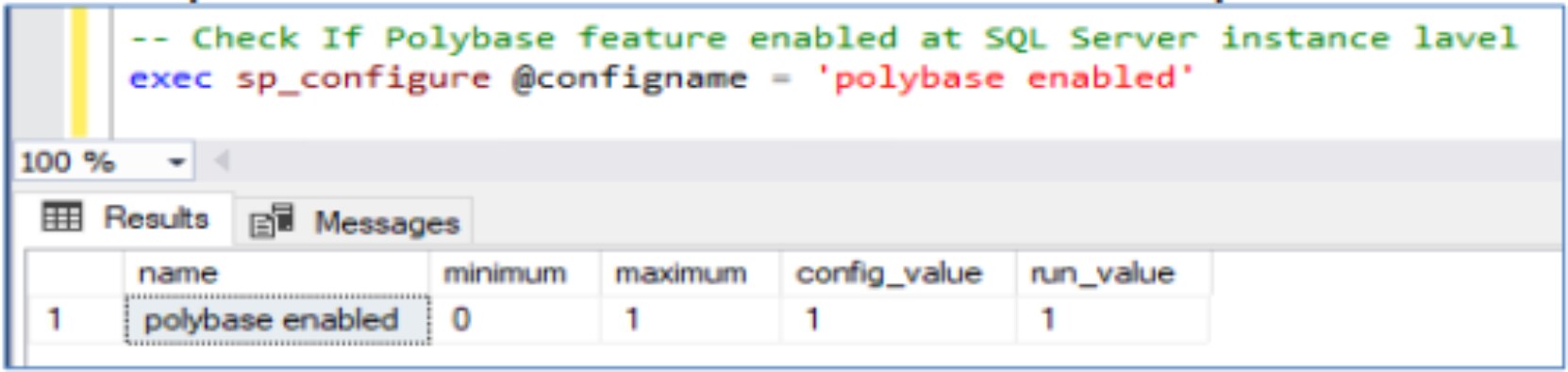
Run the following stored procedure to verify that PolyBase is enabled:
Encryption and communication setup
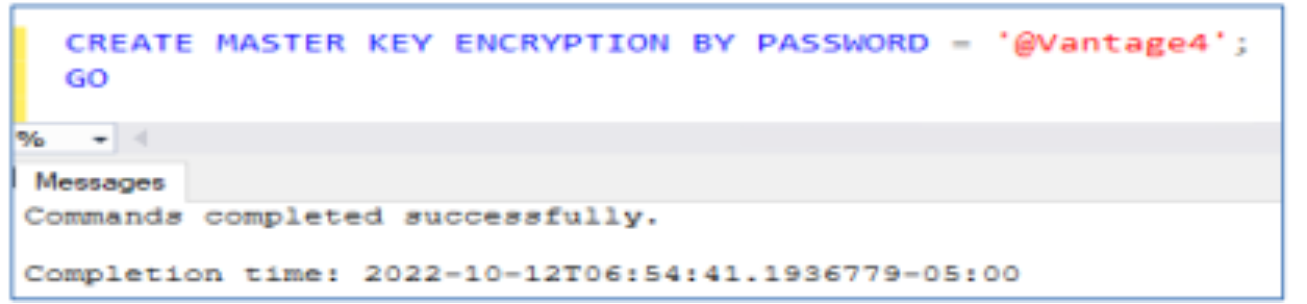
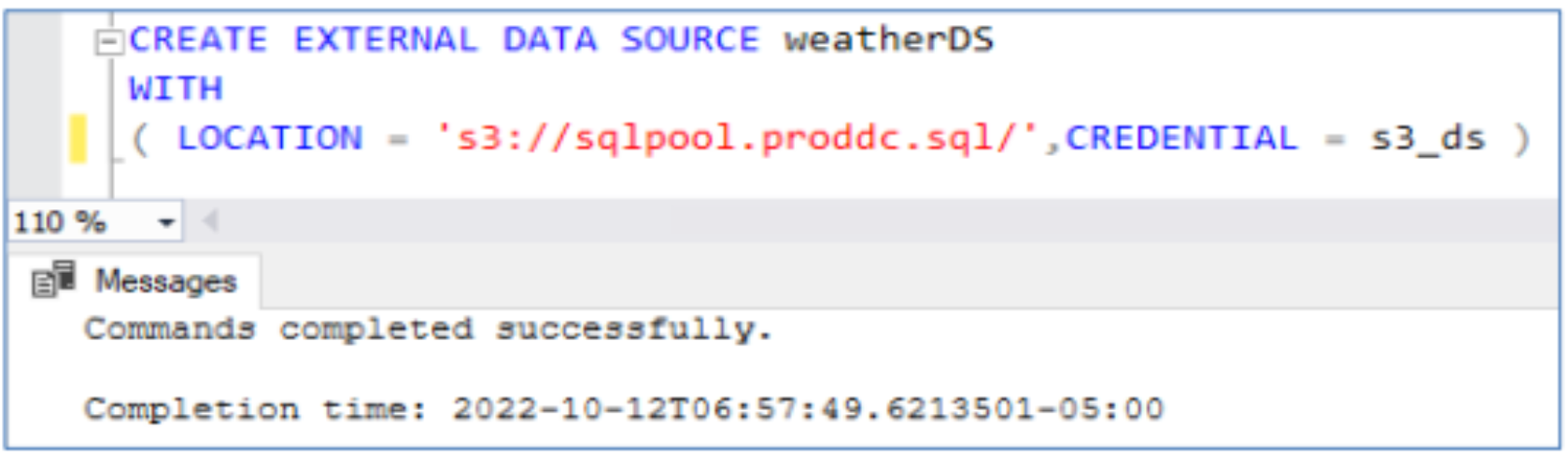
To access an external data source, an encryption key is used to verify that communication between the external data source and the SQL Server instance is secure. Dell Elastic Cloud Storage is used as the external data source in this example.
- Create the encryption key in the SQL Server instance.
- Create database scope credentials within the database.

- Establish a connection with the external data source by pointing to the S3 storage URL and passing the database scoped credentials.
- Use OPENROWSET to validate that the data located in ECS is reachable.
Creating external tables through the use of select queries
CREATE EXTERNAL TABLE AS SELECT (CETAS) allows for the creation of external tables using data that is not present on a local Microsoft SQL Server 2022 instance. Data virtualization is valuable for enterprises engaging with large volumes of data as a part of their daily operations and CETAS makes this process easy. Data virtualization allows all types of data to be accessed from one place which hides the underlying complexity of heterogeneous data and gives data specialists direct data access. Data virtualization requires no extra infrastructure for data and allows new applications to be integrated with existing infrastructure which eliminates wasteful data silos and reduces costs.
Data virtualization with parquet files
Parquet is an open-source datafile format created by Apache that is designed for efficient data storage and retrieval. The data in a Parquet file is stored in columnar format and uses efficient data compression and encoding schemes. Parquet files provide the enhanced performance needed for handling complex data at scale. These files were designed by Apache to be a common interchange format for both interactive and batch workloads.
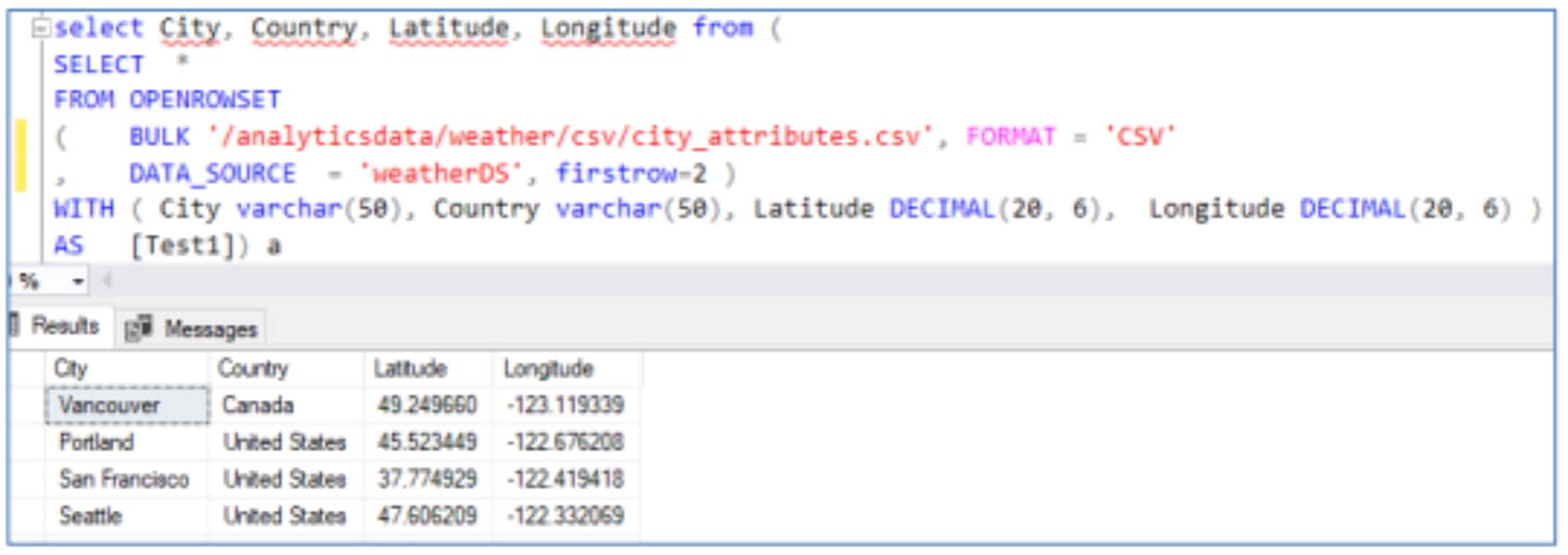
Traditional database engines such as SQL Server store data in row-based comma separated files, however in SQL Server 2022, T-SQL queries enable the conversion of csv files to Parquet using CREATE EXTERNAL TABLE AS SELECT (CETAS) with the OPENROWSET syntax. Using these features, it is possible to join relational data in SQL with efficiently stored non-relational data located in object storages such as Dell’s Elastic Cloud Storage. It is possible to use CETAS queries to create external datasets in Parquet file format without ever landing the data within the SQL server instance. The following is an example of creating an external dataset with CETAS.
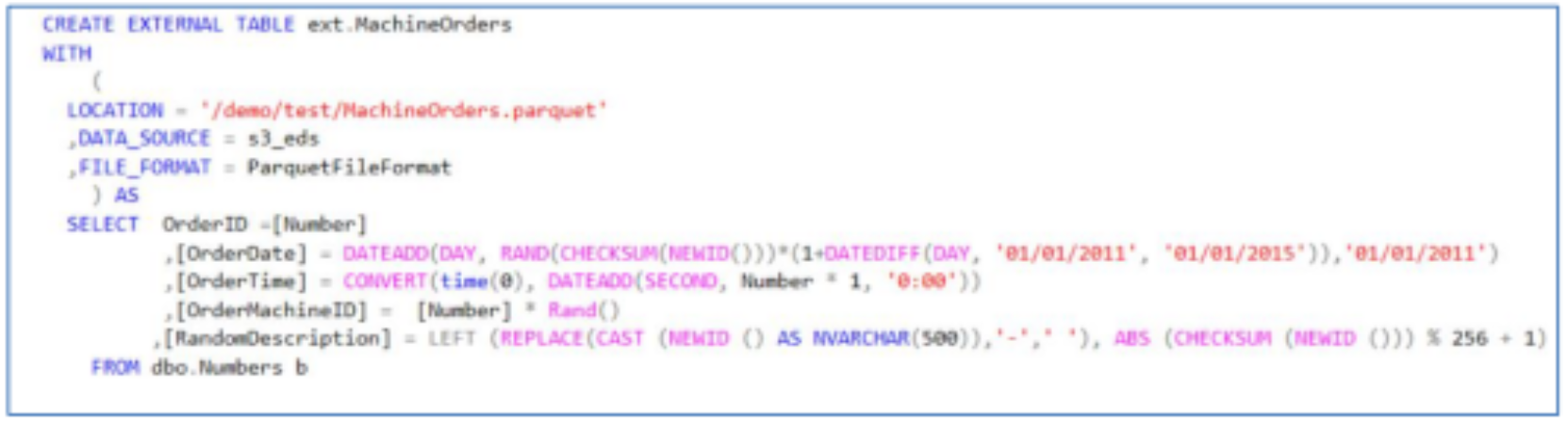
It is also possible to convert table data to Parquet through CETAS. The following is an example this command:
CREATE CREDENTIAL [s3://<ECS Bucket URL>]
WITH IDENTITY = ‘S3 Access Key’,
SECRET = ‘sqluser:<Username>/<Password>’;
CSV data can be converted to Parquet using CETAS and OPENROWSET together. Here is a command that accomplishes this:
CREATE EXTERNAL TABLE ext_city_attributes
WITH
(
LOCATION = '/analyticsdata/weather/parquet/ext_city_attributes.parquet',
DATA_SOURCE = weatherDS,
FILE_FORMAT = ParquetFileFormat
) AS
SELECT City, Country, Latitude, Longitude
FROM (
SELECT *
FROM OPENROWSET
(
BULK '/analyticsdata/weather/csv/city_attributes.csv',
FORMAT = 'CSV',
DATA_SOURCE = 'weatherDS',
FIRSTROW=2
)
WITH (
City VARCHAR(50),
Country VARCHAR(50),
Latitude DECIMAL(20, 6),
Longitude DECIMAL(20, 6)
) AS Test1
) AS A;
PySpark can also be used to convert the data from CSV to Parquet as shown below:
import os
import sys
os.environ['PYSPARK_PYTHON'] = sys.executable
os.environ['PYSPARK_DRIVER_PYTHON'] = sys.executable
import findspark
findspark.init()
import pyspark
import findspark
findspark.init()
sc = pyspark.SparkContext(master='spark://spark1n.proddc.sql:7077')
sc._jsc.hadoopConfiguration().set("mapreduce.fileoutputcommitter.marksuccessfuljobs", "false")
from pyspark.sql import SparkSession
spark = SparkSession.builder.master("'spark://spark1n.proddc.sql:7077'").getOrCreate()
from pyspark.sql import SQLContext
sqlContext = spark.builder.getOrCreate()
from pyspark.sql.types import *
schema = StructType([
StructField("City", StringType(), True),
StructField("Country", StringType(), True),
StructField("Latitude", DoubleType(), True),
StructField("Longitude", DoubleType(), True)
])
rdd = sc.textFile("csv/city_attributes.csv").map(lambda line: line.split(","))
rdd = rdd.zipWithIndex().filter(lambda tup: tup[1] > 14).map(lambda x:x[0])
rdd = rdd.map(lambda p: (p[0], p[1], float(p[2]), float(p[3]) ) )
df = sqlContext.createDataFrame(rdd, schema)
df.printSchema()
df.show()
df.write.mode("overwrite").parquet("city_attributes.parquet")
These different methods of converting data to and from Parquet files serve different purposes. The OPENROWSET use case works well for small batches of data that can quickly run and for scenarios where it is not necessary to have immediate access to the database. Large workloads can take many hours to run and would use the resources required for regular database operations to convert data to a different format. In these cases, it is more practical to rely on a platform such as PySpark to handle the data conversion without utilizing resources meant for analytical processes.
Accessing external data
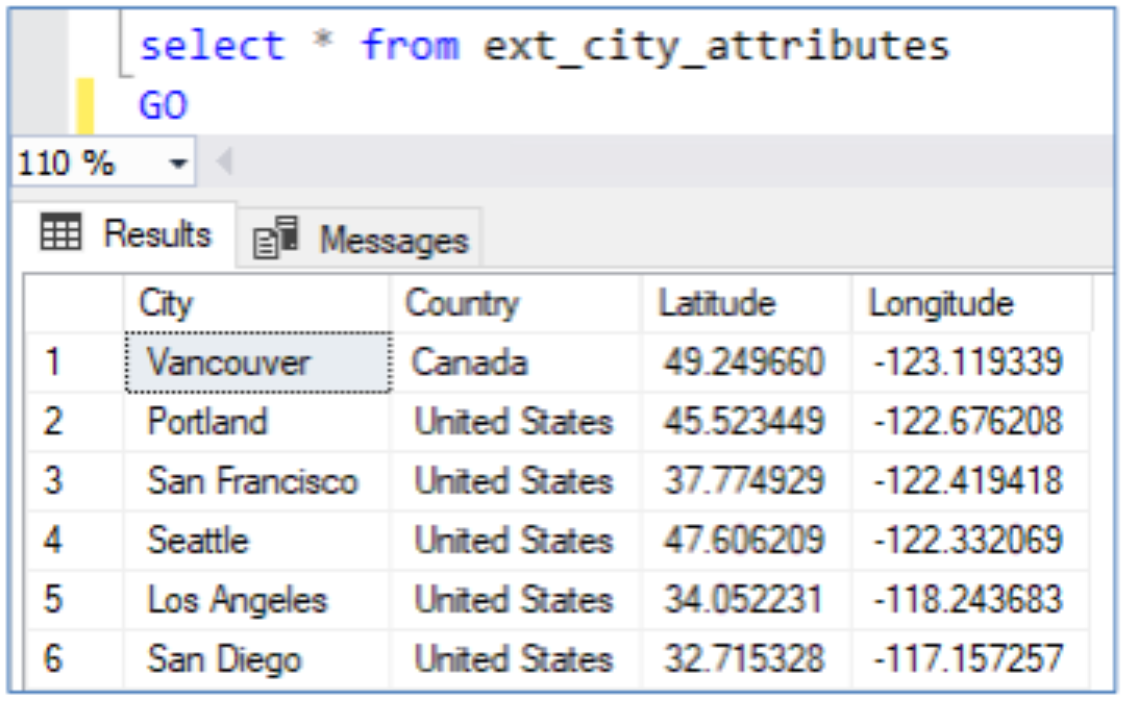
External tables simplify working with data outside of SQL Server, using PolyBase to access the external data. When creating external tables, information about the file format is required along with the data source, and location of the files. An external file format must be specified in SQL Server:
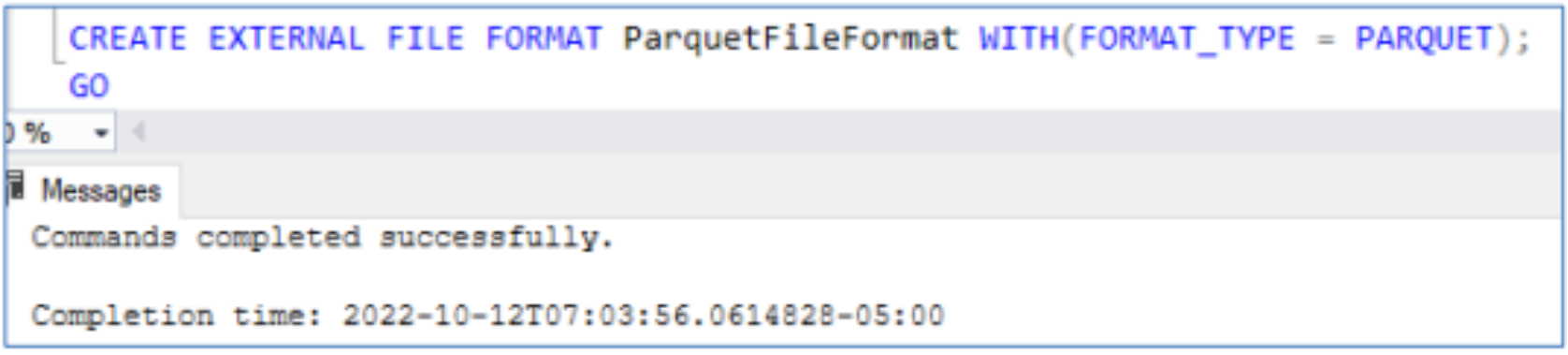
Users can create an external table from the data on S3 compatible storage by providing the file location, the data source and file format as shown in the following screenshots.
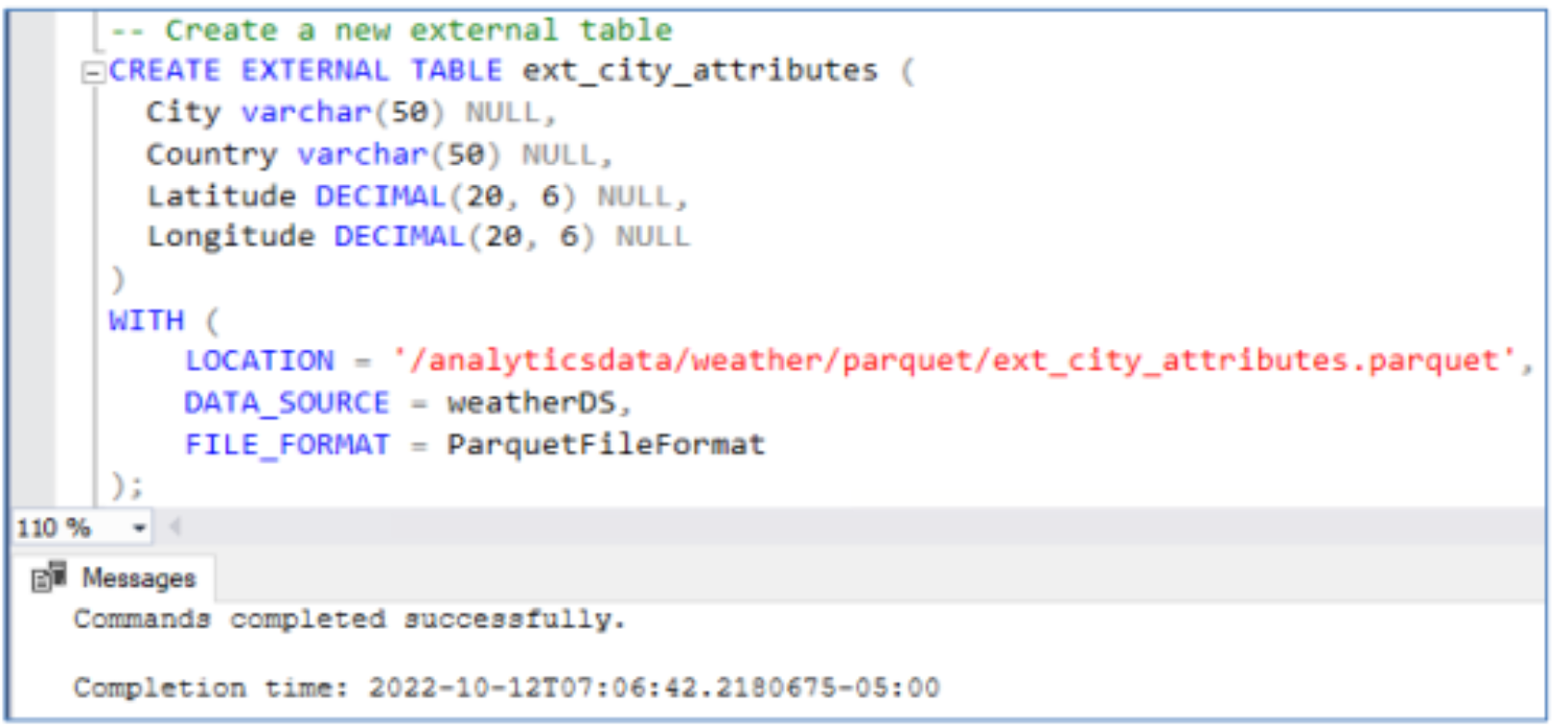
Once the external table has been created, data can be queried.
It is not currently possible to have multicolumn statistics for external data. It is possible to create statistics for singular columns of external tables which can improve performance.
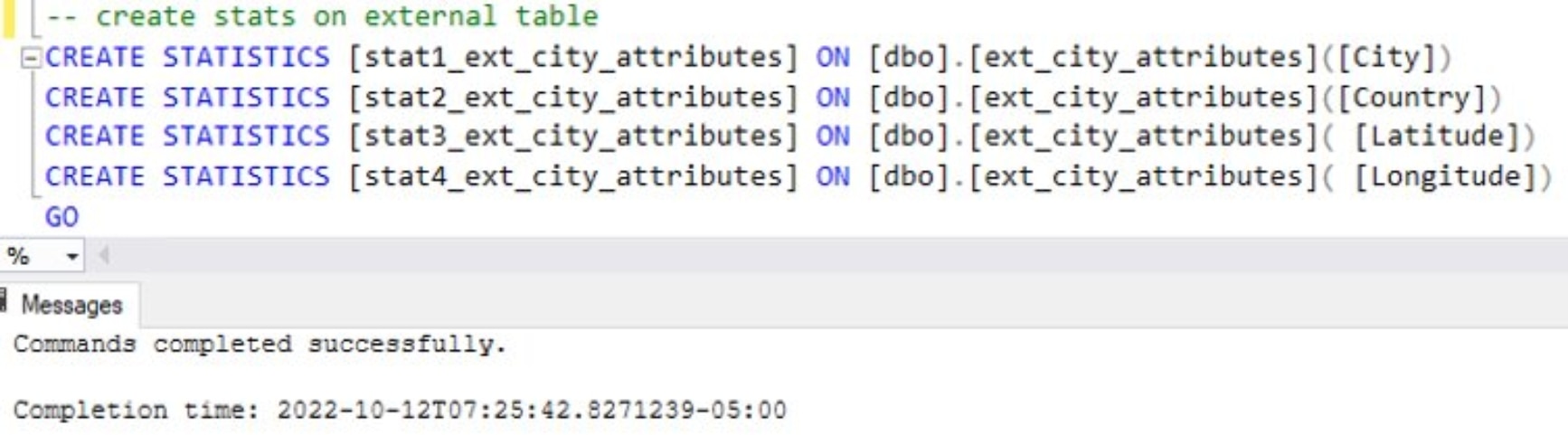
Creating statistics is costly and it is not always practical or necessary to have statistics for all a table’s columns. It is more useful to simply have statistics for fields such as City and Country which would likely need to be accessed more frequently than the other table attributes. This is akin to the rational used for creating indexes. This allows for a more effective use of system resources. It is important to consider cardinality when creating statistics for databases as depending on the cardinality the statistic may provide no benefits for queries that attempt to use it. This is especially true with large volumes of externally stored data where statistics must be manually generated by the user.
Data virtualization testing details
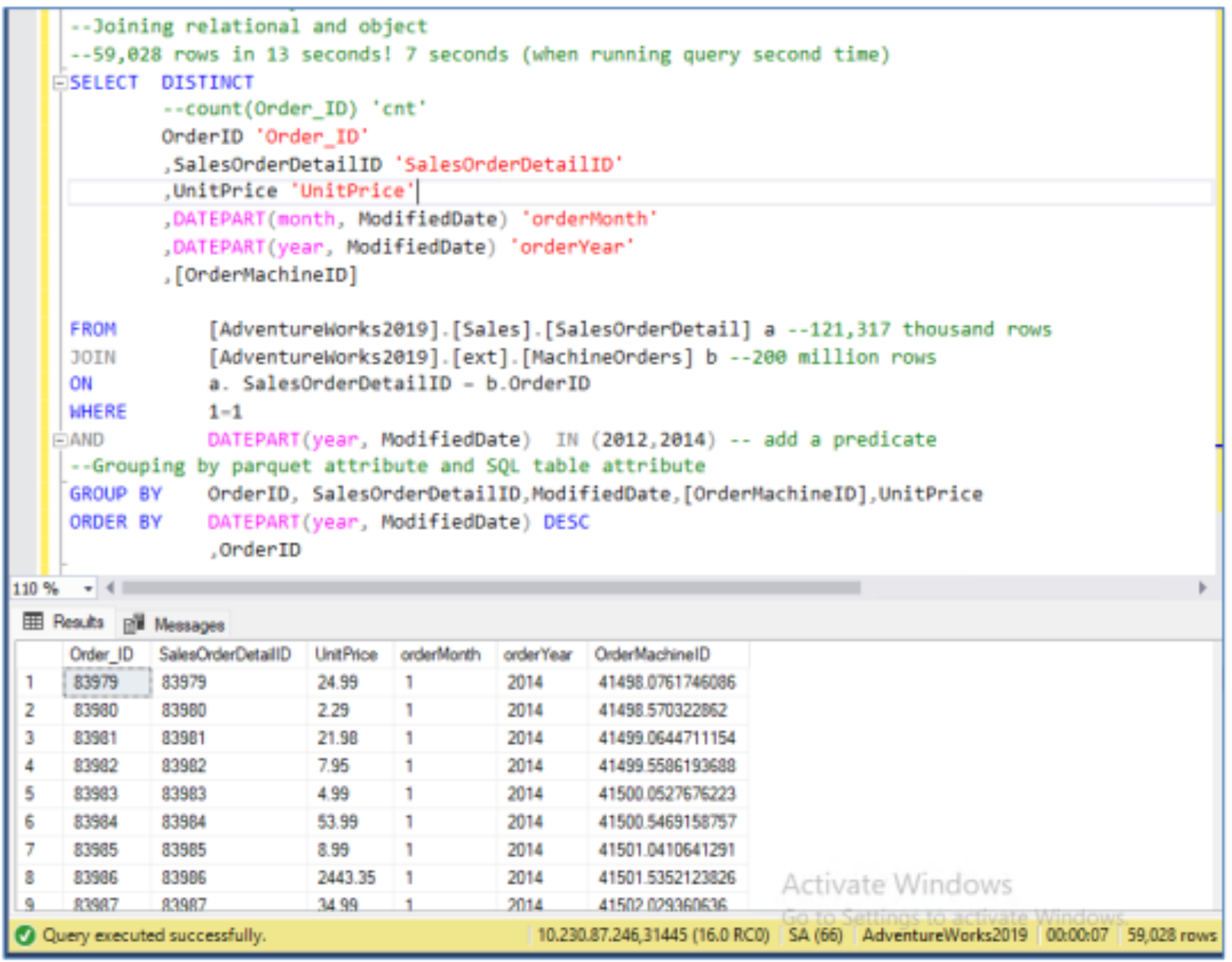
The Dell solutions engineering team conducted tests and performed research to determine the feasibility of reading hundreds of millions of records from ECS. This is was an extremely important consideration when evaluating the practical use of external data with Microsoft SQL Server 2022 for data analytics. To validate this, the relational data present in the SalesOrderDetail table from Microsoft’s AdventureWorks database was joined with an external table. The SalesOrderDetail table had 121,000 records and the external table backed up by Parquet files on Dell ECS contained 200 million records. The following is an example of such a query that demonstrates the join completing within seconds.
Dell solutions engineers also used Microsoft SQL Server to query data that resided externally on ECS. Two external tables backed up in CSV files were joined. These tables contained one and five million records.
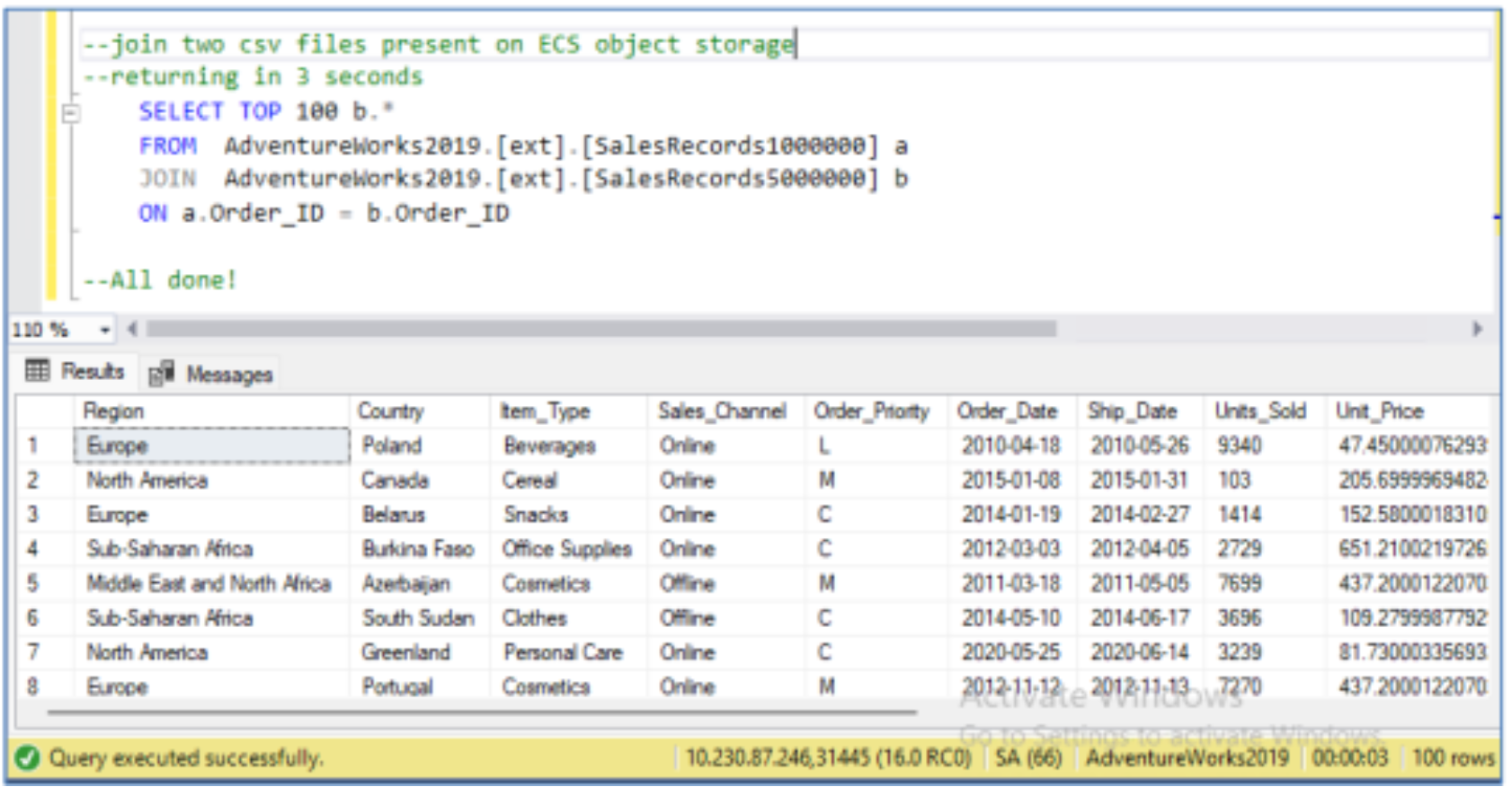
This allows for semi-structured and unstructured data to be kept externally from SQL Server in a more affordable object storage such as Dell ECS without hindering performance. Accessing data this way creates countless opportunities for performing ETL/ELT workflows and offloading the ETL/ELT process altogether.
Data tiering use case
New T-SQL functions use cases
Overview
Microsoft SQL Server 2022 has introduced several new Transact-SQL (T-SQL) queries that can be used to gather additional analytical information. The functions tested by Dell’s software engineers in queries with internal and external data include GREATEST, LEAST, FIRST_VALUE, LAST_VALUE, STRING_SPLIT, GENERATE_SERIES, and DATE_BUCKET. These queries, which were added to Microsoft SQL Server 2022 allow for additional information to be gathered from data stored in a Dell Elastic Cloud Storage data lake. These queries were tested on data stored in Parquet files to simulate a realistic scenario. The data used for these queries comes from the US Weather dataset, the US AQI dataset, and Microsoft’s Wide World Importers dataset.
DATE_BUCKET Function
Function overview
Date buckets allow for data to be grouped according to ranges of dates which is especially useful. This query allows companies to analyze monthly profitability patterns. The DATE_BUCKET function supports parameters that allow for different increments of time to be selected, including hourly, monthly, and yearly. It is possible to allow for periods of several weeks or years to fall into the same bucket by modify the unit of time’s scalar. The start and end dates of the range can be specified, allowing for business data to be precisely analyzed.
Example Monthly DATE_BUCKET Query
SELECT DATE_BUCKET(MONTH, 1, DateOf) AS DayTemp, City,
AVG(Temperature) AS AvgMonthlyTemp
FROM Temperature_View
GROUP BY DATE_BUCKET(MONTH, 1, DateOf), City
ORDER BY DayTemp;
Results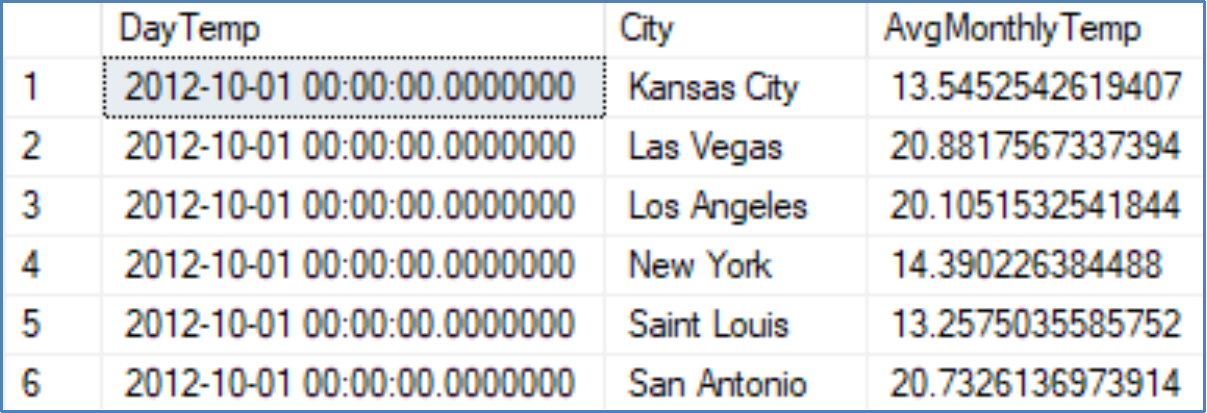
Query description
This query returns the average temperature for each city every month beginning on the first day of the month. It groups all the values that occur within the range of a month and then these groups can be aggregate.
Example Biweekly DATE_BUCKET Query
SELECT DATE_BUCKET(WEEK, 2, InvoiceDate) AS InvoiceWeek,
COUNT(CustomerId) AS CustomerCount
FROM WideWorldImporters.Sales.Invoices
GROUP BY DATE_BUCKET(WEEK, 2, InvoiceDate)
ORDER BY InvoiceWeek;
Results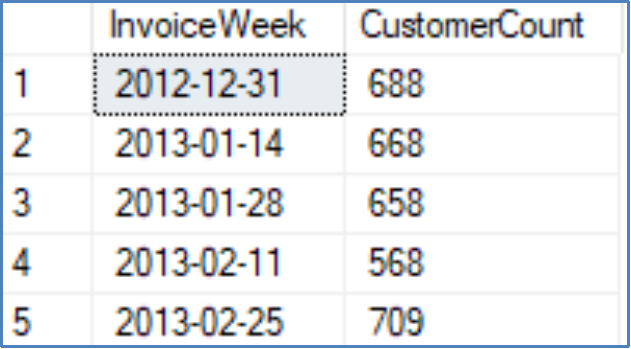
Query description
This query returns the biweekly counts of customers for each invoice. It demonstrates how custom time periods can be specified by users to acquire the preferred information.
GREATEST and LEAST Functions
Function Overview
The MIN and MAX functions do not always permit the retrieval of data in the preferred format. The GREATEST and LEAST T-SQL functions introduced for SQL 2022 allow for the retrieval of the maximum or minimum value of a row, respectively. This is useful for data analysts who could previously only find these values for columns. These functions can be used in SQL stored procedures and functions to select specific parameters.
Example GREATEST Query
SELECT DateTime, 32 + 9/5 * (
GREATEST([San_Antonio], [San_Diego], [San_Francisco], [Kansas_City], [Saint_Louis],
[Las_Vegas], [Los_Angeles], [New_York], Seattle)-273.15) AS HighestTemp
FROM Temperature
WHERE DateTime = '2012-10-01 13:00:00:000';
Results
Query description
This query selects the maximum temperature value from a list of columns for the row entry at a specified DateTime which is useful for perform comparisons between the values in a row. The relevant result can then be added as a new column in the resulting table.
Example LEAST Query
SELECT DateTime, 32 + 9/5 * (
LEAST([San_Antonio], [San_Diego], [San_Francisco], [Kansas_City], [Saint_Louis],
[Las_Vegas], [Los_Angeles], [New_York], Seattle)-273.15) AS LowestTemp
FROM Temperature
WHERE DateTime = '2012-10-01 13:00:00:000';
Results
Query description
This query selects the minimum temperature from a list of columns for each row entry at a specified DateTime.
GENERATE_SERIES Function
Function overview
GENERATE_SERIES is a function that allows for the creation of a series of numeric values. This is helpful for querying specific values or creating new data through joins. It can be used to create completely new data through string concatenation or mathematical operations. It is a powerful function for transforming data and has many use cases.
New String Creation with GENERATE_SERIES
WITH Series AS (
SELECT value AS SeriesId FROM GENERATE_SERIES(1,1000)
)
SELECT TOP 5 'employee'+(CONVERT (varchar (10), SeriesId)) AS Employees
FROM Series;
Results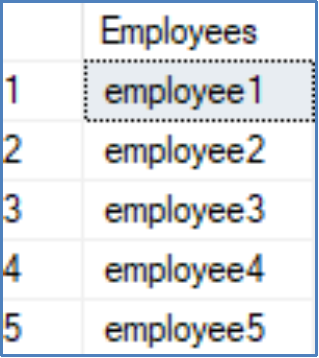
Query description
This example creates a series using the GENERATE_SERIES function and then creates a new table which is populated with numbered employee strings. It demonstrates one of the ways that the GENERATE_SERIES function can create new data.
Finding the First Occurrence of a Repeated Character Sequence Using GENERATE_SERIES
DECLARE @S VARCHAR(8000) = 'Aarrrgggh!';
SELECT value, S
FROM (
SELECT value=1, S=LEFT (@S, 1)
UNION ALL
SELECT value,
CASE
WHEN SUBSTRING(@S, value - 1, 1) <> SUBSTRING(@S, value, 1)
THEN SUBSTRING(@S, value, 1)
END
FROM GENERATE_SERIES(1, 100)
WHERE value BETWEEN 2 AND LEN(@S)
) AS A
WHERE S IS NOT NULL;
Results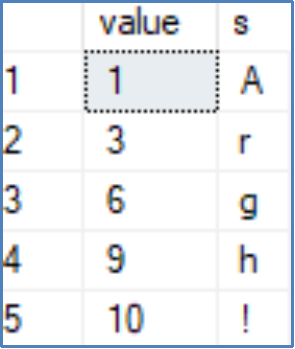
Query Description
GENERATE_SERIES can be used to provide additional information regarding the indexing of values. In this case, the string’s repeat character sequences are associated with their ordinal position and the first occurrence of the character in a sequence of identical characters has its index retained to condense string information.
STRING_SPLIT Function
Function overview
The STRING_SPLIT function can split a string into substrings by using a delimiter. The function creates a column containing the substring values and another column with their ordinal position if the ordinal option is enabled. This can be used to analyze frequent words within a column of strings. It can also be used to select and clean substrings to them in an understandable format. For example, each string in a row might contain an employee’s name and badge number. A string split could be used for all the strings in a column and only retrieve the names of employees to display in a view to a user who should not be privileged to see both the employees’ badge numbers and names by using the ordinal option.
Substring Extraction Example with STRING_SPLIT
SELECT D.[Primary Contact], D.Customer, D.FirstName, value City
FROM (
SELECT C2.[Primary Contact], C2.Customer, C2.FirstName, value C2v, ordinal C2o
FROM (
SELECT B.[Primary Contact], B.Customer, B.FirstName, value Bv, ordinal Bo
FROM (
SELECT *
FROM (
SELECT value AS FirstName, C.[Primary Contact], C.Customer
FROM Customer C
CROSS APPLY STRING_SPLIT(C.[Primary Contact], ' ',1)
WHERE ordinal = 1
) AS NS
WHERE Customer <> 'Unknown' AND Customer NOT LIKE '%Head Office%'
) B CROSS APPLY STRING_SPLIT(B.Customer, '(', 1) WHERE ordinal = 2 ) B2
CROSS APPLY STRING_SPLIT(Bv, ')', 1)
WHERE ordinal = 1) D CROSS APPLY STRING_SPLIT(C2v, ',', 1)
WHERE ordinal = 1;
Results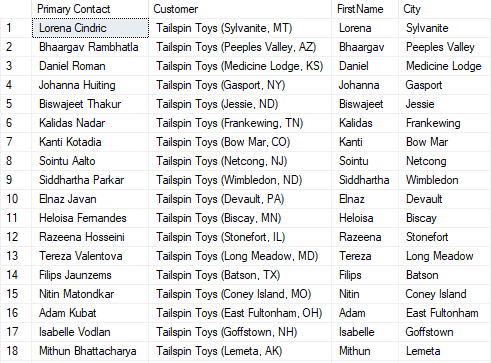
Query description
The city name of each value stored in the customer column is added to the row in this example query. The function splits strings and uses the ordinal property to extract the required substring. This allows data transformation entirely in Microsoft SQL Server.
FIRST_VALUE and LAST_VALUE Functions
Function overview
The FIRST_VALUE and LAST_VALUE functions are nondeterministic because the order by function is nondeterministic, which changes the first and last values depending on the conditions chosen when there are multiple equal values. These functions are helpful for rapidly determining the first and last values that appear in a table or partition. This can be used to find the item with the minimum price and populate its name alongside all the other items in that table’s partition which is an additional functionality not previously available to the MIN and MAX functions without performing a self-join. Partitions can provide great value because they allow for more data insights to be easily visualized by a single query.
Example FIRST_VALUE Query
SELECT City, DateOf, Temperature,
FIRST_VALUE(City) OVER (PARTITION BY DateOf ORDER BY Temperature ASC) AS ColdestCity
FROM Temperature_View
ORDER BY DateOf;
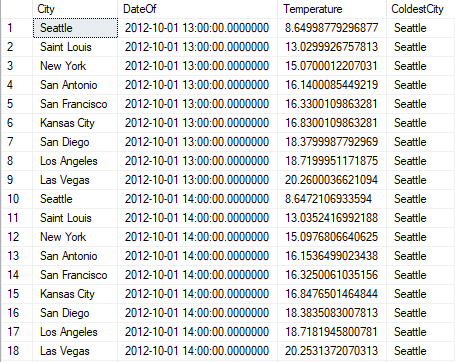
Results
Query description
The FIRST_VALUE function selects the first value in each partition. In this case, the partitions are based on the DateOf values. The first ordered column partition value can be selected and added as a new column without the need for a self-join.
Example LAST_VALUE Query
SELECT City, DateOf, Temperature, LAST_VALUE(City)
OVER (
PARTITION BY DateOf
ORDER BY Temperature ASC
ROWS BETWEEN UNBOUNDED PRECEDING AND UNBOUNDED FOLLOWING) AS HottestCity
FROM Temperature_View
ORDER BY DateOf;
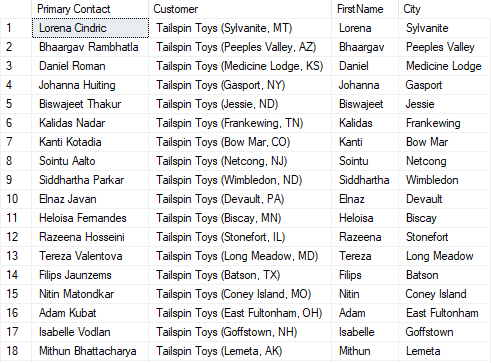
Results
Query description
LAST_VALUE is less intuitive than the FIRST VALUE function, and extra care must be taken to implement it correctly. The simplest use case, however, is to combine FIRST_VALUE and use descending order to emulate the LAST_VALUE function. Thanks to ordering the two functions’ roles are highly interchangeable.
The reason that the LAST_VALUE function is less intuitive is framing. A frame refers to a set of rows for the window which is usually smaller than a partition. The default frame contains the rows between the current row and the first row. For example, with row 5, the window holds the values of rows 1 through 5. FIRST_VALUE includes the first row by default and so this concept does not interfere with retrieving the desired results.
The window only goes up to the current row for the default LAST_VALUE frame. To circumvent this, specify the following frame, ROWS BETWEEN CURRENT ROW AND UNBOUNDED FOLLOWING. This forces the window to begin with the current row and end at the last row of the partition and provides the expected query results.
Deployment automation use case
To create an SQL deployment for OpenShift cluster, the Dell engineering team developed an automated script to ensure that the data virtualization use cases were easily replicable and repeatable. This script uses a single .yaml file to deploy the SQL Server 2022 instances and perform necessary steps for the data virtualization use case. Encrypted communication between SQL Server and ECS requires prior setup of appropriate certificates.
This script creates the ConfigMap, the secret for logging in to SQL Server, establishes the persistent volume claim and deploys the pods with services exposed. The automated script also is used to automatically restore the sample databases, configure PolyBase, setup S3 connectivity, and run use case validation tests. This is an extremely useful scenario for quickly bringing new database engines online without worrying about the physical location of the data stores.
Deploying SQL Server SQL Server with S3 Connectivity through an Automated Script
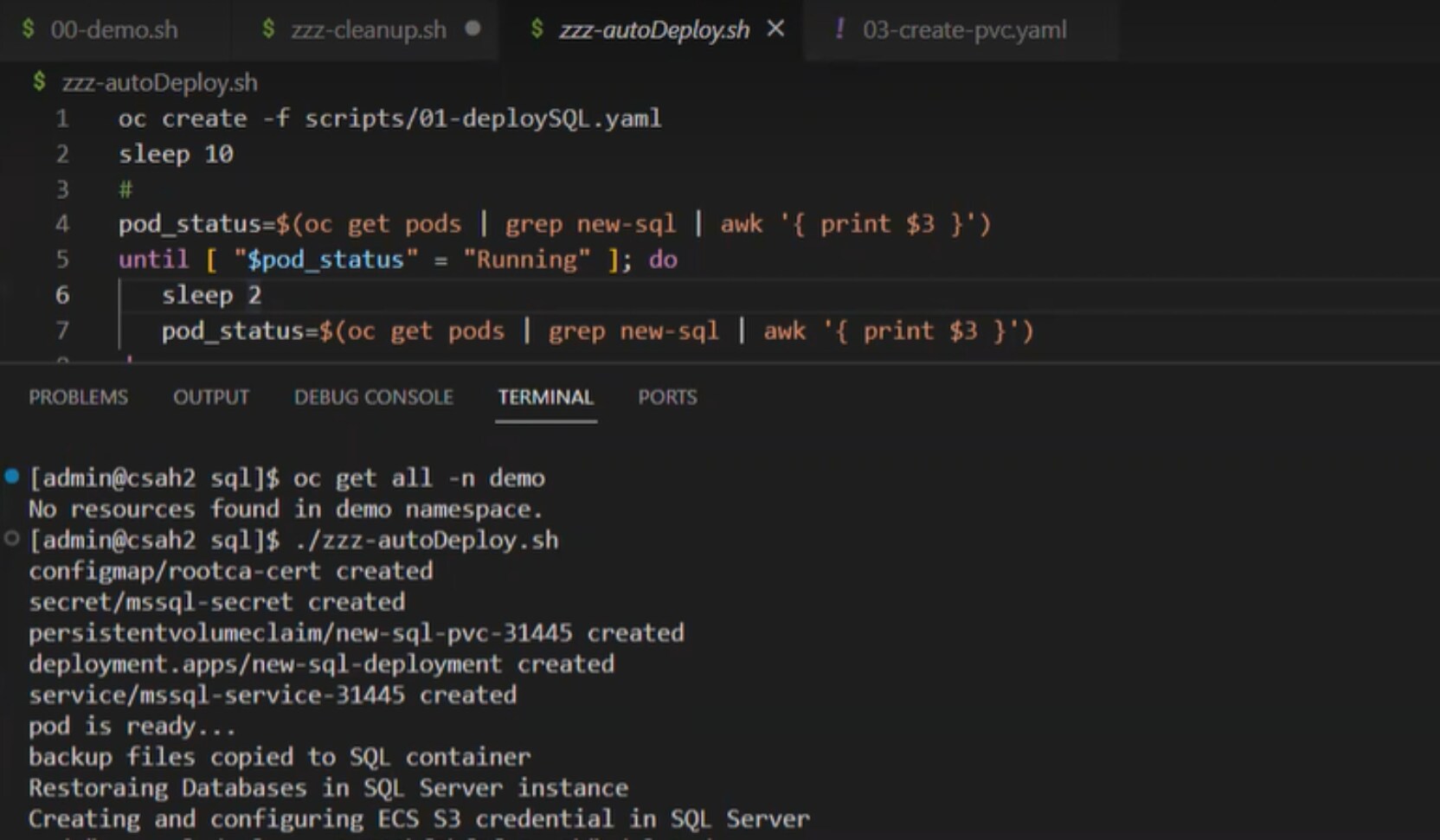
The script quickly configures and creates all the required components for the analytics as a service scenario. An additional script has been provided to clean up the environment when it is no longer needed. These automation files are available on GitHub. Visit Microsoft’s GitHub for the WorldWideImporters and WorldWideImportersDW backup files. The appendix contains further details about the individual scripts created for automation.