
HPC High-Performance Storage Solution for BeeGFS

Oct 19, 2026
HPC High-Performance Storage Solution for BeeGFS This white paper describes a solution for HPC high-performance, high-throughput scalable storage, a Dell Technologies Validated Design for BeeGFS. This paper explains the architecture, tuning guidelines, and performance of the solution. Dell Technologies

Introduction

Executive summary

In high-performance computing (HPC), designing a well-balanced storage system to achieve optimal performance presents significant challenges. A typical storage system consists of a variety of considerations, including file system choices, file system tuning, disk drive, storage controller, IO cards, network cards, and switch strategies. Configuring these components for best performance, manageability, and future scalability requires a great deal of planning and organization.

The Dell Technologies Validated Design for HPC BeeGFS High-Capacity Storage is a fully supported, easy-to-use, high-throughput, scale-out, parallel file system storage solution with well-described performance characteristics. This solution is offered with deployment services and full hardware and software support from Dell Technologies. 

The solution in large configuration with four ME5084 arrays scales to 6.72 PB of raw storage (5.069 PB usable) and uses Dell PowerEdge servers and Dell PowerVault storage arrays.

Document purpose

The purpose of this document is to describe the architecture, tuning best practices, and performance of the Dell Technologies Validated Design for High-Capacity Storage with BeeGFS for sequential and random workloads.

Audience

This document is intended for solution architects and administrators who are already utilizing HPC clusters for their research and scientific computing requirements. This paper is not a detailed configuration guide but does advise best practices for configuration. This paper assumes that the readers will understand the basic concepts of storage performance benchmarking.

Business challenges

Market environment

In recent years, the requirement for I/O performance has increased dramatically with increasing demand for both traditional HPC I/O bandwidth but also for increased IOPS and metadata performance. The BeeGFS filesystem has steadily gained popularity and is increasingly being used as the file system of choice in many top HPC centers today. This whitepaper demonstrates how the BeeGFS filesystem deployed on the latest generation of PowerEdge servers and PowerVault storage arrays offers high capacity, high availability, and high performance that can be tailored to meet the needs of the customer.

Building-block approach

A highly flexible solution that provides superior performance and reliable scalability to run todays and tomorrow’s most demanding HPC applications.

Ease of use

This solution is optimized for use in today’s large-scale data processing systems that consist of thousands of compute nodes (BeeGFS clients) running tens of thousands of concurrent processes.

High availability

The solution is designed to enhance the availability of storage services to the HPC cluster by using a pair of Dell PowerEdge servers and PowerVault storage arrays along with Pacemaker and Corosync software. The goal of the solution is to improve storage services availability and maintain data integrity in the event of possible failures or faults, and to optimize performance in a failure-free scenario.

Solution overview

Configurations

The Dell Technologies Validated Design for HPC BeeGFS Storage is available in three base configurations: Small, Medium, and Large. These base configurations can be used as building blocks to create additional flexible configurations to meet different capacity and performance goals as illustrated in Figure 1:
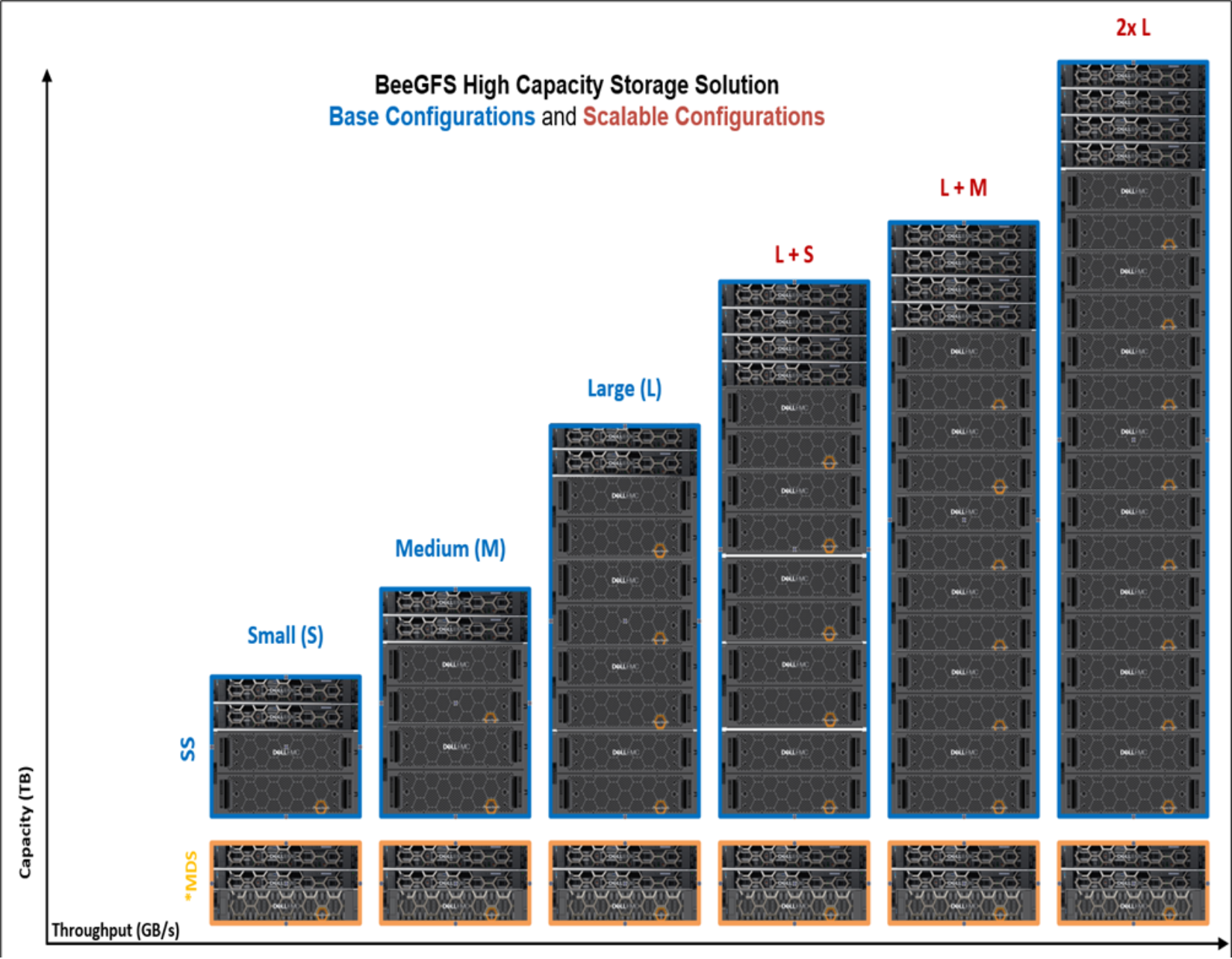
BeeGFS high-capacity storage solution—base and scalable configurations

Figure 1.   BeeGFS high-capacity storage solution—base and scalable configurations

The metadata component of the solution that includes a pair of metadata servers (MDS) and a metadata target storage array remains the same across all the configurations as shown in Figure 1. The storage component of the solution includes a pair of storage servers (SS) and a single storage array for the small configuration, while a medium configuration uses two storage arrays, and a large configuration uses four storage arrays. The PowerVault ME5024 storage array is used as the metadata storage, and PowerVault ME5084 arrays are used as the data storage.

To scale beyond a large configuration, an additional pair of storage servers are needed. The additional storage server pair can have either one, two, or four storage arrays as indicated in the scalable configurations.

BeeGFS file system

This storage solution is based on BeeGFS, an available source parallel file system, which offers flexibility and easy scalability. The general architecture of BeeGFS consists of four main services: management, metadata, storage, and client. The server components are implemented as user space daemons. The client is a patchless kernel module. An additional monitoring service called Grafana is also available.

The key elements of the BeeGFS file system are as follows:

  • MetaData Targets (MDTs): Stores all the metadata for the file system including filenames, permissions, time stamps, and the location of stripes of data.
  • Management Daemon (MGMTD): Stores management data such as configuration and all the file system components.
  • MetaData Server (MDS): A server that runs the metadata services.
  • Storage Targets (STs): Stores the data stripes of the files on a file system in the ME5084 arrays. There can be multiple storage targets in a single storage service.
  • Storage Server (SS): A server that runs the storage services.
  • Client Module: The BeeGFS client kernel module is installed on the clients to allow access to data on the BeeGFS file system. To the clients, the file system appears as a single namespace that can be mounted for access.

For more information on BeeGFS file system architecture, see Introduction to BeeGFS.

Solution architecture

Overview

Figure 2 shows the large configuration architecture with four PowerVault ME5084 storage arrays:
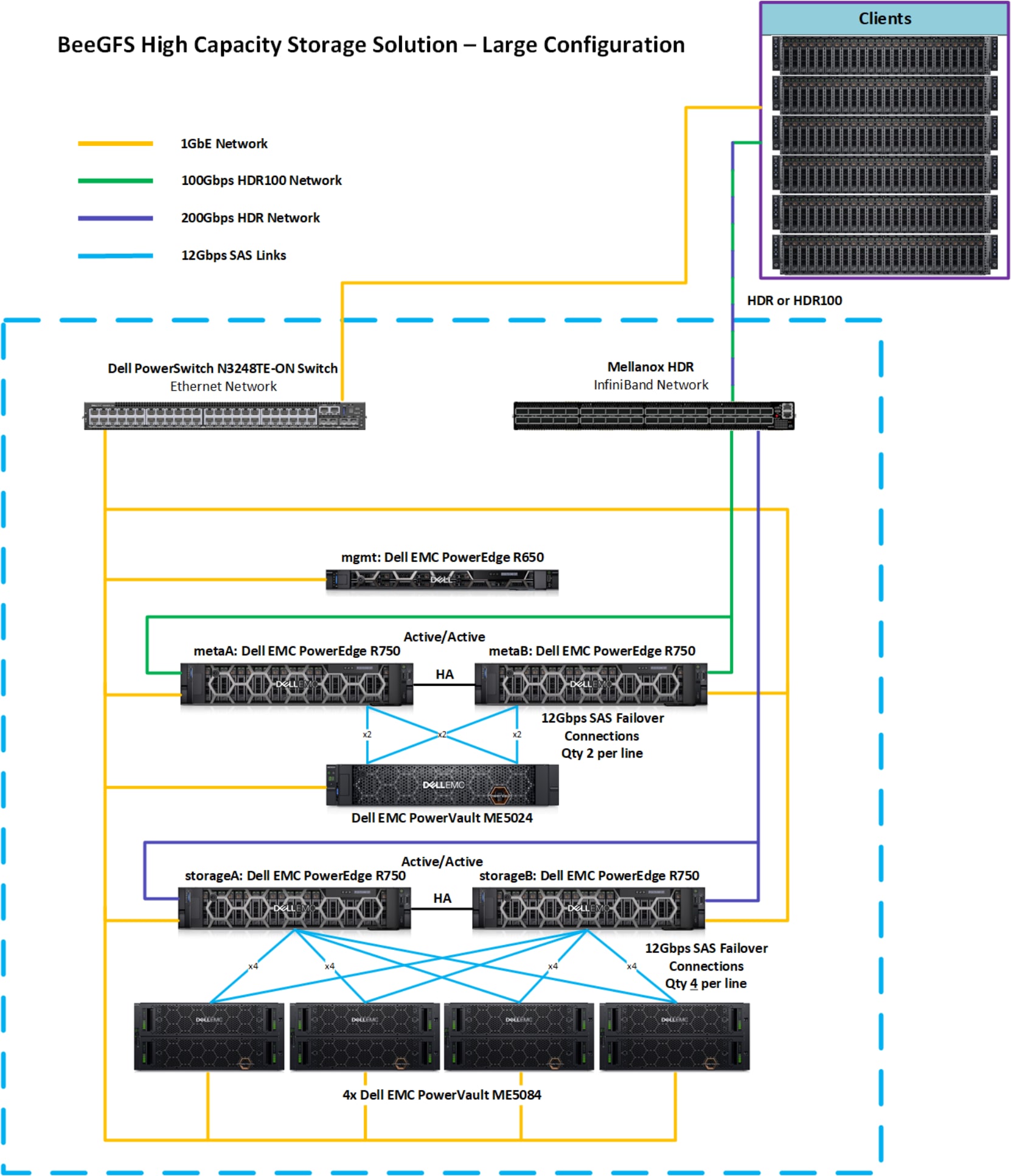
Figure 2.   Solution reference architecture—large configuration

In figure 2, the management server (the topmost server) is a PowerEdge R650. The MDS function is provided by two PowerEdge R750 servers. The MDS pair is attached to a PowerVault ME5024 through 12 Gb/s SAS links. The PowerVault ME5024 hosts the metadata targets.

The SSs are a pair of PowerEdge R750 servers. The SS pair is attached to four fully populated PowerVault ME5084 storage arrays through 12 Gb/s SAS links. The four PowerVault ME5084 arrays host the storage targets.

The solution uses InfiniBand HDR100 as the data network connecting the metadata targets to the compute clients, and InfiniBand HDR to connect the storage targets. Gigabit Ethernet is used for management operations.

Management server

The single management server is connected to the MDS pair and SS pair through an internal 1 GbE network.

BeeGFS provides a tool called beegfs-mon that collects use and performance data from the BeeGFS services and stores the data in a timeseries database called InfluxDB. beegfs-mon-grafana provides predefined Grafana panels that can be used out of the box to extract and visualize this data. Both Grafana and InfluxDB are installed on the management server. After starting and enabling InfluxDB and Grafana server services, Grafana dashboard can be accessed using the URL: http://<IP of mgmt.>:3000.

Metadata server

The beegfs-mgmtd service in the BeeGFS high-capacity solution is not running on the management server. It is managed by Pacemaker to run on either metaA or metaB. Storage for the management daemon is bound by default to the first metadata partition of metaA (metaA-numa0-1), and physically resides on the ME5024. In the event of a failure, the management data will follow this partition along with the beegfs-mgmtd service to the functional node. The beegfs-mgmtd store is initialized on the directory mgmtd on the metadata target 1 as follows:

/opt/beegfs/sbin/beegfs-setup-mgmtd -p /beegfs/metaA-numa0-1/mgmtd -S beegfs-mgmt

The two PowerEdge R750 servers that are used as the MDS are directly attached to the PowerVault ME5024 storage array housing the BeeGFS MDTs and MGMTD. Figure 3shows the SAS ports on ME5024 array.
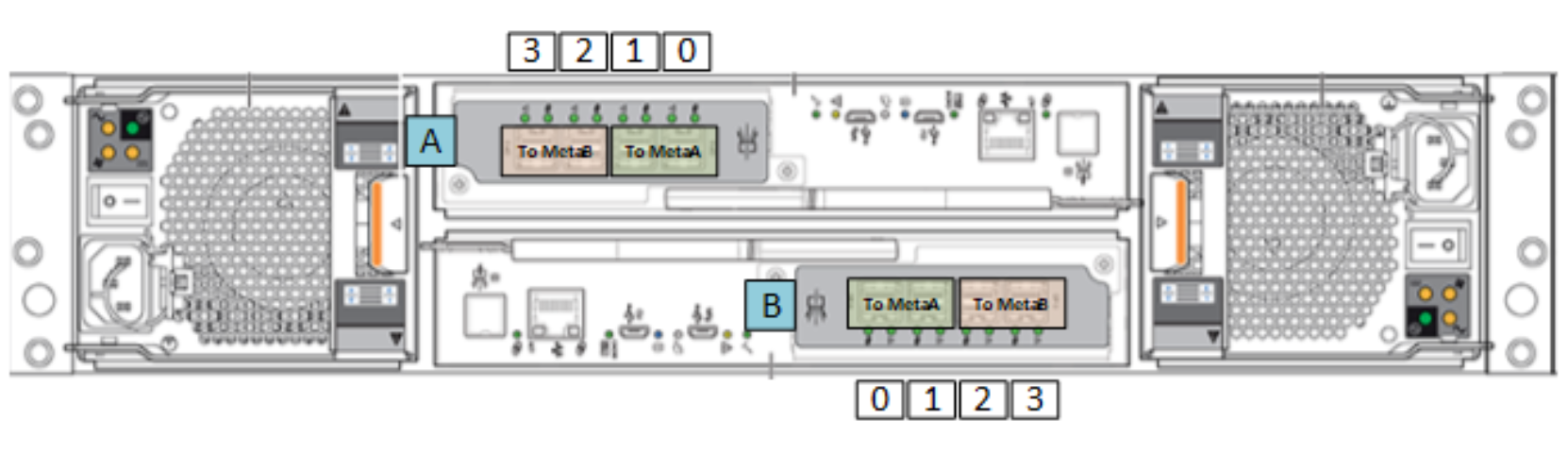
Figure 3.   ME5024 SAS ports

Metadata targets

The ME5024 array is fully populated with 24× 960 GB SAS SSDs. An optimal way to configure the 24 drives for metadata is to configure twelve MDTs. Each MDT is a RAID 1 disk group of two drives each. Figure 4 shows how the MDTs are configured.
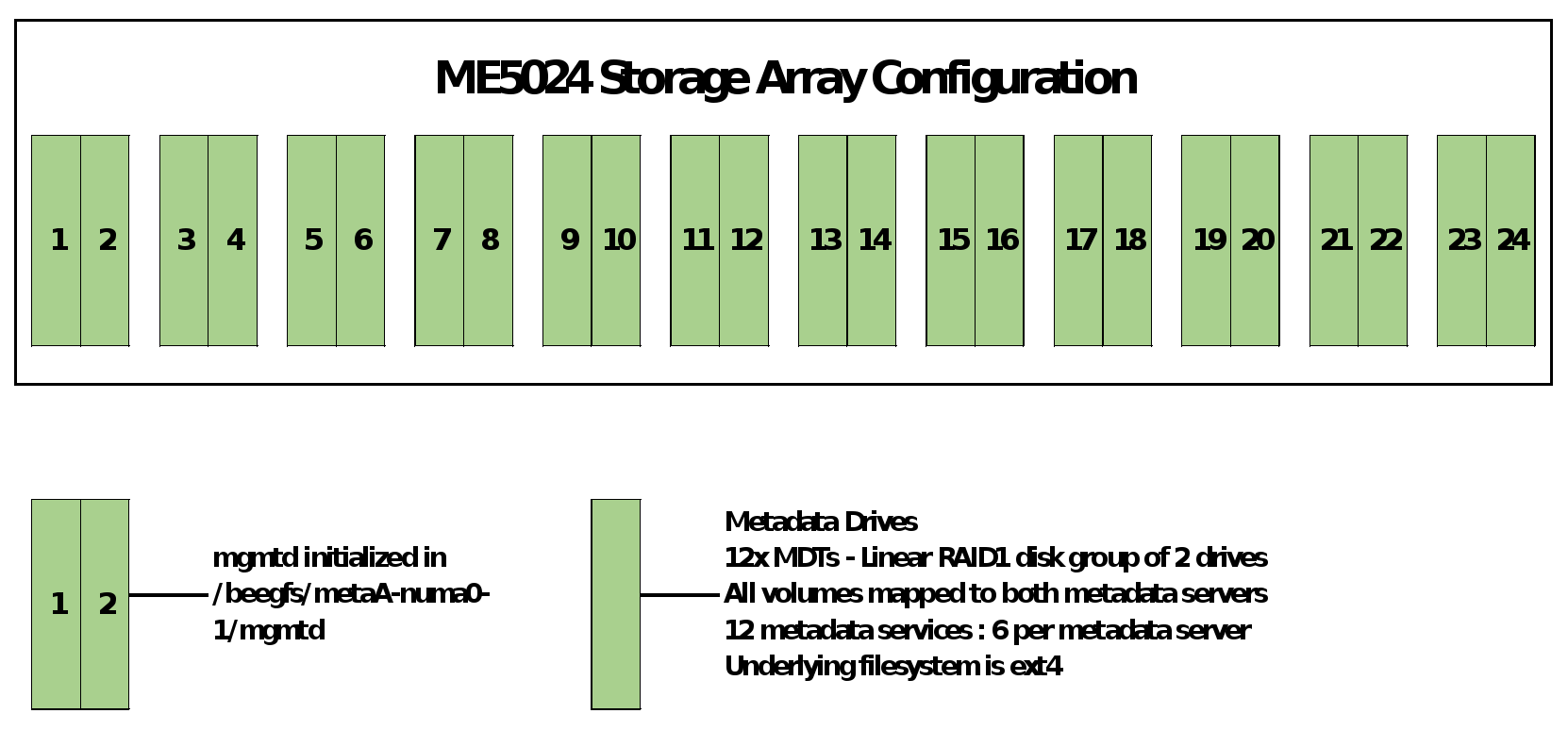
Figure 4.   Configuration of metadata targets in the ME5024 storage array

The management service runs on the metadata servers, and it is initially set up on the metaA server. The metadata targets are formatted with the ext4 file system because it outperforms other file systems with small file I/O and handles storing metadata as extended attributes inside the inode more efficiently.

Storage servers

Each PowerEdge R750 server in the SS pair is equipped with four quad-port 12 Gb/s SAS host bus adapters HBA355e and two NVIDIA Mellanox InfiniBand HDR adapters to handle storage requests. This allows the SAS HBAs to be evenly distributed across the two CPUs for load balancing. With four quad-port 12 Gb/s SAS controllers in each PowerEdge R750, the two servers are redundantly connected to each of the four PowerVault ME5084 high-density storage arrays, with a choice of 8 TB, 12 TB, 16 TB, or 20TB of NL SAS 7.2 K RPM hard disk drives (HDDs) or any supported drive as defined in the Dell PowerVault ME5 Series Storage System Support Matrix. Figure 5 shows the SAS ports on the ME5084 array.
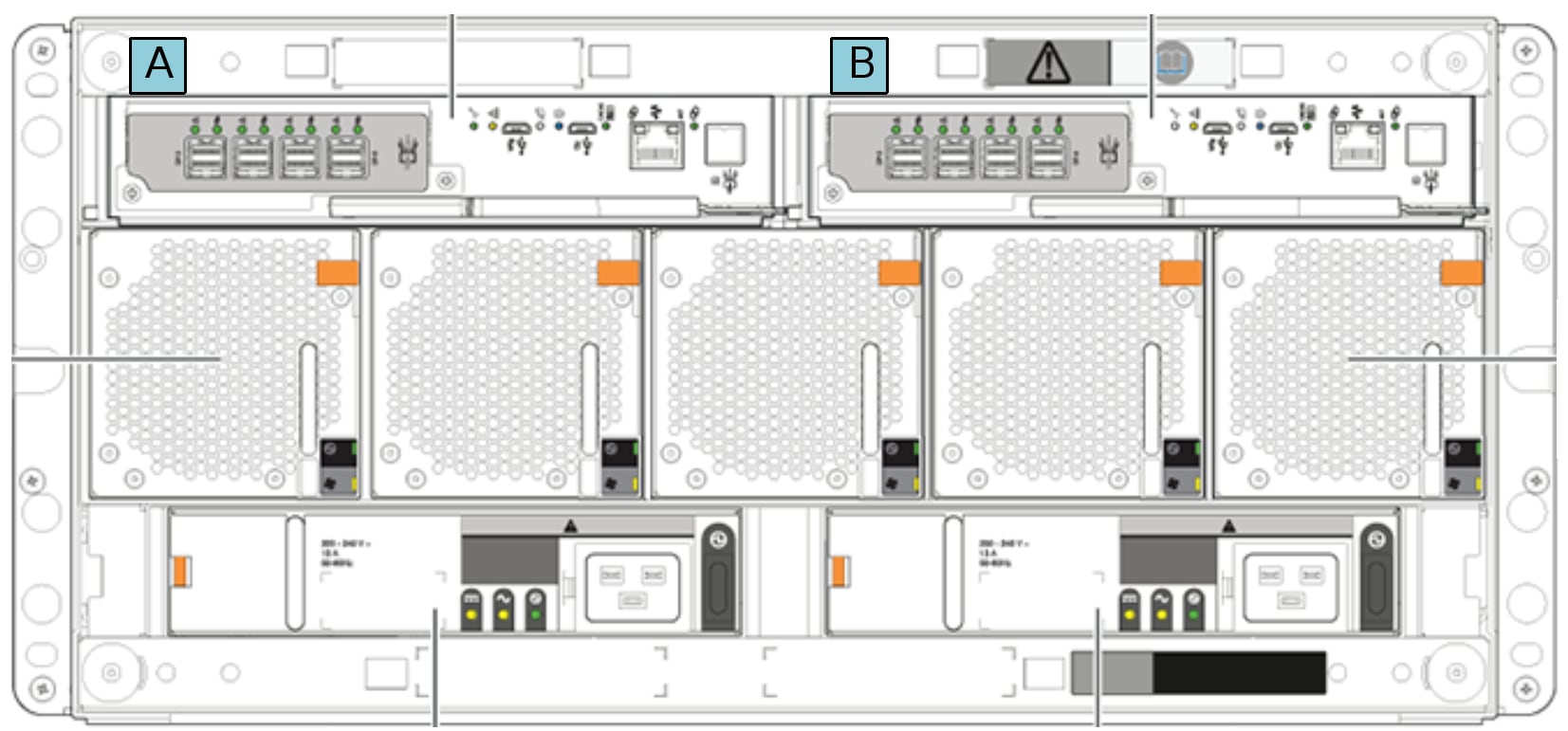
Figure 5.   ME5084 SAS ports

Storage targets

Figure 6 illustrates how each ME5084 storage array is divided into eight linear RAID 6 disk groups of ten drives each, with eight data and two parity disks per group. Each disk group is formatted with a chunk size of 128k and makes up a single storage target (ST), for a total of eight ST’s.
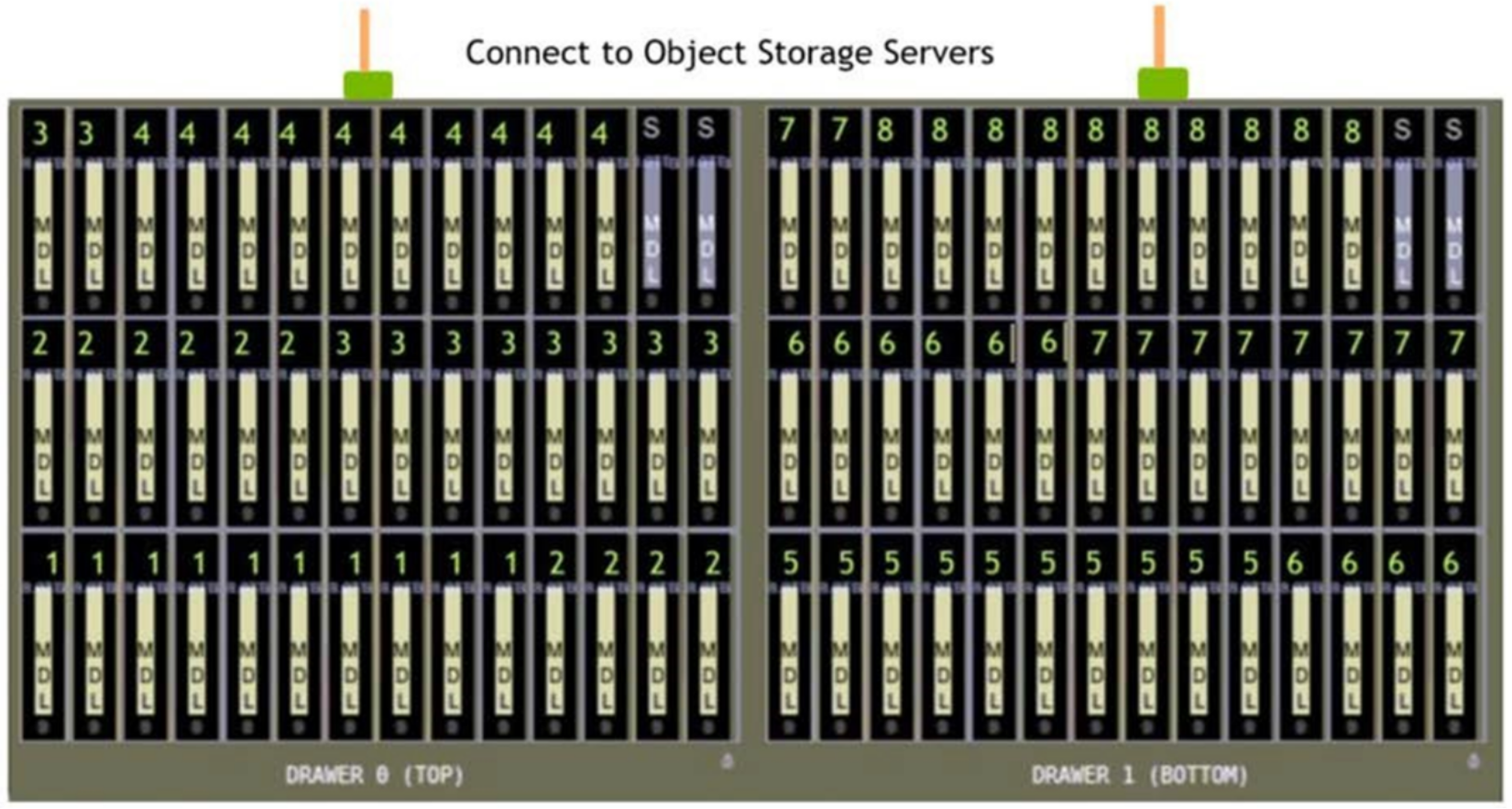
RAID 6 (8+2) LUNs layout on one ME4084

Figure 6.   RAID 6 (8+2) LUNs layout on one ME5084

Each ST provides about 64 TB of formatted object storage space when populated with 8 TB HDDs. Since each array has 84 drives, after creating eight RAID-6 disk groups, we have 4 spare drives per array, 2 per tray, which are configured as global dynamic hot spares across the 8 disk groups in the array. For every disk group, a single volume using all the RAID’s capacity is created. As a result, a large base configuration as shown in Figure 2 has a total of 32 linear RAID 6 volumes across four ME5084 storage arrays. Each of these RAID 6 volumes is configured as an ST for the BeeGFS file system, resulting in a total of 32 STs across the file system in the base large configuration.

The STs are presented to clients via InfiniBand HDR connections. From any compute node that is equipped with the BeeGFS client, the entire namespace can be mounted, accessed, and managed like any other local file system.

Hardware and software configuration

Table 1 describes the hardware and software details of the solution:

Table 1.      Solution hardware and software specifications

Component

Specification

Management server

1× Dell EMC PowerEdge R650

Metadata servers

2× Dell EMC PowerEdge R750

Storage servers

2× Dell EMC PowerEdge R750

Processors

Management Server, MDS, and SS:

2× Intel Xeon Gold 6326 2.9G, 16 cores

Memory

Management Server, MDS and SS:
16x 16GB RDIMM, 3200MT/s, Dual Rank

Local disks and RAID controller

Management Server, MDS and SS:
PERC H345 Integrated RAID Controller, 2× 480GB 12Gbps SAS SSDs configured in RAID1 for OS

InfiniBand HCA

MDS: 2× NVIDIA Mellanox ConnectX-6 Single Port HDR100 with firmware version 20.28.4512

SS: 2× NVIDIA Mellanox ConnectX-6 Single Port HDR with firmware version 20.28.4512

External storage controllers

MDS: 2× Dell HBA355e Adapter

SS: 4× Dell HBA355e Adapter

Object storage enclosures

4× Dell EMC PowerVault ME5084 fully populated with a total of 336 drives

Metadata storage enclosure

1× Dell EMC PowerVault ME5024 full y populated with 24 SSDs

RAID controllers

Duplex RAID controllers in the ME5084 and ME5024 enclosures

Hard disk drives

On each ME5084 Enclosure: 84× 8 TB 3.5 in. 7.2 K RPM NL SAS3

ME5024 Enclosure: 24× 960 GB SAS3 SSDs

Any drive included in the ME5 support matrix is valid

Operating system

Red Hat Enterprise Linux release 8.3

Kernel version

4.18.0-240.el8.x86_64

NVIDIA Mellanox OFED

5.4-1.0.3.0

BeeGFS file system version

7.2.4

Grafana

8.1.5-1

InfluxDB

1.8.9-1

Pacemaker

2.0.4-6

Corosync

3.0.3-4

Management switch

Dell Networking N3248TE-ON

InfiniBand switch

NVIDIA QM8790 Quantum HDR 200 Gb/s Edge Switch—1U with firmware version 27.2008.2500

High-availability testing

Mechanisms to handle failure

There are many distinct types of failures and faults that can impact the functionality of a highly available BeeGFS storage solution. Table 2 lists the potential failures that are tolerated in the solution.

Table 2.      High availability—mechanisms to handle failure

Failure type​

Mechanism to handle failure​

Single local operating system disk failure on a server​

Operating system installed on a RAID1 virtual device (two disks).​

HDD failures in the ME arrays​

The storage targets are in RAID 6 disk group of 10 drives (8+2). Four dynamic global spares have been configured. Automatic RAID rebuild takes place if a disk fails. ​

Power supply or power bus​

failure​

Each server has dual redundant PSUs, and each PSU must be connected to a separate power bus. The server can continue to be operational with a single PSU.​

SAS cable / SAS port failure​

Two SAS HBA cards installed on each MDS, four on each SS. Redundant connections are made to all arrays across both MDS/SS. A single SAS card or cable failure will not impact data availability, but performance may be reduced depending on I/O load.​

InfiniBand link/Adapter failure. ​

Two physical interfaces configured in an active-backup logical bonded interface. When the active link fails, the backup link takes over. When the active adapter fails, the passive takes its place​

Single ME5 SAS controller failure (SS or MDS)​

If a single ME5 SAS controller fails, the remaining ME5 controller takes over the I/O transactions. Performance may be degraded depending on the I/O load.​

Single server failure​

Event monitored by pcs services. ​
In case of a failure, the services failover to the other server.

Private Ethernet switch failure (yet to be tested)​

A single point of failure, but it is not a vital resource for the cluster. If there is an additional component failure before the ethernet switch comes back online, the service is stopped and manual intervention from a system administrator is required. ​

Performance evaluation

Factors

There are many factors involved while determining file system performance. Some of these factors include:

  • Network bottlenecks: Careful network design is required to maximize overall throughput. 
  • Number of client systems: Number of clients and storage servers needs to be balanced to achieve best performance. 
  • Type of data access: Most parallel filesystems treat file metadata (for example, file names, directory structure, permissions, and so on.) differently to the file contents. Having dedicated metadata servers and storage servers can lead to better throughput when performing different file operations for example, read, write, copy, mkdir, and so on).

Benchmarks built-in with BeeGFS

Before evaluating performance using benchmark tools, one should determine the theoretical maximum performance that can be achieved from the given storage solution. For this purpose, benchmarks built-in with the BeeGFS file system, storage targets benchmark, and network benchmark (NetBench) are used.

Storage benchmark

The StorageBench benchmark measures the streaming throughput of the underlying file system and devices independent of the network performance. This benchmark is started and monitored with the beegfs-ctl tool which is provided by the beegfs-utils package. To simulate the client IO, this benchmark generates read/write operations locally on the servers without any client communication.

For ME5, running with a lower number of threads per target increased throughput compared to the ME4. The following example starts a write benchmark on all targets of all BeeGFS storage servers with an IO block size of 1m, using 3 threads per target, each of which will write 83.333GB of data to its own file. The benchmark in this configuration will write an aggregate total of 3 threads * 32 storage targets * 83.333 GB ≈ 8TB.

# beegfs-ctl --storagebench --alltargets --write --blocksize=1m --size= 83333M --threads=3


Write storage benchmark was started.

You can query the status with the --status argument of beegfs-ctl.


Server benchmark status:

Running:      2

To query the benchmark status/result of all the targets, the following command is run:

# beegfs-ctl --storagebench --alltargets --status --verbose


Server benchmark status:

Finished:     2


Write benchmark results:

Min throughput:             904337  KiB/s   nodeID: storageB [ID: 2], targetID: 30

Max throughput:            1001486  KiB/s   nodeID: storageA [ID: 1], targetID: 13

Avg throughput:             946137  KiB/s

Aggregate throughput:     30276385  KiB/s


List of all targets:

1                           939170  KiB/s   nodeID: storageA [ID: 1]

2                           996384  KiB/s   nodeID: storageA [ID: 1]

3                           941789  KiB/s   nodeID: storageA [ID: 1]

4                           995194  KiB/s   nodeID: storageA [ID: 1]

5                           965538  KiB/s   nodeID: storageA [ID: 1]

6                           997436  KiB/s   nodeID: storageA [ID: 1]

7                           939469  KiB/s   nodeID: storageA [ID: 1]

8                           997001  KiB/s   nodeID: storageA [ID: 1]

9                          1000081  KiB/s   nodeID: storageA [ID: 1]

10                          975687  KiB/s   nodeID: storageA [ID: 1]

11                          974937  KiB/s   nodeID: storageA [ID: 1]

12                          991752  KiB/s   nodeID: storageA [ID: 1]

13                         1001486  KiB/s   nodeID: storageA [ID: 1]

14                          975145  KiB/s   nodeID: storageA [ID: 1]

15                          972958  KiB/s   nodeID: storageA [ID: 1]

16                          991755  KiB/s   nodeID: storageA [ID: 1]

17                          904682  KiB/s   nodeID: storageB [ID: 2]

18                          910179  KiB/s   nodeID: storageB [ID: 2]

19                          917154  KiB/s   nodeID: storageB [ID: 2]

20                          908761  KiB/s   nodeID: storageB [ID: 2]

21                          918233  KiB/s   nodeID: storageB [ID: 2]

22                          929526  KiB/s   nodeID: storageB [ID: 2]

23                          904650  KiB/s   nodeID: storageB [ID: 2]

24                          927542  KiB/s   nodeID: storageB [ID: 2]

25                          915285  KiB/s   nodeID: storageB [ID: 2]

26                          918840  KiB/s   nodeID: storageB [ID: 2]

27                          904625  KiB/s   nodeID: storageB [ID: 2]

28                          904427  KiB/s   nodeID: storageB [ID: 2]

29                          918312  KiB/s   nodeID: storageB [ID: 2]

30                          904337  KiB/s   nodeID: storageB [ID: 2]

31                          917674  KiB/s   nodeID: storageB [ID: 2]

32                          916376  KiB/s   nodeID: storageB [ID: 2]

From the output we can infer that the theoretical maximum write performance that can be achieved is 31.01 GB/s and that the storage targets and connections are properly configured.  

The following example starts a read benchmark on all targets of all BeeGFS storage servers with an IO block size of 1m:

# beegfs-ctl --storagebench --alltargets --read --blocksize=1m --size= 83333M --threads=3


Read storage benchmark was started.

You can query the status with the --status argument of beegfs-ctl.


Server benchmark status:

Running:      2


# beegfs-ctl --storagebench --alltargets --status --verbose                                                                                                                          


Server benchmark status:

Finished:     2


Read benchmark results:

Min throughput:             689416  KiB/s   nodeID: storageA [ID: 1], targetID: 1

Max throughput:            1190017  KiB/s   nodeID: storageA [ID: 1], targetID: 12

Avg throughput:             942333  KiB/s

Aggregate throughput:     30154675  KiB/s


List of all targets:

1                           689416  KiB/s   nodeID: storageA [ID: 1]

2                           939904  KiB/s   nodeID: storageA [ID: 1]

3                           959275  KiB/s   nodeID: storageA [ID: 1]

4                           981542  KiB/s   nodeID: storageA [ID: 1]

5                           976171  KiB/s   nodeID: storageA [ID: 1]

6                           999804  KiB/s   nodeID: storageA [ID: 1]

7                           995303  KiB/s   nodeID: storageA [ID: 1]

8                           991671  KiB/s   nodeID: storageA [ID: 1]

9                          1163885  KiB/s   nodeID: storageA [ID: 1]

10                         1185279  KiB/s   nodeID: storageA [ID: 1]

11                         1178187  KiB/s   nodeID: storageA [ID: 1]

12                         1190017  KiB/s   nodeID: storageA [ID: 1]

13                         1177244  KiB/s   nodeID: storageA [ID: 1]

14                         1186608  KiB/s   nodeID: storageA [ID: 1]

15                         1186889  KiB/s   nodeID: storageA [ID: 1]

16                         1179729  KiB/s   nodeID: storageA [ID: 1]

17                         1102887  KiB/s   nodeID: storageB [ID: 2]

18                         1123221  KiB/s   nodeID: storageB [ID: 2]

19                         1117767  KiB/s   nodeID: storageB [ID: 2]

20                          709551  KiB/s   nodeID: storageB [ID: 2]

21                          706013  KiB/s   nodeID: storageB [ID: 2]

22                          716241  KiB/s   nodeID: storageB [ID: 2]

23                          708539  KiB/s   nodeID: storageB [ID: 2]

24                          705435  KiB/s   nodeID: storageB [ID: 2]

25                          784060  KiB/s   nodeID: storageB [ID: 2]

26                          779695  KiB/s   nodeID: storageB [ID: 2]

27                          789206  KiB/s   nodeID: storageB [ID: 2]

28                          787650  KiB/s   nodeID: storageB [ID: 2]

29                          786551  KiB/s   nodeID: storageB [ID: 2]

30                          791030  KiB/s   nodeID: storageB [ID: 2]

31                          782739  KiB/s   nodeID: storageB [ID: 2]

32                          783166  KiB/s   nodeID: storageB [ID: 2] 

From the output we can infer that the theoretical maximum read performance that can be achieved is 30.88 GB/s. For storage bench results with varying thread counts, see Further storage bench results.

The generated files will not be automatically deleted when the benchmark is completed and are not visible to users. The files can be deleted using the following command:

# beegfs-ctl --storagebench --alltargets –cleanup

NetBench benchmark

NetBench mode is intended for network throughput benchmarking. When NetBench mode is enabled, data is not actually written to storage devices. Instead, write requests sent over the network get discarded by the storage servers and do not get submitted to the underlying filesystem. Similarly, in case of a read request, instead of reading from the underlying file system on the servers, only memory buffers are sent to the clients.  Consequently, NetBench mode is independent of the underlying disks and can be used to test the maximum network throughput between the clients and the storage servers.

Before starting the benchmarking using IOzone, the NetBench tool was used to benchmark the solution’s overall network performance. Enable NetBench mode on clients as shown below:

"echo 1 > /proc/fs/beegfs/<client ID>/NetBench_mode"

Note: When you have multiple BeeGFS file systems mounted on a client, make sure that the NetBench mode is enabled only on the appropriate file system of relevance. The following command can be used to identify the client node ID for a given management node.                   beegfs-ctl --listnodes --nodetype=client --sysMgmtdHost=10.10.218.200

Provided below is the partial output of the NetBench benchmark results for the large configuration of the BeeGFS High-Capacity Storage Solution with 4x PowerVault Storage Arrays.

Iozone: Performance Test of File I/O

        Version $Revision: 3.492 $

        Compiled for 64 bit mode.

        Build: linux-AMD64


Contributors:William Norcott, Don Capps, Isom Crawford, Kirby Collins

             Al Slater, Scott Rhine, Mike Wisner, Ken Goss

             Steve Landherr, Brad Smith, Mark Kelly, Dr. Alain CYR,

             Randy Dunlap, Mark Montague, Dan Million, Gavin Brebner,

             Jean-Marc Zucconi, Jeff Blomberg, Benny Halevy, Dave Boone,

             Erik Habbinga, Kris Strecker, Walter Wong, Joshua Root,

             Fabrice Bacchella, Zhenghua Xue, Qin Li, Darren Sawyer,

             Vangel Bojaxhi, Ben England, Vikentsi Lapa,

             Alexey Skidanov, Sudhir Kumar.


Run began: Fri Dec  2 16:20:57 2022


Include close in write timing

Include fsync in write timing

Record Size 1024 kB

File size set to 7812500 kB

No retest option selected

Network distribution mode enabled.

Command line used: /home/brendan/iozone_builder/iozone3_492/src/current/iozone -i 0 -c -e -r 1m -s 7812500 -t 1024 -+n -+m /home/brendan/iozone_builder/machinefile

        Output is in kBytes/sec

        Time Resolution = 0.000001 seconds.

        Processor cache size set to 1024 kBytes.

        Processor cache line size set to 32 bytes.

        File stride size set to 17 * record size.

        Throughput test with 1024 processes

        Each process writes a 7812500 kByte file in 1024 kByte records


        Test running:

        Children see throughput for 1024 initial writers        = 47684492.22 kB/sec

        Min throughput per process                      =   42955.05 kB/sec

        Max throughput per process                      =   48262.39 kB/sec

        Avg throughput per process                      =   46566.89 kB/sec

        Min xfer                                        = 6951936.00 kB


        Test cleanup:

The actual theoretical network performance from this solution which has two HDR InfiniBand adapters is 50 GB/s, and the maximum achievable performance from the existing network infrastructure is 47.7 GB/s.

IOzone benchmark

After ascertaining the theoretical maximum performance that can be achieved from the storage solution by running the StorageBench and NetBench benchmarks, the next step is to run the IOzone benchmarks for performance characterization of the I/O between the clients and the storage arrays. The performance studies of the solution use InfiniBand HDR data networks. Performance testing objectives were to quantify the capabilities of the solution, identify performance peaks, and determine the most appropriate methods for scaling.

Dell Technologies generally tries to maintain a standard and consistent testing environment and methodology. In some areas, we purposely optimized server or storage configurations and took measures to limit caching effects.

Large base configuration

Dell Technologies performed the tests on the solution configuration described in Table 1. The following table details the client test bed that we used to provide the I/O workload.

Table 3.      Client configuration

Component

Specification

Operating system

Red Hat Enterprise Linux release 8.4 (Ootpa)

Kernel version

4.18.0-305.el8.x86_64

Servers

16× Dell EMC PowerEdge C6420

InfiniBand Adapter

1× ConnectX-6 100Gb/s HDR100 adapter card with firmware version 20.31.2006

NVIDIA Mellanox OFED version

5.4-1.0.3.0

BeeGFS 

7.3.0

The performance analysis focused on the following two key performance characteristics:

  • Throughput, data sequentially transferred in GB/s
  • I/O operations per second (IOPS)

The goal was a broad but accurate overview of the capabilities of the solution using the InfiniBand HDR interconnect. Dell Technologies used IOzone benchmarks for performance characterization. IOzone uses an N-to-N file-access method. N-to-N load was tested, where every thread of the benchmark (N clients) writes to a different file (N files) on the storage system. For examples of the commands that were used to run these benchmarks, see Appendix A.

Dell Technologies ran each set of tests on a range of clients to test the scalability of the solution. The number of simultaneous physical clients involved in each test ranged from a single client to sixteen clients. The number of threads per node corresponds to the number of physical compute nodes, up to sixteen. The total number of threads above sixteen were simulated by increasing the number of threads per client across all clients. For instance, for 128 threads, each of the 16 clients ran eight threads.

To prevent inflated results due to caching effects, Dell Technologies ran the tests with a cold cache. Before each test started, the BeeGFS file system under test was remounted. A sync was performed, and the kernel was instructed to drop caches on all the clients and BeeGFS servers (MDS and SS) with the following commands:

sync && echo 3 > /proc/sys/vm/drop_caches

In measuring the solution performance, Dell Technologies performed all tests with similar initial conditions. The file system was configured to be fully functional, and the targets tested were emptied of files and directories before each test.

IOzone sequential N-N reads and writes

To evaluate sequential reads and writes, Dell Technologies used IOzone benchmark version 3.492 in the sequential read and write mode. We conducted the tests on multiple thread counts, starting at two threads and increasing in powers of two to 1024 threads. Because this test works on one file per thread, at each thread count, the number of files equal to the thread count was generated. The threads were distributed across 16 physical client nodes in a round-robin fashion.

Dell Technologies converted throughput results to GB/s from the KiB/s metrics that were provided by the tool. Except for the single thread count, for which 1 TB was used as aggregate file size an aggregate file size of 8 TB was chosen to minimize the effects of caching from the servers for all other thread counts. Within any given test, the aggregate file size used was equally divided among the number of threads. A record size of 1 MiB was used for all runs. Operating system caches were also dropped or cleaned on the client nodes between tests and iterations and between writes and reads.

The commands used for Sequential N-N tests are given below:

Sequential Writes: iozone -i 0 -c -e -w -r 1m -s $SIZE -t $THREAD -+n -+m /path/to/threadlist


Sequential Reads:  iozone -i 1 -c -e    -r 1m -s $SIZE -t $THREAD -+n -+m / path/to/threadlist

For BeeGFS, the default chunk size is 512KiB and stripe count is four. However, the chunk size and the number of targets per file (stripe count) can be configured on a per-directory or per-file basis. For all these tests, BeeGFS chunk size was set to 1 MiB and stripe count was set to 1 as shown below:

$ beegfs-ctl --setpattern --numtargets=1 --chunksize=1m /mnt/beegfs/iozone-dfiles/


$ beegfs-ctl --getentryinfo --mount=/mnt/beegfs/ /mnt/beegfs/iozone-dfiles/ --verbose

Entry type: directory

EntryID: 0-635AFA5A-1

ParentID: root

Metadata node: metaB-numa0-3 [ID: 9]

Stripe pattern details:

+ Type: RAID0

+ Chunksize: 1M

+ Number of storage targets: desired: 1

+ Storage Pool: 1 (Default)

Inode hash path: 1A/28/0-635AFA5A-1

Figure 7 shows the sequential N-N performance of the solution:
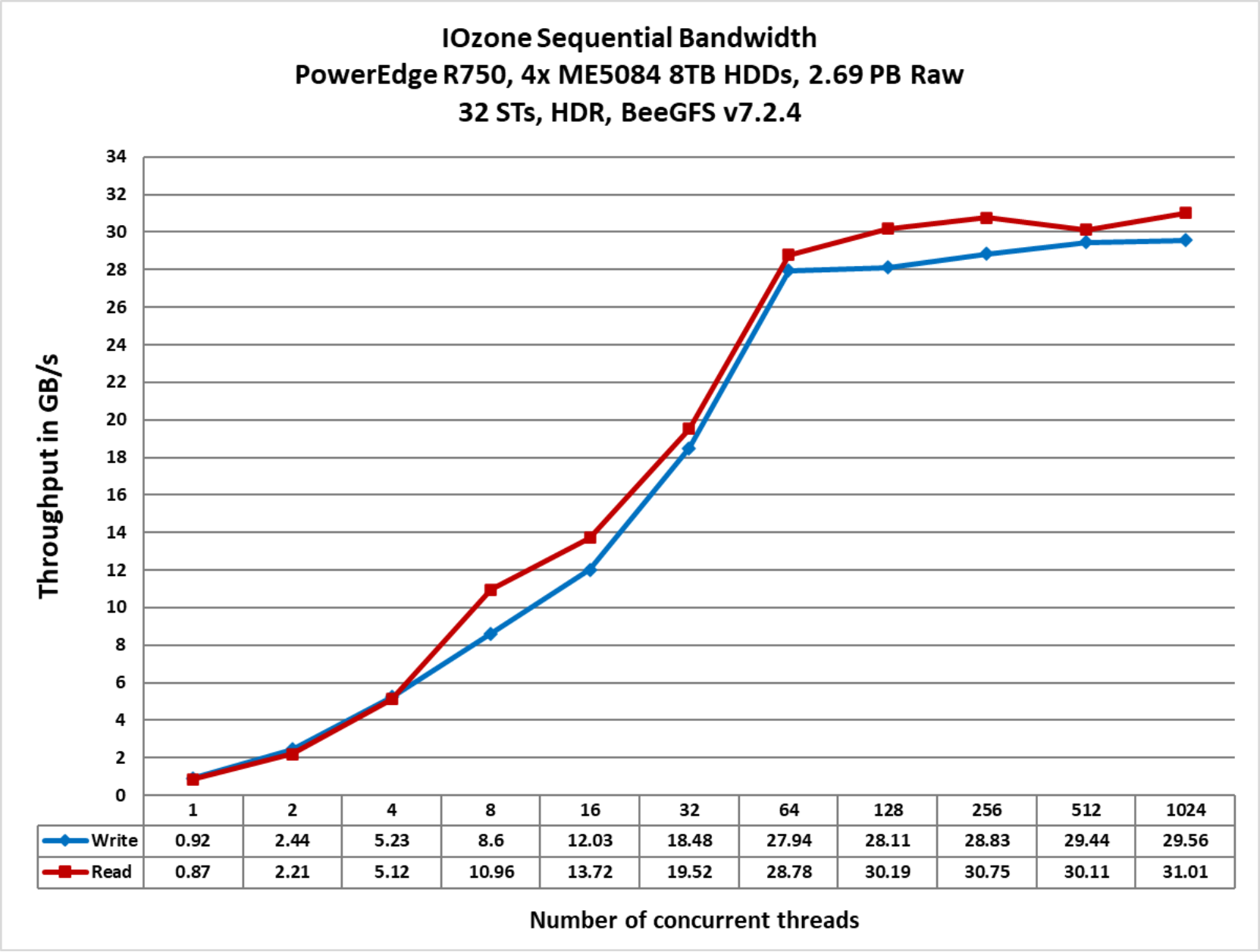
Figure 7.   Sequential N-N reads and writes

As the figure shows, the peak read throughput of 31.01 GB/s and peak write throughput of 29.56 GB/s was attained at 1024 threads. The read and write performance scale linearly with the increase in the number of threads until the system attained its peak. After this, reads and writes saturate as we scale. The overall sustained performance of this configuration for reads is ≈ 30GB/s and that for the writes is ≈ 29 GB/s with the peaks as mentioned above. Above 4 threads, the reads tend to be slightly higher than the writes.

IOzone random reads and writes

As described in the IOzone sequential N-N reads and writes, a stripe count of 1 and a chunk size of 1 MiB were used. The files written were distributed evenly across the STs (round-robin) to prevent uneven I/O loads on any single SAS connection or ST in the same way that a user would expect to balance a workload.

The request size was set to 4KiB. Performance was measured in I/O operations per second (IOPS). The operating system caches were dropped between the runs on the BeeGFS servers. The file system was unmounted and remounted on clients between iterations of the test.

The command used for random read and write tests is as follows:

iozone -i 2 -w -c -O -I -r 4K -s $Size -t $Thread -+n -+m /path/to/threadlist

The following figure shows the random read and write performance:
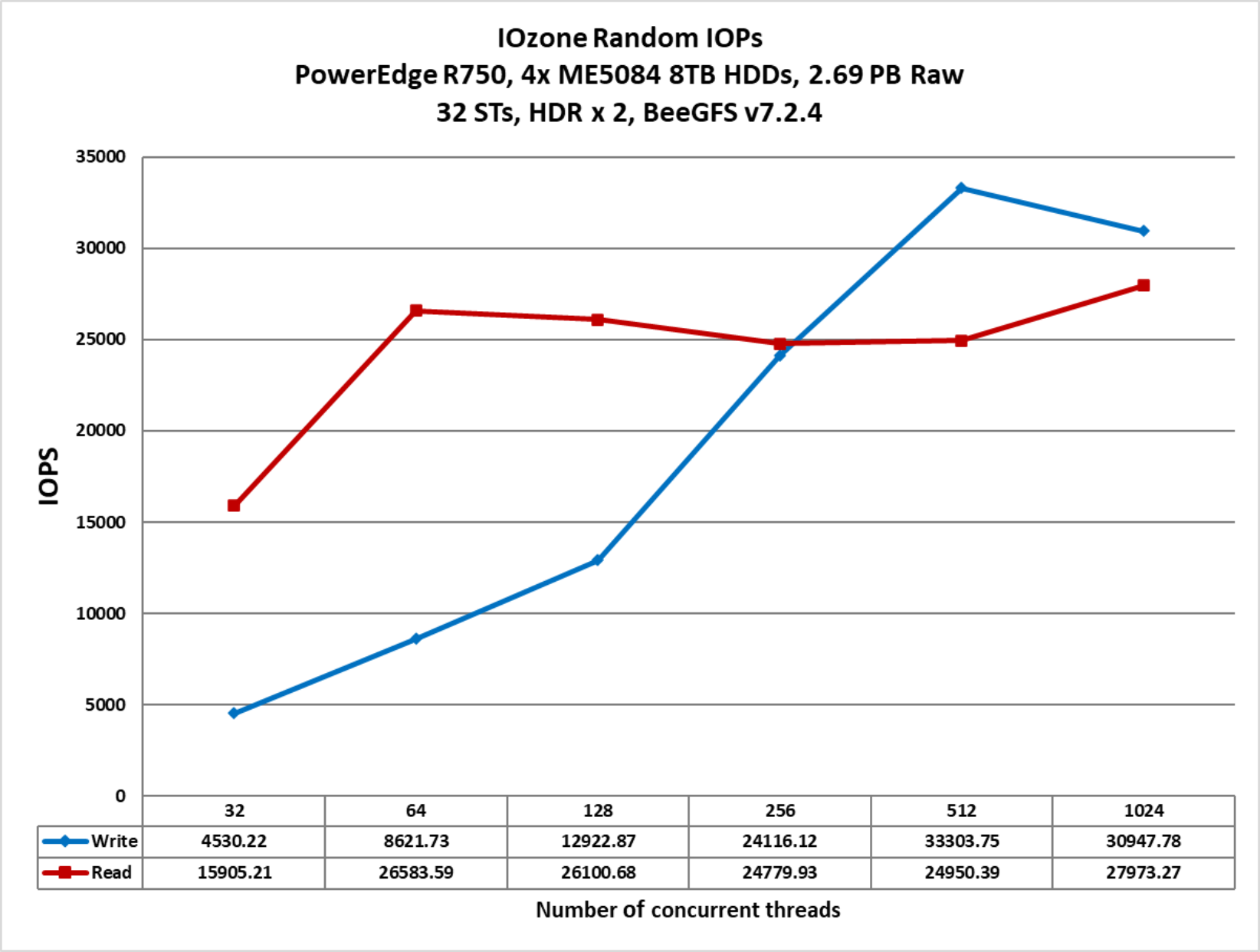
Figure 8.   Random N-N reads and writes

As the figure shows, the write performance reaches at 33.3K IOPS at 512 threads and the read performance of around 28K IOPS at 1024 threads, which is the maximum number of threads allowed by the benchmark.

Performance tuning

Parameters

This section shows the tuning parameters that we configured on the BeeGFS testbed system in the Dell Technologies HPC and AI Innovation Lab.

  • Tuned the IO scheduler settings for the storage block devices on the storage servers by adding the following lines to /etc/rc.local and make /etc/rc.local executable afterwards:

for mdev in /dev/mapper/storage*; do

dev=$(basename $(readlink -f "$mdev"))

echo "$dev"

echo deadline > /sys/block/${dev}/queue/scheduler

echo 2048 > /sys/block/${dev}/queue/nr_requests

echo 4096 > /sys/block/${dev}/queue/read_ahead_kb

echo 256 > /sys/block/${dev}/queue/max_sectors_kb

done

$ chmod +x /etc/rc.local

• Tuned the IO scheduler settings for the metadata block devices on the metadata servers by adding the following lines to /etc/rc.local and make /etc/rc.local executable afterwards:

for mdev in /dev/mapper/storage*; do

dev=$(basename $(readlink -f "$mdev"))

echo "$dev"

echo deadline > /sys/block/${dev}/queue/scheduler

echo 128 > /sys/block/${dev}/queue/nr_requests

echo 128 > /sys/block/${dev}/queue/read_ahead_kb

echo 256 > /sys/block/${dev}/queue/max_sectors_kb

done

$ chmod +x /etc/rc.local

  • Disabled transparent huge pages by creating /etc/tmpfiles.d/90-beegfs-hugepages.conf file with the following content:

# cat /etc/tmpfiles.d/90-beegfs-hugepages.conf

# Recommended configuration for BeeGFS servers

# Disable transparent hugepages

# Type  Path                          Mode    UID     GID     Age Argument

    w   /sys/kernel/mm/transparent_hugepage/khugepaged/defrag  - - - -    0

    w   /sys/kernel/mm/transparent_hugepage/defrag - - - -       never

    w   /sys/kernel/mm/transparent_hugepage/enabled  -  - -   -  never

  • Tuned virtual memory settings by adding the following lines to /etc/sysctl.d/90-beegfs.conf:

# VM ratios recommended for BeeGFS

vm.dirty_background_ratio = 5

vm.dirty_ratio = 20

vm.min_free_kbytes = 262144

vm.vfs_cache_pressure = 50

  • The following BeeGFS specific tuning parameters were used in the metadata, storage, and client configuration files:

beegfs-meta.conf

connMaxInternodeNum = 64

tuneNumWorkers = 12

tuneUsePerUserMsgQueues = true # Optional

tuneTargetChooser = roundrobin (benchmarking)

beegfs-storage.conf

connMaxInternodeNum = 24

tuneNumWorkers = 12

tuneUsePerTargetWorkers = true

tuneUsePerUserMsgQueues = true # Optional

tuneBindToNumaZone =

tuneFileReadAheadSize = 0m

beegfs-client.conf

connMaxInternodeNum = 24

connRDMABufNumber = 22

connRDMABufSize = 32768

Note: The tuneTargetChooser parameter was set to roundrobin for the purpose of benchmarking so that the targets are chosen in a deterministic, round-robin fashion. However, in a production system, it is recommended to use the “randomized” algorithm which chooses the targets in a random fashion.

Conclusion

Summary

The Dell Technologies Validated Design for HPC BeeGFS High-Capacity Storage is a high-performance clustered file system solution that is easy to manage, fully supported, and capable of scaling both throughput and capacity. The solution includes the PowerEdge server platform, PowerVault ME5 storage products, and BeeGFS technology. The large configuration of the solution with four ME5084 arrays and 2.69 PB of raw storage space, has shown to sustain a sequential throughput of approximately 30 GB/s, which is consistent with the needs of HPC environments.

References

Appendix A

IOzone benchmark tool

This appendix provides information about the IOzone benchmark tool that was used to measure sequential N to N read and write throughput (GB/s) and random read- and write I/O operations per second (IOPS).

The following sub sections provide the command line reference and describe the various options used in the commands to run the respective benchmarks.

IOzone reference and options

The IOzone tests were N-to-N. Meaning, N client threads would read or write N independent files. The commands used to run the IOzone benchmarks are given below: 

IOzone sequential tests

Sequential Writes: iozone -i 0 -c -e -w -r 1m -s $SIZE -t $THREAD -+n -+m /path/to/threadlist


Sequential Reads:  iozone -i 1 -c -e    -r 1m -s $SIZE -t $THREAD -+n -+m / path/to/threadlist

By using -c and -e in the test, IOzone provides a more realistic view of what a typical application is doing.

IOzone random writes and reads 

iozone -i 2    -c -O -I -r 4k -s $SIZE -t $THREAD -+n -+m /path/to/threadlist

The O_Direct command line parameter enables bypassing the cache on the compute node on which the IOzone thread is running. The following table describes IOzone command line arguments.

Table 4.      IOzone command-line arguments

IOzone argument

Description

-i 0

Write test 

-i 1

Read test 

-i 2

Random Access test 

-+n

No retest 

-c

Includes close in the timing calculations 

-t

Number of threads 

-e

Includes flush in the timing calculations 

-r

Records size 

-s

File size 

-t

Number of threads 

-+m

Location of clients to run IOzone when in clustered mode 

-w

Does not unlink (delete) temporary file 

-I

Use O_DIRECT, bypass client cache

-O

Give results in ops/sec

Further storage bench results

For ME5, running with a lower number of threads per target increased throughput compared to ME4. The following command is used to run storage bench write:

beegfs-ctl --storagebench --alltargets --write --blocksize=1m --size=$((SIZE))M --threads=$THREADS

The following command is used to run storage bench read:

beegfs-ctl --storagebench --alltargets --read --blocksize=1m --size=$((SIZE))M --threads=$THREADS

$SIZE is a variable that is configured to write an aggregate totally of 8TB across 32 storage targets for varying thread counts. This is defined as: 

SIZE=$((250000/$THREADS))

The following is a summary of results obtained by running storage bench at varying thread counts:

Threads

write-KiBs

read-KiBs

write-GBs

read-GBs

1

28154211

29103615

28.83

29.81

2

30431313

29070171

31.17

29.77

3

30276385

30154675

31.01

30.88

4

30134254

30157806

30.86

30.89

5

30050541

29916035

30.78

30.64

6

30023428

29373712

30.75

30.08