HPC Software-Defined Storage with PixStor
Introduction
Executive summary
Document purpose
Audience
Business challenges
Market environment
Building-Block Approach
High Availability
Solution overview
Configurations
The Dell Technologies Validated Design for HPC PixStor Storage uses a modular approach to meet customer requirements. The basic building block is called a storage module (SM) that is available in three base configurations: Small (S), Medium (M), and Large (L), with an optional capacity expansion for the L configuration. Additionally, an optional high-demand metadata (HDMD) module is available for high metadata performance or very large number of files are required. These configurations can be used as scale-out building blocks to meet different capacity and performance goals as illustrated in Figure 1.
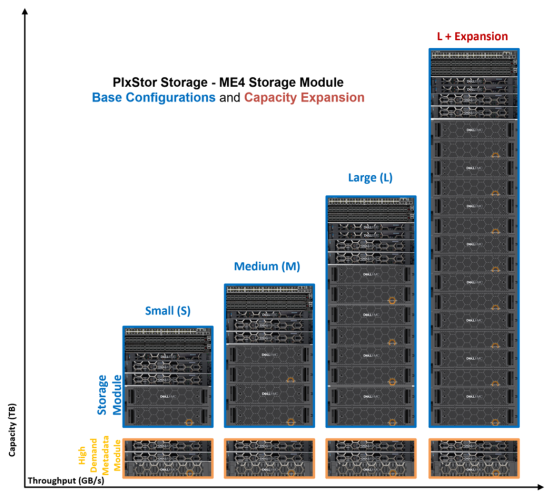
Figure 1. HPC PixStor storage - storage module configurations
Introduction
System Design
Figure 2 presents the design for the new generation of the Validated Design for HPC PixStor Storage, which leverages Dell EMC PowerEdge R650, R750 and R7525 servers and PowerVault ME4084 and ME4024 storage arrays, with PixStor 6.0 software from ArcaStream. In addition, optional PowerVault ME484 EBOD arrays can be used to increase the capacity of the solution. Figure 2 presents the solution design depicting such capacity expansion as SAS additions to the existing PowerVault ME4084 storage arrays.
PixStor software includes the widespread general parallel file system (GPFS) also known as Spectrum Scale as the PFS component which is considered software-defined storage due to its flexibility and scalability. In addition, PixStor software includes many other ArcaStream software components like advanced analytics, simplified administration and monitoring, efficient file search, advanced gateway capabilities and many other features.
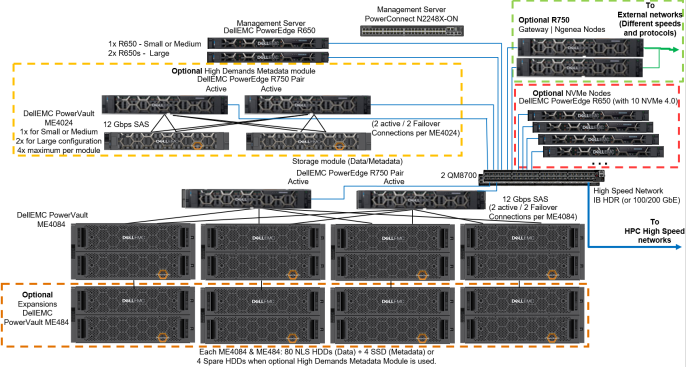
Figure 2. Solution design
The main components of the PixStor storage solution are:
Management servers
Dell EMC PowerEdge R650 servers provide graphic user interface (GUI) and command line interface (CLI) access for management and monitoring of the PixStor storage solution, as well as performing the advanced search capabilities compiling some metadata information in a database to speed searches and avoid loading metadata network shared disks (NSDs).
Storage module
Currently- the main building block for the PixStor storage solution, each module includes one pair of storage servers, 1, 2 or 4 backend storage arrays (ME4084) with optional capacity expansions (ME484), and the network-shared disks contained in those arrays.
Storage server (SS)
An essential part of storage modules, HA pairs of Dell EMC PowerEdge R750 servers (failover domains) are connected to ME4084s arrays via SAS 12 Gbps cables, manage data NSDs and provides access to NSDs via redundant high-speed network interfaces. For the standard PixStor configuration, these servers have the dual role of metadata servers and manage metadata NSDs (using SSDs that replace all spare HDDs).
Backend storage
 Stores the file system data (MD4084) or metadata (ME4024). PowerVault ME4084s are part of the storage module and PowerVault ME4024s are part of the optional High-Demand metadata module in Figure 2.
Capacity expansion storage
Optional Capacity Expansions are PowerVault ME484 (inside dotted orange square in Figure 2) connected behind ME4084s via SAS 12 Gbps cables to expand the capacity of a storage module. For PixStor storage configurations, each ME4084 can only use one ME484 expansion, for performance and reliability (even that ME4084 supports up to three ME484s).
Network-shared disks (NSDS)
NSDS are backend block devices (e.g. RAID LUNs from ME4 arrays or RAID 10 NVMeoF devices) that store information, data and metadata. In the PixStor storage solution, file system data and metadata are stored in different NSDs, data NSDs normally use spinning media (NLS SAS3 HDDs), while metadata NSDs use SAS3 SSDs (metadata include directories, filenames, permissions, time stamps and the location of data in other NSDs).
NVMeoF-based NSDs are currently used only for data, however, we are currently testing them for metadata, and we plan to test them for data + metadata.
High-demand metadata server (HDMDS)
Part the optional high-demand metadata module (inside dotted yellow square in Figure 2). Pairs of Dell EMC PowerEdge R750 servers in HA (failover domains) connected to PowerVault ME4024s arrays via SAS cables, manage the metadata NSDs and provides access to the metadata backend via redundant high-speed network interfaces.
NVMe nodes
Main part of the optional NVMe Tier modules (inside dotted green square in Figure 2). Pairs of PowerEdge R650 servers in HA (failover domains) provide a high-performance flash-based tier for the PixStor storage solution. Performance and capacity for this NVMe tier can be scaled out by additional pair of NVMe nodes. Increased capacity is provided by selecting the appropriate capacity for the NVMe devices supported in the PowerEdge R650.
Each PowerEdge R650 has ten NVMe devices split in slices/partitions. Then, slices from all drives in both servers are combined into RAID10 devices, for high throughput. These NVMe nodes leverage NVMesh as the NVMe over Fabric (NVMeoF) component to have each mirror copy from the RAID10 on a different server (for HA purposes) and provide block devices to the file system to use as NSDs.
Native client software
Software installed on the clients that allow access to the file system. The file system must be mounted for access and appears as a single namespace.
Gateway nodes
The optional gateway nodes (inside dotted red square in Figure 2) are PowerEdge R750 servers (same hardware as Ngenea nodes but different software) in a Samba’s Clustered Trivial Data Base (CTDB) cluster providing NFS or SMB access to clients that do not have, or cannot have, the native client software installed, but instead use NFS or SMB protocols to access information.
Ngenea nodes
The optional Ngenea nodes (inside dotted red square in Figure 2) are PowerEdge R750 servers (same hardware as gateway nodes but different software) that use PixStor software to access to external storage devices that could be used as another tier in the same single namespace (e.g. Object Storage, cloud storage, tape libraries, etc.) using enterprise protocols, including cloud protocols.
Management switch
The Dell EMC PowerSwitch N2248X-ON gigabit ethernet switch was used to connect the different servers and storage arrays. It is used for administration of the solution, interconnecting all the components.
High-performance switch
NVIDIA® QM8700 switches provide high-speed access via InfiniBand (IB) HDR and HDR100. For Ethernet solutions, the NVIDIA Mellanox SN3700 can be used.
Solution components
Overview
High-Speed, Management and SAS Connections
Since the Validated Design for HPC PixStor Storage is sold with deployment services included, a detailed depiction of the cabling for SAS or high-speed network is out of scope for this document. Similarly, the cabling of the different components to the management switch is also out of scope for this document.
Management servers are PowerEdge R650s with riser configuration 0 that has 3 x16 slots, Figure 3 shows the slot allocation for the server. The LAN on motherboard port 1 (LOM 1) is connected to the 1 GbE management network and named man0, and the LOM port 2 is named man2 and along with the iDRAC dedicated port, are connected to an external management network to access the PixStor storage solution. Slots 1 and 2 used for ConnextX-6 adapters connected to the high-speed network switches, and slot 3 has an optional serial port card.

Figure 3. PowerEdge R650 management server - slot allocation
Storage nodes (SN) and high-demand metadata (HDMD) servers use PowerEdge R750 servers with the Riser configuration 1 that has 8 slots, 2 x16 and 6 x8, and Figure 4 shows the slot allocation for the server. The LOM port 1 and iDRAC dedicated port are connected to the 1 GbE management network. All PowerEdge R750 servers have slots 3 & 6 (x16) used for ConnectX-6 (CX6) adapters connected to the high-speed network switches. Storage or HDMD servers connected to PowerVault ME4 arrays have two SAS HBA355e cards in slots 2 & 5 (x8). Slot 8 is used for an optional serial port card.
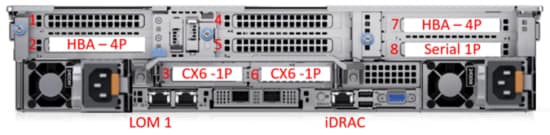
Figure 4. PowerEdge R750 storage and metadata nodes - slot allocation
Figure 5 shows the controllers of the PowerVault ME4084s, one SAS port (A0-A3 & B0-B3) from each controller (A & B) is connected to a different HBAs in slots 2 and 7 on each of the storage node. The SAS connector I/O 0 (blue section) of each controller is used to connect an expansion PowerVault ME484 in Figure 6 using port I/O 0 of the correspondent I/O module (controller A to I/O module A, controller B to I/O module B).
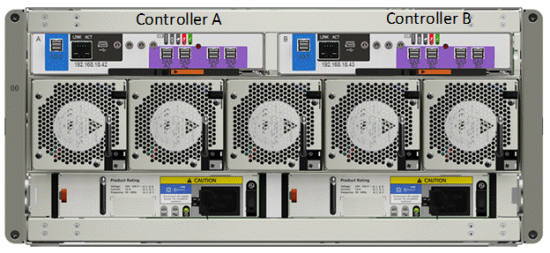
Figure 5. PowerVault ME4084 - controllers and SAS ports
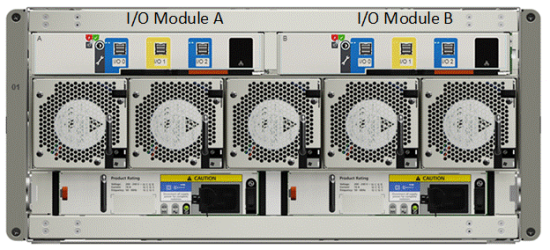
Figure 6. PowerVault ME484 - I/O module and SAS ports
Figure 7 shows the controllers of the PowerVault ME4024, one SAS port (A0-A3 & B0-B3) from each controller (A & B) is connected to a different HBAs in slots 2 and 7 on each of the high-demand metadata nodes.
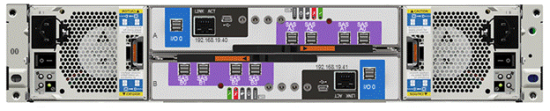
Figure 7. PowerVault ME4024 - controllers and SAS ports
Gateways/Ngenea nodes use PowerEdge R750 servers with the Riser configuration 2 have 6 slots, 2 x8 and 4 x16, Figure 8 shows the slot allocation for the server. The LOM port 1 and iDRAC dedicated port are connected to the 1 GbE management network. All 4 x16 can be used with CX6 adapters or other high speed network interface cards (NICs) supported by the PowerEdge R750, two full-height (FH) in slots 2 and 7 and two low-profile (LP) in slots 3 and 6. Slots 4 and 5 (x8) can be used for any supported NIC. Slots 1 and 8 are not available in this configuration.
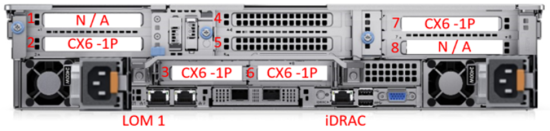
Figure 8. PowerEdge R750 gateway or Ngenea nodes - slot allocation
The management switch for this generation of the solution is the Dell EMC PowerSwitch N2248X-ON (shown in Figure 9), unless the HPC cluster has enough free ports to connect all the redundant connections from the different PixStor solution servers.

Figure 9. Management switch - N2248X-ON
For InfiniBand deployments, a pair of Mellanox QM8700 IB HDR 200 Gbps switches (shown in Figure 10) is used as a simple Layer 2 switch using 1 GbE ports.

Figure 10. InfiniBand HDR managed switch - QM8700
For Ethernet deployments, a pair of Mellanox SN3700 Ethernet 200 Gbps switches (shown in Figure 11) are required, unless the HPC cluster has enough free ports to connect all the redundant connections from the different PixStor storage servers. The CX6 adapters used by the solution are VPI, which can be configured as InfiniBand or Ethernet as needed. There is also a 100 Gbps version of the switch, the SN3700C (not shown).

Figure 11. Ethernet 200 Gbps managed switch - SN3700
Storage Configuration on ME4 Arrays
The Validated Design for HPC PixStor Storage has two variants — the standard configuration and the one that includes the high-demand metadata module. On the standard configuration, the same pair of PowerEdge R750 servers use their PowerVault ME4084 arrays to store DATA on NLS SAS3 HDDs and metadata on SAS3 SSDs. On Figure 12 we can see this PowerVault ME4084 configuration showing how are the drives assigned to the different LUNs. Notice that each PowerVault ME4084 has eight linear RAID6 (8 data disks + 2 parity disks) Virtual Disks used for DATA only where HDDs are selected alternating even-numbered disk slots for one LUN, and odd-numbered disk slots for the next LUN, and that pattern repeats until all 80 NLS disks are used. The last four disk slots have SAS3 SSDs, which are configured as two linear RAID 1 pairs, and only hold metadata. Linear RAIDs were chosen over virtual RAIDs to provide the maximum possible performance for each virtual disk. Similarly, RAID 6 was chosen over ADAPT despite the speed advantage of the later when rebuilding after failures.
When the storage module has a single PowerVault ME4084, then GPFS is instructed to replicate the first RAID 1 on the second RAID 1 as part of a failure group. However, when the storage module has 2 or 4 PowerVault ME4084s, those arrays are divided in pairs and GPFS is instructed to replicate each RAID 1 on one array to the other array, using different failure groups. Therefore, each RAID 1 always has a replica managed by a GPFS failure group.
All the virtual disks have associated volumes that span their whole size and are mapped to all ports, so that they are all accessible to any HBA port from the two PowerEdge R750s connected to them. Also, each PowerEdge R750 has one HBA port connected to each PowerVault ME4084 controller from their storage arrays. Such that even if one server is operational and only a single SAS cable remains connected to each PowerVault ME4084, the solution can still provide access to all data stored in the ME4 arrays. Optional capacity expansion arrays PowerVault ME484 use the exact same configuration of the PowerVault ME4084 they are connected to, including the four SSDs for metadata.
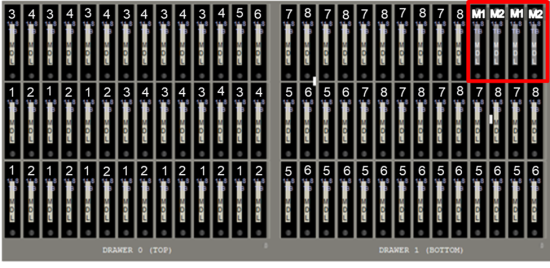
Figure 12. PowerVault ME4084 (or MD484) drives assigned to LUN for Standard configuration
When the optional high-demand metadata module is used, the eight RAID 6 are assigned just like the standard configuration and are also used only to store data. However, instead of SSDs, the last four disk slots have NLS SAS3 HDDs to be used as hot spares for any failed disk within the array, see Figure 13.
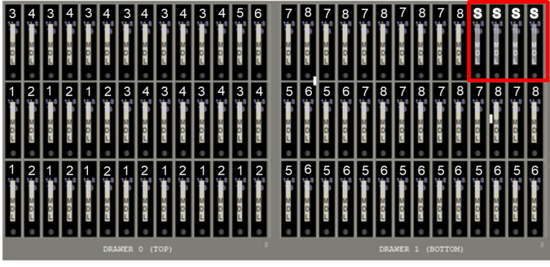
Figure 13. PowerVault ME4084 (or ME484) drives assigned to LUN for configuration with high-demand metadata
With the high-demand metadata module, optional capacity expansion arrays PowerVault ME484 also use the exact same configuration of the PowerVault ME4084 they are connected to, including the four spare HDDs.
An additional pair of PowerEdge R750 servers are connected to one or more PowerVault ME4024, which are used to store metadata. Those arrays are populated with SAS3 SSDs that are configured as twelve RAID 1 Virtual Disks (VDs), and disks for such VDs are selected starting in disk slot 1 and for its mirror moving twelve disks to the right (slot N & Slot N+12), as can be seen in Figure 14. Similar to the standard configuration, when a single PowerVault ME4024 array is used, GPFS is instructed to replicate metadata using pairs of RAIDs 1 LUNs as part of a failure group. However, if more than one PowerVault ME4024 is used, then LUNs part of failure groups are kept in separate arrays.
All the virtual disks on the storage module and the HDMD module are exported as volumes that are accessible to any HBA port from the two PowerEdge R750s connected to the correspondent PowerVault ME4 arrays, and each PowerEdge R750 has one HBA port connected to each PowerVault ME4 controller from their storage arrays. Such that even if one server is operational and only a single SAS cable remains connected to each ME4, the solution can still provide access to all data (or metadata) stored in those arrays.

Figure 14. PowerVault ME4024 drives assigned to LUN for configuration with high-demand metadata
Finally, high-speed networks are connected via CX6 adapters to handle information exchange with clients, but also to evaluate if a node part of a module is operational.
NVMe Tier Configuration
Gateway Nodes
Ngenea Nodes
Performance characterization
Benchmarks selected and test beds
PixStor storage solution with high-demand metadata module without capacity expansion PowerVault ME484s
PixStor storage solution with high-demand metadata module without capacity expansion PowerVault ME484s
Sequential IOzone Performance N Clients to N Files
Sequential N clients to N files performance was measured with IOzone version 3.492. Tests executed varied from single thread up to 512 threads.
Caching effects were minimized by using files big enough to avoid it, with a total data size of 8 TiB, more than two times the total memory size of servers and clients. It is important to note that GPFS uses the tunable page pool to set the maximum amount of memory used for caching data, regardless the amount of RAM installed and free (set to 32 GiB on clients and 96 GiB on servers to allow I/O optimizations). It is also important to note that while in other Dell Technologies HPC solutions, the block size for large sequential transfers is 1 MiB, GPFS was formatted with a block size of 8 MiB and therefore, that value or multiples of it should be used on the benchmark for optimal performance. A block size of 8 MiB may look too large, however GPFS uses subblock allocation. In the current configuration, each block was subdivided in 512 subblocks of 16 KiB each.
The following commands were used to execute the benchmark for writes and reads, where Threads was the variable with the number of threads used (1 to 512 incremented in powers of two), and threadlist was the file that allocated each thread on a different node, using sequential round-robin to spread them homogeneously across the 16 compute nodes. The variable FileSize has the result of 8192 (GiB) / Threads to divide the total data size evenly among all threads used. A transfer size of 16 MiB was used for this performance characterization.
./iozone -i0 -c -e -w -r 16M -s ${FileSize}G -t $Threads -+n -+m ./threadlist
./iozone -i1 -c -e -w -r 16M -s ${FileSize}G -t $Threads -+n -+m ./threadlist
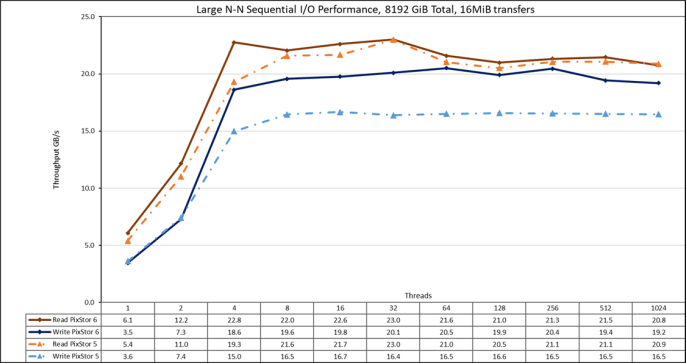
Figure 15. N to N sequential performance
From the results, we can observe that Read performance is higher at low thread counts (>10%) with a peak at 4 threads where it was almost 18% higher than PixStor 5, and after that is only marginally higher than what observed with PixStor 5, with a small drop in performance at 1024 threads. Write performance was almost the same for 1 & 2 threads, and then at 4 threads, It was 24% higher than PixStor 5 and reached a plateau that was stable and remained about 20% higher than PixStor 5 until the maximum number of threads that IOzone allows is reached and performance dropped a bit at 1024 threads (since there are only 640 cores in the nodes, this could be due to oversubscription overhead). Note that the peak read performance was 23 GB/s at 32 threads and the peak write performance of 20.5 was reached at 64 threads. The significant improvement in write performance compared to PixStor 5 was a pleasant surprise that may be due to block I/O improvements in Red Hat 8.x or possibly hardware and driver improvements for the new HBA335e (a PCIe 4 adapter), since with a total data size of 8 TiB, it cannot be due to any cache effects from servers, clients or combined.
It is important to remember that the GPFS preferred mode of operation is scattered, and the solution was formatted to use it. In this mode, blocks are allocated from the very beginning in a pseudo-random fashion, spreading data across the whole surface of each HDD. While the obvious disadvantage is a smaller initial maximum performance, that performance is fairly constant, regardless of how much space is used on the file system. In contrast to other parallel file systems that use the outer tracks to hold more data (sectors) per disk revolution, and therefore have the highest possible performance the HDDs can provide, as the system uses more space, inner tracks with less data per revolution are used, with the consequent reduction of performance. GPFS also supports that allocation system (it is called clustered), but it is only used on the PixStor storage solution as an exception in deployments with special conditions.
Sequential IOR Performance N Clients to 1 File
Sequential N clients to a single shared file performance was measured with IOR version 3.3.0, assisted by OpenMPI v4.1.2A1 to run the benchmark over the 16 compute nodes. Tests executed varied from single thread up to 512 threads since there are not enough cores for 1024 threads (the 16 clients have a total of 16 x2 x 20 = 640 cores) and oversubscription overhead apparently affected IOzone results at 1024 threads.
Caching effects were minimized by setting the GPFS page pool tunable to 32GiB on the clients and 96 GiB on the servers, and using a total data size of 8 TiB, more than twice the RAM size from servers and clients combined. A transfer size of 16 MiB was used for this performance characterization. The previous performance test section has a more complete explanation for those matters.
The following commands were used to execute the benchmark, where Threads is the number of threads used (1 to 512 incremented in powers of two), and my_hosts.$Threads is the corresponding file that allocated each thread on a different node, using sequential round-robin to spread them homogeneously across the 16 compute nodes. The variable FileSize has the result of 8192 (GiB) / Threads to divide the total data size evenly among all threads used.
mpirun --allow-run-as-root -np $Threads --hostfile my_hosts.$Threads --mca btl_openib_allow_ib 1 --mca pml ^ucx --oversubscribe --prefix /usr/mpi/gcc/openmpi-4.1.2a1 /usr/local/bin/ior -a POSIX -v -i 1 -d 3 -e -k -o /mmfs1/perftest/ior/tst.file -w -s 1 -t 16m -b ${FileSize}G
mpirun --allow-run-as-root -np $Threads --hostfile my_hosts.$Threads --mca btl_openib_allow_ib 1 --mca pml ^ucx --oversubscribe --prefix /usr/mpi/gcc/openmpi-4.1.2a1 /usr/local/bin/ior -a POSIX -v -i 1 -d 3 -e -k -o /mmfs1/perftest/ior/tst.file -r -s 1 -t 16m -b ${FileSize}G
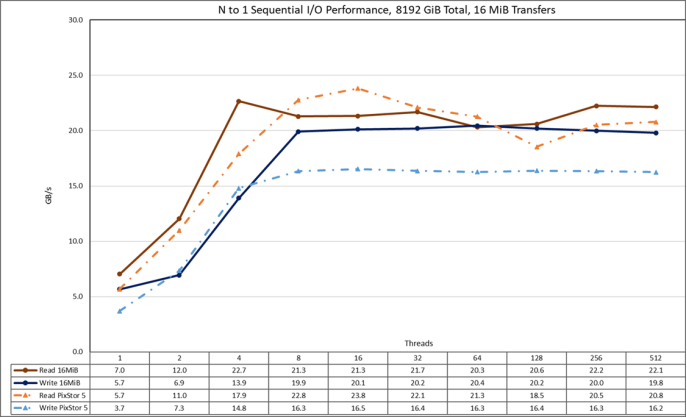
Figure 16. N to 1 sequential performance
From the results, we can observe again that PixStor 6 has similar read performance and better write performance than that observed in PixStor 5, but in this case that performance rises very fast for reads with the number of clients used and then reaches a plateau that is semi-stable for reads and very stable for writes all the way to the maximum number of threads used on this test. Therefore, large single shared file sequential performance is stable even for 512 concurrent threads. Note that the maximum read performance was 23.8 GB/s at 16 threads. Furthermore, read performance decreased from that value until reaching the plateau at around 21 GB/s, with a momentary decrease below 21 GB/s at 64 and 128 threads. Similarly, note that the maximum write performance of 20.4 was reached at 64 threads and it is much better than PixStor 5 results, but by storing 8 TiB of data, that cannot be the result of cached data.
Random Small Blocks IOzone Performance N Clients to N Files
Random N clients to N files performance was measured with IOzone version 3.492. Tests executed varied from single thread up to 512 threads. This benchmark used 4 KiB blocks for emulating small blocks traffic.
Caching effects were minimized by setting the GPFS page pool tunable to 16GiB on the clients and 32 GiB on the servers and using files two times that size. The section titled Sequential IOzone Performance N Clients to N Files above has a more complete explanation about why this is effective on GPFS.
The following command was used to execute the benchmark in random I/O mode for both writes and reads, where Threads was the variable with the number of threads used (1 to 512 incremented in powers of two), and threadlist was the file that allocated each thread on a different node, using round robin to spread them homogeneously across the 16 compute nodes.
./iozone -i0 -c -e -w -r 16M -s ${Size}G -t $Threads -+n -+m ./threadlist
./iozone -i2 -O -w -r 4K -s ${Size}G -t $Threads -+n -+m ./threadlist
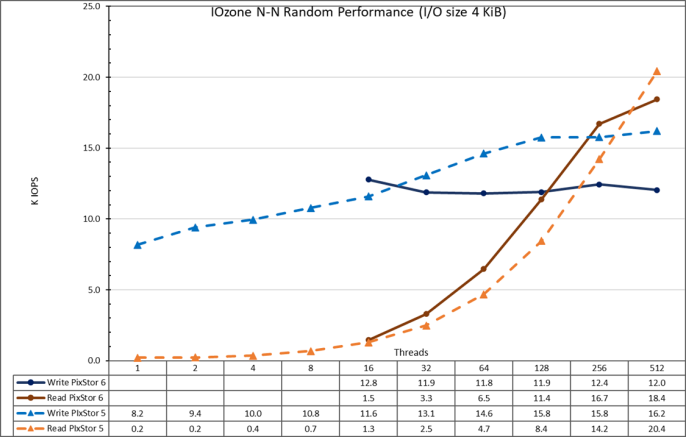
Figure 17. N to N random performance
From the results, we can observe that write performance starts at a high value of almost 12.8K IOPS and rises slowly to the maximum of 12.8K IOPS at 256 threads. Read performance on the other hand starts small at 1.5K IOPS and increases performance almost linearly with the number of clients used (keep in mind that number of threads is doubled for each data point) until it reaches the maximum performance of 18.4K IOPS at 512 threads with signs of approaching a maximum. However, as previously explained, using more threads on the current 16 compute nodes than the number of cores (640), has the limitation that incurring in more context switching, which apparently limits performance. A future test with more compute nodes could check what random read performance can be achieved with 1024 threads with IOzone. Also, FIO or IOR could be used to investigate the behavior with more than 1024 threads.
Metadata Performance with MDtest Using Empty Files
Metadata performance was measured with MDtest version 3.3.0, assisted by OpenMPI v4.1.2A1 to run the benchmark over the 16 compute nodes. Tests executed varied from single thread up to 512 threads. The benchmark was used for files only (no directories metadata), getting the number of creates, stats, reads and removes the solution can handle.
To properly evaluate the solution in comparison to other Dell Technologies HPC storage solutions, the optional high-demand metadata module was used, with a single PowerVault ME4024 array.
This high-demand metadata module can support up to four PowerVault ME4024 arrays, and it is suggested to increase the number of PowerVault ME4024 arrays to 4, before adding another metadata module. Additional PowerVault ME4024 arrays are expected to increase the metadata performance linearly with each additional array, except maybe for Stat operations (and Reads for empty files), since their numbers are very high, at some point, the CPUs will become a bottleneck and performance will not continue to increase linearly.
The following command was used to execute the benchmark, where Threads was the variable with the number of threads used (1 to 512 incremented in powers of two), and my_hosts.$Threads is the corresponding file that allocated each thread on a different node, using round robin to spread them homogeneously across the 16 compute nodes. Similar to the random I/O benchmark, the maximum number of threads was limited to 512, since there are not enough cores for 1024 threads and context switching could affect the results, reporting a number lower than the real performance of the solution.
mpirun --allow-run-as-root -np $Threads --hostfile my_hosts.$Threads –map-by node --mca btl_openib_allow_ib 1 --oversubscribe --prefix /usr/mpi/gcc/openmpi-4.1.2a1 /usr/local/bin/mdtest -v -d /mmfs1/perf/mdtest -P -i 1 -b $Directories -z 1 -L -I 1024 -u -t -F
Since performance results can be affected by the total number of IOPs, the number of files per directory and the number of threads, it was decided to keep fixed the total number of files to 2 MiB files (2^21 = 2097152), the number of files per directory fixed at 1024, and the number of directories varied as the number of threads changed as shown in Table 3.
Table 3. MDtest distribution of files on directories
|
Number of Threads |
Number of Directories per Thread |
Total Number of Files |
|
0001 |
2048 |
2,097,152 |
|
0002 |
1024 |
2,097,152 |
|
0004 |
0512 |
2,097,152 |
|
0008 |
0256 |
2,097,152 |
|
0016 |
0128 |
2,097,152 |
|
0032 |
0064 |
2,097,152 |
|
0064 |
0032 |
2,097,152 |
|
0128 |
0016 |
2,097,152 |
|
0256 |
0008 |
2,097,152 |
|
0512 |
0004 |
2,097,152 |
|
1024 |
0002 |
2,097,152 |
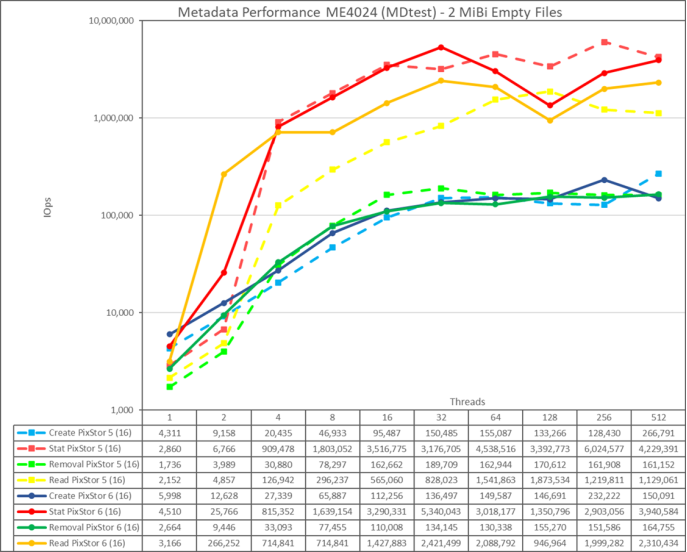
Figure 18. Metadata performance - empty files
First, note that the scale chosen was logarithmic with base 10, to allow comparing operations that have differences several orders of magnitude; otherwise, some of the operations would look like a flat line close to 0 on a normal graph. A log graph with base 2 could be more appropriate, since the number of threads are increased in powers of 2, but such graph would look pretty similar, and people tend to handle and remember better numbers based on powers of 10.
The storage system gets very good results with Stat and Read operations reaching their peak value at 32 threads with 5.34M Op/s and 2.42M op/s respectively. Removal operations attained the maximum of 164.76K Op/s at 512 threads and Create operations achieving their peak at 256 threads with 232.22K Op/s. Stat and Read operations have more variability, but once they reach their peak value, performance does not drop below 2.9M Op/s for Stats and 2M op/s for Reads. Create and Removal are more stable once their reach a plateau and remain above 130K op/s for Removal and 146K op/s for Create.
Metadata Performance with MDtest Using 4 KiB Files
This test is almost exactly identical to the previous one, except that instead of empty files, small files of 4KiB were used. The following command was used to execute the benchmark, where Threads was the variable with the number of threads used (1 to 512 incremented in powers of two), and my_hosts.$Threads is the corresponding file that allocated each thread on a different node, using round robin to spread them homogeneously across the 16 compute nodes.
mpirun --allow-run-as-root -np $Threads --hostfile my_hosts.$Threads –map-by node --mca btl_openib_allow_ib 1 --oversubscribe --prefix /usr/mpi/gcc/openmpi-4.1.2a1 /usr/local/bin/mdtest -v -d /mmfs1/perf/mdtest -P -i 1 -b $Directories -z 1 -L -I 1024 -u -t -F -w 4K -e 4K
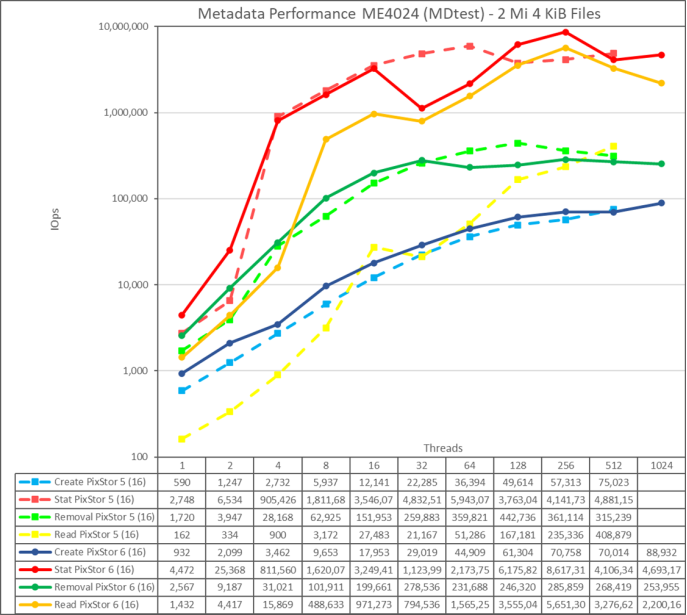
Figure 19. Metadata performance - small files (4K)
The system gets very good results for Stat and Removal operations reaching their peak value at 256 threads with 8.62M op/s and 5.65M op/s respectively. Removal operations attained the maximum of 285.86K Op/s and Create operations achieving their peak with 70.76K op/s, both at 256 threads. Stat and Reads operations have more variability, but once they reach their peak value, performance does not drop below 4M op/s for Stats and 3.2M op/s for Reads. Create and Removal have less variability, creates keep increasing as the number of threads grows, and removals slowly decrease after reaching its peak value.
Since these numbers are for a metadata module with a single PowerVault ME4024, performance will increase for each additional PowerVault ME4024 arrays, however we cannot assume a linear increase for each operation. Unless the whole file fits inside the inode for such file, data targets on the PowerVault ME4084s will be used to store small files, limiting the performance to some degree.
Summary
PixStor solution with capacity expansion and high-demand metadata
PixStor solution with capacity expansion and high-demand metadata
Sequential IOzone Performance N Clients to N Files
Sequential N clients to N files performance was measured with IOzone version 3.492. Tests executed varied from single thread up to 1024 threads, and the results of the capacity expanded solution (4x PowerVault ME4084s + 4x PowerVault ME484s) are contrasted to the large size solution (4x PowerVault ME4084s).
Caching effects were minimized by using files big enough to avoid it, with a total data size of 8 TiB, more than two times the total memory size of servers and clients. It is important to note that GPFS uses the tunable page pool sets the maximum amount of memory used for caching data, regardless the amount of RAM installed and free (set to 32 GiB on clients and 96 GiB on servers to allow I/O optimizations). It is also important to note that while in other Dell Technologies HPC solutions, the block size for large sequential transfers is 1 MiB, GPFS was formatted with a block size of 8 MiB, and therefore that value or multiples of it, should be used on the benchmark for optimal performance. A block size of 8 MiB may look too large when using small files, however, GPFS uses subblock allocation to prevent waste. In the current configuration, each block was subdivided in 512 subblocks of 16 KiB each.
The following commands were used to execute the benchmark for writes and reads, where Threads was the variable with the number of threads used (1 to 512 incremented in powers of two), and threadlist was the file that allocated each thread on a different node, using sequential round-robin to spread them homogeneously across the 16 compute nodes. The variable FileSize has the result of 8192 (GiB) / Threads to divide the total data size evenly among all threads used. A transfer size of 16 MiB was used for this performance characterization.
./iozone -i0 -c -e -w -r 16M -s ${FileSize}G -t $Threads -+n -+m ./threadlist
./iozone -i1 -c -e -w -r 16M -s ${FileSize}G -t $Threads -+n -+m ./threadlist
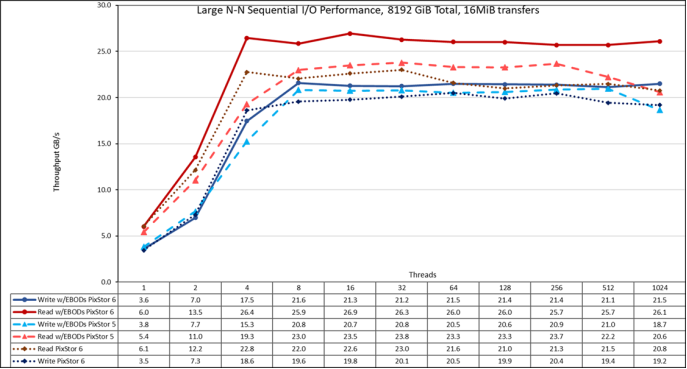
Figure 20. N to N sequential performance
From the results, we can observe that performance rises very fast with the number of clients used and then reaches a plateau that is stable until the maximum number of threads that IOzone allow is reached, and therefore large file sequential performance is stable even for 1024 concurrent clients. Note that both read and write performance benefited from the doubling the number of drives, but writes only slightly and reads significantly. The maximum read performance was limited by the bandwidth of the PowerVault ME4084 controllers used on the storage nodes starting at 4 threads. Similarly, the maximum write performance increased to 21.6 GB/s at 8 and 128 threads and it is closer to the PowerVault ME4 arrays’ maximum specs (22 GB/s).
Here it is important to remember that GPFS preferred mode of operation is scattered, and the solution was formatted to use such mode. In this mode, blocks are allocated from the very beginning of operations in a pseudo-random fashion, spreading data across the whole surface of each HDD. While the obvious disadvantage is a smaller initial maximum performance, that performance is fairly constant regardless of how much space is used on the file system. That is in contrast to other parallel file systems that initially use the outer tracks that can hold more data (sectors) per disk revolution, and therefore have the highest possible performance the HDDs can provide, however, as the system uses more space, inner tracks with less data per revolution are used, with the consequent reduction of performance.
Sequential IOR Performance N Clients to 1 File
Sequential N clients to a single shared file performance was measured with IOR version 3.3.0, assisted by OpenMPI v4.1.2A1 to run the benchmark over the 16 compute nodes. Tests executed varied from single thread up to 512 threads since there are not enough cores for 1024 threads (the 16 clients have a total of 16 x2 x 20 = 640 cores) and oversubscription overhead apparently affected IOzone results at 1024 threads.
Caching effects were minimized by setting the GPFS page pool tunable to 32GiB on the clients and 96 GiB on the servers, and using a total data size of 8 TiB, more than twice the RAM size from servers and clients combined. A transfer size of 16 MiB was used for this performance characterization. The previous performance test section has a more complete explanation for those matters.
The following commands were used to execute the benchmark, where Threads is the number of threads used (1 to 512 incremented in powers of two), and my_hosts.$Threads is the corresponding file that allocated each thread on a different node, using round-robin to spread them homogeneously across the 16 compute nodes. The variable FileSize has the result of 8192 (GiB) / Threads to divide the total data size evenly among all threads used.
mpirun --allow-run-as-root -np $Threads --hostfile my_hosts.$Threads --mca btl_openib_allow_ib 1 --mca pml ^ucx --oversubscribe --prefix /usr/mpi/gcc/openmpi-4.1.2a1 /usr/local/bin/ior -a POSIX -v -i 1 -d 3 -e -k -o /mmfs1/perftest/ior/tst.file -w -s 1 -t 16m -b ${FileSize}G
mpirun --allow-run-as-root -np $Threads --hostfile my_hosts.$Threads --mca btl_openib_allow_ib 1 --mca pml ^ucx --oversubscribe –prefix /usr/mpi/gcc/openmpi-4.1.2a1 /usr/local/bin/ior -a POSIX -v -i 1 -d 3 -e -k -o /mmfs1/perftest/ior/tst.file -r -s 1 -t 16m -b ${FileSize}G
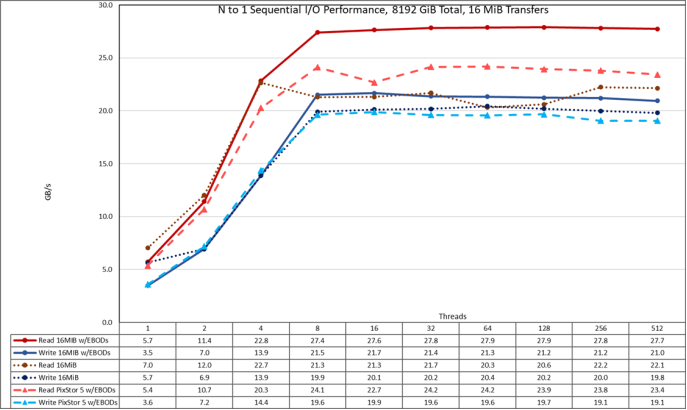
Figure 21. N to 1 sequential performance
From the results, we can observe again that the extra drives benefit a lot for read, and only marginally for write performance. Performance rises again very fast with the number of clients used and then reaches a plateau that is fairly stable for reads and writes all the way to the maximum number of threads used on this test. Notice that the maximum read performance was 27.9 GB/s at 16 threads and the bottleneck was the PowerVault ME4 controllers. Note that the maximum write performance of 21.7 GB/s was reached at 16 threads and reach a plateau.
Random Small Blocks IOzone Performance N Clients to N Files
Random N clients to N files performance was measured with IOzone version 3.492. Tests executed varied from single thread up to 512 threads. This benchmark used 4 KiB blocks for emulating small blocks traffic.
Caching effects were minimized by setting the GPFS page pool tunable to 16GiB on the clients and 32 GiB on the servers and using files two times that size. The section titled Sequential IOzone Performance N Clients to N Files above has a more complete explanation about why this is effective on GPFS.
The following command was used to execute the benchmark in random I/O mode for both writes and reads, where Threads was the variable with the number of threads used (1 to 512 incremented in powers of two), and threadlist was the file that allocated each thread on a different node, using round robin to spread them homogeneously across the 16 compute nodes.
./iozone -i0 -c -e -w -r 16M -s ${Size}G -t $Threads -+n -+m ./threadlist
./iozone -i2 -O -w -r 4K -s ${Size}G -t $Threads -+n -+m ./threadlist
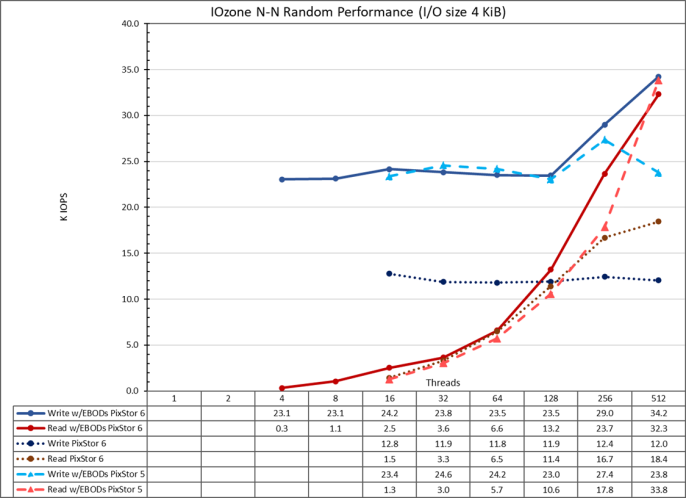
Figure 22. N to N random performance
From the results, we can observe that write performance starts at a high value of 23.1K IOPS at 4 threads and it remains at that level until suddenly rising at 256 threads and reaches a peak of 34.2K IOPS at 512 threads. This was not the expected behavior and more testing is needed to understand the cause.
Read performance on the other hand starts at 322 IOPS at 4 threads and increases performance almost linearly with the number of clients used (keep in mind that number of threads is doubled for each data point) and reaches the maximum performance of 32.33K IOPS at 512 threads. Using more threads will require more than the 16 compute nodes assigned to this testing, to avoid context switching and other related issues that may cause a lower apparent performance, where the arrays could in fact maintain the performance.
Metadata Performance
Summary
Estimated Usable Capacities and Performance
Summary
The following table provides information regarding usable capacity and performance for all the different configurations that include PowerVault ME4 arrays. Note that only values in black were measured or pre-defined (as the number of PowerVault ME4 units or the rack space used). The rest of the values were extrapolated based on the measured values and performance results.
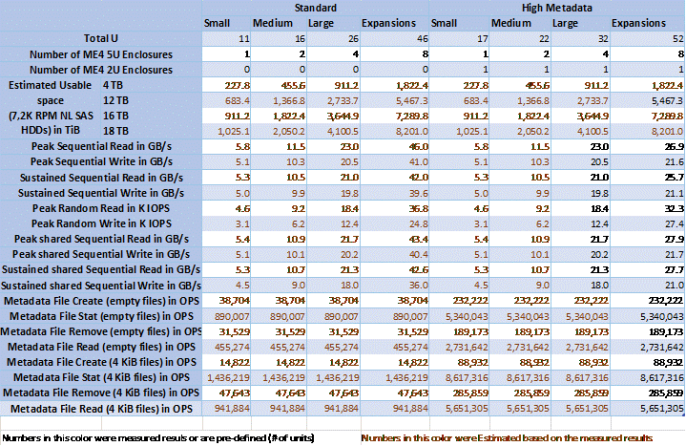
Table 6. Estimated usable capacities and performance for the different configuration sizes