Machine Learning Using Red Hat OpenShift Container Platform
Executive summary
Business case
Dell EMC OpenShift Container Platform overview
Document purpose
Audience
We value your feedback
Solution technology
Solution architecture
As shown in Figure 1, the Dell EMC reference architecture for OpenShift Container Platform on Dell EMC infrastructure uses five node types: bastion, master, infrastructure, application, and storage.
- Bastion node—The bastion node serves as the main deployment and management server for the OpenShift cluster.
- Master nodes—The master nodes perform control functions for the entire cluster environment. These nodes are responsible for the creation, scheduling, and management of all objects specific to OpenShift, including the API, controller management, and scheduler capabilities.
- Infrastructure nodes—The infrastructure nodes execute a range of control plane services, including the OpenShift Container registry, the HAProxy router, and the Heketi service.
- Storage nodes—The storage nodes provide persistent storage for the environment. Kubernetes storage classes can create persistent volumes manually or automatically. The Dell EMC PowerEdge R740 server is used for storage and the PowerEdge R640 server is used for the remaining node types.
- Application nodes—The application nodes run containerized workloads. They contain a single binary of OpenShift node components and are used by master nodes to schedule and control containers. Kubeflow uses the application node resources for running ML/DL jobs.
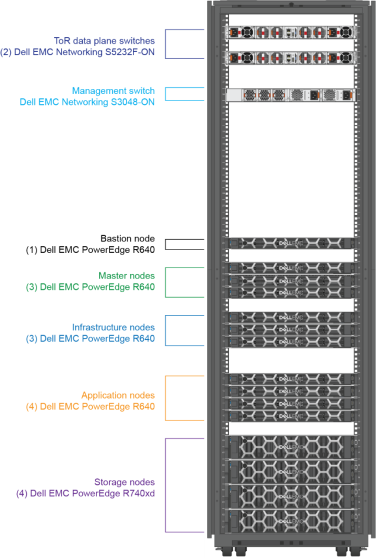
Figure 1. Rack diagram
Recommended configuration for OCP with Kubeflow
Machine learning with Kubeflow
Machine learning with Kubeflow
ML workflow
A typical ML workflow includes the following steps: data acquisition, data analysis, data preparation, data validation, model building, model training, model validation, training at scale, model inference, and monitoring. The following diagram shows an example:
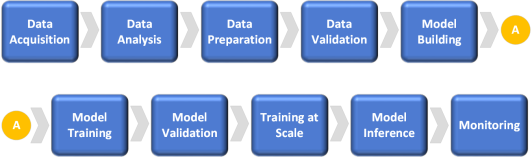
Figure 2. Machine learning workflow
Installing and deploying Kubeflow
Overview
Deploying Kubeflow v0.5
Kubeflow v0.5 installation is based on ksonnet, a configurable, typed, templating system for the Kubernetes application developer. The ksonnet system separates Kubernetes object definitions from the cluster destination to simplify and automate deployments.
To deploy Kubeflow v0.5 on OpenShift Container Platform v3.11:
- Download ksonnet and kfctl and add them to your path by running the following command:
$ mkdir ~/bin
$ cd ~/bin
$ wget https://github.com/kubeflow/kubeflow/releases/download/v0.5.1/kfctl_v0.5.1_linux.tar.gz
$ tar -xzf kfctl_v0.5.1_linux.tar.gz
$ wget https://github.com/ksonnet/ksonnet/releases/download/v0.13.1/ks_0.13.1_linux_amd64.tar.gz
$ tar -xzf ks_0.13.1_linux_amd64.tar.gz
$ ln -s ks_0.13.1_linux_amd64/ks ks
$ export PATH=$PATH:~/bin
$ cd ~
- Export a value for KFAPP by running the following command:
$ export KFAPP=kubeflow
$ kfctl init ${KFAPP}
$ cd ${KFAPP}
$ kfctl generate all -V
Note: KFAPP serves as the name of the directory where the deployment is stored and the project or namespace where Kubeflow is installed. The name “kubeflow” is recommended because some of the ksonnet parameters are still hard-coded with kubeflow as the project name.
- Deploy Kubeflow by running the following command:
$ kfctl apply all -V
- Add ambassador, default, and katib to the anyuid security context by running the following command:
$ oc adm policy add-scc-to-user anyuid -z ambassador
$ oc adm policy add-scc-to-user anyuid -z default
$ oc adm policy add-scc-to-user anyuid -z katib-ui
Note: Relaxing the Security Context Constraints (SCC) is required to get Kubeflow services up and running, but is not recommended for a production environment. We expect OpenShift Container Platform to add proper SCCs for these users in the future.
- Set the ambassador service to deploy as ClusterIP (the default is NodePort) by running the following command:
$ ks param set ambassador ambassadorServiceType ‘ClusterIP’
$ oc expose service ambassador
$ oc get routes
NAME HOST/PORT PATH SERVICES PORT TERMINATION WILDCARD
ambassador ambassador-kubeflow.router.default.svc.cluster.local ambassador ambassador None
- To verify the Kubeflow installation, enter the URL that was exposed by the route, as displayed by the ambassador service.
The Kubeflow web UI opens, as shown in the following figure:
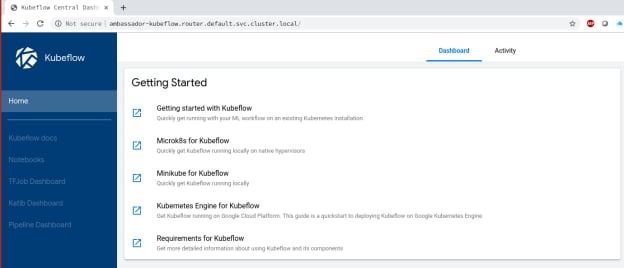
Figure 3. Kubeflow user interface
You can access the Kubeflow components and documentation using the web UI.
Using Kubeflow
Overview
Launching a Jupyter notebook
Jupyter is a collaborative tool that data scientists use to develop and execute code, documentation, and visualization in their ML model development process. For more information, see the Jupyter website.
To create and manage notebook servers in your Kubeflow deployment:
- In the Kubeflow dashboard, click Notebooks.
A notebook management window opens, as shown in Figure 4.

Figure 4. Jupyter Notebook Servers window
- Click New Server in the top right corner of the Notebook Servers pane.
Figure 5 shows the menu that is now available for configuring the notebook server with various options. The user should at a minimum
- Set a name for the new notebook server.
- Choose the namespace to which the notebook server will belong.
- Choose one of the standard TensorFlow notebook server images that come as part of the Kubeflow deployment.
- After you have chosen your options, click Spawn at the bottom of the window.
A pod is deployed using the TensorFlow container image that you specified, and it can be verified by opening the Notebook section of the Kubeflow dashboard, as shown Figure 6.
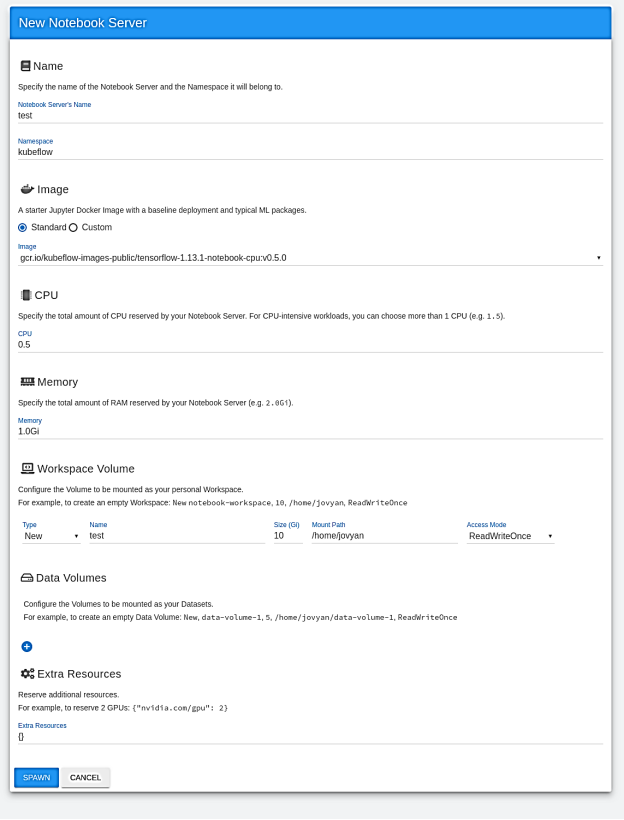
Figure 5. Creating a Jupyter Notebook Server
A notebook server is created using your selected options, as shown in the following figure:
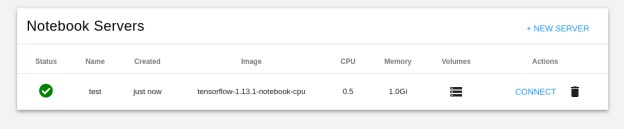
Figure 6. Configured Notebook Server
- Click Connect.
The Jupyter notebook opens, as shown in Figure 7.
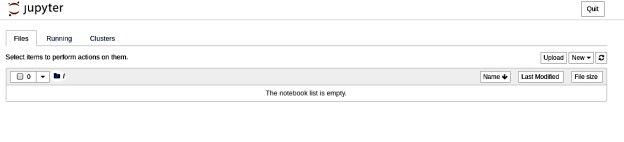
Figure 7. Jupyter notebook
- To verify that the correct TensorFlow version was installed, click New.
An empty code cell opens in which you can run Python code to display the TensorFlow version that is installed in the notebook. Figure 8 shows the expected version, v1.13.1:
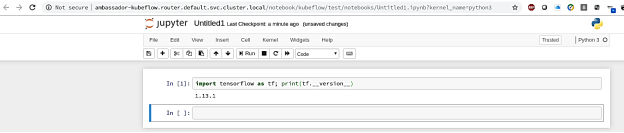
Figure 8. Verifying the TensorFlow installation
Tensorflow training
Another significant state in the ML life cycle is the training of neural network models. Because this is the most computationally intensive part of ML/DL, data scientists need results as quickly as possible to be productive.
TFJobs
Kubeflow uses a Kubernetes custom resource, TFJobs, to run TensorFlow training jobs in an automated fashion and enable data scientists to monitor job progress by viewing the results. Kubeflow provides a YAML representation for TFJobs. For more information, see TensorFlow Training (TFJob).
To run the training jobs efficiently and take advantage of the hardware optimization features that are available in the latest Intel Xeon scalable processor, Dell EMC recommends using the Intel Optimized Tensorflow ML Framework. The Optimized TensorFlow ML framework uses Intel MKL-DNN library primitives to take advantage of Intel architecture features such as AVX2 for floating-point matrix multiplication and to run Tensorflow training jobs on Intel CPUs.
TensorFlow distributed training uses the compute capability of multiple nodes to work on the same neural network training, reducing execution time. Multiple components play a role to enable distributed training. For example, the Parameter Server (PS) stores the parameters that the individual workers need, while worker nodes are responsible for the computation or model training.
Running a TFJob
To demonstrate the capabilities of the latest Intel Xeon Scalable processor in running ML/DL training jobs and the scaling efficiencies of the OpenShift Platform, we ran the commonly used TensorFlow CNN benchmark to train the ResNet50 model.
To deploy the TFJob, we used the following YAML file:
|
tf_intel_cnn.yaml |
||
|
apiVersion: kubeflow.org/v1beta2 kind: TFJob metadata: labels: experiment: experiment name: inteltfjob namespace: default spec: tfReplicaSpecs:
|
Ps: nodeSelector: intelrole: ps replicas: 1 template: metadata: creationTimestamp: null spec: nodeSelector: intelrole: ps containers: - args: - nohup - unbuffer - python - /opt/benchmarks/tf_cnn_benchmarks.py - --batch_size=256 - --model=resnet50 - --variable_update=parameter_server - --mkl=True - --num_batches=100 - --num_inter_threads=2 - --num_intra_threads=40 - --data_format=NHWC - --kmp_blocktime=1 - --local_parameter_device=cpu image: docker.io/intelaipg/intel-optimized-tensorflow name: tensorflow ports: - containerPort: 2222 name: tfjob-port resources: {} workingDir: /home/benchmarks/tf_cnn_benchmarks.py restartPolicy: OnFailure
|
Worker: nodeSelector: intelrole: worker replicas: 2 template: metadata: creationTimestamp: null spec: nodeSelector: intelrole: worker containers: - args: - nohup - unbuffer - python - /opt/benchmarks/tf_cnn_benchmarks.py - --batch_size=500 - --model=resnet50 - --variable_update=parameter_server - --mkl=True - --num_batches=100 - --num_inter_threads=2 - --num_intra_threads=40 - --data_format=NHWC - --kmp_blocktime=1 - --local_parameter_device=cpu image: docker.io/intelaipg/intel-optimized-tensorflow name: tensorflow ports: - containerPort: 2222 name: tfjob-port resources: {} workingDir: /home/benchmarks/tf_cnn_benchmarks.py restartPolicy: OnFailure
|
Note: The container image specified in the file, docker.io/intelaipg/intel-optimized-tensorflow, uses the Intel MKL-DNN library to optimize TensorFlow performance on Intel Xeon processors. Parameters recommended by Intel, such as using NUM_INTER_THREADS and NUM_INTRA_THREADS to specify inter- and intra-task parallelism, are passed as arguments to the training run to take advantage of all available cores on the Xeon CPU and maximize parallelism.
- To register the YAML file, run the following command:
$ oc apply -f tf_intel_cnn.yaml
- To run the Tensorflow benchmark by executing the TFJob, set the variables by running the following commands:
$ export KUBEFLOW_TAG=v0.5.0
$ export KUBEFLOW_SRC=${HOME}/kubeflow-${KUBEFLOW_TAG}
$ export KFAPP=kf-app
$ export CNN_JOB_NAME=inteltfjob
- Generate the ks component for tf-job-simple-v1beta1 by running the following command:
$ ks generate tf-job-simple-v1beta1 ${CNN_JOB_NAME} --name=${CNN_JOB_NAME}
- Deploy the TFJob to the cluster by running the following command:
$ ks apply default -c ${CNN_JOB_NAME}
- To view the logs of the running tfjob, run the following command:
$ oc get -n kubeflow -o yaml tfjobs ${CNN_JOB_NAME}
NAME AGE
Inteltfjob 1m
- Check that the pods for running the benchmark were launched by running the following command:
$ oc get pods
NAME READY STATUS RESTARTS AGE
inteltfjob-ps-0 0/1 Pending 0 4m
inteltfjob-worker-0 1/1 Running 0 4m
inteltfjob-worker-1 1/1 Running 0 4m
After the TFJob launches successfully, it is displayed in the TFJobs dashboard, as shown in the following figure:
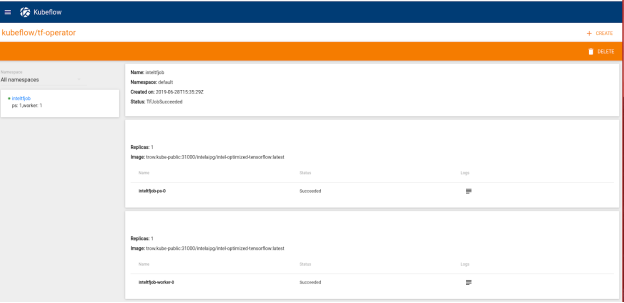
Figure 9. TFJobs dashboard
Comparison of distributed with non-distributed training
Performance comparison
We compared the performance results from executing the TensorFlow benchmark on a single application node (non-distributed training) with execution using training on two application nodes (one PS node and two worker nodes). The following figure shows the results:
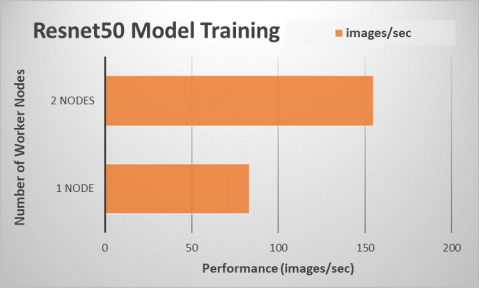
Figure 10. Performance scaling for model training using multiple server nodes
The throughput indicates that a training job using two application nodes is almost 1.9 times faster than a training job using a single application node. Using the optimized Tensorflow framework distribution from Intel and applying the appropriate parameters when launching a training job enables the ML practitioner to execute their Tensorflow jobs efficiently on Intel Xeon Scalable processors.