Modernize Your Oracle Database Server Platform and Accelerate Deployments
Introduction
Executive summary
Document purpose
Audience
Business challenges
Market environment
Solution overview
Optimized Oracle database platform
This document describes a validated design infrastructure for Oracle database workloads. It consists of servers, network switches, and storage. This validated design has been vigorously tested by Dell engineers to ensure it is optimized for Oracle databases. The entire design can be customized based on database workload requirements and provides businesses increased flexibility.
The server in this validated design is the Dell PowerEdge R750 which is a 2U dual-socket rack server. It is powered by 3rd Generation Intel Xeon scalable processors. The servers can be configured with different CPU types such as the number of cores per processor and clock speed best suited for the workload requirements.
The network switch is the Dell PowerSwitch S5224F-ON. It has 24 x SFP28 ports that can be configured with 10 GbE or 25 GbE for data network. It also has 4 x 100 GbE QSFP28 ports that can be used for uplinks.
The storage system is the Dell PowerStore 1000T. It is a 2U two-node dual socket Intel® Xeon® platform. It is a midrange, modern storage infrastructure that is engineered for data-centric workloads. It is designed for performance, scalability, and efficiency. The PowerStore platform includes multiple models that can be used for this solution design. Each model has different specification such as supported drive types, I/O modules, expansion enclosures, NVRAM drives, and more. These specifications can be tailored to any database workload requirement. The following figure shows an overview of the Dell optimized Oracle Database platform Validated Design.
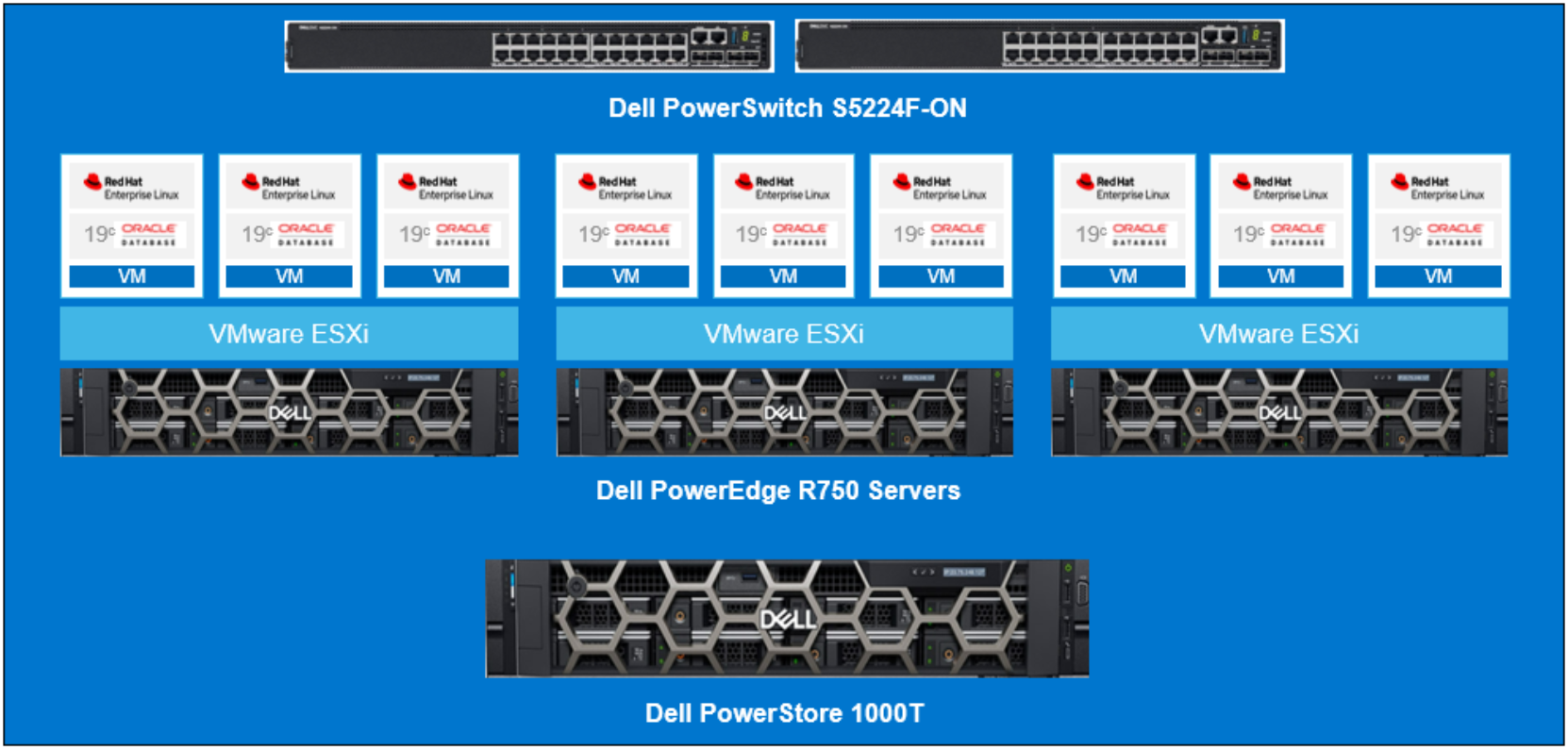
Figure 1. Optimized Oracle Database platform architecture
Dell customers are aware that running Oracle database workloads requires a robust infrastructure. The various infrastructure components must be carefully researched and tested once they are procured. If the components are not from the same vendor, the database becomes more difficult to manage because it requires support from multiple vendors to troubleshoot problems as they arise. Another potential issue is that each vendor deploys their own set of best practices, meaning a solution one component may conflict with another component and could disrupt optimal infrastructure function.
This solution solves those problems, as the entire system is designed for Oracle workloads. Dell engineers have expertise in Oracle databases, Linux, and VMware. This validated design was properly configured, tested, and tuned according to best practices, avoiding any potential failures or outages.
This infrastructure solution addresses both bare metal and virtualized environments for Oracle databases. It allows businesses to quickly stand-up Oracle database platforms to roll out a new business line or meet deadlines. This infrastructure also quickly provides a tested Oracle platform solution for application developers to test new codes and free up time so they can focus more on value-added tasks.
Solution architecture
Optimized Oracle database platform
PowerEdge Servers
Dell PowerEdge servers include multiple BIOS profiles. Each profile, when set, changes certain BIOS settings on the server. Dell engineers tested Oracle OLTP workloads with different BIOS settings to determine the best performance outcome. From these tests, they designed a customized profile to allow users to customize their configurations when deploying Oracle databases. The following list includes available BIOS profiles that come with the Dell PowerEdge servers.
- Virtualization Optimized Performance Profile
- Virtualization Optimized Performance Per Watt Profile
- Database Optimized Performance Profile
- Database Optimized Performance Per Watt Profile
- SDS Optimized Performance Profile
The recommended profile for Oracle OLTP workloads is Database Optimized Performance Profile. Select this profile when you are setting up the servers for Oracle database. When deploying Oracle database in a virtualized environment, Virtualization Technology and x2APIC must also be enabled in addition to this profile. These two additional settings are not required when deploying Oracle databases on bare metal servers. For security reasons, the following ports were also disabled in the BIOS.
- User accessible USB ports
- Internal USB ports
- iDRAC Direct USB port
- Serial communication
For detailed explanation of each BIOS profile, see CPU Best Practices.
The following table shows the PowerEdge R750 details used for this Validated Design.
Table 1. PowerEdge server configuration details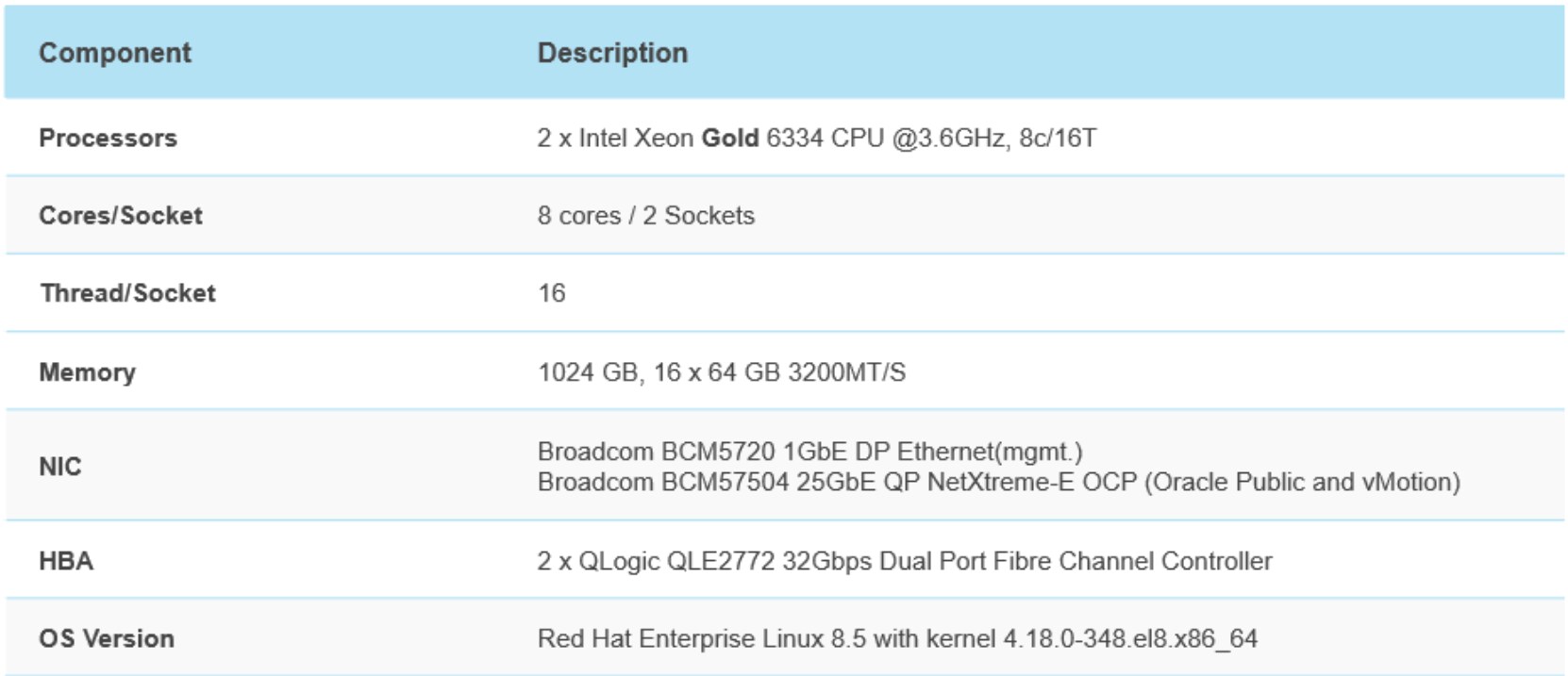
PowerStore
The Dell PowerStore is a 2U two-node dual socket Intel® Xeon® platform. It is an active/active configuration where both nodes (controllers) can serve data to the volumes. However, only one node can own a volume at a time. For this validation, Dell engineers manually configured the volumes with node affinity to provide the best performance possible for running Oracle database workloads. PowerStore node affinity provides the load balancing of the volumes created on the array to maximize performance. In later versions of the PowerStore operating system, the node affinity is automated during the volume creation process.
PowerStore has four Fibre Channel front-end I/O ports per node for storage connectivity. To maximize storage performance, all four front-end I/O ports on each PowerStore node are zoned to all PowerEdge HBA ports. The following table provides an overview of a PowerStore 1000T model.
Table 2. PowerStore 1000T configuration details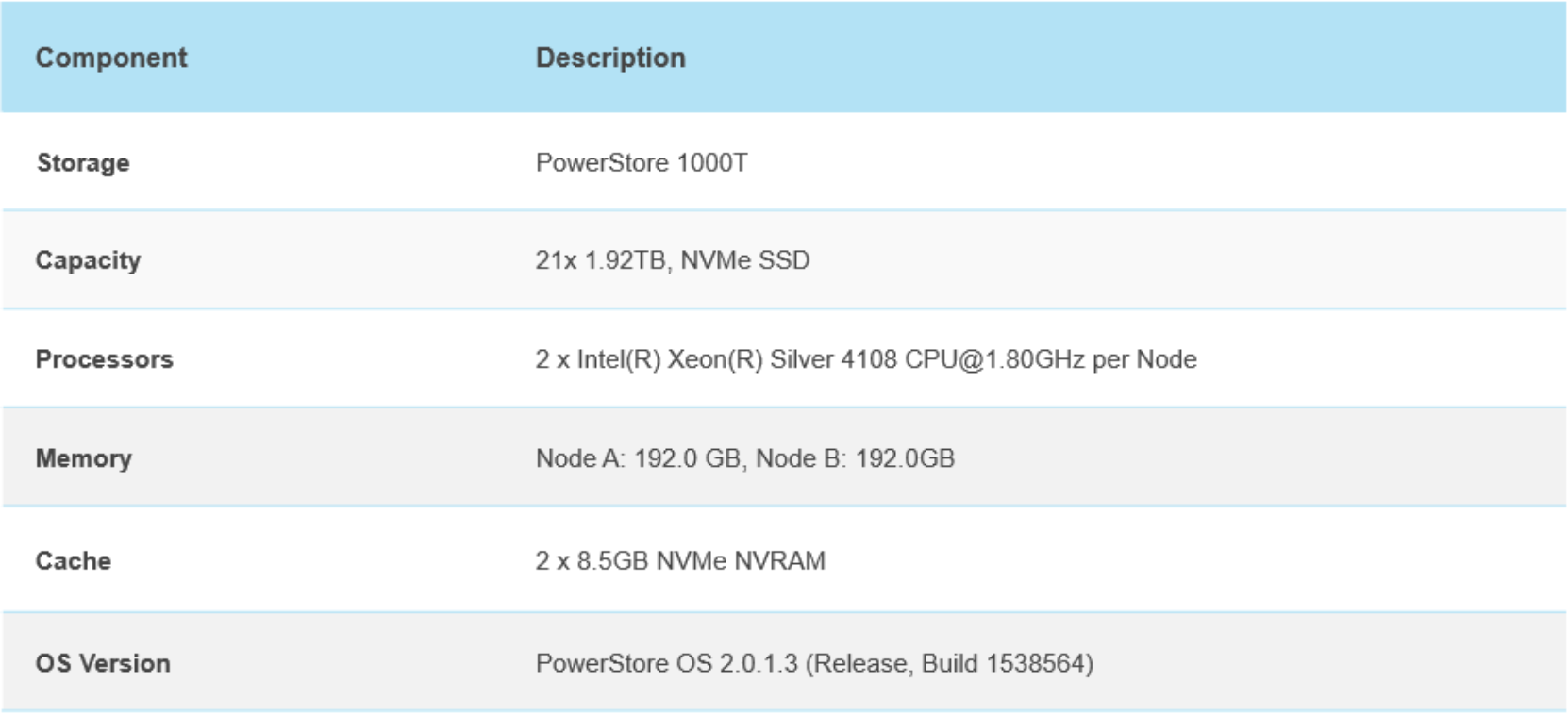
PowerStore has many features such as volume performance policy, volume group, and snapshot. The volume performance policy consists of three priority levels: High, Medium, and Low. This policy controls the quality of service for the data path to the volume. The default priority setting for newly created volumes is medium.
The volume group feature provides users with the ability to snapshot more than one volume at the same time. Oracle requires all volumes belonging to the database to be snapshotted atomically for a functional snapshot of an Oracle database. Depending on the business requirements, Oracle snapshots can be used to create clones for dev/test or other purposes.
This validated design includes four storage volume groups. This design was to allow granularity for the database administrators to only snapshot what is necessary, therefore saving capacity. Data in the TEMP tablespace is not required when snapshotting the database and resides in its own storage volume group. Even though, a single instance database was tested, a separate ASM disk group named “GRID” was created for the Oracle Restart option. This ASM disk group is not required for a functional database snapshot; therefore, it has its own storage volume group. The following list describes the four storage volume groups:
- VM_OS volume group
- VM_GRID volume group
- VM_DB1 volume group
- VM_TEMP volume group
The VM_OS storage volume group has one volume configured with the PowerStore volume performance policy of medium (default). This volume group was for the Linux operating system.
The VM_GRID storage volume group contains three volumes configured with the PowerStore volume performance policy of medium (default). Since Oracle Restart was configured, a separate ASM disk group was created for Grid Infrastructure and the ASM registry file.
The VM_DB1 storage volume group contains twelve volumes. This volume group consists of the following ASM disk groups:
- DATA_DG
- REDO_DG
- FRA_DG
Each of these ASM disk groups has four volumes. The DATA_DG volumes were configured with the PowerStore volume performance policy of medium. The REDO_DG volumes were configured with the PowerStore volume performance policy of high. The FRA_DG volumes were configured with the PowerStore volume performance policy of low.
The VM_TEMP storage volume group has one volume and was configured with the PowerStore volume performance policy of medium (default). Since the temp tablespace is not needed for database snapshots, a dedicated storage volume group was created.
The following table provides an overview of the volume groups created for this validation.
Table 3. 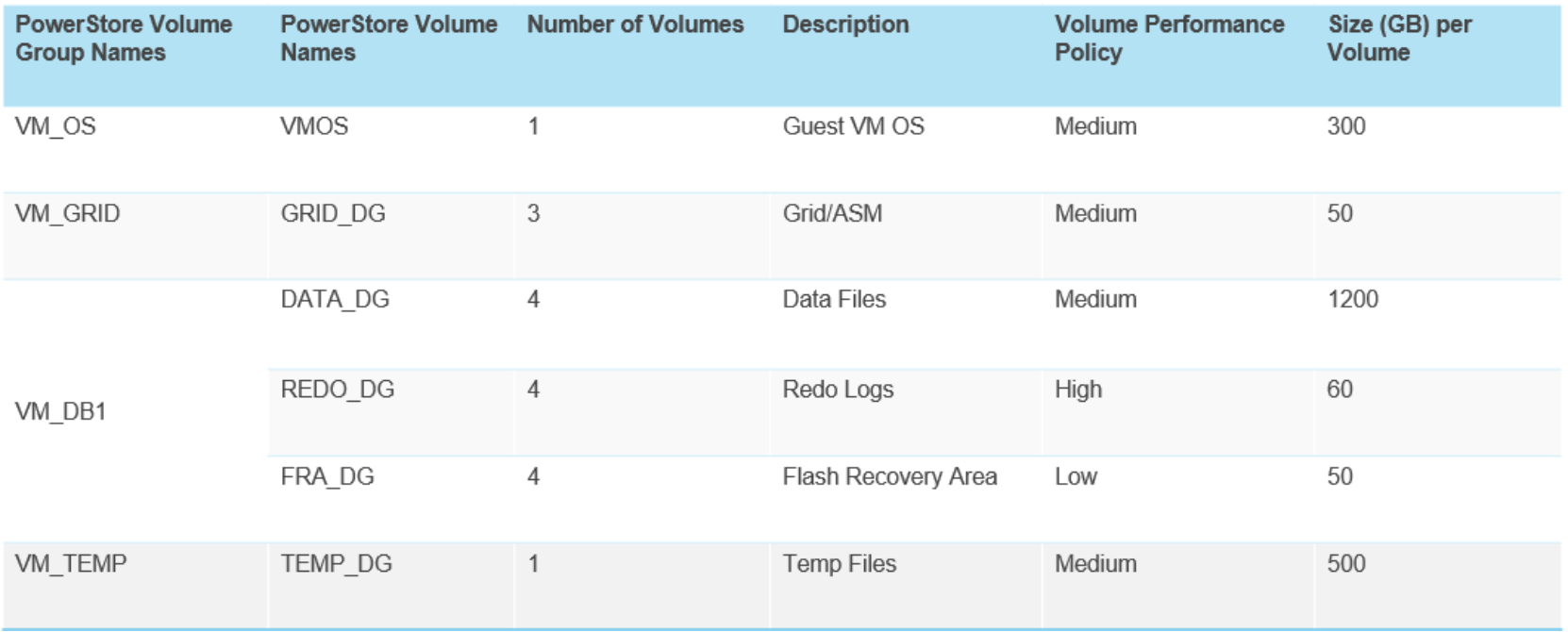
Optimized volume groups configuration for Oracle database
For detailed PowerStore best practices and features, see Storage Best Practices.
In addition, the PowerStore also includes Oracle Enterprise Manager (OEM) plugins to allow users to gain performance insights of the PowerStore from the OEM user interface.
PowerSwitch
The network stack consists of the Dell PowerSwitch S5224F-ON, which has 24 x SFP28 ports that can be configured with 10 GbE or 25 GbE and 4 x 100 GbE QSFP28 ports. We configured this switch with 25GbE for the public network and the VMotion network during the tests. We also enabled Jumbo Frame for these two VLANs. When possible, users should consider Jumbo Frame for better performance. When using Jumbo Frame, it is extremely important to ensure that all devices on the same VLAN are configured with Jumbo Frames, or the system will not function properly. In an Oracle RAC deployment, the private interconnect between RAC nodes should be configured with Jumbo Frames. The following table provides an overview of the PowerSwitch.
Table 4. Dell PowerSwitch S5224F-ON configuration details 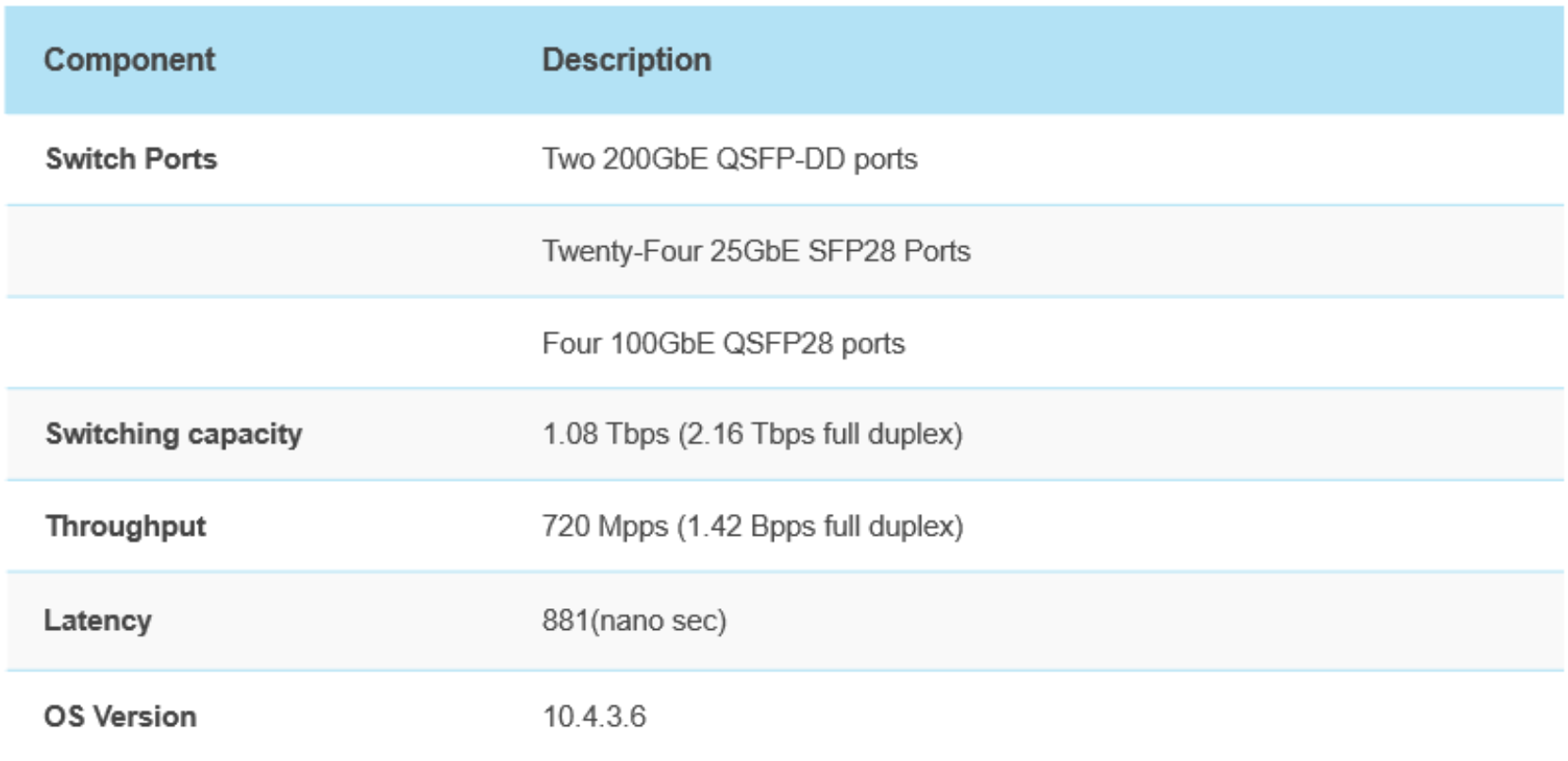
VMware vSphere
VM Operating System
The operating system stack for the Oracle database virtual machine is Red Hat Enterprise Linux x64. In Linux, “tuned” is a profile-based system tuning tool that uses the udev device manager to monitor connected devices and enables both static and dynamic tuning of the system settings. It comes with several pre-defined profiles for common use cases, but the tuned service also enables you to define custom profiles.
Oracle software installation requires certain kernel settings, meaning Oracle provides a pre-packaged RPM called oracle-database-preinstall. However, these settings may not always be optimal for OLTP workloads. To determine optimal settings for these kernel parameters, Dell engineers performed various tests. The engineers used a tuned profile to accelerate the implementation of these settings. This profile included the recommended settings for Oracle OLTP workloads, which can be placed in a file and enabled with the tuned-adm command. In addition to the Oracle OLTP profile, HugePages parameter should also be enabled. Oracle provides a script called hugepages_settings.sh which can be used to get the recommended value for the Linux vm.nr_hugepages parameter. To use the HugePages setting, the transparent_hugepage parameter should be disabled by setting it to never. For more detail on the Linux operating system kernel parameters best practices, see Linux Best Practices.
The link to the Oracle script can be found here.
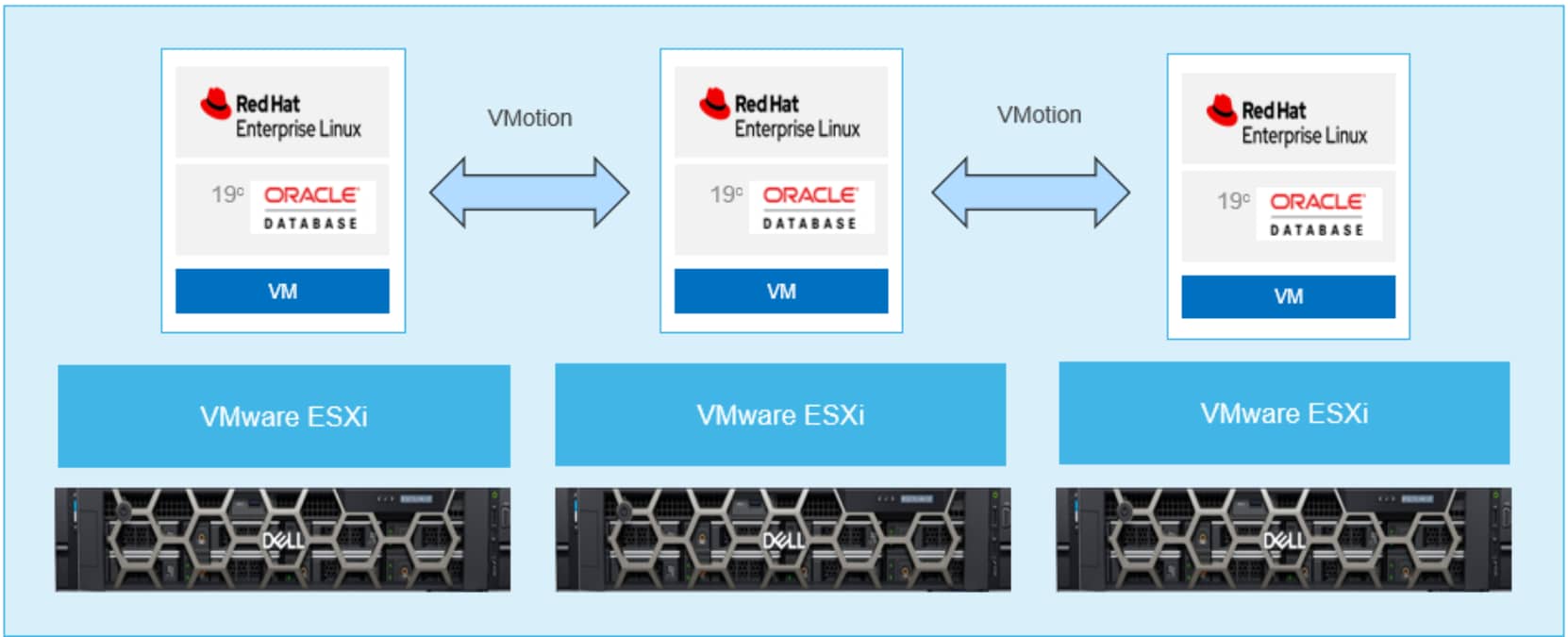
Figure 2. Oracle Database VM layout
Oracle ASM storage
ASM disk group settings for the Oracle ASM are displayed in the following table. Selecting multiple volumes for the GRID disk group was based on Oracle’s recommendation for high availability when deploying RAC. In this Validated Design, Dell followed this recommendation for a single instance database with Oracle Restart option. This recommendation is not needed in a production environment. The DATA, REDO, and FRA disk groups also contain multiple volumes. This provides better performance because of multiple devices and higher I/O concurrency. The GRID disk group was configured with an ASM Normal Redundancy setting, as described in Oracle best practices, while other disk groups were configured with External Redundancy. Since the PowerStore has built-in redundancy, it is not necessary to apply a Normal Redundancy setting for other disk groups; which saves capacity on the storage.
Table 5. Oracle ASM disk groups configuration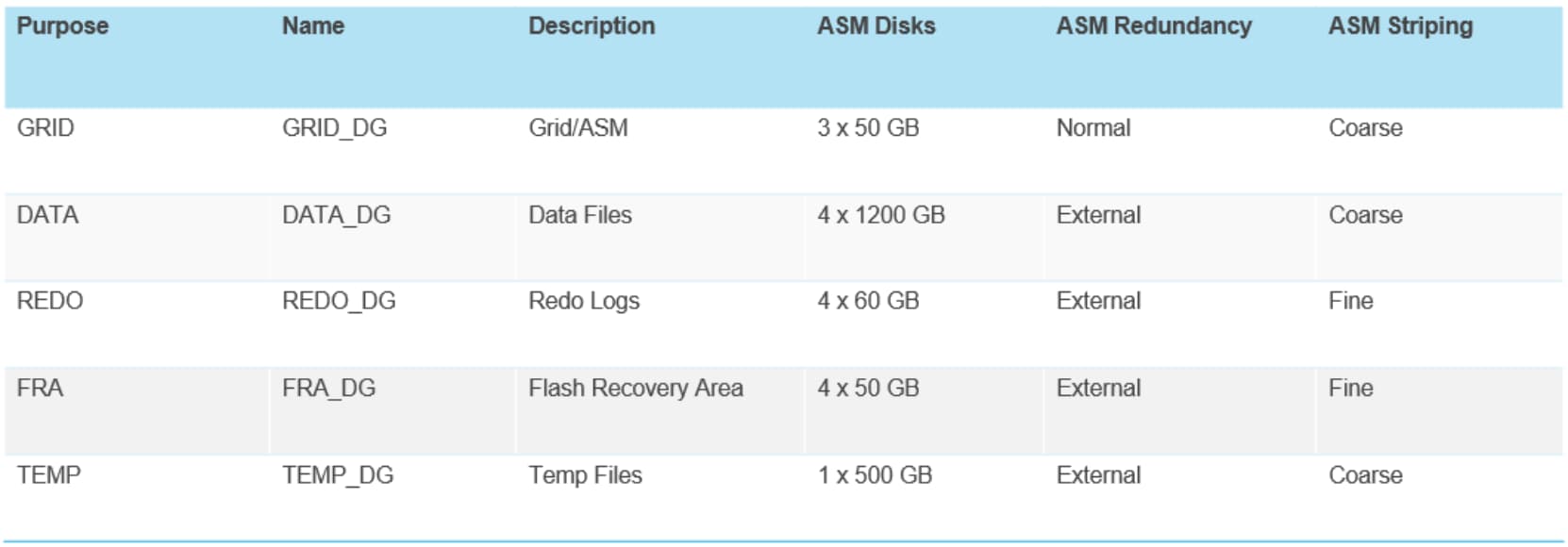
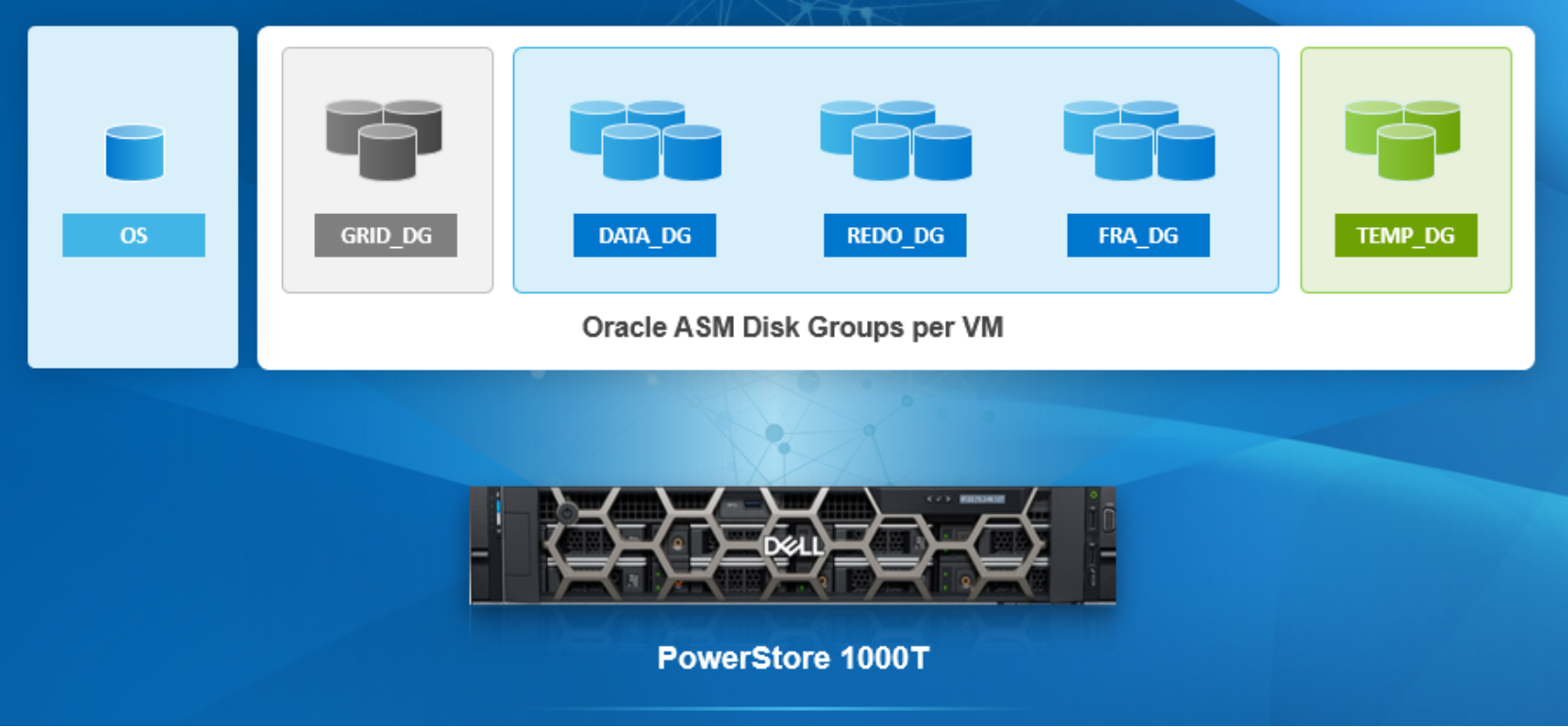
Figure 3. Oracle ASM disk groups per VM
Oracle online redo logs
While testing OLTP workload using the HammerDB test tool, the Oracle online redo logs were configured to prevent frequent log switching. If database switches online redo log too often, it will affect database performance. We look at the AWR reports to determine the right size of the redo logs and adjust accordingly. In a production deployment, the number of redo logs and sizes also depend on the Recovery Time Objective (RTO) and Recovery Point Objective (RPO). Sizing incorrectly could affect database performance and business RTO and RPO requirements. The following table shows the online redo log layout during our tests.
Table 6. Oracle online redo logs configuration 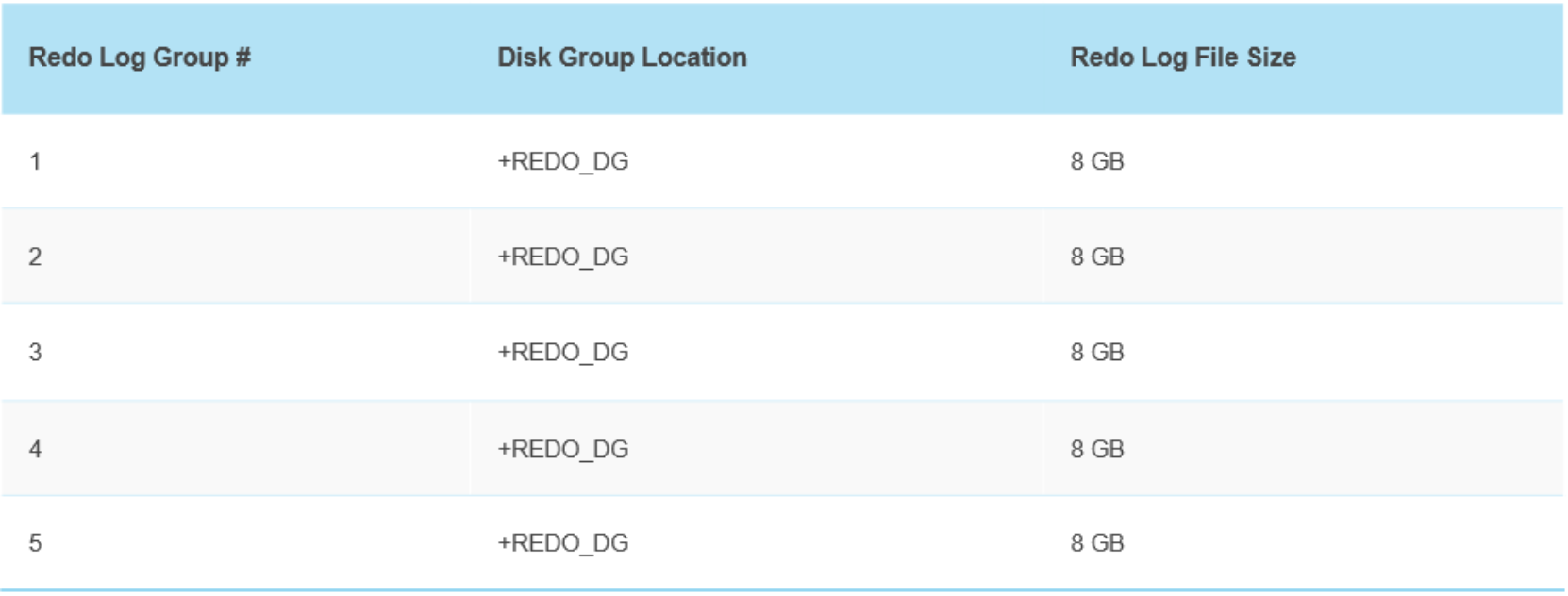
Oracle database parameters
Database Solution Optimizer
Database Solution Optimizer (DSO) is a Dell’s toolkit that allows System Administrators and DBAs to enable best practices at each layer in the solution stack. This toolkit allows the IT teams the ability to configure the solution with best practices during the initial stand-up of the infrastructure. It operates using a module-based approach allowing the IT teams the granularity and flexibility. The following modules are currently available with this Validated Design. Please note that this toolkit is not a supported product.
- PowerEdge server BIOS module
- Red Hat Enterprise Linux Operating System module
- Storage System module
- Report module
- Oracle module
This toolkit is a work in progress and more modules will be available in future releases. Those modules will include:
- Log module
- VMware ESXi module
- Network module
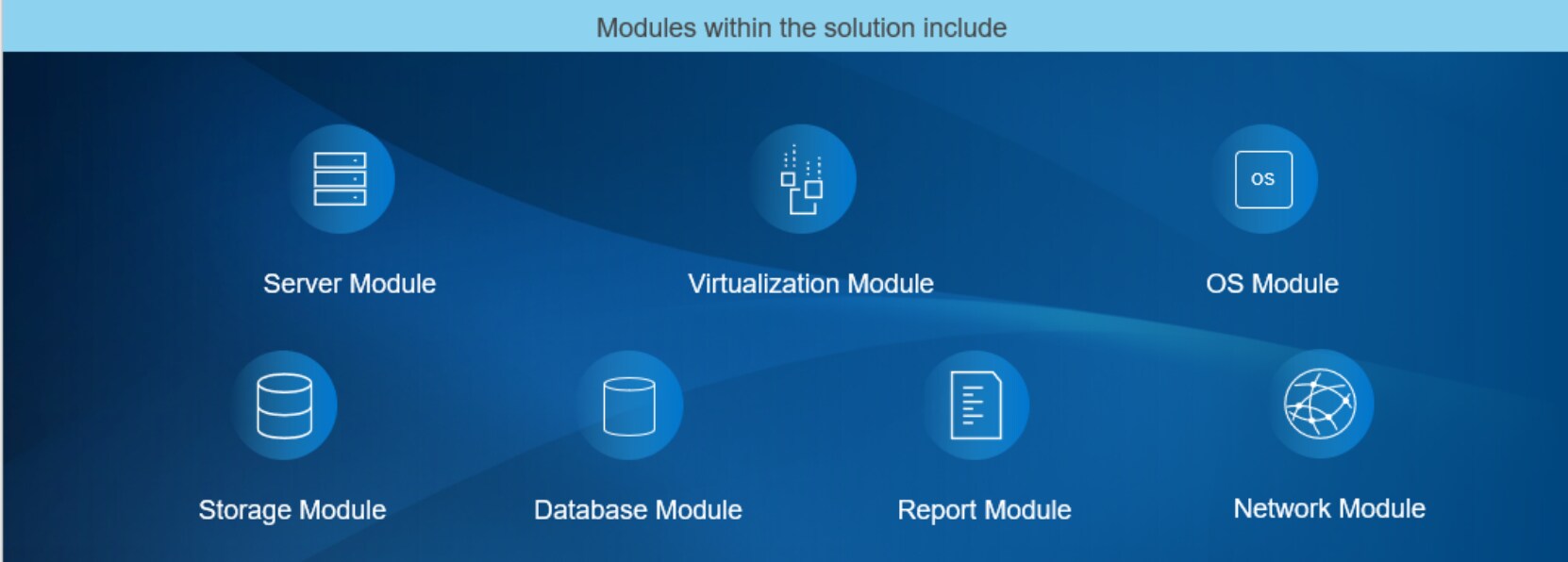
Figure 4. Database Solution Optimizer modules
BIOS Module
This module interacts with iDRAC Redfish Rest API to allow System Administrators to select the proper profile setting without having to go into the BIOS mode and change various parameters which can be error prone. The recommended profile for Oracle OLTP workload is Database Optimized Performance Profile.
Red Hat Enterprise Linux Operating System Module
This module allows System Administrators the ability to verify and set kernel parameters according to best practices such as using the correct tuned profile for Oracle database and the setting of HugePages.
Storage Module
This module uses storage Rest API to interact with the storage system to gather information about the data path connectivity, volume groups, and LUNs details. System Administrators can verify if the number of data paths, volume groups, and LUNs have been adequately configured based on best practices. In future releases, the same module can be used to applied recommended settings.
Report Module
This module provides the ability to compare the current settings with the recommended settings for all components in the stack. This will allow System Administrators and DBAs to verify if all settings in the stack have been set according to best practices. It will be available in HTML format in the future release so it can be viewed with any web browser.
Oracle Database Module
This module provides the DBAs insights into the database initialization parameters settings. The DBAs can use this module to retrieve the current settings related to database and storage and change them according to best practices. This ensures that the database is operating optimally within the whole stack.
Log Module
The purpose of this module is to log all operations when this utility is invoked. This allows an audit trail to the System Administrators and DBAs of what has been done to the whole solution.
VMware ESXi Module
This module provides the ability to gather ESXi related parameters and configuration for best practices. Parameters such as SCSI controllers, path policy, and ESXi power policy are some examples that will be verified to ensure they are set properly.
Network Module
This module allows IT teams to verify if network settings have been configured based on best practices. One such setting would be the MTU size for private and VMotion VLANs.