Multimodality Data Preparation Pipeline
Introduction
Retrieval-Augmented Generation (RAG) is an effective approach to improve Large Language Model (LLM) behavior by combining information retrieval with generative AI. With RAG, an AI system retrieves relevant data from a vector store database. The database stores data as high-dimensional vectors that represent the meaning of words or phrases before generating a response using an LLM. This approach allows RAG to extract contextually relevant information from a vast dataset that supplements the data on which it was trained, allowing it to generate accurate, context-aware answers or insights.
Unlike traditional search models that rely on keyword matching, RAG can handle more complex, open-ended queries by retrieving data that is based on semantic meaning. RAG bridges the gap between search and generation, improving both the accuracy of retrieved content and the relevance of the generated responses.
The early implementations of RAG primarily focused on text-based data, retrieving relevant documents or snippets using semantic search to generate responses. As LLMs have evolved to support diverse datatypes such as images, audio, and video, RAG has also evolved to support these multimodal scenarios. RAG is far more powerful when it can handle diverse datatypes, enabling richer, context-aware results across various media.
A significant component of all RAG implementations is the data ingest and preparation phase that populates the vector database. This blog describes an approach to building multimodal data pipelines that simplifies the complexity of multimodal data preparation so that RAG can be expanded to more comprehensive solutions.
A basic RAG data preparation pipeline
The purpose of the pipeline is to convert raw text data into a structured, searchable format that can be used during RAG inferencing. This setup is useful for creating searchable archives or powering AI applications that must find relevant information quickly from a diverse set of documents.
The following figure shows a typical data preparation pipeline for text-based RAG:
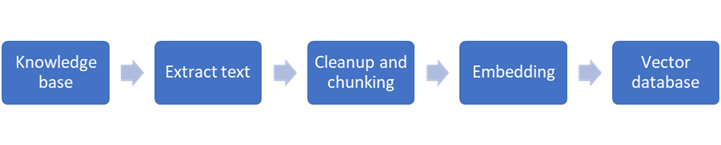
Figure 1. RAG data ingestion pipeline
The pipeline includes the following main components:
- The knowledge base is a repository of documents to be processed.
- The extract text stage converts a specific document format to raw text.
- Cleanup and chunking preprocesses the raw text to optimize vectorization.
- Embedding uses a vector embedding model to convert text chunks to vector format.
- The vector database stores the vectors and provides efficient retrieval.
This pipeline is a basic version; it is more of an example than a production-ready blueprint. There are several limitations for enterprise implementations:
- It assumes a one-time loading process with no support for incremental processing when source documents change and little support for metadata outside the document.
- The simplicity of the implementation lends itself to a siloed implementation in which the pipeline is embedded into the specific RAG implementation.
- Most importantly, it is document- and text-centric and does not include the multimedia capabilities that are necessary for multimodal RAG.
Requirements for multimodal data preparation
As organizations increasingly work with diverse datasets, the need for a more comprehensive data preparation solution becomes essential. Data preparation for multimodal data is significantly more complex than dealing with text alone. The primary challenge is that each datatype requires specialized processing—extracting information from images or transcribing audio accurately is far trickier than text processing.
A comprehensive solution for multimodal data preparation must meet the following requirements:
- Ability to process multiple data formats including text, image, video, and audio
- Flexibility to:
- Support multiple vector databases
- Use multiple embedding models
- Reuse the same pipeline for multiple RAG scenarios
- Production grade support for automation, management, and error handling
A design that addresses these requirements ensures multimodal data is ready for semantic search in RAG pipelines. By integrating various datatypes into a unified framework, you can expand the capabilities of RAG to handle any type of data, making it a more comprehensive solution for modern search and AI tasks.
Design of a multimodal data preparation pipeline
This pipeline design addresses the requirements of multimodel data preparation. It supports diverse content types and can extract relevant information and convert it into a standardized, LLM-understandable format in a vector database.
The following major components play a crucial role in designing the data preparation pipeline:
- Embedding models convert high-dimensional data such as words and images into their compact numerical representation, which are called vectors, that capture semantic or structural relationships among the tokens. Similar inputs are mapped closely together in this vector space, enabling tasks such as similarity search, clustering, and classification.
- Speech-to-text (STT) models, or automatic speech recognition (ASR) systems, are designed to convert spoken language into text by analyzing audio signals. They predict word sequences by using deep learning architectures such as Recurrent Neural Networks (RNNs), Convolutional Neural Networks (CNNs), or transformers. Also, they power applications such as voice assistants, transcription tools, and real-time translation.
- Vision language models (VLMs) combine visual and textual understanding by integrating computer vision and Natural Language Processing (NLP) techniques. Trained on image-text pairs, they perform tasks such as image captioning, visual question answering, and multimodal reasoning by learning the relationships between what is seen and what is said.
- Vector databases are designed to store and efficiently search high-dimensional vector representations—such as embeddings—using similarity measures rather than exact matches. Using algorithms such as Approximate Nearest Neighbor (ANN) enables fast and scalable retrieval, making them ideal for applications such as recommendation systems, semantic search, and generative AI.
- Model serving runtimes manage the deployment and scaling of large language models in real time. They handle resource allocation, input processing, and response generation, with optimizations such as batching and quantization to ensure low-latency, cost-efficient performance in production environments.
- Microservice platforms such as Kubernetes and OpenShift orchestrate microservices—independent, modular components of an application. Kubernetes automates container deployment and scaling, while OpenShift adds enterprise features such as Continuous Integration and Continuous Deliver (CI/CD), security, and developer tools, enabling scalable, resilient cloud-native applications.
Processing overview
The enhanced pipeline design supports multiple heterogenous data formats by adding a data extraction component and data classification and routing logic to the basic data preparation pipeline. The routing logic passes data through processing modules specialized for each data format. The output from the processing modules is aggregated and sent to the vector embedding components and finally to the vector databases. Dividing the processing of information components provides flexibility in the selection of components and can be expanded to a microservices implementation.
The following figure shows the details of the design:
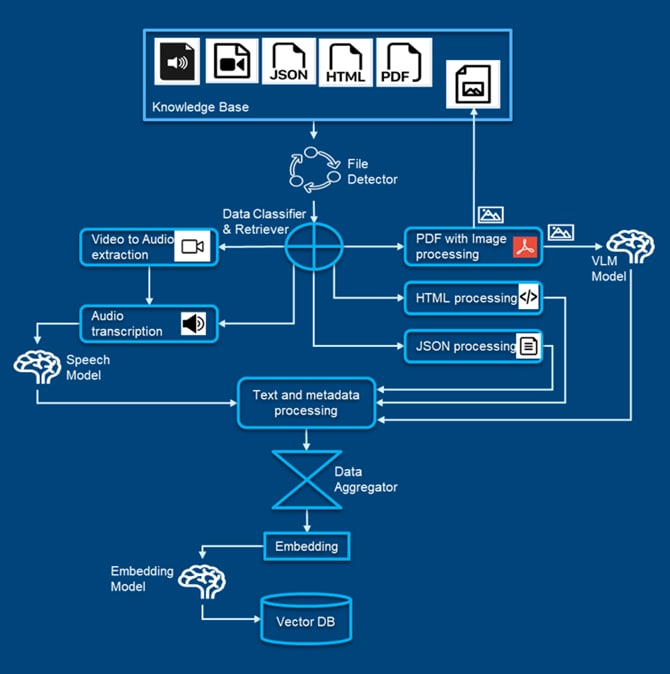
Figure 2. Multimodality data preparation pipeline
Component details
The following table summarizes the different components and functions of the multimodality data pipeline:
Table 1. Multimodality data preparation pipeline components
|
Modules |
Components |
Functions |
|
Knowledge base |
Data source |
Catalogs organizations’ internal data |
|
Source connector |
Data source connector |
Connects to different data sources |
|
File detector |
Detects new files or file updates |
|
|
File processor |
File retriever |
Retrieves files from the source |
|
File tracer |
Unique id for tracing the life cycle of a file |
|
|
File classifier |
Classifies files to be processed in a different subpipeline |
|
|
Data processor |
Text processor |
Processes text files |
|
PDF processor |
Processes PDF files and maintains tables, graphs, and images |
|
|
HTML processor |
Processes HTML files and maintains tables, graphs, and images |
|
|
Video-to-audio processor |
Extracts audio from video files |
|
|
Audio transcription processor |
Transcribes audio files to text format |
|
|
Data alignment |
Data aggregator |
Aggregates data for a file and maintains data consistency |
|
File metadata processor |
Generates and maintains metadata about file |
|
|
Vector processing |
Data chunking |
Creates smaller chunks from the processed file |
|
Grounding maintainer |
Creates and maintains chunk metadata and links to documents, images, and videos |
|
|
Vector embedding |
Creates vector embedding for the text chunks |
|
|
Vector storage |
Stores vector embedding and texts to the vector database |
|
|
Data retriever
|
Semantic search |
Provides semantic search functionality |
|
Text-based search |
Provides text-based search functionality |
|
|
Hybrid search |
Provides hybrid search functionality |
|
|
Data reranker |
Reranks the retrieved chunks based on their relevancy to the query |
- Knowledge base—The knowledge base is the catalog of an organization’s internal data such as documents and media files. It might also include data from enterprise applications, which is stored on a file system, that is used in RAG to enrich an LLM response with internal data.
- Source connector—The main function of the source connector module is to access the organization knowledge base and detect new or updated files. This module includes the following components:
- Data source connector
The primary responsibility of this component is to connect to the diverse set of data sources. There is a growing list of connectors with access to different types of data sources such as file server, S3 bucket, Delta Lake, database, and so on. - File detector
The file detector monitors the knowledge base for new or updated files and triggers pipeline processing instantly.
- Data source connector
- File processor—The primary job of the file processor module is tracing, classification, and retrieval of the file from the data source. The following components are part of this module:
- File retriever
The file retriever extracts the file from the data source and passes a copy to the file tracer for further processing. - File tracer
The file tracer generates a unique identifier for the file and maintains tracing for the life cycle. - File classifier
Based on file extensions and content mapping, the file is classified separately and sent to the data processor module. The file classifier is also responsible for directing files to specialized processing modules based on the data format.
- File retriever
- Data Processor module—The data processor module consists of different specialized processor components that perform the processing of the different modality of the data to address the unique aspects of each datatype.
- The Text processor handles text file data.
- The PDF processor extracts text and metadata from PDF files, ensuring that all valuable information is captured. Images in the PDF files are fed to a VLM to extract and interpret any text in the images.
- The HTML processor extracts text, charts, tables, images, and metadata from the markup that is used in the HTML file. Images in the HTML file are fed to a VLM to extract and interpret any text in the images.
- The Video-to-audio processor extracts audio from a video file and passes this information to an audio transcription processor to generate the text.
- The Audio transcription processor uses a speech-to-text model to convert audio into text.
- Data alignment—The data alignment module ingests raw multiformat data—text, images, audio, and video—along with associated metadata such as file attributes and source context. It generates unified textual descriptions for multimedia content, producing structured segments ready for vectorization.
- The Data aggregator consolidates streams from format-specific components, cleans the inputs, and generates unified textual descriptions with metadata for consistent representation. It also performs data chunking, segmenting the cleaned content into manageable units for efficient vectorization.
- The File metadata processor cleans, standardizes, and structures the extracted text from all multimodal sources along with text descriptions and metadata, preparing it for aggregation.
- Vector processing—The vector processing module transforms structured multimodal data chunks into high-dimensional vector representations. These embeddings enable efficient similarity search, retrieval, and downstream machine learning tasks.
- Data chunking segments incoming multimodal data streams into structured, manageable units for efficient downstream processing. It ensures consistency and scalability across diverse datatypes.
- The Grounding maintainer maintains contextual coherence by linking segmented data to relevant semantic or temporal anchors by using metadata. It enables accurate interpretation and alignment across modalities.
- Vector embedding uses an embedding model to transform the processed data into vector representations, enabling semantic search and analysis.
- Vector storage stores the generated vectors in a high-speed, scalable vector database, allowing for efficient querying and retrieval of information.
- Data retriever—The Data retriever module orchestrates the efficient extraction of relevant multimodal data chunks from large-scale repositories. By using vector similarity search and metadata filtering, it identifies and retrieves contextually aligned information that is tailored to specific queries. This module ensures low-latency access to high-quality data, enabling seamless integration with downstream analytics, reasoning engines, and generative models.
- Semantic search uses vector embeddings to retrieve contextually relevant data that is based on meaning rather than exact keywords. It is for understanding nuanced queries across modalities.
- Text-based search performs traditional keyword-based retrieval using indexed textual metadata. It ensures fast and precise lookup for structured or known queries.
- Hybrid search combines semantic and text-based search strategies to balance precision and contextual relevance. It enhances retrieval robustness across diverse datatypes and query intents.
- The Data reranker refines initial search results by reevaluating them using advanced scoring models. It prioritizes the most contextually relevant outputs for final delivery.
Implementation details
To explore solutions for handling diverse data in a RAG setup, the Dell Technologies engineering team implemented a multimodality data preparation pipeline. Throughout this process, we explored and adopted various methodologies for extracting, tagging, and contextualizing diverse data. We also evaluated different storage and retrieval strategies to optimize downstream performance. To support this effort, we used several generative AI models, including those models for image understanding and advanced embedding algorithms.
The primary focus of our optimized implementation was on storing and retrieving meaningful information from diverse media types including PDFs, video, and audio and enriching the LLMs’ response to text-based queries.
Table 2. Solution components
|
Components |
Options |
Used |
|
Embedding model |
NV-Embed-v2 |
NV-Embed-v2 |
|
intfloat/e5-mistral-7b-instruct |
||
|
Speech-to-text model |
Whisper-Large-v2 |
Whisper-Large-v3 |
|
Whisper-Large-v3 |
||
|
Image-to-text model |
Qwen2.5-VL-7B-Instruct |
Qwen2.5-VL-7B-Instruct |
|
Llama-3.2-11B-Vision-Instruct |
||
|
Llama-3.2-90B-Vision-Instruct |
||
|
Vector database |
Redis |
Redis |
|
Milvus |
||
|
PgVector |
||
|
Model serving runtime |
vLLM |
vLLM |
|
Platform |
Kubernetes |
Kubernetes |
|
OpenShift |
Code Examples
This section provides an overview of how the entire data ingestion pipeline is running.
- The following example shows how to initialize the pipeline modules:
def main(): env = PrepareEnvironment() # Create directories with the following folder structure directories_to_process_files = [ "dataset", "dataset/media_dataset", "dataset/pdf_dataset", "dataset/audio_files", "dataset/audio_chunk_merged", "dataset/audio_chunk_texts", "dataset/audio_chunks", "dataset/image_folder", ] env.create_directories(directories_to_process_files) ds = KBUtility() file_extensions = ["mp3", "mp4", "pdf"] files = ds.download_files(url, config.auth_token) files = ds.get_valid_files(files, exts=file_extensions) VECTOR_DB = os.getenv("VECTOR_DB", "redis://localhost:6379") OPENAI_API_KEY = os.getenv("OPENAI_API_KEY") VLLM_BASE_URL = os.getenv("VLLM_BASE_URL") MODEL_NAME = os.getenv("EMBEDDING_MODEL_NAME", "nvidia/NV-Embed-v2") TTS_MODEL_NAME = os.getenv("TTS_MODEL_NAME", "openai/Whisper-Large-v3") INDEX_NAME = os.getenv("INDEX_NAME") vector_db_manager = VectorDBManager( VECTOR_DB, OPENAI_API_KEY, VLLM_BASE_URL, MODEL_NAME, INDEX_NAME ) # Based on file extension, this function will call and process individual file using different ingestion pipelines. status = ds.invoke_data_ingestion_pipeline(files, vector_db_manager) if status: console.log("All files processed successfully.") - The following example shows how the media files are converted to audio files. If the file type is .mp4, it first extracts audio from the video clip and appends it to the audio list. The final codec is set as .mp3 before the audio files are appended to the list.
def process_audio_video_files(media_dataset_path, output_path) -> AudioFileClip:
        audio_list = []
        for file in tqdm(os.listdir(media_dataset_path), desc="Processing Files"):
            filename_splits = os.path.splitext(os.path.basename(file))
            extension = filename_splits[1]
            filename = filename_splits[0]
       audio_filename = os.path.join(output_path, filename) + ".mp3"

            if str.lower(extension) == ".mp4":
                video = VideoFileClip(os.path.join(media_dataset_path, file))
                audio = video.audio

                audio.write_audiofile(audio_filename, codec="mp3")
                audio_list.append(audio)

                audio.close()
                video.close()

            else:
                audio = AudioFileClip(os.path.join(media_dataset_path, file))
                audio.write_audiofile(audio_filename, codec="mp3")
                audio_list.append(audio)

                audio.close()

        return audio_list
- The following example shows how to chunk the audio files. We set the chunk size to 30 for better context preservation and the chunk overlap to two words to make the merge more accurate and have fewer word repetitions.
def chunk_audio(
        audio_file_path, chunk_size=30, chunk_overlap=2, output_path=None
    ) -> list[AudioFileClip]:
        chunk_start = 0
        chunk_end = chunk_size + (2 * chunk_overlap)
        chunk_index = 0

        audio = AudioFileClip(audio_file_path)
        total_duration = audio.duration
        audio_chunk_list = []
        while chunk_start < total_duration:
            chunk_start = max(0, chunk_index * (chunk_size))
            chunk_end = chunk_start + chunk_size + 2 * chunk_overlap

            if chunk_end > total_duration:
                chunk_end = total_duration
            if chunk_start >= total_duration:
                break
            audio_chunk = audio.subclip(chunk_start, chunk_end)
            print(audio_chunk.duration)
            if output_path:
                filename = os.path.splitext(os.path.basename(audio.filename))[0]
                output_file_path = os.path.join(
                    output_path, f"{filename}_chunk_{chunk_index+1}#t={chunk_start}.mp3"
                )

                audio_chunk.write_audiofile(output_file_path, codec="mp3")
                audio_chunk.filename = output_file_path
            audio_chunk_list.append(audio_chunk)
            chunk_index += 1
        audio.close()
        return audio_chunk_list
- The following example shows how the audio chunks are converted to text. We use the TTS model to process the audio chunks and generate text. Also, we assume that the language of the audio is English.
def process_audio_chunks(audio_chunk_files):
        audio_texts = []
        for chunk_file in audio_chunk_files:
            with open(chunk_file, "rb") as file:
                audio_bytes = file.read()
            data = base64.b64encode(audio_bytes).decode()
            prediction = rest_request(TTS_MODEL_NAME, data)
            text = prediction.get("text", "")
            # Create the text file
            txt_filename = os.path.join(
                converted_text_output_path,
                os.path.basename(chunk_file).replace(".mp3", ".txt"),
            )
            with open(txt_filename, "w") as f:
                f.write(text)
            audio_texts.append(text)
        return audio_texts

    chunk_merge_audio_texts = ChunkMerge()
    chunk_file_list = os.listdir("audio_chunk_texts")
    chunk_merge_audio_texts.invoke(
        {"chunk_folder_path": "audio_chunk_texts", "output_path": "audio_chunk_merged"}
    )
- The following example shows how the audio and video chunks are ingested and stored to the vector database. When the audio chunks are converted to text, the vector_db_manager creates embeddings from the text chunks and adds them to the vector store.
def media_ingest(url, local_filename, vector_db_manager):
        for text_file in os.listdir(processed_chunks_dir):
            if text_file.endswith(".txt"):
                file_path = os.path.join(processed_chunks_dir, text_file)
                start_time = get_start_time(text_file)
                text_chunk = [extract_chunk_text(file_path)]
                if text_chunk:
                    metadata = f"{url}{local_filename}#t={start_time}"
                    text_chunks = [text_chunk]
                    metadata = f"{url": metadata}
                vector_db_manager.add_documents_to_store(text_chunks, metadata)
- The following example shows how the PDF files are ingested and stored to the vector database. This function highlights the process of ingesting PDFs and storing them in a vector store.
def pdf_ingest(
        file_server_url, local_filename, vector_db_manager,
        img_url="./image_folder/",
    ):
        pdf_file = os.path.join(pdf_dataset_directory, local_filename)
        formatted_output = extract_text_tables_images(
            pdf_file, image_folder, local_filename
        )
        text_splitter = CharacterTextSplitter.from_tiktoken_encoder(
            encoding_name, chunk_size, chunk_overlap
        )
        all_splits = text_splitter.create_documents([formatted_output])
        modified_splits = []
        metadata_chunk = []
        for index, doc in enumerate(all_splits):
            doc.page_content = doc.page_content.replace("\x00", "")
            img_file_names, line_numbers = find_image_lines(doc.page_content)
            img_urls = [img_url + img_name for img_name in img_file_names]
            img_summary = []
            meta_data = ""
            for image_loc, line_num in zip(img_urls, line_numbers):
                img_filename = os.path.basename(image_loc)
                image_url = f"{file_browser_api_url}resources/images/{img_filename}"
                image = read_image(image_loc)
                llm_response = VLM_call_single_image(image, doc.page_content)
                llm_resp_dictionary = process_llm_response(llm_response)
                chunk_wise_meta = []
                if llm_resp_dictionary == None:
                    img_summary.append(" ")
                else:
                    img_summary.append(llm_resp_dictionary["Description"])
                    save_image(image_loc, image_url, file_browser_auth)
                    new_image_url = image_url.replace(
                        "api/resources/images/", "files/images/"
                    )
                    meta_data += new_image_url + ","
            final_text = insert_at_lines(doc.page_content, img_summary, line_numbers)
            modified_splits.append(final_text)
            metadata_chunk.append(
                {
                    "category": "multimedia",
                    "imagelink": meta_data,  # Sample image link
                    "doclink": f"PDF_Metadata:
 {file_server_url}{os.path.basename(local_filename)}\n",
# Sample document link)
                }
            )
        vector_db_manager.add_documents_to_store(modified_splits, metadata_chunk)
Conclusion
The multimodality data preparation pipeline revolutionizes data handling with end-to-end pipeline implementation covering extraction, transformation, and storage of multimodal datatypes, enabling seamless integration with an AI implementation such as RAG.
By centralizing and standardizing data, the pipeline enhances the efficiency, scalability, and accuracy of information retrieval. The diverse range of datatypes—text, images, audio, and video—spread across various sources are processed seamlessly and stored in a way that enables fast and intelligent retrieval.
This method ensures that organizations can use richer insights across diverse data formats for more informed decision making.