OneFS Metadata
OneFS uses two principal data structures to enable information about each object, or metadata, within the file system to be searched, managed, and stored efficiently and reliably. These structures are:
- Inodes
- B-trees
OneFS uses inodes to store file attributes and pointers to file data locations on disk. Each file, directory, link, and so on, is represented by an inode.
Within OneFS, inodes come in two sizes - either 512B or 8KB. The size that OneFS uses is determined primarily by the physical and logical block formatting of the drives in a diskpool.
All OneFS inodes have both static and dynamic sections. The static section space is limited and valuable because it can be accessed in a single I/O, and does not require a distributed lock to access it. It holds fixed-width, commonly used attributes such as POSIX mode bits, owner, and size.
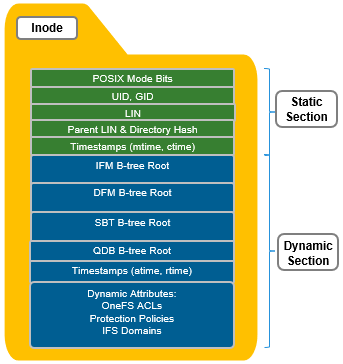
In contrast, the dynamic portion of an inode allows new attributes to be added, if necessary, without requiring an inode format update. This can be done by simply adding a new type value with code to serialize and deserialize it. Dynamic attributes are stored in the stream-style type-length-value (TLV) format, and include protection policies, OneFS ACLs, embedded b-tree roots, domain membership info, and so on.
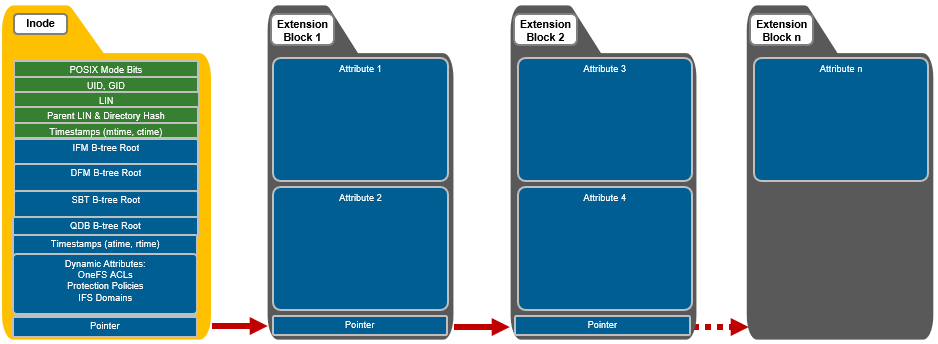
If necessary, OneFS can also use extension blocks, which are 8KB blocks to store any attributes that cannot fully fit into the inode itself. OneFS data services such as SnapshotIQ also commonly leverage inode extension blocks.
Inodes are dynamically created and stored in locations across all drives in the clusters; OneFS uses b-trees (actually B+ trees) for their indexing and rapid retrieval. The general structure of a OneFS b-tree includes a top-level block, known as the ‘root’. B-tree blocks that reference other b-trees are referred to as ‘inner blocks’. The last blocks at the end of the tree are called ‘leaf blocks’.
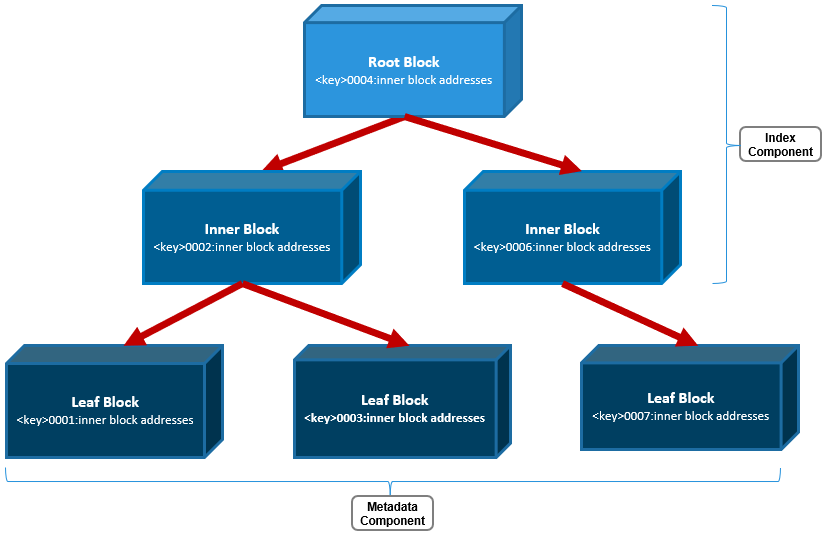
Only the leaf blocks actually contain metadata, whereas the root and inner blocks provide a balanced index of addresses allowing rapid identification of and access to the leaf blocks and their metadata.
A LIN, or logical inode, is accessed every time a file, directory, or b-tree is accessed. The function of the LIN Tree is to store the mapping between a unique LIN number and its inode mirror addresses.
The LIN is represented as a 64-bit hexadecimal number. Each file is assigned a single LIN and, because LINs are never reused, it is unique for the cluster’s lifespan. For example, the file /ifs/data/test/file1 has the following LIN:
# isi get -D /ifs/data/test/f1 | grep LIN:
*   LIN:                1:2d29:4204
Similarly, its parent directory, /ifs/data/test, has:
# isi get -D /ifs/data/test | grep LIN:
*   LIN:                1:0353:bb59
*   LIN:                1:0009:0004
*   LIN:                1:2d29:4204
The file above’s LIN tree entry includes the mapping between the LIN and its three mirrored inode disk addresses.
# isi get -D /ifs/data/test/f1 | grep "inode"
* IFS inode: [ 92,14,524557565440:512, 93,19,399535074304:512, 95,19,610321964032:512 ]
Taking the first of these inode addresses, 92,14,524557565440:512, the following can be inferred, reading from left to right:
- It’s on node 92.
- Stored on drive lnum 14.
- At block address 524557565440.
- And is a 512byte inode.
The file’s parent LIN can also be easily determined:
# isi get -D /ifs/data/test/f1 | grep -i "Parent Lin"
*  Parent Lin          1:0353:bb59
In addition to the LIN tree, OneFS also uses b-trees to support file and directory access, plus the management of several other data services. That said, the three principal b-trees that OneFS employs are:
|
Category |
B+ Tree Name |
Description |
|
Files |
Metatree or Inode Format Manager (IFM B-tree) |
|
|
Directories |
Directory Format Manager (DFM B-tree) |
|
|
System |
System B-tree (SBT) |
|
OneFS also relies heavily on several other metadata structures too, including:
- Shadow Store - Dedupe/clone metadata structures including SINs
- QDB – Quota Database structures
- System B+ Tree Files
- STF – Snapshot Tracking Files
- WORM
- IFM Indirect
- Idmap
- System Directories
- Delta Blocks
- Logstore Files
Both inodes and b-tree blocks are mirrored on disk. Mirror-based protection is used exclusively for all OneFS metadata because it is simple and lightweight, thereby avoiding the additional processing of erasure coding. Because metadata typically only consumes around 2% of the overall cluster’s capacity, the mirroring overhead for metadata is minimal.
The number of inode mirrors (minimum 2x up to 8x) is determined by the nodepool’s achieved protection policy and the metadata type. The following is a mapping of the default number of mirrors for all metadata types.
|
Protection Level |
Metadata Type |
Number of Mirrors |
|
+1n |
File inode |
2 inodes per file |
|
+2d:1n |
File inode |
3 inodes per file |
|
+2n |
File inode |
3 inodes per file |
|
+3d:1n |
File inode |
4 inodes per file |
|
+3d:1n1d |
File inode |
4 inodes per file |
|
+3n |
File inode |
4 inodes per file |
|
+4d:1n |
File inode |
5 inodes per file |
|
+4d:2n |
File inode |
5 inodes per file |
|
+4n |
File inode |
5 inodes per file |
|
2x->8x |
File inode |
Same as protection level. I.e. 2x == 2 inode mirrors |
|
+1n |
Directory inode |
3 inodes per file |
|
+2d:1n |
Directory inode |
4 inodes per file |
|
+2n |
Directory inode |
4 inodes per file |
|
+3d:1n |
Directory inode |
5 inodes per file |
|
+3d:1n1d |
Directory inode |
5 inodes per file |
|
+3n |
Directory inode |
5 inodes per file |
|
+4d:1n |
Directory inode |
6 inodes per file |
|
+4d:2n |
Directory inode |
6 inodes per file |
|
+4n |
Directory inode |
6 inodes per file |
|
2x->8x |
Directory inode |
+1 protection level. I.e. 2x == 3 inode mirrors |
|
|
LIN root/master |
8x |
|
|
LIN inner/leaf |
Variable – per-entry protection |
|
|
IFM/DFM b-tree |
Variable – per-entry protection |
|
|
Quota database b-tree (QDB) |
8x |
|
|
SBT System b-tree (SBT) |
Variable – per-entry protection |
|
|
Snapshot tracking files (STF) |
8x |
Note that, by default, directory inodes are mirrored at one level higher than the achieved protection policy, because directories are more critical and make up the OneFS single namespace. The root of the LIN Tree is the most critical metadata type and is always mirrored at 8x.
OneFS SSD strategy governs where and how much metadata is placed on SSD or HDD. There are five SSD Strategies, and these can be configured using OneFS’ file pool policies:
|
SSD Strategy |
Description |
|
L3 Cache |
All drives in a Node Pool are used as a read-only evection cache from L2 Cache. Currently used data and metadata will fill the entire capacity of the SSD Drives in this mode. Note: L3 mode does not guarantee that all metadata will be on SSD, so this may not be the most performant mode for metadata intensive workflows. |
|
Metadata Read |
One metadata mirror is placed on SSD. All other mirrors will be on HDD for hybrid and archive models. This mode can boost read performance for metadata intensive workflows. |
|
Metadata Write |
All metadata mirrors are placed on SSD. This mode can boost both read and write performance when there is significant demand on metadata IO. Note: It is important to understand the SSD capacity requirements needed to support Metadata strategies. |
|
Data |
Place data on SSD. This is not a widely used strategy, because Hybrid and Archive nodes have limited SSD capacities, and metadata should take priority on SSD for best performance. |
|
Avoid |
Avoid using SSD for a specific path. This is not a widely used strategy but could be handy if you had archive workflows that did not require SSD and wanted to dedicate your SSD space for other more important paths/workflows. |
Fundamentally, OneFS metadata placement is determined by the following attributes:
- The model of the nodes in each node pool (F-series, H-series, A-series)
- The current SSD Strategy on the node pool configured using the default filepool policy and custom administrator-created filepool policies
- The cluster’s global storage pool settings
You can use the following CLI commands to verify the current SSD strategy and metadata placement details on a cluster. For example, to check whether L3 Mode is enabled on a specific node pool:
# isi storagepool nodepool list
ID     Name                       Nodes  Node Type IDs   Protection Policy  Manual
----------------------------------------------------------------------------------
1      h500_30tb_3.2tb-ssd_128gb  1      1               +2d:1n             No
In this output, there is a single H500 node pool reported with an ID of 1. To display the details of this pool, use the following command:
# isi storagepool nodepool view 1
                 ID: 1
               Name: h500_30tb_3.2tb-ssd_128gb
              Nodes: 1, 2, 3, 4, 21, 22, 23, 24, 25, 26, 27, 28, 29, 30, 31, 32, 33, 34, 35, 36, 37, 38, 39, 40
      Node Type IDs: 1
  Protection Policy: +2d:1n
             Manual: No
         L3 Enabled: Yes
L3 Migration Status: l3
               Tier: -
              Usage
                Avail Bytes: 321.91T
            Avail SSD Bytes: 0.00
                   Balanced: No
                 Free Bytes: 329.77T
             Free SSD Bytes: 0.00
                Total Bytes: 643.13T
            Total SSD Bytes: 0.00
    Virtual Hot Spare Bytes: 7.86T
Note that if, as in this case, L3 is enabled on a node pool, any changes to this pool’s SSD Strategy configuration using file pool policies, and so on, will not be honored. This will remain until L3 cache has been disabled and the SSDs reformatted for use as metadata mirrors.
You can use the following command to check the cluster’s default file pool policy configuration:
# isi filepool default-policy view
          Set Requested Protection: default
               Data Access Pattern: concurrency
                  Enable Coalescer: Yes
                    Enable Packing: No
               Data Storage Target: anywhere
                 Data SSD Strategy: metadata
           Snapshot Storage Target: anywhere
             Snapshot SSD Strategy: metadata
                        Cloud Pool: -
         Cloud Compression Enabled: -
          Cloud Encryption Enabled: -
              Cloud Data Retention: -
Cloud Incremental Backup Retention: -
       Cloud Full Backup Retention: -
               Cloud Accessibility: -
                  Cloud Read Ahead: -
            Cloud Cache Expiration: -
         Cloud Writeback Frequency: -
      Cloud Archive Snapshot Files: -
                                ID: -
And to list all FilePool Policies configured on a cluster:
# isi filepool policies list
View a specific FilePool Policy:
# isi filepool policies view <Policy Name>
OneFS also provides global storagepool configuration settings that control additional metadata placement. For example:
# isi storagepool settings view
     Automatically Manage Protection: files_at_default
Automatically Manage Io Optimization: files_at_default
Protect Directories One Level Higher: Yes
       Global Namespace Acceleration: disabled
       Virtual Hot Spare Deny Writes: Yes
        Virtual Hot Spare Hide Spare: Yes
      Virtual Hot Spare Limit Drives: 2
     Virtual Hot Spare Limit Percent: 0
             Global Spillover Target: anywhere
                   Spillover Enabled: Yes
        SSD L3 Cache Default Enabled: Yes
                     SSD Qab Mirrors: one
            SSD System Btree Mirrors: one
            SSD System Delta Mirrors: one
The CLI output below includes descriptions of the relevant metadata options available.
# isi storagepool settings modify -h | egrep -i options -A 30
Options:
    --automatically-manage-protection (all | files_at_default | none)
        Set whether SmartPools manages files' protection settings.
    --automatically-manage-io-optimization (all | files_at_default | none)
        Set whether SmartPools manages files' I/O optimization settings.
    --protect-directories-one-level-higher <boolean>
        Protect directories at one level higher.
    --global-namespace-acceleration-enabled <boolean>
        Global namespace acceleration enabled.
    --virtual-hot-spare-deny-writes <boolean>
        Virtual hot spare: deny new data writes.
    --virtual-hot-spare-hide-spare <boolean>
        Virtual hot spare: reduce amount of available space.
    --virtual-hot-spare-limit-drives <integer>
        Virtual hot spare: number of virtual drives.
    --virtual-hot-spare-limit-percent <integer>
        Virtual hot spare: percent of total storage.
    --spillover-target <str>
        Spillover target.
    --spillover-anywhere
        Set global spillover to anywhere.
    --spillover-enabled <boolean>
        Spill writes into pools within spillover_target as needed.
    --ssd-l3-cache-default-enabled <boolean>
        Default setting for enabling L3 on new Node Pools.
    --ssd-qab-mirrors (one | all)
        Controls number of mirrors of QAB blocks to place on SSDs.
    --ssd-system-btree-mirrors (one | all)
        Controls number of mirrors of system B-tree blocks to place on SSDs.
    --ssd-system-delta-mirrors (one | all)
        Controls number of mirrors of system delta blocks to place on SSDs.
OneFS defaults to protecting directories one level higher than the configured protection policy and retaining one mirror of system b-trees on SSD. For optimal performance on hybrid platform nodes, the recommendation is to place all metadata mirrors on SSD, assuming that the capacity is available. Be aware, however, that the metadata SSD mirroring options only become active if L3 Mode is disabled.
Additionally, global namespace acceleration (GNA) is a legacy option that allows nodes without SSD to place their metadata on nodes with SSD. All currently shipping PowerScale node models include at least one SSD drive.
Author: Nick Trimbee