Oracle Big Data SQL on Dell EMC PowerFlex
Sep 25, 2026
Executive summary
Business case
The world is entering a new era of innovation. Data from sources including sensors, physical equipment, and software applications populate a proliferation of information silos that must be managed properly. The growing number of data sources that are associated with the Internet of Things and multicloud systems increases the need for robust distributed data management solutions.
Enterprises make significant investments to develop data management strategies using data warehouses, data marts, data lakes, and so on. Their goal is to improve how they integrate and analyze data. It is increasingly clear that rapid growth in the volume, velocity, and variety of available data is straining traditional strategies for data management and analysis. These challenges include:
- Volume—The quantity of raw data produced requires a significant investment by the business to capture and analyze the data, and to develop actionable insights.
- Velocity—The delay in moving data from one system to another impacts the velocity at which insights can be derived. Strategies like data compression can expedite moving data but might not completely resolve the issue because of the high volume of data.
- Variety—Many different types of data, including videos files, sensor data, machine data, images, and social media content, require special handling. Organizations need flexible systems that can efficiently handle this wide set of collection, storage, and analysis demands.
As the volume, velocity, and variety of data sources increase, the agile enterprise must be able to mine value in a short period. The compute and storage resources required to maintain the current generation of data warehouses and data lakes have increased so that these traditional approaches are no longer practical. To address these evolving data management challenges, a solution that enables accessing data in its native repository has significant advantages, including:
- Reducing resources required to integrate data into data warehouses or data marts
- Reducing the latency caused by front-loaded integration
Addressing these challenges allows developers and data scientists to spend more time mining data and developing insights for the enterprise and less time moving it around from one repository to the next.
- The ability to manage the unified data layer with centralized security and governance
- The ability to deliver data access to business users across disparate data repositories and in real time
Data virtualization solutions that can easily access disparate data repositories help organizations to quickly integrate with new data sources across edge, core, and cloud locations. These solutions offer the best option for broadening the value of data silos by enabling customers to gain insights. Thus, the capability to quickly integrate new data sources accelerates the ability of the enterprise to move from information to actionable insights.
Server virtualization uses a hypervisor layer to hide the complexity of hosting resources using disparate operating systems on a common platform. Similarly, data virtualization uses a “datavisor” to hide the complexity of working with many data sources. When data repositories are connected through a common virtualized access and management layer, this datavisor layer includes a library of access drivers to connect to common data repositories. The core value provided is the ability to integrate, present data, and enable analysis across different repositories with less end-user and developer complexity.
This white paper and the associated design guide show how Oracle Big Data SQL on Dell Technologies infrastructure advances the use of enterprise data virtualization technology. As part of the Oracle data virtualization journey, you will learn how Oracle Big Data SQL was installed and configured in the Dell Technologies solutions evaluation lab. We also discuss how the infrastructure components were chosen to support this solution. In the final phase of our evaluation testing, we document how a TPCH decision support dataset can be imported into different management repositories, demonstrating the value of Oracle’s Big Data SQL data virtualization approach. This white paper, together with the associated design guide, assists your enterprise in accelerating your data virtualization journey using Oracle Big Data SQL on Dell Technologies infrastructure with PowerFlex storage.
Solution overview
This solution demonstrates how IT and data professionals can use the data virtualization capabilities of Oracle Big Data SQL to integrate multiple data repositories. Data virtualization can be an efficient and seamless experience for many application development use cases. Oracle Big Data SQL supports integration across a wide set of data management options including Apache Hadoop, Apache Kafka, many NoSQL products, object-structured data stores, and relational database products like Oracle Database. Access is enabled using native access drivers delivered with Oracle Big Data SQL. Oracle Database Gateways are used to transparently connect SQL Server to Oracle Big Data SQL. Our goal is to show how customers can use data virtualization to natively connect and, in the absence of access drivers, to integrate other systems.
In the data virtualization architecture described in this paper, PowerEdge servers were used for the Oracle Big Data SQL deployment and for the storage. One of the key design considerations was to architect the data virtualization platform for maximum agility. For example, it was important that the PowerEdge servers be easily redeployed based on initial test results. Observing and adjusting the architecture enables Dell Technologies to show customers how to be successful.
PowerFlex software-defined storage maximizes agility by enabling the Dell team to easily address any I/O bottlenecks by adding additional storage nodes while providing enterprise class resiliency. All the data management applications were installed on the PowerFlex storage platform for maximum scalability.
VMware vSphere virtualization was used to enable the nondisruptive movement of applications in the solution. For example, as part of initially testing the data virtualization infrastructure, it became important to intelligently place application components. Thus, the team was able to quickly use vMotion for intelligent placement of data virtualization services. This use of vMotion also made it possible to manage the entire data virtualization infrastructure from VMware vSphere.
In using Oracle Big Data SQL data virtualization, the focus of this solution was on functionality. The key goal was to validate that Oracle Big Data SQL can access Oracle NoSQL Database (ONDB), Hadoop, and Microsoft SQL Server using Oracle Database Gateways for Microsoft SQL Server. The standard queries provided with the decision support benchmark were modified to access tables across these management layers. Performance was not part of our testing but, because the architecture was designed to maximize agility, nearly any component can be scaled to address possible bottlenecks.
Document purpose
In this white paper, we expand on the information that is available from Oracle and the Big Data SQL ecosystem. We provide insights into each layer of the architecture and describe how the architecture can be applied to common customer use cases. In addition, we explore the intersection of Oracle Big Data SQL and its access drivers to support big data and connect your data sphere. The use case in this white paper shows how developers and data scientists can easily support a Big Data SQL ecosystem with VMware vSphere virtualization and PowerFlex software-defined infrastructure.
Audience
This white paper is for IT professionals interested in how Dell Technologies can position your Oracle Big Data SQL data virtualization platform for success. Oracle Big Data SQL is a strong fit for enterprises that already use other Oracle products. As you read about how Oracle Big Data SQL was implemented, we hope to provide valuable insights that will assist your business in using data virtualization.
We value your feedback
Dell Technologies and the authors of this document welcome your feedback on the solution and the solution documentation. Contact the Dell Technologies Solutions team and provide your commens by email.
Author: Sam Lucido
Contributors: Phil Hummel, Reed Tucker
Note: For links to additional documentation for this solution, see the Dell Technologies Solutions Info Hub for Oracle.
Business case
Business case
The 2005 ACM SIGMOD International Conference on Management of Data included a paper titled “Enterprise Information Integration: Successes, Challenges and Controversies” (Halevy 2005). The authors open the paper by defining the goals of an Enterprise Information Integration (EII) tool as follows:
“The goal of EII Systems is to provide uniform access to multiple data sources without having to first loading [SIC] them into a data warehouse.”
Around this time, there were nearly 30 venture-backed software firms entering the EII market including Avaki, Ipedo, Journee Software, Metamatrix, Xaware, and more (Eve, 2017). A year later in 2006, Forrester published a research paper entitled “Information Fabric: Enterprise Data Virtualization” (Yuhanna, 2006) that established data virtualization as a specific approach within the broader category of enterprise information integration technologies.
Data virtualization
Data virtualization is distinct from other data integration approaches as it is implemented through a layer of abstraction that changes the paradigm of data integration:
- From dedicated platforms hosting physical copies of data from multiple sources
- To an ecosystem that connects multiple and disparate data sources in response to job requests run in real time
Connecting to data systems using a unified virtualization platform like Oracle Big Data SQL has benefits for many use cases. Perhaps the most impactful benefit is the ability of both developers and data scientists to use a common virtualization interface for analytics based on a large and growing set of data source options. Centralizing access to multiple data sources using one standard interface can result in greater efficiencies and less operational complexities.
The goal of this solution is to demonstrate the advantages of using data virtualization with Oracle Big Data SQL. We show how to efficiently access data from multiple sources without introducing extract and load overhead. Our focus is to demonstrate the functionality of Oracle Big Data SQL using moderately sized sample datasets. Showing how Oracle Big Data SQL can scale to petabytes of source data is beyond the scope of this solution. Customers interested in proof-of-concepts with larger data volumes can contact our Customer Solutions Center. Organizations using Oracle Big Data SQL will realize many benefits including improving the speed and flexibility of analytics and reporting without having to incur the overhead of moving data.
Organizations adopting data virtualization might also reduce the need for expanding existing platforms by switching from a complete dependency on structured data repositories and data lakes with a shift to using data at its source. For data scientists, this can lead toward a more a self-service oriented analytics approach. Many organizations find enabling more end users with the ability to explore data sources improves discovery of hidden insights and provides a better understanding of what is available in existing data sources. This can also lead to improved collaboration between IT and end users on the development of new business intelligence and insights. Overall, data virtualization provides many opportunities to increase agility across data analytic efforts with the express goal of improving business decisions.
In this solution, we designed an elastic server and storage solution that can be used for data virtualization and to consolidate disparate data sources. To facilitate an elastic private cloud solution, Dell Technologies used the combination of compute nodes with VMware vSphere virtualization and PowerFlex software-defined storage. This elastic private cloud solution is designed to provision resources based on the needs of data virtualization, meaning that growth can be addressed incrementally. A right-sized data virtualization solution t is neither over-provisioned or under-provisioned. Throughout this solution, we describe considerations that you can use to drive success in architecting a data virtualization infrastructure.
Use case overview
Use case overview
We approached the implementation of our Oracle Big Data SQL solution in phases that parallel how enterprises that are interested in creating a new data virtualization infrastructure project would appropriately proceed. Our first step was to design and configure a resilient storage layer with the PowerFlex system to demonstrate how software-defined storage can accelerate and protect critical analytics and reporting services. We used a PowerFlex configuration with multiple controller nodes to eliminate a single point of failure on the controller. Although large-scale performance was not a requirement for this solution, larger PowerFlex configurations can easily enable massive scale-out performance with the addition of more nodes.
PowerFlex provides you with the flexibility to deploy the architecture in three ways:
- Disaggregated (Two-Layer) architecture
- Single-Layer or Hyperconverged Configuration Infrastructure (HCI)
- Mixed architecture (Combination of Single-layer and Two-layered configurations)
The HCI configuration enables both applications and storage services to use the same servers. We used the HCI configuration option for both Hadoop and Oracle NoSQL Database (ONDB) in our lab work for this solution. Our engineers provisioned Hadoop over three PowerFlex nodes, distributing the workload. We placed an Oracle NoSQL Database on a fourth PowerFlex node. In placing Hadoop and NoSQL on the PowerFlex nodes in HCI mode, we were able to consolidate workloads and more fully use PowerFlex.
PowerFlex also supports a disaggregated two-layer architecture that separates data management workloads from the storage of datasets. Both Oracle and Microsoft SQL Server were placed on dedicated compute nodes. These nodes were not responsible for managing storage so that they could instead provide substantial compute resources for these data management systems. In this two-layer architecture, PowerFlex was used for storage-only services. By using both an HCI and the disaggregated two-layer configuration, we optimized the overall data virtualization architecture across all the services.
VMware vSphere virtualization
VMware vSphere 7.0 virtual machines (VMs) were used to virtualize Oracle, ONDB, Hadoop, and Microsoft SQL Server services. Virtualization accelerated deployment of the Oracle Big Data SQL and other applications by enabling the engineers to create templates and use an incremental configuration strategy. For example, after the initial installation of Oracle and the other applications were completed, each application was saved as a template. These templates enabled the engineering team to quickly deploy copies for testing different configurations. Using VMware vSphere accelerated the deployment of the data virtualization ecosystem and enabled the team to optimize the platform.
Oracle Big Data SQL
Oracle Big Data SQL can connect to a broad range of source systems including the Oracle Database system, Hadoop, and several NoSQL Database options. In this solution, we configure data sources for Hadoop and ONDB as part of the Big Data SQL architecture. Many enterprises that use Oracle also need Microsoft SQL Server. This solution included an independent installation of Microsoft SQL Server to demonstrate how Oracle Big Data SQL can connect to systems outside the Hadoop and NoSQL project scope. When the infrastructure and these three applications were deployed, we tested the capability of Oracle Big Data SQL to query non-relational and relational data. This solution provides a complete description of how enterprises can deploy Oracle Big Data SQL to unify access to distributed data sources, achieving the goal of accelerating data analysis.
Oracle Big Data SQL architecture
Oracle Big Data SQL architecture
The following section provides a description of the Dell Technologies solution architecture for Oracle Big Data SQL. For a more thorough technical review of the architecture with accompanying installation instructions, see the companion Oracle Big Data SQL on Dell EMC PowerFlex Design Guide that is available from the Dell Technologies Solutions Info Hub for Oracle.
PowerEdge R640 for Oracle and Microsoft SQL Server databases
We selected PowerEdge R640 two-socket servers as the compute nodes to represent an entry-level architecture for data virtualization. We recommend that enterprises with large data virtualization efforts consider PowerEdge four-socket servers. Four-socket platforms have the flexibility to deploy initially with only two sockets populated, and can upgrade to a four-processor configuration later.
Compute nodes with two-sockets are a building block that can provide cloud-native elasticity to avoid both overprovisioning and underprovisioning of resources. Selecting the two-socket compute nodes can also provide benefits of lower database licensing costs when the number of CPU cores influences costs. For customers interested in how the number of cores impacts Oracle databases licensing, the Dell EMC and Oracle Database Licensing White Paper provides a strong foundation guide.
The capability of the PowerEdge R640 server to support up to 6 TB of RAM was also important in our selection decision. Databases like Oracle and Microsoft SQL Server benefit from large memory pools. The PowerEdge R640 server also supports Non-volatile DIMMs (NVDIMM) and Intel Optane DC persistent memory. The PowerEdge R640 Rack Server webpage has more detail with links to the specification sheet and technical guide.
We deployed two identical compute nodes in our lab for development of this solution. The first PowerEdge R640 server was dedicated to Oracle Big Data SQL 4.1. The second compute node was dedicated to Microsoft SQL Server 2019 Enterprise Evaluation Edition.
Table 1. Oracle Big Data SQL and SQL Server PowerEdge R640 hardware component details
|
Component |
Details |
|
Processors |
2 x Intel Xeon Gold 6240L CPU @ 2.60 GHz, 18C/36T |
|
Memory |
384 GB, 12 x 32 GB 2666 MT/S |
|
NIC |
1 x Intel Ethernet 10G 4P X550/I350 rNDC |
|
NIC |
2 x Mellanox ConnectX-4 LX 25 GbE SFP Adapter |
Recommendation: In the BIOS configuration of these servers, customers can set the System Profile from the default value to ’Performance.’ The ‘Performance’ setting configures CPU Power Management to Maximum Performance, Memory Frequency to Maximum performance, Turbo Boost to Enabled, and configures many other settings that maximize performance for databases.
By default, Logical Processor is enabled on the PowerEdge R640 server. With Logical Processor enabled, the CPU presents two logical CPU cores for each physical core to the operating system. This can substantially improve performance for highly parallelized workloads like databases. We recommend that you verify that Logical Cores has been enabled.
PowerFlex software-defined storage
PowerFlex systems combine Dell EMC PowerEdge server hardware with the PowerFlex operating system (PowerFlex software) to create a software-defined SAN. PowerFlex systems are delivered as either a PowerFlex appliance or as a PowerFlex rack system. Both options are fully supported and can be configured to meet a wide range of customer specifications.
Customer configuration options can include high-capacity hard drives, solid-state drives (SSDs), and newer storage technologies such as Non-Volatile Memory Express (NVMe) or Peripheral Component Interconnect Express (PCIe) flash. With these options, customers can create storage tiers that match their capacity and performance requirements. Customers can also use Quality of Service (QoS) settings to define maximum IOPS, maximum IOPS per GB, maximum bandwidth, and maximum bandwidth per GB.
PowerFlex software also supports data compression, which saves valuable storage space on low-latency SSDs. Compression can be configured when a volume is created but is not enabled by default. PowerFlex thin provisioning is a feature that reserves storage space by allocating physical space that is used, enabling more efficient use of storage. Volumes not using compression are thin provisioned by default.
PowerFlex Manager automates and simplifies management of the PowerFlex system including firmware, BIOS, and overall health for both node and switch hardware. PowerFlex Manager checks for compliance with a Release Certification Matrix provided by Dell to ensure proper deployment of a known good configuration. The dashboard also provides a health and history summary of the PowerFlex integrated system. From the dashboard, an administrator can easily monitor server, storage, and services utilization. The resources screen provides a view into PowerFlex nodes, PowerFlex operating system gateways, and hypervisor clusters. For a quick video overview, see Exploring Dell PowerFlex Manager.
With PowerFlex systems, organizations deploying Oracle Big Data SQL can scale from four nodes up to thousands of nodes. This range of scalability provides more granular sizing so that IT departments can start small, with a minimal investment, adding nodes and racks over time. Each additional node adds more capacity and performance.
For our solution, we deployed a PowerFlex rack including PowerFlex nodes in a cabinet with smart power delivery units and thermal sensors. The PowerFlex rack also comes with a white-glove deployment service that ensures a turnkey experience. It also supports bare-metal deployments after securing a support preapproval.
The PowerFlex rack in our lab used Dell EMC PowerFlex R840 nodes for the storage pool. The Storage Data Server (SDS) is a service that runs on each server and is the broker for storage services, as shown in the following figure:
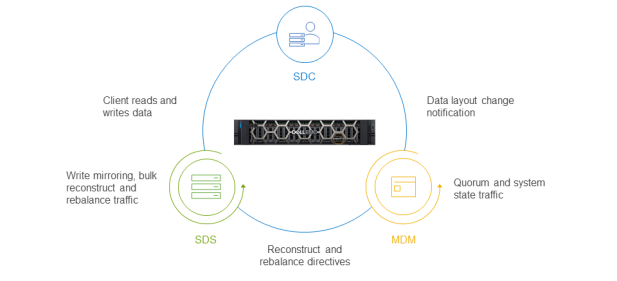
Figure 1. PowerFlex services communication
For this test, the storage architecture used four PowerFlex storage nodes, each running the SDS service. We considered two flexible deployment options. The first option is a traditional two-layer SAN architecture in which applications use compute resources that are separate from the SAN resources, as shown in the following figure. This deployment option works well for applications that require fully dedicated CPU and memory for optimal performance or that work only in a traditional two-layer architecture. In this Big Data SQL solution, only the Oracle Database and Microsoft SQL Server data sources were deployed on individual dedicated servers using a two-layer SAN architecture.
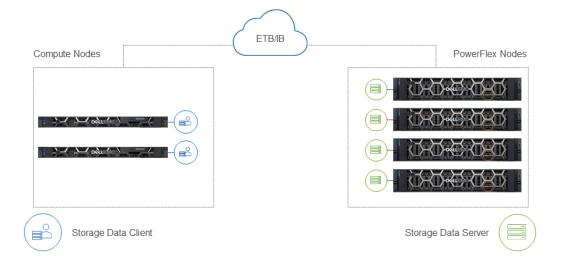
Figure 2. PowerFlex two-layer storage architecture for Oracle and Microsoft SQL Server
The other option is the single-layer deployment option, which is also called a hyperconverged infrastructure (HCI). The single layer option is a model in which compute and storage reside on the same layer, as shown in the following figure. We used this model in our testing for Hadoop and ONDB to maximize consolidation for multiple applications on the PowerFlex nodes by sharing compute resources. The HCI deployment option maximizes a customer’s investment through consolidation.
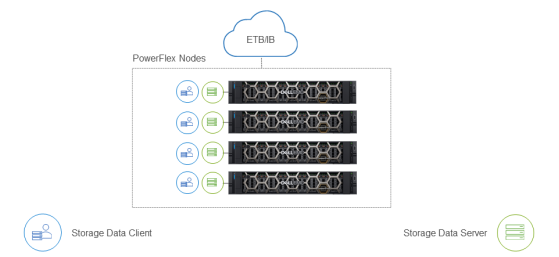
Figure 3. Single-layer (HCI) architecture for Hadoop and Oracle NoSQL
We implemented the PowerFlex HCI architecture using four PowerFlex R840 storage nodes, each running the SDS service. Thus, all four servers contributed to the storage pool for the Big Data SQL solution. The objective of this white paper is to provide best practices for deploying Oracle Bid Data SQL on PowerFlex and performance testing was out of scope in this study.
We configured each PowerFlex R840 node with four Intel Xeon Gold 6240L CPUs featuring 18 cores each. A total of 72 available physical cores (144 logical cores with hyperthreading enabled) were available on each server.
Each server in the HCI configuration had eight 3.84 TB SSDs (a total 30.72 TB of raw capacity) providing a balanced performance and capacity configuration. The following table summarizes the PowerFlex R840 storage component details:
Table 2. PowerFlex R840 component details
|
Component |
Details |
|
Processors |
4 x Intel Xeon Gold 6240L CPU @ 2.60 GHz, 18C/36T |
|
Memory |
1.5 TB, 24 x 64 GB 2666MT/S |
|
NIC |
1 x Intel Ethernet 10G 2P X550/I350 rNDC |
|
NIC |
2 x Mellanox ConnectX-4 LX 25 GbE SFP Adapter |
|
Drives |
8 x 3.84 GB SAS SSD |
The PowerFlex architecture also includes one or more controller nodes that run the Meta Data Manager (MDM) service. The MDM functions as the PowerFlex monitoring and configuration agent that is used mainly for management. A multi-MDM environment consists of one Primary MDM, with other MDMs functioning as tie-breakers. The controller nodes are also responsible for coordinating operations between the client (SDC) and storage data server (SDS). For example, the three controller nodes communicate with clients if the data layout changes, and with the storage nodes for rebalancing activities. The following table shows the component details of the PowerFlex R640 controller.
Table 3. PowerFlex R640 controller component details
|
Component |
Details |
|
Processors |
2 x Intel Xeon Gold 6130 CPU @ 2.10 GHz, 18C/36T |
|
Memory |
192 GB, 6 x 32 GB 2666MT/S |
|
NIC |
1 x Intel Ethernet 10G 2P X550/I350 rNDC |
In our tested configuration, the MDM services ran on three PowerEdge R640 controller nodes, as shown in the following figure:
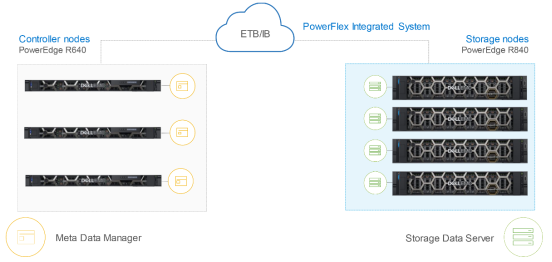
Figure 4. PowerFlex controller nodes
The controller nodes also hosted VMware vCenter for management of virtual machines and the PowerFlex operating system with accompanying gateway services. The PowerFlex integrated rack that we used for testing was designed for high availability (HA). The HA design starts with the RAID 1 mesh mirrored layout, as shown in the following figure:
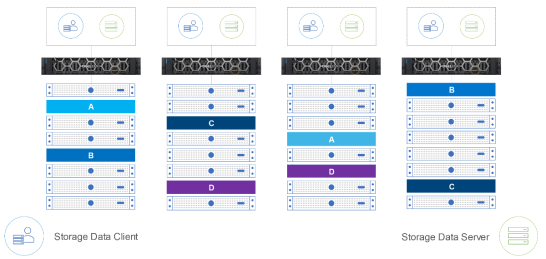
Figure 5. PowerFlex RAID 1 mesh example
With RAID 1 mesh mirrored protection, each data block is stored on two different SDS units ensuring that multiple copies of data reside on separate physical storage. Spreading copies of data across nodes protects against node failure and offers protection against a single drive failure.
Oracle Big Data SQL version 4.1
The Oracle 19c database includes many SQL Analytics capabilities like data wrangling functions, advanced aggregations, pattern matching, and more. These analytic functions are implemented through SQL statement syntax that most Oracle developers can easily use from experience. Using Oracle’s in-database SQL Analytics reduces the effort of learning analytical functions so developers can achieve data insights in less time.
However, for enterprises that want to perform analysis across data sources like Apache Hadoop, Apache Kafka, object stores, and NoSQL databases, Oracle Big Data SQL is uniquely positioned to accelerate application development by taking advantage of virtualization. The proposition is even stronger for enterprises that have a wealth of SQL and PL/SQL experience, as Oracle Big Data SQL can leverage that knowledge for data access across all these data sources.
Big Data SQL uses access drivers to connect to data sources like:
- Apache Hive using the ORACLE_HIVE access driver—Apache Hive is a distributed data warehouse system designed to enable analytics across petabytes of data using SQL. The ORACLE_HIVE driver enables the creation of Oracle external tables that reference Apache Hive data sources.
- Hadoop Distributed File System (HDFS) using ORACLE_HDFS access driver—HDFS is a distributed file system designed for high throughput. It accesses data and performs analytics across large datasets. The ORACLE_HDFS driver enables the creation of external tables in the Oracle database that can directly access files stored in HDFS.
- Object storage using ORACLE_BIGDATA access driver—An object store saves and manages data as objects rather than in file systems or block storage. The ORACLE_BIGDATA driver enables the creation of external tables to query data in object stores. The same access driver also supports access to text, Parquet, and Avro file types.
Oracle external tables allow access to data outside the Oracle database by specifying attributes including access parameters and datatype parameters. After an external table has been created, developers can access the external data with the same patterns as if it were in a table stored in the Oracle database. The TYPE attributes specify the source of the external data like ORACLE_HDFS or ORACLE_HIVE. The ACCESS parameters provide the metadata to locate data and generate tables. Other features of Oracle external tables include:
- Automatic mapping of the HCatalog to Oracle tables—The HCatalog is a Hadoop tool that maps tables in the Hive metastore to a repository. Automatic mapping of Hive metadata to external Oracle tables accelerates development using data virtualization.
- Many-to-one mappings of Hadoop clusters to one Oracle database—With Oracle Big Data SQL, the enterprise can access multiple Hadoop clusters using a single Oracle database.
In this solution, we used Oracle Big Data SQL to connect to Hadoop using the ORACLE_HDFS access driver and ONDB using the NoSQL client, and to Microsoft SQL Server using Oracle Gateways. To test the data virtualization capabilities, we used data from the TPC-H decision workload benchmark. The tables were distributed across all the source data sources by assigning a subset of tables to each source. In the final test, we used Oracle Big Data SQL to query the decision support tables using standard queries that were modified to use external tables.
As part of the data virtualization tests, we loaded two tables, ORDERS and PART, in the Oracle database. These medium-sized tables enabled us to test combining local data in the Oracle database with external data from data sources like Cloudera Hadoop, ONDB, and Microsoft SQL Server.
Oracle NoSQL Database version 19.5
Oracle NoSQL Database (ONDB) is a non-relational database with a shared-nothing architecture designed for scalability and throughput. An ONDB uses KVStore—a collection of storage nodes across which data is distributed. This shared-nothing architecture supports petabytes of data and can service a massive number of network requests. Each storage node can service requests; therefore, the parallelization enables greater scalability and throughput. Cases for NoSQL include:
- Document databases—This type of database is designed to store and retrieve JavaScript Object Notation (JSON)-like documents. The benefit of retrieving JSON documents is that they are in the same format as the application code. This benefit makes document databases a strong choice for blogs, content catalogs, and social platforms.
- Key-value databases—In this type of database, a key can be used to look up a value. The value can range from a simple string to a large complex object. For example, a key-value database can be used to store the information from a user’s web session. The key enables saving the unstructured data (value) from the session in a document.
In this use case, the REGION and NATION tables from the decision support benchmark were loaded into the NoSQL database. We joined data from these two tables with tables in Hadoop and Microsoft SQL Server using Oracle Big Data SQL to validate data virtualization.
We placed the ONDB database on one PowerFlex HCI node with the processor of the PowerFlex node shared between the storage service and the NoSQL database. The four Intel processors on each PowerFlex node have sufficient processing power for the NoSQL database for a test of this size.
The storage performance for the NoSQL database benefits from reads and writes balanced across all the PowerFlex HCI nodes. This approach of distributing reads and writes across all nodes in the PowerFlex storage platform assists with eliminating hot spots, provides greater consistency in performance, and optimizes efficiency.
Cloudera Hadoop version 6.2.1
Cloudera delivers an enterprise data platform that enables companies to build end-to-end data pipelines with true hybrid cloud features. Cloudera Data Platform can span from edge devices to public or private clouds with integrated security and governance to protect customers’ data. Cloudera has found that customers have spent many years investing in their big data assets and want to continue to build on that investment by moving toward a more modern architecture that helps leverage multiple form factors.
The latest offering from Cloudera for on-premises analytics is Cloudera Data Platform Cloud (CDP). CDP is a next-generation hybrid data platform with cloud-native, self-service analytic experiences bringing the speed, scale, and economics of a true cloud experience. CDP Private Cloud is deployed as two components—the data lake cluster (CDP-PVC Base) and the compute experiences for data warehousing and machine learning running on an OpenShift Kubernetes cluster. This architecture allows administrators to deploy independently scalable compute environments with on-demand provisioning and autoscaling. The use of a container-based architecture also allows organizations to easily manage multiple service versions concurrently while sharing a single instance of shared data, resource metadata, and security configuration across all the hosted compute experiences.
For this solution, we added a Cloudera Hadoop instance for loading the LINEITEM and SUPPLIER tables from the decision support benchmark into HDFS. These tables are the two largest tables in the decision support benchmark and are best positioned to show the value of Cloudera Hadoop integration into a virtualization scenario.
We hosted three Cloudera Hadoop nodes on three separate PowerFlex HCI nodes:
- Primary Node—This node monitors and manages stored data in HDFS and provides other services. We installed one primary node in the Cloudera Hadoop configuration.
- Worker Node—This node reads and writes data to storage and performs computations. We installed two worker nodes.
The three PowerFlex HCI nodes running the Cloudera Hadoop service shared the processors with the storage service. This HCI configuration worked well because the Cloudera Hadoop nodes had most of the processor capacity and memory available. All reads and writes were distributed across the PowerFlex nodes driving optimal performance.
Microsoft SQL Server 2019 Enterprise Evaluation Edition
SQL Server 2019 is the latest generation of Microsoft’s data platform that significantly extended its capabilities as a platform for data unification. This release has been enhanced to deliver breakthrough scalability and performance to improve the stability and response time of the database. The addition of support for Linux with the release of SQL Server 2017 provided organizations the flexibility to select Windows or Linux operating systems based on their business and application needs. SQL Server 2019 extends the options for Linux with support for Red Hat Enterprise Linux 8.0 and Ubuntu 18.04. This support continues to provide organizations with more options for running SQL Server in containers with Kubernetes. Other new features include:
- Intelligent Query Processing—This new feature can improve the performance of existing workloads with minimal implementation effort. There are several approaches for improving performance including row mode memory grant feedback and batch mode on rowstore, among others.
- In-Memory Database—Optimizations include the ability to use Persistent Memory (PMEM) for datapages. Because persistent memory is faster than solid-state drives, the database can service I/O requests faster, accelerating performance.
Microsoft has also improved SQL Server’s security features in this release. These enhancements include protection of data at rest, in transit, and in use, and Always Encrypted with secure enclaves. These features support rich computations on encrypted data, while still protecting sensitive Personally Identifiable Information (PII) data.
We loaded two additional decision support database tables into the SQL Server database for our virtualization scenario. The CUSTOMER and PARTSUPP tables are medium-sized tables that are queried by using the Oracle Database Gateway as part of the Oracle Big Data SQL solution.
VMware vSphere 7
VMware vSphere is among the top hardware virtualization platforms in the world. VMware vSphere virtualization uses the ESXi hypervisor to allow applications, including high-performance databases, to share compute and storage resources with a single management interface. VMware vSphere is an established virtualization platform with a strong history of reliability and performance. It is ideal for databases like Oracle. VMware vSphere 7 was released in April of 2020 and added these new features:
- The capability to scale clusters up to 96 hosts per cluster—The Oracle ecosystem benefits by enabling database teams to place more interconnected applications in the same cluster with less management overhead.
- Greater performance enabled through monster virtual machines (VMs)—VMs can now use up to 24 TB of memory and use up to 768 vCPUs of processing power.
- Optimized vMotion—VMware vSphere 7 vMotion consumes fewer resources for migrating a live virtual machine than it did in previous releases. This lower consumption means with demanding workloads like Oracle databases, using vMotion is more convenient and has less impact on VM performance.
- Broader ESXi compatibility—VMware vSphere supports Windows 2019, Ubuntu 19, SUSE Linux 11.x, CentOS 8.x, Red Hat Enterprise Linux 8.x, and others.
Every application we used for this Oracle Big Data SQL solution was virtualized to offer consolidated resource management and maximum agility. For example, while testing the data virtualization environment, the engineering team was able to nondisruptively move VMs between hosts using VMotion. The features of the vCenter console for VMware vSphere reduced management time and facilitated an efficient build of the complete data virtualization platform.
Summary of the solution architecture
The infrastructure footprint for this Oracle Big Data SQL solution used a total of nine servers: two PowerEdge R640 servers were dedicated to Oracle and Microsoft SQL Server, four nodes consisted of the PowerFlex storage, and three nodes were dedicated to the PowerFlex controller services.
Table 4. Oracle Big Data SQL solution architecture
|
Component |
Infrastructure or software version |
Notes |
|
Oracle Big Data SQL 4.1 |
PowerEdge R640 compute node |
Dedicated PowerEdge server |
|
Microsoft SQL Server 2019 Enterprise Evaluation Edition (64-bit) |
PowerEdge R640 compute node |
Dedicated PowerEdge server |
|
Cloudera Hadoop 6.2.1 and Hive 2.1 |
PowerFlex nodes |
Used 3 of the 4 PowerFlex nodes |
|
Oracle NoSQL 19.5 |
PowerFlex node |
Used 1 of the 4 PowerFlex nodes |
|
VMware vSphere 7.0 |
VMware ESXi 7.0 with vCenter 7.0 |
Installed on the PowerEdge servers and PowerFlex nodes |
|
Dell EMC PowerFlex storage |
Flex OS 3.5.1 |
4 x R840 nodes |
|
Dell EMC PowerFlex controllers |
Flex OS 3.5.1 |
3 x R640 nodes |
Two operating systems were used: Oracle, Hadoop, and ONDB used Oracle Linux 7.6 with kernel 4.14.35-1818.3.3.el7uek.x86_64. Microsoft SQL Server was deployed on Windows Server 2019 Datacenter Evaluation Edition.
The following table details the virtual machine configuration for each application in the Oracle Big Data SQL software stack:
Table 5. VM configuration: vCPU and vMem details
|
|
vCPU |
vMEM |
|
|
|
Number of vCPUs |
Total (GB) |
Limit (MB) |
|
Oracle |
8 |
64 |
Unlimited |
|
ONDB |
5 |
48 |
Unlimited |
|
Hadoop Primary |
8 |
64 |
Unlimited |
|
Hadoop Data node 1 |
10 |
64 |
Unlimited |
|
Hadoop Data node 2 |
10 |
64 |
Unlimited |
|
SQL Server |
8 |
64 |
Unlimited |
The primary goal of the setup was to demonstrate data virtualization functionality; therefore, the virtual machines were not sized for performance. The sizing in this table reflects a starting point for the initial deployment of the VMs for each application in the stack. Monitoring your Oracle Big Data SQL deployment provides more information that can be used to fine-tune vCPU and vMemory allocations, allowing you to optimize the resources for data virtualization across the disparate data silos.
Storage design
Storage design
Storage Pools enable the business to intelligently place workloads based on the optimal storage type. PowerFlex Storage Pools can be used for data segregation, tiering, and performance management. PowerFlex also features the flexibility to nondisruptively move storage pools from one storage type to another.
The PowerFlex storage platform was designed to include native integration with Non-Volatile Memory Express (NVMe) drives and Intel Optane Storage Class Memory. For example, an Oracle database supporting enterprise applications achieves optimal storage performance when using Intel Optane or NVMe storage.
The complete list of supported drives also includes Serial-attached SCSI (SAS) SSDs. The following table compares the full set of drive type characteristics that are available for PowerFlex:
Table 6. PowerFlex drive type characteristics
|
Drive type |
Benefits |
|
Intel Optane Storage Class Memory |
Exceptionally low read latency Maintains low read latency under heavy write workloads |
|
NVMe SSD |
Low read latency Higher operations per second |
|
SAS SSD |
Balanced performance and capacity |
SAS SSD drives
SAS SSD drives use the legacy SCSI command set protocol. This command set worked well with traditional hard drives; however, as technology advanced, the protocol became inefficient for faster I/O processing and was surpassed by newer protocols with less overhead.
SAS SSD drives can deliver cost-effective performance for many applications at a lower cost per GB than NVMe SSD and Optane Storage class memory (SCM) drives. Consider SAS SSD drives for database environments where performance is not a priority and for those environments that might benefit from greater total available capacity in a limited data center space.
NVMe SSD drives
NVMe SSD drives can deliver higher data transfer rates than either Serial AT Attachment (SATA) or SAS interfaces because they offer more available channels (lanes) through which data can flow. NVMe uses the PCIe bus and an optimized protocol that reduces overhead, further boosting performance over older technologies. Optimizations in the NVMe protocol include deep I/O queues and support for 64 K commands per queue.
SSDs based on NVMe are more responsive for heavy workloads and less prone to performance degradation due to large numbers of I/O requests. These factors are often an important benefit for database workloads where both high Input Output Operations per Second (IOPS) requirements and increased bandwidth demand scenarios need consistent low latency response.
Organizations are increasingly choosing NVMe SSD as the most cost-effective storage for high-performance database platforms and similar business critical applications. Consider the benefits of using NVMe SSDs for production databases where enterprise performance is critical.
Intel Optane Storage Class Memory (SCM) drives
Intel Optane SCM is a new class of memory that brings storage performance closer to DRAM memory speeds. Though DRAM is faster, the benefit of SCM memory is its persistence. SCM memory can be used as storage to provide a faster tier of performance. With SCM memory, read latencies are low and are less impacted by writes to the storage. SCM memory is best positioned for production and real-time analytics that require the best possible performance.
Understanding volume names
The storage team used the following naming convention for PowerFlex volumes:
- TM—The internal name for this Oracle Big Data SQL solution was Titanium (TM). Use of internal names enables multiple programs to run in parallel with clarity and understanding.
- VM—Indicates VMware vSphere storage (RDM and VMFS) were used.
- Application name—ORACLE, NOSQL, and SQL for Microsoft SQL Server were used to indicate the application. In the case of Hadoop, MS indicates Hadoop Name Node and DN indicates a Worker Node.
- Purpose of storage—Operating System (OS), DATA, REDO, TEMP, and LOG were used to indicate the purpose of the volume.
For example, the volume name TM_VM_ORACLE_DATA indicates that the storage volume is part of the Titanium (Oracle Big Data SQL Solution) solution, uses VMware storage, contains the Oracle application, and stores database datafiles.
Oracle storage configuration
Many enterprises interested in Oracle’s Big Data SQL data virtualization have experience with Oracle relational databases. The following table shows the simplified database layout that was used to test data virtualization. Dell Technologies’ Oracle customer team works closely with our customers to configure a database for performance.
Table 7. Oracle 19c on PowerFlex
|
|
Oracle 19c |
|
|
||
|
Volume name |
VM disk configuration |
Description |
Size (GB) |
Number of volumes |
Total size (GB) |
|
TM_VM_ORACLE_OS |
VMFS |
Oracle Linux OS |
800 |
1 |
800 |
|
TM_VM_ORACLE_DATA |
RDM |
Data files |
600 |
2 |
1,200 |
|
TM_VM_ORACLE_REDO |
RDM |
Redo logs |
50 |
4 |
200 |
|
TM_VM_ORACLE_TEMP |
RDM |
Temporary tablespace |
500 |
1 |
500 |
The following explains in more detail what each of the Oracle volumes contains:
- Guest VM OS—Oracle Enterprise Linux 7.6 was installed in a VMware File System (VMFS) virtual disk file.
Note: The remaining volumes use VMware Raw Device Mapping (RDM). RDM points the virtual machine directly to the PowerFlex LUN, instead of a virtual disk file.
- Oracle datafiles—Database files contain the database objects and data in the database.
- Oracle redo logs—Redo logs are filled with redo records enabling the database to reconstruct data in the case of a failure.
- The temporary tablespace (TEMP)—The TEMP area contains a set of files used by the database that contain data that is not required for recovery.
Oracle Automatic Storage Management (ASM) was used to manage the database files. ASM uses disk groups to store datafiles and provides benefits like even distribution of data across disk groups to eliminate hot spots. The following table lists the ASM disk group configuration:
Table 8. Oracle on PowerFlex
|
|
Oracle 19c |
|
|
||
|
ASM disk group |
Purpose |
ASM stripping |
Size (GB) |
Number of volumes |
|
|
DATA |
Datafiles, control files, and other files |
Coarse grain |
1,200 |
ora-data1, ora-data2, ora-data3, ora-data4 |
|
|
REDO |
Online redo logs |
Fine grain |
200 |
ora-redo1, ora-redo2, ora-redo3, ora-redo4 |
|
|
TEMP |
Temp files |
Fine grain |
500 |
Ora-temp |
|
Oracle NoSQL storage configuration
ONDB can have multiple storage nodes that are typically identically configured, although it is not required that they be identical. In this solution, we used only one storage node because performance was not a testing criterion. NoSQL Storage nodes provide dedicated storage space that can be physical or virtual.
Table 9. Oracle NoSQL on PowerFlex
|
|
Oracle NoSQL |
|
|
||
|
Volume name |
VM disk configuration |
Description |
Size (GB) |
Number of volumes |
Total size (GB) |
|
TM_VM_NOSQL_OS |
VMDK |
Oracle Linux operating system |
800 |
1 |
800 |
|
TM_VM_NOSQL_SN |
VMDK |
Storage node |
100 |
2 |
200 |
Both the Oracle Linux operating system and the NoSQL storage nodes were installed on VMDK datastores.
Cloudera Hadoop storage configuration
HDFS is a distributed file system that has proven to be a highly reliable, high-throughput storage option for big data that is primarily write once/read many. The name node for the cluster is responsible for tracking and storing metadata about the location of blocks across the distributed worker nodes.
The worker nodes write and read blocks of 128 MB by default. These data blocks are distributed across all the worker nodes in a Hadoop cluster. The following table shows that the storage configuration for our two worker nodes (DN1 and DN2) is the same with five VMFS volumes of 600 GB on each node:
Table 10. Cloudera Hadoop on PowerFlex
|
|
Cloudera Hadoop: Name node |
|
|
||
|
Volume name |
VM disk configuration |
Description |
Size (GB) |
Number of volumes |
Total size (GB) |
|
TM_VM_MS_OS |
VMFS |
Oracle Linux operating system |
800 |
1 |
800 |
|
TM_VM_MS_DATA |
VMFS |
HDFS storage |
500 |
1 |
500 |
|
|
Cloudera Hadoop: Worker nodes |
|
|
||
|
TM_VM_DN<1/2>_OS |
VMFS |
Oracle Linux operating system |
800 |
1 |
800 |
|
TM_VM_DN<1/2>_DATA |
VMFS |
HDFS storage |
600 |
5 |
3,000 |
Microsoft SQL Server storage configuration
We used a minimal storage configuration for our Microsoft SQL Server instance. Dell Technologies’ dedicated Microsoft customer team can work closely with our customers to configure databases for maximum performance and protection.
Table 11. Microsoft SQL Server on PowerFlex
|
|
Oracle Big Data SQL |
|
|
||
|
Volume name |
VM disk configuration |
Description |
Size (GB) |
Number of volumes |
Total size (GB) |
|
TM_VM_SQL_OS |
VMFS |
Windows Enterprise Server |
800 |
1 |
800 |
|
TM_VM_SQL_STG |
VMFS |
Data files |
600 |
2 |
1,200 |
|
TM_VM_SQL_LOG |
VMFS |
Log files |
50 |
1 |
50 |
|
TM_VM_SQL_TEMPDB |
VMFS |
Temporary files |
500 |
1 |
500 |
The volume groups and storage volumes used with SQL Server consist of the following:
- Guest VM OS—We installed Windows Server 2019 Datacenter evaluation edition in a VMware File System (VMFS) virtual disk file.
Note: The remaining volumes use VMware Raw Device Mapping (RDM). RDM points the virtual machine directly to the PowerFlex LUN, instead of a virtual disk file.
- SQL Server data files—Database files contain the database objects and data in the database. The data files were distributed across the two volumes using best practices guidelines.
- SQL Server logs—Logs are filled with information that is required to recover the database.
- The tempdb—The tempdb system is a global resource that contains temporary tables, indexes, and other objects. In this solution, we created eight tempdb files to address possible contention issues.
Lab validation of Oracle Big Data SQL data virtualization
Lab validation of Oracle Big Data SQL data virtualization
This section describes how we configured Oracle Big Data SQL to access ONDB, Cloudera Hadoop, and Microsoft SQL Server. For information about the installation steps for these data management systems and how data was loaded, see the Oracle Big Data SQL on PowerFlex Design Guide.
After the Oracle Big Data SQL platform was running, we populated the data sources with data from the TPC-H benchmark data generation tool. The TPC-H benchmark models a decision support workload characterized by long running ad hoc queries using data selected from mixture of large and medium-sized tables. We used a scale factor of 3,000 with the dbgen toolkit to generate approximately 3.5 TB of data across eight tables. The following table shows placement of the tables across the data management applications, table name, approximate data size, and indicates the size of the table:
Table 12. Decision support tables across data sources
|
Database source |
Table name |
Data size (GB) |
Size of table |
|
Oracle |
ORDERS |
595 |
Medium |
|
Oracle |
PART |
75 |
Medium |
|
ONDB |
NATION |
2 |
Small |
|
ONDB |
REGION |
3 |
Small |
|
Cloudera Hadoop |
SUPPLIERS |
10 |
Small |
|
Cloudera Hadoop |
LINEITEM |
2,400 |
Large |
|
SQL Server |
CUSTOMER |
75 |
Medium |
|
SQL Server |
PARTSUPP |
400 |
Medium |
|
|
|
|
|
|
Total |
3,560 |
|
|
Connecting to Oracle NoSQL
Connecting to an ONDB database is a two-step process. The first step is creating external Hive tables. Creating the external Hive tables enables us to define the tables in the NoSQL database that we want to access from Oracle Big Data SQL and the properties needed to access those tables.
The second step is creating external Oracle tables. These external Oracle tables enable seamless access to the NoSQL database from within the Oracle Big Data SQL database. This step is accomplished by defining which external Hive tables to access when creating the Oracle Big Data SQL external tables.
Creating Hive tables
To connect the Oracle Big Data SQL to an ONDB database, we created Hive external tables for NoSQL. To create the Hive external table for NoSQL, a DBA can use the Oracle Big Data SQL system Hive client:
Hive> CREATE EXTERNAL TABLE IF NOT EXISTS regions
(R_regionkey int,
R_name string,
R_comment string)
STORED BY 'oracle.Kv.hadoop.hive.table.TableStorageHandler’
TBLPROPERTIES (
"oracle. Kv.kvstore" = "kvstore",
"oracle. Kv.hosts" = "oracle-nosql.localdomain:5001”,
"oracle. Kv.tableName" = "region”,
"oracle. Kv.hadoop.hosts" = ”hadoop-namenode.localdomain, hadoop-datanode1.localdomain, datanode2.localdomain”);
The first three lines of the create external table command define the table REGIONS and the columns:
- Column R_REGIONKEY with a datatype of integer (int)
- Column R_NAME with the datatype of string
- Column R_COMMENT with the datatype of string
The STORED BY clause calls the Java class TableStorageHandler to create the Hive table. The TBLPROPERTIES provides the connection metadata to access the NoSQL table and the Hadoop hosts for data storage.
is the following example shows the Hive command to create the NATION table:
Hive> CREATE EXTERNAL TABLE IF NOT EXISTS nation
(n_nationkey int,
N_name string,
N_regionkey string,
N_comment string)
STORED BY 'oracle.Kv.hadoop.hive.table.TableStorageHandler
TBLPROPERTIES (
"oracle.Kv.kvstore" = "kvstore",
"oracle.Kv.hosts" = "oracle-nosql.localdomain:5001”,
"oracle.Kv.tableName" = "nation”,
"oracle. Kv. hadoop. hosts" =” hadoop-namenode.localdomain, hadoop- datanode1.localdomain, datanode2.localdomain”);
These commands test Hive access to the ONDB database tables:
Hive> select * from regions;
Hive> select * from nation;
Rows are returned with each Hive query.
Both create commands were formatted for readability; however, when you issue the Hive command, we recommend the use of a single string. When the external Hive tables have been created, the Oracle Big Data SQL database can use these tables to access data in the NoSQL database.
Creating Oracle Big Data SQL tables
The second step in the process is creating the virtualized external tables on the Oracle Big Data SQL database to enable a developer to access the NoSQL data from the Oracle database:
SQL>create table region
(r_regionkey number(10,0),
r_name varchar2(30),
r_comment varchar(125))
ORGANIZATION EXTERNAL
(TYPE ORACLE_HIVE DEFAULT DIRECTORY DEFAULT_DIR
ACCESS PARAMETERS
(com.oracle.bigdata.tablename=default.region))
REJECT LIMIT UNLIMITED;
The first three lines of the create external table command define the table REGIONS and the columns:
- Column R_REGIONKEY with a datatype of a 10-character number
- Column R_NAME with the datatype of varchar2: variable-length character strings
- Column R_COMMENT with the datatype of varchar: variable-length character strings
The next two lines define the table as external, ORACLE_HIVE references the type of external table, and the DEFAULT_DIR specifies the location of the files read or written to by the external tables.
The last three lines define:
- Access parameters needed to connect to the external table. For example, com.oracle.bigdata.tablename=default.region specifies the Hive table name as REGION.
- The REJECT LIMIT clause defines the acceptable about of errors that can occur. In this case UNLIMITED means there are no limits to the number of errors that can occur.
The following example shows the SQL command that defines the external Hive table named NATION:
SQL>create table nation
(n_nationkey number(10,0),
n_name varchar2(20),
n_regionkey varchar2(30),
n_comment varchar2(200))
ORGANIZATION EXTERNAL
(TYPE ORACLE_HIVE DEFAULT DIRECTORY DEFAULT_DIR
ACCESS PARAMETERS
(com.oracle.bigdata.tablename=default.nation))
REJECT LIMIT UNLIMITED;
Now that both the Hive external tables for NoSQL and the Oracle Big Data SQL external tables have been created, a developer can access the specified table data in the NoSQL database.
Connecting to Cloudera Hadoop
The database administrator or developer needs to create external tables in the Oracle database to access tables in Cloudera Hadoop:
SQL>create table tpch.lineitem
(l_orderkey number(10,0),
l_partkey number(10,0),
l_suppkey number(10,0),
l_linenumber integer,
l_quantity number,
l_extendedprice number,
l_discount number,
l_tax number,
l_returnflag char(1),
l_linestatus char(1),
l_shipdate date,
l_commitdate date,
l_receipdate date,
l_shipinstruct char(10),
l_shipmode char(10),
l_comment varchar2(44))
organization external
(type oracle_hdfs DEFAULT DIRECTORY DEFAULT_DIR
access parameters
(com.oracle.bigdata.cluster = cluster1
com. oracle.bigdata.rowformat = delimited fields terminated by ‘|’
LOCATION ('/user/oracle/lineitem*.csv’);
In the example, the first line of the CREATE TABLE statement instructs the database to create the table LINEITEM in the TPCH schema. The next 16 lines define the columns definitions of the table. The next two lines define the table as external; ORACLE_HDFS references the type of external table, and the DEFAULT_DIR specifies the location of the files read or written to by the external tables. The last three lines define:
- Access parameters needed to connect to the external table. For example, com.oracle.bigdata.cluster=cluster1 specifies the Hadoop cluster that has the LINEITEM table.
- The com.oracle.bigdata.rowformat string defines the delimiter used in the CSV file. A delimiter is used to separate data fields. In this case, the delimiter is the ‘|’ character.
- The LOCATION parameter defines the path and file name for the data.
With the successful creation of the LINEITEM external table, the database administrator or developer can access the data in the Hadoop system.
The syntax for creating the second table is similar to the syntax for creating the first table:
SQL>create table tpch.part
(p_partkey number(10,0) NOT NULL,
p_name varchar2(55) NOT NULL,
p_mfgr CHAR(25) NOT NULL,
p_brand CHAR(10) NOT NULL,
p_type varchar2(25) NOT NULL,
p_size INTEGER NOT NULL,
p_container CHAR(10) NOT NULL,
p_retailprice NUMBER NOT NULL,
p_comment varchar2(23) NOT NULL)
organization external
(type oracle_hdfs DEFAULT DIRECTORY DEFAULT_DIR
access parameters
(com.oracle.bigdata.cluster = cluster1
com.oracle.bigdata.rowformat = delimited fields terminated by '|’
LOCATION ('/user/oracle/part*.csv’))
REJECT LIMIT UNLIMITED;
In creating the PART table, an additional specification is used. The REJECT LIMIT clause defines the acceptable number of errors that can occur. In this case, UNLIMITED means there are no limits to the number of errors that can occur.
The following commands test access to the Cloudera Hadoop tables:
SQL> select * from lineitem;
SQL> select * from part;
Rows are returned with each SQL query.
Now that the external tables have been created in Oracle Big Data SQL the database administrator or developer can access Hadoop data.
Connecting to Microsoft SQL Server
Oracle’s Database Gateways provided the ability to transparently connect with Microsoft SQL Server. There are two services provided in the Gateway technology:
- Heterogeneous Services—The translation engine. Translations are bi-directional:
- Translate Oracle SQL to the non-Oracle system.
- Translate SQL from non-Oracle systems to Oracle.
- Agent—Provides the metadata for heterogeneous services such as SQL mappings, and datatype conversions to enable transparent connectivity between Oracle and the non-Oracle system.
In this solution, we installed the Oracle Database Gateway on the same server as Oracle Big Data SQL. The Database Gateway is a lightweight service that can be installed almost anywhere that a customer wants. For example, it can be installed as an independent virtual machine or on the same server as the Microsoft SQL Server database.
As part of the Oracle Database Gateway Installer, the following connection information is needed:
- Microsoft SQL Server Database Server Host Name
- Microsoft SQL Server Database Server Port Number
- Microsoft SQL Server Name
- Microsoft SQL Server Database Name
After the Oracle Gateway is configured, the next step is to create a database link to access the SQL Server database. A database link enables the DBA and developer to access tables, indexes, and other objects in other databases like SQL Server. The following example shows the format used to create the database link:
SQL> CREATE PUBLIC DATABASE LINK dblink CONNECT TO "sqluser" IDENTIFIED BY "sqlpassword" USING 'dg4msql';
The following command verifies the connection to SQL:
SQL> SELECT * FROM DUAL@dblin
Testing Oracle Big Data SQL data virtualization
Testing Oracle Big Data SQL data virtualization
The queries in this section were patterned on the TPC-H decision support benchmark definition and updated for Oracle Big Data SQL. These results are not comparable to queries run for verified benchmarking results. Each query ran successfully showing how data virtualization can connect disparate data silos.
TPC-H Query 1 test
In this query, tables from Cloudera Hadoop (LINEITEM), SQL Server (CUSTOMER), and Oracle (ORDERS) were joined to produce a shipping priority report. The script uses the previously defined external tables: EXT_HDFS_CUSTOMER, EXT_HDFS_ORDERS, and EXT_HDFS_LINEITEM.
/* TPC_H Query 1 - Shipping Priority */
SELECT TOP 10 L_ORDERKEY,
SUM(L_EXTENDEDPRICE*(1-L_DISCOUNT)) AS REVENUE,
O_ORDERDATE,
O_SHIPPRIORITY
FROM EXT_HDFS_CUSTOMER,
EXT_HDFS_ORDERS,
EXT_HDFS_LINEITEM
WHERE C_MKTSEGMENT = 'FURNITURE'
AND C_CUSTKEY = O_CUSTKEY
AND L_ORDERKEY = O_ORDERKEY
AND O_ORDERDATE < '1995-03-06'
AND L_SHIPDATE > '1995-03-06'
GROUP BY L_ORDERKEY,
O_ORDERDATE,
O_SHIPPRIORITY
ORDER BY REVENUE DESC,
O_ORDERDATE
TPC-H Query 2 test
In this query, tables from Cloudera Hadoop (LINEITEM) and Oracle (ORDERS) were used for an order priority report. The table names in the script were modified to use the external tables: EXT_HDFS_ORDERS and EXT_HDFS_LINEITEM.
/* TPC_H Query 2 - Order Priority Checking */
SELECT O_ORDERPRIORITY,
COUNT(*) AS ORDER_COUNT
FROM EXT_HDFS_ORDERS
WHERE O_ORDERDATE >= '1993-11-01'
AND O_ORDERDATE < dateadd (mm, 3, cast ('1993-11-01' as date))
AND EXISTS( SELECT * FROM EXT_HDFS_LINEITEM
WHERE L_ORDERKEY = O_ORDERKEY
AND L_COMMITDATE < L_RECEIPTDATE)
GROUP BY O_ORDERPRIORITY ORDER BY O_ORDERPRIORITY
TPC-H Query 3 test
In this query, tables from SQL Server (PARTSUPP), Cloudera Hadoop (SUPPLIERS), and ONDB (EXT_ORA_NATION) were used for an important stock identification report. The table names in the script were modified to use the external tables: EXT_HDFS_PARTSUPP and EXT_ORA_NATION.
/* TPC_H Query 3 - Important Stock Identification */
SELECT PS_PARTKEY,
SUM(PS_SUPPLYCOST*PS_AVAILQTY) AS VALUE
FROM EXT_HDFS_PARTSUPP,
SUPPLIER,
EXT_ORA_NATION
WHERE PS_SUPPKEY = S_SUPPKEY
AND S_NATIONKEY = N_NATIONKEY
AND N_NAME = 'ARGENTINA'
GROUP BY PS_PARTKEY HAVING SUM(PS_SUPPLYCOST*PS_AVAILQTY) > (SELECT SUM(PS_SUPPLYCOST*PS_AVAILQTY) * 0.0000001000
FROM EXT_HDFS_PARTSUPP,
SUPPLIER,
EXT_ORA_NATION
WHERE PS_SUPPKEY = S_SUPPKEY
AND S_NATIONKEY = N_NATIONKEY
AND N_NAME = 'ARGENTINA')
ORDER BY VALUE DESC
TPC-H Query 4 test
This query used all the tables except PARTSUPP and is the most comprehensive test because it pulls data from all four data sources: Oracle Big Data SQL, ONDB, Cloudera Hadoop, and Microsoft SQL Server.
/* TPC_H Query 8 - National Market Share */
SELECT O_YEAR,
SUM(CASE WHEN NATION = 'CHINA' THEN VOLUME ELSE 0 END) / SUM(VOLUME)AS MKT_SHARE
FROM ( select extract(year from o_orderdate) as o_year,
L_EXTENDEDPRICE * (1-L_DISCOUNT) AS VOLUME,
N2.N_NAME AS NATION
FROM PART,
SUPPLIER,
EXT_HDFS_LINEITEM,
EXT_HDFS_ORDERS,
EXT_HDFS_CUSTOMER,
EXT_ORA_NATION N1,
EXT_ORA_NATION N2,
EXT_REGION
WHERE P_PARTKEY = L_PARTKEY AND
S_SUPPKEY = L_SUPPKEY AND
L_ORDERKEY = O_ORDERKEY AND
O_CUSTKEY = C_CUSTKEY AND
C_NATIONKEY = N1.N_NATIONKEY AND
N1.N_REGIONKEY = R_REGIONKEY AND
R_NAME = 'ASIA' AND
S_NATIONKEY = N2.N_NATIONKEY AND
O_ORDERDATE BETWEEN '1995-01-01' AND '1996-12-31' AND
P_TYPE = 'SMALL BRUSHED COPPER'
) AS ALL_NATIONS
GROUP BY O_YEAR
ORDER BY O_YEAR
Modifying the four queries used to test data virtualization provided insights into the value of using Oracle Big Data SQL. There is a minor learning curve to understand how to connect disparate data sources. For example, in this solution we used Oracle Big Data SQL access drivers to connect to Cloudera Hadoop. To connect to the Microsoft SQL Server database, we used Oracle Database Gateway. The two different access methods meant less consistency in connecting disparate data sources.
The capability to quickly define external tables and start creating queries is beneficial. When the external tables are available, developers can start creating reports and performing analysis immediately, especially if the developer has Oracle and SQL or PL/SQL programming experience. Table 13 shows the four modified queries used to validate Oracle Big Data SQL data virtualization. The goal in running these queries was to test accessing all tables across all database systems.
Table 13. Summary of databases and tables accessed by query
|
Database Source |
Table name |
Query 1 |
Query 2 |
Query 3 |
Query 4 |
|
Oracle |
ORDERS |
✔ |
✔ |
|
✔ |
|
Oracle |
PART |
|
|
|
✔ |
|
ONDB |
NATION |
|
|
✔ |
✔ |
|
ONDB |
REGION |
|
|
|
✔ |
|
Cloudera Hadoop |
SUPPLIERS |
|
|
✔ |
✔ |
|
Cloudera Hadoop |
LINEITEM |
✔ |
✔ |
|
✔ |
|
SQL Server |
CUSTOMER |
✔ |
|
|
✔ |
|
SQL Server |
PARTSUPP |
|
|
✔ |
|
Summary
Summary
Oracle Big Data SQL fits well into an enterprise that has a foundation of Oracle experience. For example, teams working on mining big data can accelerate analysis through Big Data SQL data virtualization. As this solution shows, the steps to connect disparate systems are definitely manageable. Querying the data only requires writing SQL. Choosing use cases that can be achieved in a short time provides a pathway to early wins for the enterprise. The ability to achieve an early win was demonstrated in this solution because the data sources that we used had access drivers or were configured with Oracle Database Gateways.
Building on early wins means the enterprise can use Oracle Big Data SQL experience as a foundation for more comprehensive data analytics initiatives. These key factors will influence broader adoption of data analytics using Oracle Big Data SQL.
- Fast access to other disparate resources—One of the cornerstones of data virtualization is the capability to quickly connect to other systems. In this solution, we used Microsoft SQL Server to determine if connecting to resources that had no Oracle Big Data SQL access driver was relatively seamless. Lengthy and complex processes for connecting to heterogeneous data sources detract from the value of data virtualization. In this solution, using Oracle Database Gateways streamlined accessing the Microsoft SQL Server database.
- Accessing various disparate resources—For data virtualization to be successful, the platform must support numerous disparate resources. Oracle Big Data SQL supports Apache Hadoop, Apache Kafka, ONDB, object stores, and through Oracle Database Gateways, other data sources. A key recommendation to selecting a data virtualization platform is to map the data sources with the access methods to understand capabilities, complexities, and cost.
- Analytics tools—Oracle 19c, part of Big Data Clusters, has integrated analytic capabilities for developers. Tools like Python, R, Scala, and others were not used in the scope of this solution. However, it is critical that the tools that developers are using today are available to support ongoing analytic programs. The recommendation is to include a list of analytic tools required for the data virtualization platform.
The final consideration is the adoption of an agile data virtualization and analytics infrastructure. In the case of the solution architecture proposed for this Oracle Big Data SQL platform, our key goals were to achieve rapid build out, multisource data placement, and design for expansion of the system. The combination of the PowerFlex system and VMware virtualization maximized agility of the data virtualization platform and the ability to scale it up or down on-demand. The PowerFlex system enables a modern, network-based blended architecture of dedicated PowerEdge servers for Oracle and Microsoft SQL Server databases and a hyperconverged platform for Cloudera Hadoop and NoSQL databases.
Because this Oracle Big Data SQL solution is based on servers for dedicated computing and storage, the ability to rapidly address growth is significantly simplified. The capability to rapidly address expansion of one part of the data virtualization platform means that the enterprise can optimize investment. For example, if additional storage capacity and performance is required, adding PowerFlex nodes addresses the growth requirement. Conversely, if dedicated compute is needed for additional databases, the business can rapidly address the expansion.
The agility of this Oracle Big Data SQL solution means that architects can dynamically build the data virtualization platform over time. The planned expansion approach reduces risks for the enterprise. Architects and developers are challenged to deliver a comprehensive solution architecture that addresses performance over two to three years; this solution meets that challenge.
Another key benefit is the capability to incrementally update the data virtualization platform with infrastructure and software advances. Advances in processors and storage technology can be realized almost immediately by seamlessly adding new PowerEdge servers or PowerFlex nodes to the platform. The challenges associated with large metal upgrades or highly integrated systems are not factors in this agile platform approach.
Transformation to an Oracle Big Data SQL platform enables the business to embrace data virtualization and enhances the possibility of achieving quick wins on analytic initiatives. When combined with this Dell Technologies platform, the enterprise can achieve a highly agile platform that enables optimal expansion.
References
Dell Technologies documentation
The following Dell Technologies documentation provides additional and relevant information. Access to these documents depends on your login credentials. If you do not have access to a document, contact your Dell Technologies representative.
Other documentation
This white paper references the following documentation:
- Halevy, A. Y., Ashish, N., Bitton, D., Carey, M., Draper, D., Pollock, J., Rosenthal, A. & Sikka, V. (2005, June). Enterprise information integration: successes, challenges and controversies. In Proceedings of the 2005 ACM SIGMOD international conference on Management of data (pp. 778-787).
- Eve, B. (2017). The Story of How Data Virtualization Became Data Virtualization. Retrieved from Cisco Blogs: https://blogs.cisco.com/analytics-automation/the-story-of-how-data-virtualization-became-data-virtualization
- Yuhanna, N. G. (2006). Information fabric: Enterprise data virtualization. Forrester Research Inc.
Tags: