Dell SupportAssist Error SupportAssist Is Unable To Connect to the Internet
Summary: A solution for the error "SupportAssist is unable to connect to the Internet."
This article applies to
This article does not apply to
This article is not tied to any specific product.
Not all product versions are identified in this article.
Symptoms
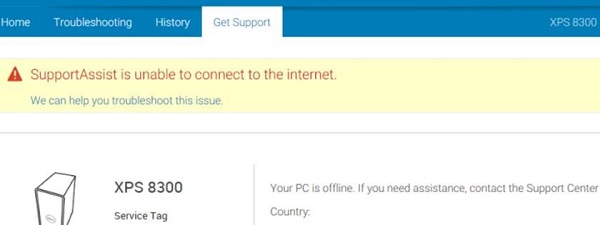
Dell SupportAssist may install successfully but displays the error message "SupportAssist is unable to connect to the Internet."
Cause
Not applicable
Resolution
To resolve this issue, follow these steps:
- Click the Settings option.
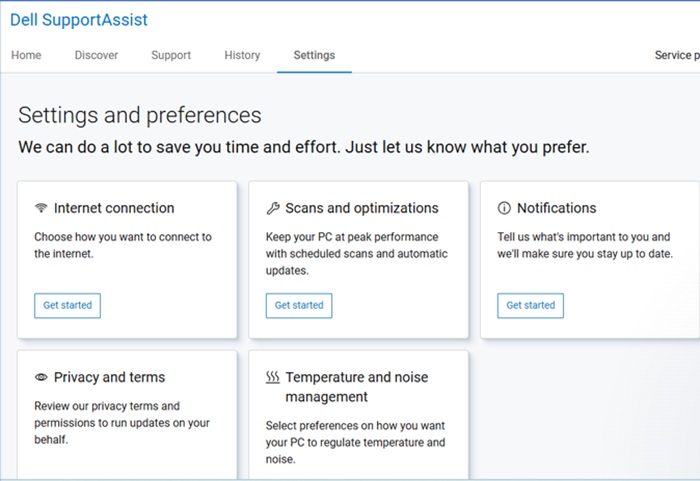
- Click Get Started under Internet Connection.
- Select Connect directly (recommend).
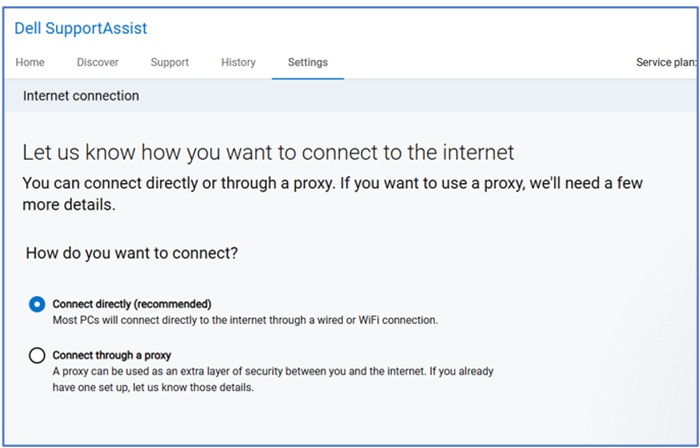
- Exit SupportAssist and reopen the application.
Affected Products
SupportAssistArticle Properties
Article Number: 000132911
Article Type: Solution
Last Modified: 25 Aug 2026
Version: 8
Find answers to your questions from other Dell users
Support Services
Check if your device is covered by Support Services.