Support for Dell OpenManage Enterprise
Summary: This article provides an overview and details of the OpenManage Enterprise (OME) console. This system's management console is designed to automate and unify management tasks.
This article applies to
This article does not apply to
This article is not tied to any specific product.
Not all product versions are identified in this article.
Instructions

Dell OpenManage Enterprise 4.8
- One-to-many management from a single console; built for scale
- Robust, intuitive, management capabilities, regardless of form-factor
- Automate IT processes for greater efficiency
Dell OpenManage Enterprise is a centralized systems management console for monitoring, updating, and managing Dell PowerEdge infrastructure. Administrators can use OpenManage Enterprise to deploy updates, monitor hardware health, automate server management, and manage multiple Dell systems from a single interface. Download OpenManage Enterprise to simplify enterprise IT operations and lifecycle management.
Features and Benefits of OpenManage Enterprise
Simplify: Reduces complexity with an intuitive system management solution.
Unify: One-to-many consoles, built to scale
OpenManage Enterprise is a one-to-many systems management console for the data center.
NOTE: OME now supports (monitoring-only, such as discovery, inventory, health and alerts) for up to 25,000 devices from a single OME console. Other features, such as plugins and firmware updates, shall continue with current scale limits.
Automate: IT management tasks from discovery to retirement
Secure: Security is a top priority.
OpenManage Enterprise detects drift from a user-defined configuration template, alerts users, and remediates misconfigurations based on preset policies.
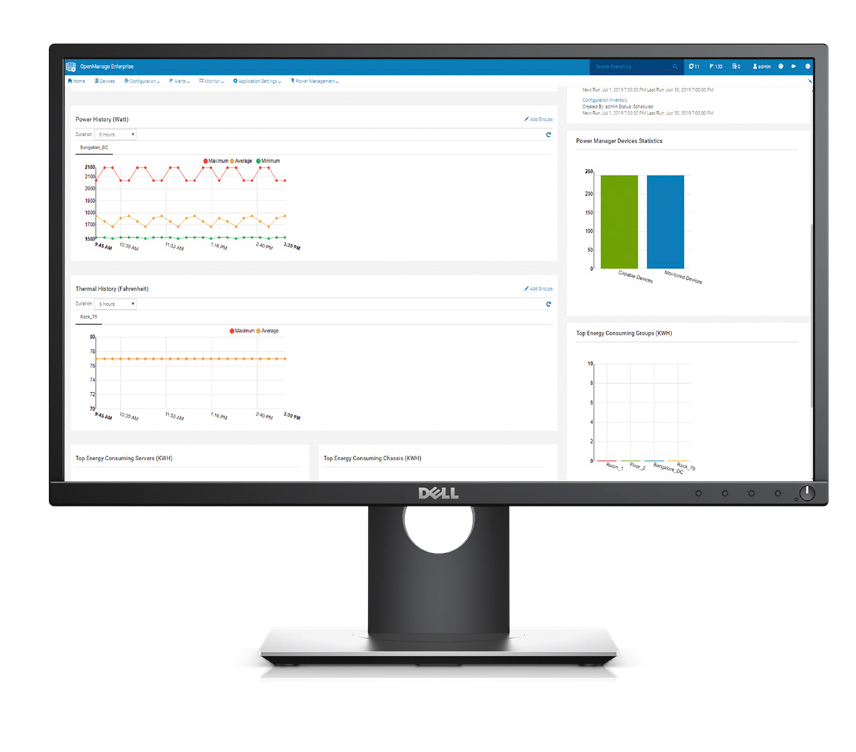
Latest Enhancements to OpenManage Enterprise
New Features in OpenManage Enterprise 4.8
- User Experience
- UI enhancements and accessibility improvements: Use the interface efficiently with full keyboard navigation and improved information density. UI enhancements resolve accessibility, navigation, and scaling issues.
- Streamlined auto deploy template workflow: Deploy templates more quickly using a simplified five-step Auto Deploy Template workflow. The non-configurable iDRAC Management IP step is removed to reduce setup time.
- Firmware Management
- Partial firmware update resilience: Firmware compliance jobs continue when one or more bundles are unavailable for download. Available components update as expected, while unavailable components are skipped without blocking the rest of the job.
- Security
- Flexible CyberArk credential retrieval methods: Select from multiple credential retrieval methods for CyberArk integration, choosing the method that matches your CyberArk deployment and avoiding manual workarounds.
- CyberArk support for iDRAC 10: Apply CyberArk credential management to iDRAC 10-based PowerEdge servers, enabling consistent privileged credential automation across iDRAC 9 and iDRAC 10 platforms.
- Integrated Rack
- Support for LiteOn 19-inch 33kW power shelf: Discover, monitor, manage, and update the LiteOn 19-inch 33kW power shelf through its Power Management Controller, collecting telemetry and managing the power shelf as part of rack-scale infrastructure.
- Support for Delta Gen 3 in-rack CDUs: Discover, inventory, and monitor Delta Gen 3 in-rack CDUs, managing liquid cooling infrastructure alongside Dell servers from a single console.
- License status column for racks: Quickly identify licensed racks and filter by license status using the License Status column in the Racks list view.
- Operating System Support
- Support for RHEL 9.8 and RHEL 10.2: Manage PowerEdge servers running RHEL 9.8 or RHEL 10.2 through existing workflows.
- Support for Ubuntu 26.04: Manage PowerEdge servers running Ubuntu 26.04 through existing workflows.
- Support for ESXi 9.1 and vCenter 9.1: Manage virtualized infrastructure running ESXi 9.1 and VMware vCenter 9.1.
- Support for Azure Stack HCI 24H2 on PowerEdge R6715, R6725, R7715, and R7725: Discover, inventory, monitor, and manage these devices; view telemetry data, deploy configuration templates, and include devices in firmware compliance reports.
- Support for Windows Server 2025 on XR8610t and XR8620t: Manage PowerEdge XR8610t and XR8620t servers running Windows Server 2025 through existing workflows.
- Appliance Management
- MCP server status display: View current MCP server status directly in the GUI with real-time visibility. Server enable or disable operations are managed through the TUI, while the GUI provides read-only visibility into server states.
- Support for Workstations with Dell Remote Management Controller (RMC)
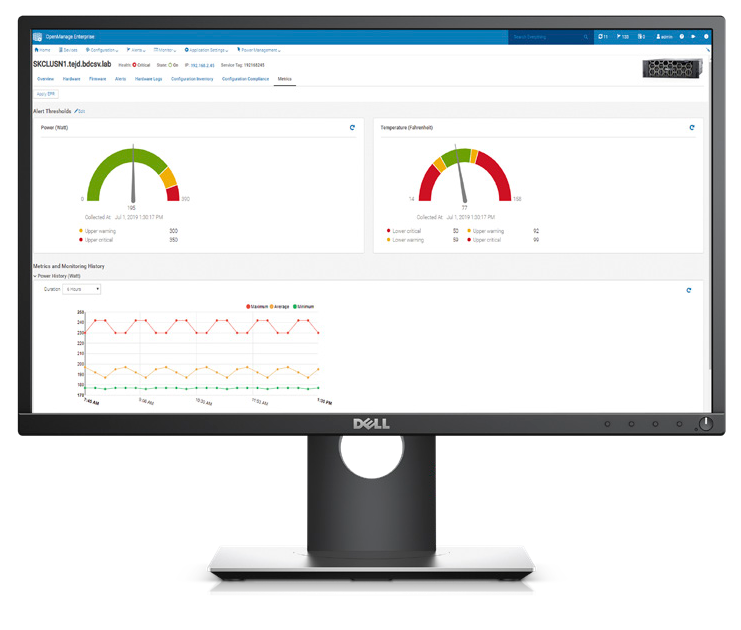
Licensing for OpenManage Enterprise
Installing and using OpenManage Enterprise does not require the OpenManage Enterprise Advanced, OpenManage Enterprise Advanced Plus, or OME Integrated Rack license.
The OpenManage Enterprise Advanced or Advanced Plus license is needed for key automation features. These include bare-metal server deployment and cloning, deploying automatically with Service Tags or Node IDs, and power management functionality. They also enable advanced configuration features—for example, enforcing configuration compliance, I/O aggregator (IOA) provisioning, VLAN management, and profile management
In addition, the OpenManage Advanced Plus license enables plugins for partner integrations (for example, the Plugin for VMware vCenter). (Note: The OpenManage Advanced Plus license contains all the features of the OpenManage Advanced license.)
Use of advanced features requires that the OpenManage Enterprise Advanced license be installed on the target server. The OpenManage Enterprise Advanced and Advanced Plus licenses are perpetual licenses that are valid for the life of a server and are non-transferable. The license can be bound to the Service Tag of only one server at a time
To view the list of devices and their licenses, select OpenManage Enterprise > Monitor > Reports > License Report, and then click Run.
OpenManage Enterprise Advanced or Advanced Plus licensed based features.
- Automated deployment: Deploy PowerEdge servers automatically with service tags or node IDs.
- Configuration and drift detection: Create firmware and configuration baselines for compliance monitoring and enable automated scheduled updates.
- Enhanced modular management: Capture and edit chassis templates using the intuitive OpenManage Enterprise user interface.
- Virtual address management and stateless provisioning
- Internal Password Rotation support
- Telemetry export to Kafka for devices enabled by OME Advanced or higher
Advanced Plus only — partner integrations and extensibility:
- VMware vCenter integration (OMEVV), Microsoft System Center integrations, ServiceNow integration, and CyberArk Credential Provider support .
OpenManage Enterprise Integrated Rack License
- The OpenManage Enterprise (OME) Integrated Rack license is a term-based subscription designed to unlock the full management potential of Dell's PowerRack infrastructure. It is exclusively available for purchase and use with Dell PowerRack systems and extends the portfolio above OME Advanced Plus
- It is available with 1-year, 3-year, and 5-year term options and is non-transferable
- The license is applied at the server level via the iDRAC Licensing Manager but is enforced at the rack level. Every server in a rack must have an active Integrated Rack subscription for OME to enable rack-level functionality, and only then is that rack considered licensed
- Expiration: Upon expiration, all functionality enabled by the license is disabled. OME issues advance alerts three months prior, one month prior, and at the time of expiration.
- Renewal Support: OME delivers rack-level license-expiration reporting and can generate service-tag–based renewal reports.
Key Features of the OME Integrated Rack license (in addition to all OME Advanced and Advanced Plus features)
- Rack-Scale Infrastructure Management: Management of rack-level devices (CDUs, Power Shelves, Integrated Rack Controller).
- Leak mitigation (in conjunction with the Integrated Rack Controller) and sequenced multi-device shutdown.
- Rack-Level Power Management: Full rack-level power monitoring, rack-level power redundancy and headroom analysis, load change alerts, and rack power sequencing (on/off).
- Automation: Inventory automation for rack and U-position assignment.
- Firmware Updates: CDU and power shelf firmware updates (select Dell-branded and 3rd-party models) and orchestrated rack-scale firmware updates.
- Telemetry and Reporting: Rack-level built-in and custom reports, plus telemetry from non-server integrated rack components.
The OpenManage Portfolio Software Licensing Guide provides additional information for licensing options for your organization.
Evaluate, Purchase, and Download of the OpenManage Enterprise Advanced license.
Managing OpenManage Enterprise Licenses
OpenManage Enterprise Advanced/Advanced Plus/Integrated Rack and iDRAC Enterprise or Datacenter licenses can be managed on either an individual server or one-to-many bases. Individual licenses can be imported onto an iDRAC. For one-to-many OpenManage Enterprise 4.1 or higher has integrated license management with integration to Dell Digital Locker and license deployment. Dell License Manager is a standalone tool where OpenManage Enterprise is not available.
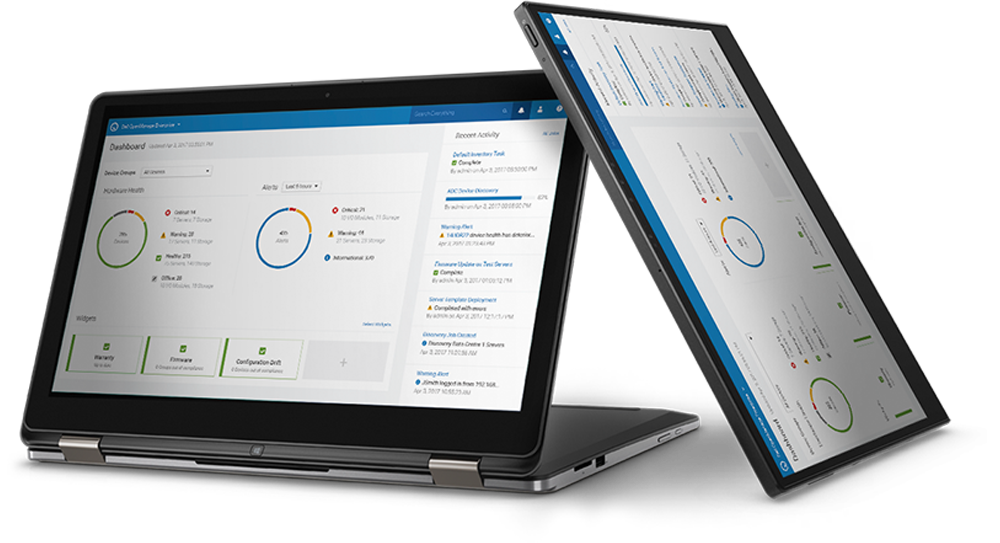
Download and install the new OpenManage Enterprise appliance
OpenManage Enterprise is an appliance that is deployed to a hypervisor.OpenManage Enterprise can be installed on VMware vSphere, Microsoft Hyper-V, or Kernel-based KVM. See the Deployment section in the OpenManage Enterprise User Guide.
OpenManage Enterprise User Guide Document download
4.8 Appliance Downloads for New Deployment
Click this link to download VMware ESXi, Microsoft Hyper-V, and KVM images:
Download
To upgrade offline from OME 4.6.x or 4.7.x, use this link:
Download
4.7 Appliance Downloads for New Deployment
Click this link to download VMware ESXi, Microsoft Hyper-V, and KVM images:
Download
To upgrade offline from OME 4.5.x or 4.6.x, use this link:
Download
4.6 Appliance Downloads for New Deployment
Click this link to download VMware ESXi, Microsoft Hyper-V, and KVM images:
Download
To upgrade offline from OME 4.4.x or 4.5.x, use this link:
Download
4.5 Appliance Downloads for New Deployment
Click this link to download VMware ESXi, Microsoft Hyper-V, and KVM images:
Download
To upgrade offline from OME 4.3.x or 4.4.x, use this link:
Download
OME 4.5 and OME 4.5.1 are identical products. Some customers may experience issues upgrading from 4.3.x and 4.4.x to 4.5. Version 4.5.1 resolves this issue.
- If you are planning for a new installation of OME, use version 4.5.
- If you are already on version 4.5, you do not need to upgrade to 4.5.1 and you will not see the upgrade option for 4.5.1.
- However, if you are on versions 4.3.x or 4.4.x, you will see 4.5.1 as an upgrade option (not 4.5).
4.4 Appliance Downloads for New Deployment
Download
To upgrade offline from OME 4.2 or 4.3.x, use this link:
Download
OME 4.4 and OME 4.4.1 are identical products. Some customers may experience issues upgrading from 4.2 and 4.3.2 to 4.4. Version 4.4.1 resolves this issue.
- If you are planning for a new installation of OME, use version 4.4.
- If you are already on version 4.4, you do not need to upgrade to 4.4.1 and you will not see the upgrade option for 4.4.1.
- However, if you are on versions 4.2 or 4.3.2, you will see 4.4.1 as an upgrade option (not 4.4).
Upgrade from Previous Releases of OpenManage Enterprise to OpenManage Enterprise 4.3.2
Recommendation to customers who upgrade from OME 4.3 or 4.3.1 to OME 4.3.2:
Delete any scheduled firmware update jobs that were created in OpenManage Enterprise 4.3 or 4.3.1 from a compliance report that uses REBOOT REQUIRED filter set to NO. Then, re-create them in 4.3.2, if necessary. Ensure that no scheduled firmware update jobs are running before proceeding with the upgrade.
Existing OME 4.1, 4.2, 4.3 and 4.3.1 customers can upgrade directly to OME 4.3.2.
Existing OME 4.0 and 4.0.1 customers must first upgrade to OME 4.2, and then to OME 4.3.2.
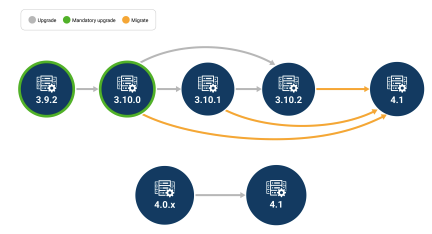
Existing OME 3.10 customers first migrate to OME 4.1, and then upgrade to OME 4.3.2.
Upgrade from 4.0.0, 4.0.1, or 4.1 version to OpenManage Enterprise 4.2
Online upgrade method, managed through the appliance web interface. See updating the console and plugins section of the OpenManage Enterprise User guide for detailed steps.
Offline upgrade (only for disconnected sites where the OpenManage Enterprise appliance is unable to access Dell.com to perform Online method) from OpenManage Enterprise 4.0 or 4.0.1 or 4.1 to version 4.2 Download upgrade files
Migrate from 3.10.x version to OpenManage Enterprise 4.1
Migration to OpenManage Enterprise version 4.2 from older 3.10.x versions is not supported. First install OpenManage Enterprise 4.1 as a new appliance then follow the instructions to migrate data from previous version OpenManage Enterprise 3.10.x. Once migrated to 4.1 use standard upgrade method to move to the latest version.
You must be on OpenManage Enterprise version 3.10.x to "migrate" to OpenManage Enterprise 4.1.
You must be on OpenManage Enterprise version 3.10.x to "migrate" to OpenManage Enterprise 4.1.
For Migration OpenManage Enterprise 4.1.0 for VMware ESXi Download the OVF image
For Migration OpenManage Enterprise 4.1.0 for Microsoft Hyper-V Download the VHD image
For Migration OpenManage Enterprise 4.1.0 for KVM Download the KVM image
January 2025
Tech note
January 2025
Tech note
This technical brief outlines expanded GPU monitoring capabilities introduced in OpenManage Enterprise (OME). As GPUs become critical for high‑performance data center workloads such as AI, effective monitoring and lifecycle management are essential for maximizing infrastructure availability and return on investment.
Read the Tech Note
June 2022
Thirty-one page white paper
December 2023
Five-page DfD Tech Note
November 2021
Nine page white paper
October 2020
Twelve page white paper
June 2020
Seven page white paper
January 2019
Twenty-two page white paper
April 2022
Five-page tech note
October 2020
Twelve page white paper
July 2020
Fourteen page white paper
March 2020
Thirty-two page white paper
July 2019
Thirty-nine page white paper
July 2019
Fourteen page white paper
July 2019
Twenty-eight page white paper
September 2018
Thirty-one page white paper
September 2019
Twenty-nine page white paper
July 2024
Five-page DfD Tech Note
January 2019
Twenty-three page white paper
February 2025
Tech note
June 2022
Blog
May 2022.
Twenty-five page white paper
August 2021
Fifteen page white paper
November 2020
Nineteen page white paper
November 2023
Four-page DfD Tech Note
December 2023
Sixteen page White Paper
December 2019
Ten page white paper
For Migration OpenManage Enterprise 4.1.0 for KVM Download the KVM image
Upgrade from any previous version to OpenManage Enterprise 3.10.
Upgrading to OpenManage Enterprise 3.10 directly from OpenManage Enterprise 3.9, 3.8.x, 3.7.x, 3.6.x, 3.5.x, 3.4.x, 3.3.x, 3.2.x, OpenManage Enterprise 3.1, OpenManage Enterprise 3.0, or OpenManage Enterprise Tech Release (1.0) directly is not supported.
-
Upgrade from OpenManage Enterprise 3.9 but first upgrade to version 3.9.2 before considering an upgrade to 3.10.
-
3.9->3.9.2->3.10
-
-
OpenManage Enterprise versions 3.7.x or 3.8.x must first be upgraded to version 3.9, then to 3.9.2, before considering an upgrade to 3.10.
-
3.7.x->3.9->3.9.2->3.10
-
3.8.x->3.9->3.9.2->3.10
-
-
OpenManage Enterprise versions earlier than version 3.7 must first be updated to version 3.9, then to 3.9.2, before considering an upgrade to 3.10.
-
3.6.x->3.8->3.9->3.9.2->3.10
-
3.5.x->3.7->3.9->3.9.2->3.10
-
3.4.x->3.6.1->3.8->3.9->3.9.2->3.10
-
3.3.x->3.5->3.7->3.9->3.9.2->3.10
-
3.2.x->3.4->3.6.1->3.8->3.9->3.9.2->3.10
-
3.1.x->3.3.1->3.5->3.7->3.9->3.9.2->3.10
-
OpenManage Enterprise - Tech Release version should be first upgraded to OpenManage Enterprise version 3.1.
Resources for OpenManage Enterprise
Dev Ops
OpenManage Enterprise GitHub repository includes examples of how to use the OpenManage Enterprise, OMEM API for python, Ansible, and PowerShell.
Documentation
See OpenManage Enterprise Documentation for all the latest documentation including user guide, compatibility matrix, and security configuration guide.
Windows Server 2025 Support Update for OpenManage Enterprise
January 2025
Tech note
The tech note details the updates in OpenManage Enterprise (OME) version 4.2, which now supports Microsoft Windows Server 2025. Key enhancements include server discovery, hardware driver updates, and virtual machine management for Windows Server 2025 Hyper-V environments.
Read the tech note.
Read the tech note.
From Observation to Optimization: OpenManage Enterprise Exposing GPU Metrics
January 2025
Tech note
This technical brief outlines expanded GPU monitoring capabilities introduced in OpenManage Enterprise (OME). As GPUs become critical for high‑performance data center workloads such as AI, effective monitoring and lifecycle management are essential for maximizing infrastructure availability and return on investment.
Read the Tech Note
OpenManage Enterprise Scale and Performance
June 2022
Thirty-one page white paper
This technical whitepaper provides an overview of the scalability, reliability, and performance of Dell OpenManage Enterprise. It provides the best practices to achieve optimal performance in a scaled and non‐scaled environment. The goal of this whitepaper is to provide the information that you require to achieve optimal performance, as demonstrated by our test results.
Read the white paper.
Read the white paper.
License Management and Deployment Functionality
December 2023
Five-page DfD Tech Note
This technical white paper provides information of this feature for customers who have purchased. After Point-of-Sale (APOS) OpenManage Enterprise Advanced/Advanced+ or iDRAC enterprise/Data center licenses and must deploy licenses to target iDRACs. OpenManage Enterprise (OpenManage Enterprise) can now seamlessly interface with Dell's online license portal to tie and install these licenses to specific servers, which accelerate and streamlines the license deployment process.
Read the white paper.
Read the white paper.
OpenManage Enterprise Appliance Share Configuration
November 2021
Nine page white paper
Learn how to configure the OpenManage Enterprise appliance to use HTTPS or CIFS for the Appliance Share and associated benefits.
Read the white paper.
Read the white paper.
Server-Initiated Discovery with OpenManage Enterprise 3.4
October 2020
Twelve page white paper
What if servers in your data center could announce their presence and be automatically managed with OpenManage Enterprise? With the Server-Initiated Discovery feature in OpenManage Enterprise 3.4, servers can automatically notify OpenManage Enterprise of their presence and get discovered by OpenManage Enterprise.
Read the white paper.
Read the white paper.
Upgrading OpenManage Enterprise Appliance
August 2019
Nineteen page white paper
Nineteen page white paper
This technical white paper provides a step-by-step procedure to upgrade the OpenManage Enterprise appliance version for online and offline sites.
Read the white paper.
Read the white paper.
Boost data center staff productivity with OpenManage Enterprise
June 2020
Seven page white paper
This Principled Technologies white paper presents time-and-effort measurements of key capabilities of the OpenManage Enterprise systems management console. This helps IT admins free up time and reduce the potential for error and downtime.
Read the white paper.
Read the white paper.
Define Custom Groups and Reports in Dell OpenManage Enterprise.
January 2019
Twenty-two page white paper
This technical white paper provides information about using the query builder feature to manage your Query Groups and Reports in managing your data center.
Read the white paper.
Read the white paper.
Improve Operational Efficiency Through OpenManage Enterprise Server Drift Management.
April 2022
Five-page tech note
This Direct from Development (DfD) tech note describes how capabilities in Dell’s OpenManage Enterprise server management appliance facilitate the simplification of drift management. Giving visibility of issues while simultaneously reduces the time and effort to resolve.
Read the tech note.
Read the tech note.
Server-Initiated Discovery with OpenManage Enterprise 3.4
October 2020
Twelve page white paper
What if servers in your data center could announce their presence and are automatically managed by OpenManage Enterprise? With the Server-Initiated Discovery feature in OpenManage Enterprise 3.4, servers can automatically notify OpenManage Enterprise of their presence and get discovered by OpenManage Enterprise.
Read the white paper.
Read the white paper.
Windows Driver Updates with OpenManage Enterprise 3.4
July 2020
Fourteen page white paper
This technical white paper provides information about managing Windows operating system driver inventory and updates using OpenManage Enterprise 3.4 console.
Read the white paper.
Read the white paper.
Deployment and Migration of Boot from SAN Configuration using Dell OpenManage Enterprise version 3.3.1
March 2020
Thirty-two page white paper
This technical whitepaper illustrates deployment of the boot from SAN configurations on servers and the migration of these deployed configurations to identical servers using OpenManage Enterprise.
Read the white paper.
Read the white paper.
Chassis, Sled, and IOA Template Cloning using Dell OpenManage Enterprise version 3.2
July 2019
Thirty-nine page white paper
This technical white paper describes the process of cloning a complete chassis configuration to a newly procured chassis using OpenManage Enterprise.
Read the white paper.
Read the white paper.
Auto-Deploy Provisioning on Servers or Chassis Using Dell OpenManage Enterprise 3.2.
July 2019
Fourteen page white paper
This Dell technical white paper describes the process of auto deploying configurations on not-yet discovered server or chassis using OpenManage Enterprise.
Read the white paper.
Read the white paper.
Remote script execution with Dell OpenManage Enterprise
July 2019
Twenty-eight page white paper
This technical white paper describes the Remote Script Execution feature of OpenManage Enterprise. It gives an overview of the feature along with a use case to enable and use the feature as a System Administrator.
Read the white paper.
Read the white paper.
Creating firmware baselines and catalogs by using Dell OpenManage Enterprise
September 2018
Thirty-one page white paper
This technical white paper provides information about creating firmware catalogs, creating firmware baselines, and then managing them. A brief procedure is provided about viewing the Firmware Baseline Compliance Report, and then upgrading the firmware version.
Read the white paper.
Read the white paper.
Updating Firmware using OpenManage Enterprise APIs
September 2019
Twenty-nine page white paper
This document shows the workflow and the APIs involved in the firmware update process for OpenManage Enterprise v3.0, v3.1, v3.2, and OpenManage Enterprise - Modular Edition v1.0 and v1.00.10.
Read the white paper.
Read the white paper.
A Beginner's Guide to working with Dell OpenManage Enterprise API and Postman
July 2024
Five-page DfD Tech Note
To help kickstart your journey into interfacing with the OpenManage Enterprise API, this document provides examples of using REST API calls to perform common server management tasks, and highlights a few useful resources. The document covers the basic steps needed to set up and configure Postman to access the OpenManage Enterprise REST API, including using credentials with Postman for authentication. Then to help you get familiar with features, it contains a selection of OpenManage Enterprise GET and POST API calls examples being used in Postman.
Read the white paper.
Read the white paper.
End to End Automation with REST API in Dell OpenManage Enterprise 3.0
January 2019
Twenty-three page white paper
This technical paper describes the uses of REST API use in Dell OpenManage Enterprise 3.0 for Systems Management.
Read the white paper.
Read the white paper.
Custom Access Roles with OpenManage Enterprise
February 2025
Tech note
The tech note explains the new feature in OpenManage Enterprise version 4.3.1, which allows administrators to create custom access roles, enhancing security by restricting functionality based on user roles and integrating with existing RBAC and SBAC systems.
Read the tech note.
Read the tech note.
OpenManage Enterprise: Security Built In
June 2022
Blog
This blog has commented on some of the key methods and features Dell uses to keep OpenManage Enterprise secure, so that customers can use it with confidence.
Read the blog.
Read the blog.
Dell OpenManage Enterprise 3.9 - Security Configuration Guide
May 2022.
Twenty-five page white paper
This paper contains information about specific security features of OpenManage Enterprise, and how to enable, disable, and configure each feature.
Read the white paper.
Read the white paper.
Scope-Based Access Control with OpenManage Enterprise 3.6.
August 2021
Fifteen page white paper
OpenManage Enterprise has integrated Role-Based Access Control, with three integrated roles - Administrator, Device Manager, and Viewer. Each role differs in the privileges that the role has. In OpenManage Enterprise 3.6 and later, Scope-Based Access Control is implemented. This feature enables an Administrator to restrict the scope of a Device Manager user to one or more groups. Read on to understand how SBAC can be enforced with OpenManage Enterprise and what a scope restricted user sees.
Read the white paper.
Read the white paper.
Dell OpenManage Enterprise Login with PingFederate
November 2020
Nineteen page white paper
This technical white paper provides information about configuring OpenManage Enterprise (OME) and PingFederate to enable logging into OpenManage Enterprise using PingFederate.
Read the white paper.
Read the white paper.
iDRAC Credential Management in OpenManage Enterprise Overview
November 2023
Four-page DfD Tech Note
This white paper provides a technical overview about configuring OpenManage Enterprise (OME) and iDRAC credentials. These credentials are required for OpenManage Enterprise for server management tasks. This feature offers customers support for either internal OpenManage Enterprise iDRAC password rotation or iDRAC credential retrieval from CyberArk Central Credential Provider, an external third-party credential provider solution.
Read the white paper.
Read the white paper.
iDRAC Credential Management in OpenManage Enterprise
December 2023
Sixteen page White Paper
This technical white paper provides detailed information about configuring OpenManage Enterprise (OME) and iDRAC credentials.OpenManage Enterprise version 4.1 or higher offers enhanced password management features for managing Dell iDRACs. This feature enables greater security by allowing automated password rotation which can be scheduled and managed internally or using CyberArk integration.
Read the white paper.
Read the white paper.
Multihoming on OpenManage Enterprise 3.3.1
December 2019
Ten page white paper
This white paper describes the multihoming implementation for OpenManage Enterprise 3.3.1.
Read the white paper.
Read the white paper.
Videos
Dell OpenManage Enterprise Support Tutorial Collection
Playlist of OpenManage Enterprise videos from deployment, migrate discovery, alert management, catalogs and firmware updates, log reading, troubleshooting, and more.
Last updated on 22 November 2023
Dell OpenManage Enterprise Quick Insight Overview
Video shows casing commonly used features of OpenManage Enterprise.
October 2024
OpenManage Enterprise Boosts Data Center staff productivity
Increase data center staff's productivity by using OpenManage Enterprise.
June 2020
Lightweight Directory Access Protocol integration
How to integrate Lightweight Directory Access Protocol (LDAP) in OpenManage Enterprise.
May 2019
OpenManage Enterprise Overview
OpenManage Enterprise empowers IT pros with intelligent automation that delivers real-time efficiencies and cost savings.
March 2019
Discovering devices
How to discover devices in OpenManage Enterprise.
February 2019
Active Directory services integration
How to add Active Directory services to OpenManage Enterprise.
February 2019
Viewing Device Details
Demonstrates the process of viewing various device details by using OpenManage Enterprise - Tech Release.
January 2018
Email alert policy
Demonstrates the process of creating an email alert policy in OpenManage Enterprise - Tech Release.
January 2018
Firmware baseline
Demonstrates the process of creating a firmware baseline and viewing the noncompliant attributes in OpenManage Enterprise - Tech Release.
January 2018
Support Community
Release History
New Features in OpenManage Enterprise 4.7
- New Dell PowerEdge servers support
- Adds support for Dell PowerEdge R4715, R5715, and XE9780LAP servers.
- User Interface upgraded
- The user interface is upgraded, providing a faster, more responsive console with a consistent look and feel.
- OpenManage Enterprise MCP Server
- The Dell OpenManage Enterprise MCP Server connects your OpenManage Enterprise appliance to an AI chat interface (Open WebUI) through the Model Context Protocol (MCP). You can monitor and manage your Dell server infrastructure by typing requests in plain language.
- Enables AI-powered server management operations including health monitoring, alert management, firmware compliance and updates, configuration compliance and remediation, power control, power capping, hardware inventory, performance monitoring, log retrieval, and job tracking.
- Requires OME 4.7 or later, Open WebUI v0.8.0 or later, DNS configuration with FQDN reachable from MCP Client, network connectivity on port 443, and trusted HTTPS certificate.
- Supports OAuth 2.1 authentication (recommended for automatic sign-on and token management) and session-based authentication (Bearer token).
- Uses the same HTTPS certificate as the OpenManage Enterprise web console.
- Scale and performance enhancements
- Provides performance enhancements that allow you to monitor up to 25,000 devices.
- Collect and view operational metrics (such as CPU, memory, and network usage) for up to 25,000 devices without experiencing performance drops.
- Increases alert capacity to a maximum of 150,000 alerts on both fresh and upgraded installations.
- Session-based Redfish authentication
- Uses session-based Redfish authentication instead of Basic authentication to connect to iDRAC9 and later for operations such as discovery, inventory, health checks, and firmware updates. If session-based authentication fails, the appliance reverts to basic authentication to complete the task.
- Infrastructure Update Catalog (IUC) integration
- Supports creating and updating firmware baselines using the Infrastructure Update Catalog from Dell.com to enable updates for Power Shelf, Integrated Rack Controller (IRC) devices.
- GPU Firmware Update Enhancements
- Support for Full Power Cycle as a reboot option for GPU or accelerator firmware updates.
- Provides a power control option that performs a complete AC power off and power on sequence to support GPU components requiring a full power cycle for firmware updates.
- Integrated Rack License
- OpenManage Enterprise now supports Integrated Rack licenses, enabling advanced rack-level monitoring and metrics for racks that contain an Integrated Rack Controller (IRC). License status determines the availability of additional rack-level attributes.
- NVL switch support
- Adds support for discovery, hardware inventory, health monitoring, and alert monitoring of NVIDIA switches (N5600).
- New PDU support
- Enables monitoring and power management operations for the Raritan PX3-4201R power distribution unit.
- SUSE Linux Enterprise Server 16 support
- Adds support for discovery, inventory, and monitoring support for the SLES 16 operating system.
- New Power Shelf Support
- Adds support for discovery, inventory, monitoring, alerts, and rack management for Delta 19-inch 33kW power shelves.
- Enhanced visualization for Integrated Racks
- Enhanced visualization for Rack scale infrastructure in physical hierarchy grouping.
- Rack power redundancy indication
- Indication of power redundancy status at rack level for rack scale infrastructure.
- Power load change notification
- Enable power swing notification with high magnitude in data center infrastructure.
New Features in OpenManage Enterprise 4.6
- Support for the latest compute and networking platforms
- E.g. PowerEdge R770AP, PowerEdge XE9780, PowerEdge XE9785, PowerEdge XE9780L, PowerEdge XE9785L, PowerEdge XE8712. For details, please refer to the latest OME Support Matrix.
- Telemetry enhancements (Integration with Kafka)
- OME can now stream device inventory, health, alerts, metrics, and audit logs to an Apache Kafka cluster. This enables downstream tools such as Vector, Prometheus, and Grafana to consume, analyze, and visualize the data.
- Management of Integrated Rack
- Support for Integrated Rack Controller (IRC)
- Simulate critical alerts from IRC to validate rack-level containment policies before enabling them in production environments.
- With containment policy enabled, OME will automatically initiate the associated server shutdown task when it receives critical leak events.
- Enhanced power management capabilities
- Automatic physical grouping of Power Shelves.
- Telemetry support for Power Shelf and SONiC switches
- Rack composition verification using network topology information
- Improved telemetry visualization
- Support for ServerTech PDU
- Firmware Update enhancements
- OpenManage Enterprise (via Dell Update Manager plugin) now supports firmware lifecycle management for select Power Shelf, CDU, and IRC devices.
- Deploy OME on new hypervisors
- OpenShift version 4.19.11 or later
- ProxMox VE 9.0 or later (as a virtual appliance), supporting both GUI and CLI-based deployment methods
- Nutanix AHV 10.0.1.1 or later / AOS 7.0.1.6 or later
- Scaling OME to support more devices with a single OME console
- OME now supports (monitoring-only, such as discovery, inventory, health and alerts) for up to 25,000 devices from a single OME console. Other features, such as plugins and firmware updates, shall continue with current scale limits.
- Security enhancements
- Forward alerts and audit logs to remote Syslog servers with TLS support, including Server-only, Client-only, and Mutual authentication modes.
- Backup and Restore operations now support SFTP protocol, enabling secure and flexible backup storage options beyond CIFS, NFS, and HTTPS.
- Administrators can reset existing user passwords.
- OME is now based on the common operating system SLES 15 SP6.
- Note: OME 4.7 does not support SHA-1 certificates in the certificate chain. Ensure that all certificates in the chain, including intermediate and root, are signed using SHA-256 or stronger algorithms.
- Better integration with SmartFabric Manager
- Launch a SmartFabric Manager instance (from OME) to view detailed connectivity information for the selected device, including:
- Physical topology views for servers, showing connections between GPUs, NICs, and switchports.
- Physical topology views for switches, showing connectivity to other switches and servers.
- Launch a SmartFabric Manager instance (from OME) to view detailed connectivity information for the selected device, including:
New Features in OpenManage Enterprise 4.5
- All Power Manager features are now integrated into OpenManage Enterprise interface. A separate plugin is no longer required.
- Discovery, inventory, monitoring, and SNMP alerting for Power Shelves (For Dell IRSS - Integrated Rack Scalable Systems – racks only)
- Rack level GPU and CPU reporting, carbon footprint, GPU density visualization
- Perform a staggered power on or power off operation for rack groups
- Automatically add devices to groups based on the physical hierarchy
- Discovery, inventory, and monitoring for Dell Top-of-Rack switches running the SONiC operating system
- Enhanced data protection with an option to select SHA-384 and SHA-512 cryptographic hash algorithms when generating Certificate Signing Requests (CSRs)
- Credentials can now be encrypted using the AES-256 symmetric encryption algorithm
- Discovery, inventory, and health collection tasks now run asynchronously, improving performance and scalability in large environments
- Discovery, inventory, and alerting for platforms running Azure Stack HCI 24H2
- Discovery, inventory, monitoring, and alerting for PowerEdge R760 servers running Azure Stack HCI 23H2
- Ability to send critical messages as a banner to an OME console
- Support for new platforms and operating system versions. For details, refer to the latest support matrix.
New Features in OpenManage Enterprise 4.4
- Full lifecycle management support for the latest Dell PowerEdge 17th generation servers with iDRAC10
- OME 4.3.2 already supports discovery, onboarding, health, alerts, firmware updates, remote commands, and license management with iDRAC10. OME 4.4 extends this support for full lifecycle management.
- Pre-enable support for vSphere 9.0
- Deployment of OME VM in the hypervisor of vSphere 9.0
- Alert reception from Sonic and InfiniBand Switches with pre-installed MIBs
- Signed OME images so customers can verify that the images they are installing are from Dell
New Features in OpenManage Enterprise 4.3.2
- Support for the latest Dell PowerEdge 17th generation of servers based on iDRAC10
- OME 4.3.2 supports discovery, onboarding, health, alerts, firmware updates, remote commands, and license management with iDRAC10
- OME 4.3.2 does not support the full lifecycle management (as in configuration compliance) with iDRAC10. This will be available in the next release of OME.
- OME Advanced and Advanced Plus licenses for iDRAC10 are now available for purchase and shipment both at Point-of-Sale and After Point-of-Sale.
- OME 4.3.2 does not support the license features of OME at this point. This will be available in the next release of OME.
- However, we strongly recommend that customers purchase Point-of-Sale licenses directly from the factory for ease-of-deployment. This will allow customers to start using the full lifecycle management when they upgrade to the next release of OME without needing to spend time deploying APOS licenses.
- New OME license SKUs for iDRAC10
- 634-CSGW, OpenManage Enterprise Advanced, Point of Sale (POS) that is comes pre-deployed on servers directly from the factory
- 634-CSGT, OpenManage Enterprise Advanced, After Point of Sale (APOS) - must be deployed by customer using OME license management feature
- 634-CSGX, OpenManage Enterprise Advanced Plus, Point of Sale (POS) that is comes pre-deployed on servers directly from factory
- 634-CSGV, OpenManage Enterprise Advanced Plus, After Point of Sale (APOS) - must be deployed by customer using OME license management feature
- 634-CSGS, OpenManage Enterprise Advanced Plus Upgrade, After Point of Sale (APOS) - must be deployed by customer using OME license management feature
- There is no change to OME license SKUs for iDRAC8 and iDRAC9.
- Custom Roles for OME users
- Customers can now create multiple custom roles (in addition to the pre-built Admin, Device Manager and View Only roles). They can then assign new or existing users to one of the custom roles.
- As an example, some customers want to have different users assigned for Firmware Updates and Configuration Compliance. This can now be accomplished with OME 4.3.2.
- Streamlined support for PLDM Firmware Updates
- The Platform Level Data Model (PLDM) for firmware updates is a standard developed by the Distributed Management Task Force (DMTF) to facilitate the management and updating of firmware across various devices. It also tries to reduce the reboot of servers. However, the need for reboot of the server is only determined by iDRAC after the update has been applied to the component. OME 4.3.2 manages such firmware updates in a graceful way.
- Support for new platforms 17G, XC, XE, VxRail platforms, and VSAN Ready Nodes (See the OME 4.3.x Support Matrix for details): https://www.dell.com/support/home/product-support/product/dell-openmanage-enterprise/docs )
New Features in OpenManage Enterprise 4.2
-
Support for OME Virtual Appliance to be deployed in new Microsoft Windows 2025 Hyper-V hypervisor
- Pre-enablement of support for Windows Systems Center 2025
- Pre-enablement of support for Windows 2025
- Discover devices with these OS
- Support for SUSE 15 SP6, Ubuntu 24.04.4, RHEL 9.4
- Discover devices with these OS
- Enhanced security for customers using Dell License Manager (DLM) functionality in OM
- DLM functionality in OME 4.1 with only work until October 31, 2024
- Customers who want managed licenses starting November 01, 2024 must upgrade to OME 4.2
- Support for new XE, XR, XC, XE and VxRail platforms, VSAN Ready Nodes
Migration from OpenManage Enterprise 3.10.x to OpenManage Enterprise 4 requires the use of a certificate. This can be the default, self-signed certificate, or a full certificate chain that includes the root certificate. For more details, see Troubleshooting Certificate Chain Issues Required for OpenManage Enterprise Migration.
New Features in OpenManage Enterprise 4.1
OpenManage Enterprise 4.1 and associated plugins include the Dell License Manager (DLM) functionality. This allows customers to access their Dell license vault and bind/upgrade the systems management licenses to specific servers directly from OpenManage Enterprise. It also includes enhancements to template deployment and extensive security improvements.
Note: OpenManage Enterprise 4.1 replaces OpenManage Enterprise 4.0 and OpenManage Enterprise 4.0.1 for all future downloads. OpenManage Enterprise versions 4.0 and OpenManage Enterprise 4.0.1 were removed from Dell download sites.
Note: OpenManage Enterprise 4.1 replaces OpenManage Enterprise 4.0 and OpenManage Enterprise 4.0.1 for all future downloads. OpenManage Enterprise versions 4.0 and OpenManage Enterprise 4.0.1 were removed from Dell download sites.
Supported since 4.0:
-
Support for customers who use CyberArk Credential Provider software. OpenManage Enterprise can now access iDRAC passwords from the CyberArk vault.
- OpenManage Enterprise can now create a new set of encrypted credentials to access iDRAC, and also regularly rotate them automatically.
- Local Multi-Factor Authentication (MFA) with RSA SecurID
-
Provide default install of OPENMANAGE ENTERPRISE-Services plug-in and CloudIQ plug-in with OpenManage Enterprise
-
Other security features
-
TLS 1.3
-
Secure Boot (i.e.Pre-boot environment is protected and only allows OS distribution provided signed binaries to run at startup of the appliance)
-
Removed SMBv1
-
-
>Platforms
-
Support new platforms
-
New PowerEdge servers
-
New XR/XE/XC/VxRail platforms
-
-
Affected Products
Dell EMC OpenManage Enterprise, Dell EMC OpenManage Enterprise Power Manager, OpenManage Enterprise Services, OpenManage Enterprise Update ManagerArticle Properties
Article Number: 000175879
Article Type: How To
Last Modified: 01 Oct 2026
Version: 69
Find answers to your questions from other Dell users
Support Services
Check if your device is covered by Support Services.