PowerProtect DD: How To Set and Change the System Passphrase
Oversigt: This article describes the steps to set and change the passphrase on a Data Domain (DD) system.
Denne artikel gælder for
Denne artikel gælder ikke for
Denne artikel er ikke knyttet til et bestemt produkt.
Det er ikke alle produktversioner, der er identificeret i denne artikel.
Instruktioner
The system passphrase must be set before the system can support data encryption or request digital certificates.
Note: Be sure to record the passphrase somewhere safe. The passphrase cannot be recovered!
By default, the system passphrase length is not set. To determine if a minimum length is configured for the passphrase:
sysadmin@datadomain# system passphrase option show min-length
Option       Value
----------   ---------
min-length   (not set)
----------   ---------
Setting the passphrase from the command line (CLI):
sysadmin@datadomain# system passphrase set
Enter new passphrase:
Re-enter new passphrase:
Passphrases matched.
The passphrase is set.
Setting the passphrase from the DD web interface (GUI):
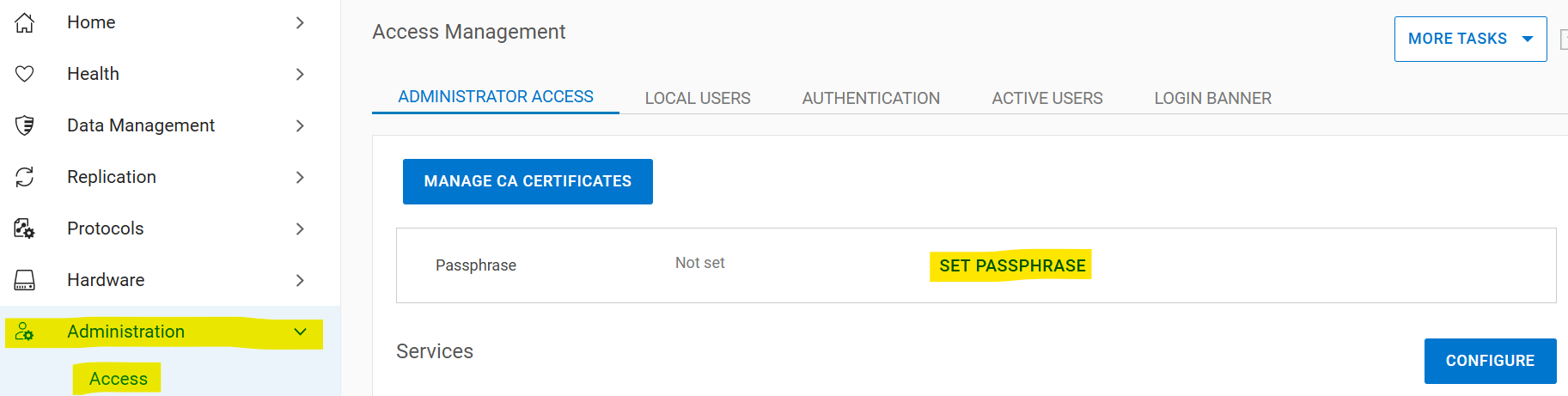
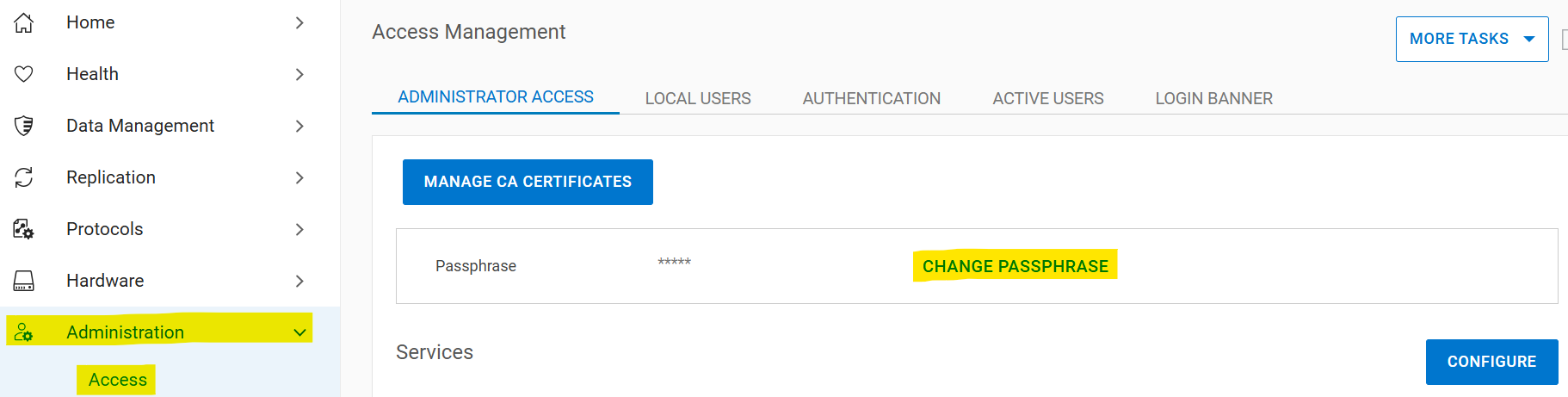
Select Administration > Access > Administrator Access > Set Passphrase. If the system passphrase is not set, the Set Passphrase button appears in the Passphrase area. If a passphrase is configured, the Change Passphrase button appears, and your only option is to change the passphrase.
Changing the system passphrase
Prerequisites for changing the passphrase:
- An account with security permissions must exist for two-user authentication
- Enable the security authorization policy
- Disable the file system
If there is no security officer:
- Create a security officer
sysadmin@datadomain# user add secuser role security Enter new password: Re-enter new password: Passwords matched. User "secuser" added. - Log in as the security officer and check if the security authorization policy is enabled.
secuser@datadomain# authorization policy show Runtime authorization policy is disabled. - Enable the authorization policy if it is disabled.
secusr@datadomain# authorization policy set security-officer enabled
Runtime authorization policy has been enabled.
From the CLI:
The file system must be disabled to change the passphrase. The passphrase change fails if the file system is enabled when the command is run.sysadmin@datadomain# filesys disable
This action will disable the file system.
Applications may experience interruptions
while the file system is disabled.
Are you sure? (yes|no) [no]: yes
ok, proceeding.
Please wait........
The filesystem is now disabled.
sysadmin@datadomain# system passphrase change
This command requires authorization by a user having a 'security' role.
Please present credentials for such a user below.
Username: secuser
Password:
Enter current passphrase:
Enter new passphrase:
Re-enter new passphrase:
Passphrases matched.
The system passphrase has changed
sysadmin@datadomain# filesys enable
Please wait..........
The filesystem is now enabled.From the GUI:
Select Administration > Access > Administrator Access > Change Passphrase:
Enter security officer credentials, the current passphrase, and the new passphrase. Check the "Restart file system now" box:

If the issues with the passphrase are not fixed after following these steps, contact Dell Support.
Flere oplysninger
This content is translated in different languages:
| https://downloads.dell.com/TranslatedPDF/PT-BR_KB535800.pdf |
| https://downloads.dell.com/TranslatedPDF/ZH-CN_KB535800.pdf |
| https://downloads.dell.com/TranslatedPDF/ES_KB535800.pdf |
| https://downloads.dell.com/TranslatedPDF/DE_KB535800.pdf |
| https://downloads.dell.com/TranslatedPDF/FR_KB535800.pdf |
| https://downloads.dell.com/TranslatedPDF/IT_KB535800.pdf |
| https://downloads.dell.com/TranslatedPDF/JA_KB535800.pdf |
| https://downloads.dell.com/TranslatedPDF/NL_KB535800.pdf |
| https://downloads.dell.com/TranslatedPDF/KO_KB535800.pdf |
| https://downloads.dell.com/TranslatedPDF/RU_KB535800.pdf |
| https://downloads.dell.com/TranslatedPDF/PT_KB535800.pdf |
| https://downloads.dell.com/TranslatedPDF/SV_KB535800.pdf |
Berørte produkter
Data DomainProdukter
Data Domain, DD OS 6.2, DD OS, DD OS 6.0, DD OS 6.1Artikelegenskaber
Artikelnummer: 000019730
Artikeltype: How To
Senest ændret: 12 jan. 2026
Version: 5
Find svar på dine spørgsmål fra andre Dell-brugere
Supportservices
Kontrollér, om din enhed er dækket af supportservices.