Data Domain: BMC/iDRAC-nulstillingsprocedure
Oversigt: Denne artikel indeholder instruktioner til manuel nulstilling af BMC (Baseboard Management Controller) eller iDRAC (Integrated Dell Remote Access Controller) på Data Domain- og PowerProtect DD-systemer. DDOS kan automatisk forsøge en nulstilling, når der registreres kendte problemer, men manuel indgriben kan være påkrævet, hvis advarslerne fortsætter. ...
Denne artikel gælder for
Denne artikel gælder ikke for
Denne artikel er ikke knyttet til et bestemt produkt.
Det er ikke alle produktversioner, der er identificeret i denne artikel.
Symptomer
Gælder for:
- Alle Data Domain-systemer
Mulige symptomer:
- BMC reagerer ikke.
- iDRAC er offline eller kan ikke nås.
- Falske eller forbigående indberetninger vedrørende:
- Blæsere
- Strømforsyninger
- Temperatursensorer
- Flere hovedenhedssensorer rapporterer som "Utilgængelig","Fraværende" eller "Mislykket".
- Sendt advarsel
-
EVT-ENVIRONMENT-00039: BMC failure has been detected. File system is unchanged.
-
Årsag
BMC eller iDRAC kan holde op med at reagere på grund af interne fejl eller overdreven trafik, hvilket resulterer i forældede eller fejlagtige advarsler. En nulstilling rydder disse betingelser og gendanner sensorfunktionaliteten.
Løsning
Alle DD-systemers BMC/iDRAC-nulstillingsprocedure:
- Sluk for Data Domain-systemet ved at udstede DD-CLI-kommandoen:
-
#system poweroff
-
- Vent på, at DD-systemet lukkes elegant ned.
- Fjern alle vekselstrømskabler fra DD-hovedenheden/controlleren.
- Vent i 2 minutter.
- Tilslut alle strømforsyninger igen, og start systemet ved at trykke på tænd/sluk-knappen på frontpanelet.
- Hvis systemet stadig oplever BMC-problemer, skal du kontakte din supportudbyder.
BEMÆRK: Dell PowerEdge "Loppedræn"-procedure:
Data Domain: Procedure for DD3300/DD6900/DD9400/DD9900-platform loppedræn (BMC-nulstilling).
Data Domain: Procedure for DD3300/DD6900/DD9400/DD9900-platform loppedræn (BMC-nulstilling).
Alternativ mulighed for "blød nulstilling" til PowerProtect DD-systemer:
Den grafiske brugergrænseflade (brugergrænseflade) på iDRAC giver mulighed for at udføre en blød nulstilling:
- Opret forbindelse til iDRAC.
- Log på grænsefladen ved at indtaste brugernavn og adgangskode
- Vælg: Vedligeholdelsesdiagnosticering >> Nulstil iDRAC
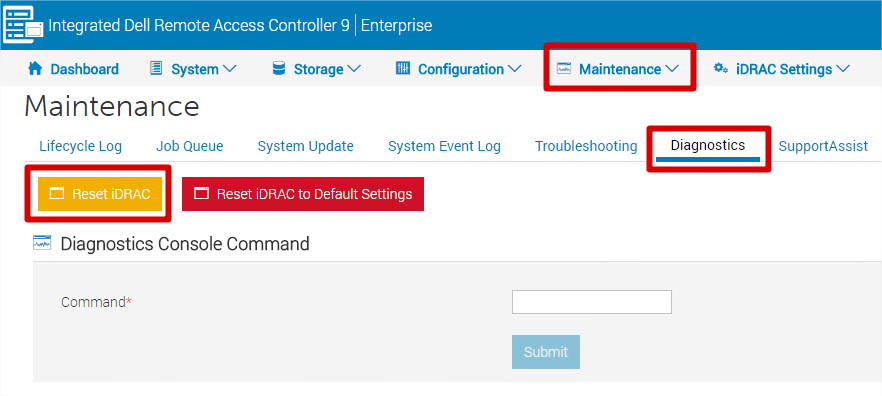
- IDRAC kan ikke nås i nogle minutter – systemets ydeevne påvirkes ikke.
Bemærk: Vælg ikke "Nulstil iDRAC til standardindstillinger", medmindre du vil gendanne alle indstillinger (herunder IP, brugernavn og adgangskode) til fabriksindstillingerne.
Berørte produkter
Data Domain, DD OS, DD2200 Appliance, DD2500 ApplianceArtikelegenskaber
Artikelnummer: 000079739
Artikeltype: Solution
Senest ændret: 18 apr. 2026
Version: 7
Find svar på dine spørgsmål fra andre Dell-brugere
Supportservices
Kontrollér, om din enhed er dækket af supportservices.