Premier: Standard Configurations
Oversigt: Standard Configurations are personalized product bundles created by your Dell Sales Representative, so your organization can repeatedly purchase online at your negotiated price.
Denne artikel gælder for
Denne artikel gælder ikke for
Denne artikel er ikke knyttet til et bestemt produkt.
Det er ikke alle produktversioner, der er identificeret i denne artikel.
Instruktioner
Learn more about the simple, intuitive Standard Configuration page, and its main features by watching the Standard Configurations video.
Duration: 00:02:52 (hh:mm:ss)
When available, closed caption (subtitles) language settings can be chosen using the Settings or CC icon on this video player.
Access Standard Configurations
1. To access your standard configurations, click the "Shop" category and select "Standard Configurations" located within the secondary navigation to view your list of customized configurations. For a faster navigation, Premier user can access the standard configurations from the Dashboard on the Premier home page. (Figure 1: Access Standard Configurations) 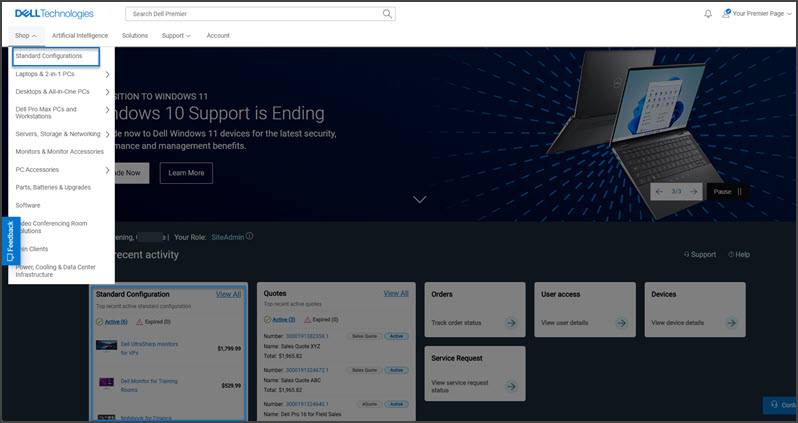
Figure 1: Access Standard Configurations
2. There are multiple ways to quickly find a standard configuration: You can filter by category, sort by name, subtitle, created by, product, price, or use the dynamic search box. To review the exact list of included components and services, users can click the name of the configuration or the product image. Once ready, you can add to a cart or customize.
For product transitions, you can see notifications when a standard configuration is about to be retired. For configurations with a defined end of marketing life, Dell Technologies recommends possible replacements so you can start having a discussion with your account team*. (Figure 2: Premier Standard Configurations) 
Figure 2: Premier Standard Configurations
Back to Top of Page
Shop Standard Configurations
1. Locate the Standard Configuration of your choice by using one of the filtering or search options.
2. Click the name or the image of the configuration to view the exact list of included components and services. Select "Customize & Buy."
3. Within the configuration page, view/select the component options wanted.
4. Click "Review" to view your customized configuration.
5. If you want to change your selection, click "Edit" next to the corresponding component.
6. Click "Add to Cart."
* Availability may vary by country or region. Contact your account team for more information.
If you have questions or need assistance, engage the Premier Support Teams.
Artikelegenskaber
Artikelnummer: 000106488
Artikeltype: How To
Senest ændret: 30 jun. 2025
Version: 21
Find svar på dine spørgsmål fra andre Dell-brugere
Supportservices
Kontrollér, om din enhed er dækket af supportservices.