Dell Security Management Server Virtual Server log commands
Oversigt: This article provides an overview of the command-line language that is used in the Dell Security Management Server Virtual (formerly Dell Data Protection | Virtual Edition Server) "View Logs" menu screen. ...
Denne artikel gælder for
Denne artikel gælder ikke for
Denne artikel er ikke knyttet til et bestemt produkt.
Det er ikke alle produktversioner, der er identificeret i denne artikel.
Symptomer
Affected Products:
- Dell Security Management Server Virtual
- Dell Data Protection | Virtual Edition
Årsag
Not Applicable
Løsning
The Dell Security Management Server Virtual gives the Server Administrator quick access to log files for troubleshooting. From the GNU nano screen, server issues may be reviewed and resolved by checking the Dell Security Management Server Virtual View Logs and select System logs, Server logs, or Databasesecustomizer log.
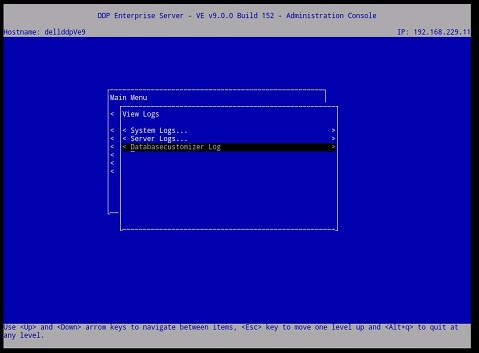
Figure 1: (English Only) Virtual Edition Server's View Logs menu
Once a log is selected, it opens in the GNU Nano text editor.
The GNU Nano is a text editor that is suited to working in UNIX, as it does not rely on the mouse, but still has many useful features.
Most nano commands are invoked by holding down the Ctrl key (that is, the control key), and pressing one of the other keys. In this text, the control key is referenced using ^ (for example, ^G means hold down the CTRL key and press the g key). Most of the important Dell Security Management Server Virtual commands are listed below Figure 2.
For example, enter ^G (CTRL+G) for the GNU nano's help menu.
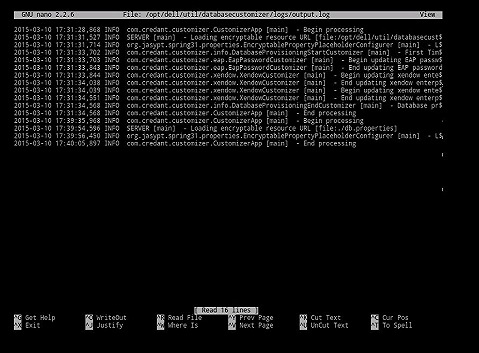
Figure 2: (English Only) Virtual Edition GNU nano user interface
Most commonly used commands:
| Commonly used commands | Keyboard combination |
|---|---|
| Get Help | Crtl G |
| Exit | Crtl X |
| Where is | Crtl W |
| Write Out | Crtl O |
| Prev Page | Crtl Y |
| Cur Pos | Crtl C |
Other available commands:
- Justify = Crtl J
- Read File = Crtl R
- Cut Text = Crtl K
- UnCut Text = Crtl U
- To Spell = Crtl T
To contact support, reference Dell Data Security International Support Phone Numbers.
Go to TechDirect to generate a technical support request online.
For additional insights and resources, join the Dell Security Community Forum.
Berørte produkter
Dell EncryptionArtikelegenskaber
Artikelnummer: 000130664
Artikeltype: Solution
Senest ændret: 08 mar. 2023
Version: 8
Find svar på dine spørgsmål fra andre Dell-brugere
Supportservices
Kontrollér, om din enhed er dækket af supportservices.