Dell Security Management Server Virtual Upgrade Fails on Interfaces.d
Oversigt: Upgrading Dell Security Management Server Virtual appliance fails with an error referencing the interfaces.d directory.
Denne artikel gælder for
Denne artikel gælder ikke for
Denne artikel er ikke knyttet til et bestemt produkt.
Det er ikke alle produktversioner, der er identificeret i denne artikel.
Symptomer
Affected Products:
- Dell Security Management Server Virtual
Affected Versions:
- v10.2.9 to v10.2.11
Affected Operating Systems:
- Linux
The Dell Security Management Server Virtual upgrade stops with a message Failed to restore from backup file: and this occurs after attempting the restore of the files in the etc/network/interfaces directory.
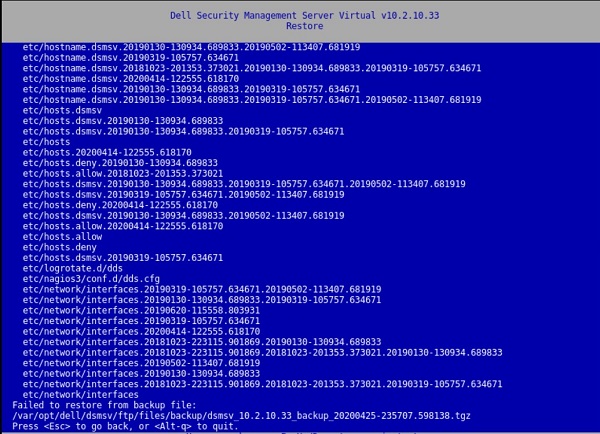
Figure 1: (English Only) Restore returns Failed to restore from backup file:
Pressing a key result in a window with:
[Errno 21] Is a directory:
‘/etc/network/interfaces.d’.
This error is also present in the /var/log/messages file:
![[Errno 21] Is a directory: ‘/etc/network/interfaces.d’](https://supportkb.dell.com/img/ka06P000000sfPFQAY/ka06P000000sfPFQAY_en_US_6.jpeg)
Figure 2: (English Only) [Errno 21] Is a directory: ‘/etc/network/interfaces.d’
Årsag
Not Applicable
Løsning
To resolve the issue, follow the instructions to rename the interfaces.d directory.
- Log in to the Dell Security Management Server Virtual Console.
- Select Launch Shell in the Dell Security Management Server Virtual Administration Console.
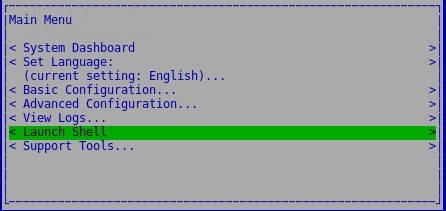
Figure 3: (English Only) Launch Shell
- Switch to the
dellsupportuser account using the commandsu dellsupport.

Figure 4: (English Only) Switch to dellsupport
- Provide the password for the
dellsupportuser. By default, the password isdellsupport.

Figure 5: (English Only) Type password
- Rename the interfaces.d directory with the following command:
sudo mv /etc/network/interfaces.d /etc/network/interfaces.old

Figure 6: (English Only) Type sudo mv /etc/network/interfaces.d /etc/network/interfaces.old
- Exit out of the shell by typing
exitor usingctrl-dtwice and run the upgrade through the user interface.
To contact support, reference Dell Data Security International Support Phone Numbers.
Go to TechDirect to generate a technical support request online.
For additional insights and resources, join the Dell Security Community Forum.
Berørte produkter
Dell EncryptionArtikelegenskaber
Artikelnummer: 000131146
Artikeltype: Solution
Senest ændret: 06 jul. 2023
Version: 10
Find svar på dine spørgsmål fra andre Dell-brugere
Supportservices
Kontrollér, om din enhed er dækket af supportservices.