Openshift Event Code: 1030NODE0004
Oversigt: Filesystem has less than 3% inodes left.
Denne artikel gælder for
Denne artikel gælder ikke for
Denne artikel er ikke knyttet til et bestemt produkt.
Det er ikke alle produktversioner, der er identificeret i denne artikel.
Symptomer
When a node's filesystem becomes full, it has a widespread impact. This issue can cause any or all of the applications scheduled to that node to experience anything from degraded performance to becoming fully inoperable.
Depending on the node and filesystem involved, this issue could pose a critical threat to the stability of the cluster.
Depending on the node and filesystem involved, this issue could pose a critical threat to the stability of the cluster.
Årsag
The NodeFilesystemAlmostOutOfFiles alert is similar to the NodeFilesystemSpaceFillingUp alert, but rather than being based on a prediction that a filesystem will run out of inodes in a certain amount of time, it uses simple static thresholds. The alert triggers at a warning level when 5% of available inodes remain, and triggers at a critical level when 3% of available inodes remain.
Løsning
Diagnosis:
Note the instance and mountpoint labels from the alert. You can graph the usage history of this file system by using the following query in the OpenShift web console(Observe → Metrics → Run queries):

Mitigation:
The number of inodes allocated to a file system is usually based on the storage size. You might be able to solve the problem, or at least delay the negative impact of the problem, by increasing the size of the storage volume. Otherwise, determine the application that is creating large numbers of small files and then either adjust its configuration or provide it with dedicated storage.
Support:
If all the above steps cannot resolve the issue, contact the Dell EMC technical support for further investigation.
Note the instance and mountpoint labels from the alert. You can graph the usage history of this file system by using the following query in the OpenShift web console(Observe → Metrics → Run queries):
You can also open a debug session on the node and use standard Linux utilities to locate the source of the usage: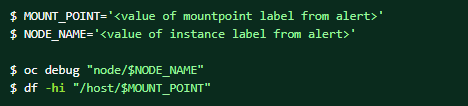
Mitigation:
The number of inodes allocated to a file system is usually based on the storage size. You might be able to solve the problem, or at least delay the negative impact of the problem, by increasing the size of the storage volume. Otherwise, determine the application that is creating large numbers of small files and then either adjust its configuration or provide it with dedicated storage.
Support:
If all the above steps cannot resolve the issue, contact the Dell EMC technical support for further investigation.
Berørte produkter
APEX Cloud Platform for Red Hat OpenShiftArtikelegenskaber
Artikelnummer: 000217406
Artikeltype: Solution
Senest ændret: 13 feb. 2026
Version: 3
Find svar på dine spørgsmål fra andre Dell-brugere
Supportservices
Kontrollér, om din enhed er dækket af supportservices.