NVP vProxy: Unable to log in using root credentials, root access lost
Zusammenfassung: Root account access through the vProxy appliance is lost.
Dieser Artikel gilt für
Dieser Artikel gilt nicht für
Dieser Artikel ist nicht an ein bestimmtes Produkt gebunden.
In diesem Artikel werden nicht alle Produktversionen aufgeführt.
Symptome
From the VMware vSphere web client, unable to log in to the vProxy appliance using the root account. Access Denied or invalid credentials errors are returned.
You are unable to log in using the vProxy's admin account from either SSH or vSphere web client. Access Denied or Invalid Credential errors are returned.
NOTE: Root access is blocked over SSH by default. Unless SSH configuration file settings on vProxy are set to enable root over SSH, root access returns "Access Denied" over SSH. The root account is accessible through vSphere Virtual Machine (VM) console connection.
You are unable to log in using the vProxy's admin account from either SSH or vSphere web client. Access Denied or Invalid Credential errors are returned.
Ursache
Both the root account and admin users are locked out or the user credentials are lost or unknown.
Lösung
NOTE: If access is lost to both the root and admin user account, the vProxy must be redeployed.
The vProxy OVA packages are available through the NetWorker Product Support page.
If the root account is accessible:
If the root account is accessible through the vSphere VM console connection, connect to the vProxy over SSH and login with admin credentials. Switch to the root user account using the below command and specify the root users password.
sudo su -
You can only change (update) the root password if you already have access to the root account.
sudo passwd root
If the admin user password is lost but know the root password, connect to the vProxy from the vSphere web client and login as root. The admin password can be changed with the command:
passwd admin
NOTE: If you change the admin user password, you must update the vProxy password in NetWorker. Otherwise, it continues to try to use the old password and locks out the account. This can be done from the NetWorker Management Console (NMC) or NetWorker Web User Interface (NWUI).

Figure 1: Screenshot of vProxy properties from the NetWorker Management Console (NMC).
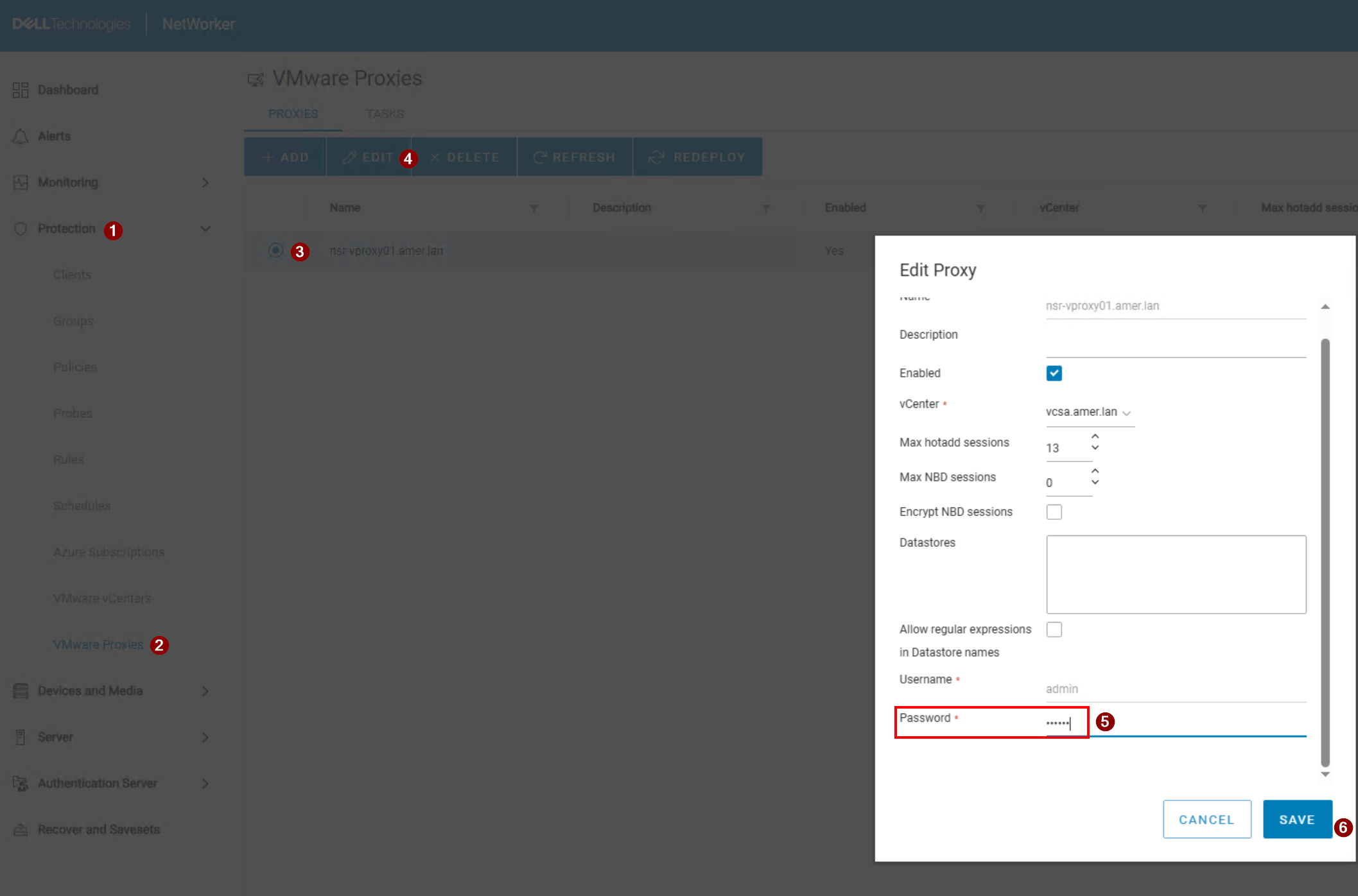
Figure 2: Screenshot of vProxy properties from the NetWorker Web User Interface (NWUI).
If the admin account is locked, log in with the root account from the vSphere web client and reset admin account with pam_tally2 to reset it:
pam_tally2 --user admin --reset
If the admin account continues to become locked, check to see where the login requests are coming from:
journalctl -u sshd | grep -w 'admin'
This command lists the IP addresses of systems which attempted (and failed) to login using the admin credentials:
Dec 06 09:23:36 nsr-vproxy02.amer.lan sshd[9407]: pam_unix(sshd:auth): authentication failure; logname= uid=0 euid=0 tty=ssh ruser= rhost=192.168.9.100  user=admin
Dec 06 09:23:38 nsr-vproxy02.amer.lan sshd[9407]: Failed password for admin from 192.168.9.100 port 54788 ssh2
Betroffene Produkte
NetWorkerProdukte
NetWorker Family, NetWorker SeriesArtikeleigenschaften
Artikelnummer: 000215827
Artikeltyp: Solution
Zuletzt geändert: 06 Nov. 2025
Version: 7
Antworten auf Ihre Fragen erhalten Sie von anderen Dell NutzerInnen
Support Services
Prüfen Sie, ob Ihr Gerät durch Support Services abgedeckt ist.