AppSync:無法使用 AppSync GUI 建立服務方案完成報告
Zusammenfassung: 無法使用 AppSync GUI 匯出服務方案完成報告。
Dieser Artikel gilt für
Dieser Artikel gilt nicht für
Dieser Artikel ist nicht an ein bestimmtes Produkt gebunden.
In diesem Artikel werden nicht alle Produktversionen aufgeführt.
Symptome
無法使用 AppSync 4.5 GUI 匯出服務方案完成報告。
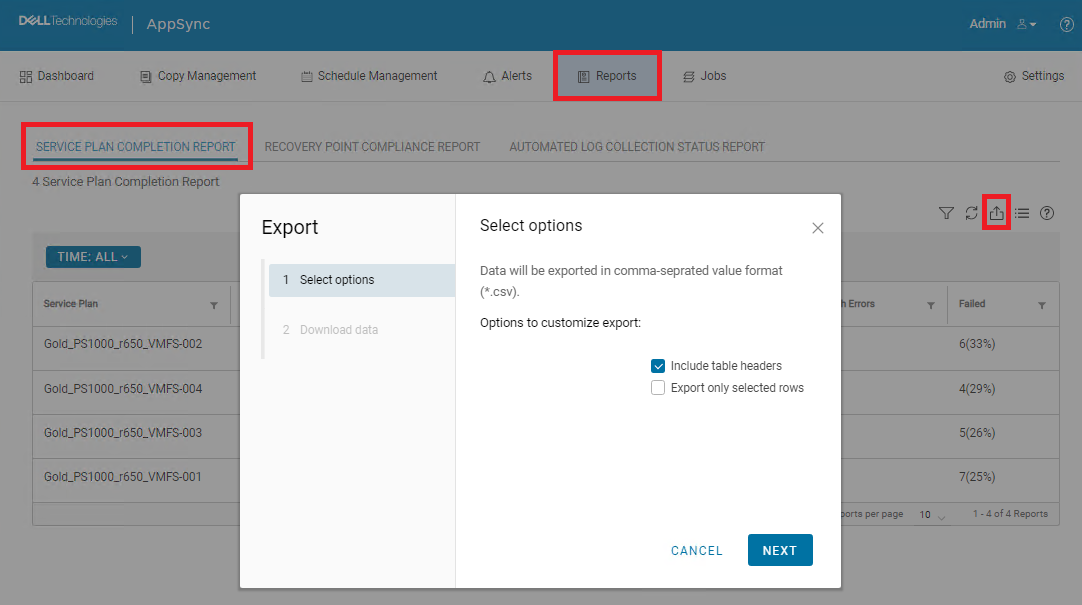
如果選取了「Include table headers」,且未選取「Export only selected rows」,則不會執行下載。實際上,沒有任何發生。
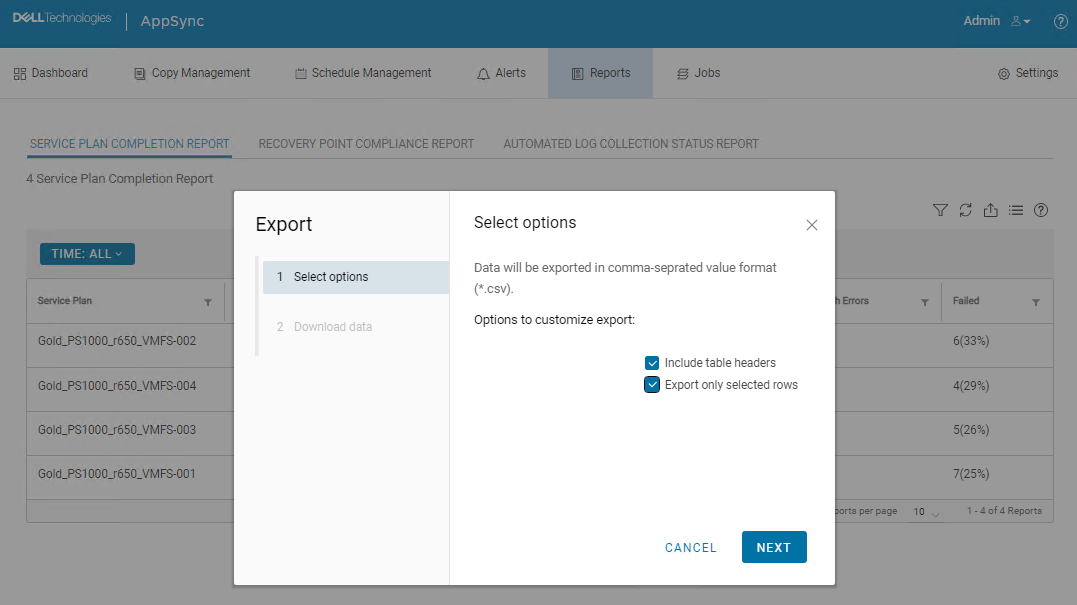
如果同時選取「Include table headers」和「Export only selected rows」,則開始下載並下載 CSV 檔案。然而,所有資料都遺失。

Ursache
這是 AppSync UI 錯誤。
Lösung
解決 方案:
下列 AppSync CLI 命令可用來匯出服務方案完成報告。
範例命令輸出:
Service_Plan_Completion_Report_2022_12_26_18_24_38.csv

永久修正:
此問題預計在 4.5 之後的版本中解決。
下列 AppSync CLI 命令可用來匯出服務方案完成報告。
appsync-cli.bat -report report_type=spc detailed=true
範例命令輸出:
C:\EMC\AppSync\appsync-cli>appsync-cli.bat -report report_type=spc detailed=true
Picked up JAVA_TOOL_OPTIONS: "-Dos.name=Windows Server 2019"

Exporting SPC Details to: "C:\EMC\AppSync\Service_Plan_Completion_Report_2022_12_26_18_24_38.csv"
Service_Plan_Completion_Report_2022_12_26_18_24_38.csv
永久修正:
此問題預計在 4.5 之後的版本中解決。
Weitere Informationen
請參閱 4.5 後版本的版本資訊,以判斷是否已包含修正程式。
Betroffene Produkte
AppSyncArtikeleigenschaften
Artikelnummer: 000206985
Artikeltyp: Solution
Zuletzt geändert: 16 Mai 2026
Version: 4
Antworten auf Ihre Fragen erhalten Sie von anderen Dell NutzerInnen
Support Services
Prüfen Sie, ob Ihr Gerät durch Support Services abgedeckt ist.