OptiPlex 3040 MFF Microphone Not Recognized
Summary: This article provides information about how to resolve an issue with the microphone not recognized on your Dell OptiPlex 3040 Micro Form Factor (MFF) system.
Αυτό το άρθρο ισχύει για
Αυτό το άρθρο δεν ισχύει για
Αυτό το άρθρο δεν συνδέεται με κάποιο συγκεκριμένο προϊόν.
Δεν προσδιορίζονται όλες οι εκδόσεις προϊόντων σε αυτό το άρθρο.
Symptoms
OptiPlex 3040 MFF systems may encounter an issue with the microphone not getting recognized when it is connected to the system.

Figure 1: Microphone settings
Cause
Generally this issue is related to an audio configuration issue in the audio software settings.
Resolution
-
Right-click the Dell audio speaker icon and select Sound Manager.

-
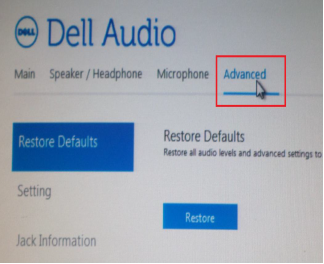
Click Advanced.
-
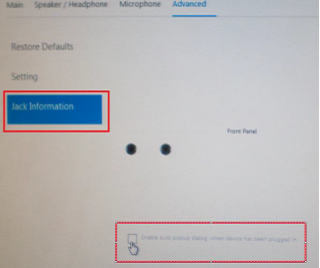
Click Jack Information and check the box next to Enable auto popup dialog when a device has been plugged on.
- Connect the microphone to the system.
- In the menu that appears, select Mic-In.
- Test the Microphone.
Επηρεαζόμενα προϊόντα
OptiPlex 3040 MicroΙδιότητες άρθρου
Article Number: 000149418
Article Type: Solution
Τελευταία τροποποίηση: 07 Οκτ 2024
Version: 7
Βρείτε απαντήσεις στις ερωτήσεις σας από άλλους χρήστες της Dell
Υπηρεσίες υποστήριξης
Ελέγξτε αν η συσκευή σας καλύπτεται από τις Υπηρεσίες υποστήριξης.