PowerProtect Data Manager: SQL backups fail with error "Unable to log in"
Summary: SQL backups fail with error "Unable to log in" due to invalid PowerProtect credential information.
Symptoms
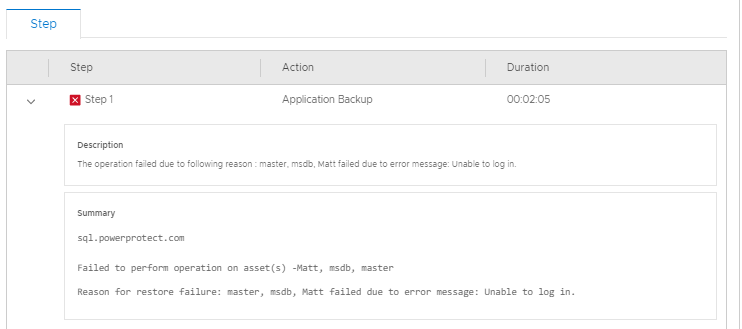
The PowerProtect Data Manager Jobs pane shows a critical error on the Protection tab. When analyzing the details of the error, Step 1 lists the following:
Description

The operation failed due to following reason : master, msdb, Matt failed due to error message: Unable to log in.

Summary

sql.powerprotect.com

Failed to perform operation on asset(s) -Matt, msdb, master
Reason for restore failure: master, msdb, Matt failed due to error message: Unable to log in.
The PowerProtect /var/log/brs/adm/adm.log shows:
Line 5851: 2021-01-21T03:08:07.960Z INFO [] [monitorActorSystem-akka.actor.default-dispatcher-13] [][][][][] [c.e.d.e.a.s.s.i.ActivityServiceImpl.completeTask(152)] - Completed task=acc66b7a-127d-4bc1-af65-130e063d1887, result=ActivityResource.Result[status=FAILED,summaries=[sql.powerprotect.com, , Failed to perform operation on asset(s) -master, Matt, msdb, Reason for restore failure: msdb, Matt, master failed due to error message: Unable to log in.
The host Agent Service logs under C:\Program Files\DPSAPPS\AgentService\logs shows:
[2021-01-21 17:53:59,717 GMT| 2021-01-21 09:53:59,717015 Pacific Standard Time| DBGAPPBACKUPASSETS| PID-6452| TID-8940| INFO] nsr/AppAgentService/AddOns/7FFEFD30_C062_4803_BFE7_8A52A9BC4442\AddOnJobManager.py-execute()-Line 323- Process stdout data: {"response":{"jobId":"2339871181","status":"FAILURE","applicationInstances":[{"applicationInstance":"MSSQLSERVER","status":"FAILURE","successfulSources":[],"failedSources":[],"backupCommand":"C:\\Program Files\\DPSAPPS\\MSAPPAGENT\\bin\\ddbmsqlsv.exe -c sql.powerprotect.com -l full -a NSR_DFA_SI_DD_HOST=10.240.194.24 -a NSR_DFA_SI_DEVICE_PATH=/PPDMsql-svcaccout-ppdm-2a284 -a NSR_DFA_SI_DD_USER=PPDMsql-svcaccout-ppdm-2a284 -a JOB_ID=2339871181 -a ENCRYPT_USING_DEFAULT_VALUES=FALSE -a BACKUP_PROMOTION=ALL -y +2d -I C:\\Program Files\\DPSAPPS\\MSAPPAGENT\\tmp\\Ddb80CF.tmp MSSQL:","output":""}]},"errors":[{"type":"systemErr","text":"Unable to log in.\n"}]}
Cause
PowerProtect Credentials creation contained an invalid username or password. PowerProtect Credentials creation does not run an authentication check, so the symptom is not experienced until an authentication occurs. Usernames can be listed in "domain\username" format or "username@domain.suffix" format. The domain suffix (.org, .com, .edu) MUST be specified when using username@domain format.
Examples of valid usernames:
administrator@my-domain.com
my-domain\administrator
Examples of invalid usernames:
administrator@my-domain
administrator
Resolution
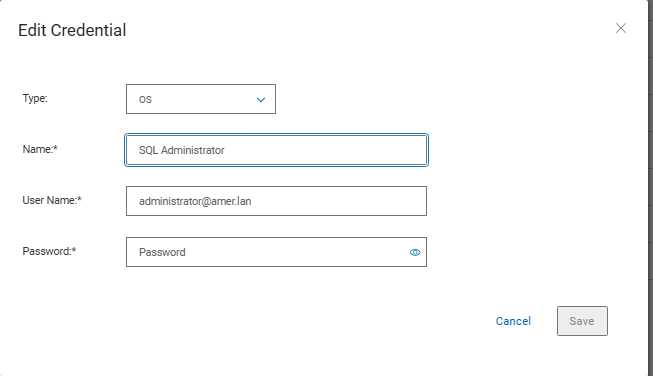
Update PowerProtect credentials to reflect the correct username format and contain the correct password.
- Within PowerProtect, click Administration > Credentials.
- Select the credential and click Edit.
- Enter the correct username and password.
- Click Save.