VxRail: Cannot Remove vSphere License Through vSphere Web Client
Summary: Customer cannot remove vSphere license through vSphere web client.
Αυτό το άρθρο ισχύει για
Αυτό το άρθρο δεν ισχύει για
Αυτό το άρθρο δεν συνδέεται με κάποιο συγκεκριμένο προϊόν.
Δεν προσδιορίζονται όλες οι εκδόσεις προϊόντων σε αυτό το άρθρο.
Symptoms
Customer cannot remove vSphere license through vSphere web client.
When you try to remove the license, an error may appear "storage error."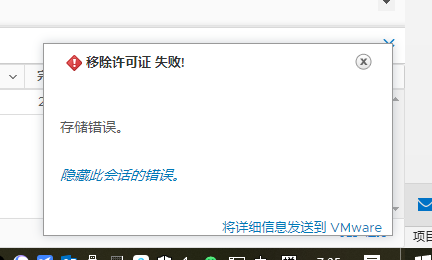
Cause
If the PSC or vCenter had an unexpected reboot, then you may see the PSC or vCenter needing a "fsck" check (File system check).
Resolution
For this situation, check these two things.
-
Confirm if the PSC can be rebooted to verify if there is any OS partition issue. See Broadcom KB https://knowledge.broadcom.com/external/article?legacyId=2147154
-
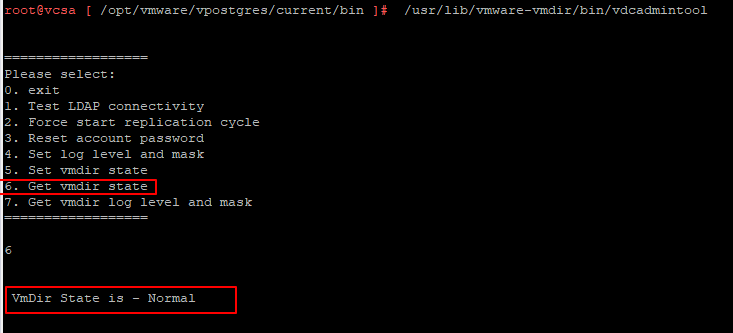
Log in to the PSC node and run the command below to check the vmdir state:
/usr/lib/vmware-vmdir/bin/vdcadmintool
-
If the vmdir state output is read-only, use the command below to change the vmdir state and check again:
"/usr/lib/vmware-vmafd/bin/dir-cli state set --state NORMAL --login administrator --password <password>"

Επηρεαζόμενα προϊόντα
VxRail, VxRail Appliance SeriesΙδιότητες άρθρου
Article Number: 000185499
Article Type: Solution
Τελευταία τροποποίηση: 13 Ιαν 2026
Version: 3
Βρείτε απαντήσεις στις ερωτήσεις σας από άλλους χρήστες της Dell
Υπηρεσίες υποστήριξης
Ελέγξτε αν η συσκευή σας καλύπτεται από τις Υπηρεσίες υποστήριξης.