PPDM: The database cannot be backed up, SQL Server FILESTREAM support is not enabled
Summary: Resolving PowerProtect Data Manager database backup failure with FILESTREAM functionality: Set FilestreamEffectiveLevel to 3, enable FILESTREAM for Transact-SQL access, and restart SQL Server service. ...
Αυτό το άρθρο ισχύει για
Αυτό το άρθρο δεν ισχύει για
Αυτό το άρθρο δεν συνδέεται με κάποιο συγκεκριμένο προϊόν.
Δεν προσδιορίζονται όλες οι εκδόσεις προϊόντων σε αυτό το άρθρο.
Symptoms
PowerProtect Data Manager Application Direct Protection policy completion with exceptions, SQL AlwaysOn Availability Group (AAG) database backup is skipped.
Protection policy logs show:
Protection policy logs show:
{"response":{"jobId":"Job_ID","status":"FAILURE","applicationInstances":[{"applicationInstance":"Instance_Name","status":"FAILURE","successfulSources":[],"failedSources":[],"skippedSources":[{"type":"database","name":"DB_Name","taskId":"task_Id","errorMessage":"The database cannot be backed up. Check the logs for more details.","status":"SKIPPED","errorCode":"","vendorSpecificErrorMessage":""}]Enabling Troubleshooting:
ddbmsqlsvdebug log shows:
SQL Server FILESTREAM support is not enabled for this instance. Database '<DB name>' is using FILESTREAM functionality and cannot be backed up.Backup of FILESTREAM enabled database fails, backup of other databases that do not have FILESTEAM enabled are successful.
Cause
The FILESTREAM must be configured on the instance level.
Run the following queries to confirm the status:
SELECT convert(int, SERVERPROPERTY ('FilestreamEffectiveLevel'))
The output of the
SELECT command returns FilestreamEffectiveLevel equal to 1 in customer setup.
For full access to file stream data,
FilestreamEffectiveLevel must be 3 (3 means that T-SQL access, local and remote streaming access is allowed.)
SELECT COUNT * FROM master.sys.master_files AS mf WHERE mf.database_id = DB_ID(N'DBNAME') and mf.type = '2'
The output of the
SELECT command returns 1 in customer setup, which means it is FILESTREAM data.
FilestreamEffectiveLevel of SQL server should be 3 to run the backup of this database, but it is set to 1. That is the reason backups are failing for this database.
Note: You can find these
SELECT commands in the ddbmsqlsv.debug log.
Resolution
Enable FILESTREAM.
-
On the Start menu, go to All Programs > SQL Server > Configuration Tools, and then select SQL Server Configuration Manager.
Note: On newer versions of Windows, follow these instructions from Microsoft to open SQL Server Configuration Manager.
- In the list of services, right-click SQL Server Services, and then select Open.
- In the SQL Server Configuration Manager snap-in, locate the instance of SQL Server on which you want to enable FILESTREAM.
- Right-click the instance, and then select Properties.
- In the SQL Server Properties dialog box, select the FILESTREAM tab.
- Select the Enable FILESTREAM for Transact-SQL access check box.
- If you want to read and write FILESTREAM data from Windows, select Enable FILESTREAM for file I/O streaming access. Enter the name of the Windows share in the Windows Share Name box.
- If remote clients must access the FILESTREAM data that is stored on this share, select Allow remote clients to have streaming access to FILESTREAM data.
- Select Apply.
Note: Restart the SQL Server service.
See the Microsoft article Enable and configure FILESTREAM 
Additional Information
See the Microsoft article Enable and configure FILESTREAM for more information.
Details of
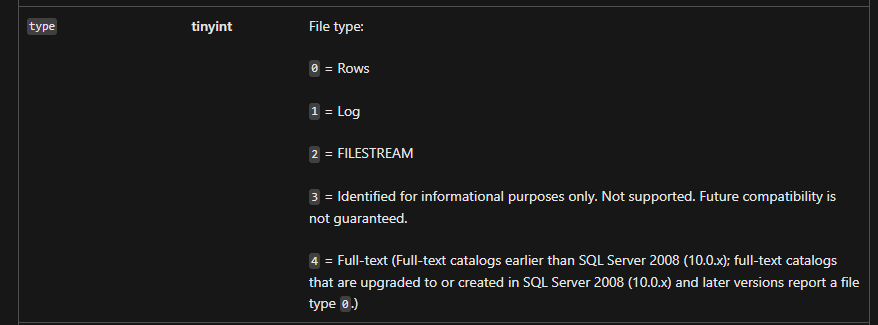
Figure 1: Details of
for more information.
Details of
master.sys.master_files:
Figure 1: Details of
master.sys.master_files
Επηρεαζόμενα προϊόντα
PowerProtect Data Manager, Microsoft App AgentΙδιότητες άρθρου
Article Number: 000227736
Article Type: Solution
Τελευταία τροποποίηση: 22 Ιαν 2026
Version: 4
Βρείτε απαντήσεις στις ερωτήσεις σας από άλλους χρήστες της Dell
Υπηρεσίες υποστήριξης
Ελέγξτε αν η συσκευή σας καλύπτεται από τις Υπηρεσίες υποστήριξης.