Avamar: Backup Fails with No Data Status - Unable to Determine Plugin Version
Summary: Backup fails with "No Data" status - Avagent reports "Unable to determine plug-in version."
This article applies to
This article does not apply to
This article is not tied to any specific product.
Not all product versions are identified in this article.
Symptoms
A scheduled backup or a backup initiated from the Policy window fails immediately with a status of "No Data."
- Hovering over the status reveals that the "Activity Failed - client has no data specified by dataset"
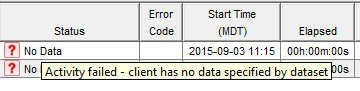
- On the "Activity Report" tab, it shows as:


- Status_code "30915" and status_code_summary "Activity failed - client has no data specified by dataset
- In the "Activities - Failed" report, it is shown as:
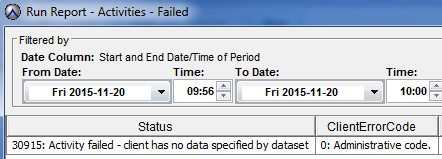
- Status "30915: Activity failed - client has no data specified by dataset"
Cause
Several things can cause this error.
- For errors not listed below, see the Resolution Path for additional causes and solutions.
- If this is an AVE or single node Locked to only point backup to Data Domain, this is expected.
- Avamar-DataDomain Integration: How to lock all Avamar and Avamar virtual edition backups to Data Domain backend in single node.
- Notice in the Server column that it should say DD-server-name

- Verify client accessibility using the Backup tab in the Backup, Restore, and Manage window.
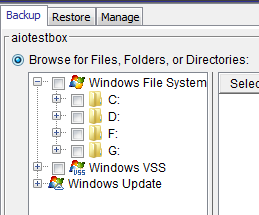
- If the plugins are visible and browsable, then see the Resolution Path.
- If the plugins are not visible and a window appears stating "The configuration of this client does not support browsing" or "No plug-ins found for client xxxxx." Then the avagent.log on the client machine must be examined.
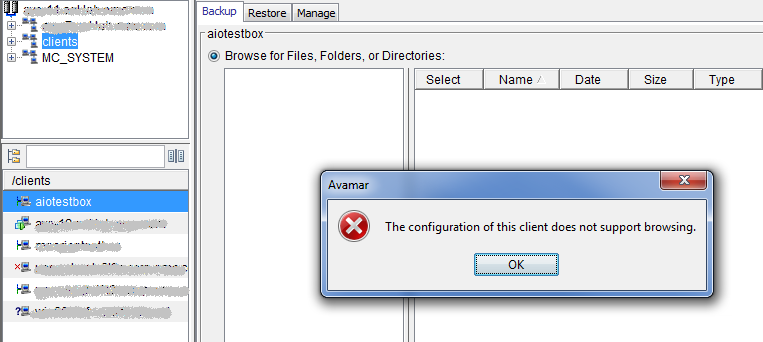
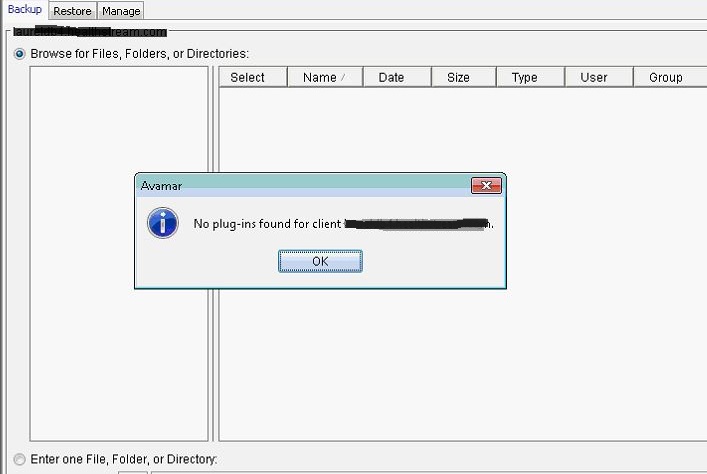
- The avagent.log is located in C:\Program Files\avs\var by default.
- Either the Management Console Server (MCS) on the Avamar Grid or the client machine itself is disabling the plugins.
- If the MCS disables the plugins, see the Resolution Path for the appropriate resolution.
- If the client machine itself disables the plugins, the log records errors such as the following.
- Notice in the Server column that it should say DD-server-name
- Avamar-DataDomain Integration: How to lock all Avamar and Avamar virtual edition backups to Data Domain backend in single node.
avagent Error <5451>: Failed to get plugin 'Windows' version with code 0xc0000142: No error description string
avagent Error <5924>: Unable to determine plugin version for Windows pin file C:\Program Files\avs\bin\windows.pin
avagent Error <5937>: Plugin Windows disabled- OR
avagent Error <5451>: Failed to get plugin 'Windows' version with code 128: There are no child processes to wait for
avagent Error <5924>: Unable to determine plugin version for Windows pin file C:\Program Files\avs\bin\windows.pin
avagent Error <5937>: Plugin Windows disabled - OR
avagent Error <5451>: Failed to get plugin 'Windows' version with code 255: The extended attributes are inconsistent
avagent Error <5924>: Unable to determine plugin version for Windows pin file C:\Program Files\avs\bin\windows.pin
avagent Error <5937>: Plugin Windows disabled
These errors repeat for all plug-ins that are installed on the machine that is 'Windows VSS', update, SQL, so forth.
The log reports (depending on the version of the installed Avamar client):
avagent Warning <7145>: No pin files found
- OR
avagent Warning <7184>: No pin files foundIn the Windows Event Viewer, open the System Log and look for Event ID 243 such as the following:
Log Name:      System
Source:        Win32k
Date:          4/24/2014 10:54:54 AM
Event ID:      243
Task Category: None
Level:         Warning
Keywords:      Classic
User:          N/A
Computer:      Workstation.emc.com
Description:
A desktop heap allocation failed.
Desktop Heap is a shared memory storage space for all applications that use the Local System Account. If "desktop heap allocation" failure messages are seen in the System log in the Event Viewer, then it might be due to a memory leak. An application on the client may be using all the memory allocated to the Desktop Heap, even if RAM utilization is low, causing this issue.
When this occurs, backups continue to fail with the same error until a reboot is performed. After the reboot, the backups will work again for a few days and then start failing again. Another reboot fixes the issue for another few days.
Note: If the plugins fail to register during initial client activation, antivirus software can also cause this issue.
Some antivirus software such as Symantec may be configured with highly secure and or strict scan settings, which is preventing avtar and database plug-ins from being registered.
Even excluding the avtar.exe and avagent.exe processes in the antivirus software during the Avamar client installation and registration may not work.
Resolution
If this is an AVE or single node Locked to only point backup to Data Domain, Adjust Dataset to direct backup to proper Data Domain.
If the plug-ins are not registering due to antivirus: Disable the antivirus software temporarily and kill any existing antivirus processes that are running. Then reinstall the Avamar client MSI package as normal.
If the plug-ins are disabled due to Desktop Heap allocation failures, the options are as follows:
- Disable or remove any applications/programs that might be experiencing memory leaks. Collaborate with Microsoft support in order to find the offending programs. Alternatively, rebooting the machine on a scheduled basis flushes the desktop heap temporarily.
- Increase the max heap values in the registry and reboot the Windows client for the changes to take effect. Use the following URL for procedures and recommended values:
- Preferred Long-Term Fix if the offending application cannot be identified or while the application is being identified.
- Change the Avamar "Backup Agent" service from the default NT Authority\SYSTEM account to a domain user account with sufficient permissions on the Windows client and restart the service for the changes to take effect. While the Backup Agent service runs as the SYSTEM account by default, you can use any NT domain account that has at least R/W access on the Windows client. This works because the Avamar service will no longer use the same heap as the other programs that are logged in as System (including the program that has the memory leak.)
- The URL below provides some more details on this and other workarounds:

Affected Products
Avamar Client, Avamar Plug-inArticle Properties
Article Number: 000159530
Article Type: Solution
Last Modified: 19 Nov 2025
Version: 7
Find answers to your questions from other Dell users
Support Services
Check if your device is covered by Support Services.