SourceOne File Archiving: Error in the console under the Activity Summary when a File Archiving activity is created
Summary: A user could not list the File Archive details under Organizational Policies. It gives an error in the console stating, "EMC SourceOne failed to load one or more components required to display summary data for the activity type." ...
This article applies to
This article does not apply to
This article is not tied to any specific product.
Not all product versions are identified in this article.
Symptoms
An error is reported in the SourceOne console, under the Activity Summary, when creating a File Archiving Activity.
EMC SourceOne failed to load one or more components required to display summary data for the activity type
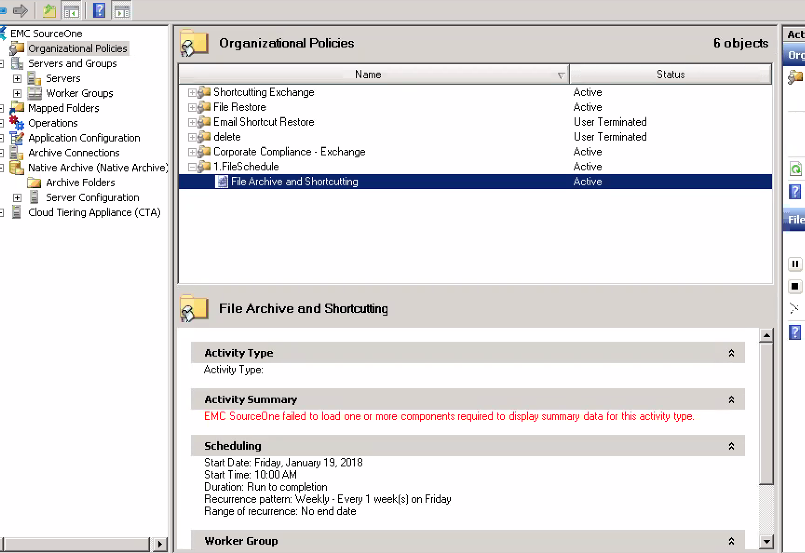
Check the ExMMCAdmin.dll.log on the SourceOne Master server in the '<SourceOne Installation Directory>\Logs' folder. The File archives DLL, and it cannot be found.
For Example:
Attempting to load plugin for taskType.id <-1788567307> by name
<..\..\SOFile\SOFileUI.dll>, mgr type <EMC.EX.SOFileUI.FileArchiveUIMgr>...

Plugin did not return a name for taskType.id <-1788567307> - using default <>...
Cause
The "EMC SourceOne Business Component Extensions for File Archiving" component is not correctly installed on SourceOne worker machines.
Resolution
Install "EMC SourceOne Business Component Extensions for File Archiving" module on SourceOne worker machines using the ES1_FileArchiveBCESetup.exe installation kit.
Article Properties
Article Number: 000168797
Article Type: Solution
Last Modified: 25 June 2025
Version: 5
Find answers to your questions from other Dell users
Support Services
Check if your device is covered by Support Services.