PowerStore:無法下載部分資料收集
Summary: 無法下載部分資料收集。
This article applies to
This article does not apply to
This article is not tied to any specific product.
Not all product versions are identified in this article.
Symptoms
當其中一個應用裝置的資料收集失敗時,部分資料收集可能會在多重應用裝置設定中發生。
發生這種情況時,資料收集的狀態為「PARTIAL」,而在 PowerStore Manager UI 中,選擇此 DC 進行下載時,會顯示以下螢幕擷取畫面中顯示「支援資料無法下載」的訊息。
例子:
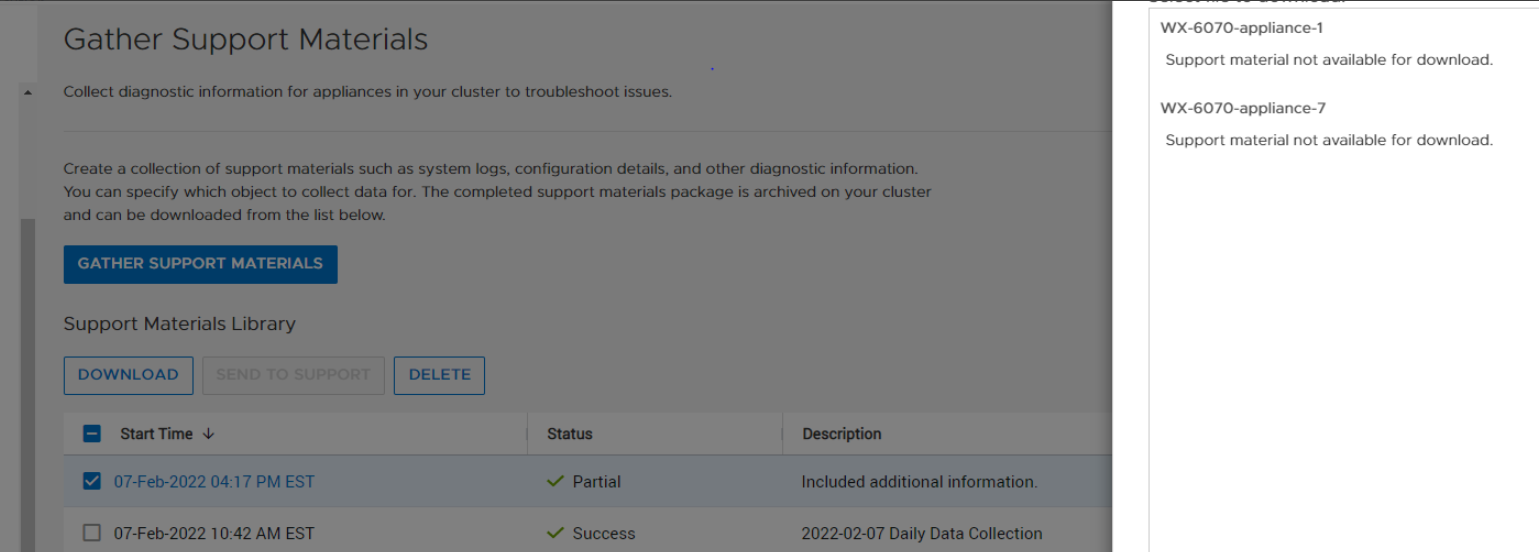
發生這種情況時,資料收集的狀態為「PARTIAL」,而在 PowerStore Manager UI 中,選擇此 DC 進行下載時,會顯示以下螢幕擷取畫面中顯示「支援資料無法下載」的訊息。
例子:
Cause
根本原因為不支援使用「部分」的「dc_status」進行資料收集。
Resolution
若要下載 PARTIAL 資料收集套裝,請從 Service docker 中的命令列使用「scp」。
在具有 PARTIAL 資料收集的裝置的 Service docker 上,執行下列步驟:
- 如下圖所示,執行「svc_dc清單」,並識別要下載的資料收集。
[SVC:service@ABCDEF-B ~]$ svc_dc list |
- 擷取根。
- 移至/cyc_var/cyc_service/data_collection/和「scp」,將資料收集到目標位置,如下所示:
root@ABCDEF-A:/home/service/user>cd /cyc_var/cyc_service/data_collection |
解析度
此問題已在 PowerStore 3.0 及更新版本中修正,其中可下載 PowerStore Manager UI 的部分 DC。
Affected Products
PowerStoreArticle Properties
Article Number: 000213481
Article Type: Solution
Last Modified: 13 Jun 2025
Version: 4
Find answers to your questions from other Dell users
Support Services
Check if your device is covered by Support Services.