PowerVault ME5: Nessuna opzione di preferenza dell'unità di base disponibile durante la creazione di un utente tramite PowerVault Manager.
Summary: Non è possibile modificare la preferenza dell'unità di base durante la creazione di un utente tramite PowerVault Manager sugli array della serie ME5. La generazione precedente di PowerVault Manager sulla serie ME4 presentava questa opzione. Utilizzare l'interfaccia della riga di comando di PowerVault per modificare questo valore. ...
Symptoms
In PowerVault ME5, la creazione di un utente in PowerVault Manager non presenta l'opzione "preferenze di base".
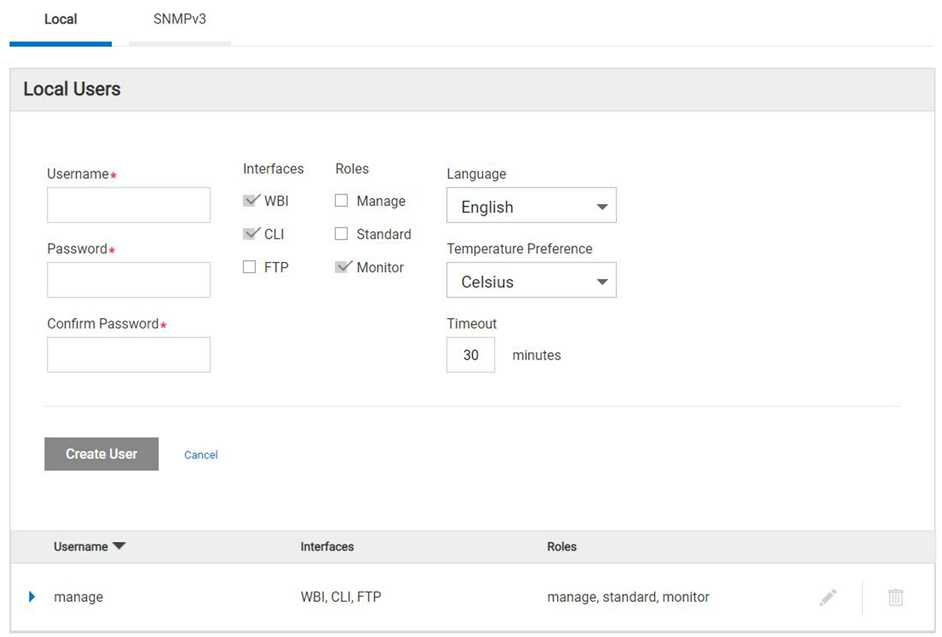
Figura 1. Finestra di dialogo di creazione utente di PowerVault Manager.
Cause
I tecnici Dell hanno identificato che questa funzione non fa parte dell'interfaccia web-based di PowerVault Manager (WBI) nella famiglia di prodotti ME5 e che le preferenze di base di controllo possono essere impostate solo tramite CLI. Si tratta del funzionamento previsto per progettazione.
Resolution
-
Utilizzando l'interfaccia a riga di comando (CLI), è possibile impostare il valore di preferenza di base durante la creazione di un nuovo utente.
Di seguito è riportato un esempio che mostra come creare un utente con preferenze base 2:
# create user base 2 interfaces wbi roles monitor Michael
Enter new password: ********
Re-enter new password: ********
Success: Command completed successfully. (Michael) - The new user was created. (2022-04-05 13:16:17)

# show users
Username             Roles                    User Type    User Locale            WBI   CLI   FTP   SNMP  Authentication Type Privacy Type
  Password                         Privacy Password                 Trap Host Address Trap Host Port
-------------------------------------------------------------------------------------------------------------------------------------------
John                 monitor                  Standard     English                x
  ********                         ********
Michael              monitor                  Standard     English                x
  ********                         ********
manage               manage, standard, monitor  Standard     English                x     x     x
  ********                         ********
-------------------------------------------------------------------------------------------------------------------------------------------
Success: Command completed successfully. (2022-04-05 13:16:29)
-
Per verificare qual è la preferenza di base creata durante la creazione dell'utente tramite CLI.
Di seguito sono riportati i comandi di riferimento CLI:
# set CLI json
{
"status":[
  {
    "object-name":"status",
    "meta":"/meta/status",
    "response-type":"Success",
    "response-type-numeric":0,
    "response":"Command completed successfully. (2022-04-05 13:16:36)",
    "return-code":0,
    "component-id":"",
    "time-stamp":"2022-04-05 13:16:36",
    "time-stamp-numeric":1649164596
  }
]
}


# show users Michael
{
"users":[
  {
    "object-name":"user",
    "meta":"/meta/users",
    "username":"Michael",
    "roles":"monitor",
    "user-type":"Standard",
    "user-type-numeric":2,
    "user-locale":"English",
    "user-locale-numeric":0,
    "interface-access-WBI":"x",
    "interface-access-CLI":"",
    "interface-access-FTP":"",
    "interface-access-SMIS":"",
    "interface-access-SNMP":"",
    "storage-size-base":2,
    "storage-size-precision":1,
    "storage-size-units":"Auto",
    "temperature-scale":"Celsius",
    "timeout":1800,
    "authentication-type":"",
    "privacy-type":"",
    "password":"********",
    "default-password-changed":"True",
    "default-password-changed-numeric":1,
    "privacy-password":"********",
    "trap-destination":"",
    "trap-port":""
  }
],
"status":[
  {
    "object-name":"status",
    "meta":"/meta/status",
    "response-type":"Success",
    "response-type-numeric":0,
    "response":"Command completed successfully. (2022-04-05 13:16:44)",
    "return-code":0,
    "component-id":"",
    "time-stamp":"2022-04-05 13:16:44",
    "time-stamp-numeric":1649164604
  }

]
}

# set cli console
Success: Command completed successfully. (2022-04-05 13:19:50)