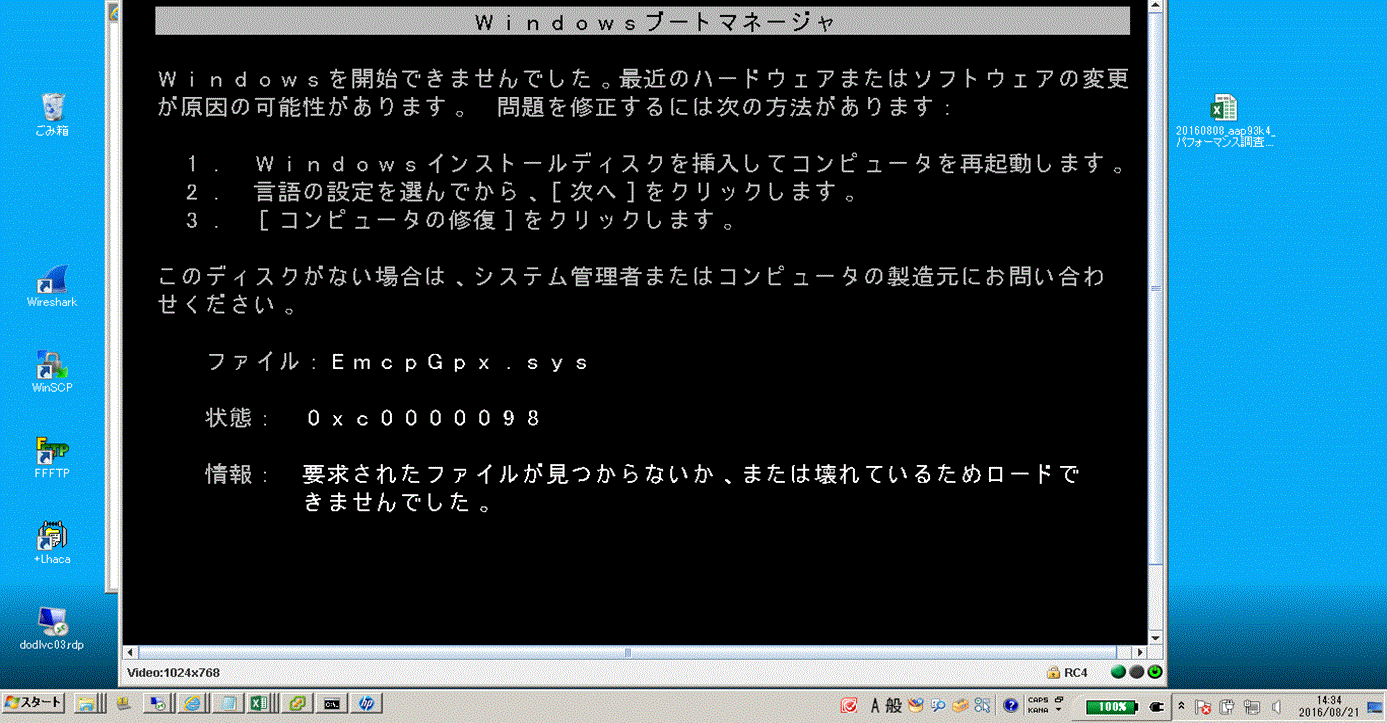
PowerPath : Un hôte Windows ne démarre pas avec l’erreur « EmcpGpx.sys at 0xc0000098 after upgrading PowerPath 5.5 to 6.0 »
Summary: Impossible de démarrer un hôte après la mise à niveau vers PowerPath 6.0.
This article applies to
This article does not apply to
This article is not tied to any specific product.
Not all product versions are identified in this article.
Symptoms
Impossible de démarrer un hôte après la mise à niveau vers PowerPath 6.0.
Le mode sans échec ne fonctionne pas non plus.
Cause
Procmon, l’explorateur de processus et handle.exe sont nécessaires pour dire exactement ce qui retient EmcpMpx.sys et EmcpBase.sys.
=== HOST\XXXXXXXX_SETUPAPI.DEV.LOG ===
     sig:                Using catalog 'C:\Windows\system32\CatRoot\{F750E6C3-38EE-11D1-85E5-00C04FC295EE}\oem34.CAT'.
     cpy:                Source File 'C:\Windows\system32\DRIVERS\SET9996.tmp' is NOT signed NT5 Crypto.
     cpy:                DrpGetFileProt Status=0 dwClass=5
     cpy:                MoveFile: 'C:\Windows\system32\DRIVERS\SET9996.tmp'
     cpy:                      to: 'C:\Windows\system32\DRIVERS\EmcpMpx.sys'
!!!  cpy:                MoveFile: FAILED!
!!!  cpy:                Error 5: Access is denied.
     cpy:                DrpSetRegFileProt 'C:\Windows\system32\DRIVERS\EmcpMpx.sys' Status=0 Class=OEM Legacy
!    cpy:                Targetfile 'C:\Windows\system32\DRIVERS\EmcpMpx.sys' marked to be moved from 'C:\Windows\system32\DRIVERS\SET9996.tmp' on next reboot.

     sig:                Using catalog 'C:\Windows\system32\CatRoot\{F750E6C3-38EE-11D1-85E5-00C04FC295EE}\oem32.CAT'.
     cpy:                Source File 'C:\Windows\system32\DRIVERS\SET8165.tmp' is NOT signed NT5 Crypto.
     cpy:                DrpGetFileProt Status=0 dwClass=5
     cpy:                MoveFile: 'C:\Windows\system32\DRIVERS\SET8165.tmp'
     cpy:                      to: 'C:\Windows\system32\DRIVERS\EmcpBase.sys'
!!!  cpy:                MoveFile: FAILED!
!!!  cpy:                Error 5: Access is denied.
     cpy:                DrpSetRegFileProt 'C:\Windows\system32\DRIVERS\EmcpBase.sys' Status=0 Class=OEM Legacy
!    cpy:                Targetfile 'C:\Windows\system32\DRIVERS\EmcpBase.sys' marked to be moved from 'C:\Windows\system32\DRIVERS\SET8165.tmp' on next reboot.
Resolution
Le mode sans échec ne fonctionne pas, mais la dernière configuration correcte connue peut fonctionner. Si c’est le cas, démarrez dans LKGC, puis redémarrez l’hôte. Le problème disparaît.
Additional Information
La raison pour laquelle le système d’exploitation n’a pas pu démarrer est un échec de la mise à jour d’EmcpBase et EmcpMpx. Au démarrage, le système d’exploitation utilise toujours les anciennes versions de EmcpBase et EmcpMpx. Lorsqu’il utilise ces fichiers sys et lorsqu’il atteint EmcpGpx, parce qu’il s’agit d’une version différente (plus récente), il ne parvient pas à croire qu’il est corrompu ou manquant car il recherche l’ancienne version.
Affected Products
PowerPath for WindowsProducts
PowerPath for WindowsArticle Properties
Article Number: 000171330
Article Type: Solution
Last Modified: 19 Feb 2024
Version: 3
Find answers to your questions from other Dell users
Support Services
Check if your device is covered by Support Services.