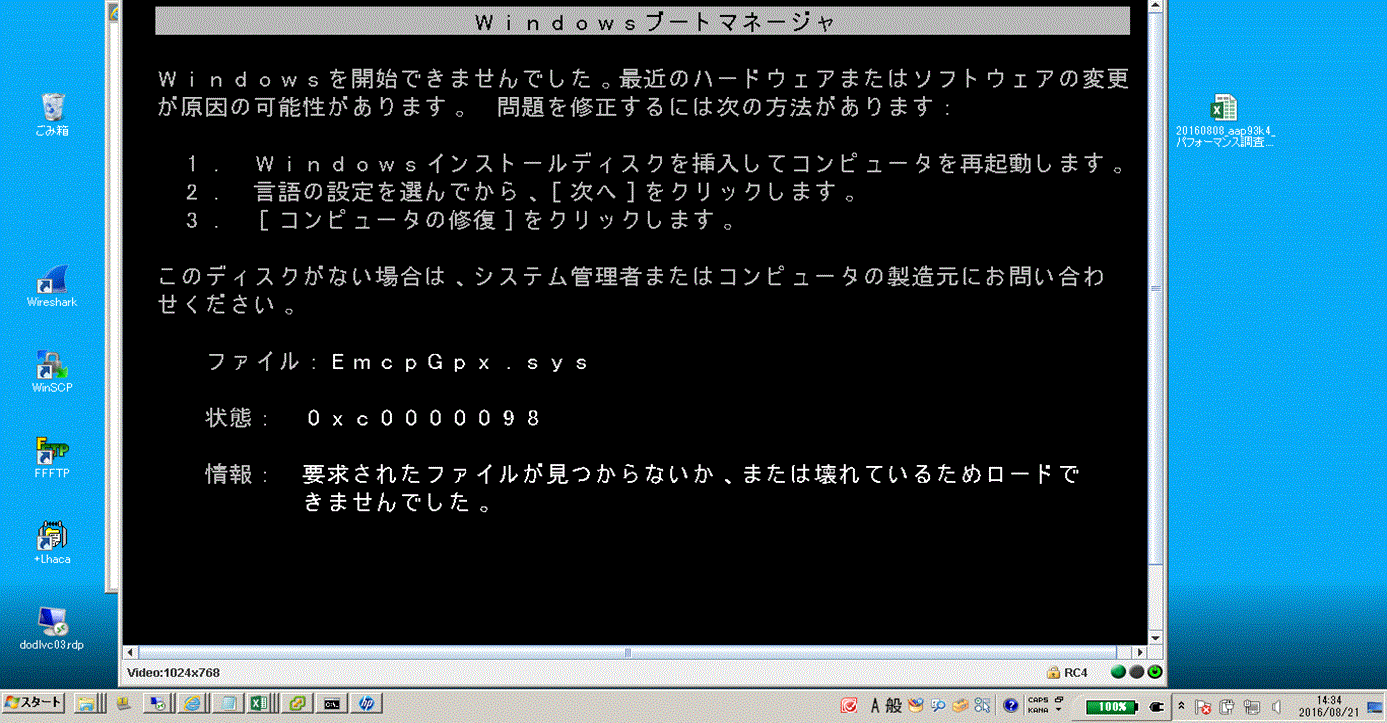
PowerPath: A Windows host does not boot with the error "EmcpGpx.sys at 0xc0000098 after upgrading PowerPath 5.5 to 6.0"
Summary: Unable to boot a host after upgrading to PowerPath 6.0.
This article applies to
This article does not apply to
This article is not tied to any specific product.
Not all product versions are identified in this article.
Symptoms
Unable to boot a host after upgrading to PowerPath 6.0.
Safe Mode does not work either.
Cause
Procmon, process explorer, and handle.exe are necessary to tell exactly what is holding EmcpMpx.sys and EmcpBase.sys.
=== HOST\XXXXXXXX_SETUPAPI.DEV.LOG ===
     sig:                Using catalog 'C:\Windows\system32\CatRoot\{F750E6C3-38EE-11D1-85E5-00C04FC295EE}\oem34.CAT'.
     cpy:                Source File 'C:\Windows\system32\DRIVERS\SET9996.tmp' is NOT signed NT5 Crypto.
     cpy:                DrpGetFileProt Status=0 dwClass=5
     cpy:                MoveFile: 'C:\Windows\system32\DRIVERS\SET9996.tmp'
     cpy:                      to: 'C:\Windows\system32\DRIVERS\EmcpMpx.sys'
!!!  cpy:                MoveFile: FAILED!
!!!  cpy:                Error 5: Access is denied.
     cpy:                DrpSetRegFileProt 'C:\Windows\system32\DRIVERS\EmcpMpx.sys' Status=0 Class=OEM Legacy
!    cpy:                Targetfile 'C:\Windows\system32\DRIVERS\EmcpMpx.sys' marked to be moved from 'C:\Windows\system32\DRIVERS\SET9996.tmp' on next reboot.

     sig:                Using catalog 'C:\Windows\system32\CatRoot\{F750E6C3-38EE-11D1-85E5-00C04FC295EE}\oem32.CAT'.
     cpy:                Source File 'C:\Windows\system32\DRIVERS\SET8165.tmp' is NOT signed NT5 Crypto.
     cpy:                DrpGetFileProt Status=0 dwClass=5
     cpy:                MoveFile: 'C:\Windows\system32\DRIVERS\SET8165.tmp'
     cpy:                      to: 'C:\Windows\system32\DRIVERS\EmcpBase.sys'
!!!  cpy:                MoveFile: FAILED!
!!!  cpy:                Error 5: Access is denied.
     cpy:                DrpSetRegFileProt 'C:\Windows\system32\DRIVERS\EmcpBase.sys' Status=0 Class=OEM Legacy
!    cpy:                Targetfile 'C:\Windows\system32\DRIVERS\EmcpBase.sys' marked to be moved from 'C:\Windows\system32\DRIVERS\SET8165.tmp' on next reboot.
Resolution
Safe Mode does not work, but Last Known Good Configuration may work. If that is the case, boot in LKGC, and then reboot a host again. The issue goes away.
Additional Information
The reason why the operating system was unable to boot up was because of a failure to update EmcpBase and EmcpMpx. On boot, the operating system is still using the older versions of EmcpBase and EmcpMpx. When it uses those sys files and when it reaches EmcpGpx, because it is a different version (newer) it fails believing that is corrupt or missing since it is looking for the older version.
Affected Products
PowerPath for WindowsProducts
PowerPath for WindowsArticle Properties
Article Number: 000171330
Article Type: Solution
Last Modified: 19 Feb 2024
Version: 3
Find answers to your questions from other Dell users
Support Services
Check if your device is covered by Support Services.