Dell EMC Unity: Creating Replication Connection fails with time skew, local interconnects validate has failed, Error 0x6500128
Summary: Dell EMC Unity: Creating Replication Connection fails with time skew, local interconnects validate has failed, Error 0x6500128 (User Correctable)
This article applies to
This article does not apply to
This article is not tied to any specific product.
Not all product versions are identified in this article.
Symptoms
Scenario 1: When trying to create/verify a Replication Connection, and the Connection Mode is "Both", it does not complete.
Scenario 2: A replication connection between two Unity systems with connection mode as "Both" was created but cannot be verified. Its 'health status' is degraded with no 'remote interface'.
Cause
Scenario 1: In this particular example, the Replication Connection is not completing because there are no existing Asynchronous IP Interfaces. When Connection Mode "Both" is selected, there must exist Synchronous IP Interfaces (Sync Replication Management Port) and Asynchronous IP Interfaces (Ethernet Port x) on the Source and Target Unity systems.
Scenario 2: There are no fibre channel (FC) ports configured on these Unity systems.
Scenario 2: There are no fibre channel (FC) ports configured on these Unity systems.
Resolution
Resolution:
Scenario 1: Under Unisphere > Data Protection > Replication > Interfaces, create an Ethernet Port x replication interface pair for the local SPA and SPB, and repeat on the target system. Once the interfaces are created, retry the create Replication Connection task.
Optionally, select only Synchronous for the 'Connection Mode' when creating the Synchronous Replication Connection.
Scenario 2: Synchronous replication needs fibre connectivity between source and destination Unity systems, hence only asynchronous 'connection mode' can be setup and not both (synchronous and asynchronous). Otherwise, configure FC ports on both SPA and SPB for each Unity system.
Scenario 1: Under Unisphere > Data Protection > Replication > Interfaces, create an Ethernet Port x replication interface pair for the local SPA and SPB, and repeat on the target system. Once the interfaces are created, retry the create Replication Connection task.
Optionally, select only Synchronous for the 'Connection Mode' when creating the Synchronous Replication Connection.
Scenario 2: Synchronous replication needs fibre connectivity between source and destination Unity systems, hence only asynchronous 'connection mode' can be setup and not both (synchronous and asynchronous). Otherwise, configure FC ports on both SPA and SPB for each Unity system.
Additional Information
Scenario 1: When trying to create/verify a Replication Connection, and the Connection Mode is "Both", it does not complete with the following:
Subsequently, if 'Verify and Update' is run, it does not complete with:
Error message:
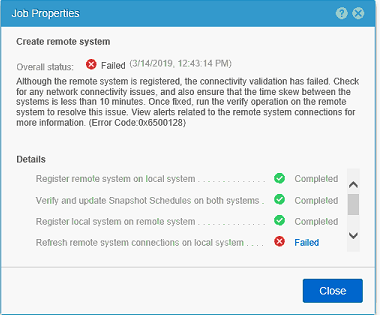
Failed: The remote system is registered but local interconnects validate has failed. The time skew between the local and remote systems may be more than 10 minutes. Fix the time skew and run verify operation on the remote system to resolve the issue. For more information, view alerts related to the remote system connections. (Error Code:0x6500128)
Rollback Result: Task was rolled back and marked as failed. This is because some tasks failed or SP rebooted during task execution. (Error Code:0x100a)
Rollback Result: Task was rolled back and marked as failed. This is because some tasks failed or SP rebooted during task execution. (Error Code:0x100a)
Subsequently, if 'Verify and Update' is run, it does not complete with:
Failed: For a replication connection that supports both synchronous and asynchronous replication sessions, ensure that you have at least one interface each configured on the management and data ports of each SP. (Error Code:0x650016d)
Scenario 2: A replication connection between two Unity systems with connection mode as "Both" was created but cannot be verified. It's 'Health status' is degraded with no 'Remote Interface'.
Replication Connection:

Replication Connection:
Error message:
- CLI command to list FC ports on Unity:
- To find sync replication ports on Unity array, refer KB article 000490250 https://support.emc.com/kb/490250
Affected Products
Dell EMC Unity Family |Dell EMC Unity All FlashProducts
Dell EMC Unity 300F, Dell EMC Unity 400, Dell EMC Unity 400F, Dell EMC Unity 500, Dell EMC Unity 500F, Dell EMC Unity 600, Dell EMC Unity 600F, Dell EMC Unity Family |Dell EMC Unity All Flash, Dell EMC Unity HybridArticle Properties
Article Number: 000059727
Article Type: Solution
Last Modified: 20 Oct 2025
Version: 4
Find answers to your questions from other Dell users
Support Services
Check if your device is covered by Support Services.