Unable to Turn on Dell Power Button Sync System from Standby Mode
Summary: This article provides information about the Dell Power Button Sync (DPBS) function when woken from Standby mode.
This article applies to
This article does not apply to
This article is not tied to any specific product.
Not all product versions are identified in this article.
Symptoms
Platforms that support Dell Power Button Sync (DPBS) function can be woken from Standby mode by connecting it to a DPBS monitor with a USBC cable. (See Figure.1)
However, due to operating system behavior, the Platform, and the monitor may flash the video for a couple of seconds then return to Standby mode.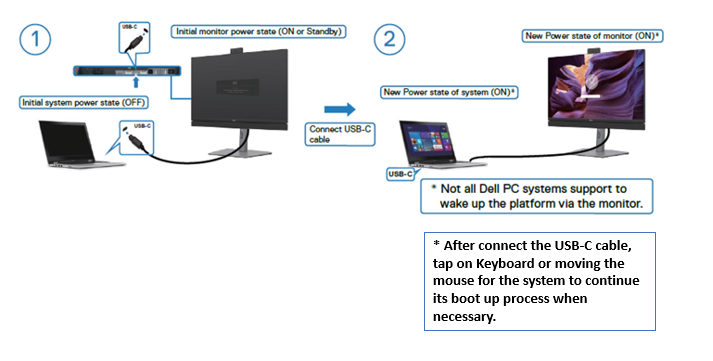
Figure.1 Connection Via USBC
All Monitors which support DPBS function. Below just list a few examples:
- P3421W
- U3421WE
- U3821DW
- U4021QW
- U2421E
- C2422HE
- C2722DE
- C3422WE
- U3223QZ
All Platforms which support DPBS function. Below just list a few examples:
- Latitude 7320 (Carnoustie TGL)
- Latitude 9520 2 in 1 (Olympic MLK 15)
- Latitude 5421
- Latitude 3320
- XPS 9510
- Precision 5760
Cause
It is the operating system behavior dependency.
Resolution
To prevent the computer from returning to Standby mode, you can tap the Keyboard or move the Mouse before the video goes off.
Affected Products
Dell 24 Video Conferencing Monitor C2422HE, Dell 27 Video Conferencing Monitor C2722DE, Dell 34 Video Conferencing Curved Monitor C3422WE, Dell P3421W, Dell U2421E, Dell U3421WE, Dell U3821DW, Dell U4021QW, Latitude 3320, Latitude 7320
, Latitude 7320 Detachable, Latitude 5421, Latitude 9520, Precision 5760, Dell U3223QZ, XPS 15 9510
...
Article Properties
Article Number: 000195111
Article Type: Solution
Last Modified: 05 May 2025
Version: 7
Find answers to your questions from other Dell users
Support Services
Check if your device is covered by Support Services.