Dynamic Charge Policy in Dell Optimizer Remains Grayed Out on Latitude Rugged and Rugged Extreme Laptops
Summary: This article provides information about the Dynamic Charge Policy in Dell Optimizer remaining unavailable on Latitude Rugged and Rugged Extreme laptops.
This article applies to
This article does not apply to
This article is not tied to any specific product.
Not all product versions are identified in this article.
Symptoms
Affected Platforms:
- Latitude 5430 Rugged
- Latitude 7330 Rugged Extreme
Affected Products:
- Dell Optimizer
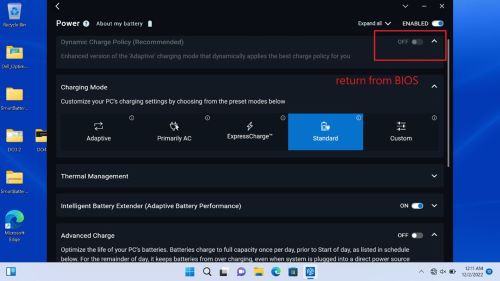
If the Battery 1 configuration setting in the BIOS is set to Custom, the Dynamic Charge Policy in Dell Optimizer is unavailable when trying to change charging modes from Custom to other settings (for example Adaptive, Primarily AC, Express Charge, or Standard).
| Battery configuration in BIOS setup menu | Results | ||
|---|---|---|---|
| Batt 1 | Batt 2 | ||
| Adaptive or Primarily AC or Express Charge or Standard | Custom | Fail | |
| a | Custom | Custom | Pass |
| b | Custom | Adaptive or Primarily AC or Express Charge or Standard | Pass |
Table 1: Isolation Table
Cause
This is working as designed, the Dell optimizer does not support battery 1.
Resolution
Users can recover this issue by following the below steps:
- Boot to BIOS setup menu
- Set Battery 1 configuration to a different charging mode (for example Adaptive, Primarily AC, Express Charge, Standard) instead of custom, then save.
- Boot to the operating system, this issue is resolved.
Affected Products
Dell Optimizer, Latitude 7330 Rugged Extreme, Latitude 5430 RuggedArticle Properties
Article Number: 000208970
Article Type: Solution
Last Modified: 14 May 2025
Version: 5
Find answers to your questions from other Dell users
Support Services
Check if your device is covered by Support Services.