Latitude 5430 Rugged and Latitude 7330 Rugged Extreme Have No Option for About my Battery in Dell Optimizer
Summary: A Latitude 5430 Rugged or Latitude 7330 Rugged Extreme computer may not have an "About my battery" option when only connecting one battery.
This article applies to
This article does not apply to
This article is not tied to any specific product.
Not all product versions are identified in this article.
Symptoms
The Latitude 5430 Rugged and Latitude 7330 Rugged Extreme support dual batteries. Slot 2 is the main battery. When only slot 1 has a battery connected, Dell Optimizer (DO) cannot display About my battery information. This does not occur when there is a battery connected in slot 2. This issue only occurs on multibattery models.

The following image shows a slot 1 and slot 2 example. When holding the laptop with the handle facing upwards and when looking at the bottom of the laptop, slot 1 is on the left, and slot 2 is on the right.
If a battery is not connected in slot 2, users cannot access the battery information through Dell Optimizer.

Affected Platforms:
- Latitude 5430 Rugged
- Latitude 7330 Rugged Extreme
Affected Products:
- Dell Optimizer
Cause
Dell Optimizer requires, when using a single battery, to put the battery in slot 2.
Resolution
Workarounds if a single battery is used in slot 1:
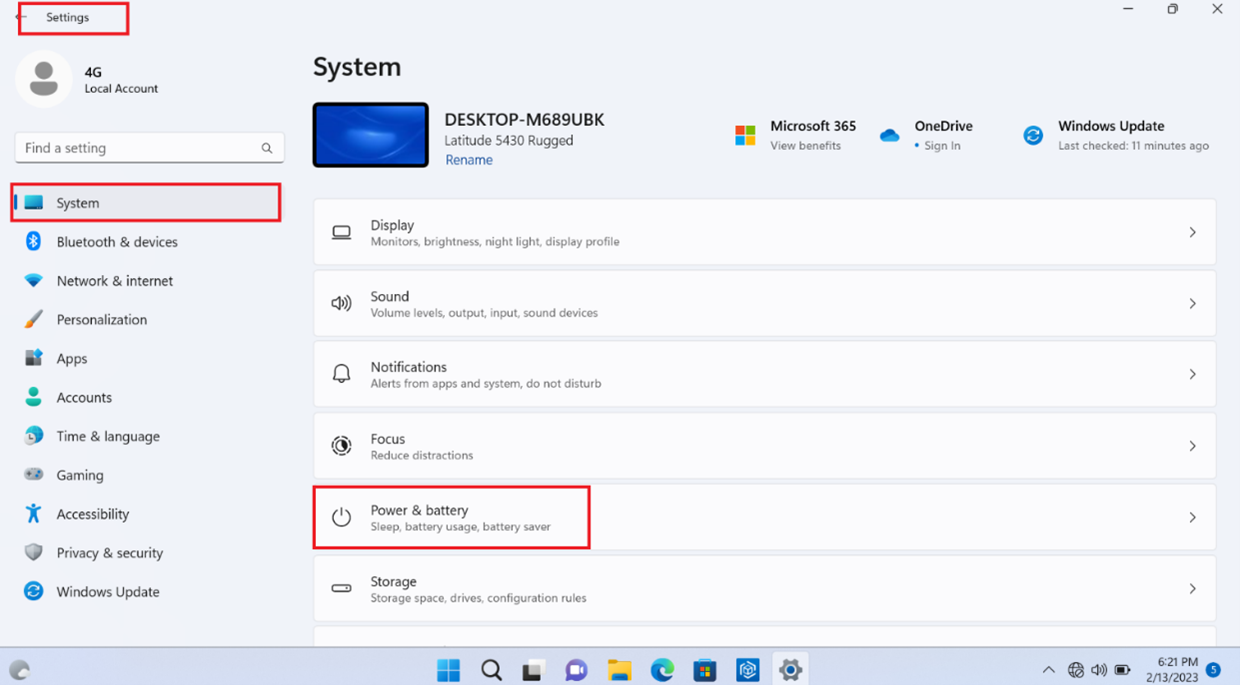
- Users may get relevant information from the Windows Power & battery settings. Right-click the Start Menu, click Settings, click System, and then click Power & battery.
- Move the battery to slot 2 and then restart Dell Optimizer to access About my battery information.
Affected Products
Dell Optimizer, Latitude 7330 Rugged Extreme, Latitude 5430 RuggedArticle Properties
Article Number: 000208974
Article Type: Solution
Last Modified: 28 Aug 2025
Version: 4
Find answers to your questions from other Dell users
Support Services
Check if your device is covered by Support Services.