Limitations Associated with Installing and Running MyDell and Dell Optimizer on a Laptop with an ARM Processor
Summary: Learn about what happens when you install both MyDell and Dell Optimizer on an Advanced RISC Machine (ARM) Processor and Chipset Laptop.
This article applies to
This article does not apply to
This article is not tied to any specific product.
Not all product versions are identified in this article.
Instructions
An explanation of what can occur when you install MyDell and Dell Optimizer on the same laptop with an ARM Central Processor Unit (CPU)
There are no restrictions on installing the ARM version of MyDell and the ARM version of Dell Optimizer on any Dell ARM laptops. However, there are limitations when running both applications simultaneously on the same laptop.
Dell products using an ARM processor:
- Client products:
- Latitude 7455 laptop
- Consumer products:
- XPS 13 9345 laptop
- Inspiron 14 Plus 7441 laptop
When consumer products are shipped from the factory, they come with the MyDell application pre-installed. Client products are shipped with the Dell Optimizer application instead. These applications are also available for download and installation from the Dell Support site. Although Dell documentation lists the supported products for each application, there are no restrictions preventing you from downloading and installing them both on any laptop.
MyDell and Dell Optimizer do not differentiate between client and consumer models of the Dell ARM laptop. They only verify that it is a Dell laptop with the correct chipset. As a result, they can technically install these applications on any Dell ARM laptop.
Both MyDell and Dell Optimizer successfully install and run without any problems where only one of the applications is running at one time. However, if they attempt to launch both applications simultaneously, the first application that launches operates as usual, but the second remains forever on the loading screen. This is because both applications are using the same background services.
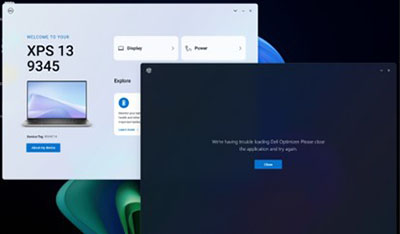
Dell Technologies recommends that installing MyDell is kept to the applicable consumer products, and Dell Optimizer to the applicable client products. If the two applications are inadvertently installed on the same laptop, remove the application that is not meant for that laptop model.
Affected Products
Dell Optimizer, Inspiron 14 Plus 7441, Latitude 7455, MyDell, XPS 13 9345Article Properties
Article Number: 000226713
Article Type: How To
Last Modified: 06 Aug 2025
Version: 2
Find answers to your questions from other Dell users
Support Services
Check if your device is covered by Support Services.