PowerProtect: VMware Protection Engine updated with Automatic Update Setting disabled
Summary: VMware Protection Engine updated with Automatic Update Setting updates disabled
This article applies to
This article does not apply to
This article is not tied to any specific product.
Not all product versions are identified in this article.
Symptoms
The PowerProtect Data Manager appliance is used to protect the vSphere environment. The PowerProtect 19.20 release notes present a new feature that allows independent updates of the virtual machine (VM) Direct Engines.
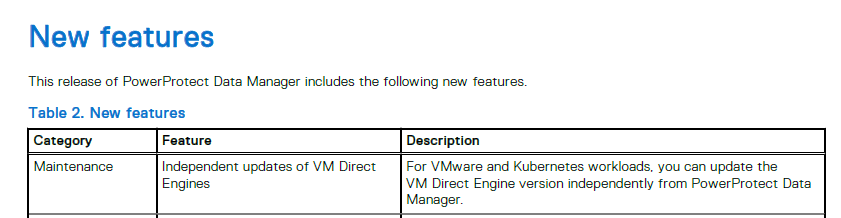
Once the environment is running PowerProtect 19.20, the Automatic Update Settings may be disabled from the "Infrastructure > Protection Engines" page. Default was enabled.
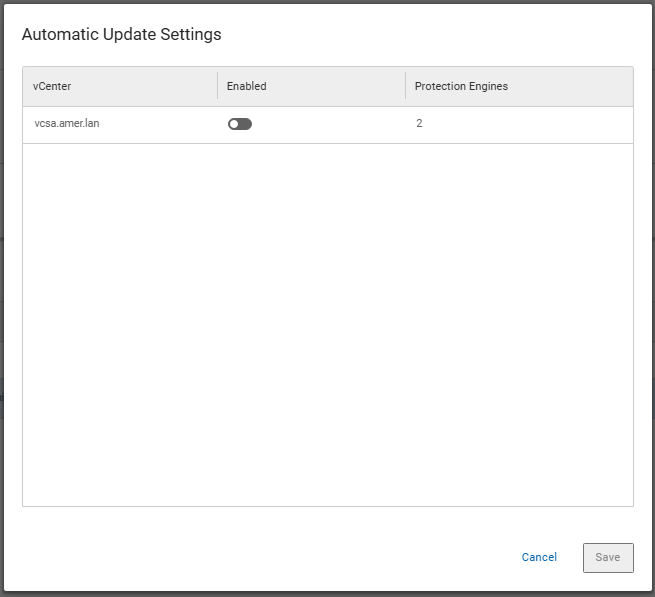
The Automatic Update Settings was disabled, and the environment was upgraded to PowerProtect 19.21.0-11. After the upgrade, the VMware Virtual Machine Protection Engine was automatically redeployed (upgraded) with 19.21.0-11_1.
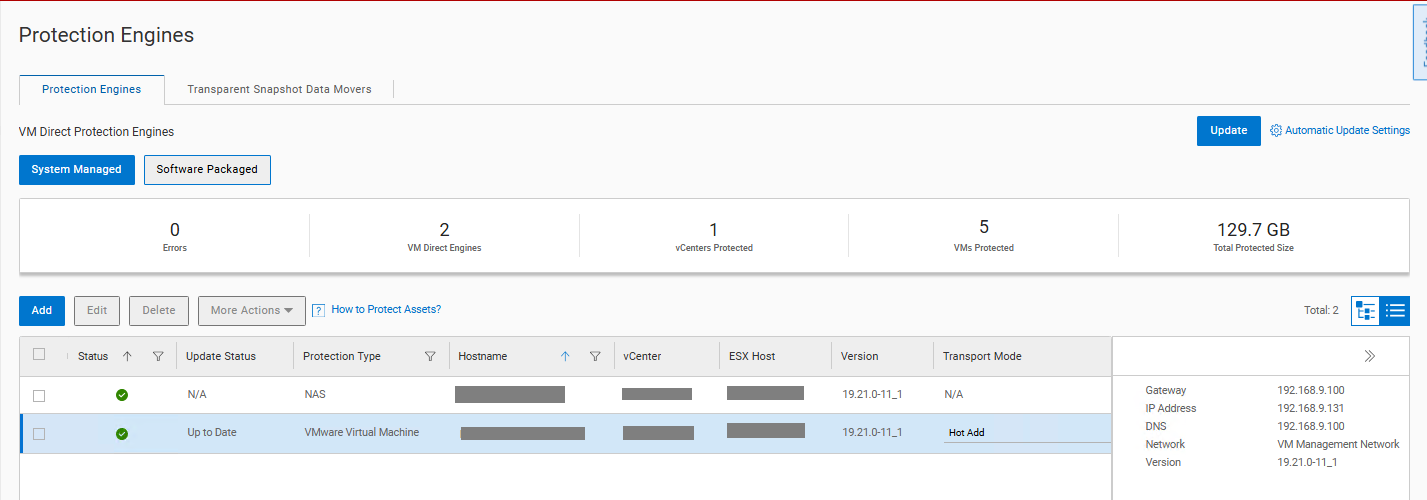
The upgrademgr.log shows the Automatic update setting detected the upgrade mode was a Disruptive Upgrade (DU) and required updating of the VM Direct Protection Engine.
YYYY-MM-DD HH:MM:SS INFO [] [upgrademgr-task-executor-4] [][][][TRACE_ID:9b21243b042b3cfd][] com.emc.brs.vmdm.vpe.service.clients.VMDMClientService - getUpgradeType: minimumVmProxyVersion=19.16, fromVersion=19.19.0-20, toVersion=19.20.0-18, minimumSkippableVersion=, upgradeType=DU
YYYY-MM-DD HH:MM:SS INFO [] [upgrademgr-task-executor-4] [][][][TRACE_ID:9b21243b042b3cfd][] com.emc.brs.vmdm.vpe.service.clients.VMDMClientService - Calling GET https://localhost:8443/api/v2/protection-engines
YYYY-MM-DD HH:MM:SS INFO [] [upgrademgr-task-executor-4] [][][][TRACE_ID:9b21243b042b3cfd][] com.emc.brs.vmdm.vpe.service.clients.VMDMClientService - Calling GET https://localhost:8443/api/v2/protection-engines/2a95355c-77ab-4b93-91e7-ca645ddcca6a/proxies
YYYY-MM-DD HH:MM:SS INFO [] [upgrademgr-task-executor-4] [][][][TRACE_ID:9b21243b042b3cfd][] com.emc.brs.upgrademgr.service.PrecheckResponseServiceImpl - vProxy precheck - upgrade mode is DU.
YYYY-MM-DD HH:MM:SS INFO [] [upgrademgr-task-executor-4] [][][][TRACE_ID:9b21243b042b3cfd][] com.emc.brs.upgrademgr.service.PrecheckResponseServiceImpl - No minimum skippable version provided, skip update is not supported.
YYYY-MM-DD HH:MM:SS INFO [] [upgrademgr-task-executor-4] [][][][TRACE_ID:9b21243b042b3cfd][] com.emc.brs.upgrademgr.service.PrecheckResponseServiceImpl - vProxy precheck - Precheck message returned: 1 VM Direct Protection Engine in vCenter my-vcenter.my-domain.com would be updated automatically.
YYYY-MM-DD HH:MM:SS INFO [] [upgrademgr-task-executor-4] [][][][TRACE_ID:9b21243b042b3cfd][] com.emc.brs.upgrademgr.service.PrecheckResponseServiceImpl - INFO - Reason: 1 VM Direct Protection Engine would be updated automatically.. Remedy: Wait for update job to complete before retry. Refer to the user documentation for troubleshooting.
YYYY-MM-DD HH:MM:SS INFO [] [upgrademgr-task-executor-3] [][][][TRACE_ID:9b21243b042b3cfd][] com.emc.brs.upgrademgr.service.component.precheck.UpgradeSnapshotPermissionValidator - Upgrade snapshot permission validation passed
The expectation is for the VM Direct Protection Engine to remain at 19.20.0-18.
Cause
The Automatic settings are applicable only when more than one VM Direct Engine is present for the supported protection types of VMware Virtual Machine and Kubernetes. If only one VM Direct Engine is present of each supported type, then the upgrade mode becomes a DU. The DU mode workflow upgrades the VM Direct Engine as part of the PowerProtect Data Manager server update. The PowerProtect upgrade precheck, in DU cases, provides details indicating the VM Direct Engine is updated as part of the upgrade.
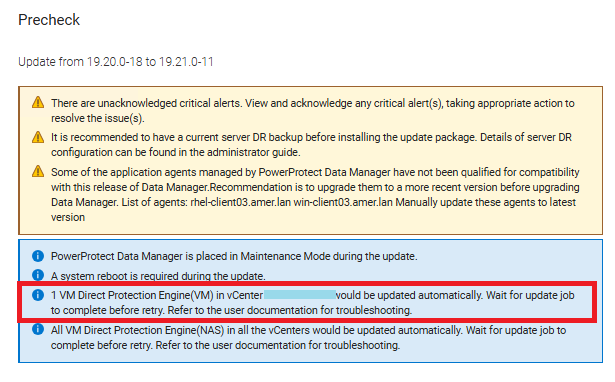
Resolution
This is expected behavior with a single VM Direct Engine deployment. The documentation will be updated in the future to clarify the single VM Direct Engine scenario.
Article Properties
Article Number: 000369718
Article Type: Solution
Last Modified: 07 Oct 2025
Version: 1
Find answers to your questions from other Dell users
Support Services
Check if your device is covered by Support Services.