PowerStore: System Health Checks Detect Invalid Battery Status
Summary: PowerStore: System Health Checks detects battery status in IPMI.
Instructions
System Health may report a failure for the BBU Sensor Check (was BBU IPMI I2C Check) as displayed in one of the following scenarios:
- Running a System Check using PowerStore Manager (UI) with the Run Upgrade Extensions option:
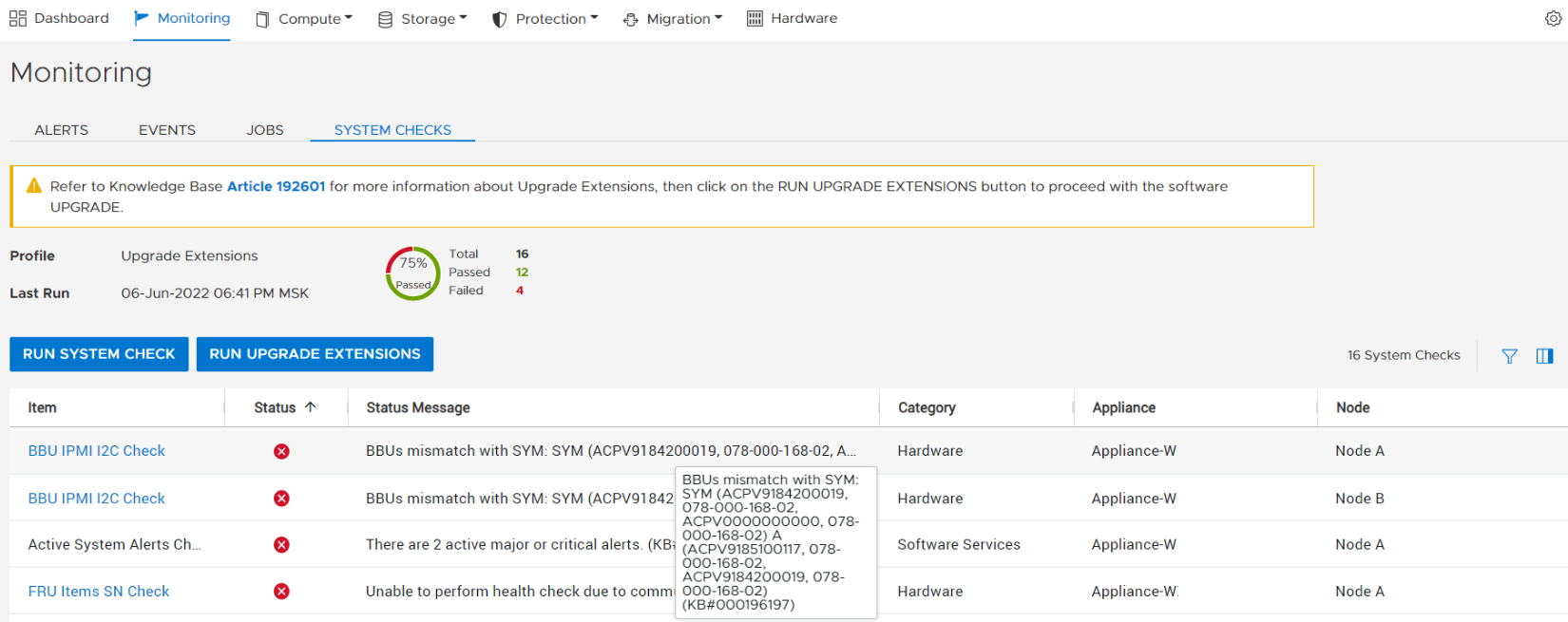
Tip: The Profile field displays Upgrade Extensions when the Run Upgrade Extensions option is used to perform a System Check.
- Running a System Check using PowerStore Manager (UI) with the Run System Check option:

Tip: The Profile field displays Service Engagement when the Run System Check option is used to perform a System Check.
- Running the System Health Service Script (svc_health_check) using an SSH connection:
$ svc_health_check run -rhc bbu_sensor_check
Name                          Location Status     Description
BBU IPMI I2C Check            node_a   FAILED     SYM BaseEnclosure-NodeA-InternalBatteryBackupModule0:
                                                  fru_lifecycle_state is MGMT_FRU_OBJ_FAILED(3)
                                                  (KB#000196197)
BBU IPMI I2C Check            node_b   FAILED     SYM BaseEnclosure-NodeA-InternalBatteryBackupModule0:
                                                  fru_lifecycle_state is MGMT_FRU_OBJ_FAILED(3)
                                                  (KB#000196197)
The above message is displayed when the health check fails any of the following checks:
- The battery status
- The BBU is inserted, enabled, and holding up the charge
- That node's BBU status is consistent across the internal repository (SYM) and the internal sensor (IPMI)
When this issue exists, power redundancy is lost which may potentially cause service interruption if a power or hardware fault occurs.
Investigate and resolve any alerts raised for BBUs.
If no alerts are raised, contact Dell Technical Support to resolve as soon as possible.
NOTE: The bbu_sensor_check of SHC unintentionally compares the PNs between the two BBUs in the same appliance and expects them to be the same. If two BBUs in the same appliance have two different PNs, the bbu_sensor_check check reports a false positive failure of "Mismatched part number detected" on both nodes.
BBU Sensor Check                   node_a    FAILED     Mismatched part number detected on node A (KB#000196197)
BBU Sensor Check                   node_b    FAILED     Mismatched part number detected on node B (KB#000196197)
Known Issues:
- If the SHC test of "bbu_sensor_check" fails on both Nodes, reporting "Mismatched part number detected," see article 212653, PowerStore: System Health Check fails for "BBU Sensor Check node_x FAILED Mismatched part number detected on node X (KB#000196197)" for how to verify the SHC error is a false positive and can be ignored.