PowerStore: IMT에 의해 생성된 파일 시스템 삭제가 완료되지 않았습니다.
Summary: IMT에 의해 생성된 파일 시스템을 삭제하지 못했습니다.
This article applies to
This article does not apply to
This article is not tied to any specific product.
Not all product versions are identified in this article.
Symptoms
기존 Dell 소스 스토리지 시스템에서 PowerStore 스토리지 시스템으로 NAS 서버를 가져오는 동안 NAS 서버, 파일 시스템 및 관련 객체가 동기화됩니다. 취소 중에 동일한 객체가 타겟에서 삭제됩니다. 어떤 이유로 인해 가져오기 중에 취소가 완료되지 않은 경우 사용자에게 "Object Identifier not found"라는 메시지가 표시될 수 있습니다.
다음과 같은 오류가 표시됩니다.
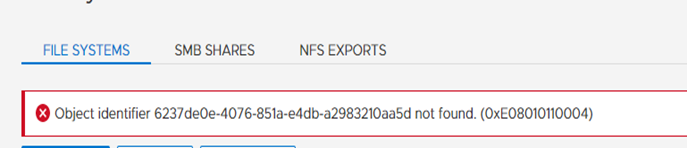
그림 1: PowerStore에서 오류 메시지 "Object Identifier Not Found"의 스크린샷
다음과 같은 오류가 표시됩니다.
그림 1: PowerStore에서 오류 메시지 "Object Identifier Not Found"의 스크린샷
Cause
파일 시스템 및 관련 객체를 삭제할 수 없습니다.
Resolution
파일 시스템이 자동으로 삭제되지 않은 경우 파일 시스템을 삭제하려면 수동 개입이 필요합니다.
PowerStore CLI에 로그인하고 REST API 명령을 사용하여 FS 이름을 가져옵니다.
PowerStore CLI에 로그인하고 REST API 명령을 사용하여 FS 이름을 가져옵니다.
curl -s -X GET http://[{cluster ip}]:3085/api/instances/filesystem/{id} 이 출력을 사용하면 PowerStore Manager에서 관련 FS를 삭제할 수 있습니다.Affected Products
PowerStoreArticle Properties
Article Number: 000201906
Article Type: Solution
Last Modified: 12 Jun 2023
Version: 2
Find answers to your questions from other Dell users
Support Services
Check if your device is covered by Support Services.